Using RBAC for Genomic Data in the Cloud
By Dr. Zubair Khalid, DVM, MS, PhD ·

By the end of this article you will be able to design a role-based access control (RBAC) model for a genomic data project, implement it on AWS with IAM policies and roles, test that each role can do exactly what it should and nothing more, and wire those roles into a running analysis pipeline. You will need an AWS account with administrator-level IAM permissions, the AWS CLI version 2 installed and configured (aws, version should return 2.x), and, ideally, a scratch project with three S3 buckets for raw reads, processed outputs, and logs. Everything in the walkthrough can be built and torn down in a test account in under an hour.
Cloud platforms have carried biological data workloads for well over a decade. MorphoBank, a web application and database built on software as a service principles compatible with cloud computing, has supported team-based construction of phylogenetic matrices since its inception, replacing single-user desktop files with shared, online, interoperable infrastructure [1]. The same shift happened across genomics, and it changed the security problem. When data lived on one lab workstation, the door was the office. When data lives in an object store that an auto-scaling cluster can read at line rate, the door is a policy document, and the policy document had better be right.
Why Genomic Data Needs Tighter Control Than Most Cloud Data
Genomes are identifiers. A genome cannot be de-identified the way a phone number or a zip code can, because the sequence itself is the identifier, it persists for life, and it implicates biological relatives who never consented to anything. This is why controlled-access repositories, institutional review boards, and data use agreements treat genomic data differently from most other research data, and why an access model for genomics has to be deliberate rather than improvised.
The second reason is structural. Cloud bioinformatics is collaborative by design. A single project routinely involves the sequencing core that uploads BCL and FASTQ files, a bioinformatician who runs alignment and variant calling, analysts and statisticians who work on derived matrices, external collaborators who need time-limited access to a few files, and a compliance officer who needs to see logs but not sequences. Team-based science in the cloud depends on the ability to share, annotate, and archive data across people and institutions, which is exactly the capability that cloud SaaS platforms were built to provide and that local, single-user tooling could not [1]. Role-based access control is the mechanism that makes that sharing safe.
RBAC stands for role-based access control. Instead of attaching permissions to individual people, you define roles, attach permissions to the roles, and assign people to roles. A person's effective permissions are the union of the roles they hold. This gives you three properties that matter enormously for genomic data:
- Least privilege by default. A new collaborator gets the Analyst role, not a copy of someone's admin credentials.
- Auditable intent. When you review access, you review six role definitions, not sixty user policies.
- Clean offboarding. Removing a person from a role removes their access in one action, with no orphaned permissions left behind.
RBAC Fundamentals: Subjects, Roles, and Permissions
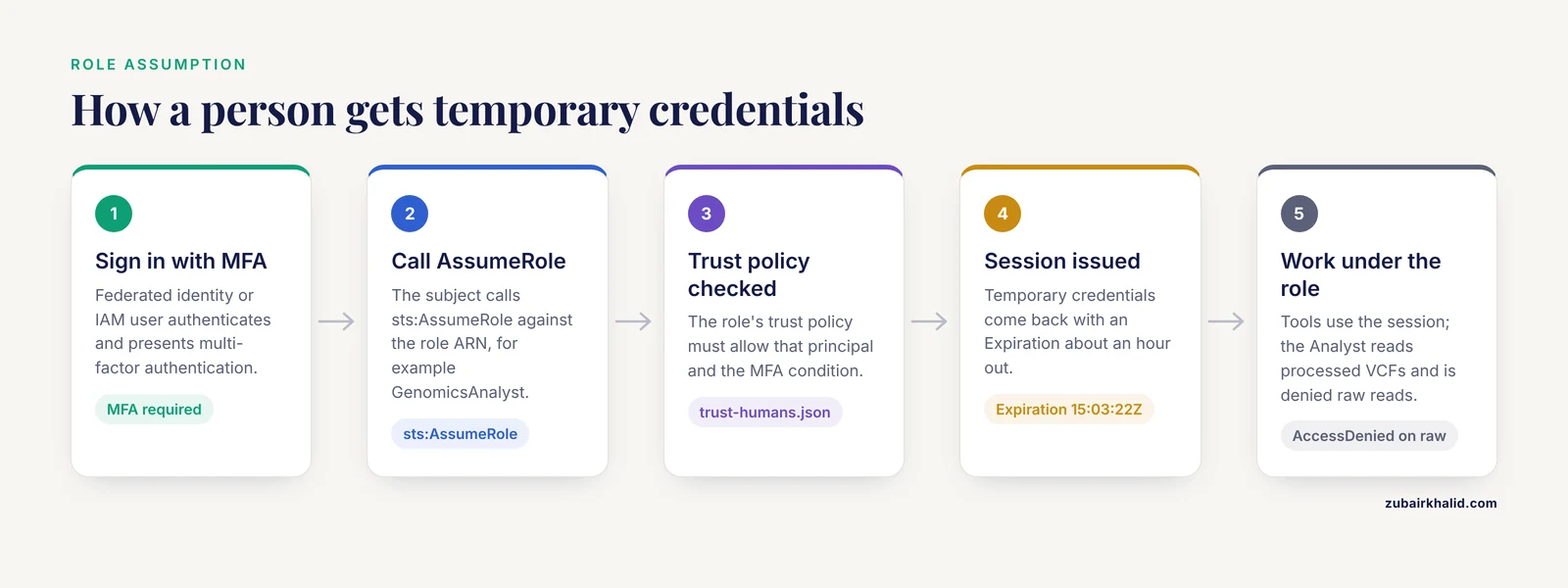
Four terms carry the whole model, so define them precisely before touching a console.
- Subject is the human or machine that wants access. In AWS terms, a subject is an IAM user, a federated identity from your organization's identity provider, or a workload such as a Batch job or an EC2 instance.
- Permission is a specific action on a specific resource, written as a statement like "allow
s3:GetObjectonarn:aws:s3:::proj-raw-reads/*". - Role is a named bundle of permissions with a trust policy that says who may assume it. Roles are the atomic unit of assignment.
- Session is the temporary credential set a subject receives when it assumes a role. Sessions expire, which is one of the strongest arguments for role assumption over long-lived access keys.
Two design principles should govern everything you build. Least privilege means each role gets the minimum actions on the minimum resources needed for its job, and nothing else. Separation of duties means the person who can create or modify access policies is not the same role that routinely reads the data, so no single compromised identity can both change the rules and exploit them.
A pattern worth adopting from the start is a break-glass role. This is a highly privileged role that nobody uses day to day, that requires multi-factor authentication to assume, and whose assumption triggers an alert. When an emergency occurs at 2 a.m., you want one well-defined door, monitored, rather than a shared admin password in a group chat.
How AWS Implements RBAC for Genomics Workloads
AWS does not have a button labeled "RBAC". It gives you primitives that assemble into RBAC, and knowing which primitive does which job prevents most design errors.
IAM users are long-lived identities with permanent credentials. For humans in an RBAC genomics cloud setup, minimize these. Use them only for break-glass and bootstrap, and require MFA.
IAM groups attach policies to collections of users. Groups implement the "assign people to roles" half of RBAC within your own account, for example a GenomicsAnalysts group holding the analyst permission policy.
IAM roles are the workhorse. A role has two JSON documents attached: a trust policy, which states which principals may assume it, and one or more permission policies, which state what the assume is allowed to do. Workloads assume roles, federated humans assume roles, and cross-account collaborators assume roles. If you remember one sentence from this article, make it this one: in AWS genomics, roles are the RBAC unit and trust policies are the assignment mechanism.
Permission boundaries and service control policies (SCPs) act as ceilings. A boundary caps what a role can ever do even if someone attaches a broader policy later. An SCP caps what any identity in the account can do. Use them for guardrails such as "no bucket in this account may ever be public".
Resource-based policies attach directly to the resource, most importantly S3 bucket policies. They are the right place for coarse, always-on rules that should hold no matter who calls, such as denying any request that does not arrive over TLS.
ABAC (attribute-based access control) is RBAC's sibling. Instead of role names, authorization keys off tags, for example "allow s3:GetObject where the object's study tag equals the principal's study tag". ABAC scales better for hundreds of studies, but it is harder to reason about. A common and sane trajectory in cloud bioinformatics is to start with clean RBAC for a handful of projects and adopt ABAC tags when the role count starts multiplying.
A Reference RBAC Genomics Cloud Template
Here is a role model that fits a typical genomics project with one raw-read bucket, one processed-output bucket, one reference-data bucket, and one log bucket. Treat it as a template you adapt, not a law.
| Role | Raw reads bucket | Processed bucket (BAM, VCF) | Reference data | Logs and audit | Typical holder |
|---|---|---|---|---|---|
| SequencingOperator | Write (upload), no read, no delete | None | Read | None | Sequencing core uploads |
| Bioinformatician | Read, no delete | Read and write, no delete raw | Read | Read | Pipeline engineers |
| Analyst | None | Read only | Read | None | Statisticians, collaborators |
| PipelineRunner | Read | Read and write to its prefix only | Read | Write its own logs | EC2, Batch, HealthOmics task role |
| Auditor | None | None | None | Read | Compliance, QA |
| BreakGlass | Full, MFA required, alerted | Full | Full | Full | On-call admin, emergencies only |
Three decisions in this table do most of the protective work. The SequencingOperator can upload but not read, which limits the blast radius of a compromised upload credential. The Analyst cannot touch raw reads at all, so derived-value files can be shared far more freely than source data. The PipelineRunner is scoped to a prefix such as s3://proj-processed/runs/2026/*, so a runaway or compromised job cannot overwrite another run's outputs.
Trust policy template
This trust policy belongs on every human-facing role. It allows federated principals from your organization to assume the role and requires MFA.
{
  "Version": "2012-10-17",
  "Statement": [
    {
      "Sid": "AllowFederatedAssumeWithMFA",
      "Effect": "Allow",
      "Principal": {
        "AWS": "arn:aws:iam::123456789012:root"
      },
      "Action": "sts:AssumeRole",
      "Condition": {
        "BoolIfExists": { "aws:MultiFactorAuthPresent": "true" }
      }
    }
  ]
}
Permission policy template for the Analyst role
{
  "Version": "2012-10-17",
  "Statement": [
    {
      "Sid": "ListProcessedBucket",
      "Effect": "Allow",
      "Action": ["s3:ListBucket"],
      "Resource": "arn:aws:s3:::proj-processed-123456789012",
      "Condition": {
        "StringEquals": { "s3:prefix": ["vcf/", "bam/"] }
      }
    },
    {
      "Sid": "ReadProcessedObjects",
      "Effect": "Allow",
      "Action": ["s3:GetObject"],
      "Resource": "arn:aws:s3:::proj-processed-123456789012/vcf/*"
    },
    {
      "Sid": "ReadProcessedBAMs",
      "Effect": "Allow",
      "Action": ["s3:GetObject"],
      "Resource": "arn:aws:s3:::proj-processed-123456789012/bam/*"
    }
  ]
}
Note the two-part pattern in this template, because it is the single most common source of confusing behavior in S3 permissions. s3:ListBucket applies to the bucket ARN with no trailing path and controls directory listing. s3:GetObject applies to object ARNs with a trailing /* and controls file download. A policy that grants only s3:GetObject on objects but not s3:ListBucket on the bucket produces a role that can fetch s3://bucket/vcf/cohort.vcf.gz by exact name but gets denied when it tries to list the folder. That behavior is correct, and knowing why saves hours.
Step-by-Step Walkthrough: Building RBAC on AWS for Genomic Data
The following walkthrough builds the Analyst and PipelineRunner roles from the template, adds a TLS guardrail, and verifies both. Replace 123456789012 with your account ID. Run everything from a directory containing the JSON files shown.
Step 1. Create the buckets
aws s3 mb s3://proj-raw-reads-123456789012
aws s3 mb s3://proj-processed-123456789012
aws s3 mb s3://proj-logs-123456789012
Expected output for each:
make_bucket: proj-raw-reads-123456789012Enable default encryption and block public access on all three. These are account-level guardrails you can also enforce with an SCP, but set them per bucket here.
aws s3api put-public-access-block \
  --bucket proj-raw-reads-123456789012 \
  --public-access-block-configuration BlockPublicAcls=true,IgnorePublicAcls=true,BlockPublicPolicy=true,RestrictPublicBuckets=true
No output means success. Silence is normal for put-* API calls.
Step 2. Write the trust policies
Save the trust policy template above as trust-humans.json. For the PipelineRunner workload role, the trust policy names the service that may assume it, for example the EC2 service for instance profiles:
{
  "Version": "2012-10-17",
  "Statement": [
    {
      "Sid": "AllowEC2ToAssume",
      "Effect": "Allow",
      "Principal": { "Service": "ec2.amazonaws.com" },
      "Action": "sts:AssumeRole"
    }
  ]
}
Save this as trust-pipeline.json.
Step 3. Create the roles
aws iam create-role \
  --role-name GenomicsAnalyst \
  --assume-role-policy-document file://trust-humans.json

aws iam create-role \
  --role-name GenomicsPipelineRunner \
  --assume-role-policy-document file://trust-pipeline.json
Expected output:
{
    "Role": {
        "Path": "/",
        "RoleName": "GenomicsAnalyst",
        "RoleId": "AROA4K2EXAMPLE7QZVB",
        "Arn": "arn:aws:iam::123456789012:role/GenomicsAnalyst",
        "CreateDate": "2026-11-11T14:03:22Z",
        "AssumeRolePolicyDocument": {
            "Version": "2012-10-17",
            "Statement": [ "...trust policy echoed back..." ]
        }
    }
}
Step 4. Write and attach the permission policies
Save the Analyst policy template above as analyst-policy.json, then write a policy for the pipeline role:
{
  "Version": "2012-10-17",
  "Statement": [
    {
      "Sid": "ReadRawReads",
      "Effect": "Allow",
      "Action": ["s3:GetObject", "s3:ListBucket"],
      "Resource": [
        "arn:aws:s3:::proj-raw-reads-123456789012",
        "arn:aws:s3:::proj-raw-reads-123456789012/*"
      ]
    },
    {
      "Sid": "WriteOwnRunPrefix",
      "Effect": "Allow",
      "Action": ["s3:PutObject"],
      "Resource": "arn:aws:s3:::proj-processed-123456789012/runs/*",
      "Condition": {
        "StringEquals": { "s3:x-amz-server-side-encryption": "aws:kms" }
      }
    },
    {
      "Sid": "WriteOwnLogs",
      "Effect": "Allow",
      "Action": ["s3:PutObject"],
      "Resource": "arn:aws:s3:::proj-logs-123456789012/pipeline/*"
    }
  ]
}
Save as pipeline-policy.json. The encryption condition means the pipeline physically cannot write an unencrypted object to the processed bucket, which turns a policy preference into a mechanical guarantee.
Create and attach both policies:
aws iam create-policy \
  --policy-name GenomicsAnalystPolicy \
  --policy-document file://analyst-policy.json

aws iam put-role-policy \
  --role-name GenomicsPipelineRunner \
  --policy-name PipelineAccess \
  --policy-document file://pipeline-policy.json
create-policy returns a JSON block whose Arn field, something like arn:aws:iam::123456789012:policy/GenomicsAnalystPolicy, is what you attach elsewhere. Record it. Then attach the managed policy to the analyst role:
aws iam attach-role-policy \
  --role-name GenomicsAnalyst \
  --policy-arn arn:aws:iam::123456789012:policy/GenomicsAnalystPolicy
Step 5. Assign a human to the role
For federated organizations, group membership in your identity provider controls who can call sts:AssumeRole. For a quick test inside one account, verify that your administrative user can assume the analyst role:
aws sts assume-role \
  --role-arn arn:aws:iam::123456789012:role/GenomicsAnalyst \
  --role-session-name analyst-test
Expected output:
{
    "Credentials": {
        "AccessKeyId": "ASIAEXAMPLE4KQ7UX",
        "SecretAccessKey": "wJaEXAMPLEbx2pnxq=",
        "SessionToken": "FwoGZXIvYXdzEA...(long token)...",
        "Expiration": "2026-11-11T15:03:22Z"
    },
    "AssumedRoleUser": {
        "Arn": "arn:aws:sts::123456789012:assumed-role/GenomicsAnalyst/analyst-test"
    }
}
The Expiration timestamp is the point of this design. The credential dies in about an hour. Nothing long-lived leaked.
Step 6. Test as the Analyst
Configure a named profile from the assumed credentials:
aws configure set aws_access_key_id     ASIAEXAMPLE4KQ7UX --profile analyst-test
aws configure set aws_secret_access_key wJaEXAMPLEbx2pnxq= --profile analyst-test
aws configure set aws_session_token     FwoGZXIvYXdzEA... --profile analyst-test
Then run the two tests that define the role:
aws s3 ls s3://proj-processed-123456789012/vcf/ --profile analyst-testExpected output (once files exist):
2026-11-11 14:41:07 184203941 cohort.vcf.gz
2026-11-11 14:41:09 184203941 cohort.vcf.gz.tbi
aws s3 ls s3://proj-raw-reads-123456789012/ --profile analyst-testExpected output:
An error occurred (AccessDenied) when calling the ListObjectsV2 operation: Access DeniedThat denial is the system working. If the Analyst could list raw reads, the template was implemented wrong. Copy a processed file to confirm reads work end to end, then attempt a write and confirm it fails:
aws s3 cp s3://proj-processed-123456789012/vcf/cohort.vcf.gz ./cohort.vcf.gz --profile analyst-test
aws s3 cp ./cohort.vcf.gz s3://proj-processed-123456789012/vcf/cohort.vcf.gz --profile analyst-test
The first command succeeds. The second returns AccessDenied, because the Analyst role has GetObject but not PutObject.
Step 7. Add the TLS guardrail bucket policy
Attach this to every genomics bucket so no configuration mistake elsewhere can ever expose data in transit:
{
  "Version": "2012-10-17",
  "Statement": [
    {
      "Sid": "DenyInsecureTransport",
      "Effect": "Deny",
      "Principal": "*",
      "Action": "s3:*",
      "Resource": [
        "arn:aws:s3:::proj-raw-reads-123456789012",
        "arn:aws:s3:::proj-raw-reads-123456789012/*"
      ],
      "Condition": {
        "Bool": { "aws:SecureTransport": "false" }
      }
    }
  ]
}
Save as guardrail-tls.json and apply:
aws s3api put-bucket-policy \
  --bucket proj-raw-reads-123456789012 \
  --policy file://guardrail-tls.json
Step 8. Verify with policy simulation
Do not trust your reading of the policies. Make AWS evaluate them:
aws iam simulate-principal-policy \
  --policy-source-arn arn:aws:iam::123456789012:role/GenomicsAnalyst \
  --action-names s3:GetObject s3:PutObject s3:ListBucket \
  --resource-arns arn:aws:s3:::proj-processed-123456789012/vcf/cohort.vcf.gz
Expected output:
[
    {
        "EvalActionName": "s3:GetObject",
        "EvalResourceName": "arn:aws:s3:::proj-processed-123456789012/vcf/cohort.vcf.gz",
        "EvalDecision": "allowed"
    },
    {
        "EvalActionName": "s3:PutObject",
        "EvalResourceName": "arn:aws:s3:::proj-processed-123456789012/vcf/cohort.vcf.gz",
        "EvalDecision": "explicitDeny"
    },
    {
        "EvalActionName": "s3:ListBucket",
        "EvalResourceName": "arn:aws:s3:::proj-processed-123456789012/vcf/cohort.vcf.gz",
        "EvalDecision": "notAllowed"
    }
]
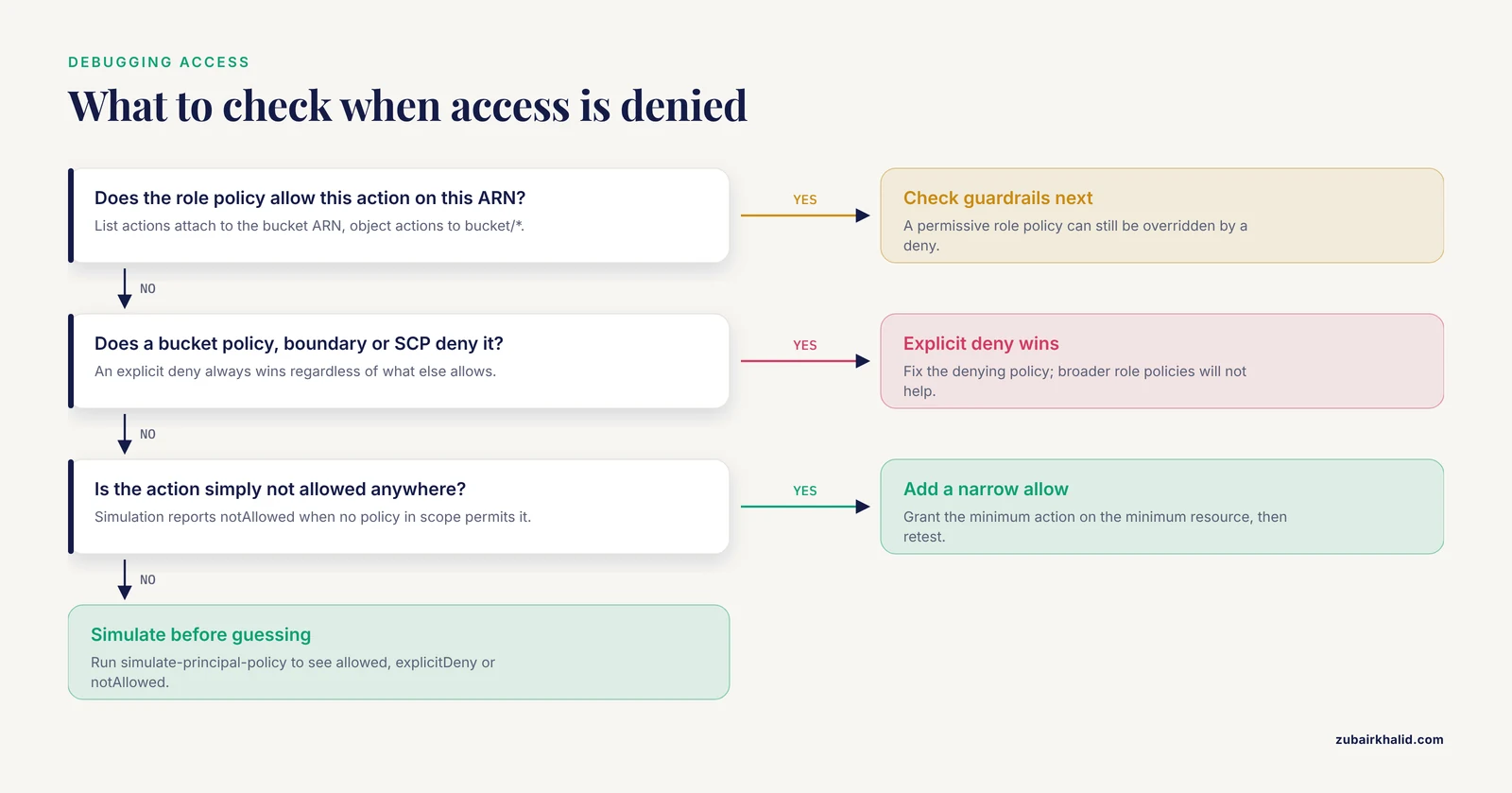
Read this output carefully because it encodes IAM's evaluation logic. notAllowed means no policy in scope permits the action, which is functionally a deny. explicitDeny means a policy affirmatively denies it, and an explicit deny always wins regardless of what else allows. Both block access, but only simulation shows you which one you are dealing with, and that distinction matters when you are debugging a role that "should work".
Step 9. Clean up
In a test account, remove everything so the account does not accumulate orphaned roles:
aws iam detach-role-policy \
  --role-name GenomicsAnalyst \
  --policy-arn arn:aws:iam::123456789012:policy/GenomicsAnalystPolicy
aws iam delete-policy --policy-arn arn:aws:iam::123456789012:policy/GenomicsAnalystPolicy
aws iam delete-role --role-name GenomicsAnalyst
aws iam delete-role --role-name GenomicsPipelineRunner
Delete the roles before the policies they reference where dependencies exist, and delete buckets with aws s3 rb s3://bucket-name, force only when you are certain the contents are disposable.
The RBAC Genomics Cloud Format: Anatomy of a Policy Document
Because every role in the system is a JSON document, the format itself is worth knowing cold. An IAM policy has a small fixed grammar.
| Element | What it does | Example value |
|---|---|---|
Version | Policy language version, always 2012-10-17 in current documents | "2012-10-17" |
Statement | Array of permission statements | array of objects |
Sid | Human-readable statement label, optional but invaluable in audits | "ReadProcessedObjects" |
Effect | Allow or Deny, nothing else | "Allow" |
Action | Service operation or wildcard pattern | "s3:GetObject" |
Resource | ARN the statement applies to | "arn:aws:s3:::proj-raw/*" |
Principal | Who the statement applies to, used only in trust and resource policies | {"Service": "ec2.amazonaws.com"} |
Condition | Circumstances under which the statement applies | {"Bool": {"aws:SecureTransport": "false"}} |
Three format details cause real production incidents.
First, wildcards. Action: "s3:" grants every S3 operation including deletions and permission changes. In an RBAC genomics cloud design, wildcards in actions should appear only in break-glass roles. Wildcards in resources deserve equal suspicion. Resource: "" in a permission policy reaches every bucket the account can see.
Second, the Condition block is where format knowledge pays off. Conditions you will actually use for genomic data include aws:SecureTransport for TLS enforcement, aws:MultiFactorAuthPresent for sensitive roles, s3:prefix to constrain listings to subfolders, s3:x-amz-server-side-encryption to force encrypted writes, and s3:ExistingObjectTag paired with principal tags for tag-based ABAC. Conditions are also how you implement time-bounded collaborator access, using DateGreaterThan and DateLessThan on aws:CurrentTime, though it is usually cleaner to simply let the session expire.
Third, managed policies have a documented size limit of 6,144 characters. A role for a large multi-study project can exceed that if you enumerate per-file resources inline. The fix is structural, not cosmetic: put the variation into bucket prefixes and conditions rather than into long lists of ARNs, and split genuinely distinct permissions into separate attached policies.
Running Pipelines Under RBAC
The roles that do the most data movement in genomics are not human. An alignment workflow reading 200 GB of FASTQ and writing BAMs, index files, and VCFs through S3 is the highest-volume principal in the account, and it must be a role, never a person's credentials.
The mechanism differs slightly by compute service but the principle is identical. On EC2, an instance profile wraps the PipelineRunner role so that software on the instance obtains credentials automatically through the instance metadata service, with no keys on disk. On AWS Batch and EKS, task roles do the same per job or per pod. On services such as AWS HealthOmics, you supply a role when you create the run, and the service assumes it for the duration. Tools then pick it up transparently: the AWS CLI, aws s3 cp, and the S3 Java and Python SDKs all resolve credentials from the environment, and Nextflow's S3 reads and Htslib's S3 URL support both work against instance or task credentials without extra configuration.
Two rules keep pipeline RBAC healthy. Give the pipeline a dedicated role, not one shared with humans, so that CloudTrail entries for the role map one to one to workflow runs. And scope the pipeline's write permission to its run prefix, as in the template above, so that a misconfigured retry cannot clobber a previous run's outputs. Pipelines that share one unscoped write bucket eventually destroy someone's month of work, and the access model is where you prevent that.
For external collaborators, the cloud-native pattern is per-collaboration roles with narrow resource scopes and short maximum session durations, assumed through a federated identity or through S3 presigned URLs generated by a trusted internal role. Presigned URLs are the right tool for "send one VCF to one person until Friday", and they keep the collaborator entirely outside your IAM surface.
Auditing and Verification
An RBAC model you cannot verify is a diagram, not a control. Three mechanisms close the loop.
CloudTrail records every API call, including s3:GetObject data events if you enable data event logging, which you must do explicitly for the genomics buckets. Management events are logged by default, data events are not. For a raw-read bucket, data event logging answers the only question that matters after an incident: who read which objects, when, from where. Ship CloudTrail logs to the dedicated logs bucket, in a separate account if you can, so that the audit trail is not writable by the same roles that touch the data.
IAM Access Analyzer continuously evaluates resource-based policies and flags external or unexpected principals with access to your resources. Run it in every account that holds genomic buckets and treat any finding as urgent.
Simulation as a test. The simulate-principal-policy call in Step 8 belongs in your infrastructure tests, not just your terminal history. Teams that write the expected allow and deny decisions for each role as automated checks catch policy regressions the same way they catch code regressions, which matters because genomic access policies change every time a project adds a collaborator or a new data type.
The shared, archived, auditable character of cloud-based scientific infrastructure is not incidental to collaboration, it is what makes multi-institution genomic work practical at all, a capability that platforms like MorphoBank demonstrated early for phenomic and phylogenetic matrices [1]. Auditing is the part of that bargain that makes the sharing defensible.
Common Mistakes and Limitations
- Granting
s3:ListBucketands3:GetObjectagainst the same ARN shape. List actions attach to the bucket ARN, object actions tobucket/*. Mixing them up produces roles that either cannot list or can read the entire bucket. Test both cases in Step 6 every time. - Using the root user or long-lived access keys for pipeline compute. Any workload holding static keys turns a compromised host into a permanent credential leak. Instance profiles and task roles exist precisely to prevent this.
- Copy-pasting admin policies for speed.
Action: "*"on a genomics project violates least privilege in a single line and survives for years because "it worked". Every role in the reference table exists for a reason. - Forgetting that explicit deny beats allow. If a bucket policy, permission boundary, or SCP denies an action, no amount of permissive role policy rescues it. When access inexplicably fails, check resource policies and account guardrails, not just the role.
- No break-glass path. If you lock every role down correctly but provide no MFA-gated emergency role, the eventual emergency produces an exception that is worse than the control. Define the break-glass role and its alerting on day one.
- Treating RBAC as consent management. RBAC governs who can technically touch data. It does not record whether a sample's consent permits oncology reuse, whether a data use agreement covers a new collaborator, or whether a dataset came from a controlled-access repository with its own access committee. Keep those authorizations in a separate system and reflect them in role assignments, never in the IAM documents alone.
- Role explosion. One bespoke role per person or per project scales badly and defeats the audit benefit. When roles multiply past what a person can review in a sitting, move variation into tags and conditions, that is the point where ABAC earns its complexity.
- Unlogged data events. CloudTrail management events alone will not tell you who downloaded a BAM. If data event logging is not enabled on the raw and processed buckets, your audit of an actual data exposure is blind.
One further limitation deserves plain language. RBAC reduces the probability and blast radius of misuse, it does not make misuse impossible. A legitimate Bioinformatician can still copy data they are authorized to read. Access control is one layer among several, alongside encryption, network isolation, monitoring, and the human agreements that govern data use, and individual cases involving patient-derived or otherwise sensitive material should always be reviewed with your institution's privacy and security offices before the data moves.
Frequently Asked Questions
What does RBAC mean for genomic data in the cloud?
RBAC, role-based access control, means permissions are attached to named roles such as Bioinformatician or Analyst, and people and pipelines are assigned to those roles rather than given individual permissions. For genomic data, this concentrates your access decisions in a small set of reviewable role definitions instead of scattered per-user settings.
Is RBAC enough to comply with privacy rules such as HIPAA?
RBAC is necessary but not sufficient. HIPAA-style compliance for genomic data also requires encryption in transit and at rest, audit logging, workforce training, and business associate agreements with your cloud provider. RBAC supplies the access control layer of that program, not the whole program.
What is the difference between an IAM user, group, and role in an RBAC genomics cloud setup?
A user is a long-lived identity, a group is a collection of users sharing policies, and a role is a permissions bundle that subjects assume temporarily to receive short-lived credentials. In genomics workloads, roles are preferred for both humans and pipelines because credentials expire and every assumption is attributable to a session.
Can you give a simple RBAC genomics cloud template?
The article's reference table gives one: SequencingOperator uploads without reading, Bioinformatician reads raw and writes processed, Analyst reads processed only, PipelineRunner is scoped to its own run prefix, Auditor sees logs only, and BreakGlass requires MFA. The JSON policy templates in the walkthrough implement the Analyst and PipelineRunner rows directly.
How do I give an external collaborator time-limited access to a single VCF file?
Have a trusted internal role generate an S3 presigned URL for that object with a short expiry, or create a dedicated collaborator role whose trust policy names the collaborator's federated principal and whose policy reads only that file's prefix. Presigned URLs are simplest for one file, roles are better for an ongoing collaboration.
How does RBAC work with pipelines such as Nextflow on AWS?
The compute service, whether EC2, Batch, EKS, or HealthOmics, assumes the PipelineRunner role on the workflow's behalf, and the tools resolve those credentials automatically from the environment. The pipeline inherits the role's permissions, so its S3 access is governed by the same policy documents as everything else, and CloudTrail attributes every object operation to that role.
Should I use ABAC tags instead of RBAC?
Start with RBAC while you have a number of roles a human can review, and add ABAC when projects multiply and per-project roles become unmanageable. Many organizations run both, using roles for coarse separation of duties and tags with s3:ExistingObjectTag conditions for per-study scoping within a role.
How do I find out who accessed a genomic data file after the fact?
Enable CloudTrail data event logging on the buckets in question, ship the logs to a separate audit bucket, and query there. Without data events enabled, S3 object reads are not individually logged, so turn it on before you need it, and complement it with IAM Access Analyzer findings for configuration-level exposure.