Automating Multi-Step Bioinformatics Pipelines with Python
By Dr. Zubair Khalid, DVM, MS, PhD ·

By the end of this guide you will be able to build, run, and verify a multi-step bioinformatics pipeline in Python that wraps external command-line tools, processes sequences with Biopython, skips work that is already done, runs many samples in parallel, records provenance, and writes a summary report. You will also know the failure modes that break real pipelines and the point at which a dedicated workflow manager becomes the better tool.
Before you start, have the following on hand:
- Python 3.10 or newer, installed through Miniconda or Miniforge so you can create isolated environments
- A terminal (Terminal on macOS, Windows Terminal or WSL on Windows)
- Optionally, the external tools fastp, MAFFT, and IQ-TREE, which the worked example uses. All three install from the bioconda channel
- A small FASTA file or paired-end FASTQ files to test with. Public test data from any sequencing practical works fine
Why Python for Automating Multi-Step Bioinformatics Pipelines
Python sits at the center of modern bioinformatics automation for a practical reason: most analysis workflows are chains of heterogeneous tools, and Python is good at gluing heterogeneous things together. A published phylogenetics pipeline, for example, wraps MAFFT, MUSCLE, and ClustalW for alignment, then Neighbor-Joining, UPGMA, maximum likelihood, and maximum parsimony for tree building, and adds tree visualization and statistical comparison of topologies on top, all from one Python framework [1]. A molecular dynamics automation suite, PyMACS, coordinates structure cleanup, topology generation, ligand parameterization, solvation, energy minimization, equilibration, production simulation, and trajectory analysis through Python, accepting PDB, CIF, and mmCIF inputs [2].
The pattern repeats across domains. CGAS runs chloroplast genome analysis from raw reads to publication-ready figures through 14 modules in three sequential phases, calling fastp, GetOrganelle, MAFFT, and IQ-TREE among others [3]. PePApipe integrates thirteen software tools for African swine fever virus genome analysis in a Python program that runs locally or through Slurm batch scheduling [4]. A public health pipeline handles API ingestion with automated retries, statistical analysis with pandas, scikit-learn, and statsmodels, and dynamic Word report generation with python-docx [5].
Python alone does not solve orchestration at scale. A study that reimplemented the RiboViz ribosome profiling workflow inside a workflow management system found that these systems provide a common workflow language, incremental builds, re-entrancy (the ability to resume from where a run stopped), and container support, which frees the scientist to focus on the analysis rather than on how the workflow runs [6]. The honest framing, which this guide returns to later, is that plain Python is the right tool up to a certain scale, and workflow managers take over beyond it.
What a Multi-Step Pipeline Actually Needs
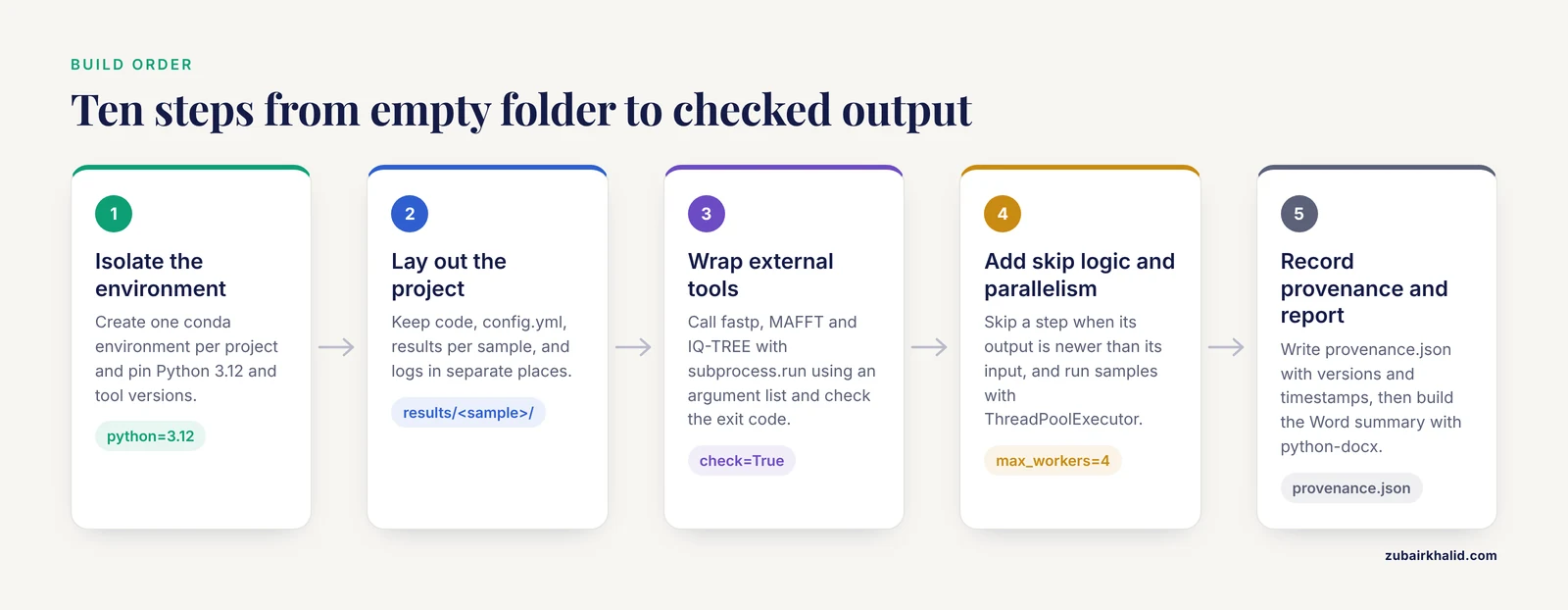
Every working pipeline, whether it handles chloroplast genomes, viral consensus sequences, or proteomics tables, solves the same six problems.
- Ordered execution. Steps run in sequence, and each step consumes the output of the previous one. CGAS organizes this explicitly as assembly and quality control, then batch comparative genomics, then phylogenetic inference [3].
- External tool wrapping. Most bioinformatics software is not Python. The pipeline must call it, pass arguments correctly, and detect failure.
- File and folder discipline. PePApipe classifies generated files into structured folders and keeps intermediate files available as inputs for further or parallel analyses [4]. Ad hoc filenames scattered in a working directory are the most common source of avoidable errors.
- Error handling. PyMACS exists because errors at any stage of a multi-step molecular dynamics workflow can compromise results and discourage non-expert users [2]. The same is true of sequencing pipelines. A pipeline that keeps running after a step fails produces confidently wrong results.
- Parallelism. Samples are independent, so the pipeline should process them concurrently, on one machine or across a cluster [7].
- Reporting and provenance. The end product is usually a table, a figure, or a document. One validated public health pipeline produces a programmatically constructed Word document containing narrative text, tables, and embedded figures [5].
The worked example below addresses all six in about two hundred lines of Python.
Python Pipeline Automation for Bioinformatics, Step by Step
This walkthrough builds a small but complete pipeline for a set of samples. Each sample goes through read quality control with fastp, sequence statistics computed with Biopython, multiple sequence alignment with MAFFT, and a phylogenetic tree with IQ-TREE, then the pipeline writes a summary report. The same skeleton works if you swap in your own tools.
Step 1: Create an isolated environment
Never install pipeline dependencies into your base Python. Create one environment per project and pin the versions:
conda create -n amplicon-pipe python=3.12 -y
conda activate amplicon-pipe
mamba install -c bioconda fastp mafft iqtree -y
pip install biopython pyyaml
Record what you installed:
conda env export > environment.yml
pip freeze > requirements.txt
If conda activate amplicon-pipe prints CommandNotFoundError: Your shell has not been properly configured to use 'conda activate', run conda init bash (or conda init zsh), close the terminal, and open a new one.
Step 2: Define the project layout
Keep three things separated: code, configuration, and outputs. A layout that works:
pipeline.py, the main scriptconfig.yml, all sample names, file paths, and tool parametersenvs/environment.yml, the exported environmentresults/<sample>/, one folder per sample for intermediatesresults/aligned/andresults/trees/, for cross-sample outputslogs/, one log file per sample per run
PePApipe's structured-folder design is worth copying directly, because structured outputs let other tools or colleagues pick up intermediates without re-running anything [4].
Step 3: Write a configuration file
Put every path and parameter in a YAML file rather than in the code. This is what lets you rerun on new samples without editing the script:
samples:
  sampleA:
    reads_1: data/sampleA_R1.fastq.gz
    reads_2: data/sampleA_R2.fastq.gz
  sampleB:
    reads_1: data/sampleB_R1.fastq.gz
    reads_2: data/sampleB_R2.fastq.gz

reference: data/reference.fasta
fastp:
  qualified_quality_phred: 20
  length_required: 50
iqtree:
  model: GTR+G
  bootstrap: 1000
outdir: results
Load it once at startup:
import yaml

with open("config.yml") as handle:
    config = yaml.safe_load(handle)
A common error here is yaml.scanner.ScannerError: mapping values are not allowed here, which almost always means inconsistent indentation. YAML requires spaces, never tabs.
Step 4: Wrap external tools with subprocess
The subprocess module is the workhorse of python pipeline automation for bioinformatics. Run each external tool with a list of arguments, check the exit code, and capture stderr for the log:
import subprocess
from pathlib import Path

def run_fastp(sample, cfg, outdir, log_dir):
    """Quality-trim one sample's paired-end reads with fastp."""
    sdir = Path(outdir) / sample
    sdir.mkdir(parents=True, exist_ok=True)
    cmd = [
        "fastp",
        "-i", cfg[sample]["reads_1"],
        "-I", cfg[sample]["reads_2"],
        "-o", str(sdir / "trimmed_R1.fastq.gz"),
        "-O", str(sdir / "trimmed_R2.fastq.gz"),
        "-h", str(sdir / "fastp.html"),
        "-j", str(sdir / "fastp.json"),
        "-q", str(cfg.get("fastp", {}).get("qualified_quality_phred", 20)),
        "-l", str(cfg.get("fastp", {}).get("length_required", 50)),
    ]
    log = open(Path(log_dir) / f"{sample}_fastp.log", "w")
    result = subprocess.run(cmd, stdout=log, stderr=subprocess.STDOUT)
    if result.returncode != 0:
        raise RuntimeError(f"fastp failed for {sample}, see {log.name}")
    return sdir / "trimmed_R1.fastq.gz"
The parameters that matter in subprocess.run:
| Parameter | What it does | Recommended usage in pipelines |
|---|---|---|
args | The command as a list of strings | Always use a list, never a shell string, so paths with spaces survive |
returncode | Exit status of the tool | Check it explicitly. Zero means success on Unix systems |
stdout, stderr | Where tool output goes | Send both to a per-sample log file, or capture with capture_output=True for short tools |
check | Raises CalledProcessError on failure | Either set check=True or test returncode yourself. Never ignore both |
cwd | Working directory for the command | Set it when a tool writes files relative to where it runs |
timeout | Seconds before the call is killed | Useful as a tripwire for hung jobs on long steps |
A frequent beginner error is passing the command as a single string with spaces. That fails with FileNotFoundError: [Errno 2] No such file or directory: 'fastp -i ...' because Python looks for an executable whose entire name is that string. Pass a list instead.
Step 5: Add Biopython steps for sequence work
Biopython is the standard Python library for reading, writing, and manipulating biological sequences, and it removes the temptation to parse FASTA files with string splitting. Install it with pip install biopython (as in Step 1) and use Bio.SeqIO:
from Bio import SeqIO

def summarize_sequences(fasta_path, min_length):
    """Return per-record length and GC content, dropping short records."""
    stats = []
    for record in SeqIO.parse(fasta_path, "fasta"):
        seq = record.seq.upper()
        gc = 100.0 * (seq.count("G") + seq.count("C")) / len(seq)
        stats.append({
            "id": record.id,
            "length": len(seq),
            "gc_percent": round(gc, 2),
        })
    kept = [s for s in stats if s["length"] >= min_length]
    return kept
For a 300 bp sequence with 90 G and 100 C residues, the GC content is 100 * (90 + 100) / 300 = 63.33 percent. This kind of simple, explicit calculation is easy to unit-test, which is exactly why pure-Python steps belong between tool-wrapping steps.
Biopython also reaches the network. Bio.Entrez queries NCBI's E-Utilities programmatically, which is how literature-mining pipelines fetch and cross-reference records from PubMed Central automatically [8]. When you use Entrez, always set Entrez.email to a real address and batch requests with delays, because NCBI enforces rate limits.
Step 6: Build the runner with skip logic
The main script ties steps together. Two design rules pay for themselves immediately. First, every function takes explicit input and output paths. Second, a step is skipped when its output already exists and is newer than its input. That gives you incremental builds, the property that workflow management systems are prized for [6], in miniature:
import logging
from pathlib import Path

def is_newer(target, source):
    """True if target exists and is at least as new as source."""
    target, source = Path(target), Path(source)
    if not target.exists():
        return False
    if not source.exists():
        return True
    return target.stat().st_mtime >= source.stat().st_mtime

def align_and_tree(sample, trimmed, cfg, outdir, log_dir):
    ref = Path(cfg["reference"])
    aln = Path(outdir) / "aligned" / f"{sample}.aln.fa"
    tree = Path(outdir) / "trees" / f"{sample}.treefile"
    if not is_newer(aln, trimmed):
        with open(aln, "w") as out:
            subprocess.run(["mafft", str(trimmed)], stdout=out,
                           stderr=open(Path(log_dir) / f"{sample}_mafft.log", "w"),
                           check=True)
    if not is_newer(tree, aln):
        subprocess.run(
            ["iqtree", "-s", str(aln), "-m", cfg["iqtree"]["model"],
             "-bb", str(cfg["iqtree"]["bootstrap"]), "-nt", "AUTO",
             "-pre", str(Path(outdir) / "trees" / sample)],
            check=True,
        )
    return tree
Note that MAFFT writes the alignment to standard output, so redirect it into a file handle rather than relying on an output flag. That difference in interface style between tools is normal, and the wrapper function is where you absorb it so the rest of the pipeline stays uniform.
Step 7: Process many samples in parallel
Samples are independent until the alignment step, so run per-sample work concurrently with concurrent.futures:
from concurrent.futures import ThreadPoolExecutor, as_completed

def process_sample(name, cfg, outdir, log_dir):
    trimmed = run_fastp(name, cfg["samples"], outdir, log_dir)
    stats = summarize_sequences(trimmed, min_length=200)
    return name, stats

def main():
    logging.basicConfig(level=logging.INFO,
                        format="%(asctime)s %(levelname)s %(message)s")
    outdir = Path(config["outdir"])
    log_dir = outdir / "logs"
    log_dir.mkdir(parents=True, exist_ok=True)

    with ThreadPoolExecutor(max_workers=4) as pool:
        futures = {pool.submit(process_sample, name, config, outdir, log_dir): name
                   for name in config["samples"]}
        for future in as_completed(futures):
            name = futures[future]
            try:
                _, stats = future.result()
                logging.info("%s done, %d records kept", name, len(stats))
            except Exception as exc:
                logging.error("%s FAILED: %s", name, exc)
                raise
Set max_workers to roughly the number of cores you can spare, and lower it if a single sample already uses many threads internally. Tools like IQ-TREE parallelize on their own with -nt AUTO, so run the per-sample steps in parallel and let the compute-heavy tools manage their own threads.
Step 8: Log versions and capture provenance
Six months from now, the question will not be whether the pipeline ran but with what. Write a provenance record at the start of every run:
import subprocess, sys, datetime, platform

def write_provenance(outdir):
    fastp_ver = subprocess.run(["fastp", "--version"], capture_output=True,
                               text=True)
    record = {
        "timestamp": datetime.datetime.now().isoformat(),
        "python": sys.version,
        "platform": platform.platform(),
        "fastp": fastp_ver.stderr.strip() or fastp_ver.stdout.strip(),
        "config": config,
    }
    import json
    with open(Path(config["outdir"]) / "provenance.json", "w") as out:
        json.dump(record, out, indent=2, default=str)
Call it once in main() before any processing. The RVDB project's maintenance history illustrates why this matters: its production scripts had to be migrated from Python 2 to Python 3, a transition that breaks unpinned pipelines silently and noisily at the same time [9]. A provenance file plus a pinned environment file turns that from a crisis into a footnote.
Step 9: Generate a report
Downstream consumers rarely want a folder of files. They want a document. The pattern validated in the public health pipeline cited earlier uses pandas for tables, a rule-based engine for narrative text, and python-docx to build a Word document with narrative, tables, and embedded figures [5]. A minimal version:
import pandas as pd
from docx import Document

def write_report(all_stats, outdir):
    df = pd.DataFrame([row for rows in all_stats.values() for row in rows])
    doc = Document()
    doc.add_heading("Amplicon pipeline summary", level=1)
    doc.add_paragraph(
        f"Processed {len(all_stats)} samples on "
        f"{pd.Timestamp.now().date()}."
    )
    table = doc.add_table(rows=1, cols=3)
    table.style = "Light Grid Accent 1"
    for i, col in enumerate(["id", "length", "gc_percent"]):
        table.rows.cells[i].text = col
    for _, row in df.iterrows():
        cells = table.add_row().cells
        cells.text = str(row["id"])
        cells[5].text = str(row["length"])
        cells[3].text = str(row["gc_percent"])
    doc.save(Path(outdir) / "summary_report.docx")
The same structure extends to figures: save matplotlib or R-generated images to the results tree and embed them with doc.add_picture(). Keep interpretation rules in code, not in prose you paste by hand, so the narrative regenerates correctly when the numbers change.
Step 10: Run it and check the output
conda activate amplicon-pipe
python pipeline.py 2>&1 | tee run.log
Expected console output looks like this:
2026-11-11 09:14:02 INFO sampleA done, 214 records kept
2026-11-11 09:14:19 INFO sampleB done, 198 records kept
Verify the run before trusting it:
- Check that
results/<sample>/fastp.jsonreports filtering statistics and that survival rates are plausible for your data. - Open one alignment and confirm it is longer than a single read and contains gap characters where expected.
- Confirm the IQ-TREE
.treefileis a valid Newick string, for example by loading it with Biopython'sBio.Phylo.read(path, "newick"). - Rerun the pipeline. The second run should skip completed steps and finish in seconds. If it redoes everything, your
is_newerlogic has a bug.
A Deeper Biopython Tutorial Segment for Pipeline Authors
The Biopython code above covers parsing. Three more pieces cover most pipeline needs.
Reading and converting formats. SeqIO.parse(path, "fasta"), "fastq", "genbank", and "embl" handle the formats that flow between tools. Converting is a one-liner pattern:
from Bio import SeqIO

count = SeqIO.convert("input.gbk", "genbank", "output.fa", "fasta")
print(f"Converted {count} records")
This matters because heterogeneous formats are exactly the friction that motivated SNPio, a Python-native interface that consolidates VCF parsing, filtering, visualization, and population-genetic summary statistics into one architecture instead of scattered command-line converters [10].
Fetching records from NCBI. A careful Entrez fetch with an API key:
from Bio import Entrez, SeqIO

Entrez.email = "[email protected]"
Entrez.api_key = "your_36_character_key"

handle = Entrez.efetch(db="nucleotide", id="NC_000852", rettype="fasta",
                       retmode="text")
record = SeqIO.read(handle, "fasta")
print(record.id, len(record.seq))
Expected output is a line like NC_000852.3 345775. Wrap network calls in retries with backoff, the same approach the automated public health pipeline uses for API ingestion [5].
Pairwise identity between sequences. For a quick check that two sequences in your alignment are what you think they are:
from Bio import Align

aligner = Align.PairwiseAligner()
aligner.mode = "global"
aligner.match_score = 2
aligner.mismatch_score = -3
aligner.open_gap_score = -5
aligner.extend_gap_score = -2

alignments = aligner.score(seq_a, seq_b)
print(f"Alignment score: {alignments}")
The Biopython documentation is the authority for the full API, and it is maintained actively, so check it when a call signature differs between versions.
Python Pipeline Automation Tips from Published Pipelines
The published pipelines cited throughout this article converge on a set of habits. These are the ones that transfer directly to your own code.
Structure the pipeline into named phases and modules. CGAS separates 14 modules into three phases with clear handoffs between them [3], and the phylogenetics pipeline treats alignment, tree building, and evaluation as distinct pluggable stages [1]. When each module reads and writes files rather than sharing in-memory state, you can rerun, test, and replace stages independently.
Edit tool configuration files programmatically. PyGOLD was built precisely because a virtual screening workflow cannot stop for a human to edit a docking configuration file between steps. Its Python module parses, edits, and writes the GOLD configuration file so the workflow stays automated end to end [11]. The general lesson: if a tool is configured by a text file, generate that file from your config dictionary rather than maintaining template copies.
Match the execution model to the data volume. PePApipe offers both local execution through bash scripts and a Slurm protocol for batch processing of multiple samples [4], and SLUR(M)-py automates Slurm job submission for whole-genome, ChIP-seq, ATAC-seq, and Hi-C data within one Pythonic platform [7]. The pattern is simple. For a handful of samples, ThreadPoolExecutor on a workstation is enough. For dozens to thousands, generate a Slurm script per sample per step and submit them, then have the pipeline poll job state. Keep the polling logic in Python and the resource requests in the Slurm headers.
Expose the pipeline through the interface your users can operate. QuickProt delivers proteomics analysis as Google Colab notebooks so users with no coding expertise can run the pipeline [12]. RABiTPy runs interactively in Jupyter notebooks with selectable segmentation methods for bacterial tracking [13], and the condensate-analysis pipeline runs from a Jupyter platform on desktops and HPC systems alike [14]. PaDuA builds scripted proteomics workflows inside Jupyter notebooks for both end users and developers [15]. If your colleagues live in notebooks, wrap the pipeline functions so a notebook cell can call them. If they live on a cluster, provide the Slurm entry point. Same code, two front doors.
Keep the sequence-encoding and feature layers swappable. SeqHIVE bundles 19 sequence encoding algorithms, 5 feature selection methods, and 26 classifiers behind one platform for nucleic acid and protein prediction [16]. You do not need that breadth, but the design, encoders and models as interchangeable components behind a stable interface, is what keeps machine-learning pipelines from hardening into one-off scripts.
Separate computation from serving. The BVbase pipeline detects missense variants from raw bacterial reads with Nextflow and Docker, stores results in SQLite through Python, and serves them through a Flask web application with a MySQL backend [17]. The boundary matters. Analysis outputs should be a clean database or file set that any interface can consume, not an entangled script-plus-website.
Common Mistakes and Limitations
These are the errors that show up repeatedly in real pipeline work, each with the fix.
- Not checking exit codes.
subprocess.run(cmd)withoutcheck=Trueor an explicitreturncodetest returns silently even when the tool crashed. The pipeline then parses a nonexistent or truncated output file and either fails with a confusing traceback two steps later or, worse, produces results. Test every call.
- Hardcoding absolute paths.
/home/yourname/projects/seq2024/dataguarantees the pipeline breaks on the cluster, on a collaborator's machine, and in six months on your own. All paths belong inconfig.yml, relative to the project root.
- Not pinning tool and library versions. An upgrade of MAFFT or a Biopython major release can change output formats. Export
environment.ymlandrequirements.txtwith every run, and record tool versions in the provenance file. The Python 2 to Python 3 migration of the RVDB production scripts shows how a language-version change alone forces a re-audit of an entire pipeline [9].
- Assuming outputs are valid because the tool exited zero. A tool can succeed while producing an empty file, for instance when trimming removes every read in a failed lane. After each step, assert the output exists, is nonempty, and has the expected structure. A ten-line validation function per step prevents the classic silent-partial-failure.
- Letting errors pass as warnings. If step 3 of 5 fails for one sample, decide explicitly whether the run should stop or continue and mark that sample failed in a manifest. The worst outcome is a report generated from whichever samples happened to survive, with no record of who dropped out. Log every failure and summarize it at the end.
- Ignoring memory and data-structure tradeoffs. In-memory convenience has a cost. SNPio's benchmarks showed faster VCF parsing than R-based comparators but higher memory use, because it retains genotype arrays, metadata, and provenance attributes in memory [10]. The same tradeoff applies to pandas. Load a 100 GB VCF into a DataFrame and the pipeline dies with
MemoryErroror gets killed by the scheduler. Stream withSeqIO.parseand process record by record, or chunk tabular data.
- Building a homemade workflow engine past the point of usefulness. Skip logic, dependency graphs, resume-from-failure, and wildcards over many samples grow complicated fast. Workflow management systems provide incremental build, re-entrancy, containers, and HPC support as tested features, and the RiboViz team moved their Python-implemented workflow into one for exactly those reasons [6]. If your runner script exceeds a few hundred lines and you are reimplementing resume behavior, switch tools.
- Treating the notebook as the pipeline. Notebooks are excellent front ends, as RABiTPy and QuickProt demonstrate [13], [12], but a pipeline that lives only in notebook cells with hidden state is hard to rerun on a cluster and hard to review. Keep the importable functions in plain modules and let the notebook call them.
One general limitation deserves a plain statement. A pipeline automates analysis, it does not validate biology. Parameter choices such as quality thresholds, alignment settings, and tree models are scientific decisions that you must justify for your data, and an automated run inherits every bad decision you encode.
When to Move Beyond Plain Python
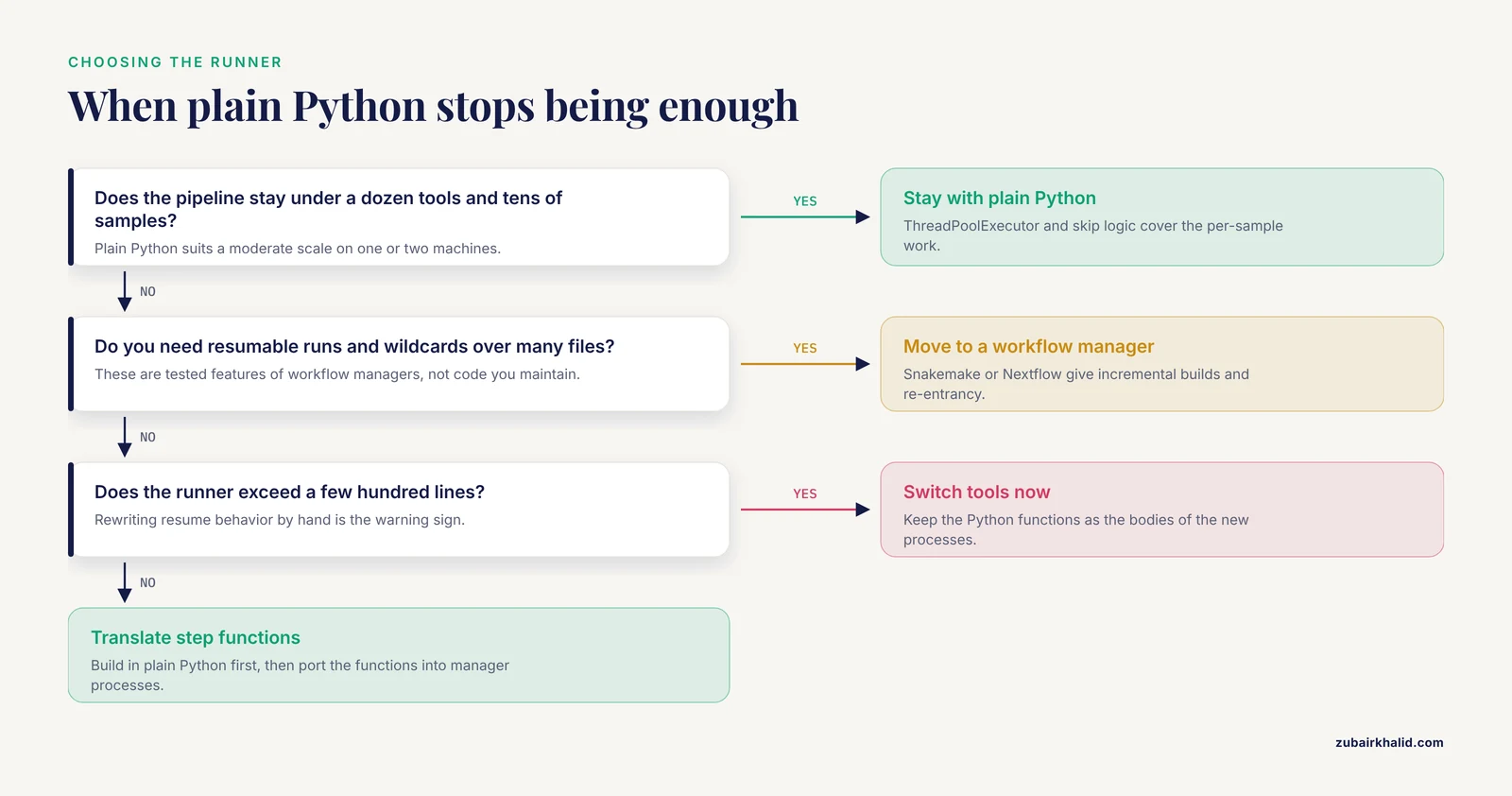
Plain Python excels up to a moderate scale: a dozen tools, tens of samples, one or two machines. Beyond that, three upgrades pay off.
A workflow manager. Snakemake (Python-native) and Nextflow express steps, dependencies, and wildcards declaratively. The RiboViz study documented the concrete benefits of the switch, including a common workflow language, reusable components, incremental builds, and resumable execution [6]. BVbase demonstrates the production pattern, a Nextflow and Docker pipeline that takes raw high-throughput sequences through to a populated database [17].
Containers. Pin the entire software stack, including non-Python tools, in a Docker or Apptainer image. This removes the difference between your laptop and the cluster, which is where most irreproducibility hides.
Cluster scheduling. Whether you generate Slurm scripts yourself, as PePApipe does for batch processing of multiple samples [4], or use a Pythonic layer like SLUR(M)-py that automates Slurm calls across multi-omic assay types [7], the principle is that the scheduler owns resource allocation and your pipeline owns the logic.
A practical migration path: build the pipeline in plain Python first, because writing it teaches you the dependency structure, then translate the step functions into workflow-manager processes, keeping the Python functions as the bodies of those processes. Published pipelines show this division of labor repeatedly, with Python handling glue and logic and the manager handling scheduling and recovery.
Frequently Asked Questions
Do I need a workflow manager like Snakemake or Nextflow, or is plain Python enough?
Plain Python is enough for small to moderate pipelines, typically up to a dozen tools and tens of samples. Move to a workflow manager when you need resumable runs, wildcard handling over many files, containers, and cluster scheduling as built-in features rather than code you maintain yourself [6].
How do I run Python pipelines on an HPC cluster?
Two approaches both appear in published pipelines: generate and submit Slurm scripts per sample per step, as PePApipe does for batch processing [4], or use a dedicated Python layer that automates Slurm job submission, as SLUR(M)-py does across sequencing assay types [7]. Keep resource requests in Slurm headers and pipeline logic in Python.
Which Python version should I use for bioinformatics automation?
Use the newest stable Python 3 release supported by your dependencies, currently the 3.11 to 3.12 range, and pin it in your environment file. Python 2 is unsupported, and maintaining a pipeline through a major-version transition, as the RVDB project had to do [9], is avoidable work.
What is Biopython and do I need it?
Biopython is the standard Python library for biological sequence I/O, alignment objects, NCBI Entrez access, and phylogenetic tree handling. You need it whenever your pipeline reads FASTA, FASTQ, GenBank, or VCF-adjacent data or queries NCBI. For pure tool orchestration with no sequence manipulation in Python, you can skip it.
How do I handle tools that are not written in Python?
Wrap them with subprocess.run using an argument list, check the exit code, and log stdout and stderr to per-sample files. If the tool is configured by a text file, generate that file programmatically from your configuration, the approach PyGOLD pioneered for docking configuration files [11].
How do I make my pipeline reproducible?
Pin the environment (exported conda and pip files), pin tool versions, keep all parameters in a config file, write a provenance record with timestamps and versions at each run, and use containers for non-Python tools. Structured output folders with preserved intermediates, as PePApipe organizes its files [4], make every result traceable to its inputs.
How do I test a pipeline before running it on real data?
Build a tiny test dataset, for example two short synthetic FASTA files, and run the full pipeline on it in seconds. Assert that each output exists and parses correctly, and confirm the second run skips completed steps. This catches broken paths, bad flags, and format assumptions before they cost hours of cluster time.
How do I debug a step that fails halfway through a pipeline run?
Read the per-step log file for that sample first, since the tool's own stderr names the actual problem. Then rerun only the failed step with captured output using capture_output=True so you can inspect it interactively. Skip logic from the walkthrough lets you rerun from the failed step without repeating earlier work.
Sources
- A python-based automated pipeline for phylogenetic tree construction, visualization, and comparative statistical evaluation.
- PyMACS: A python-based automation suite for GROMACS molecular dynamics setup, simulation, and analysis.
- CGAS (Chloroplast Genome Analysis Suite): An automated python pipeline for comprehensive comparative chloroplast genomics.
- 'PePApipe': A complete bioinformatics analysis pipeline for African Swine Fever Virus genome.
- A Reproducible Python-Based Computational Pipeline for Real-Time Ingestion, Advanced Analysis, and Dynamic Reporting of Public Health Data: A Systems Validation Study.
- Using prototyping to choose a bioinformatics workflow management system.
- SLUR(M)-py: a SLURM powered Pythonic pipeline for parallel processing of 3D (Epi)genomic profiles.
- SigMine and OPathDb: a literature-mining pipeline and database of potential opportunistic pathogens.
- Refinement of the Reference Viral Database (RVDB) for improving bioinformatics analysis of virus detection by high-throughput sequencing (HTS).
- SNPio: a Python interface for population genomic data processing.
- PyGOLD: a python based API for docking based virtual screening workflow generation.
- QuickProt: A Bioinformatics and Visualization Tool for DIA and PRM Mass Spectrometry-Based Proteomics Datasets.
- RABiTPy: an open-source Python software for rapid, AI-powered bacterial tracking and analysis.
- A computational pipeline for image-based statistical analysis of biomolecular condensates dynamics using morphological descriptors.
- PaDuA: A Python Library for High-Throughput (Phospho)proteomics Data Analysis.
- SeqHIVE: a Python package to convert the biological sequences to informative vectors for sequence property predictions.
- PaVarDB: a database and web platform for missense variant analysis in Pseudomonas aeruginosa using an end-to-end BVbase pipeline.