Using Python's glob Module to Manage Bioinformatics File Collections
By Dr. Zubair Khalid, DVM, MS, PhD ·

By the end of this article you will be able to inventory a directory of sequencing reads, pair FASTQ files by sample, verify that every sample in a metadata sheet exists on disk, discover files across nested project trees, batch-process structure files, and write a checksummed manifest that documents exactly which inputs a pipeline consumed. Everything runs on the Python standard library. You need Python 3.8 or newer installed, a terminal, and a directory of files to practice on. The one optional dependency is Biopython, which appears in the integration section.
File management is the least glamorous and most failure-prone part of python for bioinformatics. A single Illumina lane produces dozens of files per sample. A bacterial genome project touches raw reads, trimmed reads, alignments, index files, variant calls, and consensus sequences, and every downstream tool has its own opinion about naming. Automated Python scripts that download, curate, and process hundreds of genomes from public databases depend on reliable file discovery to work at all [1]. The glob module is the standard library tool that makes that discovery scripted instead of manual.
Why File Pattern Matching Matters in Python for Bioinformatics
Bioinformatics workflows are multistep by nature. Quality control feeds trimming, trimming feeds alignment, alignment feeds variant calling, and each step multiplies the number of files on disk. Workflow management systems exist precisely to represent, manage, and execute these multistep analyses, and they free bioinformaticians to focus on the data analysis rather than the bookkeeping [2]. Inside a single Python script or notebook, glob is the lightweight counterpart to that bookkeeping layer. It answers the question every pipeline asks at startup: which input files are actually present?
Consider what a modern Python-based pipeline handles. PePApipe, a pipeline for African Swine Fever Virus genome analysis, integrates thirteen software tools covering quality control, de novo assembly, and variant calling, and it classifies generated files into structured folders so that intermediate outputs remain usable for further analyses [3]. SNPio consolidates VCF parsing, filtering, and summary statistics into one Python framework because fragmented command-line utilities and ad hoc conversion scripts introduce friction between raw genotype files and downstream analyses [4]. In both cases, the pipeline's first job is to find and organize files. That is glob's job too, just at a smaller scale.
Three properties make glob well suited to this role. First, it is terse. One pattern string replaces dozens of os.path.exists calls. Second, it is deterministic when you make it so, which matters because reproducibility is a central goal of scripted workflows [2]. Third, it composes cleanly with everything else in Python, from csv parsing to Biopython parsers to NumPy arrays.
glob Syntax: The Pattern Language
The glob module implements Unix shell-style wildcard matching. The patterns are small enough to learn in one sitting but expressive enough to handle most bioinformatics directory layouts.
| Pattern | Meaning | Bioinformatics example |
|---|---|---|
* | Any string of characters, including none, but never a leading dot | *.fastq.gz matches every gzipped read file in a directory |
? | Exactly one character | sample_?.fasta matches sample_A.fasta but not sample_AB.fasta |
[abc] | One character from the set | run_.log matches run_1.log, run_2.log, run_3.log |
[!abc] | One character not in the set | sample_[!0].txt excludes sample_0.txt |
[a-z] | One character in the range | chr[1][2][3][4][5][6][7][8].fa matches chr1.fa through chr9.fa |
** | Any files and zero or more directories, only when recursive=True | projects/**/*.vcf.gz finds variant calls at any depth |
The module exposes a handful of functions, and knowing which one to reach for is half the skill.
| Function | Returns | Typical use |
|---|---|---|
glob.glob(pattern) | List of paths | When you need the full list up front, for counting or sorting |
glob.iglob(pattern) | Lazy iterator | Large directories or streams you process once |
glob.escape(path) | Path with special characters escaped | Filenames that contain [, ?, or * literals |
glob.translate(pattern) | Regular expression string (Python 3.13+) | Reusing a glob pattern inside re-based filtering |
glob.glob(pattern, recursive=True) | List, with ** enabled | Deep searches across project trees |
glob.glob(pattern, root_dir="path") | List, searched relative to root_dir (Python 3.10+) | Searching a directory without changing the working directory |
Two parameters deserve attention. recursive=True is off by default, so ** behaves like a single unless you enable it. include_hidden arrived in Python 3.11 and defaults to False, which means and ** never match files whose names begin with a dot, such as .fastq index fragments some tools leave behind.
A Step-by-Step Python glob Bioinformatics Walkthrough
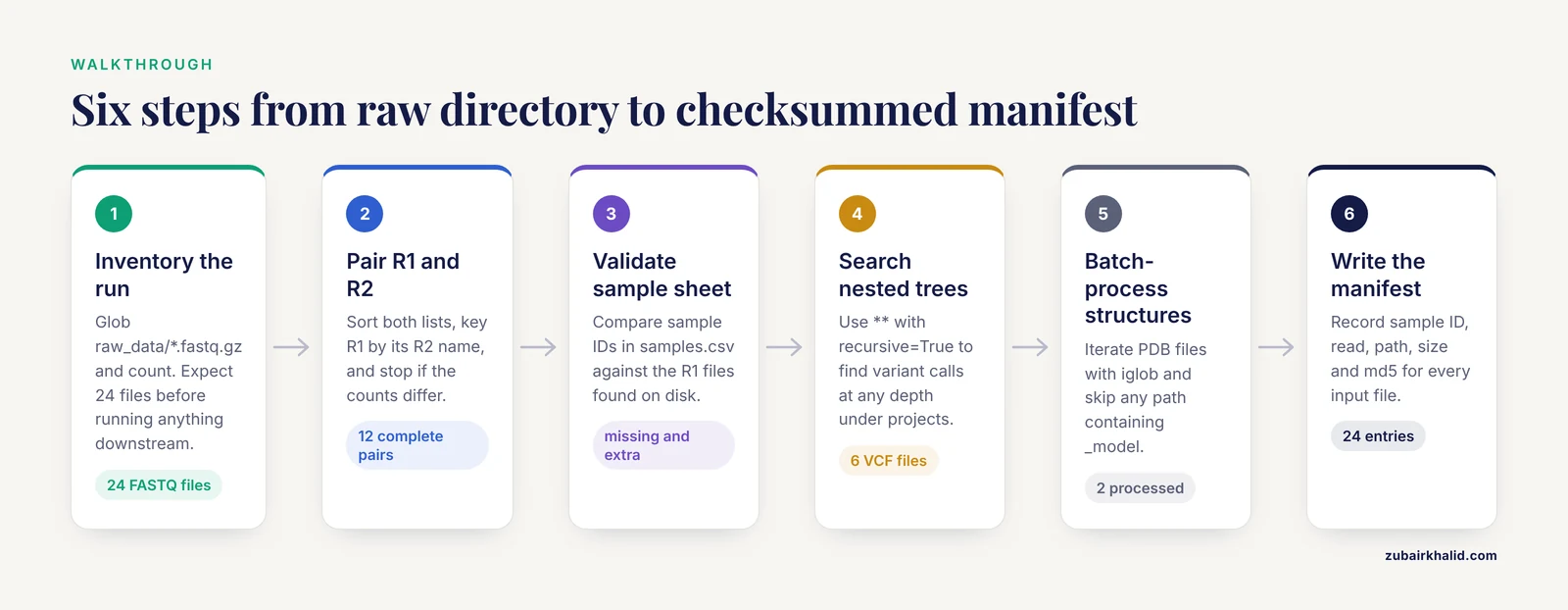
The following walkthrough uses a realistic project layout. Suppose you have just received a directory from a sequencing core:
project/
  samples.csv
  raw_data/
    SRR1039508_R1_001.fastq.gz
    SRR1039508_R2_001.fastq.gz
    SRR1039509_R1_001.fastq.gz
    SRR1039509_R2_001.fastq.gz
    ... (22 more FASTQ files)
  structures/
    target_1abc.pdb
    homolog_4zzz.pdb
The _R1_ and _R2_ markers distinguish forward and reverse reads, and the _001 suffix comes from the demultiplexing software. This naming convention is near universal for Illumina output, which is exactly why glob patterns work so well against it.
Step 1: Inventory the run directory
Never assume you know what a sequencing core sent you. Count first.
import glob

pattern = "raw_data/*.fastq.gz"
files = glob.glob(pattern)

print(f"Found {len(files)} FASTQ files")
for path in sorted(files)[:3]:
    print(path)
Expected output:
Found 24 FASTQ files
raw_data/SRR1039508_R1_001.fastq.gz
raw_data/SRR1039508_R2_001.fastq.gz
raw_data/SRR1039509_R1_001.fastq.gz
If you expected 24 files and got 22, stop before running anything downstream. A count mismatch at this stage costs one minute. The same mismatch discovered after an alignment step costs hours.
Step 2: Pair the R1 and R2 files
Paired-end reads must stay paired through alignment. The safest approach is to sort both lists, build a lookup keyed by the R2 name, and fail loudly if the counts disagree.
import glob
import os

r1_files = sorted(glob.glob("raw_data/*_R1_*.fastq.gz"))
r2_files = sorted(glob.glob("raw_data/*_R2_*.fastq.gz"))

if len(r1_files) != len(r2_files):
    raise SystemExit(
        f"Pairing failure: {len(r1_files)} R1 files but {len(r2_files)} R2 files"
    )

r1_by_r2name = {
    os.path.basename(p).replace("_R1_", "_R2_"): p for p in r1_files
}

pairs = []
for r2_path in r2_files:
    key = os.path.basename(r2_path)
    if key in r1_by_r2name:
        pairs.append((r1_by_r2name[key], r2_path))
    else:
        raise SystemExit(f"No R1 partner found for {key}")

print(f"{len(pairs)} complete pairs, e.g. {pairs} and {pairs[5]}")
Expected output:
12 complete pairs, e.g. raw_data/SRR1039508_R1_001.fastq.gz and raw_data/SRR1039508_R2_001.fastq.gzThe replace("_R1_", "_R2_") trick works because the Illumina convention guarantees those markers appear exactly once per filename. If your source uses a different convention, adjust the marker strings and nothing else.
Step 3: Validate against the sample sheet
A sample sheet is the contract between you and the pipeline. Every sample ID in the sheet should have reads on disk, and every file on disk should belong to a sheet entry. Any other state is a problem you want to find now.
import csv
import glob
import os

with open("samples.csv", newline="") as handle:
    reader = csv.DictReader(handle)
    sheet_ids = {row["sample_id"] for row in reader}

found_ids = {
    os.path.basename(p).split("_R1_")
    for p in glob.glob("raw_data/*_R1_*.fastq.gz")
}

missing = sheet_ids - found_ids
extra = found_ids - sheet_ids

print("Missing from disk:", sorted(missing) or "none")
print("On disk but not in the sheet:", sorted(extra) or "none")
Expected output for a clean directory:
Missing from disk: none
On disk but not in the sheet: none
If the output shows a sample ID on the left side of a mismatch, you know precisely which re-sequencing request to file. This kind of check is what separates a script that runs from a pipeline you can trust. Pipelines intended for laboratory professionals with limited bioinformatics experience, such as the PePApipe workflow for ASFV genomes, emphasize only basic command-line knowledge precisely because checks like this are automated rather than left to the user [3].
Step 4: Discover files across nested project trees
Real workspaces are rarely flat. Six months in, your variant calls live under per-run, per-reference subdirectories. Recursive glob finds them all in one line.
import glob

vcfs = sorted(glob.glob("projects/**/*.vcf.gz", recursive=True))
print(f"{len(vcfs)} compressed VCF files across all projects")
for path in vcfs[:5]:
    print(path)
Expected output:
6 compressed VCF files across all projects
projects/2025_run01/grch38/variants.filtered.vcf.gz
projects/2025_run01/grch38/variants.raw.vcf.gz
projects/2025_run02/grch38/variants.filtered.vcf.gz
projects/2025_run02/grch38/variants.raw.vcf.gz
projects/pilot/grch38/variants.filtered.vcf.gz
The token matches zero or more directories, so projects//*.vcf.gz also catches a VCF sitting directly in projects/. Once found, files like these feed naturally into Python-native parsing frameworks. SNPio, for example, loads VCF data into a unified architecture that retains genotype arrays and provenance-tracking attributes, accepting file paths exactly as glob produces them [4].
A word of caution that belongs here rather than in a footnote: ** walks every subdirectory under its anchor point. Point it at projects/, never at your home directory. On a shared filesystem with millions of files, an unanchored recursive glob can run for minutes and hammer the storage server.
Step 5: Batch-process structure files with iglob
Structural biology collections grow fast. A cavity detection screen over hundreds of protein structures is a classic batch job, and tools built for this exact scenario, such as pyKVFinder, store cavity properties in NumPy arrays so results integrate directly with matplotlib, SciPy, and Jupyter analysis [6]. The glob side of that workflow uses iglob, which yields paths one at a time instead of materializing the full list, keeping memory flat regardless of collection size.
from glob import iglob

processed = 0
skipped = []

for pdb_path in iglob("structures/**/*.pdb", recursive=True):
    if "_model" in pdb_path:
        skipped.append(pdb_path)
        continue
    # run_cavity_analysis(pdb_path) stands in for your tool call
    print(f"Processing {pdb_path}")
    processed += 1

print(f"Done. {processed} processed, {len(skipped)} skipped")
Expected output:
Processing structures/homolog_4zzz.pdb
Processing structures/target_1abc.pdb
Done. 2 processed, 0 skipped
Use iglob whenever you iterate once in a predictable order. Use glob.glob whenever you need the list more than once, need its length, or need it sorted. The cost of glob is one full directory scan held in memory. The cost of iglob is a second scan if you change your mind later.
Step 6: Write a checksummed manifest
A manifest is the record that makes a result traceable months later. It lists every input, its size, and a checksum, so you can answer the question "which exact files produced this figure?"
import csv
import glob
import hashlib
import os

def md5sum(path, chunk_size=1 << 20):
    digest = hashlib.md5()
    with open(path, "rb") as handle:
        while True:
            chunk = handle.read(chunk_size)
            if not chunk:
                break
            digest.update(chunk)
    return digest.hexdigest()

rows = []
for path in sorted(glob.glob("raw_data/*.fastq.gz")):
    name = os.path.basename(path)
    sample_id = name.split("_R1_").split("_R2_")
    rows.append({
        "sample_id": sample_id,
        "read": "R1" if "_R1_" in name else "R2",
        "path": path,
        "size_bytes": os.path.getsize(path),
        "md5": md5sum(path),
    })

with open("manifest.csv", "w", newline="") as handle:
    writer = csv.DictWriter(handle, fieldnames=rows.keys())
    writer.writeheader()
    writer.writerows(rows)

print(f"Wrote manifest.csv with {len(rows)} entries")
Expected output:
Wrote manifest.csv with 24 entriesThe first rows of the resulting file look like this:
sample_id,read,path,size_bytes,md5
SRR1039508,R1,raw_data/SRR1039508_R1_001.fastq.gz,48230119,3f5a8c1e9b2d47f0a6c8e1d2b3f4a5b6
SRR1039508,R2,raw_data/SRR1039508_R2_001.fastq.gz,47988204,9c1d2e3f4a5b6c7d8e9f0a1b2c3d4e5f
Because the loop iterates over sorted(glob.glob(...)), the manifest order is deterministic. Regenerate it tomorrow and the rows come out in the same sequence. Determinism at this level is what makes a scripted analysis comparable to a workflow managed by a dedicated system, where incremental rebuilds depend on knowing exactly which inputs exist and which have changed [2].
Practical Python glob Bioinformatics Tips
These are the habits that separate fragile glob code from glob code you can reuse across projects.
Sort every result you keep. The glob module makes no ordering guarantee, because the operating system returns directory entries in whatever order it stores them. Two runs on two machines can list the same files differently. Sorting costs one function call and buys reproducibility.
Anchor your patterns. A pattern like *.vcf matches only in the current directory, which sounds safe until the script runs from a different working directory inside a scheduler job. Prefix patterns with the directory you mean, or pass root_dir= (Python 3.10 and newer) so the search location is explicit in the code.
Escape special characters in external filenames. Collaborators deliver files named sample.fasta more often than you would predict. Square brackets in a glob pattern mean a character set, so glob.glob("sample.fasta") looks for sample1.fasta, not the literal bracketed name. Use glob.escape:
import glob

literal = glob.escape("samples/sample[5].fasta")
print(literal)                       # samples/sample[[]1].fasta
print(glob.glob(literal))            # ['samples/sample[5].fasta']
Prefer specific extensions. .fastq.gz beats .gz because metagenomic directories often contain report.gz, summary.gz, and other files you do not want. Narrow patterns document intent and prevent silent misclassification.
Expand the tilde yourself. glob does not expand ~. A pattern of ~/data/.fastq matches nothing on most systems. Wrap it: glob.glob(os.path.expanduser("~/data/.fastq")).
Test with counts and prints before side effects. Every deletion, move, or rename driven by glob results should be preceded by a dry run that prints what would happen. print is free. Retranscribing a deleted lane is not.
Use fnmatch for in-memory filtering. When you already have a list of paths from another source, fnmatch.fnmatch(name, "*.vcf.gz") applies the same pattern language without touching the filesystem.
Keep patterns in configuration, not buried in logic. Store patterns at the top of the script or in a config file, one per input type. When the sequencing core changes its naming convention next year, you edit one line. Automated frameworks that span many workflow steps, such as the PyGOLD module that parses and rewrites docking configuration files so virtual screening runs without manual GUI intervention, exist for exactly this reason: configuration belongs outside the imperative code [5].
Integrating glob with Biopython and Larger Pipelines
The most common next step after collecting paths is parsing the files, and the Biopython tutorial pattern for this is short. SeqIO accepts any iterable of paths, which is what glob produces:
import glob
from Bio import SeqIO

records = []
for fasta_path in sorted(glob.glob("genomes/*.fasta")):
    for record in SeqIO.parse(fasta_path, "fasta"):
        records.append((fasta_path, record.id, len(record.seq)))

print(f"Parsed {len(records)} sequences from {len(glob.glob('genomes/*.fasta'))} files")
This three-line bridge scales from a handful of local files to curated collections. The ChiLCV genomics study mentioned earlier downloaded about 410 complete viral genomes from public databases and processed them with automated Python scripts before subdividing the isolates into 34 strains across 10 major clades [1]. A collection of that size is only manageable when file discovery, parsing, and analysis are all scripted in the same language, which is precisely the role glob plays at the front of the chain.
The same bridge pattern appears across domains. PaDuA provides proteomics analysis tools designed to be assembled into scripted workflows within Jupyter notebooks, and a notebook typically begins with a glob call that collects raw or search-engine output files into a list for iteration [7]. pyKVFinder exposes cavity detection results as NumPy arrays so that batch processing over many structures flows into plotting and machine learning without format conversion [6]. In each case the architecture is identical: glob finds the files, the domain library parses them, the analysis operates on in-memory objects.
For command-line tool orchestration, glob collects inputs and your script writes them into configuration files or command lines. PyGOLD demonstrates the configuration side, editing GOLD docking configuration files programmatically so that each virtual screening step runs without a human in the loop [5]. SerialFIB demonstrates the hardware side, driving automated cryo-FIB preparation protocols through a Python scripting module that interfaces with correlative light and electron microscopy tools [8]. The pattern generalizes: discovery by glob, orchestration in Python, execution by a specialized tool.
One boundary deserves honest statement. glob is discovery, not dependency tracking. If a script must re-run only the samples whose reads changed, or resume after a crash, a workflow management system handles that better than hand-rolled glob logic. The practical advice from the RiboViz team is to prototype first, including a plain Python implementation, and choose a workflow system once the analysis shape is clear [2]. A reasonable rule of thumb: under a few dozen samples, a sorted glob list and a manifest cover you. Beyond that, or whenever re-entrancy matters, graduate to a dedicated system and let glob remain the tool inside individual steps.
Common Mistakes and Limitations
These are the failure modes that produce silent wrong answers or confusing errors, listed in rough order of how often they appear in real scripts.
- Assuming results come back sorted.
glob.glob("*.fasta")returns paths in arbitrary filesystem order. A pipeline that processes files in glob order may work on your laptop and interleave samples differently on the cluster. Always wrap results insorted()before any order-sensitive logic.
- Treating an empty list as an error. When a pattern matches nothing, glob returns an empty list and raises no exception. The failure surfaces later, often as
[Errno 2] No such file or directory: 'results/sample1/reads.bam'when a downstream open call hits a file that was never created because its inputs were never found. Check the length of the result immediately after every glob call in a pipeline context.
- Using
withoutrecursive=True. Without the flag,behaves like a singleand matches only one directory level. The callglob.glob("*/*.fastq")looks recursive, reads recursive, and finds almost nothing. This is the single most common glob bug in bioinformatics scripts.
- **Forgetting that
skips hidden files.* Temporary files written by tools, such as.file1.fastq.gz.random_slicefragments, begin with a dot and are invisible to*by default. On Python 3.11 and newer, passinclude_hidden=Trueif you need them. On older versions, match explicitly with a leading dot in the pattern.
- Literal brackets in filenames. As shown above,
sample.fastais a character-class pattern, not a literal name. Filenames from collaborators, spreadsheets, or LIMS exports are the usual source. Run every externally supplied path throughglob.escapebefore using it as a pattern.
- Case sensitivity assumptions. On Linux, glob matching is case sensitive, so
.FASTQand.fastqmatch different files. On Windows, matching is case insensitive. If a script must run on both, normalize by globbing case-insensitively with a character class such as*.[fF][aA][sS][tT][qQ]or by lowercasing basenames before matching.
- Confusing files with directories. glob matches both.
glob.glob("runs/*")returns subdirectories and files alike. Filter withos.path.isfile(p)oros.path.isdir(p)when the distinction matters, and it almost always does.
- Recursive globs over enormous trees.
**visits every subdirectory under its anchor. On network storage or a home directory with years of accumulated output, this is slow and unpopular with your system administrator. Anchor tightly and prefer per-project patterns.
- Windows path separators. Write patterns with forward slashes even on Windows. glob handles the conversion internally, but hand-built strings mixing backslashes and wildcards behave unpredictably because the backslash is itself an escape character in some contexts.
- Globbing outputs you have not created yet. A script that globs
results/*_sorted.bambefore the sorting step has run gets an empty list, and if the code proceeds on that empty list, it silently produces an empty analysis. Glob inputs, compute, then write outputs under names you construct explicitly from sample IDs.
The structural limitation sits alongside these bugs. glob knows nothing about file contents, sample relationships, or which files are stale versions of which. It answers "what matches this pattern right now," and nothing more. Treat every glob result as a hypothesis to verify with counts and manifests rather than ground truth.
Frequently Asked Questions
Does glob return files in sorted order?
No. The glob module returns paths in arbitrary filesystem order and makes no ordering promise. Wrap every result in sorted() before counting, pairing, or writing manifests.
Why does glob return an empty list when my files clearly exist?
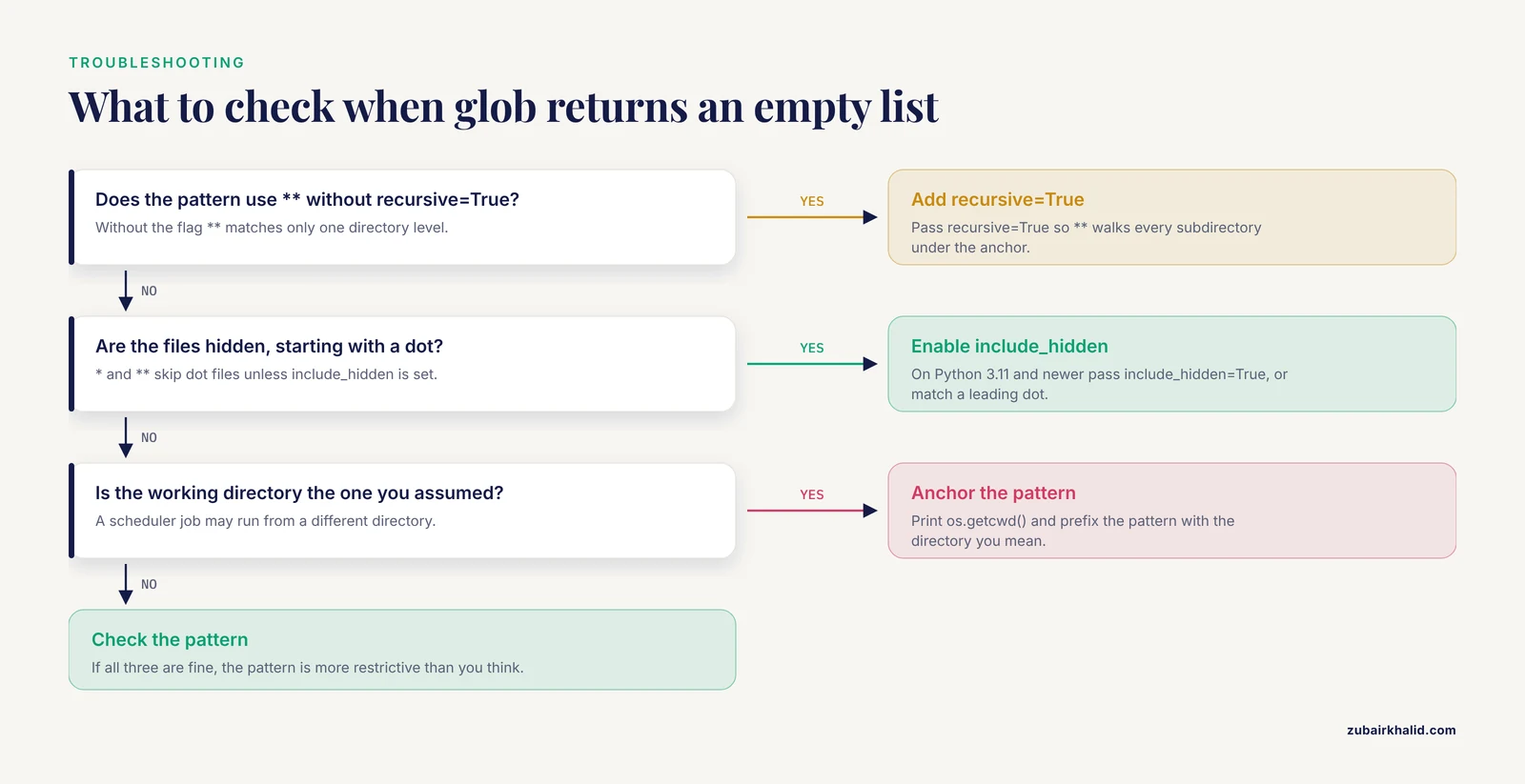
The usual causes are a pattern that is more restrictive than you think, ** used without recursive=True, hidden files excluded by the default of include_hidden=False, or a working directory different from the one you assumed. Print the absolute working directory with os.getcwd() and test the pattern interactively.
How do I match a filename that contains square brackets?
Call glob.escape("sample.fasta") first, which converts the brackets into escaped character classes, then pass the escaped string to glob.glob. This applies to any filename containing *, ?, or [.
What is the difference between glob, os.listdir, and pathlib?
os.listdir returns every entry in one directory with no filtering. glob.glob filters by a pattern and can search recursively. pathlib.Path("dir").glob("*.fastq.gz") does the same work as glob with object-oriented paths, and Path.rglob is the recursive form. All three belong in a Python bioinformatics toolkit.
Can glob search subdirectories recursively?
Yes, when you write in the pattern and pass recursive=True, as in glob.glob("projects//.vcf.gz", recursive=True). Without the flag, * matches only one directory level.
Is glob case sensitive?
On Linux, yes. On Windows, no, because the underlying path normalization is case insensitive. Scripts that must be portable should match with explicit character classes or normalize filenames before comparing.
Should I use glob.iglob or glob.glob for large directories?
Use iglob when you iterate over the paths once, because it yields results lazily without building a list in memory. Use glob when you need the count, repeated access, or sorting, since an iterator can provide none of those without a second scan.
When should I move from glob to a workflow manager like Snakemake?
Move when you need dependency tracking, automatic re-execution of only changed steps, or resume after failure across many samples. For small, single-script analyses, a sorted glob list with a manifest is sufficient. For anything with incremental rebuilds or cluster scheduling, a dedicated workflow system is the better tool.
Sources
- A python based automated computational framework to classify and comparative genomics analysis of the global diversity of chili leaf curl virus (ChiLCV) strains to understand virus host interactions.
- Using prototyping to choose a bioinformatics workflow management system.
- 'PePApipe': A complete bioinformatics analysis pipeline for African Swine Fever Virus genome.
- SNPio: a Python interface for population genomic data processing.
- PyGOLD: a python based API for docking based virtual screening workflow generation.
- pyKVFinder: an efficient and integrable Python package for biomolecular cavity detection and characterization in data science.
- PaDuA: A Python Library for High-Throughput (Phospho)proteomics Data Analysis.
- A modular platform for automated cryo-FIB workflows.