Running Python for Bioinformatics on Windows, Mac, and Linux
By Dr. Zubair Khalid, DVM, MS, PhD ·

The real difference between Windows, Mac, and Linux for Python bioinformatics is not what the language can do, since the same Python code runs on all three, but how you install Python, how you install compiled command-line tools, and how easily the machine talks to servers that do the heavy lifting. The rule of thumb is simple: start on the computer you already own, install Python through an environment manager such as Miniconda rather than as a bare system install, and move compute-heavy steps to a Linux server or cluster only when your datasets outgrow your laptop. Every major setup path described below works on all three operating systems, and published bioinformatics software has shipped installers for Windows, Mac, and Linux for well over a decade [1].
This guide walks through the setup for each operating system, compares your options side by side, gives a short Biopython tutorial you can run on any of the three, and covers the pros and cons that actually decide which platform fits your work.
Why Python Is a Sound Choice for Bioinformatics
Python is the most widely taught scripting language in the life sciences, and its ecosystem covers the daily work of the field: reading sequence files, running analyses, wrapping external tools, and producing figures. A few concrete examples show how broad the coverage is.
GenomeDiagram, a Python package for visualizing large-scale genomic and comparative genomic data, integrates directly with Biopython data types and generates publication-quality vector and raster graphics [2]. PyCorrFit, a graphical tool for fluorescence correlation spectroscopy data evaluation, distributes ready-made binaries for Ubuntu Linux, Mac OS X, and Microsoft Windows [3]. ImagePy, an open-source bioimage analysis package, has been tested on Windows, Mac, and Linux and deliberately separates its data model from its user interface so that analysis plugins stay portable [4]. Smoldyn, a particle-based biochemical simulator used in systems biology, added a Python application programming interface so users can drive simulations from Jupyter notebooks and other Python libraries, and it installs with pip on Mac, Windows, and Linux [5]. The Atomic Simulation Environment (ASE), a Python library for working with atomistic structures, follows the same pattern of a pure Python front end around compiled compute engines [6].
Two lessons come out of this track record. First, "python bioinformatics windows mac linux options" is not a question with three separate answers, because the core libraries are the same everywhere. Second, Python frequently acts as the glue layer around fast compiled code written in C or C++, a design that appears across scientific computing [7]. Your operating system choice affects the glue and the packaging far more than the science.
The Mental Model Before You Install Anything
Every setup problem in this space reduces to three concepts. Getting them straight prevents most of the errors described later in this article.
Interpreter. The interpreter is the program that executes your Python code. When someone says "Python 3.12", they mean a specific version of that program. Different projects often need different versions.
Environment. An environment is a private folder containing one interpreter plus the packages installed for a specific project. Environment isolation exists because bioinformatics tools pin old package versions, and two tools that both need the same package but different versions cannot coexist in one environment. Textbooks on Python setup treat environment management as the first practical skill to learn for exactly this reason [8], [9]. The pattern is not unique to biology. Guides for setting up Python in forensic computing, for example, describe the same sequence of installing an interpreter, configuring the system path, and creating isolated package environments [10].
Shell. The shell (Terminal on Mac, a terminal emulator on Linux, PowerShell or Command Prompt on Windows) is where you type commands such as python, version. Bioinformatics work is shell-heavy because most sequencing tools are command-line programs. Getting comfortable with a shell matters more than which shell you pick.
Installing Python on Windows
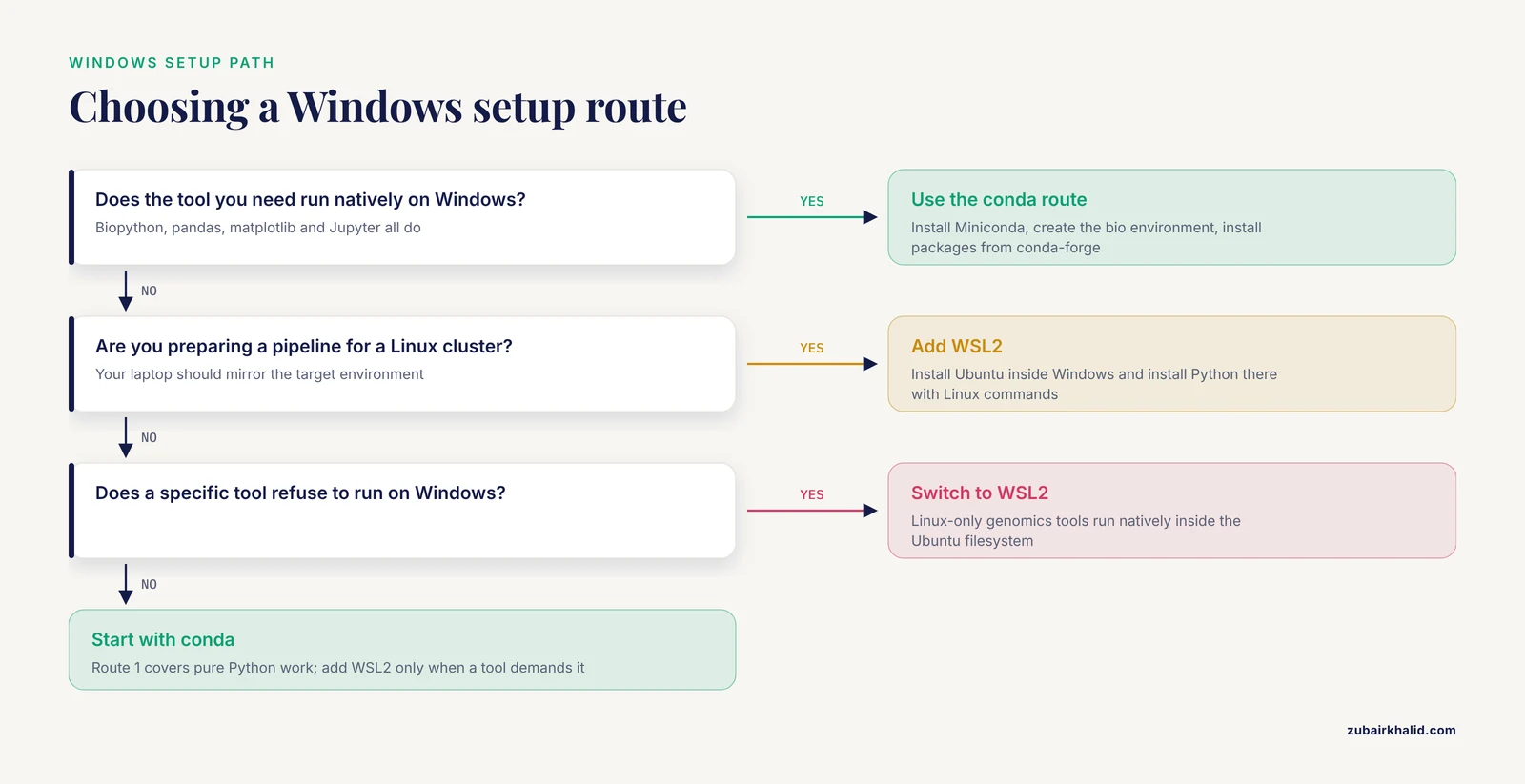
Windows is the most common starting point for students and clinicians, and it is fully workable. The historical friction was that much bioinformatics software assumed a Unix-like environment. Modern tooling has reduced that friction substantially, but it has not eliminated it, so Windows users should understand two routes.
Route 1: Conda-based setup (recommended for beginners)
Download the Miniconda installer from the official Anaconda site, run it, and accept the default options, including the option to add Miniconda to your PATH environment variable (the list of directories your shell searches for programs). Open "Anaconda Prompt" from the Start menu and verify the install:
conda --version
python --version
Create a dedicated environment for bioinformatics work:
conda create -n bio python=3.12
conda activate bio
conda install -c conda-forge biopython jupyter matplotlib pandas
This route works because conda distributes prebuilt binary packages for Windows, so you avoid compiling C extensions, which is the single most common failure point for beginners on Windows. Step-by-step instructions for configuring a Python development environment on Windows, including editor setup, follow the same structure of installer first, environment second, editor third [11].
Route 2: Windows Subsystem for Linux (WSL2)
WSL2 runs a real Linux distribution, typically Ubuntu, inside Windows. You install it from an administrator PowerShell prompt with wsl, install, then install Python inside Ubuntu using Linux commands. The advantage is that command-line tools built only for Linux, which describes a large fraction of genomics software, run natively. The disadvantage is a second filesystem and a second set of habits to learn. Most sequencing pipelines that eventually run on a Linux server are easiest to develop under WSL2, because your laptop then mirrors the target environment.
For pure Python work with Biopython, pandas, and notebooks, Route 1 is enough. Add WSL2 when a specific tool refuses to run on Windows or when you are preparing a pipeline for a Linux cluster.
Editor choice on Windows
Install Visual Studio Code or PyCharm. Both detect conda environments and let you run scripts and notebooks against the bio environment you created. Detailed Windows-focused walkthroughs of this editor-configuration step exist in the pedagogical literature.
Installing Python on macOS
Mac ships with a command-line environment close to Linux, which is why many bioinformatics developers prefer it. Three setup details matter.
First, never use the system Python that Apple includes. It belongs to the operating system, upgrading macOS can break it, and installing packages into it risks corrupting system tooling. This principle, that the interpreter used for your projects should be one you control and can replace freely, is standard advice across Python setup guides,.
Second, install either Miniconda (as above, using the macOS installer) or Homebrew. Homebrew is a package manager for Mac that installs command-line tools such as wget, samtools, and git, and it can install Python itself. The practical difference is that Homebrew manages system-level tools while conda manages per-project environments. Many Mac users run both: Homebrew for utilities, conda for Python environments.
Third, note the processor distinction. Recent Macs use Apple Silicon (ARM-based M-series chips), older Macs use Intel chips. Conda-forge publishes packages for both, but some specialist bioinformatics binaries still ship Intel-only builds, which run under Apple's Rosetta translation layer at some speed cost. When a tool offers builds for both architectures, match the one to your hardware.
The resulting workflow is nearly identical to Linux, which makes the Mac a comfortable bridge if you expect to work on university clusters later.
Installing Python on Linux
Linux is the default platform of production bioinformatics. Most published pipelines, most cluster schedulers, and most container images assume a Linux base. If you administer your own machine, a common choice is Ubuntu or a similar distribution because its package repositories are large and its documentation is abundant.
A clean native setup looks like this:
sudo apt update
sudo apt install -y python3 python3-venv python3-pip
python3 -m venv ~/envs/bio
source ~/envs/bio/bin/activate
pip install biopython
In practice, most bioinformaticians on Linux install Miniconda anyway, because conda solves the same dependency problems in the same way on every operating system and because many bioinformatics tools are distributed as conda packages rather than distribution packages. Running Miniconda identically on your laptop and your server removes a whole class of "works on my machine" failures.
Linux also supports features the other platforms handle differently: long-running jobs under screen or tmux that survive disconnection, cron-based scheduling, and direct SSH access to compute servers. The cluster connection matters. Setting up, configuring, and operating high-performance computing (HPC) infrastructure, which means clusters of networked computers sharing memory, processors, and storage, is the standard answer when datasets outgrow what an ordinary desktop can hold or compute. Your Linux laptop is the training ground for that environment.
One further Linux advantage shows up in service deployment. WeBIAS, a system for publishing command-line bioinformatics applications through web forms, is written in pure Python and was developed and tested on GNU/Linux platforms, with the authors noting that pure Python should make it easy to deploy on other platforms such as Windows and Mac OS X as well [12]. The general point holds for your own scripts: code written in pure Python moves freely, code that shells out to Linux-only binaries does not.
Side-by-Side Comparison
| Criterion | Windows | macOS | Linux |
|---|---|---|---|
| Easiest Python install | Miniconda ( graphical installer) | Miniconda or Homebrew | Miniconda or system package manager |
| Package availability via conda | Excellent | Excellent | Excellent |
| Command-line bioinformatics tools | Partial, improved by WSL2 | Good, via Homebrew and conda | Best, most tools target Linux first |
| Path to HPC and cluster work | Indirect (SSH client, WSL2 helps) | Good (Unix-native shell) | Direct (same OS family as clusters) |
| Running published GUI bioinformatics software | Yes, installers widely available [3] | Yes, installers widely available [3] | Yes, especially on Ubuntu [3] |
| Graphical bioimage analysis tools | Supported [4] | Supported [4] | Supported [4] |
| Main pitfall | Tools that assume a Unix shell | Apple Silicon binary availability, system Python confusion | Desktop ergonomics and commercial software |
| Best fit | Students, clinicians, teaching | Developers bridging laptop and server | Pipelines, servers, clusters, core facilities |
Reading the table as a whole: the differences are concentrated in the command-line tool ecosystem and the cluster pathway, not in Python itself. That is why the honest answer to "best python bioinformatics windows mac linux" is that the best choice is the one matched to your next twelve months of work, which the scenarios below make concrete.
Environment Managers: The Options and Their Pros and Cons
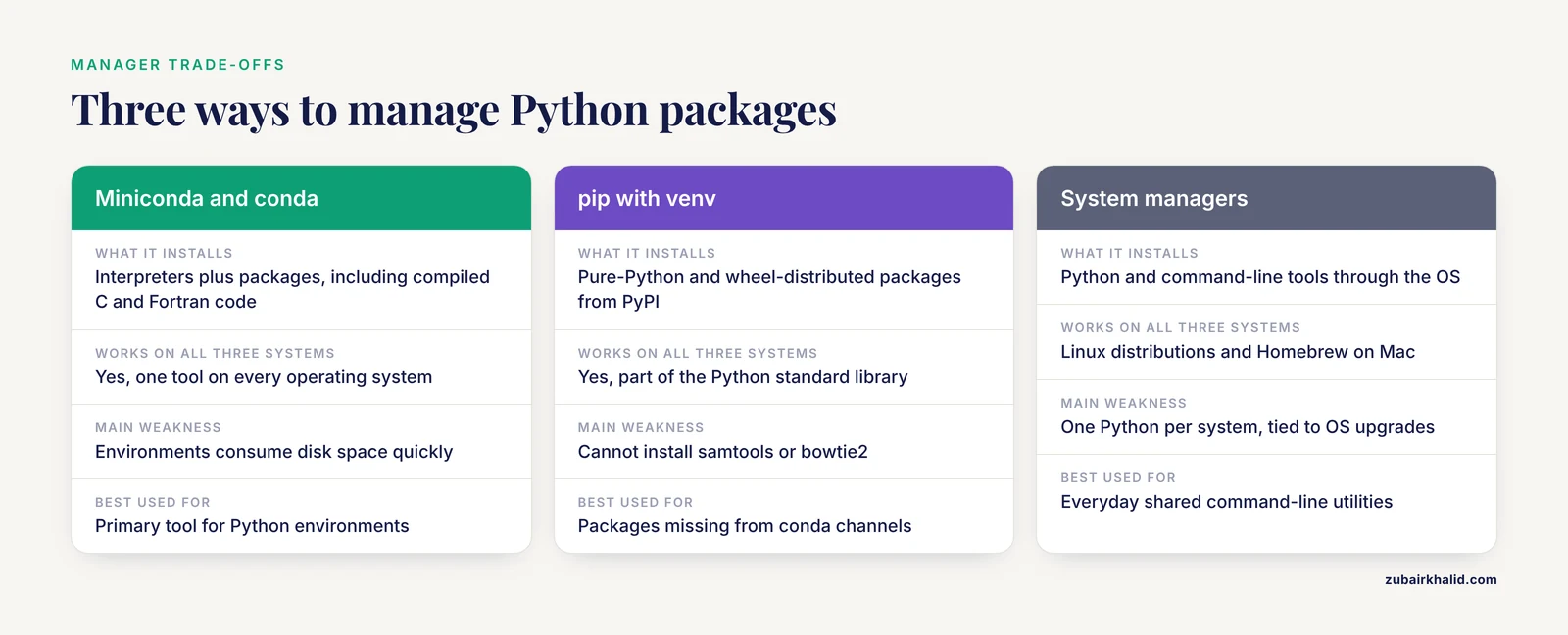
Whatever your operating system, you face the same choice of how to manage packages. This is where the "python bioinformatics windows mac linux pros and cons" question really lives, because the environment manager matters more than the OS.
Miniconda and conda
Miniconda is a minimal installer for the conda package and environment manager. Conda installs Python itself plus packages, including packages with compiled C and Fortran code, from curated channels such as conda-forge. Many domain-specific bioinformatics tools are published as conda packages, which means a single conda install command replaces an afternoon of compiling.
Pros:
- One tool manages interpreters and packages on all three operating systems.
- Compiled dependencies come prebuilt, which removes build errors on Windows especially.
- Environments are named and switchable, so a metagenomics project and a proteomics project can coexist on one laptop.
Cons:
- Environments consume disk space quickly, tens of gigabytes across a few projects is normal.
- Channel priority and mixed pip-plus-conda environments can produce solver conflicts.
- The classic conda solver is slow on large environments, which is why the community increasingly uses the faster
mambadrop-in replacement.
pip with venv
venv creates a lightweight environment around an interpreter you already have, and pip installs pure-Python and wheel-distributed packages from the Python Package Index (PyPI). Biopython installs cleanly this way on all three platforms, as does Smoldyn, whose authors distribute it through the Python package manager pip on Mac, Windows, and Linux [5].
Pros:
- Simple, fast, part of the Python standard library.
- Matches how most general Python documentation and teaching material works.
Cons:
- pip installs only Python packages, so tools like
samtoolsorbowtie2need separate installation. - Packages with complex compiled dependencies can fail to build, particularly on Windows.
System package managers
Linux distributions and Homebrew on Mac install Python and tools through the OS package manager. This is convenient for shared command-line utilities but poor for project work, because you get one Python per system and version upgrades are tied to the OS.
A reasonable default for a new bioinformatician on any platform: Miniconda for Python environments, the system package manager for a few everyday utilities, and pip inside a conda environment only when a package is missing from conda channels.
A Short Biopython Tutorial That Works on All Three Platforms
This section doubles as the answer to "biopython tutorial" searches, and every command below is identical on Windows, Mac, and Linux once you have an activated environment.
Activate your environment and confirm Biopython is present:
conda activate bio
python -c "import Bio; print(Bio.__version__)"
The classic first exercise is retrieving a sequence record from the NCBI Entrez service and parsing it. NCBI (the National Center for Biotechnology Information) maintains GenBank, the public nucleotide sequence archive. The following script downloads a record, summarizes its features, and writes the sequence to a FASTA file (a plain-text format holding a sequence name and the sequence itself):
from Bio import Entrez, SeqIO

Entrez.email = "[email protected]"  # NCBI asks for a contact address

handle = Entrez.efetch(db="nucleotide", id="NC_000913", rettype="gb", retmode="text")
record = SeqIO.read(handle, "genbank")
handle.close()

print(record.id, len(record.seq), "bases")
print(len(record.features), "features")

with open("ecoli.fna", "w") as out:
    SeqIO.write(record, out, "fasta")
Notes on what this does. Entrez.efetch queries NCBI over the network, and the db, rettype, and retmode parameters select the nucleotide database and GenBank flat-file format. SeqIO.read parses the record into a Python object whose .seq attribute holds the sequence and whose .features list holds annotated genes and other elements. SeqIO.write converts the record to FASTA. The same parser reads local files, which is how you will handle your own sequencing data:
for record in SeqIO.parse("my_reads.fasta", "fasta"):
    print(record.id, len(record.seq))
For visualization, Biopython data types feed directly into GenomeDiagram, which produces publication-quality figures of genes and features arranged along a chromosome [2]. For simulation-based work, the same pattern applies: Smoldyn's Python interface offers low-level functions mirroring its C API and higher-level object-oriented functions designed for convenient use from notebooks [5].
Run everything inside your environment, keep one environment per project, and this tutorial transfers unchanged between your Windows laptop, your Mac, and a Linux server.
Notebooks, Pipelines, and Reproducibility
Jupyter notebooks, which mix executable code, output, and narrative text in one document, are the dominant teaching and exploratory format in computational biology. TeachOpenCADD, a platform teaching cheminformatics and structural bioinformatics through Python, delivers its content as Jupyter notebooks built only on open-source resources, applies automated testing and continuous integration, and deposits all code on GitHub, explicitly to promote reproducible and reusable research [13]. Their design choices are a model for your own projects: version control your notebooks, pin your package versions, and test what you can.
Reproducibility has a second dimension beyond code. When a workflow runs, the computational settings under which each program executed, including software versions and parameters, are part of the scientific record, and workflow systems increasingly persist this provenance data so that an in silico experiment can be re-executed faithfully [14]. Practically, this means three habits:
- Export your environment (
conda env export > environment.yml) and commit it to your project repository. - Record tool versions and command-line flags in a run log, not in memory.
- Store raw inputs read-only and write all outputs to a new directory per run.
These habits cost minutes and save the months you would otherwise lose trying to reconstruct why last year's figure looked the way it did.
Connecting to Servers and Clusters
Sooner or later, laptop-scale compute ends. Genome-scale datasets demand storage and processing beyond what ordinary desktop computers support, and cluster computing systems that deploy many processors and large shared or distributed memory make such analyses tractable. Deploying that infrastructure is its own discipline, and resource-constrained institutions face real challenges in configuring and operating it, but as a user your responsibilities are narrower and learnable on any of the three operating systems.
What you need locally is an SSH client (built into Mac and Linux, available on Windows through PowerShell or WSL2), a terminal multiplexer such as tmux so long jobs survive dropped connections, and ideally a development environment that mirrors the cluster so that scripts you test locally behave the same remotely. This last point is the strongest argument for WSL2 on Windows or for a Linux virtual machine: pipelines built for microbiome meta-omics analyses are typically developed and validated as complete environments, and a local environment matching the target server removes translation errors [15].
Domain-level environment setup for meta-omics work, including quality control, assembly, and taxonomic profiling tools, is well documented and largely conda-installable today [15]. Check whether a tool you need publishes a conda package before reaching for manual builds.
Worked Scenarios
A nursing student on a Windows laptop taking a first bioinformatics course. Install Miniconda, create one bio environment, install Biopython, pandas, matplotlib, and Jupyter, and work entirely inside that environment with Visual Studio Code. No WSL2 yet. The full toolchain is cross-platform by design, exactly like the educational Python tools built to run on whatever hardware students already own, including smartphones in outreach settings [16]. Add WSL2 the first time a course assigns a Linux-only command-line tool.
A microbiology postdoc on a MacBook Pro analyzing amplicon sequencing data. Homebrew for utilities, Miniconda for the analysis environment, and a tmux session on the departmental Linux server for the actual runs. Develop and test filtering steps locally on a small subsample, then submit the full run. The local conda environment mirrors the server environment, so code moves without surprises, [15].
A core facility managing sequencing pipelines for many users. Linux throughout, conda or container-based environments per pipeline, a version-controlled repository per workflow, and provenance capture so each run's settings are persisted [14]. Where services must be exposed to non-command-line users, web frontends over command-line tools are an established pattern, and systems written in pure Python demonstrate how the web layer stays portable even when the backend is Linux-specific [12].
Common Mistakes and Limitations
These are the errors seen most often in teaching and lab settings, with the fix for each.
- Installing packages into the base or system interpreter. Every project gets its own environment. If
pip installsucceeds butimportfails, or the package later vanishes, you are almost certainly in the wrong environment.which python(Mac and Linux) orwhere python(Windows) tells you which interpreter is active. - Mixing conda and pip carelessly. Installing pip packages into a conda environment works, but doing it before all conda installs can break dependency resolution. Install everything conda offers first, then pip for the remainder.
- Forgetting that command-line tools are not Python packages.
pip install samtoolsdoes nothing useful. Tools outside the Python ecosystem come from conda, Homebrew, your Linux package manager, or manual builds. When in doubt, search conda-forge and bioconda channels first. - Not pinning versions. A pipeline that runs today against whatever versions were current will break silently after an upgrade. Export your environment file at every milestone.
- Assuming laptop performance predicts server performance. A dataset that chokes a laptop is routine on a cluster, and time spent optimizing a script before testing it at scale is often wasted. Estimate data volume early, and move to a server as soon as storage or runtime becomes the bottleneck rather than an afterthought.
- Treating the operating system choice as a science decision. It is a logistics decision. Published bioinformatics tools ship and are tested across Windows, Mac, and Linux as a matter of course [1], [3], [4], so your platform should follow your collaborators, your course, and your compute target.
- Expecting one setup to last forever. Interpreters, packages, and operating systems all move. Budget an hour per semester to rebuild environments from your exported environment files, which is precisely why you keep those files.
A final limitation belongs to scope rather than technique. This article covers environment setup and tooling, not analysis design, and a specific analysis question about your own data needs domain expertise applied to that dataset, whether your own training or a collaborator's.
Frequently Asked Questions
Do I need Linux to do serious bioinformatics in Python?
No. The Python layer, including Biopython and the scientific stack, runs identically on Windows, Mac, and Linux, and much published software in the field ships installers or tested builds for all three [1], [3], [4]. You will eventually want Linux familiarity because clusters and many command-line tools are Linux-based, and WSL2 gives you that on a Windows machine without giving up your desktop.
Should I use pip or conda?
Use conda (or its faster variant mamba) as your primary tool, because it manages the Python interpreter itself, prebuilt compiled dependencies, and non-Python command-line tools that bioinformatics depends on. Use pip inside a conda environment only for packages conda does not provide [5].
Can I follow a Biopython tutorial on Windows without WSL?
Yes. Biopython installs through conda or pip on Windows, and the code in the tutorial above runs without modification in an Anaconda Prompt window. Switch to WSL2 only when a tool outside Python itself requires Linux.
How much computer do I need to start learning?
Far less than most beginners assume. Introductory bioinformatics programming, including sequence parsing and simple analyses, runs comfortably on ordinary laptops, which is why teaching projects have succeeded even on smartphones [16]. Scale up to servers only when datasets or runtimes demand it.
How do I make my analysis reproducible?
Pin your package versions in an exported environment file, version-control your scripts and notebooks with automated testing where practical [13], and record the software versions and parameters of every run as provenance [14]. These three records together allow someone else to re-create your result.
What is the single best first step today?
Install Miniconda on whatever computer you have, create one environment named bio, install Biopython and Jupyter into it, and run the retrieval-and-parsing script above. That one hour gives you a working, isolated, cross-platform bioinformatics setup you can grow into,.
Sources
- Proteomics to go: Proteomatic enables the user-friendly creation of versatile MS/MS data evaluation workflows.
- GenomeDiagram: a python package for the visualization of large-scale genomic data.
- PyCorrFit-generic data evaluation for fluorescence correlation spectroscopy.
- ImagePy: an open-source, Python-based and platform-independent software package for bioimage analysis.
- Python interfaces for the Smoldyn simulator.
- The atomic simulation environment-a Python library for working with atoms.
- PCSIM: A Parallel Simulation Environment for Neural Circuits Fully Integrated with Python.
- Setting Up Your Python Environment, Easily
- Setting Up the Python Environment
- Setting up a Python Forensics Environment
- Setting Up an Integrated Development Environment for Python (Windows)
- WeBIAS: a web server for publishing bioinformatics applications.
- TeachOpenCADD 2022: open source and FAIR Python pipelines to assist in structural bioinformatics and cheminformatics research
- Data provenance management for bioinformatics workflows using NoSQL database systems in a cloud computing environment
- Setting up the bioinformatics environment for employing meta-omics techniques in microbiome research and pathogen diagnostics
- Bioinformatics calls the school: Use of smartphones to introduce Python for bioinformatics in high schools