Python Scripting for Bioinformatics on a Cluster
By Dr. Zubair Khalid, DVM, MS, PhD ·

A Python script on a cluster does one job at a time, while a workflow system schedules, tracks, and re-runs every job in a whole analysis, and that single difference decides how you should write your code. The rule of thumb is simple. If your analysis fits in one script that a single person can run and rerun by hand, write a plain Python script and submit it with the scheduler. If your analysis chains more than a handful of tools, processes dozens or thousands of samples, or has to be reproduced later by someone else, put your Python inside a workflow system instead of trying to make one script do everything.
This article walks through every practical option for python scripting for bioinformatics on a cluster, explains the pros and cons of each, gives worked examples with real commands, and ends with the mistakes that cost people the most compute time.
Why Python Dominates Cluster-Based Bioinformatics
Python for bioinformatics succeeds for three reasons that show up repeatedly in the published literature.
First, Python is the glue language. Most sequencing tools (BWA, SAMtools, SPAdes, fastp) are compiled command-line programs, and Python is what researchers use to call them, parse their output, and move files between steps. The UGbS-Flex pipeline for SNP discovery in polyploid crops, for example, combines publicly available software with in-house Python and Perl scripts to call SNPs from genotyping-by-sequencing reads, and its notable features come directly from what those scripts coordinate [1]. The PePApipe workflow for African Swine Fever Virus genomes is programmed in Python and integrates thirteen software tools into one automated workflow covering quality control, de novo assembly, and variant calling, and it can be executed locally through bash scripts or with a SLURM protocol for batch processing of multiple samples [2].
Second, Python has mature domain packages. Biopython handles sequence I/O and parsing. PyCellBase gives programmatic access to integrated biological data through a RESTful web service API without installing a local database [3]. pyKVFinder detects and characterizes biomolecular cavities and stores results in NumPy arrays so results flow straight into SciPy, matplotlib, and machine learning libraries [4]. SNPio consolidates VCF parsing, filtering, visualization, and population genomic summary statistics in a single Python-native framework [5]. PaDuA provides a Python library for high-throughput proteomics analysis built around scripted workflows in Jupyter Notebooks [6].
Third, Python scales its ambition. The same language that reads a FASTA file in a laptop script also drives GPU-backed variational inference. CONGAS, a Bayesian method for clustering single-cell RNA sequencing data by copy number alterations, is implemented as a Python package and scales fast on clusters because of a GPU backend and variational inference [7]. A separate automated Python workflow downloaded, curated, and processed over 400 complete Chili leaf curl virus genomes from public databases for a global diversity analysis [8].
None of this means Python is always the right architectural choice. A major review of pipeline development concluded that scripting languages such as Python and R are sufficient for small-scale pipelines intended for a single user, but are not enough to support large-scale, shareable, maintainable, and reusable pipelines handling large volumes of data on high-performance computing clusters [9]. That tension, plain scripting versus engineered pipelines, is the real subject of this article.
The Core Decision: Script or Workflow System
Before comparing specific options, understand what a workflow management system actually buys you. Workflow systems represent, manage, and execute multistep computational analyses. They provide a common language for describing an analysis, which improves reproducibility and lets teams build reusable component libraries. They support incremental builds and re-entrancy, meaning the ability to selectively re-execute parts of a workflow when inputs or configuration change and to resume from where a run previously stopped. They support containers, high-performance computing systems, and clouds. Most importantly, they delegate the mechanics of how jobs run to the system itself, freeing you to focus on what the workflow should do [10].
A research group at Edinburgh learned this through prototyping. The RiboViz package, which extracts biological insight from ribosome profiling data, originally had its core analysis implemented in a single Python script. Following best practices for scientific computing, which recommend build tools to automate workflows and reuse of code instead of rewriting, the team reimplemented that workflow inside a workflow management system and used prototyping to choose which system [10]. The lesson generalizes. Start with scripts when the problem is small, and treat migration to a workflow system as a planned step rather than an admission of failure.
The review literature frames the same trade-off in terms of requirements. Small pipelines for one user can live in notebooks and scripts. Large pipelines need modularity, reproducibility, provenance, portability to HPC, and reuse, and scientific workflow systems are the tools designed to deliver those properties [9].
Side-by-Side Comparison of Python Bioinformatics Cluster Scripting Options
| Option | Best for | Cluster fit | Reproducibility | Main drawback |
|---|---|---|---|---|
| Plain Python scripts plus SLURM | One-off analyses, file manipulation, parsing tool output | Good for array jobs and batch submission | Low unless you add version control and environments yourself | No dependency tracking between steps, manual reruns |
| Biopython and core scientific stack | Sequence parsing, format conversion, custom statistics | Excellent, installs anywhere via Conda | Medium, depends on your environment discipline | Not a substitute for specialized high-performance tools |
| Python as glue around command-line tools | Pipelines that combine best-in-class compiled tools | Excellent, this is the dominant published pattern | Medium, improves when wrapped in a workflow system | Output parsing breaks when tool versions change |
| Domain Python packages (PyCellBase, SNPio, pyKVFinder, PaDuA, PyGOLD) | Specific data types and analyses with tested APIs | Good, most are pip or Conda installable | High within the package, low across your own glue code | Package coverage is partial, you still need glue |
| Jupyter notebooks | Exploratory analysis, teaching, reports with figures | Awkward for batch production runs | Low for execution, high for narrative documentation | Notebooks hide hidden state and resist scheduling |
| Workflow systems (Snakemake, Nextflow, and similar) with Python inside | Multistep pipelines across many samples on HPC | Excellent, built for schedulers and re-entrancy | High, the main reason to adopt them | Learning curve, more upfront design work |
| Containers (Docker, Apptainer) plus Conda | Reproducible environments across systems | Excellent on systems that allow them | Very high when combined with workflows | Some HPC sites restrict Docker, root privileges |
| Cloud platforms with script editors | Labs without local clusters, teams needing shared web interfaces | Good, offloads compute entirely | Medium to high depending on platform | Cost management and data transfer to the cloud |
Option 1: Plain Python Scripts With a Scheduler
Every cluster runs a batch scheduler, and on most HPC systems that scheduler is SLURM. Python scripting for bioinformatics on a cluster at its simplest means writing a script and asking the scheduler to run it on a compute node instead of a login node.
A minimal submission script looks like this.
#!/bin/bash
#SBATCH --job-name=demo
#SBATCH --cpus-per-task=4
#SBATCH --mem=16G
#SBATCH --time=02:00:00
#SBATCH --partition=general

module load python/3.11
python analyze_samples.py --input raw/ --output results/
You submit it with sbatch demo.sh, monitor it with squeue -u yourusername, and cancel it with scancel jobid. The scheduler decides which node runs the job and enforces the CPU, memory, and time limits you declared.
The step up in sophistication is the array job, which runs the same script once per sample. This pattern appears in published pipelines. PePApipe, the ASFV genome analysis workflow, supports execution through a SLURM protocol for batch processing of multiple samples [2]. An array version looks like this.
#!/bin/bash
#SBATCH --job-name=assemble
#SBATCH --array=1-96
#SBATCH --cpus-per-task=8
#SBATCH --mem=32G
#SBATCH --time=08:00:00

module load python/3.11
sample=$(sed -n "${SLURM_ARRAY_TASK_ID}p" samples.txt)
python run_pipeline.py --sample "$sample"
Here samples.txt holds one sample name per line, and SLURM substitutes the array task ID into the line selection so 96 independent jobs launch with one submission. Each job runs on its own node allocation, which parallelizes your analysis without any multiprocessing code in Python.
Pros. Minimal learning curve beyond the scheduler itself. Full control. Easy to debug because each script is standalone. Matches how most published custom pipelines actually work, including pipelines assembled from Python scripts for tasks like genome download, curation, and processing at scale [8].
Cons. The script knows nothing about dependencies between steps. If step three fails at sample 47, you rerun things by hand and hope you remember what completed. Reproducibility depends entirely on your discipline with version control and environment files. This is exactly the gap the workflow systems literature identifies, where scripts are sufficient for single-user small-scale work but fall short for large, shared, maintainable pipelines on HPC [9].
Option 2: Biopython and the Core Scientific Stack
A Biopython tutorial belongs in every bioinformatician's notes because the library solves the boring problems well. Biopython parses biological formats, handles sequences, wraps NCBI and other online resources, and integrates with NumPy and pandas.
The canonical sequence-reading snippet is worth memorizing.
from Bio import SeqIO

for record in SeqIO.parse("contigs.fasta", "fasta"):
    print(record.id, len(record.seq))
Three lines replace a hand-written FASTA parser that will inevitably mishandle wrapped lines or blank identifiers. The same SeqIO interface reads GenBank, FASTQ, EMBL, and dozens of other formats, which makes Biopython the default choice for format conversion and quick quality checks inside cluster jobs.
Biopython pairs naturally with pandas for tabular results and matplotlib for figures. pyKVFinder demonstrates the pattern in a structural biology context. Its cavity detection results are stored in NumPy arrays, and the authors show integration with matplotlib, NGL Viewer, SciPy, and Jupyter notebooks inside automated workflows [4]. The design principle transfers to any domain package. When a package exposes results through standard Python data structures, it composes with the rest of your script instead of forcing its own workflow on you.
Pros. Saves enormous time on parsing and I/O. Well-documented, stable, installable through Conda without administrator rights. An excellent teaching foundation for python for bioinformatics generally.
Cons. Biopython is not a high-performance alignment engine or an assembler. It will not outperform BWA or SAMtools at their own jobs. Teams sometimes write slow pure-Python re-implementations of tasks that mature compiled tools already do better, which wastes cluster hours. Use Biopython for what it is good at, parsing and light manipulation, and hand the heavy compute to specialized tools.
Option 3: Python as Glue Around Command-Line Tools
The dominant pattern in published cluster pipelines is not Python replacing specialized tools. It is Python orchestrating them. This is arguably the best python bioinformatics cluster scripting option for production work, because it combines best-in-class compiled software with readable coordination logic.
UGbS-Flex, the imputation-free SNP discovery pipeline for polyploid finger millet, works this way. It combines publicly available software with in-house Python and Perl scripts, and it handles paired-end reads, clusters reads across samples, and maximizes SNP calling regardless of ploidy level or the availability of a reference genome [1]. CAGEcleaner, a pipeline for reducing genomic redundancy in biosynthetic gene cluster mining, is described as a Python-based pipeline with auxiliary bash scripts that integrates with established mining tools such as cblaster and CAGECAT [11]. PyGOLD takes the same approach in structure-based drug discovery. Because docking could not be automated through the GOLD graphical interface in the middle of a virtual screening workflow, the authors developed a Python module that parses, edits, and writes the GOLD configuration file so docking slots into an automated Python-driven pipeline. PyGOLD imports as a standard Python module with no further dependencies [12].
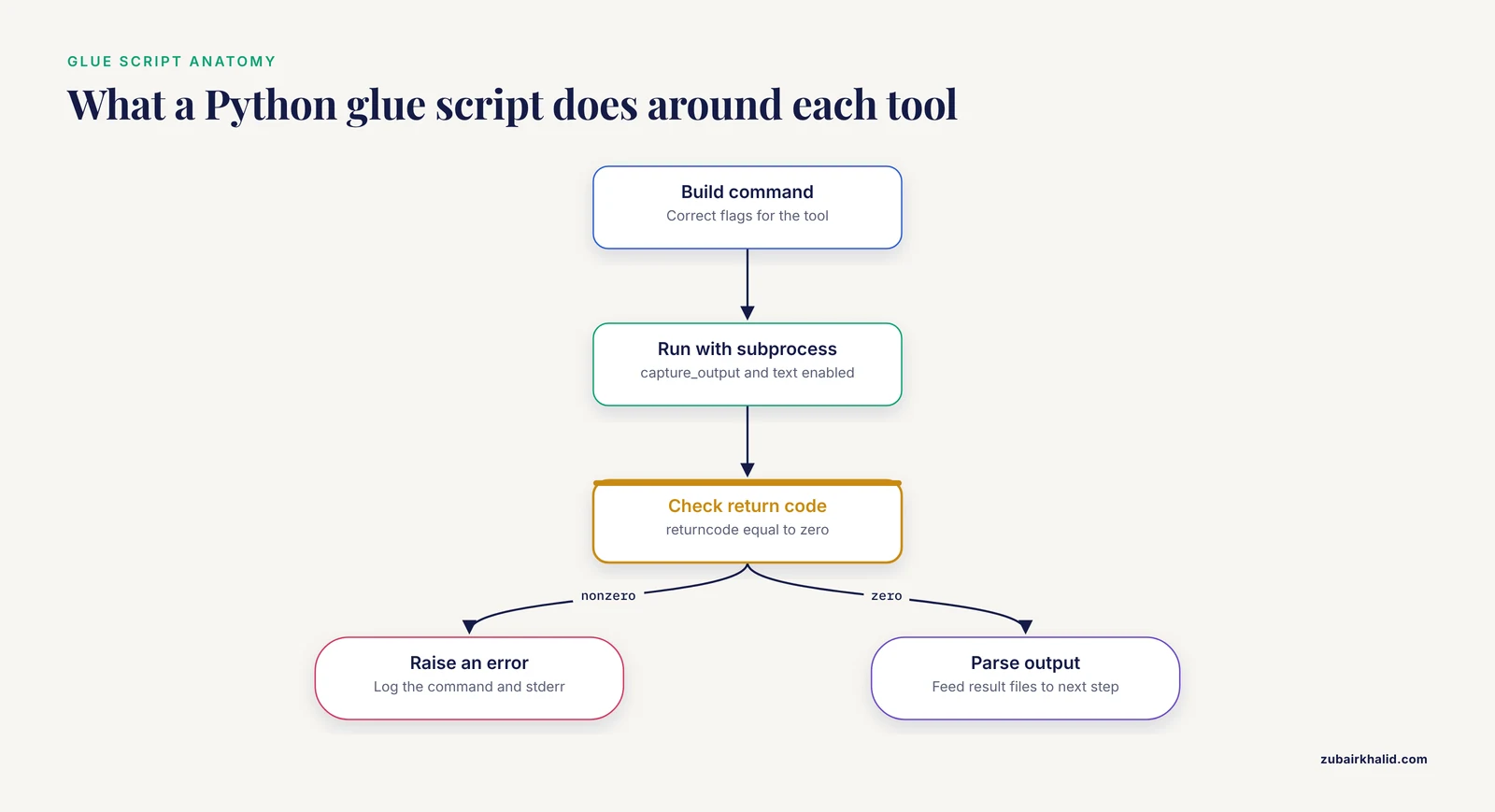
A glue script typically does four things. It builds the command with the correct flags, runs it with subprocess, checks the return code and log output, and parses the result files into the next step.
import subprocess
from pathlib import Path

for fastq in Path("raw").glob("*.fastq.gz"):
    out = Path("trimmed") / fastq.name
    cmd = ["fastp", "-i", str(fastq), "-o", str(out),
           "--thread", "8", "--detect_adapter_for_pe"]
    result = subprocess.run(cmd, capture_output=True, text=True)
    if result.returncode != 0:
        raise RuntimeError(f"fastp failed on {fastq}: {result.stderr}")
The explicit failure check matters more than it looks. On a cluster, a tool that silently writes an empty output file creates a pipeline that appears to finish and produces garbage. Fail loudly, log the command, and record the tool version alongside the output.
Pros. You get the speed and correctness of specialized tools plus the flexibility of Python. This pattern is portable to any cluster that installs the underlying tools. It matches how the published pipeline literature actually builds systems.
Cons. Output formats shift between tool versions, so parsing code is the most fragile part of any pipeline. Pin tool versions in your environment. Pin them again in your documentation. A pipeline that works with SAMtools 1.15 can break quietly against a later release.
Option 4: Domain Python Packages as Building Blocks
Beyond Biopython, a growing set of Python packages solves specific bioinformatics problems with tested APIs, and using them instead of hand-rolled code is usually the higher-quality choice.
PyCellBase provides fast, user-friendly programmatic access to the CellBase RESTful API, which integrates biological information from heterogeneous sources into a centralized NoSQL database served from a high-availability cluster with tuned real-time queries. It includes command-line tools for common tasks such as variant annotation and needs no local database installation [3]. If your cluster job needs gene or variant annotation, querying an maintained API beats maintaining a local copy of a dozen annotation databases.
SNPio addresses a different pain point in population genomics. Workflows there often depend on fragmented command-line utilities and custom conversion scripts that complicate reproducibility and obscure provenance. SNPio consolidates VCF parsing, filtering, visualization, genotype encoding, and summary statistics in one framework, and benchmarks showed faster execution than the R-based comparators vcfR and SNPfiltR at the cost of higher memory use because it retains genotype arrays and provenance attributes in memory [5]. That memory-versus-speed trade-off is a cluster planning question. If your VCF has tens of millions of sites, check the node memory limit before choosing an in-memory framework.
PyGOLD [12], pyKVFinder [4], and PaDuA [6] round out the pattern across docking, structural biology, and proteomics. A charge-cluster analysis of land plant mitochondrial proteomes also relied on a purpose-written Python script for data curation across 44,316 protein sequences from 52 species [13], which shows that even bespoke analyses follow the same pattern of scripts wrapped around data resources.
Pros. Tested code, documented APIs, and results in standard Python structures. Citable implementations.
Cons. Coverage is partial. No single package ecosystem covers every analysis, so you will combine several packages and still write glue. Check the installation channel. CAGEcleaner, for instance, is installable from Bioconda, from PyPI, and as a Docker image [11], which is the distribution pattern to look for in any package you plan to use on a cluster.
Option 5: Jupyter Notebooks on a Cluster
Notebooks occupy a specific niche. PaDuA was explicitly designed so its collection of tools builds scripted workflows within Jupyter Notebooks, facilitating analysis by both end-users and developers [6]. pyKVFinder's demonstration integration also runs through Jupyter [4]. For exploration, teaching, and communicating results with embedded figures, notebooks are excellent.
Running a notebook on a cluster usually means one of two setups. You either request an interactive node with salloc and start a notebook server there, or your institution provides a web gateway such as JupyterHub that spawns notebook sessions inside scheduler jobs. Interactive work on a login node is usually against policy and wastes shared resources.
The limitation is execution model. Notebooks assume a single persistent kernel with hidden state, which fights the batch mindset of a scheduler. A notebook that produced your figures last month may fail today because cells ran out of order. The professional pattern is to prototype in a notebook, then refactor the final logic into a script or workflow step that runs top to bottom without human intervention. Treat the notebook as a lab notebook, not as the production pipeline.
Option 6: Workflow Systems With Python Inside
When the pipeline outgrows scripts, the two leading open-source options for python bioinformatics cluster scripting are Snakemake and Nextflow. Both let you keep writing Python while the system handles scheduling, dependencies, reruns, and reporting.
Snakemake workflows are Python-flavored. A rule describes one step.
rule trim:
    input:
        "raw/{sample}.fastq.gz"
    output:
        "trimmed/{sample}_trimmed.fastq.gz"
    shell:
        "fastp -i {input} -o {output} --thread {threads} "
        "--detect_adapter_for_pe > logs/{wildcards.sample}.fastp.log 2>&1"
Running snakemake, cores 32 builds the dependency graph from your rules, runs only what is out of date, and can resubmit jobs to SLURM through a profile. Re-entrancy comes for free. Add a sample to raw/, rerun the same command, and Snakemake processes only the new sample. This is the incremental build and resume behavior that motivates the workflow systems literature [9][10].
Nextflow takes a similar role with a different syntax and strong support for containers per process. Both systems handle fan-out across samples, which replaces the array-job pattern from Option 1 with something the workflow engine tracks for you.
The published record supports the migration. RiboViz moved from a single Python script into a workflow management system after prototyping several candidates, specifically to gain incremental builds, re-entrancy, and portability [10]. Reviews mapping the requirements of large-scale bioinformatics pipelines identify scientific workflow systems as the solution class that delivers modular, reproducible, and reusable pipelines [9]. Even domain pipelines that ship their own SLURM support, like PePApipe [2], effectively reinvent small parts of what workflow systems already provide, which is a reasonable choice for a self-contained tool but a warning sign when you are building your own multi-year project.
Pros. Automatic dependency handling, selective reruns, built-in scheduler integration, container support, and a common language your collaborators can read [9][10].
Cons. Real learning curve. Converting a working script collection takes time, and the Edinburgh group found that prototyping in candidate systems was the practical way to choose between them [10]. For genuinely small analyses, the overhead exceeds the benefit, which is why the rule of thumb at the top of this article exists.
Option 7: Containers and Environment Management
Reproducibility on a cluster has two layers. The code layer is handled by version control and workflows. The environment layer is handled by Conda and containers.
Conda, and the Bioconda channel in particular, is the workhorse. Without administrator rights you can create a project environment.
conda create -n asfv -c conda-forge -c bioconda \
    python=3.11 biopython snakemake fastp
conda activate asfv
Export the environment with conda env export > environment.yml and commit it to your repository. Anyone can recreate your exact software stack. Packages distributed through both Bioconda and PyPI, like CAGEcleaner [11], install cleanly this way.
Containers go further by packaging the operating system libraries too. Docker images are common in software distribution, but many HPC centers do not allow the Docker daemon for security reasons, so the cluster-native equivalent is Apptainer (formerly Singularity), which runs containers without root privileges. Workflow systems integrate containers per step, which pairs naturally with the portability goal of the workflow systems literature [9][10].
Pros. Ends the works-on-my-node problem. Makes your analysis portable between your cluster, a collaborator's cluster, and the cloud.
Cons. Containers add build and storage overhead. Conda environments can conflict under aggressive mixing of channels, so keep one project per environment and prefer Bioconda and conda-forge together.
Option 8: Cloud Platforms With Scripting Interfaces
Not every lab has a cluster. Cloud platforms address the same computational barriers, since genomic data growth keeps raising the cost and complexity of required CPU, memory, and storage resources. Closha 2.0, a cloud-based bio-workflow design system, offers a workbench whose script editor supports Python, R, and shell scripting so users can write scripts and integrate them into pipelines, and it runs every tool inside containers to prevent dependency issues and version conflicts [14]. Platforms of this type target researchers with limited or no programming experience and remove the cluster administration burden entirely.
The trade-offs differ from a university HPC system. You gain managed environments and web interfaces. You take on data transfer costs, cloud billing, and the need to move large sequencing files over the network. For teams already inside a cloud ecosystem or without local infrastructure, the scripting model inside these platforms looks much like Option 3, Python calling containerized tools, just executed elsewhere.
Cluster Patterns Every Python Script Should Follow
Regardless of which option you choose, four patterns separate reliable cluster scripts from fragile ones.
Write to scratch, checkpoint to durable storage. Cluster nodes have fast local scratch disks, and shared filesystems are often slowed by heavy small-file I/O. Do intermediate work in scratch, copy final outputs to your project directory, and clean scratch at job end. Write intermediate results incrementally so a crash at hour six of eight does not erase the first six hours.
Log commands and versions. Every script should emit the exact commands it ran, the tool versions, and timestamps. SNPio's design decision to track provenance attributes alongside the data reflects the same principle [5]. Six months later, the log is the only reliable record of what produced a result.
Fail loudly on nonzero exit codes. As shown in the glue-script example above, check returncode after every subprocess.run. Silent partial failures are the most expensive bug class in batch computing because they corrupt downstream results while the pipeline reports success.
Match resource requests to reality. Over-requesting memory wastes allocations that other users could use, and under-requesting kills jobs with out-of-memory errors. Profile one sample first with generous limits, read the actual usage with sacct -j jobid, format=MaxRSS, then set realistic values for the full run. SNPio's benchmark finding that it ran faster but used more memory than R-based comparators [5] is exactly the kind of measured trade-off to make per pipeline, per cluster.
Worked Scenarios
Scenario 1: A graduate student with 24 RNA-seq samples. The analysis chains quality control, trimming, alignment, quantification, and differential expression. Five tools, 24 samples, one analyst. Start with glue scripts and a SLURM array job, since the scale is manageable. When the advisor asks to add a batch of 60 more samples and the collaborator's postdoc needs to rerun the analysis, migrate to Snakemake. The migration is cheap at this point because each script already does one thing. This trajectory mirrors the published guidance that scripts suit small single-user pipelines while workflow systems support shareable, reusable ones [9].
Scenario 2: A structural biology group screening thousands of ligands. Docking with GOLD anchors the workflow, and every other step is Python. PyGOLD exists precisely because a GUI cannot sit in the middle of an automated virtual screening workflow, so its module parses, edits, and writes the GOLD configuration file programmatically [12]. Cavity analysis on targets and homologs runs through pyKVFinder, whose NumPy array outputs feed SciPy calculations and matplotlib figures in the same scripts [4]. The right architecture here is Python glue with one workflow system layer to parallelize docking jobs across nodes.
Scenario 3: A population genetics core facility processing VCFs for many projects. Speed and provenance both matter, and memory on compute nodes is the constraint. SNPio offers a single Python-native framework for parsing, filtering, and summary statistics, with benchmark evidence of faster execution than R alternatives at higher memory cost [5]. Because throughput is high and the steps are standardized, wrap the processing in a workflow system with per-step containers so every project gets identical processing and a rerunnable record.
Common Mistakes and Limitations
- Running heavy work on login nodes. Login nodes are shared gatekeepers. Compiling, aligning, or training there degrades service for everyone and often violates usage policy. Submit jobs or request an interactive node with
salloc. - Hardcoding absolute paths and node names. Scripts with
/home/jdoe/old_project/baked in break on every new system. Use paths relative to the script or workflow, and let the scheduler choose nodes. - Mixing Conda environments in one job. A single job that activates three environments usually resolves package conflicts unpredictably. One environment per pipeline stage, pinned versions, exported
environment.yml. - Treating a notebook as a pipeline. Notebooks with out-of-order cell execution produce unreproducible results. Refactor notebook logic into scripts before it becomes load-bearing [6].
- Reimplementing specialized tools in pure Python. Biopython parses formats. It does not replace a modern aligner. Scripts that duplicate compiled tool functionality burn cluster hours and add bug surface. Published pipelines keep specialized tools and use Python for coordination [1][2].
- Ignoring exit codes and empty outputs. A tool that fails while writing an empty file propagates silent corruption. Check return codes and validate that outputs are nonempty and structurally sensible before continuing.
- Skipping the pilot run. Running 2,000 samples without profiling one sample invites two failure modes at once, wrong resource requests and a systemic bug replicated at scale. Run three samples end to end first, inspect outputs by hand, then scale.
- Expecting one language to do everything. The field's own assessment is that Python and R alone cannot deliver large-scale, shareable, maintainable pipelines on HPC, and that scientific workflow systems exist to fill that gap [9]. Choose the architecture before the analysis gets big, or budget the migration time later.
Frequently Asked Questions
Do I need to be a Python expert to run bioinformatics on a cluster?
No. Most cluster work requires reading and modestly editing Python scripts, plus competence with the scheduler. Published pipelines like PePApipe are designed for laboratory professionals with limited bioinformatics experience who have basic command-line knowledge, and they handle the automation internally [2]. Expertise matters more when you design pipelines than when you run them.
Should I use Biopython or command-line tools for sequence work?
Use command-line tools for alignment, assembly, and any performance-critical step, and Biopython for parsing, format conversion, and light manipulation. This division matches how published pipelines combine public software with in-house Python scripts [1]. Biopython's real value is replacing fragile hand-written parsers with a tested interface.
How do I run the same Python script on hundreds of samples?
Use a SLURM array job with a sample list file, or a workflow system that fans out automatically. The array job pattern substitutes the array task ID into a line-selection command so one submission launches one job per sample, which is the same batch processing approach used in published SLURM-based pipelines [2]. A workflow system does the same thing while also tracking which samples succeeded and rerunning only failures.
Is Snakemake or Nextflow better for Python-heavy pipelines?
Snakemake feels more natural for Python-heavy pipelines because its rule definitions are Python-flavored. Nextflow is the stronger choice when per-step containers and broad community module catalogs matter most. Both deliver the properties that make workflow systems worth adopting on HPC, including re-entrancy and portability [9][10]. The most reliable way to choose is a short prototype of your actual pipeline in each, the approach used successfully when the RiboViz team selected its system [10].
How do I install Python packages on a cluster without admin rights?
Use Conda with the Bioconda and conda-forge channels to build environments in your home or project directory, and export an environment.yml for reproducibility. Many bioinformatics packages distribute through Bioconda and PyPI [11], and Conda environments activate only inside your jobs, so no administrator involvement is needed. For full isolation, use Apptainer containers if your center supports them.
Can I use Jupyter notebooks on a cluster?
Yes, through an interactive node requested with salloc or through an institutional JupyterHub that runs notebook sessions as scheduled jobs. Avoid notebook servers on login nodes. Domain packages such as PaDuA are built to be used inside notebooks for analysis and reporting [6], but refactor the final logic into scripts or workflow steps for anything that must run unattended.
Sources
- UGbS-Flex, a novel bioinformatics pipeline for imputation-free SNP discovery in polyploids without a reference genome: finger millet as a case study.
- 'PePApipe': A complete bioinformatics analysis pipeline for African Swine Fever Virus genome.
- PyCellBase, an efficient python package for easy retrieval of biological data from heterogeneous sources.
- pyKVFinder: an efficient and integrable Python package for biomolecular cavity detection and characterization in data science.
- SNPio: a Python interface for population genomic data processing.
- PaDuA: A Python Library for High-Throughput (Phospho)proteomics Data Analysis.
- A Bayesian method to cluster single-cell RNA sequencing data using copy number alterations.
- A python based automated computational framework to classify and comparative genomics analysis of the global diversity of chili leaf curl virus (ChiLCV) strains to understand virus host interactions.
- Developing and reusing bioinformatics data analysis pipelines using scientific workflow systems.
- Using prototyping to choose a bioinformatics workflow management system.
- CAGEcleaner: reducing genomic redundancy in gene cluster mining.
- PyGOLD: a python based API for docking based virtual screening workflow generation.
- Charge cluster occurrence in land plants' mitochondrial proteomes with functional and structural insights.
- Closha 2.0: a bio-workflow design system for massive genome data analysis on high performance cluster infrastructure.