Parsing Command-Line Arguments in Python for Bioinformatics
By Dr. Zubair Khalid, DVM, MS, PhD ·

Command-line arguments are the settings a user passes to a script when it starts, and parsing them means turning the raw text from the shell into typed, validated values that your Python code can act on. The rule of thumb for choosing a parsing approach is simple. Use argparse for any script you or a collaborator will run more than twice, reach for click or typer once a tool grows into a multi-command application, move parameters into a config file when they outnumber your fingers, and hand orchestration to a workflow manager such as Snakemake or Nextflow when you are chaining many tools across many samples. This guide covers all of those options in the context of real bioinformatics work, with worked examples you can adapt to your own pipelines.
Why Command-Line Arguments Matter in Bioinformatics Workflows
Python is the dominant glue language for genomics workflows. Recent pipelines for chloroplast genomics, viral genome surveillance, and phylogenetic analysis are all programmed in Python and executed locally through shell commands or batch schedulers [1][2][3]. Every one of those tools faces the same interface problem. A chloroplast genome suite with 14 modules across three phases needs a clean way for users to say which module to run, which reads to use, and where outputs go [1]. An African Swine Fever Virus pipeline designed for laboratory professionals with limited bioinformatics experience needs to require only basic command-line knowledge, which means the argument interface must be simple, predictable, and self-documenting [2].
Command-line arguments are also a reproducibility issue, not just a convenience issue. A population genomics framework built entirely in Python argues that dependence on fragmented command-line utilities and custom conversion scripts complicates computational reproducibility and obscures data provenance [4]. A well-parsed argument block, printed into the log file of every run, is the cheapest provenance record you will ever make. When someone asks six months later which threshold produced a consensus genome, the answer should be in the log, and argparse is what gets it there reliably.
There is also a human factor. Tools that hide their configuration behind a graphical interface lower the entry barrier for some users but make automated, parallel execution harder. The Neuroptimus parameter optimization framework addressed this by providing a graphical setup layer over Python packages while still supporting parallel runs on high-performance computing architectures [5]. A well-designed command-line interface gives you the opposite trade-off, maximum automation at the cost of a learning curve, and argparse is how you keep that learning curve gentle.
argparse Fundamentals for Bioinformatics Scripts
argparse ships with the Python standard library, so every script you write can use it without a pip install. It does three things. It defines what arguments your script accepts, it converts the text from the shell into Python objects, and it generates help and error messages automatically.
Your First argparse Script
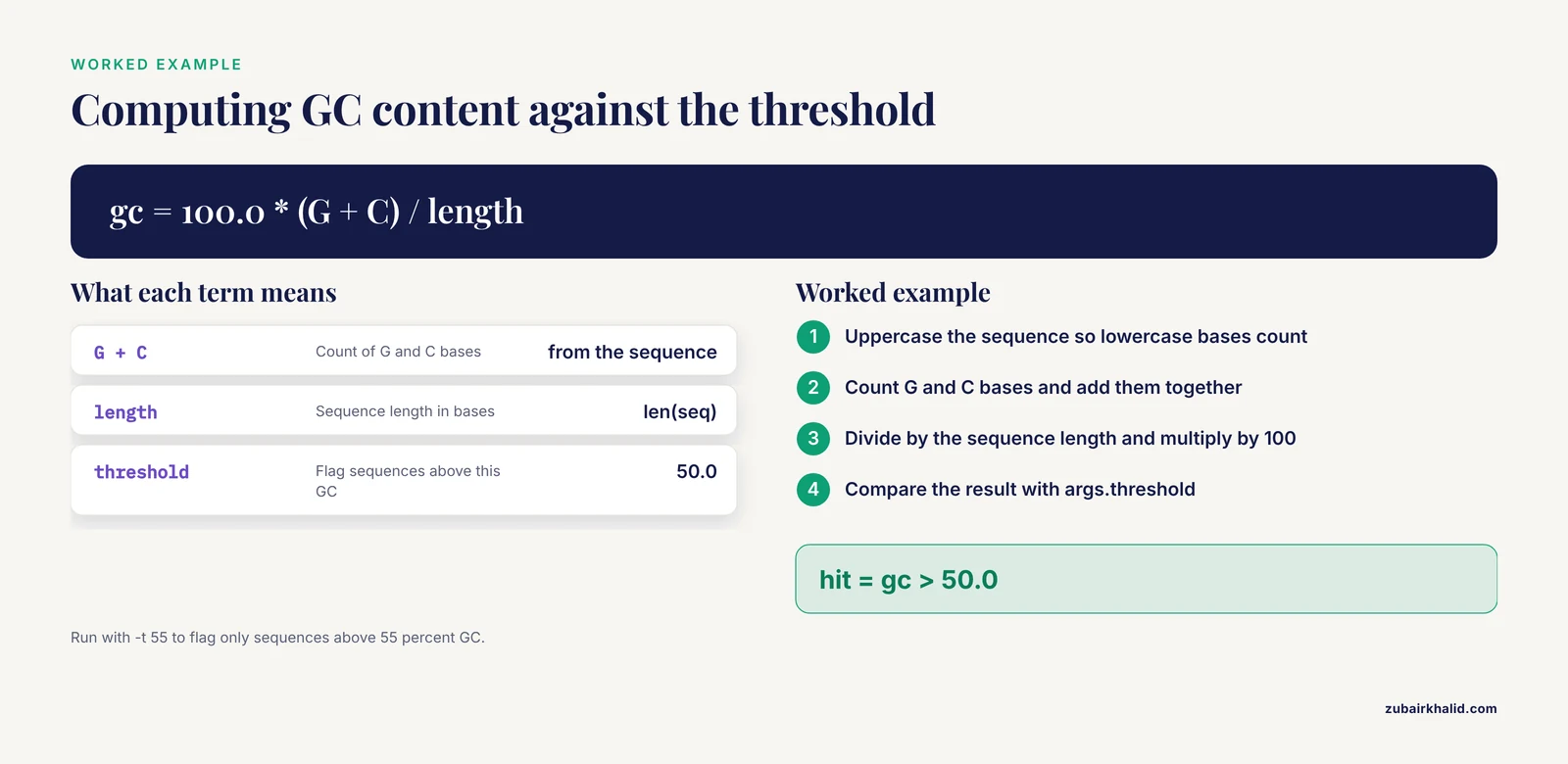
Here is a complete, runnable script that computes GC content for sequences in a FASTA file using Biopython's sequence input and output module. Save it as gc_content.py.
#!/usr/bin/env python3
"""Calculate GC content for sequences in a FASTA file."""
import argparse
from Bio import SeqIO

def main():
    parser = argparse.ArgumentParser(
        description="Calculate GC content of sequences in a FASTA file.",
        epilog="Example: python gc_content.py contigs.fasta -t 55 -o report.tsv"
    )
    parser.add_argument("fasta",
                        help="Input FASTA file (one genome or transcriptome)")
    parser.add_argument("-o", "--output", default="gc_report.tsv",
                        help="Output TSV file (default: gc_report.tsv)")
    parser.add_argument("-t", "--threshold", type=float, default=50.0,
                        help="Flag sequences above this GC percentage (default: 50.0)")
    parser.add_argument("-q", "--quiet", action="store_true",
                        help="Print only the summary, not every sequence")
    args = parser.parse_args()

    flagged = 0
    with open(args.output, "w") as out:
        out.write("id\tlength\tgc_percent\tflagged\n")
        for record in SeqIO.parse(args.fasta, "fasta"):
            seq = str(record.seq).upper()
            gc = 100.0 * (seq.count("G") + seq.count("C")) / len(seq)
            hit = gc > args.threshold
            flagged += hit
            if not args.quiet:
                print(f"{record.id}\t{len(seq)}\t{gc:.2f}\t{'yes' if hit else 'no'}")
            out.write(f"{record.id}\t{len(seq)}\t{gc:.2f}\t{'yes' if hit else 'no'}\n")
    print(f"Wrote report to {args.output}. {flagged} sequences above {args.threshold}% GC.")

if __name__ == "__main__":
    main()
Run it like this from the shell.
python gc_content.py contigs.fasta -t 55 -o high_gc.tsvIf the user types python gc_content.py -h, argparse prints a formatted help message built entirely from the strings you supplied, and exits without running your analysis. If the user types -t abc, argparse prints an error naming the offending argument and exits with a nonzero status, which is exactly what you want when the script is called from a larger pipeline.
Positional and Optional Arguments
A positional argument is required and identified by its position on the command line. In the script above, fasta is positional, so python gc_content.py contigs.fasta works with no flag. Optional arguments start with a single dash for the short form and a double dash for the long form, such as -t and -threshold.
The convention in bioinformatics, and in most published command-line tools, is that positional arguments take the primary input, typically reads or a reference, while everything that tunes behavior is an optional flag. Look at how a genome assembly pipeline stages its work. A suite like CGAS moves from raw reads through assembly, quality control, and annotation before any comparative analysis begins, and each stage needs its own input and output paths [1]. A clean split between required inputs and tunable flags keeps 14 modules from turning into 14 pages of required flags.
One subtlety confuses almost everyone at first. Positional arguments are matched in order, so if you declare two positionals, the user must supply them in that order. Optional flags can appear anywhere. When you expect mixed behavior, prefer flags for everything except the single main input.
Types, Choices, and Ranges
By default argparse returns every value as a string. The type parameter converts on the fly and rejects bad input with a clear message.
parser.add_argument("--min-length", type=int, default=200,
                    help="Discard reads shorter than this many bases")
parser.add_argument("--max-error", type=float, default=0.01,
                    help="Maximum per-base error rate")
The choices parameter restricts an argument to a fixed list, which is perfect for selecting among competing algorithms. A published Python pipeline for phylogenetic analysis integrates several aligners, including MAFFT, MUSCLE, and ClustalW, and several tree-building methods, including Neighbor-Joining, UPGMA, Maximum Likelihood, and Maximum Parsimony [3]. That is a textbook case for choices.
parser.add_argument("--aligner", choices=["mafft", "muscle", "clustalw"],
                    default="mafft", help="[Multiple sequence alignment](/blog/guides/multiple-sequence-alignment) method")
parser.add_argument("--tree-method",
                    choices=["nj", "upgma", "ml", "mp"],
                    default="ml", help="Tree reconstruction method")
With this design, -aligner blast fails immediately with a list of valid options instead of failing twenty minutes later inside a subprocess. In long-running genomics jobs, failing in the first second is a feature.
Multiple Inputs and Mutually Exclusive Groups
Real analyses rarely process one file. The nargs parameter handles counts. nargs="+" requires at least one value, nargs="*" allows zero or more, and nargs="?" makes the argument optional with a possible default.
parser.add_argument("fastas", nargs="+", help="One or more FASTA files")Mutually exclusive groups enforce logic that would otherwise live as scattered if statements.
group = parser.add_mutually_exclusive_group(required=True)
group.add_argument("--reference", help="Reference genome for read mapping")
group.add_argument("--denovo", action="store_true",
                   help="Assemble de novo instead of mapping")
A user cannot pass both -reference and -denovo, and argparse explains the conflict for you. This is the right tool for genuine either-or decisions, such as choosing between a reference-guided and a reference-free branch of a viral genome workflow [6].
Subcommands for Multi-Step Pipelines
Subcommands let one script behave like several tools, the way git does with git clone, git commit, and git push. For a pipeline with distinct phases, this keeps a single entry point while each phase keeps its own flags.
import argparse

def main():
    parser = argparse.ArgumentParser(description="Viral genome QC toolkit")
    subparsers = parser.add_subparsers(dest="command", required=True)

    p_trim = subparsers.add_parser("trim", help="Adapter and quality trimming")
    p_trim.add_argument("reads", help="Input FASTQ file")
    p_trim.add_argument("--min-q", type=int, default=20,
                        help="Minimum Phred quality (default: 20)")
    p_trim.set_defaults(func=run_trim)

    p_filter = subparsers.add_parser("filter", help="Length and N-content filtering")
    p_filter.add_argument("reads", help="Input FASTQ file")
    p_filter.add_argument("--min-length", type=int, default=100)
    p_filter.set_defaults(func=run_filter)

    p_report = subparsers.add_parser("report", help="Summarize QC metrics")
    p_report.add_argument("metrics", help="TSV of per-sample metrics")
    p_report.set_defaults(func=run_report)

    args = parser.parse_args()
    args.func(args)

def run_trim(args):
    print(f"Trimming {args.reads} at Q{args.min_q}")

def run_filter(args):
    print(f"Filtering {args.reads} to min length {args.min_length}")

def run_report(args):
    print(f"Summarizing {args.metrics}")

if __name__ == "__main__":
    main()
This pattern mirrors how real surveillance tools are structured. A decision support workflow for genomic pathogen surveillance evaluates raw data quality, assesses whether a sample contains one or multiple lineages, and produces variant calls through multi-tool comparison before reporting whether the data support a conclusion [6]. Each of those stages has its own inputs and thresholds, and subcommands keep those stages honest and independently runnable.
Help Text That Scientists Can Actually Use
Two habits separate usable tools from abandoned ones. First, every argument gets a help string that states units and defaults. "Minimum Phred quality (default: 20)" tells a wet-lab collaborator everything they need, while "cutoff" tells them nothing. Second, the epilog at the bottom of the parser shows a full example command, because most users copy the example rather than read the reference.
For tools distributed to experimentalists, this matters more than any technical consideration. A pipeline built specifically for laboratory professionals with limited bioinformatics experience succeeds or fails on whether its command line is self-explanatory [2]. The help screen is your documentation, your error message, and often your publication supplement, all generated for free.
Comparing Your Options
Several tools can parse command-line arguments in Python. The table below is the core decision aid for this article.
| Approach | Dependency | Automatic help | Type handling | Subcommands | Best for | Main drawback |
|---|---|---|---|---|---|---|
| sys.argv | None (stdlib) | No | None, all strings | Manual, error-prone | Throwaway one-liners, quick hacks | You write all validation yourself |
| argparse | None (stdlib) | Yes, full | Yes, via type | Yes | Default choice for scripts and pipelines | Verbose for very large interfaces |
| click | Third-party (pip) | Yes | Yes, via decorators | Yes | Polished multi-command applications | Extra dependency, different mental model |
| typer | Third-party (pip) | Yes | Yes, from type hints | Yes | Modern typed codebases | Requires Python type hints fluency |
| docopt | Third-party (pip) | From the docstring | No, strings only | Yes, in the docstring | Small tools where the help page is the spec | Weak type conversion and validation |
| Config file (YAML, TOML, JSON) | Varies | No | Yes, via the file format | Not applicable | Workflows with dozens of parameters | Hidden configuration, needs a template |
| Workflow manager (Snakemake, Nextflow) | Third-party | Yes, at the workflow level | Managed by the system | Rules and processes | Multi-tool, multi-sample studies | Overkill for a single analysis script |
A few of these deserve individual treatment, because the differences only become clear on real projects.
Each Parsing Option on Its Own Terms
sys.argv
sys.argv is the raw list of command-line tokens that Python provides before any library gets involved. sys.argv is the script name, sys.argv[3] is the first argument, and so on.
import sys
fasta = sys.argv[3]
threshold = float(sys.argv[5])
This is fine for a five-line script you will delete tomorrow. It provides no help text, no type validation, and no error handling, so a missing argument raises a raw IndexError at the user. Published tools almost never ship this way, and you should not either, except in personal scratch work.
argparse
argparse is the standard library parser that has shipped with Python since version 2.7. Its strengths are total portability, mature behavior, automatic help generation, type conversion, choices, subcommands, and mutually exclusive groups. Its weakness is verbosity. A tool with 30 parameters takes roughly 60 to 90 lines of parser code. For most bioinformatics scripts that verbosity is a feature, because each line doubles as documentation, but there is a point where configuration belongs in a file rather than on the command line. That point is covered below.
click
click is a third-party library that builds interfaces through decorators. Each command is a function, each parameter is a decorator, and help text comes from docstrings.
import click

@click.command()
@click.argument("fasta", type=click.Path(exists=True))
@click.option("--threshold", "-t", default=50.0, show_default=True,
              help="Flag sequences above this GC percentage")
def gc(fasta, threshold):
    """Calculate GC content of sequences in a FASTA file."""
    click.echo(f"Processing {fasta} at threshold {threshold}")

if __name__ == "__main__":
    gc()
click's decorators compose well, its click.Path(exists=True) solves the missing-input problem in one line, and its nesting model makes deeply layered applications pleasant. The cost is a dependency on every machine where the script runs, which matters on managed clusters where you may not control the environment. Note also that a modern tool in the same space argues for simple, flexible application programming interfaces where a library is specified in a few lines of code rather than through custom glue functions, a design philosophy that applies to command-line layers as much as to libraries [7].
typer
typer builds on click but derives the parser from Python type hints. Function signatures become the interface, which means an integrated development environment can autocomplete your CLI before you ever run it.
import typer
from pathlib import Path

app = typer.Typer()

@app.command()
def trim(reads: Path, min_q: int = typer.Option(20, help="Minimum Phred quality")):
    """Trim adapters and low-quality bases from reads."""
    typer.echo(f"Trimming {reads} at Q{min_q}")

if __name__ == "__main__":
    app()
typer is the shortest path from a typed, well-annotated analysis module to a usable command-line tool. The trade-offs are the same as click, an extra dependency and a style that assumes you already write type-hinted Python.
docopt
docopt takes an unusual approach. You write the help page first, in a specific format, and docopt parses command lines to match that text. This is elegant for small tools whose specification fits on one screen. It converts nothing and validates nothing beyond structure, so a numeric flag arrives as a string. For scientific tools where thresholds and paths must be validated, docopt usually ends up wrapped in manual checks, which erodes its brevity advantage.
Configuration Files
When a pipeline has dozens of parameters, the command line stops scaling. A published Python module for docking-based virtual screening exists precisely because re-editing a configuration file between every step of an automated workflow is infeasible, so the authors built a module to parse, edit, and write that configuration file programmatically [8]. The same logic applies at the human level. If your users must retype 30 flags for every run, they will copy stale commands and drift into silent errors.
The standard pattern is to accept a config file plus a few overrides.
import argparse
import json

parser = argparse.ArgumentParser(description="[Genome analysis](/blog/guides/genome-analysis) stage 2")
parser.add_argument("--config", required=True, help="JSON file with parameters")
parser.add_argument("--aligner", choices=["mafft", "muscle", "clustalw"],
                    help="Override the aligner from the config file")
args = parser.parse_args()

with open(args.config) as fh:
    params = json.load(fh)
if args.aligner:
    params["aligner"] = args.aligner
The command line records the overrides, the config file records the full state, and both go into the provenance log. Configuration files also solve another problem. Parameters that change between computing environments, such as thread counts, temporary directories, and database paths, belong in environment-specific configs rather than in analysis logic. Interoperability across formats is a real pain point in genomics, with pipelines spending real effort on National Center for Biotechnology Information-format conversion and similar transformations [1], so keeping your own parameters in one clean, versioned file is a modest price for the sanity it buys.
Pros and Cons of argparse for Bioinformatics
The question of which parser is best for Python argparse bioinformatics work has a stable answer for most labs. argparse wins the default slot, and here is the honest accounting.
Strengths
argparse requires no installation, which means a script you email to a collaborator runs on any machine with Python, including old cluster nodes where you cannot pip install anything. It generates complete help screens, catches type errors and invalid choices before your code runs, and exits with proper status codes that schedulers and workflow engines interpret correctly. It supports subcommands for pipeline-style tools, mutually exclusive groups for either-or logic, and argparse.FileType for inputs that should be opened immediately. Because it is standard, examples in textbooks, course materials, and published code are overwhelmingly argparse-based, which lowers the cost for the next person who inherits your script.
Reproducibility is a further strength when used deliberately. A framework built to reduce friction between raw genotype files, quality-control decisions, and downstream analyses tracks provenance attributes inside the tool itself [4]. You get a usable version of that for free by having argparse hold every setting in one namespace object and by writing that object into your log. Published Python scripts distributed as standalone analysis tools, such as a contamination source predictor built on top of an established contamination detector, follow exactly this pattern of a single documented entry point wrapping a well-defined computation [9].
Weaknesses
argparse is verbose, and interfaces with more than about 40 parameters become painful to maintain in a single file. It has no native support for loading defaults from configuration files or environment variables, so config integration is always hand-rolled. Its automatic messages are clear but plain, and it will never give you colored output, progress bars, or shell completion, which click and typer provide. For a personal analysis script, argparse is sometimes more ceremony than the task deserves, and sys.argv is faster to type. The honest pros and cons reduce to this. argparse trades a few extra lines of setup for portability, validation, and documentation, and that trade favors argparse in almost every bioinformatics setting where the script will outlive the week it was written.
Worked Scenarios
Scenario 1. Wrapping Alignment and Tree Building
Suppose you are building a small version of the phylogenetic pipeline described in the literature, one that collects sequences, aligns them with a chosen algorithm, builds a tree, and evaluates topology [3]. The argument interface should expose the genuine scientific choices, which are the aligner, the tree method, and the bootstrap count, while hiding bookkeeping like temporary directories behind sensible defaults.
import argparse

parser = argparse.ArgumentParser(
    description="Phylogenetic analysis pipeline: align, build, and compare trees")
parser.add_argument("sequences", help="Input FASTA with unaligned sequences")
parser.add_argument("--aligner", choices=["mafft", "muscle", "clustalw"],
                    default="mafft")
parser.add_argument("--tree", choices=["nj", "upgma", "ml", "mp"],
                    default="ml")
parser.add_argument("--bootstrap", type=int, default=100,
                    help="Number of bootstrap replicates")
parser.add_argument("--outgroup", help="Taxon to root the tree, optional")
parser.add_argument("--outdir", default="phylo_results")
args = parser.parse_args()
Notice what the choices buy you. The pipeline can run the same analysis under every aligner and every tree method to perform comparative evaluation, which is exactly the comparative statistical evaluation strategy, using topological distance measures and statistical tests, described in the published pipeline [3]. Restricting values with choices turns the argument parser into executable documentation of what the tool actually supports.
Scenario 2. A QC Gatekeeper with Subcommands
Surveillance pipelines that support policy decisions need to earn trust before their conclusions are relied upon, which is why a viral surveillance workflow evaluates raw data quality, mixed-lineage content, and multi-tool variant calls in sequence before reporting support for a conclusion [6]. Model that structure with subcommands plus a shared log.
sub = parser.add_subparsers(dest="command", required=True)
p_qc = sub.add_parser("qc", help="Assess raw read quality")
p_qc.add_argument("fastq")
p_qc.add_argument("--min-q", type=int, default=20)
p_lineage = sub.add_parser("lineage", help="Check for mixed lineages")
p_lineage.add_argument("consensus")
p_call = sub.add_parser("variants", help="Multi-tool variant calling")
p_call.add_argument("bam")
p_call.add_argument("--callers", nargs="+",
                    choices=["freebayes", "bcftools", "ivar"], required=True)
Each subcommand validates its own inputs, and a report subcommand consumes the outputs of the others. If one caller fails, the workflow records which tools agreed rather than silently trusting one result, which is the whole point of the multi-tool comparison design [6].
Scenario 3. Batch Runs on an HPC Cluster
Many published Python pipelines are executed locally through bash scripts or through a Slurm protocol for batch processing of multiple samples [2]. The argument parser is the contract between the scheduler and your code. Design it so one invocation handles exactly one sample, then let bash or Slurm loop over samples.
#!/bin/bash
#SBATCH --array=1-96
module load python/3.11
SAMPLE=$(sed -n "${SLURM_ARRAY_TASK_ID}p" samples.txt)
python asfv_pipeline.py --sample "$SAMPLE" --reads "data/${SAMPLE}_R1.fastq.gz" \
    --reference "data/ASFV_reference.fasta" --outdir "results/${SAMPLE}"
One-sample-per-invocation keeps failures isolated, makes array-job retries trivial, and makes the provenance of every sample self-contained. A pipeline that classifies outputs into structured folders and produces intermediate files usable by further or parallel analyses depends on this kind of disciplined per-sample invocation [2].
Scenario 4. Recording Provenance in the Output
Add four lines to every script you write for others.
import sys, datetime
with open(f"{args.outdir}/command_line.log", "a") as log:
    log.write(f"{datetime.datetime.now().isoformat()}\t{' '.join(sys.argv)}\n")
This echoes the full, reconstructed command into a log. Combined with argparse's default values, the log is a complete record of every setting, even the ones the user left at defaults. Workflows that aim to improve trustworthiness of genomic analyses treat process quality as a first-class output [6], and a per-run command log is the simplest meaningful step in that direction.
Where Biopython Fits In
Most Python for bioinformatics instruction eventually reaches Biopython, the most widely used open-source library for sequence work, and the pairing with argparse is straightforward. Biopython handles what the data is, argparse handles how the tool is driven. The first example in this article already showed the pattern with SeqIO.parse. A slightly richer version reads one or more files, selects a file format, and writes filtered output.
#!/usr/bin/env python3
"""Filter sequences by length, using Biopython and argparse."""
import argparse
from Bio import SeqIO

parser = argparse.ArgumentParser(description="Length-filter FASTA or FASTQ records")
parser.add_argument("infile", help="Input FASTA or FASTQ file")
parser.add_argument("--format", choices=["fasta", "fastq"], default="fasta")
parser.add_argument("--min", type=int, default=0, help="Minimum length in bases")
parser.add_argument("--max", type=int, default=None, help="Maximum length in bases")
parser.add_argument("outfile", help="Filtered output file")
args = parser.parse_args()

kept = 0
with open(args.outfile, "w") as out:
    for rec in SeqIO.parse(args.infile, args.format):
        if len(rec) >= args.min and (args.max is None or len(rec) <= args.max):
            SeqIO.write(rec, out, args.format)
            kept += 1
print(f"Kept {kept} records.")
Three points are worth internalizing from this short biopython tutorial pattern. The -format choices mirror Biopython's own file format identifiers, so one parser setting unlocks a whole family of file types. The bounds check runs before any expensive work, which matters when the input is a 50-gigabyte metagenome. And because argparse validated -min as an integer, there is no string-to-int conversion error hiding halfway through the run. The same separation of concerns scales up. A Python package that consolidates variant parsing, filtering, and summary statistics into one architecture exists because stitched-together command-line steps introduce friction between raw files and final analyses [4]. Your argparse header is the first, cheapest step toward that kind of consolidation in your own work.
One more context matters. Interactive work belongs in notebooks, where libraries built for the purpose let end-users and developers assemble scripted workflows in Jupyter [10]. Command-line tools belong everywhere else, especially scheduled runs, cluster batches, and anything a collaborator must run without reading your code. The transition from notebook cell to argparse script is mechanical, and it is worth doing the moment an analysis runs for a second time or on someone else's data.
Common Mistakes and Limitations
Writing scripts with raw string indexing into sys.argv and shipping them to collaborators. The script works for you and crashes with an opaque IndexError for everyone else. Any script that leaves your laptop should use a real parser.
Forgetting type= on numeric arguments. -bootstrap 100 arrives as the string "100", and a comparison like replicates < 10 silently compares strings and gives wrong results. Always declare type=int or type=float for numbers.
Assuming action="store_true" flags can be turned off. With store_true, the default is False and the flag can only set it to True. If you need a boolean the user can force either way, use BooleanOptionalAction in Python 3.9 and later, or use two mutually exclusive flags.
Using nargs="*" for a required list. A missing list then passes silently as an empty sequence and the analysis produces an empty result with exit code 0. Use nargs="+" when at least one value is required.
Failing to check that input files exist. argparse will happily accept data/misspelled.fasta and your code will crash ten minutes in. Either use argparse.FileType("r") for files opened immediately or call os.path.exists on every path during argument validation, before any expensive step starts.
Letting defaults lie. The help string and the actual code default must match. If you change a default in one place, change both, or reference a single constant.
Treating argparse as a workflow engine. argparse parses one invocation. It does not track file timestamps, skip completed steps, resume after crashes, or manage dependencies. Those are the core benefits of workflow management systems, which let bioinformaticians delegate how a workflow runs while they focus on what it should do, including incremental builds, re-entrancy, and container support [11]. The RiboViz project reimplemented a Python-scripted analysis workflow inside a workflow management system precisely to gain those properties [11]. The practical boundary is this. If your pipeline is one script with a handful of steps, argparse is enough. If it chains many external tools across many samples with resumable state, put a thin argparse front end on each component and let Snakemake or Nextflow drive the sequence.
Ignoring exit codes. When argparse rejects bad input it exits with status 2, and your own validation should exit nonzero with parser.error("message") or sys.exit(1). Scripts that always exit 0 poison any automation built on top of them, because batch schedulers and workflow managers judge success by the exit status.
Finally, a note on how these tools get written. Frontier language models now answer many standard bioinformatics coding questions correctly, though performance varies sharply across biological categories, so treat generated argparse scaffolding as a starting draft that you review against the documented behavior of the underlying tools [12]. The parser is not where subtle biology lives, but the defaults and choices it encodes are decisions, and decisions deserve human review.
Frequently Asked Questions
Is argparse the best choice for bioinformatics scripts in Python?
For most scripts and pipeline components, yes. argparse is in the standard library, generates help and error messages automatically, and requires nothing from your collaborators beyond a Python installation. Reach for click or typer when a tool grows into a polished multi-command application, and for a workflow of many chained tools, keep argparse at each step and let a workflow manager handle orchestration.
What is the difference between positional and optional arguments in argparse?
A positional argument is required and matched by its order on the command line, which suits the single primary input such as a FASTA file. An optional argument is introduced by a flag such as -t or -threshold, can appear anywhere, and usually carries a default. The standard bioinformatics convention is one positional input and flags for everything that tunes behavior.
How do I handle a tool that has dozens of parameters?
Move the full parameter set into a config file in JSON, YAML, or TOML format, and keep a handful of high-frequency overrides on the command line. This mirrors how published Python tools parse and programmatically edit configuration files to automate multi-step workflows, and it keeps the command log short while the config records complete state.
Can argparse run different functions for different tasks, like git subcommands?
Yes. Use add_subparsers to register named subcommands, each with its own arguments and its own function, which is the standard pattern for pipelines with distinct phases such as trimming, filtering, and reporting.
How does argparse work with Biopython?
argparse collects and validates the file paths, formats, thresholds, and flags, then hands them to Biopython functions such as SeqIO.parse to read and write sequence data. Use choices for Biopython format names like fasta and fastq, and use type=int for length or quality cutoffs so values are validated before any expensive parsing begins.
When should I stop writing Python scripts and adopt a workflow manager?
When your analysis chains multiple external tools across multiple samples, needs to skip steps that already completed, or must resume after a failure. Workflow management systems provide a common workflow language, incremental builds, re-entrancy, and container and cluster support, which lets you delegate how the analysis runs while you focus on what it computes.
Sources
- CGAS (Chloroplast Genome Analysis Suite): An automated python pipeline for comprehensive comparative chloroplast genomics.
- 'PePApipe': A complete bioinformatics analysis pipeline for African Swine Fever Virus genome.
- A python-based automated pipeline for phylogenetic tree construction, visualization, and comparative statistical evaluation.
- SNPio: a Python interface for population genomic data processing.
- Evaluation and comparison of methods for neuronal parameter optimization using the Neuroptimus software framework.
- PathoSeq-QC: a decision support bioinformatics workflow for robust genomic surveillance.
- PoolParty: streamlined design of DNA sequence libraries in Python.
- PyGOLD: a python based API for docking based virtual screening workflow generation.
- A comprehensive performance evaluation, comparison, and integration of computational methods for detecting and estimating cross-contamination of human samples in cancer next-generation sequencing analysis.
- PaDuA: A Python Library for High-Throughput (Phospho)proteomics Data Analysis.
- Using prototyping to choose a bioinformatics workflow management system.
- Assessment of LLMs on basic bioinformatics tasks requiring multi-step reasoning and code writing.