How to Push Your Research Code to GitHub
By Dr. Zubair Khalid, DVM, MS, PhD ·

By the end of this guide you will have pushed a real analysis project to GitHub, protected it with a .gitignore file that keeps patient data and credentials out of the repository, and learned the daily edit, stage, commit, push routine that carries a project from its first script to a published code availability statement. You will also be able to read the handful of error messages that stop most first pushes and fix each one in under a minute.
Have four things on hand before you start:
- Git installed on your computer. Setup takes about five minutes and is covered below.
- A terminal. macOS and Linux ship with one. Windows users get Git Bash automatically when they install Git.
- A free GitHub account at github.com.
- A small, non-confidential project folder to practice on. Two or three scripts and a README are enough for a first push.
The payoff is concrete. Journals increasingly request a code availability statement, a sentence in the manuscript saying where the analysis code can be found, and many researchers meet Git for the first time under that submission deadline [1]. The same skills let a lab share working code the way behavioral neuroscience groups share their ImageJ analysis plugins, which were released as source code in a public Git repository so other laboratories could use and extend them [2]. This guide walks through how to push your research code to GitHub from an empty terminal to a verified, clonable repository.
Why Researchers Push Code to GitHub
Version control means a program that records snapshots of your project over time, so any earlier state can be recovered exactly. Git is the version control program most researchers and software teams use. GitHub is a website that hosts a copy of a Git repository online, which turns a folder sitting on your laptop into something backed up, shareable, and open to collaborators. For researchers, GitHub has become the default place where that copy lives.
Three benefits matter for research work:
- Reproducibility. A commit history shows which version of the code produced which result, which is exactly what a reviewer asking to rerun an analysis needs [1]. Tools built on Git go further. The workflowr R package combines Git history, literate analysis documents, automated reproducibility checks, and a browsable results website, so a collaborator can audit an entire project from a single URL [3].
- Collaboration. Multi-institution studies need a place to merge everyone's work without emailing compressed folders back and forth, and Git workflows built around branches and pull requests are designed for that setting [1].
- Publication. A public repository is the standard home for the code behind a paper. The Brownian motion augmentation study for nanopore sensors, which introduced the YupanaNet classifier, points readers to its code and data through a single GitHub URL listed with the paper [4]. Releasing source code this way invites reuse, which is the effect the ImageJ behavior-analysis plugins set out to create when their authors moved the code into a public Git repository [2].
Git for Scientists: Four Ideas and One Habit
Git feels abstract until you separate four ideas, the same four that Git primers written for clinical researchers treat as the foundation of everyday use [1].
- Repository. A repository, or repo, is your project folder plus the complete history of every saved snapshot. The history lives in a hidden subfolder named
.git. Deleting a file from the folder does not delete it from the history. - Commit. A commit is one snapshot: the state of every tracked file, plus the author, timestamp, message, and a unique identifier called a hash. A tracked file is any file Git records in its history. Commits are effectively permanent. You can move away from them, but you can rarely erase them.
- Branch. A branch is a movable label pointing at one commit. Every repository starts on a branch named
main. Creating a new branch lets you try an idea without touching the main line of work. - Remote. A remote is another copy of the repository, usually on GitHub. The conventional name for your primary remote is
origin. Pushing copies your new commits to the remote. Pulling copies the remote's new commits down to you.
One more term appears constantly: the staging area, a waiting room between your edits and the next commit. You edit files, stage the ones that belong together, then commit them as a single unit. That edit, stage, commit cycle is the daily habit that carries everything else in Git for scientists [1].
Set Up Git on Your Computer
Install Git first.
- Windows: download the Git for Windows installer from git-scm.com and accept the defaults. This also installs Git Bash, the terminal used in the examples below.
- macOS: run
xcode-select, installin Terminal, or install with Homebrew usingbrew install git. - Linux (Debian or Ubuntu): run
sudo apt install git.
Confirm the installation, then introduce yourself to Git. Git writes your name and email into every commit so collaborators can tell who changed what.
git --version
git config --global user.name "Ada Lovelace"
git config --global user.email "[email protected]"
git config --global init.defaultBranch main
git config --global core.editor "nano"
The -global flag means these settings apply to every repository on this computer. Setting init.defaultBranch to main matches the default branch name GitHub uses. Check the result:
git config --global --listuser.name=Ada Lovelace
[email protected]
init.defaultBranch=main
core.editor=nanoIf you work with clinical data and will push from a shared machine, use the anonymized email GitHub provides under Settings, Emails (it looks like [email protected]) instead of your institutional address. That keeps your address off public commit records.
Connect GitHub to Your Computer
GitHub needs proof that your computer is allowed to push. Two mechanisms cover every situation.
Option A, SSH keys (set up once, then never type a password). An SSH key is a paired cryptographic key: a private half that stays on your computer and a public half you upload to GitHub.
ssh-keygen -t ed25519 -C "[email protected]"Press Enter to accept the default file location and set a passphrase if prompted. Then display the public key, copy it, and paste it into GitHub under Settings, SSH and GPG keys, New SSH key.
cat ~/.ssh/id_ed25519.pubTest the connection:
ssh -T [email protected]Expected output:
Hi alovelace! You've successfully authenticated, but GitHub does not provide shell access.Option B, HTTPS with a personal access token. A personal access token is a long password generated by GitHub under Settings, Developer settings. When a push asks for a password, paste the token. Recent Git installers include Git Credential Manager, which stores the token in your operating system keychain so you enter it once. Plain account passwords stopped working for GitHub in August 2021, which is why a first HTTPS push fails until a token exists.
Either option works. SSH is the better long-term choice on a laptop you control. HTTPS is easier on managed clinical machines where you cannot create keys.
Step-by-Step: Push Code to GitHub for Researchers
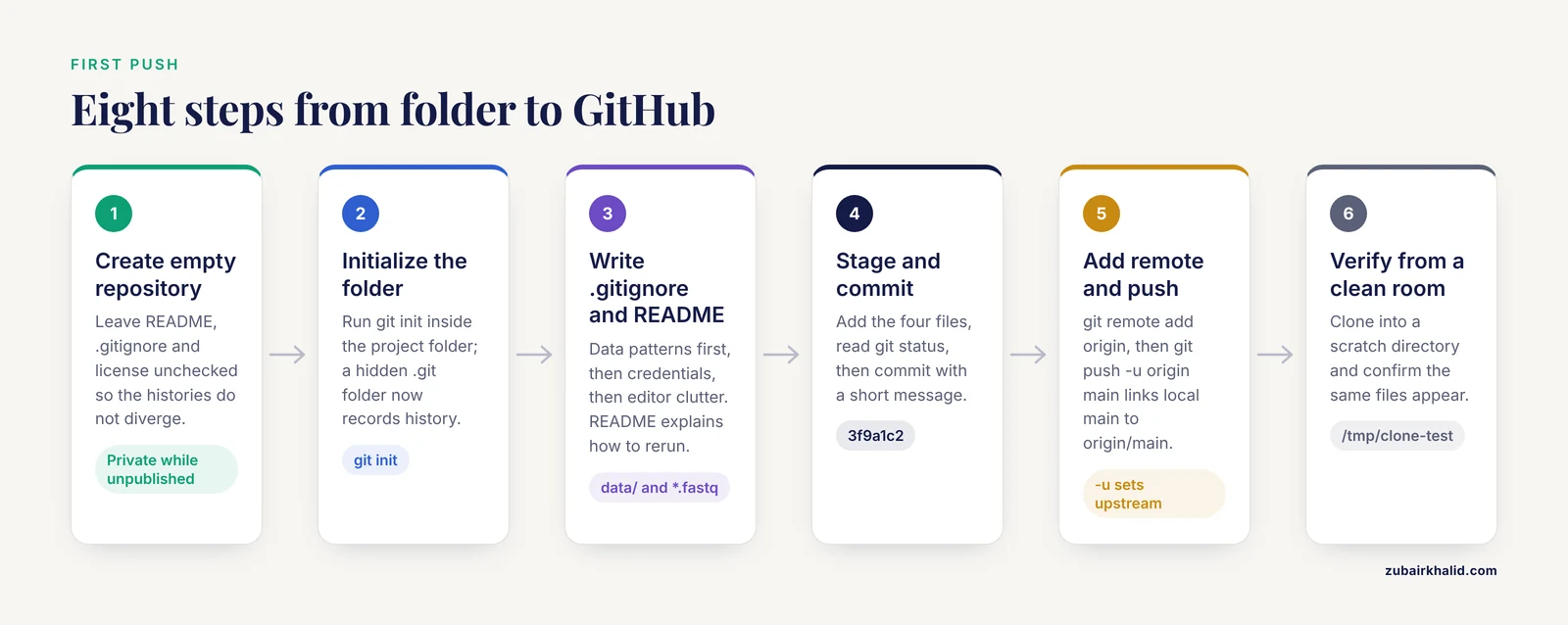
This walkthrough pushes an existing project folder called rna-seq-pipeline containing analysis.R, helpers.R, and a README. The same eight steps work for any language.
1. Create the empty repository on GitHub
Log in, click the + icon at the top right, choose New repository, and give it a short, lowercase name such as rna-seq-pipeline. Add a one-line description. Choose Private while the project is unpublished. Leave the initialization options (Add a README, Add .gitignore, Choose a license) unchecked. If GitHub creates a README and your local folder also has history, the two histories diverge and the first push is rejected. Click Create repository. GitHub shows a quick setup page with your repository URL, which looks like [email protected]:alovelace/rna-seq-pipeline.git over SSH or https://github.com/alovelace/rna-seq-pipeline.git over HTTPS. Keep this page open.
2. Turn the project folder into a repository
Open a terminal in the folder and initialize Git:
cd ~/projects/rna-seq-pipeline
git init
Initialized empty Git repository in /home/ada/projects/rna-seq-pipeline/.git/Nothing visible changes except a hidden .git folder, which now records history.
3. Write .gitignore and README before anything else
Create a file named .gitignore (a list of file patterns Git should never track) and a README.md (the front page of the repository). Data patterns come first in the ignore list, because identifiable patient data must never enter a version-controlled repository, and a .gitignore is the guardrail that prevents an inadvertent commit [1].
# Data that stays on lab storage
data/
*.fastq
*.fastq.gz
*.bam
*.RData

# Credentials and configuration secrets
.env
config/credentials.*

# Editor and language clutter
.Rhistory
.Rproj.user/
__pycache__/
*.pyc
.ipynb_checkpoints/
.DS_Store
4. Stage the first files and inspect
Staging means marking files to include in the next commit.
git add .gitignore README.md analysis.R helpers.R
git status
On branch main
No commits yet
Changes to be committed:
(use "git rm --cached <file>..." to unstage)
new file: .gitignore
new file: README.md
new file: analysis.R
new file: helpers.RRead this output every time. Files under "Changes to be committed" are staged. Untracked files, meaning files present in the folder but not recorded by Git, appear separately and will not be included.
5. Make the first commit
git commit -m "Initial commit: analysis scripts, README, ignore rules"[main (root-commit) 3f9a1c2] Initial commit: analysis scripts, README, ignore rules
4 files changed, 210 insertions(+)
create mode 100644 .gitignore
create mode 100644 README.md
create mode 100644 analysis.R
create mode 100644 helpers.RThe -m flag supplies the message directly. The string 3f9a1c2 is the shortened hash of this snapshot.
6. Connect the local repository to GitHub
git remote add origin [email protected]:alovelace/rna-seq-pipeline.git
git remote -v
origin [email protected]:alovelace/rna-seq-pipeline.git (fetch)
origin [email protected]:alovelace/rna-seq-pipeline.git (push)git remote add creates a bookmark named origin pointing at the URL you copied in step 1. Use the https:// URL instead if you chose tokens over SSH. If you paste the wrong URL, correct it with git remote set-url origin CORRECT-URL.
7. Push
git push -u origin mainEnumerating objects: 5, done.
Counting objects: 100% (5/5), done.
Writing objects: 100% (3/3), 1.05 KiB | 1.05 MiB/s, done.
Total 3 (delta 0), reused 0 (delta 0)
To github.com:alovelace/rna-seq-pipeline.git
* [new branch] main -> main
branch 'main' set up to track 'origin/main'.Three parts matter. origin names the remote. main names the branch. The -u flag links your local main to origin/main (its upstream counterpart), so every later push needs only git push.
8. Verify from a clean room
Refresh the GitHub page. Your four files should be listed with the commit message beside them. Then prove the repository is self-contained by cloning it (downloading a full copy) into a scratch directory:
git clone [email protected]:alovelace/rna-seq-pipeline.git /tmp/clone-test
ls /tmp/clone-test
README.md analysis.R helpers.R .gitignoreIf a fresh clone contains your files, the push worked, and a collaborator will see exactly the same thing.
The Daily Edit-Stage-Commit-Push Cycle
After the first push, research coding becomes a short loop repeated many times a day. Start by pulling, because collaborators may have pushed overnight:
git pullEdit your scripts, then look at what changed before writing anything to history. git status lists changed, staged, and untracked files. git diff prints unstaged edits line by line, with removed lines marked and added lines marked, so you can review work before staging it. Stage deliberately, one file at a time, to keep each commit about one idea. The command git add -p goes further and stages piece by piece, asking yes or no for each block of changes, which keeps unrelated edits out of a single commit.
git add analysis.R
git commit -m "Filter genes with very low counts before normalization"
git push
Small, frequent commits are the point of the cycle. A history of twenty focused commits lets you hand a reviewer the exact code state behind a figure. One giant final commit cannot. Write commit messages as short instructions, under about 50 characters, that say what changed and why.
The commands that carry the entire workflow:
| Command | What it does | When to use it |
|---|---|---|
git status | Lists changed, staged, and untracked files | Before every commit |
git diff | Shows unstaged edits line by line | To review work before staging |
git add file | Stages one file for the next commit | After each logical edit |
git add -p | Stages selected blocks of changes interactively | When a file mixes several edits |
git commit -m "message" | Records staged changes as a snapshot | When one unit of work is done |
git push | Uploads new commits to GitHub | After committing |
git pull | Downloads and merges commits from GitHub | Before you start editing |
git log, oneline | Prints one line per commit | To confirm what was pushed |
git remote -v | Lists the configured remotes | To check the GitHub URL |
git switch -c name | Creates and enters a new branch | Starting isolated work |
git restore file | Discards uncommitted edits to a file | When an edit was a dead end |
git revert hash | Adds a commit that undoes an earlier one | Undoing a pushed commit safely |
git clone url | Downloads a full copy of a repository | Starting from an existing GitHub project |
Write .gitignore Rules That Hold
An ignore rule only stops files that Git is not already tracking. If you committed data/batch1.csv before writing the rule, Git keeps recording changes to it forever. Untrack the file without deleting your local copy:
git rm --cached data/batch1.csv
git commit -m "Stop tracking batch data file"
Test rules before you rely on them. git check-ignore prints which rule matches a path, which settles any doubt about a pattern:
git check-ignore -v data/raw/ids.csv.gitignore:2:data/ data/raw/ids.csvThat line reads: matched by line 2 of .gitignore, the pattern data/.
Remember what ignore rules cannot do. They prevent the next commit, not the past. A patient identifier committed once lives in history even after the file is deleted in a later commit. That is why the working rule for clinical projects is to keep identifiable data out of the repository folder entirely and treat .gitignore as the second line of defense [1].
Branches, Pull Requests, and Crediting Collaborators
Branches keep experimental work away from the version of the analysis that currently runs. Create one, work on it, and push it under its own name:
git switch -c add-volcano-plot
# edit figures.R
git add figures.R
git commit -m "Add volcano plot function for differential results"
git push -u origin add-volcano-plot
A pull request is a proposal, displayed on GitHub, to merge one branch into another. Merging copies the branch's commits into the target branch. A pull request gives collaborators a place to comment on specific lines before the code lands on main. Open one by clicking the compare and pull request banner that appears after you push a new branch, describe the change, and merge after review. For multi-institution studies, this branch and pull request pattern is how work from many sites combines without anyone overwriting anyone else [1].
When two people contribute to the same change, credit both. GitHub and GitLab support a Co-Authored-By: trailer at the end of the commit message, and a nine-year study of roughly one million commits across 1,804 OpenStack repositories documented how common these multi-author commits are in large collaborative projects [5]. Add the trailer on its own line:
git commit -m "Speed up alignment step for large BAM files

Co-Authored-By: Maria Chen <[email protected]>"
GitHub then lists Maria on the commit page and in her contribution record.
Fixing Mistakes: Three Recovery Moves
Git primers for researchers emphasize recovery because everyone eventually commits something they wish they had not [1]. Three moves cover most situations, ordered from least to most serious.
1. Discard uncommitted edits to one file. This throws the changes away permanently, so confirm with git diff first.
git restore analysis.R2. Undo the last commit but keep the work. Use this when the commit was premature or the message was wrong. The edits return to the staging area:
git reset --soft HEAD~1HEAD means your current position in history, and HEAD~1 means one commit before it.
3. Undo a commit that is already on GitHub. Reverting creates a new commit that reverses an old one, which is safe on shared branches because no history is rewritten:
git revert 3f9a1c2Git opens your editor for a message and commits the reversal. Push as usual.
One warning belongs next to these tools. Commands that rewrite history, such as git reset, hard or a force push, can destroy collaborators' work on shared branches. On main, revert. Reserve history rewriting for private branches, and tell collaborators before you do it.
Error Messages You Will Hit, and the Fixes
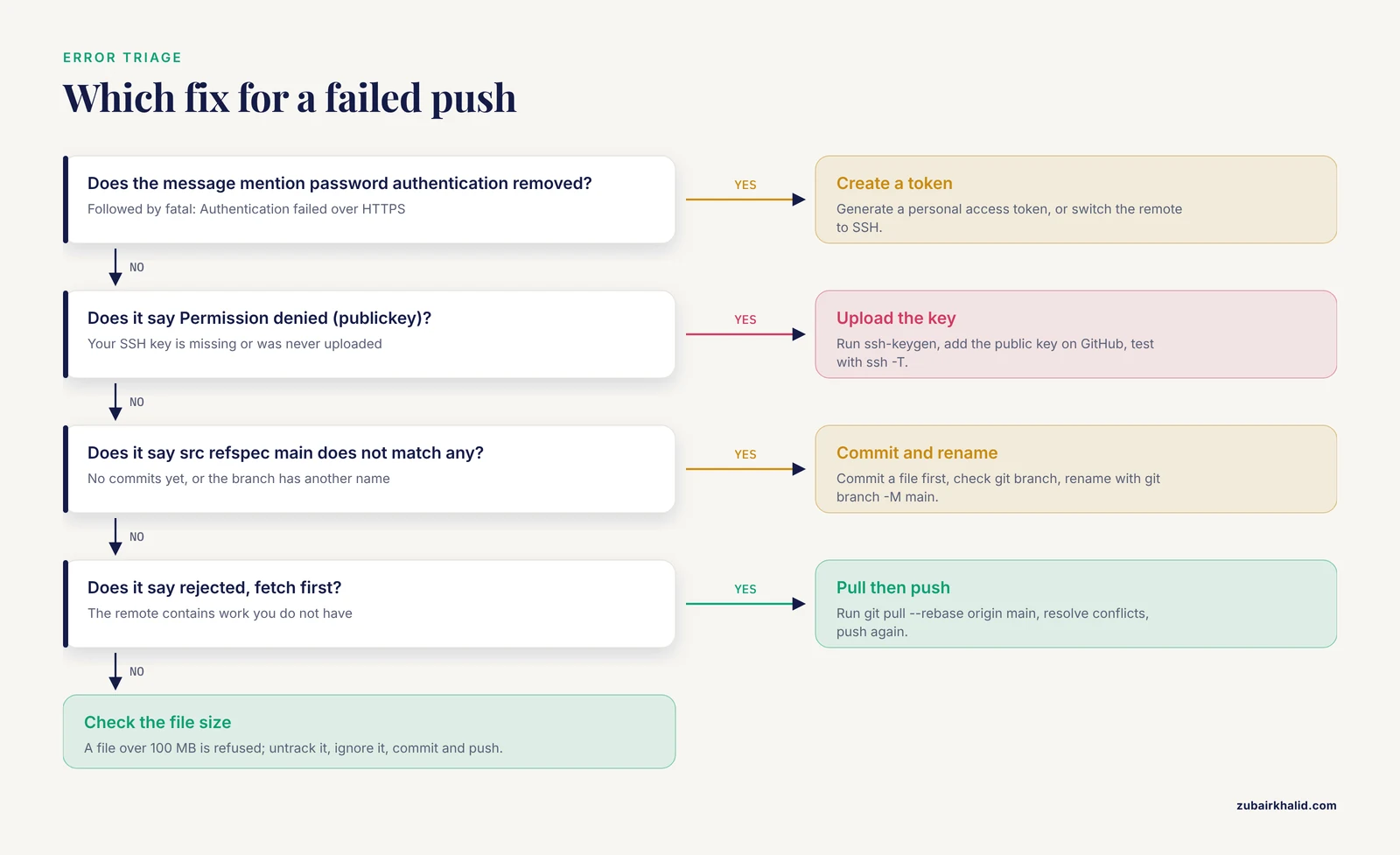
remote: Support for password authentication was removed on August 13, 2021. followed by fatal: Authentication failed. You pushed over HTTPS with your account password. Create a personal access token under Settings, Developer settings, or switch the remote to SSH with git remote set-url origin [email protected]:alovelace/rna-seq-pipeline.git.
Permission denied (publickey). Your SSH key is missing or was never uploaded to GitHub. Generate one with ssh-keygen, add the public key under Settings, SSH and GPG keys, then test with ssh -T [email protected].
error: src refspec main does not match any. You have no commits yet, or the branch is named something other than main. Commit a file first, check the branch name with git branch, and rename with git branch -M main if needed.
! [rejected] main -> main (fetch first) with the hint "Updates were rejected because the remote contains work that you do not have". Someone else pushed commits you do not have locally. Run git pull, rebase origin main, resolve any conflict (a situation where both versions changed the same lines, which Git marks in the file for you to edit), then push again.
fatal: not a git repository (or any of the parent directories): .git. You are outside a repository. Change into the project folder, or run git init if the folder was never initialized.
fatal: remote origin already exists. The remote is already configured. Check it with git remote -v and correct the URL with git remote set-url origin CORRECT-URL.
remote: error: File data/run1.fastq.gz is 180.00 MB. This exceeds GitHub's file size limit of 100.00 MB. The push was refused because a single file is too large. Remove it from the commit with git rm, cached data/run1.fastq.gz, add its pattern to .gitignore, commit, and push. If the file is already in earlier commits, the history needs rewriting with a tool such as git filter-repo, or you can start a fresh repository and copy over only the clean files.
Check That Everything Worked
A pushed repository passes four checks.
git statusreports "nothing to commit, working tree clean", meaning the files you see match the last snapshot.git log, onelineshows your commits, and the newest line lists bothHEAD -> mainandorigin/main, which means local and remote agree:
e4f5a6b (HEAD -> main, origin/main) Filter genes with very low counts before normalization
3f9a1c2 Initial commit: analysis scripts, README, ignore rules- The GitHub page shows the files, the commit message, and a fresh timestamp.
- A fresh clone in a scratch directory contains everything needed to run the analysis.
If all four pass, anyone in your lab can reproduce your starting point with one command.
Make Your Code Findable and Citable
A repository nobody can understand is only half a push. Four additions make code usable by others.
README. State what the project does, the software and package versions required, the exact command to rerun the analysis, and where output appears. Pin the environment with a requirements.txt for Python or a renv.lock for R so versions are recorded.
License. Without a license file, others can read your public code but do not have permission to reuse it. MIT and GPL are common research choices.
Code availability statement. Journals increasingly request one at submission [1]. The pattern is a single sentence with a URL, and published papers show the form: the nanopore augmentation study points to its code and data at github.com/JavierKipen/browDataAug [4].
Release. When the paper is accepted, tag the exact code state with a version number on the GitHub Releases page, for example v1.0.0, so the statement in your paper keeps pointing at the same code indefinitely.
R users who want the whole pipeline automated can adopt workflowr, which wires Git version control, literate R Markdown analysis documents, automated reproducibility checks, and a published results website into one workflow simple enough for novices [3].
Sensible Next Steps
- Protect the
mainbranch in the repository settings so direct pushes are blocked in favor of pull requests. - Invite collaborators with the least access they need, and ask them to work on branches.
- Add automated checks that run your tests or a smoke-test script on every pull request.
- Archive a tagged release at each milestone so old results stay traceable to old code.
Common Mistakes and Limitations
Pushing sensitive data. The most consequential research mistake is committing patient identifiers, and a private repository is not a safe container for them [1]. Deletion does not help, because the file remains in earlier commits. Keep identifiable data on institutional storage, list its patterns in .gitignore, and treat any accidental commit of clinical data as an incident to report to your data security office.
Committing credentials. API keys, cloud tokens, and database passwords in committed configuration files are found quickly by automated scanners that index public repositories. If one slips out, revoke or rotate it immediately, remove it from history with a tool such as git filter-repo, and consider the key burned regardless.
Treating GitHub as a data archive. GitHub rejects individual files larger than 100 MB and warns about files above 50 MB. Raw reads, alignment files, and model weights belong on institutional or cloud storage, with their paths documented in the README. Git Large File Storage exists for the occasional large binary, but it is not unlimited storage.
Editing on two computers without pulling. The second machine's push is rejected because the first machine's commits are not present. Pull before you start, push when you stop, and the problem disappears.
One giant final commit. A single commit named final_version2 cannot answer a reviewer who asks which code produced Figure 3. Commit small units often.
Vague messages. update, fixes, and final tell a collaborator nothing. Write what changed and why in one line.
Force pushing to shared branches. git push, force overwrites the remote branch and can erase colleagues' commits. Use it only on your own branches, and prefer git push, force-with-lease, which refuses if someone else pushed in the meantime.
Initializing the GitHub repository with a README when your folder already has files. The two histories diverge and the first push is rejected. Either leave the initialization options unchecked at creation, or pull with git pull origin main, allow-unrelated-histories before pushing.
Limitations. Git fluency takes a few weeks of daily use, and graphical clients such as GitHub Desktop reduce the command load while you learn. Git records code, not data or software environments, so a repository alone is not a complete reproducibility package. Pair it with environment files and institutional data storage. A public repository is also permanent in practice, since clones and forks can persist even after you delete the original.
Frequently Asked Questions
What is the difference between Git and GitHub?
Git is the version control program that records snapshots of your project on your own computer. GitHub is a website that hosts a copy of the repository online, adding backup, sharing, and collaboration features. You commit with Git and push to GitHub.
Can I store patient data or large sequencing files in my repository?
No. Identifiable patient data must never enter a version-controlled repository, and a private repository does not change that [1]. GitHub also rejects individual files larger than 100 MB. Keep raw data on institutional storage and list its file patterns in .gitignore.
How do I push an existing project folder that has never used Git?
Open a terminal in the folder, run git init, add a .gitignore and README, stage and commit your files, connect the remote with git remote add origin, then run git push -u origin main. The eight-step walkthrough above shows every command and its expected output.
Why does git push say "Everything up-to-date" when my changes are missing on GitHub?
Usually the changes were never committed, or you are on a different branch than the one you pushed. Run git status to find uncommitted files and git log, oneline to see which branch holds your work, then commit and push again.
How do I fix a push rejected because the remote contains work I do not have?
Run git pull, rebase origin main, resolve any conflicts Git reports, then push again. Pulling before each work session prevents the situation entirely.
How do I credit a collaborator on a commit I made?
Add a Co-Authored-By: trailer as the last line of the commit message, followed by the collaborator's name and email in angle brackets. GitHub then lists that person on the commit [5].
Should my research repository be public or private?
Keep it private while the project is unpublished, then make it public when the paper appears. Private repositories are free, but neither setting makes a repository an appropriate home for patient data or credentials.
How do I make my code citable in a paper?
Add a one-sentence code availability statement with the repository URL to your manuscript, tag a versioned release such as v1.0.0 when the paper is accepted, and include a README and license so others can rerun the work [4].
Sources
- Version Control for Surgical Data Science: A Primer on Git and GitHub.
- Open source code for behavior analysis in rodents.
- Creating and sharing reproducible research code the workflowr way.
- Brownian motion data augmentation: a method to push neural network performance on nanopore sensors.
- A mixed-methods analysis of micro-collaborative coding practices in OpenStack.