Provenance Tracking in Snakemake and Nextflow: Step-by-Step Guide
By Dr. Zubair Khalid, DVM, MS, PhD ·
By the end of this guide you will be able to do four things. First, you will run a Snakemake workflow and query exactly which files, parameters, code, and software environments changed between runs. Second, you will run a Nextflow pipeline with execution traces, reports, and machine-readable provenance records. Third, you will connect both systems to data-level version control so that the inputs themselves carry provenance, not just the outputs. Fourth, you will know how to package all of this into a reproducible archive that another person, or you in six months, can actually use.
You need a Linux or macOS machine with Git installed, Conda or Mamba for environment management, Snakemake 8 or later, and Nextflow 23 or later with Java 17 or later. Docker or Apptainer helps but is not required for the walkthrough. Everything here runs on a laptop. Larger genomics data storage needs, such as moving provenance into institutional archives, are covered in the data management section.
What Provenance Means in a Workflow Manager
Provenance is the record of where a piece of data came from and every process that touched it. In a bioinformatics pipeline, provenance answers three questions for any result file. Which input files went into it. Which code, parameters, and software versions transformed those inputs. And when, and on what compute environment, the transformation ran.
Provenance differs from reproducibility. Reproducibility means you can rerun the analysis and get the same result. Provenance means you can explain how the current result was produced, even if rerunning is impossible because a database was updated or a cluster node is gone. A workflow manager gives you both when configured well, but they are separate properties, and the tools track them separately.
Both Snakemake and Nextflow record provenance automatically to some degree. The record usually sits in hidden directories next to your project, and most people never look at it until something goes wrong. The core skill in provenance tracking snakemake nextflow work is knowing where those records live, how to query them, and how to promote them from scratch directories into durable archives.
There are two layers of provenance in genomics work. Workflow provenance covers executions: the commands, parameters, versions, and file relationships inside a run. Data provenance covers the inputs themselves: the origin, version, and integrity of a FASTQ file or reference genome before your workflow ever sees it. Treat the two layers as separate systems that must agree at the boundary. Research data platforms built around this idea, such as registries that version public datasets as software-like packages, show why data provenance matters. The BioBricks.ai project packages public biological and chemical datasets as modular Data Version Control (DVC) Git repositories, each with an extract-transform-load pipeline, so that data assets can be installed, resolved, and updated with a package-manager-like interface [1]. Your own pipeline inputs deserve the same treatment on a smaller scale.
Prerequisites and Environment Setup
Create an isolated environment for the tools first. Pin versions in the environment definition so the environment itself becomes part of your provenance.
mamba create -n wf-prov -c conda-forge -c bioconda \
    snakemake python=3.11
mamba create -n nf-prov -c conda-forge \
    nextflow openjdk=17
Verify both installations.
conda activate wf-prov
snakemake --version

conda activate nf-prov
nextflow -version
Expected output for Snakemake looks like this:
8.14.0The Nextflow command prints a version block with the executable version, JVM version, and operating system. Write both version strings into a TOOLS.md file in your project root. This file is the first entry in your provenance record and costs nothing to maintain.
You also need Git initialized in every project directory. Workflow code changes are a provenance category of their own, and neither workflow manager can track code history better than Git can.
git init
git add Snakefile config.yaml envs/
git commit -m "Initial workflow definition"
Snakemake Provenance Tracking Step by Step
Snakemake writes provenance records for every output file automatically. The records live in .snakemake/metadata/ as one JSON file per tracked file. Each record stores the rule name, the shell command, the parameter values, the input file versions, the conda environment, and the container image used to produce that file. You never have to opt in. You do have to know how to query it.
Build a small workflow with full directives
Create this directory layout:
myproject/
  Snakefile
  config.yaml
  envs/align.yaml
  resources/reference/genome.fa
  reads/
  results/
  logs/
  benchmarks/
Add a minimal Snakefile with the directives that feed provenance: params, log, benchmark, and conda.
configfile: "config.yaml"

SAMPLES = config["samples"]

rule all:
    input:
        expand("results/bam/{sample}.sorted.bam", sample=SAMPLES)

rule bwa_mem:
    input:
        reads=lambda wc: config["reads"][wc.sample],
        ref="resources/reference/genome.fa"
    output:
        "results/bam/{sample}.sorted.bam"
    params:
        rg="@RG\\tID:{sample}\\tSM:{sample}"
    log:
        "logs/bwa_mem/{sample}.log"
    benchmark:
        "benchmarks/bwa_mem/{sample}.tsv"
    conda:
        "envs/align.yaml"
    threads: 8
    shell:
        "bwa mem -t {threads} -R '{params.rg}' {input.ref} {input.reads} "
        "2> {log} | samtools sort -@ {threads} -o {output} - "
        "2>> {log}"
The params directive matters for provenance because parameter values are hashed and stored per output file. If you change a parameter, Snakemake detects the mismatch on the next run and tells you which files it affects. The log and benchmark directives redirect runtime evidence into files you control rather than the terminal scrollback, which disappears.
Pin the software environment explicitly. Unpinned environments undermine every other provenance measure, because the same env file can resolve to different package builds on different days.
channels:
  - conda-forge
  - bioconda
dependencies:
  - bwa =0.7.17
  - samtools =1.19
Run the workflow:
snakemake --cores 8 --use-condaExpected tail output:
Finished job 0.
100 of 100 steps (100%) done
Complete log: .snakemake/log/2026-11-11T140211.123456.snakemake.log
Note the timestamped log path. Snakemake archives every run's full log under .snakemake/log/ with a timestamp in the filename. These files are part of your provenance record and should be copied into your results archive.
Query what changed between runs
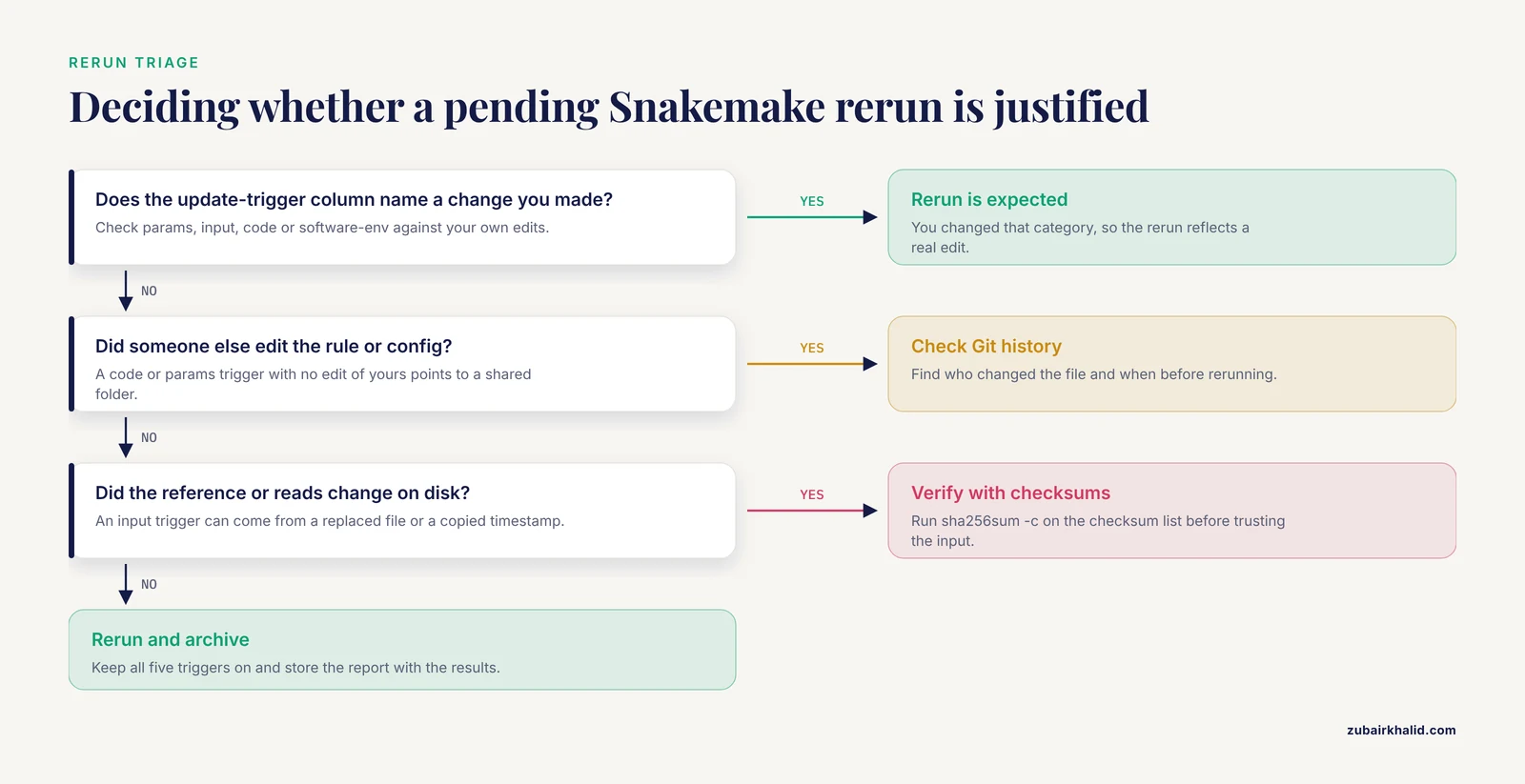
Now change a parameter in config.yaml, for example a mismatch penalty, and run the summary command before rerunning:
snakemake --summaryExpected output:
output-file                        date                 input-file(s)                          update-trigger
results/bam/sampleA.sorted.bam     2026-11-11 14:02:11  resources/reference/genome.fa, ...     params
results/bam/sampleB.sorted.bam     2026-11-11 14:05:40  resources/reference/genome.fa, ...     params
The update-trigger column is the heart of Snakemake provenance tracking. It names the category that changed: input, params, code, or software-env. If a colleague edited the shell command in the rule, the trigger shows code. If the reference genome file was replaced, the trigger shows input. This one command answers the most common provenance question in practice: why does the pipeline want to rerun, and is that rerun justified?
The focused variants list only the files affected by one category:
snakemake --list-params-changes
snakemake --list-input-changes
snakemake --list-code-changes
snakemake --list-untracked
-list-untracked is easy to overlook and valuable. It reports output files present in your results directories that no rule currently knows how to produce. Those orphan files are a classic source of confusion in shared project folders, because they look like results but no provenance record explains them.
Control rerun behavior deliberately
Snakemake decides to rerun based on configurable triggers. Since version 7.8, the default trigger set covers modification time, parameters, inputs, code, and the software environment:
snakemake --cores 8 --use-conda \
    --rerun-triggers mtime,params,input,code,software-env
Keep the full set in production. Each trigger guards against a different silent failure. Dropping software-env from the list means an environment rebuild with different package builds will not trigger a rerun, and your results will drift from your recorded environment.
Generate a self-contained provenance report
After the run, produce an HTML report:
snakemake --report reports/run_2026-11-11.htmlThe report bundles the DAG (directed acyclic graph, the workflow structure), runtime statistics, per-file metadata, software environment definitions, and captured log output into a single file you can email or attach to a data deposit. For projects with external collaborators or journal data availability statements, generating one report per analysis run and storing it next to the results is the cheapest durable provenance practice available.
Inspect the raw metadata
The JSON records under .snakemake/metadata/ are the machine-readable ground truth:
ls .snakemake/metadata | head
python -m json.tool .snakemake/metadata/results/bam/sampleA.sorted.bam \
    | head -30
You will see the rule name, the exact shell command, the input file hashes, and the conda environment recorded for that output. When a reviewer asks which version of bwa produced a BAM file, this record answers the question without any guesswork.
Nextflow Provenance Tracking Step by Step
Nextflow's provenance model differs from Snakemake's in one structural way. Snakemake attaches metadata to output files in your working tree. Nextflow keeps every task in a hashed work directory and exposes provenance through run history, log files, and optional reports.
Write a minimal pipeline
Create main.nf:
nextflow.enable.dsl = 2

process ALIGN {
    tag "${sampleId}"
    container 'biocontainers/bwa:0.7.17'

    input:
    tuple path(reads), val(sampleId)
    path reference

    output:
    tuple path("${sampleId}.bam"), val(sampleId), emit: bam

    script:
    """
    bwa mem ${reference} ${reads} \\
        | samtools sort -o ${sampleId}.bam -
    """
}

workflow {
    reads_ch = Channel.fromPath("reads/*_R1.fastq.gz")
        .map { r -> tuple([r, r], r.simpleName) }
    ALIGN(reads_ch, file("resources/reference/genome.fa"))
    ALIGN.out.bam.view()
}
Declare the pipeline identity in nextflow.config so every provenance record carries it:
manifest {
    name = 'myorg/align-demo'
    version = '0.1.0'
    description = 'Alignment demo with provenance tracking'
}

docker.enabled = true
Run with the standard provenance flags
nextflow run main.nf \
    -with-report report.html \
    -with-trace trace.txt \
    -with-timeline timeline.html \
    -with-dag dag.html
Expected terminal tail:
Completed at 11-Nov-2026 14:19:44
Duration    : 1m 12s
CPU hours   : 0.1
Succeeded   : 4
Four artifacts land in your launch directory. trace.txt is the machine-readable record and is the most useful for archival. report.html collects execution metrics, timeline.html shows resource usage per task over time, and dag.html renders the workflow graph. Generate all four on every run, then archive them with the results. They cost seconds to produce and are the difference between a run you can explain and a run you can only remember.
Read the trace file
trace.txt contains one row per task with stable columns:
task_id  status  process  tag      hash       exit  elapsed  peak_rss
1        COMPLETED  ALIGN  sampleA  1a/2b3c4d  0     22.1s    1.2 GB
2        COMPLETED  ALIGN  sampleB  5e/6f7a8b  0     21.7s    1.1 GB
The hash column deserves attention. Nextflow derives each task hash from the task script, the inputs, and the container. That hash is the task's provenance key. Any task with the same hash produces the same result, which is the mechanism behind -resume:
nextflow run main.nf -resume -with-trace trace_resume.txtExpected output:
Launch completed successfully
Cached process versions (1): 100%
On resume, tasks whose hashes match the previous run are marked CACHED in the trace and are not executed. This means the trace file itself distinguishes freshly computed results from reused ones, which is provenance information in its own right. A reader of the resumed trace knows exactly which results came from which code state.
Query run history
Nextflow keeps a persistent run history:
nextflow logExpected output:
TIMESTAMP            DURATION  RUN NAME    STATUS  SESSION ID                        COMMAND
2026-11-11 14:19:44  1m 12s    mad_curie   OK      4f1c9a2b-...                      nextflow run main.nf ...
Filter the history for a specific run's tasks:
nextflow log mad_curie -f process,tag,hash,statusExpected output:
process  tag      hash      status
ALIGN    sampleA  1a/2b3c4d  COMPLETED
ALIGN    sampleB  5e/6f7a8b  COMPLETED
Every task also leaves its actual executed script, stdout, stderr, and environment file inside work/<hash prefix>/<hash>/, with names like .command.sh, .command.out, and .command.err. If you ever need to know the literal bytes that a task executed, those files are the answer, captured at run time and untouched afterward.
Add machine-readable provenance with the nf-prov plugin
For formal, transferable provenance records, the nf-prov plugin adds support for exporting run provenance in the RO-Crate format, a standardized way to package research objects with their metadata. The plugin requires Nextflow 24 or later. Add this to nextflow.config:
plugins {
    id 'nf-prov'
}

prov {
    formats {
        rocrate {
            type = 'ro-crate'
            file = 'ro-crate-metadata.json'
            overwrite = true
        }
    }
}
With the plugin loaded, each run emits a provenance record describing the workflow, its tasks, and the files they consumed and produced. The exact configuration keys continue to evolve, so check the plugin documentation for your Nextflow version. The principle holds across versions: the RO-Crate output is a structured, standards-based provenance package rather than a collection of ad-hoc log files, which matters when a repository or journal asks for machine-actionable provenance.
Snakemake and Nextflow Provenance at a Glance
| Capability | Snakemake | Nextflow |
|---|---|---|
| Automatic task metadata | JSON record per output file in .snakemake/metadata/ | Hashed task directories under work/ with .command.* files |
| Run history query | snakemake, summary, -list-params-changes | nextflow log, nextflow log <run> -f process,hash |
| Change detection | -rerun-triggers mtime,params,input,code,software-env | Content-based task hashing with -resume |
| Human-readable report | -report report.html | -with-report, -with-timeline, -with-dag |
| Machine-readable trace | .snakemake/metadata JSON | trace.txt from -with-trace, RO-Crate via nf-prov |
| Software environment capture | Conda env YAML and container digest stored in metadata | Container image and digest recorded in logs and trace |
| Cached-versus-fresh distinction | Rerun triggers at file level | CACHED status per task in trace |
The systems are complementary rather than competing. Many groups use Snakemake for method development on small data and Nextflow for production genomics at scale, and both benefit from the same data-level versioning underneath.
Extending Provenance to the Data Layer
Workflow provenance stops at your input files. If reads/sampleA_R1.fastq.gz arrived from a collaborator's Dropbox link with no version information, the finest provenance tracking in your pipeline cannot rescue the analysis. Data-level provenance requires the same discipline as code versioning: immutable raw data, explicit versions, and integrity checks.
Three practices cover most cases in routine bioinformatics data management.
First, checksum every raw input file on arrival and store the checksum list with the data:
sha256sum data/raw/*.fastq.gz > data/raw/checksums.sha256Verify before any run that touches those files:
sha256sum -c data/raw/checksums.sha256If the check passes, you can assert in your provenance record that the workflow consumed the exact bytes you cataloged. If it fails, no workflow provenance matters, because the input changed.
Second, version data directories the way you version code. Git alone cannot handle large FASTQ and BAM files, but DVC tracks large files by storing content in a cache and committing lightweight pointer files to Git. The pattern looks like this:
dvc init
dvc add data/raw/sampleA_R1.fastq.gz
git add data/raw/.gitignore data/raw/sampleA_R1.fastq.gz.dvc
git commit -m "Add sampleA raw reads"
The committed .dvc pointer records the file's content hash, so any Git tag or branch of the repository corresponds to a fully defined state of the data. This is exactly the model behind BioBricks.ai, where each dataset is a DVC Git repository with an ETL pipeline and a package-manager-style interface handles dependency resolution and updates, letting researchers assemble multi-dataset analytic cohorts in minutes instead of the days that bespoke scripts require [1]. The project's authors note that continued expansion of automated provenance tracking will further strengthen FAIR data practices, which signals where the ecosystem is heading: provenance is moving from a pipeline concern to a data registry concern [1]. You can adopt the same pattern locally even without a shared registry. A data repository with a dvc.yaml describing how raw files became a curated intermediate gives you data lineage you can recompute.
Third, use an established archival pattern for large public datasets rather than hand-rolling one. TCGA Expedition illustrates the model at institutional scale. It consists of scripts in Bash, Python, and Java that download, extract, harmonize, version, and store all TCGA data and metadata, supporting command-line access at high-performance computing facilities while applying security and regulatory controls consistent with federal best practices [2]. The scale is enormous, with TCGA public data exceeding 1.2 Petabytes across whole genome sequence, whole exome sequence, methylation, expression, proteomic, and clinical datasets [2]. The relevant lesson for a single-lab provenance policy is structural, not size-based. Data were versioned and archived as a first-class operation, separate from analysis, so that any downstream pipeline could cite an exact data version rather than a portal URL that changes [2].
On genomics data storage, align your provenance plan with your storage plan. Raw sequencing data should live in storage that is effectively read-only after ingestion, with checksums verified on read and with version identifiers that appear in your workflow configuration files. When config.yaml references a data version tag such as cohort-v2.3 rather than a mutable directory, the data version becomes part of the automatic provenance record that Snakemake and Nextflow already capture.
Finally, bind the layers together at the end of a run. A practical archive for a completed analysis contains the workflow code at a specific Git commit, the workflow manager's provenance artifacts (Snakemake report or Nextflow trace and RO-Crate), the data version pointers, and the checksum manifests. Write a single MANIFEST.md listing those four elements, and commit it. Anyone auditing the analysis later has a complete chain from raw data bytes to final figures.
Common Mistakes and Limitations
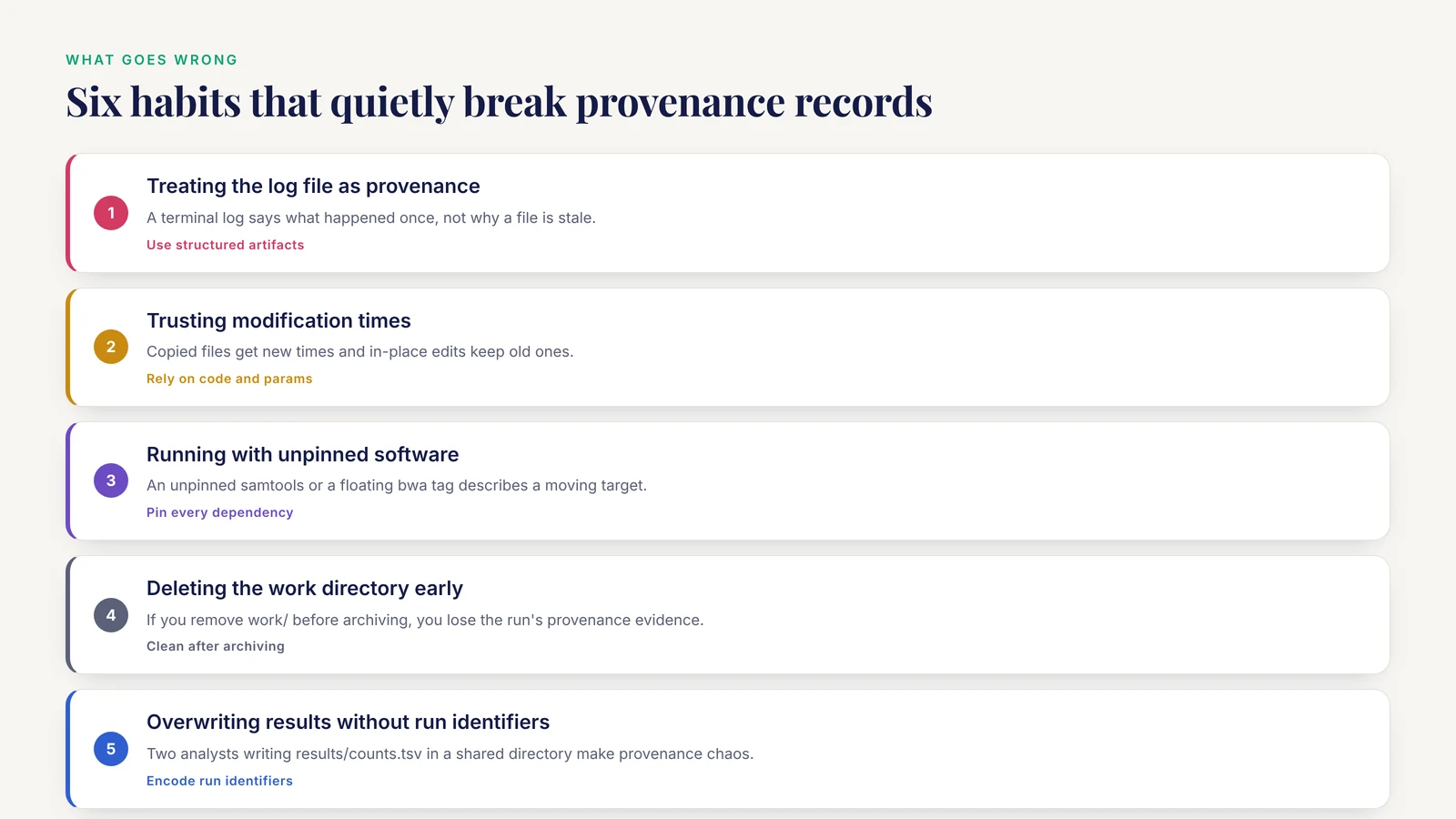
Treating the log file as provenance. A terminal log tells you what happened during one run but cannot tell you why a file is stale or which parameter produced it. Use the structured artifacts: Snakemake metadata and summary queries, Nextflow traces and history. Logs belong in the archive as supplementary evidence, never as the only record.
Trusting modification times. A file copied to a new filesystem gets a new modification time with identical content, and a file edited in place keeps its original timestamp with new content on some systems. Snakemake's mtime rerun trigger exists for speed, not for correctness. Rely on the code, params, and software-env triggers, and use checksums for anything you did not generate yourself.
Running with unpinned software. If your conda environment file lists samtools without a version, the environment captured in your provenance record describes a moving target. Pin every dependency. The same applies to containers. A floating tag such as bwa:latest can point to different binaries next month. Pin by digest where your registry supports it.
Deleting the Nextflow work/ directory too early. The hashed task directories are where executed scripts and outputs live. If you remove work/ before publishing and archiving results, you destroy the run's provenance evidence and lose the ability to resume. Clean work directories only after copying the trace, report, and published outputs into durable storage.
Overwriting results without run identifiers. Two analysts writing results/counts.tsv in a shared directory produce provenance chaos. Encode run identifiers or sample versions into output paths, or run each analysis in its own directory tree, so provenance records never describe a file that was replaced underneath them.
Assuming provenance covers manual steps. Neither Snakemake nor Nextflow records the manual database query you performed to build a gene list, the spreadsheet edit a collaborator made, or the file renamed by hand on a Friday. Any step outside the workflow is invisible to workflow provenance. Move such steps into the workflow, or document them in a dated lab notebook entry referenced by the manifest.
Ignoring the provenance of the workflow manager itself. Snakemake and Nextflow both evolve. A provenance record produced by Snakemake 6 may not be readable by Snakemake 8 tooling. Record the workflow manager's version in TOOLS.md and keep old environments installable.
A limitation worth stating plainly. Provenance tracking in these tools covers computational lineage well. It does not certify scientific validity, correct metadata entry at the bench, or appropriate sample identity management. Those require laboratory information systems and human review. And in individual research cases, data governance questions, particularly around human genomic data, need input from your institution's compliance office rather than from a general guide.
Frequently Asked Questions
Does Snakemake track provenance automatically?
Yes. Every output file receives a JSON metadata record under .snakemake/metadata/ capturing the rule, command, parameters, inputs, and environment, and every run writes a timestamped log under .snakemake/log/. You query these records with snakemake, summary and the -list-* flags rather than reading JSON by hand.
How do I see what changed since my last Snakemake run?
Run snakemake, summary before rerunning. The update-trigger column reports whether inputs, parameters, code, or the software environment changed for each output file, which tells you whether the pending rerun is expected.
How do I enable provenance tracking in Nextflow?
Add the standard flags at launch: -with-trace, -with-report, -with-timeline, and -with-dag. For standards-based, machine-readable provenance, add the nf-prov plugin to nextflow.config, which exports run provenance in the RO-Crate format on Nextflow 24 and later.
Where does Nextflow store task provenance?
Task provenance lives in hashed directories under work/, containing the executed script, standard output, standard error, and environment details for each task. Run-level provenance lives in nextflow log history, .nextflow.log, and the trace file produced by -with-trace.
What is the nf-prov plugin?
It is a Nextflow plugin that exports structured provenance for a run, including the workflow, tasks, and files, in the RO-Crate research object format. It suits journals and repositories that request machine-actionable provenance rather than plain log files.
Do I still need Git if the workflow manager records code?
Yes. Snakemake detects that rule code changed, but Git records who changed it, when, why, and what the previous versions were. Commit every workflow change before rerunning, and store the commit hash in your run manifest.
How should I version raw sequencing data?
Use checksums plus a data versioning tool such as DVC, which commits lightweight pointer files with content hashes to Git while storing large files in a cache. Reference a data version tag in your workflow configuration so the version enters the automatic provenance record. Public-data registries built on DVC repositories, such as BioBricks.ai, demonstrate the approach at community scale.
What is the difference between reproducibility and provenance?
Reproducibility is the ability to rerun an analysis and get the same result. Provenance is the ability to explain how the current result was produced. You can have provenance without reproducibility, for example when a database was updated, and reproducibility claims are weak without provenance records to support them.