Troubleshooting Provenance Gaps in Bioinformatics Pipelines
By Dr. Zubair Khalid, DVM, MS, PhD ·
The most common cause of provenance gaps in bioinformatics pipelines is an untracked manual step sitting between two tracked steps. A file gets copied, renamed, subsetted, or edited by hand, usually in a terminal, a spreadsheet, or a notebook cell that was never committed, and the record of how the data moved from raw input to analysis-ready input disappears. Everything before and after that step may be perfectly logged by a workflow engine, but the connection is broken, and the gap is what you discover months later when a reviewer, a collaborator, or a regulatory auditor asks a simple question: where exactly did this input come from?
The first thing to check is always the same. Pick one output file whose history you cannot explain, compute its checksum, and walk backward. Compare the checksum against any manifest you have, look at the file timestamps on your storage, search the pipeline repository's git history around the file's creation date, and grep the shell history of the account that ran the job. In most labs, this ten-minute walk backward finds the gap: a cp or mv that was never recorded, a filter applied interactively in R, or a download that overwrote an earlier version of a reference file without a note. This article covers the full set of causes, from the mundane to the rare, gives you a diagnostic sequence, and explains how to fix each class of gap so it does not come back.
What a Provenance Gap Actually Is
Provenance, in the data management sense, is the documented history of a data artifact: where it came from, what process produced it, which software and parameters were used, and which inputs fed into it. A provenance gap is any point in that history where the chain of custody breaks. The file exists, the result exists, but no record connects one to the other in a way you can replay.
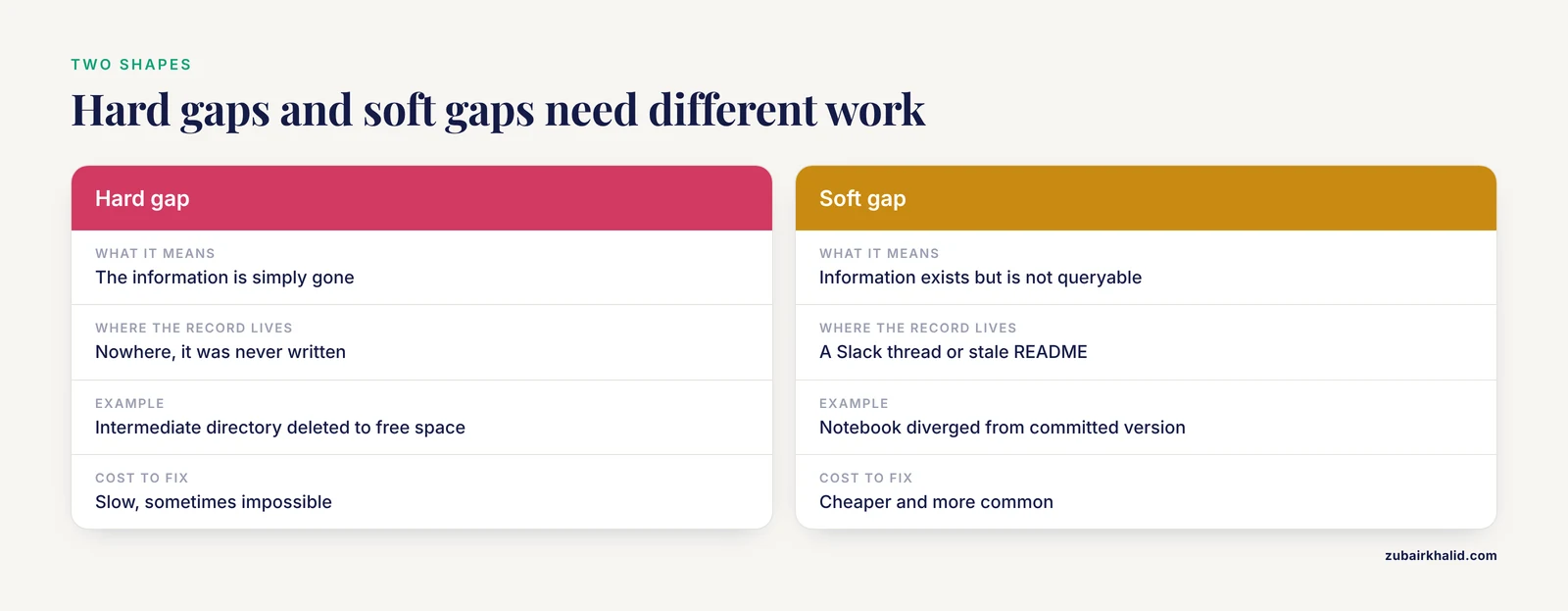
Gaps come in two shapes. A hard gap means the information is simply gone. Nobody recorded the command, the file was overwritten in place, the intermediate directory was deleted to free space, or the pipeline was run on a login node with history logging disabled. A soft gap means the information exists somewhere but is not queryable or trustworthy. It lives in a Slack thread, a README that stopped being updated, a Jupyter notebook that diverged from the committed version, or a pipeline log that was rotated away when the cluster cleaned old scratch space. Soft gaps are more common and cheaper to fix. Hard gaps usually require reconstructing the analysis from outputs, which is slow and sometimes impossible.
The practical test for whether you have a gap is replayability. Can a competent colleague, given your repository, your data store, and your documentation, regenerate the exact artifact from its declared inputs within a bounded amount of time, and confirm the result byte for byte or at least numerically? If the answer is no, you have a gap, and the troubleshooting below will tell you where it most likely sits.
A Quick Diagnostic Sequence You Can Follow Today
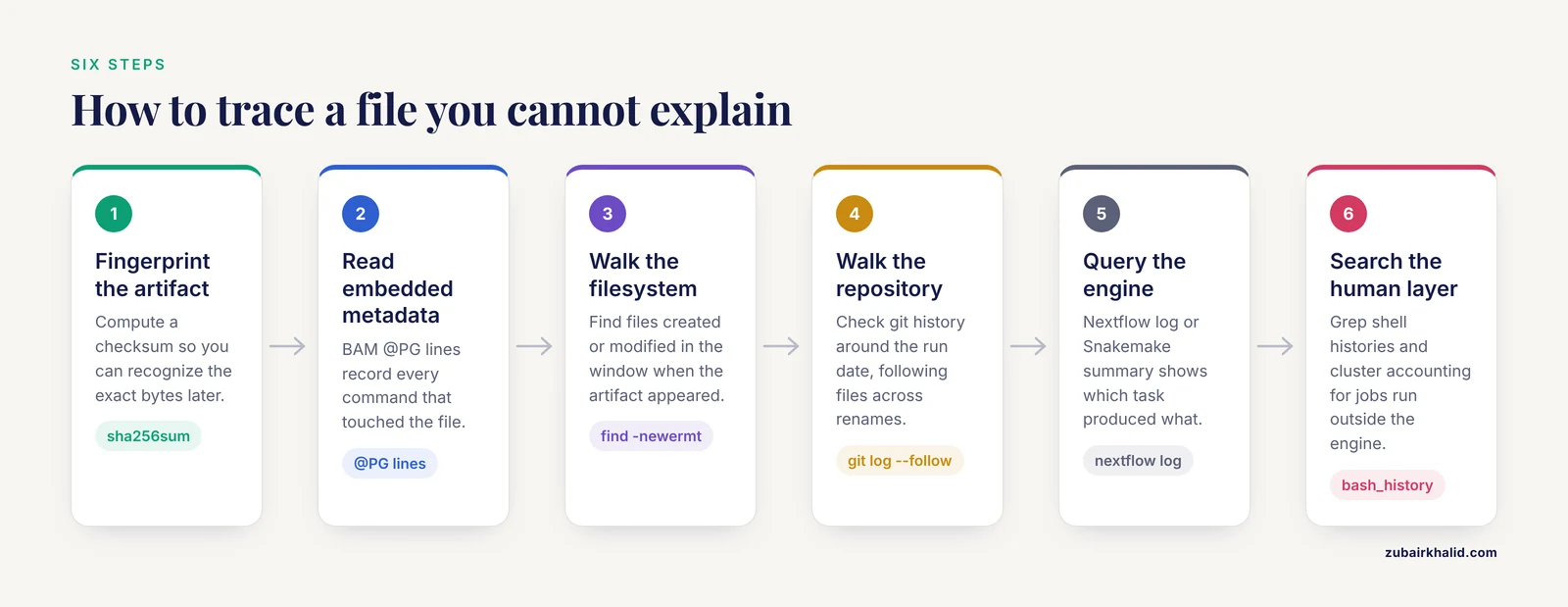
When a result cannot be traced, work through these steps in order. Each one either finds the gap or narrows where it must be.
- Fingerprint the artifact. Compute a checksum so you can recognize the exact bytes later. For a single file:
sha256sum results/cohorts/merged.vcf.gz > merged.vcf.gz.sha256If a manifest or checksum file already exists, verify against it with sha256sum -c. A mismatch tells you the file was modified or replaced after it was produced, which is itself a provenance event you need to account for.
- Read the embedded metadata. Many bioinformatics formats carry provenance in their headers. A BAM file records every command in
@PGlines. Check them:
samtools view -H aln/sample01.sorted.bam | grep '^@PG'If the header is missing @PG entries, the file was likely processed by a tool that did not write them or was converted through a format that stripped them. That conversion step is your gap.
- Walk the filesystem by time. Find every file created or modified in the window when the artifact appeared:
find /data/project -type f -newermt 2026-03-01 ! -newermt 2026-03-10Unexpected files in that window, especially in scratch/ or tmp/ directories, are good candidates for the missing step.
- Walk the repository history. If the pipeline lives in git, look at what changed around the run date:
   git log --since="2026-03-01" --until="2026-03-10" --oneline
   git log --follow -- configs/samplesheet.csv
The -follow variant matters because it tracks a file across renames, which is one of the most common ways sample metadata gets silently reorganized.
- Query the workflow engine. If the run used Nextflow, inspect the run history:
   nextflow log
   nextflow log -f hash,process,container
If it used Snakemake, ask the Directed Acyclic Graph (DAG), the dependency graph of jobs the workflow builds, what it knows:
   snakemake --summary
   snakemake --list-params-changes
These commands tell you which output files are older than their inputs and which parameters have changed since a file was generated. An output older than its input is a staleness gap, meaning the file on disk predates the current pipeline logic.
- Search the human layer. Grep shell histories on the relevant hosts (
~/.bash_history,~/.zsh_history), check cluster accounting records for jobs launched outside the workflow engine, and look at notebook save timestamps against the artifact creation time. This is where most hard gaps surface: acp, ased -i, or an interactive R session that ran at exactly the wrong moment.
If the artifact still cannot be explained after this sequence, treat the result as unverifiable. Rerun the analysis from declared inputs rather than building provenance after the fact, and label the original output accordingly.
Troubleshooting Table: Symptom, Cause, Confirmation, Fix
The table below is the core reference for this article. It lists the symptoms teams report most often, ordered roughly from most common to rarest, and maps each to its mechanism and fix.
| Symptom | Likely cause | How to confirm | Fix |
|---|---|---|---|
| A downstream file exists but no rule, task, or log claims it was produced | Manual step between workflow stages, such as a copy, rename, filter, or merge done in a shell or spreadsheet | Checksum matches no pipeline output, nextflow log and snakemake, summary show no producing task, shell history shows a cp or mv at the right timestamp | Re-express the step as a workflow rule or script, commit it, and rerun from the upstream input |
| Two runs of the same pipeline give different results with the same inputs | Unpinned tool versions, unpinned container images, or a floating reference database | Compare tool versions in @PG headers or nextflow log -f container between runs, check for :latest or unpinned tags in configs | Pin exact versions and container digests, then rerun both arms and diff the outputs |
sha256sum -c fails on a reference file or database | Reference data overwritten in place during a silent update | File modification time is later than the recorded download date, no version identifier in the filename or directory name | Move reference data into a versioned store where each version is immutable, restore the version the run actually used, and record its identifier |
| A published figure cannot be regenerated from the repository | Interactive analysis steps in a notebook or R console that were never committed | Notebook execution counts do not start at 1 and skip numbers, indicating out-of-order or edited execution, or analysis code exists only in the console history | Re-execute the notebook top to bottom against committed inputs, convert exploratory cells into scripts, and commit them |
| Pipeline results differ from the collaborator's despite identical code | Data snapshot mismatch, meaning each site downloaded the same public resource at different times | Compare file checksums and record counts for the shared input datasets between sites | Adopt a shared, versioned data source and reference its version identifier in the pipeline config, as described in the data acquisition section below |
| An output file is older than its declared input | Stale cache or resumed run that reused a partial result | snakemake, summary marks the file for rerun, or timestamps invert the dependency order | Invalidate the stale output, rerun with a clean mark, and configure resume behavior so invalidated results are not silently reused |
| Metadata columns no longer match the data table row for row | Metadata detached from data during harmonization or subsetting | Row counts differ between the expression matrix and the clinical table, or join keys collide and produce duplicated rows | Rebuild the join from a single committed script, add a row-count assertion to the pipeline, and version the metadata alongside the data |
| An archive restore does not match the original checksums | Bit rot, a failed migration, or an unlogged transformation during export and import | Verify restored checksums against the manifests created at write time | Re-export from the source of truth, rebuild manifests at each copy boundary, and treat every transfer as a checksummed event |
| Results depend on a database that changed between runs | Live queries against a resource that updates in place, such as an annotation API | Query response differs between archived run logs, or annotations changed for the same variant or accession | Snapshot the database version used by each run, store the snapshot or its immutable identifier, and query the snapshot instead of the live service |
| A resumed run produces different results from the full run | Nondeterministic behavior in a tool, such as unordered parallel writes or an uninitialized random seed | Rerun the identical job with the same inputs on the same engine and diff the outputs, isolating steps one at a time | Identify the nondeterministic step, set its seed or serialization explicitly, and add a regression check that diffs outputs between identical runs |
The Causes, Explained from Most Common to Rarest
Each failure mode below gets its mechanism, its diagnostic, and its fix. The ordering reflects how often these show up in real genomics groups, based on the practical experience of running multi-year pipelines.
1. Manual Steps Between Tracked Stages
This is the gap you will hit first and hit most often. The mechanism is simple: a workflow engine records what it executes, but it cannot record what a human types into a shell outside it. Someone notices a malformed sample sheet, fixes three lines by hand, reruns one stage, and moves on. The data on disk is now one edit ahead of the version control history. Six months later, the committed pipeline cannot reproduce the file that was actually analyzed.
Confirm the gap by working backward from the artifact, as described in the diagnostic sequence. The telltale sign is an output whose checksum matches nothing in the workflow engine's history but whose timestamp sits between two recorded stages.
The fix is structural, not motivational. Every transformation that touches data must live in a committed script or a workflow rule, no exceptions, including the quick fixes. A useful discipline is to treat any interactive command that modifies a project file as a bug in the pipeline and to write the rule the same day. Teams that adopt this rule find that the manual-edit habit fades within weeks because writing the rule is usually faster than explaining the gap later.
2. Unpinned Software and Containers
The second most common cause is software drift. A pipeline that runs bwa without a version, or pulls a Docker image tagged :latest, produces results that depend on whatever the registry served that day. When the tool updates, downstream outputs change silently, and the provenance chain now points at a label that describes two different programs at two different times.
Confirm this by extracting the recorded software identity from two runs and comparing. The @PG lines in a BAM header and the container field in Nextflow's run log are the fastest sources. If either shows an unpinned tag, treat both runs as potentially incomparable.
The fix is to pin exact versions everywhere. For containerized pipelines, resolve the image tag to its digest, the immutable content hash that identifies the exact image, and record the digest in the pipeline configuration. For conda environments, export and commit the full environment specification with version numbers. For tools compiled from source, record the commit hash. Once pinned, verify: run the pipeline twice on a small test dataset and confirm the outputs are identical.
3. Reference Data and Databases Without Versions
Genomics pipelines lean heavily on external resources: reference genomes, gene annotations, variant databases, protein records. These resources update on their own schedules, and a pipeline that simply points at a directory or a live endpoint inherits every update silently. The result is the classic cross-site reproducibility failure, where two groups run the same code on data they believe is the same and get different answers because their annotation snapshot dates differ by three weeks.
Confirm by comparing checksums and record counts for the shared input between the runs or sites that disagree. The mismatch localizes the gap to data acquisition rather than analysis.
The fix is to treat public data as versioned artifacts rather than as infrastructure. Two published systems illustrate the pattern. TCGA Expedition was built specifically to download, extract, harmonize, version, and store the full Cancer Genome Atlas data holdings, which exceeded 1.2 petabytes across genomic, methylation, expression, proteomic, and clinical data types, under a scripted, repeatable process rather than manual portal navigation [1]. That versioning step is what makes a later analysis defensible: the pipeline records which archive version it read, and that archive does not change underneath it. BioBricks.ai takes the same idea further by packaging public biological and chemical datasets as modular, independently versioned units, where each unit is a Data Version Control (DVC, a tool that version-controls large data files alongside a git repository) repository containing its own extract-transform-load pipeline, so consumers install a specific version of a dataset the way they would install a specific version of a software package [2]. When a pipeline declares [email protected] instead of "the current dump", the data acquisition step stops being a provenance gap.
4. Interactive Analysis Outside the Pipeline
Notebooks occupy an uneasy position in provenance. They mix narrative and code, which is valuable, but they also record execution order in cell counters, and a notebook whose counters skip and restart is a notebook whose saved state does not match any linear execution of its cells. The same problem appears in pure R or Python console sessions where an analyst computed an intermediate result interactively and saved it to disk. The artifact is real, but no script produces it.
Confirm by opening the notebook and checking whether the execution counts start at 1 and increase without gaps. Then check whether the notebook's committed version differs from the one that produced the published figure. For console-based work, the gap is confirmed by absence: no script mentions the artifact.
The fix is to make notebooks reproducible artifacts. Clear all outputs and restart the kernel, then execute top to bottom before committing. Any cell that depends on state created in an earlier interactive session gets rewritten to compute that state itself. For exploratory work that will never be part of the pipeline, keep it in a clearly labeled explore/ directory outside the analysis path so nobody mistakes it for a production step.
5. Metadata Detached From Data During Harmonization
Clinical and sample metadata usually arrive in a different shape than the assay data: separate tables, different identifier conventions, different update cadences. During harmonization, the process of making heterogeneous datasets consistent in structure and vocabulary, a join can silently duplicate rows when keys collide or drop rows when keys miss. The assay file and the metadata file are both versioned, but the join that connected them lived only in someone's memory of a long afternoon.
Confirm by comparing row counts and key sets across the joined and unjoined tables, then search the repository for the script that performed the join. If none exists, the harmonization step is the gap.
The fix is to version the harmonized table itself and generate it with a committed script that asserts its own invariants, such as one row per sample identifier and no duplicate keys. TCGA Expedition demonstrates the value of doing this at scale, since one of its core functions was re-associating genomic data with de-identified electronic health record data from a separate system, which is exactly the kind of cross-source join where provenance breaks if it is not scripted and logged [1].
6. In-Place Updates to Genomics Data Storage
Storage layout is part of provenance. When a pipeline reads from a shared directory where files can be modified in place, every concurrent or later run inherits an unversioned risk. An overwrite during a run can also corrupt a result in a way that looks like a software bug: the pipeline read a file that changed halfway through reading it. For large-scale genomics data storage, this failure mode is expensive because the affected files may take days to regenerate.
Confirm by checking modification times against expected activity. A reference file modified at 3 a.m. by an account that runs the update cron job, while a production run was in flight, is a strong signal. Restoring from backups and comparing checksums against write-time manifests distinguishes a legitimate update from corruption.
The fix is to make the directories pipelines read from immutable. Updates land in a new versioned directory, an atomic pointer flips to the new version, and running jobs finish against the old one. Every copy boundary, from the sequencer to the primary store to the archive, writes a checksum manifest at the moment of the copy, so any later verification has a reference point.
7. Logs and Intermediates Deleted Too Aggressively
Cluster hygiene deletes files, and provenance is often stored in the files that get deleted first. Scratch directories cleaned on a schedule, log rotation with short retention, and intermediates removed to save quota can all erase the evidence needed to reconstruct a gap after the fact.
Confirm by checking cleanup policies on the storage systems involved, and by testing whether a recent run's logs still exist for a job you know completed last month.
The fix is a retention policy that distinguishes between disposable scratch and provenance-bearing artifacts. The workflow engine's metadata, the software environment lockfile, the input checksums, and the run configuration are small files with outsized evidentiary value. Archive them with the final results, in the same storage system, under the same retention policy.
8. Cache and Resume Logic That Reuses Stale Results
Modern workflow engines offer caching and resume features that skip re-executing steps whose inputs and code are unchanged. These features are correct in principle but create a subtle provenance hazard: if the engine's invalidation logic misses a real change, for example because a change happened outside the tracked inputs, a resumed run will happily reuse an outdated intermediate and present it as current.
Confirm with the engine's own tooling. Snakemake's summary output flags files that are older than their inputs or whose parameters changed, and snakemake, list-params-changes reports rules whose parameters differ from the last run. For Nextflow, comparing the task hashes between a full run and a resumed run reveals which tasks were reused.
The fix is to include every input that affects a result in the rule's declared inputs, including reference files, parameter files, and container digests, and to run a full from-scratch execution periodically, ideally in continuous integration on a small test dataset, to verify that the cache logic and the true dependency graph agree.
9. Nondeterministic Tools and Race Conditions
The rarest and most confusing gap appears when provenance is complete and the result still cannot be reproduced. The mechanism is nondeterminism inside a tool: parallel workers writing to a shared output without a defined order, an uninitialized random seed, or a hash table whose iteration order leaks into output ordering. Two runs with identical recorded provenance produce different files.
Confirm by rerunning the identical job with identical inputs on the same engine and diffing the outputs, then bisect the pipeline stage by stage until the nondeterministic step isolates itself.
The fix is at the tool level. Set random seeds explicitly, ensure parallel writes go to per-worker files that are merged in a deterministic order, and add a regression check that runs a small dataset twice and diffs the outputs. This converts a mystery into a test failure with a named cause.
How to Fix Provenance Gaps Systematically
Point fixes close individual gaps. Systematic fixes change the conditions that produce gaps. These are the changes with the highest return, in rough order of effort.
First, version data the way you version code. The core insight behind DVC, and behind the BioBricks design, is that large data files can live under version control alongside the code that produced and transformed them, with the heavy bytes stored in a content-addressable backend and lightweight pointer files committed to git [2]. A pointer file records which exact data version the repository references, so checking out pipeline commit abc123 also declares which dataset version the pipeline consumed. For a lab starting from zero, the on-ramp is small: run dvc init, register your raw data directories with dvc add, and commit the generated pointer files. From that point, dvc status reports any drift between the declared data versions and what is actually on disk, which turns silent overwrites into loud errors.
Second, route public data acquisition through a versioned channel. Ad hoc downloads from portals are the largest single source of cross-site irreproducibility in genomics data management. The two systems discussed here solve it from different directions. TCGA Expedition scripts the entire acquisition, harmonization, versioning, and storage of a petabyte-scale public resource so that researchers get a coherent, versioned local archive rather than a folder of manually downloaded files [1]. BioBrills.ai... rather, BioBricks.ai provides a package-manager interface over more than 90 curated public datasets spanning genomics, proteomics, cheminformatics, and epidemiology, and its benchmark use cases show that assembling multi-dataset analytic cohorts drops from days to minutes compared with bespoke scripts [2]. The provenance benefit is the same in both cases: the dataset version becomes a declared, citable input instead of an accident of download timing.
Third, record the execution context with every result. A minimal provenance record for each output contains the workflow engine and version, the git commit of the pipeline, the container digests, the input checksums, the full resolved parameters, and the host environment. Most engines can emit most of this automatically. The habit that matters is storing this record with the result, not in a separate system that will drift.
Fourth, verify at copy boundaries. A checksum written at the moment a file is created is the anchor for every later investigation. Write manifests at every boundary where data moves between systems, and verify them on arrival. The cost is a few minutes of compute per terabyte. The benefit is that any silent modification, anywhere in the chain, becomes detectable.
Fifth, make the pipeline the only path to production data. Read access for humans stays open for exploration, but write access to analysis directories goes through committed code. This single policy prevents the largest class of gaps from forming at all.
A Worked Example: Tracing One Mysterious VCF
Consider a concrete case. A reviewer asks how the variants in cohortB.filtered.vcf.gz were selected. The pipeline repository has a filtering rule, but the checksum of the file on disk does not match the checksum recorded in the run manifest.
The diagnostic walks exactly the sequence above. sha256sum confirms the mismatch. The file's modification time is two days after the workflow run that should have produced it. git log, since shows one commit in that window: a change to the filter threshold in the config. Shell history on the analysis host shows an interactive bcftools view -i 'QUAL>30' command at the matching timestamp. The picture is now complete: after the workflow run, someone tightened the quality filter by hand, rewrote the file in place, and did not update the pipeline. The committed rule used a different threshold.
The fix has two parts. For this result, decide which filter is correct, update the committed config if the manual threshold was intended, and rerun the filtering stage so the artifact and its provenance agree. For the future, add a post-run verification step that checks output checksums against the manifest, so an in-place modification fails loudly at the next run instead of surfacing in peer review.
Prevention Practices That Hold Up Over Years
Prevention is mostly a small set of habits enforced by tooling rather than willpower.
- Commit everything that affects a result. Code, configs, sample sheets, environment lockfiles, and data version pointers all live in git. A run is reproducible when
git checkoutof one commit plus one data version fully describes it. - Pin software to immutable identifiers. Container digests, conda environment exports, and tool commit hashes, recorded per run, not per pipeline.
- Write checksum manifests at every data boundary. Ingestion, migration, archive, and restore are all checksummed events.
- Snapshot external databases per run. Never query a live annotation service inside a pipeline. Read from a frozen, identified version.
- Archive run metadata with results. Engine logs, resolved parameters, and environment records follow the outputs into long-term storage.
- Run a small end-to-end test continuously. A tiny dataset, run from raw inputs to final outputs on every pipeline change, catches drift in tools, references, and cache logic while the change is still one commit deep.
- Keep provenance queries cheap. A one-command answer to "what produced this file" is the goal. If the answer requires archaeology, the archaeology is the gap.
Common Mistakes and Limitations
Several recurring mistakes deserve their own section, because they are the ones experienced teams still make.
Reconstructing provenance after the fact and presenting it as if it were recorded. A post-hoc reconstruction built from memory and shell history is a hypothesis, not a record. It is honest and sometimes necessary, but it should be labeled as reconstructed, and the pipeline should then be rerun to produce a genuine record.
Versioning data without versioning the acquisition code. Copying a dataset into a versioned store helps, but if the script that fetched and preprocessed it is not committed with the data version, the gap just moved one step upstream. Version the code and the data together, which is the design BioBricks applies by shipping each dataset as a git repository containing its own ETL pipeline [2].
Pinning the container but not the reference data. Teams often achieve software reproducibility and then discover their results still drift because the annotation database updated. Data versioning and software pinning are separate problems, and both must be solved.
Trusting timestamps as provenance. File modification times change on copy, restore, and touch. They are a diagnostic aid, never evidence. Checksums and recorded identifiers are evidence.
Assuming a workflow engine guarantees provenance. Engines record what they execute. They do not record manual steps, they cannot detect an untracked input, and their cache logic only covers the dependencies you declared. The engine is one layer of the provenance system, not the whole system.
Over-cleaning. Deleting every intermediate to save storage saves terabytes and costs weeks the next time a gap appears. A middle path is to archive intermediates in compressed form with their manifests, or to guarantee that any deleted intermediate is exactly regenerable by a committed rule.
One further limitation applies to this entire domain. Provenance practices interact with data governance. Where pipelines handle human genomic data, particularly controlled-access datasets such as those managed under federal best practices in the TCGA context, the access controls, de-identification steps, and audit requirements themselves become part of the provenance record, and local institutional requirements will shape what must be logged and retained [1]. Follow your institution's data governance requirements for anything involving human subjects, and treat compliance logging and scientific provenance as complementary layers over the same pipeline.
Frequently Asked Questions
What exactly is a provenance gap in a bioinformatics pipeline?
It is any point where the documented chain from raw input to final result breaks, so the artifact cannot be traced to its producing process and inputs. Hard gaps mean the record is gone, soft gaps mean it exists but is not queryable or trustworthy.
What is the most common cause of provenance gaps?
Manual, untracked steps between tracked pipeline stages, such as hand-edited sample sheets, interactive filtering, or files copied and renamed in a terminal. These sit outside the workflow engine's record and are invisible to it.
How do I find out which step broke the provenance chain?
Fingerprint the artifact with a checksum, read embedded metadata such as BAM @PG headers, walk the filesystem by modification time, inspect the git history of the pipeline around the run date, and query the workflow engine's own logs. The gap is usually at the junction between the last recorded stage and the artifact.
How do I fix a provenance gap once I have found it?
Express the missing step as a committed script or workflow rule, rerun it from the upstream input, and record the new run's full context. If the original artifact cannot be regenerated, label it as unverifiable and rerun the analysis rather than writing provenance backward.
What tools help prevent provenance gaps in bioinformatics data management?
Workflow engines such as Nextflow and Snakemake record execution, containers pin software, checksum manifests anchor data integrity, and DVC-style version control attaches data versions to the git history, the approach used by BioBricks.ai to package public datasets as versioned bricks [2].
How should I version public reference data like TCGA downloads?
Acquire them through a scripted system that versions and archives each release, then have the pipeline declare which archive version it read. TCGA Expedition was designed exactly for this, handling download, harmonization, versioning, and storage of the full TCGA resource [1].
Can I rely on my workflow engine's cache and resume features?
Yes, if every input that affects a result is declared, including references and parameters. Undeclared dependencies are the main way cache logic silently reuses stale results, so periodically verify with a full from-scratch run on a test dataset.
How much does it cost to add provenance tracking to an existing pipeline?
The storage overhead is small, since provenance records, manifests, and pointer files are tiny relative to genomics data, and the main investment is engineering time to script manual steps and pin versions. Most teams phase it in, starting with checksum manifests and data versioning.