Common Pitfalls When Moving Bioinformatics to the Cloud
By Dr. Zubair Khalid, DVM, MS, PhD ·

The most common pitfall when moving bioinformatics to the cloud is underestimating data gravity. Your reference genomes, raw sequencing reads, and intermediate files are large, and if they live somewhere other than the compute that processes them, every job pays a tax in transfer time, transfer cost, or both. The first thing to check is simple. Identify where your input data physically sits, where your compute runs, and how many gigabytes move between them on a typical run. If the answer involves a campus server, a commercial object store in another region, and a managed cluster in a third place, you have found the root cause of most of your problems before you have debugged anything.
This article walks through the pitfalls moving bioinformatics to cloud infrastructure causes, from the most frequent to the rarest, explains the mechanism behind each failure, gives a diagnostic sequence you can follow, and ends with prevention practices. The advice draws on published deployments of cloud platforms in genomics, structural biology, clinical sequencing, and federated analysis, cited throughout.
Why Labs Move Bioinformatics Workloads to the Cloud
The motivation is usually capacity. Next-generation sequencing shifted the bottleneck in biology from generating data to analyzing it, a transition documented in the historical arc from command-line tools through web servers, cloud platforms, and containerized workflows to the current AI-driven era [1]. On-premise high-performance computing clusters often lack the scalability and economic flexibility that exponential data growth demands. A cryo-EM drug design platform built on AWS ParallelCluster was created for exactly this reason, because traditional on-premise infrastructure could not keep pace with the data volumes produced by the resolution revolution in electron microscopy [2].
Cloud bioinformatics also lowers barriers to participation. A cloud-connected microscopy and stem cell framework brought authentic research experiences to high school and community college students at institutions that could never maintain their own analysis clusters, showing that cloud access can broaden who gets to do computational science [3]. No-code cloud platforms for therapeutic peptide screening similarly remove the local installation burden entirely [4].
The trap is that the same properties that make the cloud attractive, elastic compute, pay-per-use billing, and remote storage, create new failure modes. Each technological era lowers barriers to entry while introducing new questions about transparency, trust, and rigor [1]. The sections below map those failure modes to their mechanisms and fixes.
Troubleshooting Table: Symptoms, Causes, and Fixes
This table is the core reference for the article. Each row expands into a full section below.
| Symptom | Likely cause | How to confirm | How to fix |
|---|---|---|---|
| Pipeline works on the lab server, fails immediately on cloud | Environment drift, missing libraries or versions | Read the first error line in the job log, compare tool versions | Run everything in a pinned container image |
| Bill is far larger than expected | Data egress charges, idle instances, oversized instance types | Review the cost dashboard and itemize by service | Keep data in the cloud, right-size instances, use spot capacity with checkpointing |
| Jobs spend hours in "downloading" state | Data gravity, sequential transfer of large files | Measure throughput during the download step | Stage reference and input data in cloud storage near the compute |
| Same input produces different output on rerun | Unpinned tool versions, floating-point differences across CPU architectures | Compare log headers and checksums between runs | Pin container digests and reference genome versions |
| Collaborator or reviewer cannot reproduce a result | Undocumented parameters, missing workflow code | Attempt a clean rerun from the published inputs only | Publish versioned workflows with containerized steps [5] |
| Jobs queue for hours, then die mid-run | Spot instances reclaimed by the provider | Look for interruption notices in the logs | Write checkpointed, restartable tasks |
| Compute is fast but the pipeline is slow | Input and output bottleneck on a shared filesystem | Monitor disk throughput during the slow step | Use a parallel or shared filesystem architecture and stage intermediates locally [2] |
| Access to a data bucket is denied after security review | Data governance rules restricting where protected data may be processed | Read the denial policy message | Deploy analysis inside the approved governance boundary rather than copying data out [5] |
Pitfall 1: Data Gravity and the Transfer Tax
Data gravity means large datasets attract compute. The practical consequence is that the further your compute sits from your data, the worse every run performs and the more every run costs. This is the first pitfall because it compounds all the others.
The mechanism. Raw whole-genome sequencing data, alignment intermediate files, and reference indexes routinely reach terabyte scale per project. Moving that data over a network takes time proportional to bandwidth, and in many pricing models, moving data out of a cloud provider or between providers carries explicit charges. If your pipeline pulls a 100 GB reference bundle at the start of every job, and you run 50 jobs a day, you have built a system whose dominant cost is networking rather than biology.
How to fix it. The solution pattern is to move the compute to the data, not the data to the compute. Stage reference genomes, indexes, and databases in cloud object storage in the same region as your compute, then have each job copy them to fast local storage once. The GoToCloud platform for cryo-EM structure-based drug design addressed this directly with a shared EFS architecture, where Amazon Elastic File System provides a common filesystem mounted across every node in a virtual private cluster, so software and shared data are installed once and visible everywhere [2]. The platform also automated cluster deployment inside a Virtual Private Cloud, meaning a network-isolated section of the cloud where researchers could deploy secure virtual clusters pre-installed with essential tools like RELION [2].
For federated scenarios where data cannot move at all, orchestration tools exist specifically to bring computation to distributed datasets. Fedflow automates federated learning tasks with the FeatureCloud platform using virtual machines or cloud instances, and integrates those tasks into reproducible Snakemake workflows, enabling scalable federated computing without pooling the underlying data [6]. When privacy rules or sheer size make centralized data transfer impossible, this federated pattern is the correct fix rather than a workaround.
Pitfall 2: Cost Overruns and Mispriced Compute
The second most common failure is financial. Cloud bioinformatics bills that surprise their owners usually trace to three mechanisms: paying for idle capacity, paying premium prices for compute that a cheaper option handles fine, and paying repeatedly to move data.
The mechanism. Elastic billing means cost scales with usage, which is the promise, but also means an forgotten instance bills every hour it runs. Instance families differ enormously in price per unit of work. A GPU instance costs several times an equivalent CPU instance, so choosing the wrong accelerator for your workload multiplies your bill without multiplying your output.
The evidence on cost-performance tradeoffs. The GoToCloud team performed detailed economic benchmarking on real cryo-EM datasets, including Nitrite Reductase and Streptavidin, explicitly to identify which GPU instance types, such as NVIDIA T4 versus A10G, balance processing speed against expense [2]. Their platform achieved 1.83 angstrom resolution on benchmark data, and their analysis surfaced a practical threshold they describe as the 2.0 angstrom wall for cost-performance, the point beyond which spending more on compute buys diminishing structural-resolution returns [2]. This is the model to copy. Before committing to an instance family for an aws genomics workload, benchmark your actual pipeline on two or three candidate instance types with a real dataset, and compute cost per completed sample, not cost per hour.
The fix for idle and interrupted capacity. Spot instances, which are spare cloud capacity offered at steep discounts that the provider can reclaim on short notice, are the standard cost lever for genomics. The pitfall is using them naively. A job that loses its node mid-run and cannot resume wastes everything it computed. The fix is checkpointing, meaning the workflow saves intermediate state so a restarted job resumes rather than restarts. Workflow engines like Nextflow and Snakemake handle task-level retries naturally, which is one reason they dominate cloud genomics. GenePy, a gene-burden scoring workflow deployed for Genomics England, runs as a fully automated, containerized Nextflow pipeline designed for high-throughput execution on cloud-native infrastructure, chunking its aggregation so no single task becomes an unrecoverable monolith [5].
The billing fix. Review the itemized cost dashboard weekly during the first two months of any migration. Tag every resource with a project code so costs attribute to experiments. Set budget alerts before the first large run, not after the first surprising invoice.
Pitfall 3: Reproducibility and Environment Drift
The third pitfall is the silent one. Everything runs, but nobody can reproduce it six months later.
The mechanism. A typical bioinformatics pipeline depends on dozens of tools, each with its own version, its own library dependencies, and its own compiled binaries. On a lab server, those dependencies accrete over years of ad-hoc installation. When the pipeline moves to the cloud, whoever builds the new environment reconstructs it from memory, and the versions drift. Worse, cloud lets you launch jobs on heterogeneous machine types, and floating-point arithmetic can differ across CPU architectures, so nominally identical runs can produce slightly different numbers.
The evidence. The pyCERR framework for medical image analysis and cancer genomics cloud work solves this by containerizing every workflow for reproducible, identical execution both on the Cancer Genomics Cloud, a National Cancer Institute-funded resource running on providers such as Amazon Web Services and Google Cloud Platform, and on local hardware [7]. Its radiomics features comply with the Image Biomarker Standardization Initiative standards and are validated against published reference values, with unit tests running on every code update [7]. That combination, containers plus standardized feature definitions plus automated tests, is the reproducibility bar to aim for.
The GenePy workflow for Genomics England follows the same pattern. It is containerized, deployed through Nextflow, and integrated within the Genomics England Research Environment via the Lifebit CloudOS platform, producing modular, reproducible processes that remain auditable across population-scale cohorts [5].
How to fix it. Pin everything. Reference container images by content digest, not by the mutable "latest" tag. Pin reference genome build, annotation versions, and database snapshots with checksums recorded in the workflow repository. Record the workflow engine version alongside the code. Fedflow demonstrates the endpoint of this discipline, embedding federated cloud tasks directly inside standard Snakemake workflows so that a multi-client federated analysis is itself a reproducible, versioned pipeline artifact [6].
Pitfall 4: Security, Privacy, and Governance Failures
The fourth pitfall appears the moment human genomic data enters the picture. Clinical and population-scale genomic data are regulated, and cloud deployments that ignore this stall in security review or, worse, leak.
The mechanism. Human genomic data can identify individuals, which places it under health-information privacy rules when it comes from clinical contexts. Genomic data is also uniquely sensitive because it is immutable and shared with relatives. A misconfigured storage bucket, an over-broad access credential, or an analysis cluster outside the approved jurisdiction all constitute failures here.
The evidence from regulated deployments. A 1080-gene comprehensive genomic profiling assay for solid tumor oncology with integrated cloud-based analysis demonstrated the standard that clinical cloud pipelines must meet, reporting greater than 99 percent sensitivity, 100 percent specificity, detection of single-nucleotide variants at 5 percent variant allele frequency or below, copy number variants at three copies, and 100 percent inter-run and intra-run reproducibility [8]. That level of analytical validation does not happen by accident. It requires a locked-down, versioned, monitored analysis environment.
The Genomics England deployment shows the governance pattern in practice. Rather than letting researchers download population-scale genomic data to wherever they like, the GenePy workflow runs inside the Genomics England Research Environment, delivering scalable, secure, and governance-compliant computation, with the data never leaving the controlled boundary [5].
How to fix it. Treat the governance boundary as the design constraint, not an afterthought. Identify your data classification before choosing a region or provider. Encrypt data at rest and in transit. Use the least-privilege access model, where each workflow component receives only the permissions it needs. Keep audit logs of who ran what against which data.
Safety note. Protected health information, including genomic sequences linked to identifiable patients, is a regulated asset. A leaked credential or a public storage bucket is the bioinformatics equivalent of an unlocked specimen freezer. Before any clinical or human-genomic workload runs, confirm your data-handling plan with your institutional compliance office, rotate credentials on a schedule, and never embed credentials in workflow code or container images.
Pitfall 5: Workflow Orchestration Mistakes
The fifth pitfall is lifting an on-premise workflow onto the cloud without adapting how it is orchestrated.
The mechanism. Scripts written for a single shared-memory server assume that all files are on one filesystem, that sequential steps share state in memory or scratch directories, and that failure means starting over. Cloud compute is distributed by default, so those assumptions break in ways that produce confusing partial failures.
How to fix it. Rebuild the pipeline as a directed acyclic workflow in a portable engine, with each step declaring its own inputs, outputs, container, and resource requirements. The GenePy implementation illustrates the decomposition pattern, harmonizing variant annotation, quality control, and chunked data aggregation within modular processes designed for high-throughput execution on cloud-native infrastructure [5]. Chunking matters. A single aggregation step that must see an entire cohort in memory will fail at population scale, while chunked aggregation scales linearly.
For multi-party analyses, orchestration extends across organizations. The fedflow tool exists precisely because the graphical FeatureCloud interface required manual interaction from every participant, limiting automation and reproducibility. Its command-line, headless orchestration automates multi-client federated tasks using cloud instances and embeds them in ordinary Snakemake workflows [6]. The lesson generalizes: any orchestration step that requires a human to click through it will eventually be skipped, misordered, or forgotten.
Resource requests are the other common orchestration mistake. Declaring too little memory causes silent out-of-memory kills, and declaring too much wastes money and queue time. Profile a representative sample, then set per-task requests in the workflow definition so the scheduler packs jobs efficiently.
Pitfall 6: Interoperability and Lock-In
The sixth pitfall is building on proprietary interfaces until nothing is portable.
The mechanism. Each cloud provider offers its own storage APIs, job submission interfaces, and cluster managers. Code written directly against one provider's proprietary interfaces becomes expensive to move, and datasets stored in provider-specific formats become stranded.
How to fix it. Build against open standards. The Bio-OS framework, an open-source cloud-native environment for data-intensive biomedical research, aligns with the Global Alliance for Genomics and Health cloud workstream standards, including the Workflow Execution Service, Task Execution Service, Data Repository Service, and Tool Registry Service, while adding workspace-centric data management and interactive execution models [9]. Deployments across multiple research institutions validated its ability to support interoperable biomedical cloud platforms built on FAIR principles, meaning data and workflows that are findable, accessible, interoperable, and reusable [9]. When your platform speaks GA4GH-standard interfaces, the workflow definition, the data access layer, and the tool registry all remain portable even if the underlying provider changes.
The pyCERR and Cancer Genomics Cloud pattern shows the same principle at the tool level, with containerized workflows running identically on cloud and local hardware [7].
Pitfall 7: Skills, Culture, and the Missing Runbook
The rarest pitfall is also the most preventable. The technology works, and the team cannot operate it.
The mechanism. Cloud infrastructure introduces concepts, identity and access management, virtual networks, object storage lifecycle rules, spot capacity, that classical bioinformaticians were never trained on. A review of eras in bioinformatics technology makes the pattern explicit: each era lowers barriers to entry while introducing new demands on rigor and training [1]. Platforms that remove the infrastructure burden entirely address this directly. GoToCloud was designed to eliminate specialized IT maintenance needs for cryo-EM researchers, with automated deployment scripts and pre-installed software delivering consistent analysis environments across distributed groups [2]. No-code platforms like PepPharmaHub, which provides an end-to-end cloud environment integrating sequence-based language models with curated benchmark datasets and high-throughput screening across 24 models targeting 20 therapeutic properties, remove the local administration problem altogether for their domain [4].
How to fix it. Write the runbook as you build, not after. Document how to start a cluster, how to submit a job, how to read a log, how to shut everything down, and whom to call when each of those fails. Budget real training time. Platforms like the Cancer Genomics Cloud demonstrate that managed, collaborative cloud environments with tooling for managing collaborators and compute can carry much of the operational load, letting the team focus on the biology [7].
A Diagnostic Sequence for a Failing Cloud Migration
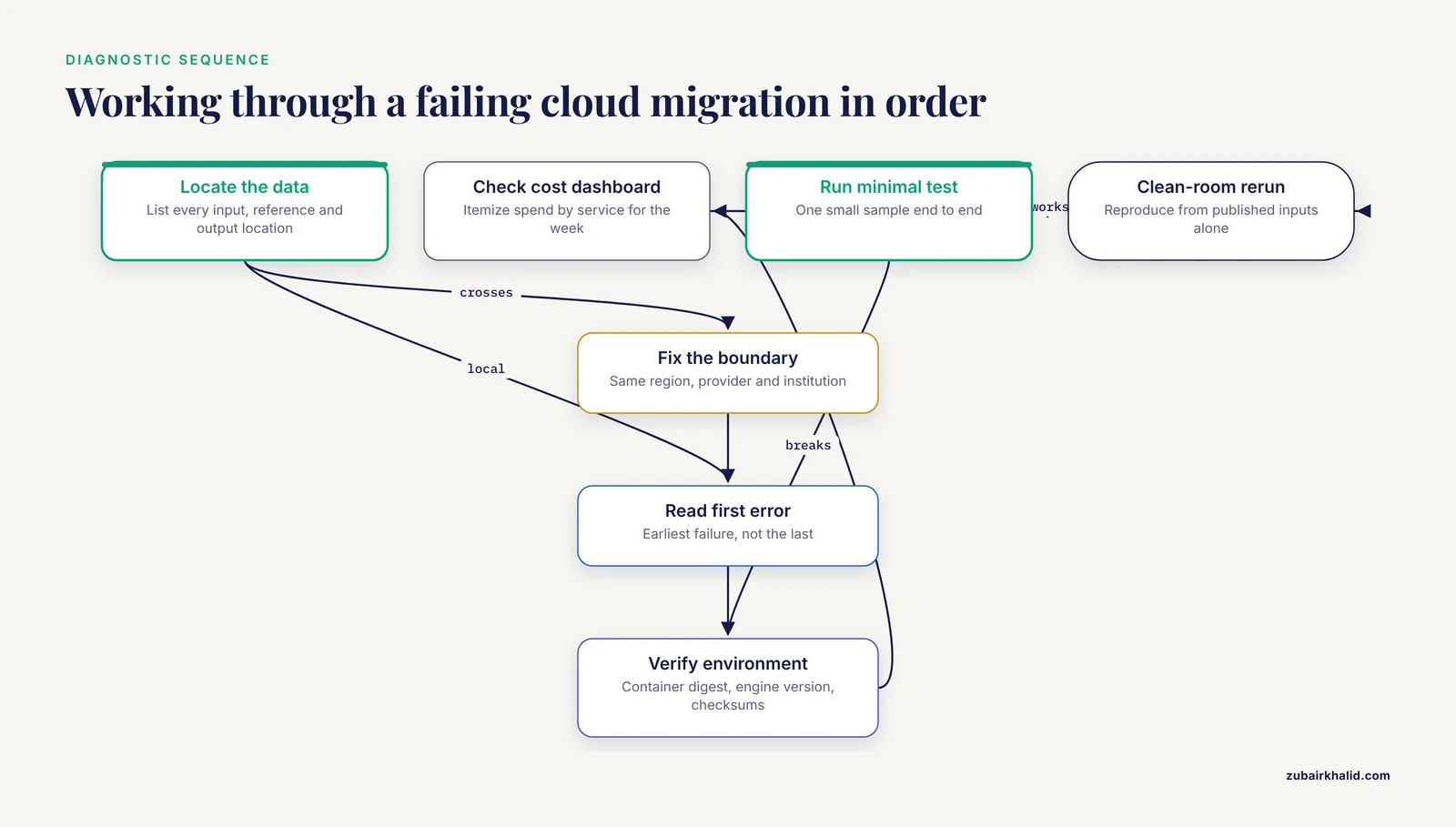
When a migration is misbehaving, work through this sequence in order. Each step either fixes the problem or eliminates a cause.
- Locate the data. List every input, reference, and output location. If data crosses a region, provider, or institutional boundary on a typical run, fix that first.
- Read the first error, not the last. Cloud job logs stack. The root cause is almost always the earliest failure, with later errors being cascade effects.
- Verify the environment. Confirm the container image digest, the workflow engine version, and the reference data checksums match the last known-good run.
- Check the cost dashboard. Itemize spend by service for the last week. Unexplained line items usually identify the resource that is misconfigured or abandoned.
- Run a minimal test case. Execute the pipeline on one small sample end to end. If the minimal case works, scale up gradually and watch where it breaks, which separates scaling problems from correctness problems.
- Check for spot interruptions. Search the logs for interruption notices before assuming a computational bug.
- Attempt a clean-room reproduction. From the published inputs alone, rerun the analysis. Anything that cannot be reproduced from recorded inputs is a reproducibility defect, whatever else it is.
Common Mistakes and Limitations
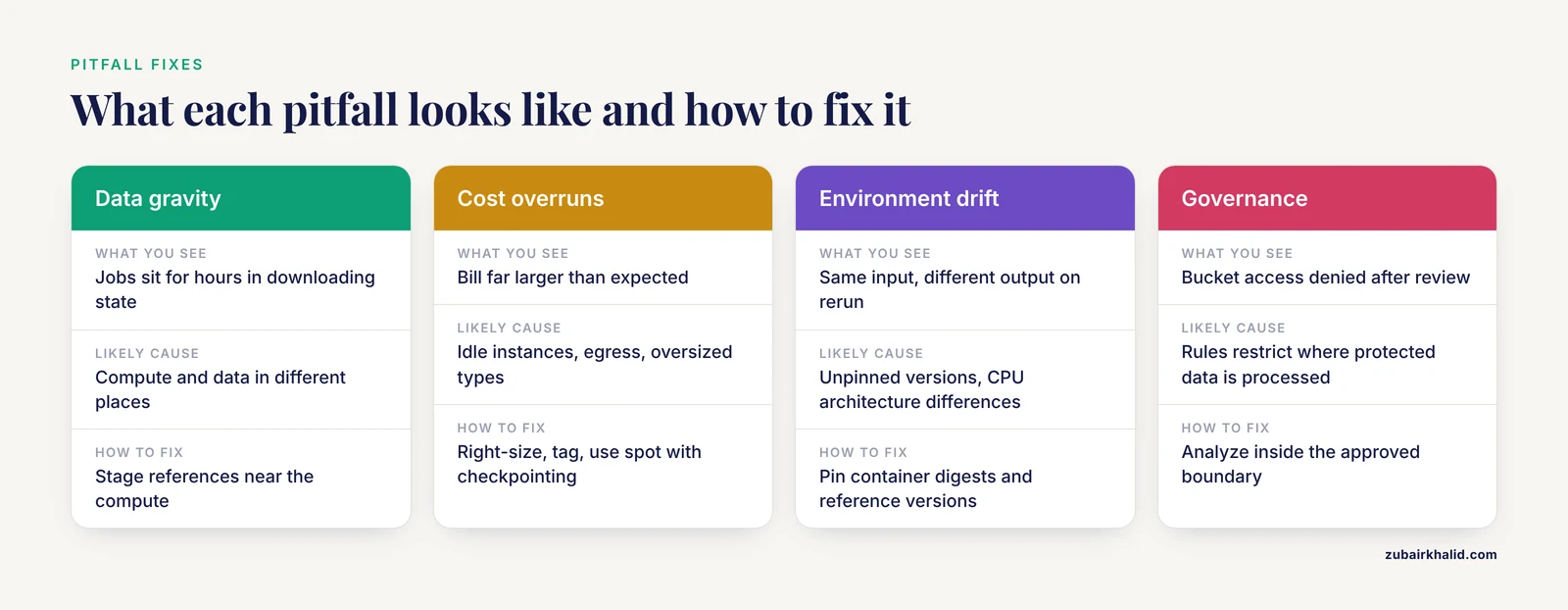
The following mistakes appear repeatedly in real migrations, and each has a specific corrective action.
- Treating the cloud as a bigger lab server. The cloud's value is elasticity and distribution. Running one monolithic job on one enormous instance wastes the primary advantage and maximizes cost.
- Skipping the benchmark. Teams that skip instance benchmarking pay for capacity their workload cannot use. The GoToCloud economic analysis, which identified specific GPU types and a measurable cost-performance wall, is the counterexample worth copying [2].
- Assuming containers solve reproducibility completely. Containers pin software but not reference data, parameters, or workflow code. Pin all four.
- Copying data out of a governed environment to analyze it elsewhere. Governance-compliant platforms exist precisely so analysis moves to the data [5]. Extracting protected data defeats the control and usually violates policy.
- Confusing a working demo with a validated system. The clinical genomics literature sets the benchmark here. Analytical validation work, with sensitivity, specificity, limit-of-detection, and reproducibility studies, is what separates a prototype from a system whose results can support decisions [8].
- Underinvesting in the runbook. The most technically elegant deployment fails operationally if only one person can operate it.
One limitation applies to everything above. Every lab's data classifications, compliance obligations, existing contracts, and workload profiles differ, so the specific configuration choices, instance families, regions, and governance boundaries, need to be evaluated against your own institution's requirements and reviewed with your compliance and security offices before production use.
Prevention Practices
The pitfalls moving bioinformatics to cloud infrastructure produces are preventable with a small set of standing practices.
- Put compute next to data, always. Make same-region data access a design rule, and treat any cross-region data movement as an exception requiring justification.
- Containerize and pin from day one. Content-digest container images, pinned references, and versioned workflows are cheap to establish early and expensive to retrofit [7].
- Write workflows in a portable engine. Nextflow and Snakemake dominate cloud genomics for good reason, and both integrate with federated and governed platforms [1][7].
- Build to open standards. GA4GH-aligned interfaces for workflow execution, task execution, data access, and tool registry keep your work portable across providers [9].
- Benchmark cost-performance on real data. Choose instance types from measured cost per completed sample, and know your workload's equivalent of the resolution wall [2].
- Instrument everything. Budget alerts, resource tags, structured logs, and cost dashboards turn silent failures into visible ones.
- Design for spot. Checkpoint early, retry automatically, and treat interruption as normal weather rather than an error condition [5].
- Govern before you grant. Decide the data boundary, the access model, and the audit requirements before the first protected dataset arrives [5].
- Automate the deployment. Scripted cluster provisioning with pre-installed, consistent software removes the drift and maintenance burden that erode both reproducibility and morale [2].
- Write the runbook as you build. Operational knowledge that lives in one person's head is a single point of failure.
The throughline across published cloud bioinformatics deployments is consistent. The teams that succeed treat the move as a redesign of how data, compute, governance, and reproducibility interact, not as a change of hardware vendor. The teams that struggle are the ones that lifted their old assumptions onto new infrastructure and paid for the mismatch in surprise bills, stalled security reviews, and results nobody could reproduce.
Frequently Asked Questions
What is the most common pitfall when moving bioinformatics to the cloud?
Data gravity. Compute and data end up in different places, so every run pays transfer costs in time and money. Check where your inputs, references, and compute physically sit before debugging anything else.
Why did my cloud bill spike after moving genomics workloads?
The usual causes are repeated data transfers, idle unattached resources, oversized instance types, and non-checkpointed jobs that rerun from scratch after interruption. Itemize the bill by service and tag resources by project to find the culprit.
How do I keep cloud bioinformatics pipelines reproducible?
Pin container images by digest, pin reference genome and database versions with checksums, version the workflow code, and publish all four together. Containerized workflows validated across cloud and local execution demonstrate the achievable standard [7].
Can I move human genomic data to any cloud region?
No. Human genomic data carries privacy obligations, and the proven pattern is to bring analysis into the governed environment where the data lives rather than moving data out, as the Genomics England Research Environment model demonstrates [5]. Confirm the boundary with your compliance office.
Do I need containers if my pipeline already works on my server?
Yes, if anyone else needs to run it. Containers make the environment portable and identical across cloud providers and local hardware, which is what reproducibility requires [7]. A pipeline that works only on one server is not reproducible, it is merely running.
What is the fastest way to diagnose a failed cloud workflow?
Read the first error in the job log, not the last. Then verify container digest and input checksums, check for spot interruption notices, and rerun one minimal sample end to end to separate correctness problems from scaling problems.
Is AWS the right choice for genomics workloads?
AWS is widely used for genomics, with published cryo-EM and medical imaging platforms built on it [2][6], but provider choice matters less than design choices. Build against open GA4GH-standard interfaces so your workflows and data remain portable regardless of provider [9].
How do federated approaches reduce data transfer problems?
Federated analysis sends computation to each data holder and shares only derived results, so the raw data never moves. Tools like fedflow automate these multi-client tasks inside standard reproducible Snakemake workflows [6].
Sources
- Eras of bioinformatics technologies from command-line interfaces to artificial intelligence (AI) chatbots.
- GoToCloud: Development and future of the cloud-based platform for cryo-EM structure-based drug DesignDevelopment and future of GoToCloud.
- Cloud-connected pluripotent stem cell platform enhances scientific identity in underrepresented students.
- PepPharmaHub: a cloud-based platform integrating multimodel language architectures with curated data resources for therapeutic peptide discovery.
- Automated GenePy gene-burden computation via a reproducible Nextflow workflow integrated with the Genomics England (GEL) Lifebit platform.
- Fedflow: cloud orchestration for federated learning with the FeatureCloud platform.
- Artificial intelligence apps for medical image analysis using pyCERR and cancer genomics cloud.
- Analytical Validation and Clinical Implementation of a 1080-Gene Comprehensive Genomic Profiling Assay with Integrated Cloud-Based Analysis for Solid Tumor Molecular Oncology.
- Bio-OS: An Integrated Cloud-native Environment for Data-Intensive Biomedical Research.