What Do Pfam Accession Numbers Mean?
By Dr. Zubair Khalid, DVM, MS, PhD ·

A Pfam accession number is a stable, permanent identifier assigned to a curated entry in the Pfam database, which catalogs protein families, domains, and motifs as profile Hidden Markov Models. The prefix PF plus a number (for example, PF00069) never changes its meaning across Pfam releases, while an optional dot suffix (for example, PF00069.28) records the specific version of the model.
That definition matters because almost every protein analysis you will ever run depends on being able to say, precisely and reproducibly, which protein feature you are talking about. When you annotate a new genome, screen a proteomics dataset, or compare your protein of interest against published work, you need a name that other scientists and other databases will interpret the same way you do. Pfam accessions serve that role for protein domains, and the same logic extends to InterPro, the integrated resource that pulls together Pfam with companion databases such as PROSITE and PRINTS [1]. This article explains what each part of a Pfam accession means, how the identifiers behave over time, and how to use them correctly alongside UniProt and InterPro in day-to-day work.
What Does a Pfam Accession Number Mean? A Plain-Language Interpretation
Think of a Pfam accession number as a permanent bar code for a protein feature. The number itself carries no hidden arithmetic or taxonomy. It is simply an identifier that was assigned once, when an entry was created, and then fixed for the life of that entry. The interpretation work happens in the layers around the number:
- The PF prefix tells you the identifier belongs to a curated Pfam entry rather than an automatically generated one.
- The numeric part distinguishes that entry from every other entry in the database. There is no meaning to the specific digits beyond their uniqueness.
- The dot and trailing number (a version suffix such as .28) identifies which release of the model you are looking at. The underlying family stays the same, but the multiple sequence alignment, the profile Hidden Markov Model, and the thresholds can be revised between releases, and each revision bumps the version number.
- A separate entry name or ID, such as Pkinase or 7tm_1, gives a human-readable label. These short names can change between releases, which is exactly why the accession exists. Anyone quoting a Pfam ID in a manuscript risks ambiguity if the ID is later renamed, while a quoted accession remains unambiguous forever.
So when a paper says a protein contains PF00069, the pfam accession number meaning interpretation is this: the protein carries a region that matches the profile Hidden Markov Model for that specific curated entry, at versioned thresholds, and that entry corresponds to the protein kinase domain. The accession tells you which statistical model was used to detect the feature, not merely that someone eyeballed the sequence and thought it looked like a kinase.
The Anatomy of a Pfam Accession, Piece by Piece
The PF prefix
Pfam distinguishes its curated entries, built and maintained by expert annotators, from automated supplement sets that existed in earlier eras of the database. The PF prefix marks an entry that has a manually inspected multiple sequence alignment and a curated description. This distinction matters when you filter results. If your pipeline reports only PF-prefixed accessions, you are reporting curated family and domain calls, which are generally the ones you want to cite in publications.
The numeric identifier
The numeric portion is zero-padded and unique. Older entries use five digits, and newer entries added as the database grows use six. You may see PF00069 and PF21xxx style accessions side by side in the current database. The length of the number tells you nothing about importance, size, or biological significance. PF00069, the protein kinase domain, is one of the most-studied entries in all of protein annotation, and its low number simply reflects early curation.
The version suffix
Every Pfam release can update an entry. Curators may add sequences to the alignment, adjust the model, or refine the description. When they do, the version number after the dot increments. PF00069.1 and PF00069.28 describe the same biological concept, the protein kinase domain, but they are not the same statistical object. A match made against version 28 may not have been detected if you rerun the analysis against version 12, because the model and its thresholds changed in between.
For reproducibility, papers and pipelines should report the full accession with version, or at minimum the Pfam release number used. Reporting only the bare accession invites exactly the kind of ambiguity the versioning system was designed to prevent.
The entry ID versus the accession
A common point of confusion for students learning pfam accession number meaning explained materials: Pfam entries have both an accession and a short name. The short name is convenient for slides and tables. The accession is what you put in databases, code, and citations. UniProt cross-references, for example, link proteins to Pfam entries by accession, not by name.
Where Pfam Accessions Come From: Profile Hidden Markov Models
To interpret what a Pfam accession asserts, you need to understand what the database actually stores. Pfam is built on profile Hidden Markov Models, usually shortened to profile HMMs. A profile HMM is a statistical model built from a multiple sequence alignment of a protein family or domain. It captures which positions in the alignment are conserved, which tolerate substitutions, and which can be occupied by insertions or deletions. Software such as HMMER then scans new sequences against these models and reports matches with statistical scores.
The workflow behind each accession looks like this:
- Curators identify a set of related protein sequences that share a conserved region.
- They build a multiple sequence alignment of that region, hand-checking the alignment where automation struggles, particularly around poorly conserved loop regions.
- From the alignment, they build a profile HMM.
- They choose score thresholds, often called gathering or trusted cutoffs, that balance sensitivity against false positives.
- They assign the entry a type (family, domain, repeat, or motif), write a description, and link supporting literature.
- The entry receives its permanent accession and enters the next release.
When you cite a Pfam accession, you are citing the outcome of that curation process. This is what separates a Pfam domain call from a loose homology statement. The accession carries with it the model, the thresholds, and the community consensus description of the feature.
The InterPro Connection: Why One Domain Has Several Numbers
Pfam does not operate alone. In 2000, the InterPro project was launched to integrate the complementary efforts of the PROSITE, PRINTS, Pfam, and ProDom database projects into a single documentation resource, merging annotations and assigning its own unique accession numbers to both combined entries and individual entries that had no counterpart in the companion resources [1]. That integration remains the backbone of how domain annotation is presented today.
Here is how the layering works in practice:
- Pfam assigns a PF accession to its profile HMM entry.
- PROSITE may cover the same biological feature with a regular expression pattern or a profile.
- PRINTS may represent it as a group of conserved motifs, called a fingerprint.
- InterPro groups all of these methods that describe the same feature into a single entry and assigns an IPR accession to it.
The practical consequence is that a feature like the protein kinase domain has a Pfam accession, a PROSITE entry, and an InterPro accession, all pointing at overlapping but not identical definitions. InterPro entries aggregate matches from the member databases and link back to them, so a user can see at a glance whether a family or domain has associated patterns, profiles, fingerprints, or HMMs [1]. The InterPro accession is often the right one to quote when you want a method-neutral statement that a protein contains a given feature. The Pfam accession is the right one to quote when you want to state exactly which HMM-based method made the call and at what thresholds.
This distinction matters in meta-analyses. If one study reports domains by Pfam and another by InterPro, you cannot simply compare counts, because the definitions and matching criteria differ. Mapping Pfam accessions to their parent InterPro entries, a mapping Pfam and InterPro publish with each release, restores comparability.
What Pfam Accessions Cover: Families, Domains, Repeats, and Motifs
The digits in a Pfam accession do not encode the entry type. You have to look it up. Knowing the type, however, changes how you should interpret a match, so it belongs in any serious pfam accession number meaning interpretation.
- Family. A family entry describes a full-length group of evolutionarily related proteins. A match to a family entry suggests the whole protein belongs to that group, not just one segment.
- Domain. A domain entry describes a conserved structural or functional unit that may occur once or many times within a protein. Most Pfam entries are domains. A match tells you about that region only, and the same domain can appear in proteins with wildly different overall functions.
- Repeat. A repeat entry describes a short, often degenerate sequence unit that occurs multiple times in tandem. Matches to repeat entries frequently appear in multiple copies along a sequence, and copy number can itself be biologically meaningful.
- Motif. A motif entry describes a short conserved sequence pattern, often a few residues that carry a specific function, such as an active-site signature. Motif matches are short and can be less specific than domain matches.
InterPro, and by extension the entries it integrates, uses a comparable classification that also includes sites of post-translational modification alongside families, domains, and repeats [1]. When you read an annotation table that lists Pfam accessions, check the entry type column before drawing conclusions. A protein with three motif matches and one domain match is not a protein with four domains.
Clans: The Higher-Level Grouping
Pfam also groups related families into clans, assigned CL-prefixed accessions. A clan collects families whose profile HMMs overlap significantly and which are believed to share a common evolutionary ancestor, often supported by structural similarity. Clans answer a question that individual family accessions cannot: which entries describe distantly related versions of the same ancient domain?
For example, the many kinase-like domain families sit within a single clan, reflecting their shared origin. If your protein matches a family accession you have never seen before, checking its clan membership can tell you whether it belongs to a well-characterized superfamily whose function you already understand.
Worked Examples: Reading Real Accessions
Concrete examples make the format stick. The following are long-established Pfam entries that appear throughout the literature.
- PF00069 (Pkinase). The protein kinase domain. A match to this entry indicates a catalytic kinase domain, one of the most common domain types across eukaryotic proteomes. Quoting PF00069.28 in a methods section states the exact model version used.
- PF00001 (7tm_1). The rhodopsin-like G-protein coupled receptor family. This is a family-type entry, so a match speaks to the overall identity of the protein as a member of this large receptor class.
- PF00076 (RRM_1). The RNA recognition motif domain. Many RNA-binding proteins carry one or more copies, so the number of matches along a sequence carries information beyond presence or absence.
- IPR000719. The InterPro entry covering the protein kinase domain concept, aggregating member database methods including Pfam's PF00069. Citing this accession makes a method-neutral claim about the feature.
The contrast between PF00069 and PF00001 also illustrates the family versus domain distinction. Both accessions describe kinases and GPCRs respectively, but one describes a segment within a protein and the other describes membership of the whole protein in a class.
How to Use UniProt to Resolve Pfam Accessions
Because Pfam accessions identify features rather than proteins, the most frequent practical task is connecting the two. UniProt, the universal protein knowledgebase, is where that connection lives, and learning how to use UniProt is a core skill for anyone working with domain annotations. The uniprot database tutorial logic for Pfam work reduces to four operations.
Operation 1: Going from a protein to its Pfam domains
You have a UniProt accession, for example a human protein of interest, and you want to know which Pfam entries it matches. UniProt entries carry cross-references to Pfam in their feature and cross-reference sections. Open the protein's UniProt entry, locate the Pfam cross-references, and click through to the Pfam entry pages for details on the matched regions, the entry type, and the description. UniProt also integrates domain predictions from InterPro member databases directly onto the entry page, so the same feature is often visible graphically as colored blocks along the sequence [1].
Operation 2: Going from a Pfam accession to proteins
You have PF00069 and you want every UniProt protein matching it. UniProt's search interface accepts domain cross-references, so you can filter the protein knowledgebase by a Pfam accession and retrieve the matching protein set with their sequences, annotations, and taxonomy. From the Pfam side, each entry page lists the sequences matched in the current release and provides downloadable alignment and model files. For large-scale retrieval, UniProt's batch retrieval and programmatic interfaces let you submit a list of accessions and pull back the corresponding records in one operation.
Operation 3: Checking what a version change means
If a collaborator reports matches to PF00069.12 and your pipeline reports PF00069.28, compare the two versions on the Pfam entry page. The entry history records how the model and alignment evolved. This quick check resolves most discrepancies that look like conflicts but are really version mismatches.
Operation 4: Visualizing feature architecture across a protein set
When your list grows beyond a handful of proteins, tabular annotation stops being readable. Tools built for this exact step take a list of UniProt accession codes, extract annotated features such as domains, repeats, disorder, and post-translational modifications from databases including UniProt and InterPro, and arrange the proteins in a two-dimensional map where features are drawn as shapes and colors along each sequence. ProFeatMap is one such tool, a Python-based web resource that also sorts the protein list by homologous feature content so that proteins sharing domain architectures cluster together, and it exports publication-quality figures [2]. For a set of a few hundred or a few thousand proteins, this kind of visualization exposes patterns, such as shared domain combinations or feature redundancy, that a table hides [2].
Comparative Relevance: Pfam Accessions in the Identifier Zoo
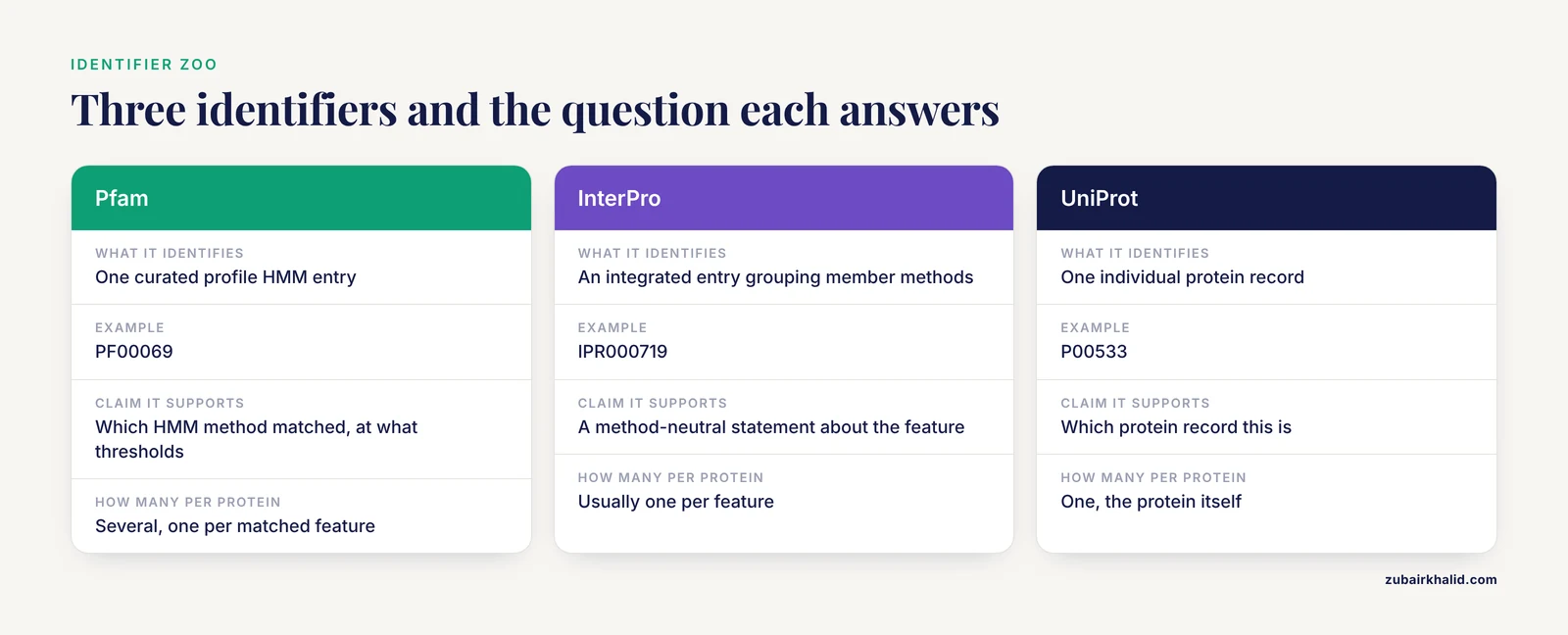
One summary table prevents most identifier mix-ups. Each of these identifiers answers a different question, and confusing them is the single most common error students make.
| Identifier | Database | Answers the question | Example |
|---|---|---|---|
| PF00069 | Pfam | Which curated profile HMM entry matched this protein region? | PF00069 (protein kinase domain) |
| IPR000719 | InterPro | Which integrated, method-neutral entry covers this feature? | IPR000719 (protein kinase domain) |
| P00533 | UniProtKB | Which protein record is this? | Human epidermal growth factor receptor |
| PS00107 | PROSITE | Which pattern or profile signature matched? | Protein kinase domain signature |
| GO term | Gene Ontology | Which controlled vocabulary term describes this function? | Protein kinase activity |
| PDB ID | Protein Data Bank | Which experimentally determined structure is this? | A specific coordinate entry |
Note the relationship between rows one, two, and four. Three different databases describe the kinase domain, each with its own method and accession, and InterPro unifies them under one entry. The UniProt accession, by contrast, identifies the entire protein, not a feature within it. A single UniProt protein typically carries several Pfam cross-references, one per matched domain or family.
Common Mistakes and Limitations
Most errors involving Pfam accessions fall into a handful of recognizable patterns. Each of the following points is practical, and each has cost real analysis time in real projects.
- Confusing Pfam accessions with UniProt accessions. PF and UniProt identifiers describe different things. A PF accession identifies a feature model. A UniProt accession identifies a protein record. Writing "the PF00069 protein" in a manuscript is a category error that reviewers will catch.
- Omitting the version suffix in reproducibility-critical contexts. The bare accession names the concept. The version names the exact model. Analyses run against different versions of the same entry can produce different match lists, so report versions or release numbers for anything that must be reproduced.
- Assuming a domain match proves a specific function. Pfam accession matches assert sequence similarity to a statistical model. Functional inference from a domain match is usually reasonable but is strongest when the domain's function is well characterized and supported by the entry's literature. Domain presence alone does not prove enzymatic activity, ligand binding, or localization.
- Treating all entry types as equivalent. As covered above, family, domain, repeat, and motif entries assert different kinds of statements. Multiplying motif matches together as if they were domains inflates apparent domain content.
- Ignoring entry obsolescence and merging. Over the years, curators occasionally retire or merge entries. An accession from an old paper may now redirect to a successor entry. When a lookup returns nothing, search the Pfam website for the entry name rather than assuming the accession was always invalid, and check whether the entry was merged into another.
- Comparing annotation counts across databases without mapping. A Pfam domain count and an InterPro entry count for the same protein set will rarely agree, because InterPro aggregates multiple member methods per feature [1]. Map to InterPro accessions before comparing studies that used different annotation sources.
- Over-reading short or low-complexity matches. Repeat and coiled-coil type regions can produce many overlapping hits. Read the entry documentation and the match boundaries rather than treating every reported fragment as an independent domain.
- Forgetting that the description is curated human text. The description attached to an accession is an expert summary, not a theorem. When a protein's annotation seems inconsistent with your experimental data, check the underlying alignment and literature linked from the entry, and remember that individual experimental cases need interpretation in their own context, ideally with domain expert input.
One further limitation deserves honest framing. Pfam covers a vast but not universal slice of protein sequence space. Novel folds and rapidly diverging families may lack representation, and absence of a Pfam match is not evidence that a region lacks biological function. Complementary resources, including structure prediction and disorder annotation, fill different parts of the gap, and feature-level maps such as those produced by ProFeatMap draw on several of these sources at once [2].
Quick Review
- A Pfam accession (PF plus a number) is a permanent identifier for a curated protein family, domain, repeat, or motif entry, stored as a profile Hidden Markov Model.
- The dot suffix is a version number. It changes when curators update the alignment or model, and it should be reported in reproducibility-critical work.
- The entry name or short ID can change between releases. The accession cannot, which is why accessions belong in citations and databases.
- Entry type matters. Family matches describe whole-protein membership. Domain, repeat, and motif matches describe features within proteins.
- InterPro assigns its own IPR accessions to integrated entries that group Pfam, PROSITE, PRINTS, and related member methods describing the same feature [1].
- UniProt is the practical bridge between proteins and domains, carrying Pfam cross-references on protein entries and supporting both single-record lookups and batch retrieval.
- For large protein sets, feature visualization tools such as ProFeatMap consume UniProt accession lists and map domains, repeats, and modifications along each sequence [2].
Frequently Asked Questions
What does the number after the dot in a Pfam accession mean?
It is the version of the entry's model and alignment. Each time curators revise an entry in a new Pfam release, the version increments. The core identity of the entry stays the same, but the statistical model can change, which can alter which sequences match.
Is a Pfam accession the same as a UniProt accession?
No. A Pfam accession identifies a curated protein feature, such as a domain or family, represented by a profile HMM. A UniProt accession identifies an individual protein record. One UniProt protein typically cross-references several Pfam entries.
Why did a Pfam accession disappear from the database?
Entries are occasionally retired or merged when curators conclude that two entries describe the same feature or that an entry no longer meets quality standards. Check the entry name in the search interface, because the accession may redirect to a successor entry that absorbed it.
What is the difference between a Pfam accession and an InterPro accession?
A Pfam accession identifies one HMM-based method's entry. An InterPro accession identifies an integrated entry that groups all member database methods describing the same biological feature, including Pfam, PROSITE, and PRINTS, and links back to each of them [1]. Quote Pfam for method-specific claims and InterPro for method-neutral ones.
Can two different proteins share the same Pfam accession?
Yes, and that is the point. The accession describes a shared feature detected by the same model. A domain like the protein kinase domain matches thousands of proteins across many species and functional contexts, all reporting the same accession.
How do I find all UniProt proteins that match one Pfam domain?
Search UniProt using the Pfam cross-reference field with the accession of interest, which returns all proteins in the knowledgebase annotated with that domain. For a list of results, retrieve the records in batch, and for visual comparison of the domain architectures across the set, feed the UniProt accessions into a feature mapping tool such as ProFeatMap [2].