Parsing GFF3 Files in Python: Options Compared
By Dr. Zubair Khalid, DVM, MS, PhD ·

The Python options for reading GFF3 differ in one sentence: a line parser hands you rows, Biopython hands you nested objects, gffutils hands you a queryable database, and pandas hands you a table you can aggregate.
The rule of thumb: pick bcbio-gff (Biopython's GFF module) for general scripted work and for writing GFF3 back out, gffutils when you will query the same annotation many times, pandas for bulk counting and filtering, and the standard library when you need streaming, zero dependencies, or complete control over edge cases.
GFF3 (General Feature Format, version 3) is the plain-text standard for describing genome annotations: genes, transcripts, exons, coding sequences, and regulatory features, each placed on a named sequence with coordinates and typed attributes. Python is a standard language for this kind of work in computational molecular biology, and Biopython is its flagship library, a mature open source collaboration that provides parsers and writers for a wide range of molecular biology formats along with wrappers for tools such as BLAST [1]. Because GFF3 is tab-delimited text, you can parse it with anything from a ten-line script to a specialized database library. The options below differ in memory behavior, hierarchy handling, and how much work they save you, and those differences decide which one belongs in your pipeline.
What a GFF3 File Actually Contains
The Sequence Ontology project maintains the GFF3 specification and supplies the controlled vocabulary for feature types. A valid file has exactly nine tab-separated columns on every feature line.
| Column | Name | Meaning |
|---|---|---|
| 1 | seqid | Identifier of the sequence the feature sits on (chromosome, contig, or scaffold) |
| 2 | source | The algorithm, project, or pipeline that produced the feature |
| 3 | type | Feature type, ideally a Sequence Ontology term such as gene, mRNA, exon, or CDS |
| 4 | start | 1-based start coordinate |
| 5 | end | 1-based end coordinate, inclusive |
| 6 | score | Numeric score such as an alignment score, or . if absent |
| 7 | strand | +, -, or . for no strand |
| 8 | phase | 0, 1, or 2 for CDS features, . otherwise (explained below) |
| 9 | attributes | Semicolon-separated key=value tags such as ID, Parent, Name, Note |
A small worked example (fields separated by tabs):
##gff-version 3
##sequence-region ctg1 1 50000
ctg1	example	gene	1000	5000	.	+	.	ID=gene01;Name=alpha
ctg1	example	mRNA	1000	5000	.	+	.	ID=tx01;Parent=gene01
ctg1	example	exon	1000	1800	.	+	.	Parent=tx01
ctg1	example	exon	4200	5000	.	+	.	Parent=tx01
ctg1	example	CDS	1200	1800	.	+	0	ID=cds01;Parent=tx01
ctg1	example	CDS	4200	4700	.	+	2	ID=cds01;Parent=tx01
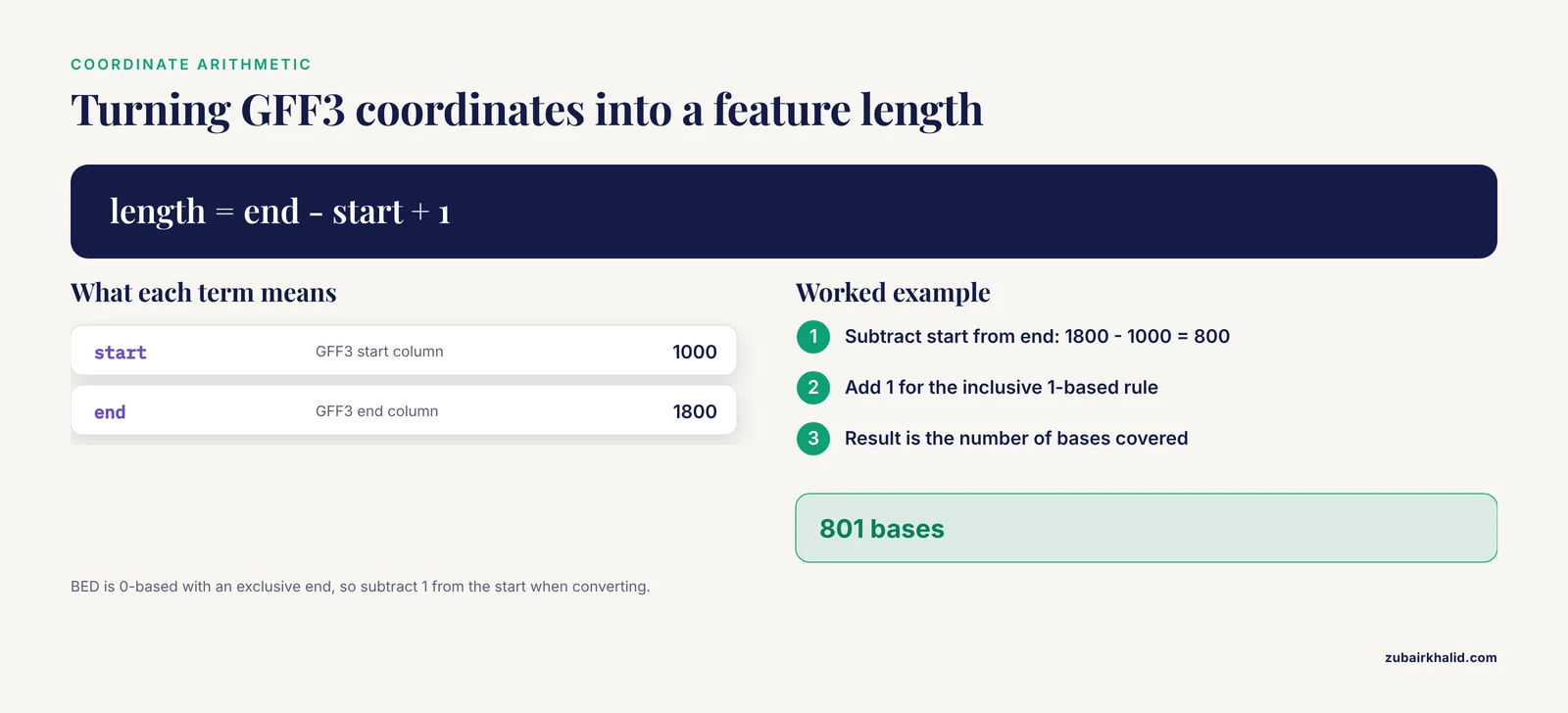
Reading this example: gene01 spans positions 1000 through 5000 on the plus strand of ctg1. The transcript tx01 declares Parent=gene01, which is how a parser knows the transcript belongs to that gene. The two exon lines each point at the transcript. The two CDS lines share the ID cds01, which marks them as parts of one discontinuous feature rather than two separate features. Coordinates are 1-based and inclusive, so the first exon covers 801 bases (1800 - 1000 + 1).
Five structural rules drive almost every parsing decision:
- Directives are lines beginning with ## that carry file metadata instead of features. A valid file starts with ##gff-version 3. ##sequence-region seqid start end declares a sequence and its length. ### marks the end of a record. ##FASTA announces that everything after it is FASTA sequence, not annotations.
- ID and Parent define the hierarchy. A gene carries ID=gene01. Its transcripts carry Parent=gene01 plus their own IDs. Exons and CDS carry Parent=tx01. A feature can have several parents, written as a comma-separated list of IDs.
- The same ID may appear on several lines. Those lines are parts of one discontinuous feature, such as a CDS interrupted by a ribosomal slippage site. A parser that treats repeated IDs as duplicates will corrupt these features.
- Attribute values are percent-encoded. The characters that carry structural meaning in the attributes column (percent, semicolon, equals, ampersand, comma) must be written as percent escapes inside values, the same convention URLs use. A comma inside a Note is written %2C so it is not mistaken for the separator between multiple values.
- Phase applies to CDS features and holds 0, 1, or 2, the number of bases to remove from the start of the feature to reach the first base of the next codon. It is not the reading frame of the first base, and it is not an offset you can subtract blindly. In the example, the first CDS block is 601 bases, which leaves 1 base of a codon unfinished, so the next block carries phase 2.
The specification defines a small set of standard attribute keys (ID, Name, Alias, Parent, Target, Gap, Derives_from, Note, Dbxref, Ontology_term, Is_circular). Everything beyond those is convention, and conventions differ between annotation sources. That heterogeneity is a recurring theme in this article, and it is the same class of problem that motivated the VDJML format, created because immune repertoire analysis tools each produced differently structured output and even labeled the same inferred rearrangement differently [2].
The Options Compared
| Option | Install | Returns | Hierarchy handling | Memory behavior | Best for | Main drawback |
|---|---|---|---|---|---|---|
| bcbio-gff (Biopython GFF module) | pip install bcbio-gff | Nested SeqRecord and SeqFeature objects | Yes, via sub_features | Whole record in memory | General scripting, conversions, writing GFF3 | Parents must precede children, records held in RAM |
| gffutils | pip install gffutils | SQLite database queried through FeatureDB | Yes, explicit parent and child queries | On-disk database, low RAM after import | Repeated ID lookups and relationship traversal | Slow one-time import, read-mostly |
| pandas | pip install pandas | DataFrame of all feature lines | No, attributes stay a string column | Whole file in RAM unless chunked | Bulk counting, filtering, summaries | No hierarchy, FASTA sections break loading |
| Standard library | none | Generator of dicts | No, you build it | Constant, streaming | Pipelines, huge files, zero-dependency environments | You own every edge case |
| gffpandas | pip install gffpandas | DataFrame with attribute helpers | No | Whole file in RAM | Quick pandas work with attributes split into columns | Thin wrapper with the limits of pandas |
| pybedtools (with BEDTools) | pip install pybedtools plus BEDTools binaries | Results of interval operations | No | Depends on the operation | Intersections, coverage, overlap arithmetic | External binaries, coordinate conversions |
Two rows of this table decide most real choices. Hierarchy handling matters when you must walk from a gene to its transcripts to its exons. Memory behavior matters once files reach hundreds of megabytes. Everything else is ergonomics.
Option 1: Biopython's GFF Module (bcbio-gff)
Biopython provides Python libraries across computational molecular biology, from sequence file parsing to wrappers around common tools [1]. The GFF support lives in the BCBio.GFF module, distributed as the separate bcbio-gff package. It reads GFF3 (and the older GFF2 and GTF formats) into Biopython objects and writes GFF3.
pip install bcbio-gffThis section doubles as a short Biopython tutorial for GFF3. Parsing:
from BCBio import GFF

with open("annotation.gff3") as handle:
    for rec in GFF.parse(handle):
        # One SeqRecord per sequence, assembled from the feature lines
        print(rec.id, len(rec.features))
        for feature in rec.features:
            if feature.type != "gene":
                continue
            gene_id = feature.qualifiers["ID"]
            for tx in feature.sub_features:
                for part in tx.sub_features:
                    print(gene_id, tx.qualifiers["ID"], part.type,
                          int(part.location.start) + 1, int(part.location.end))
Note the + 1. Biopython feature locations are 0-based with an exclusive end, while GFF3 columns are 1-based and inclusive. BCBio.GFF performs the conversion when it builds objects, so part.location.start is one less than the GFF3 start column. Copy coordinates back into GFF3 or BED files carefully.
You can restrict what gets parsed with limit_info, for example limit_info=dict(gff_types=["gene", "mRNA"]), and attach sequences from a dictionary with the target_fasta argument. Writing GFF3 back out is one call:
from BCBio import GFF

with open("annotation.gff3") as handle:
    records = list(GFF.parse(handle))

with open("edited.gff3", "w") as out:
    GFF.write(out, records)
Pros
- A real object model. sub_features mirror the ID/Parent hierarchy, so gene-to-exon traversal is attribute access rather than bookkeeping.
- One interface for GFF3, GFF2, and GTF.
- Writes valid GFF3, which makes round trips and format conversions straightforward.
- SeqFeature objects interoperate with the rest of Biopython, so you can extract sequences, translate CDS, and hand results to other Biopython parsers.
Cons
- Whole records live in memory. A chromosome-scale record with hundreds of thousands of features is heavy, and some annotations concentrate exactly that way.
- Nesting requires parents to appear before children. Many files follow that order, some do not, and out-of-order children lose their nesting.
- Qualifier values arrive as lists of strings, so multi-value keys still need handling.
- Development of this module is quieter than core Biopython, so verify behavior against your specific files rather than assuming recent specification features are supported.
Option 2: gffutils, a Queryable SQLite Database
gffutils takes a different approach. It imports a GFF3 or GTF file into a SQLite database (SQLite is the single-file relational database engine bundled with Python) and gives you a FeatureDB object for queries. The import costs time and disk once. Every later session opens the database instantly, and queries are fast.
pip install gffutilsimport gffutils
# One-time import. Genome-scale files take minutes and produce
# a database file on disk.
db = gffutils.create_db("annotation.gff3", dbfn="annotation.db", force=True)
# Later sessions skip the import entirely.
db = gffutils.FeatureDB("annotation.db")
print(db.count_features_of_type("exon"))
for tx in db.children("gene01", featuretype="mRNA"):
for exon in db.children(tx, featuretype="exon"):
print(exon.seqid, exon.start, exon.end, exon.strand)gffutils keeps the file's 1-based coordinates on its Feature objects, so no conversion is needed between database and GFF3 columns. Features without IDs get generated IDs. Duplicate IDs are renamed rather than silently merged, and the change is reported. You can also traverse upward with db.parents(), list features by type with db.features_of_type(), and drop to raw SQL with db.execute() when the high-level API is not enough.
Pair the database with pyfaidx (a Python library for indexed random access to FASTA files) when you need actual sequence:
import gffutils
from pyfaidx import Fasta

db = gffutils.FeatureDB("annotation.db")
genome = Fasta("genome.fa")

tx = db["tx01"]
parts = [str(genome[tx.seqid][c.start - 1:c.end])
         for c in db.children(tx, featuretype="CDS")]
The c.start - 1 converts the 1-based CDS start to pyfaidx's 0-based slice start. Minus-strand features need the reverse complement on top of concatenation.
Pros
- Fast repeated queries and random access by ID, in both directions (children of a gene, parents of an exon).
- On-disk storage keeps memory flat after import, which suits genome-scale annotations.
- Tolerant of messy input: missing IDs, duplicate IDs, and both GTF and GFF3 conventions.
- Built on SQLite, so the database is inspectable with ordinary SQL and portable as a single file.
Cons
- The import step is slow for large files, and the database file can be large.
- Read-mostly. Bulk edits mean re-import or careful updates.
- Import options (such as merge_strategy for duplicate or identical features) change the result, so pin them in code for reproducibility.
- A database artifact in the middle of a pipeline can confuse collaborators who expect plain text in and plain text out.
Option 3: pandas for Bulk Statistics
pandas loads the file into a DataFrame (an in-memory table with labeled columns) and answers aggregate questions with vectorized operations.
pip install pandasimport pandas as pd
COLS = ["seqid", "source", "type", "start", "end",
"score", "strand", "phase", "attributes"]
df = pd.read_csv(
"annotation.gff3",
sep="\t",
comment="#", # skips directives and comment lines
header=None,
names=COLS,
dtype=str, # keep every column as strings
na_filter=False, # do not turn "." or "None" into missing values
)
df["start"] = df["start"].astype(int)
df["end"] = df["end"].astype(int)
df["length"] = df["end"] - df["start"] + 1 # 1-based, inclusive
print(df["type"].value_counts())
print(df.groupby(["seqid", "type"])["length"].sum())Two settings do heavy lifting here. dtype=str stops pandas from guessing types and mangling the phase column or the dots in score and strand. na_filter=False stops pandas from converting placeholder-looking strings such as "None" into missing values. Both matter more than most people expect.
Attributes stay a raw string column until you parse them. Structure first, unquote last:
from urllib.parse import unquote

def parse_attributes(field):
    out = {}
    for pair in field.split(";"):
        key, sep, value = pair.partition("=")
        if sep:
            out[key.strip()] = [unquote(v) for v in value.split(",")]
    return out

df["parent"] = df["attributes"].map(parse_attributes).map(
    lambda d: d.get("Parent", [None])
)
For large files, a regex over the raw column is faster than a Python function per row:
df["parent"] = df["attributes"].str.extract(r"(?:^|;)Parent=([^;]+)")Files too big for memory can be read in chunks:
totals = {}
chunks = pd.read_csv("annotation.gff3", sep="\t", comment="#", header=None,
                     names=COLS, dtype=str, na_filter=False, chunksize=500_000)
for chunk in chunks:
    ex = chunk[chunk["type"] == "exon"]
    lengths = ex["end"].astype(int) - ex["start"].astype(int) + 1
    for seqid, n in lengths.groupby(ex["seqid"]).sum().items():
        totals[seqid] = totals.get(seqid, 0) + n
Pros
- Fast aggregate questions: counts, length distributions, per-chromosome sums, filtering on any column.
- Familiar API with plotting and export built in.
- chunksize iteration keeps memory bounded on big files.
Cons
- The whole file sits in RAM unless you chunk.
- No hierarchy. The attributes column is an opaque string until you parse it, and parent/child structure is your job.
- A ##FASTA section will be read as data and break integer conversion. Strip it first or pre-filter the lines.
- The comment argument treats # as a comment character wherever it appears in a line, which only matters for odd files with unencoded hash signs inside attribute text.
Option 4: Streaming with the Standard Library
The zero-dependency option is a generator (a function that yields one value at a time, keeping memory constant) that produces one dictionary per feature line. This is the event-based pattern: the parser emits records as it reads, and the consumer decides what to keep. Libraries in other ecosystems use the same design for the same reasons. JPhyloIO, a Java library for reading and writing phylogenetic file formats, is built around event-based reading and writing so that a single reader can feed any application data structure and remain memory efficient on large datasets [3]. Python generators give you the same decoupling in a few dozen lines.
Here is a compact, reasonably robust reference parser:
from urllib.parse import unquote

COLUMNS = ("seqid", "source", "type", "start", "end",
           "score", "strand", "phase", "attributes")

def parse_attributes(field):
    attrs = {}
    for pair in field.split(";"):
        pair = pair.strip()
        if not pair:
            continue
        key, sep, value = pair.partition("=")
        if not sep:
            continue
        attrs[key] = [unquote(v) for v in value.split(",")]
    return attrs

def gff3_records(path):
    """Yield one dict per feature line from a GFF3 file."""
    with open(path) as handle:
        for line in handle:
            if line.startswith("##FASTA"):
                break                     # sequence data follows, stop here
            if line.startswith("#"):
                continue                  # directives and comments
            parts = line.rstrip("\n").split("\t")
            if len(parts) != 9:
                continue                  # or raise, per your policy
            rec = dict(zip(COLUMNS, parts))
            rec["start"] = int(rec["start"])
            rec["end"] = int(rec["end"])
            rec["attributes"] = parse_attributes(rec["attributes"])
            yield rec
Using it to total exonic bases per sequence:
exon_bases = {}
for rec in gff3_records("annotation.gff3"):
    if rec["type"] == "exon":
        exon_bases[rec["seqid"]] = (
            exon_bases.get(rec["seqid"], 0) + rec["end"] - rec["start"] + 1
        )
Pros
- No dependencies, constant memory, works on files of any size, including files with ##FASTA sections.
- You control every decision: what counts as a bad line, whether to track hierarchy, how to log problems.
- Trivial to embed in pipelines and easy to review line by line.
Cons
- You own every edge case. Hierarchy, discontinuous features, and validation are your job.
- Questions that need multiple passes (children before parents, or joins by ID) mean buffering or reading the file twice.
- It is easy to write a parser that works on your test file and fails on the next annotation source. Test against several.
Option 5: Wrappers and Adjacent Tools
Several smaller tools sit around the main four:
- gffpandas wraps pandas with GFF-aware loading and helpers that split the attributes column into separate columns. Convenient for quick work, with the same memory limits as pandas.
- gtfparse reads GTF (the older, differently quoted cousin of GFF3) into a pandas DataFrame. Useful when a file labeled .gff is actually GTF.
- pybedtools wraps the BEDTools command-line suite, which accepts GFF3 input for interval operations such as intersect and coverage. When the question is overlap arithmetic rather than annotation structure, handing intervals to BEDTools is often the fastest path. It requires the BEDTools binaries.
- Validators outside Python: GenomeTools ships a gt gff3 command that parses, validates, and can re-emit normalized GFF3, and AGAT is a toolkit for validating and converting GFF3 and GTF files. Running one of these on third-party files before you parse them catches structural problems early. They are command-line tools rather than libraries, but they slot into the same pipeline.
How to Choose Between the Python GFF3 Parsing Options
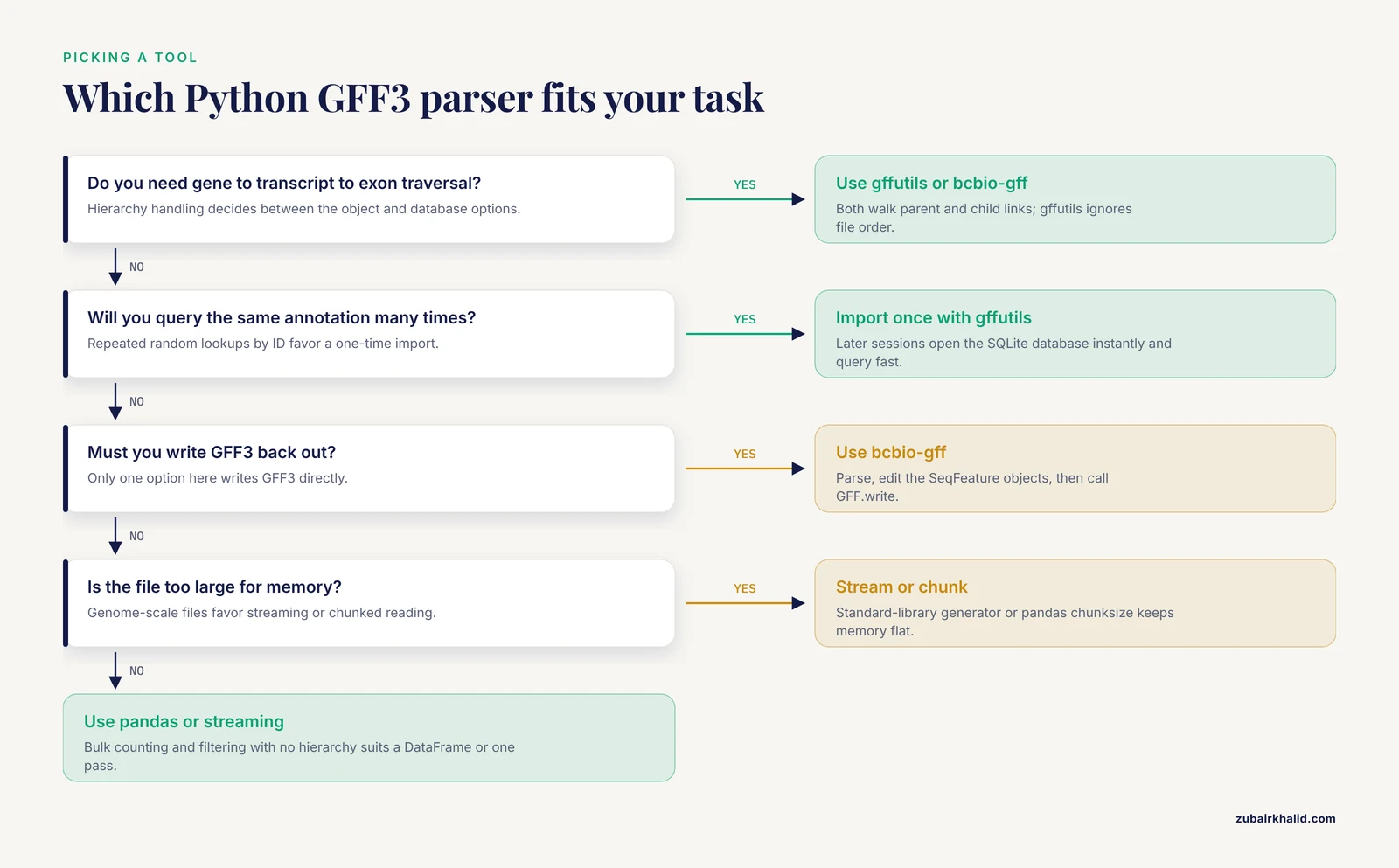
Five criteria decide almost every real choice.
- Query pattern. One sequential pass over the file suits streaming, pandas, or Biopython. Many random lookups by ID, or repeated parent/child walks, suit gffutils.
- Hierarchy. If the analysis needs gene-to-transcript-to-exon traversal, use gffutils or bcbio-gff. If the analysis only needs intervals, pandas or the standard library are simpler.
- File size. Anything under a few hundred megabytes is fair game for all options. Genome-scale files favor streaming or a one-time database import.
- Output. If you must write GFF3 back out, bcbio-gff is the only option here that does it directly.
- Dependency budget. Locked-down environments favor the standard library. Otherwise, match the tool to the question.
Memory behavior and query pattern outweigh syntax preferences. Event-based streaming keeps memory flat and stays decoupled from your data structures, a design proven at scale by libraries such as JPhyloIO [3]. Databases trade a one-time import for unlimited fast queries. In-memory tables trade RAM for vectorized speed. None of these tradeoffs is hidden in the benchmarks, they are visible in the architecture of each tool.
Scenario 1: Per-chromosome exon statistics on a genome-scale annotation
You have a full annotation, roughly a gigabyte uncompressed, and you need total exonic bases per chromosome. One pass, no hierarchy, no random access. The standard-library streaming parser from Option 4 does this in constant memory. If the team lives in pandas, the chunked reader from Option 3 gives the same answer with familiar code. Both avoid loading the file at once.
Scenario 2: Pull CDS for a list of transcripts, repeatedly, over weeks
A pipeline fetches coding sequence for hundreds of transcripts across many analysis steps. Random access by ID dominates. Import once with gffutils, then every step opens the database instantly and runs db.children() queries. Pair with pyfaidx for the sequence itself, as shown in Option 2.
Scenario 3: Edit an annotation and write GFF3 back
A collaborator needs an annotation with filtered feature types and updated names, delivered as GFF3. Parse with bcbio-gff, modify the SeqFeature objects, and write with GFF.write. The round trip stays inside one library and produces a file other tools can read.
Scenario 4: Sanity-check an unknown file before committing
Before building a pipeline around a third-party GFF3, spend five minutes with the streaming parser: count feature types, confirm the version directive, list attribute keys, and flag duplicate IDs.
from collections import Counter

ids, keys, types = Counter(), Counter(), Counter()
for rec in gff3_records("unknown.gff3"):
    types[rec["type"]] += 1
    for k in rec["attributes"]:
        keys[k] += 1
        if k == "ID":
            for i in rec["attributes"]["ID"]:
                ids[i] += 1

print(types)
print(keys)
print([i for i, n in ids.items() if n > 1])
Repeated IDs are candidates for discontinuous features, not automatically errors, so check them against the file before treating them as faults. For deeper structural checks, run a validator such as gt gff3 or AGAT first.
Scenario 5: Overlap exons with sequencing peaks
The question is interval arithmetic. Feed the GFF3 to BEDTools through pybedtools and use intersect. Feature structure is irrelevant here, so the heavier parsers buy nothing.
Common Mistakes and Limitations
- Coordinate system confusion. GFF3 is 1-based and inclusive. BED is 0-based with an exclusive end. Biopython locations are 0-based with an exclusive end. Length in GFF3 is end - start + 1. When converting a GFF3 feature to BED, the BED start is the GFF3 start minus 1. Most off-by-one bugs in annotation scripts come from mixing these systems in one script.
- Unquoting before splitting. Attribute values are percent-encoded. Unquote first and a literal comma (%2C) becomes a real comma that then splits into two wrong values. Split the attribute string on semicolons and commas first, then unquote each value. The reference parser in Option 4 shows the correct order.
- Misreading the phase column. Phase is 0, 1, or 2, the number of bases to remove from the start of the feature to reach the first base of the next codon. It is not the reading frame of the first base and not a generic offset. Keep it as a string unless the feature is a CDS, and remember the dot placeholder for non-coding features.
- Ignoring directives and FASTA sections. Naive splitters crash on ## lines or silently ingest sequence lines after ##FASTA. Handle directives explicitly and stop at ##FASTA, as the reference parser does. pandas users should strip the FASTA section before read_csv.
- Assuming parents come before children. The nesting in bcbio-gff depends on file order, and real files sometimes violate it. Either do a two-pass parse (collect IDs first, then attach children), sort by hierarchy depth, or use gffutils, which does not care about order.
- Treating repeated IDs as duplicates. The same ID on multiple lines means one discontinuous feature, not a copy-paste error. Deduplicating by ID collapses those parts and corrupts coordinates. Check the type and context before flagging.
- Splitting multi-value attributes wrong. Parent=a,b,c lists three parents. Split values on commas after structural parsing and before unquoting. Code that assumes a single string value silently drops the second and third parents.
- Confusing GTF with GFF3. GTF quotes its values, separates pairs with spaces, and ends pairs with semicolons. GFF3 uses key=value with percent-encoding. gffutils and bcbio-gff accept both. A hand-rolled parser usually accepts only one. Confirm which format the file actually is before parsing it.
- Letting pandas guess types. Without dtype=str and na_filter=False, pandas can turn dot placeholders and phase values into NaN or floats, and can convert strings such as "None" into missing values. Pin the types explicitly.
- Chromosome naming mismatches. One file says chr1, another says 1. Joins by seqid fail silently and return empty results. Normalize sequence names once, at the pipeline boundary.
- Trusting attribute conventions. The specification defines a small set of standard keys. Everything else varies by annotation source, and the same biological entity can be labeled differently by different tools. The VDJML project exists precisely because immune repertoire tools emitted differently structured files with different labels for the same results [2]. Expect the same heterogeneity in GFF3 attributes, normalize early, and never hard-code a key you have not seen in the actual file.
- Unpinned inputs. Annotation releases change IDs, coordinates, and attribute keys between versions. Record the release, the file checksum, and the parser version with every result, or the analysis will not reproduce.
One limitation applies across all options: parsing is not annotation quality control. No parser here validates ontology terms, checks feature geometry, or fixes malformed files. Validation is a separate step, handled by tools such as gt gff3 and AGAT before your parser ever sees the file.
Frequently Asked Questions
What is the best Python library for parsing GFF3 files?
There is no single best library, only the best match for the question. bcbio-gff fits general scripting and writing GFF3, gffutils fits repeated queries against large annotations, pandas fits bulk statistics, and the standard library fits streaming pipelines with no dependencies. Most analysis code ends up using two of the four.
Is GFF3 one-based or zero-based?
GFF3 coordinates are 1-based and inclusive, so a feature from 100 to 200 covers 101 bases. BED files and Biopython feature locations are 0-based with an exclusive end. When converting GFF3 to BED, subtract 1 from the start and leave the end as it is.
How do I decode percent-encoded attribute values in GFF3?
Split the attribute string on semicolons and commas first, then apply urllib.parse.unquote to each value. Unquoting first turns encoded commas and semicolons into real separators and corrupts the values.
Can pandas read a GFF3 file directly?
Yes. Call pd.read_csv with sep set to the tab character, comment set to #, header=None, and an explicit names list, then add dtype=str plus na_filter=False to protect the dot placeholders and the phase column. Strip any ##FASTA section first and parse the attributes column yourself.
How do I find all exons of a gene in Python?
With gffutils, build the database once and call db.children(gene_id, featuretype="exon"). With bcbio-gff, walk feature.sub_features from the gene down to the exons. The gffutils route also works when children appear before parents in the file.
How do I parse a GFF3 file that is too large for memory?
Stream it with a standard-library generator, read it in chunks with pandas' chunksize argument, or import it once into gffutils and query the on-disk database. All three keep memory flat no matter how large the file is.
Sources
- Biopython: freely available Python tools for computational molecular biology and bioinformatics.
- VDJML: a file format with tools for capturing the results of inferring immune receptor rearrangements.
- JPhyloIO: a Java library for event-based reading and writing of different phylogenetic file formats through a common interface.