How to Read and Write GenBank Files in Python
By Dr. Zubair Khalid, DVM, MS, PhD ·

By the end of this guide you will be able to parse GenBank files with Python, walk through the feature table of a record, extract a coding sequence and translate it, download a record straight from NCBI, write your own GenBank output from scratch, and process files too large for memory. You will also know the handful of mistakes that waste the most time, especially the one-based versus zero-based coordinate problem.
Everything here runs on standard Python plus one library, Biopython, which provides the sequence input and output machinery used across Python for bioinformatics [1]. You need Python 3 installed, a terminal, and a text editor. A GenBank flat file to practice on is provided in this guide.
What a GenBank File Contains
The GenBank flat file format is a plain-text format maintained by NCBI and used to distribute annotated nucleotide sequences. It is one of the standard file formats that bioinformatics software is expected to read and write, alongside FASTA, FASTQ, and EMBL-format text [2]. A GenBank file is organized into fixed sections, in this order:
- Header lines.
LOCUS(the record name, length, molecule type, topology, division, and date),DEFINITION,ACCESSION,VERSION,KEYWORDS, andSOURCEwith itsORGANISMblock. - FEATURES table. A list of features such as
source,gene,CDS,tRNA, ormobile_element, each with a location (for example21..101) and slash-prefixed qualifiers such as/gene="demoA"or/translation="MKV...". - ORIGIN block. The sequence itself, lowercase, in numbered lines.
- Terminator. A line containing exactly
//.
A minimal but valid record looks like this. Save it as example.gb and use it throughout this guide. It is a synthetic 150 bp sequence with one CDS feature (a protein-coding region) from positions 21 to 101.
LOCUS       DemoSeq                  150 bp    DNA     linear   BCT 01-JAN-2024
DEFINITION  Toy demonstration record for Python parsing.
ACCESSION   AB000000
VERSION     AB000000.1
KEYWORDS    .
SOURCE      Synthetic construct
  ORGANISM  Synthetic construct
            other sequences.
FEATURES             Location/Qualifiers
     source          1..150
                     /organism="Synthetic construct"
                     /mol_type="other DNA"
     CDS             21..101
                     /gene="demoA"
                     /product="demonstration protein"
                     /codon_start=1
                     /translation="MKVACGYPTGNSDFQKAMPWEFGTSN"
ORIGIN
        1 GGGACCTTAG TTACGCAACT ATGAAAGTTG CATGCGGATA TCCGACTGGT
       61 AACTCAGACT TCCAGAAAGC TATGCCGTGG GAATTTGGCA CCTCAAACTG
      121 TTGACCCATA GGCATCGATT CGATCGTTAG GCATTACGGT ACGATCCAA
//
The /translation qualifier on the CDS is the protein sequence computed by NCBI when the record was made. Later in this guide you will recompute that translation in Python and confirm it matches, which is one of the cheapest correctness checks available.
Why Use a Parser Library Instead of String Hacking
You can technically parse a GenBank file with open() and regular expressions, and many people try. This is a poor investment. Writing robust parsers for text formats is a common but tedious task in bioinformatics, and library authors solve it once so researchers do not repeat the work [3]. The GenBank format has quirks that break naive parsing quickly: qualifiers that wrap across multiple lines, locations written as join(1..50,200..300), fuzzy ends written as <21 or >101, and // terminators that can appear inside comment text.
The library-based approach is the norm across scientific computing. Chemistry has IOData, a Python library for parsing, storing, and converting specialized file formats, built with comprehensive documentation and automated testing in mind [4]. Electrophysiology has Neo, which separates data representation from analysis and provides input and output modules for many formats behind one object model [5]. Proteomics has the ProteomeCommons IO framework for reading and writing multiple data formats [6]. High-throughput sequencing has HTSlib, a C library for alignment and variant formats that is also called from Python bindings [7]. For sequence annotation formats like GenBank and EMBL, that role in Python belongs to Biopython [1].
One design idea from the parsing literature is worth borrowing even inside Biopython workflows. Event-based readers process a file as a stream of events rather than loading a full document, which keeps memory use low for large datasets and lets the parser work with any downstream data structure [8]. Biopython's iterator-based interface gives you the same practical benefit: you read one record at a time instead of the whole file [9].
Setting Up Your Environment
Install Biopython with pip:
python -m pip install biopythonVerify the installation:
python -c "import Bio; print(Bio.__version__)"Any current Biopython release supports the commands in this guide. The module you will use most is Bio.SeqIO, the sequence input and output interface that reads and writes every format Biopython supports, including genbank (also accepted as the short alias gb).
Parsing GenBank Files in Python, Step by Step
The following walkthrough parses example.gb and extracts every piece of information that matters in daily work. Each step shows real code and the exact output you should see.
Step 1: Read a Single Record
from Bio import SeqIO

record = SeqIO.read("example.gb", "genbank")
print(record.id, record.name, record.description)
Expected output:
AB000000.1 DemoSeq Toy demonstration record for Python parsing.Three different identifiers appear in one record, and confusing them is the most frequent beginner error:
| Attribute | Comes from | Value here |
|---|---|---|
| , - | , - | , - |
record.id | VERSION line | AB000000.1 |
record.name | LOCUS line | DemoSeq |
record.annotations["accessions"] | ACCESSION line | ['AB000000'] |
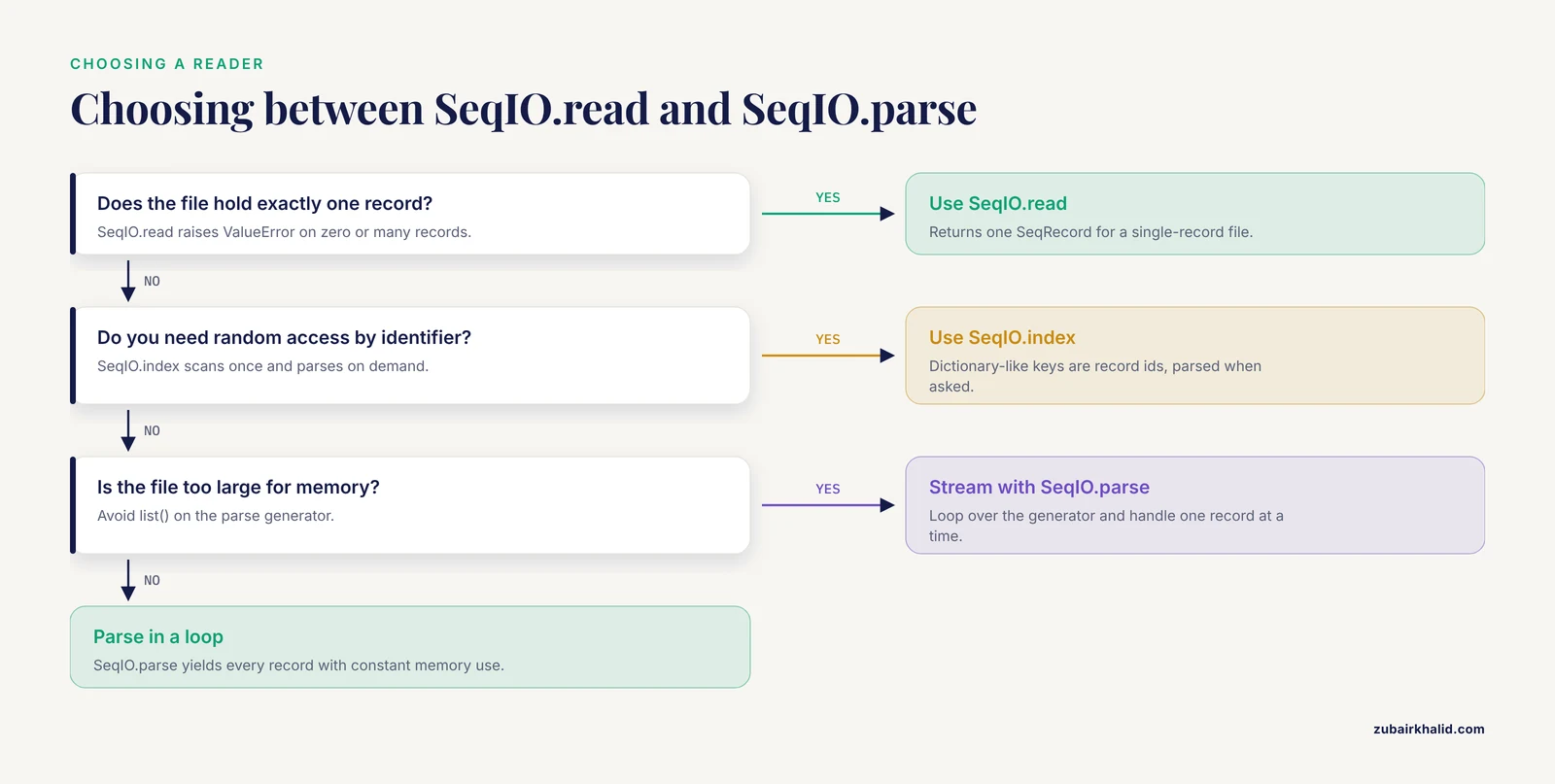
SeqIO.read is for files that contain exactly one record. It takes a filename or an open file handle and the format string "genbank".
Step 2: Iterate Over a Multi-Record File
Real GenBank files, such as a bacterial genome download or a batch of submissions, contain many records separated by //. Use SeqIO.parse, which returns a generator and never loads the whole file at once:
from Bio import SeqIO

for record in SeqIO.parse("multi.gb", "genbank"):
    print(record.id, len(record.seq))
To make multi.gb for testing, concatenate example.gb onto itself or change the accession and locus of the second copy so the two records are distinguishable.
Step 3: Explore the Record Object
A parsed record is a SeqRecord. Its most useful parts:
from Bio import SeqIO

record = SeqIO.read("example.gb", "genbank")
print(len(record.seq))                                # 150
print(record.seq[:30])                                # first 30 bases
print(record.annotations["organism"])                 # Synthetic construct
print(record.annotations["molecule_type"])            # DNA
print(record.annotations["date"])                     # 01-JAN-2024
print(record.annotations["data_file_division"])       # BCT
print(len(record.features))                           # 2
Expected output:
150
GGGACCTTAGTTACGCAACTATGAAAGTTG
Synthetic construct
DNA
01-JAN-2024
BCT
2
record.seq is a Seq object, not a string. It supports slicing, len(), translation, complement, and reverse complement. Convert to a plain string with str(record.seq) only when you need one, for example when writing to a non-Biopython function.
Step 4: Extract Features and Qualifiers
Each entry in record.features is a SeqFeature with a type, a location, and a qualifiers dictionary. Note the dictionary detail that trips up nearly everyone: every qualifier value is a list of strings, even when there is only one value, because GenBank allows repeated qualifiers such as multiple /citation lines.
from Bio import SeqIO

record = SeqIO.read("example.gb", "genbank")
for feature in record.features:
    print(feature.type, feature.location)
    for key, values in feature.qualifiers.items():
        print("   ", key, "=", values)
Expected output:
source [0:150](+)
    organism = Synthetic construct
    mol_type = other DNA
CDS [20:101](+)
    gene = demoA
    product = demonstration protein
    codon_start = 1
    translation = MKVACGYPTGNSDFQKAMPWEFGTSN
Notice that feature.location prints as 20:101, not 21..101. That is Step 5.
Step 5: Handle Coordinates Correctly
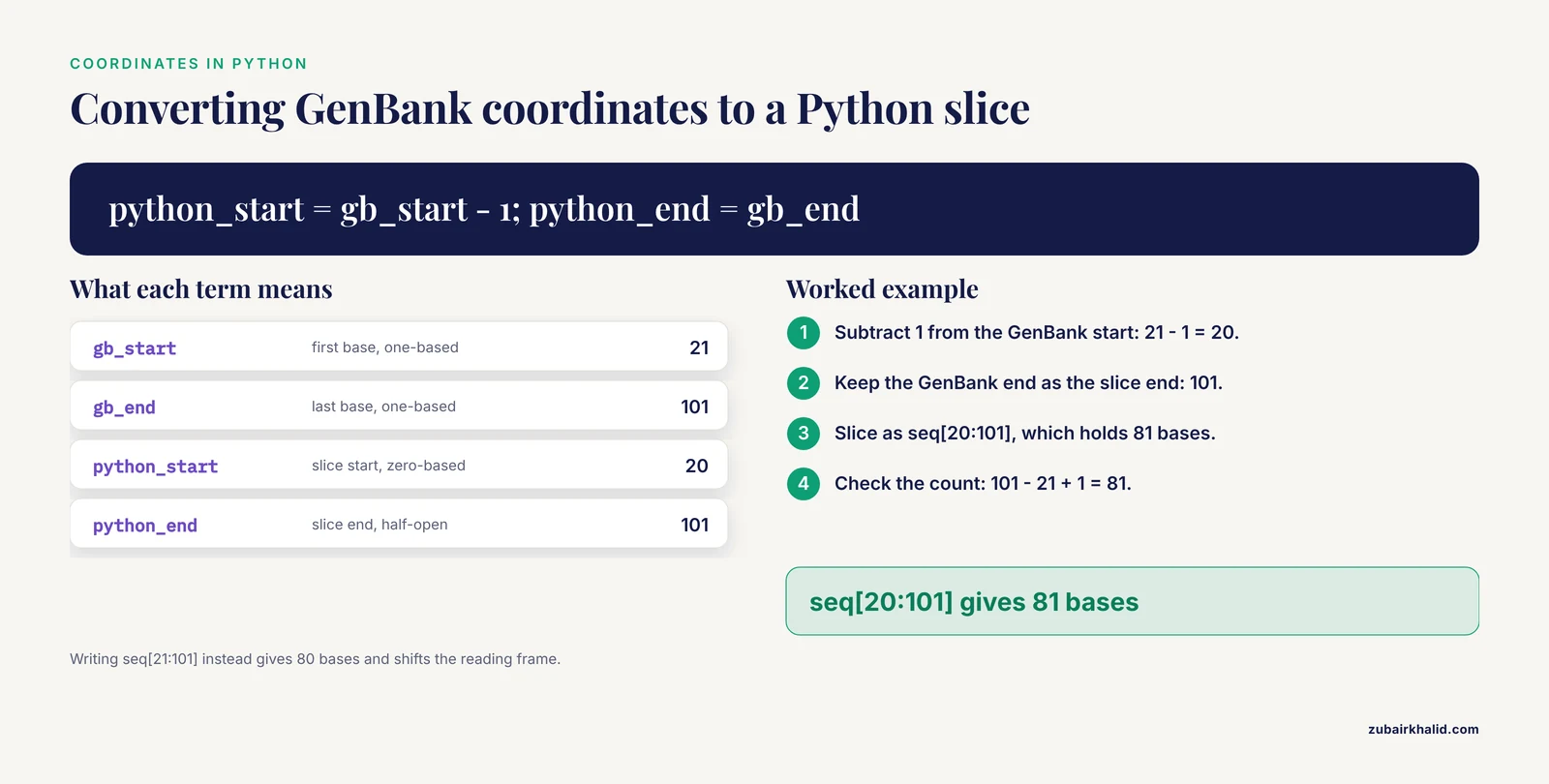
GenBank files use one-based, inclusive coordinates. The CDS starts at base 21 and ends at base 101, and both bases are included. Python uses zero-based, half-open slices. Biopython stores locations in the Python convention:
from Bio import SeqIO

record = SeqIO.read("example.gb", "genbank")
cds = [f for f in record.features if f.type == "CDS"]
print(int(cds.location.start))   # 20  (Python index of GenBank base 21)
print(int(cds.location.end))     # 101 (Python index one past GenBank base 101)
print(int(cds.location.start) + 1, int(cds.location.end))  # 21 101 (GenBank style)
The rule to memorize: GenBank 21..101 equals Python [20:101] and contains 81 bases, because 101 - 21 + 1 = 81. Never write seq[21:101] by copying numbers straight out of the file. That slice contains 80 bases and silently shifts your reading frame.
Two complications sit on top of this rule:
- Fuzzy locations. GenBank writes uncertainty as
<21..>101. Biopython represents these withBeforePositionandAfterPositionobjects. Casting withint()gives the concrete boundary. - Compound locations. A spliced CDS is written as
join(21..50,80..101). Biopython represents this as aCompoundLocationmade of multipleFeatureLocationparts. Iterate withfor part in feature.locationrather than assuming a single interval.
Step 6: Extract a CDS and Verify the Translation
feature.extract(seq) is the safe way to pull out the sequence of a feature. It applies the location, handles compound and fuzzy locations, and reverse-complements features on the minus strand automatically:
from Bio import SeqIO

record = SeqIO.read("example.gb", "genbank")
cds_feature = [f for f in record.features if f.type == "CDS"]

cds_dna = cds_feature.extract(record.seq)
print(len(cds_dna))                  # 81
print(cds_dna)                       # the 81 bp coding sequence

protein = cds_dna.translate()
print(protein)                       # MKVACGYPTGNSDFQKAMPWEFGTSN*

stored = cds_feature.qualifiers["translation"]
print(protein.rstrip("*") == stored) # True
Expected output:
81
MKVACGYPTGNSDFQKAMPWEFGTSN*
True
Two details in this output teach two things. First, translate() appends for the stop codon, while the stored /translation qualifier conventionally omits the stop, hence rstrip("") before comparing. Second, if the record declares a nonstandard genetic code through a /transl_table qualifier, pass it explicitly:
table = int(cds_feature.qualifiers.get("transl_table", ["1"]))
protein = cds_dna.translate(table=table)
Also respect /codon_start. A codon_start of 2 or 3 means the CDS begins one or two bases into the location, which is common in records with partial features. feature.extract does not apply codon_start for you, so trim the offset yourself when the qualifier is present.
Step 7: Download a Record Directly from NCBI
You often want to parse a GenBank file that you do not yet have. Biopython wraps NCBI Entrez, the web API behind the NCBI databases:
from Bio import Entrez, SeqIO

Entrez.email = "[email protected]"   # NCBI asks for contact information
Entrez.tool = "parse-genbank-demo"

handle = Entrez.efetch(db="nucleotide", id="NM_005157", rettype="gb", retmode="text")
record = SeqIO.read(handle, "genbank")
handle.close()

print(record.id)                      # accession with version, e.g. NM_005157.v
print(record.description)             # the DEFINITION line
print(len(record.seq))                # length stated on the LOCUS line
Three parameters control the fetch. db="nucleotide" selects the database, id takes one or more accessions separated by commas, and rettype="gb" with retmode="text" returns GenBank flat file text, which SeqIO.read then parses with the same code path as a local file. Set Entrez.email before any request, keep request rates modest, and prefer downloading a batch once and caching it locally over re-fetching the same record inside a loop.
Writing GenBank Files in Python
Reading is half the workflow. Sooner or later you will annotate a sequence yourself, assemble a record from scratch, or clean up a file from a collaborator, and you will need to write GenBank output.
Writing a Record You Built in Code
Build a SeqRecord, attach SeqFeature objects, and call SeqIO.write:
from Bio.Seq import Seq
from Bio.SeqRecord import SeqRecord
from Bio.SeqFeature import SeqFeature, FeatureLocation
from Bio import SeqIO

record = SeqRecord(
    Seq("ATGAAAGTTGCATGCGGATATCCGACTGGTAAC"),
    id="DemoMin",
    name="DemoMin",
    description="Synthetic demonstration CDS",
    annotations={
        "molecule_type": "DNA",
        "date": "01-JAN-2024",
        "data_file_division": "BCT",
    },
)
record.features.append(SeqFeature(FeatureLocation(0, 33, strand=1), type="source"))
record.features.append(SeqFeature(FeatureLocation(0, 33, strand=1), type="CDS",
                                  qualifiers={"product": ["mini protein"]}))
count = SeqIO.write(record, "new.gb", "genbank")
print(count)   # 1
Expected output file, abbreviated:
LOCUS       DemoMin                   33 bp    DNA     linear   BCT 01-JAN-2024
DEFINITION  Synthetic demonstration CDS.
ACCESSION   DemoMin
VERSION     DemoMin
KEYWORDS    .
FEATURES             Location/Qualifiers
     source          1..33
     CDS             1..33
                     /product="mini protein"
ORIGIN
        1 atgaaagttg catgcggata tccgactggt aac
//
The parameters that matter most:
molecule_type. Setannotations["molecule_type"]to"DNA","RNA", or a protein type. If it is missing, Biopython emits a warning and has to guess, and downstream tools that read theLOCUSline may misinterpret the record.strand. Passstrand=1for the plus strand andstrand=-1for the minus strand inFeatureLocation. Omitting it produces a feature with unknown strand in the output.idandname. These fill theVERSIONandLOCUSlines. Keep locus names short and free of spaces. If a name is too long for the fixed-widthLOCUSline, Biopython's GenBank writer issues a warning rather than producing a corrupt file, which is a signal to shorten the name, not to ignore it.qualifiers. Always pass dictionaries whose values are lists of strings, matching how the parsed format behaves.
Round-Tripping an Existing File
The most common writing task is not building a record from nothing. It is reading a file, changing something small, and writing it back:
from Bio import SeqIO

record = SeqIO.read("example.gb", "genbank")
record.annotations["comment"] = "Curated in local pipeline, 2026."
for feature in record.features:
    if feature.type == "CDS":
        feature.qualifiers["note"] = ["validated by recomputed translation"]
SeqIO.write(record, "example_copy.gb", "genbank")

check = SeqIO.read("example_copy.gb", "genbank")
assert len(check.seq) == len(record.seq)
assert len(check.features) == len(record.features)
print("round trip ok")
Expected output:
round trip okWhat Survives a Round Trip and What Does Not
Biopython's GenBank writer reproduces the standard structure faithfully, but treat round trips as lossy at the margins:
- Nonstandard qualifier formatting, exotic whitespace, and vendor-specific extensions in the original file are normalized away.
- The order of qualifiers may change.
- Very long free-text comments may be rewrapped.
- Records parsed from other formats and then written as GenBank will only contain what the source format stored. This matters most for FASTA, which stores a sequence and an identifier and nothing else, so a record parsed from FASTA has no features to write.
If interoperability with a specific downstream tool matters, open the written file in that tool, or in a validator, before trusting the pipeline.
Working With Large GenBank Files
A bacterial genome in GenBank format is a few megabytes and fits in memory easily. A metagenomic collection, a large multi-record submission, or an aggregated download does not. Two techniques keep memory flat:
- Stream with
SeqIO.parsein aforloop and process each record before the next one is read. Never calllist(SeqIO.parse(...))on a large file unless you truly need every record resident at once. - Index with
SeqIO.indexwhen you need random access by identifier:
from Bio import SeqIO

index = SeqIO.index("multi.gb", "genbank")
print(list(index.keys()))            # record identifiers
record = index["AB000000.1"]         # parsed on demand
print(len(record.seq))
index.close()
SeqIO.index scans the file once, records byte offsets for each record, and parses only the record you ask for. This mirrors the design goal documented for event-based format libraries, where the reader emits records as a stream so that memory use stays low regardless of file size [8], and it reflects the broader trend of providing programmatic format access through well-tested libraries rather than bespoke scripts [7].
Key Options Reference
| Task | Call | Key parameters | Behavior to know |
|---|---|---|---|
| , - | , - | , - | , - |
| Read one record | SeqIO.read(f, "genbank") | file or handle, format | Raises ValueError if the file holds zero or multiple records |
| Read many records | SeqIO.parse(f, "genbank") | file or handle, format | Returns a generator, constant memory |
| Write records | SeqIO.write(records, f, "genbank") | records, file or handle, format | Returns the number written, accepts a generator |
| Random access | SeqIO.index(f, "genbank") | file, format | Dictionary-like, keys are record ids, parses on demand |
| Convert in one line | SeqIO.convert(inf, "genbank", outf, "fasta") | input file, input format, output file, output format | FASTA output drops all features |
| Extract a feature | feature.extract(record.seq) | the full record sequence | Applies strand, joins, and fuzzy ends for you |
| Translate a CDS | cds.translate(table=n) | genetic code table number | Appends * for the stop codon |
The format string accepts "genbank" or "gb". Both refer to the same parser and writer.
Converting GenBank to Other Formats
Format conversion is a one-liner, but choose the target format knowing what it can hold:
from Bio import SeqIO

count = SeqIO.convert("example.gb", "genbank", "example.fasta", "fasta")
print(count)   # 1
example.fasta now contains the 150 bp sequence and the record identifier, and nothing else. The features, qualifiers, organism, and every other annotation are gone, because FASTA has no place to store them. Converting to EMBL format preserves far more, since EMBL text carries its own feature table. As a rule, convert from GenBank to richer formats when you need annotation preserved, and to FASTA only when a downstream tool genuinely wants bare sequence.
Common Mistakes and Limitations
These are the errors that account for most debugging time when people parse GenBank files with Python.
- Off-by-one coordinates. Copying
21..101from the file intoseq[21:101]drops the first base and adds a phantom one. Biopython locations are zero-based and half-open. Usefeature.extractand let the library handle the arithmetic, and only convert to GenBank-style numbers when reporting to humans. - Using
SeqIO.readon a multi-record file. This raisesValueError: Multiple records found in input handle. The fix isSeqIO.parsein a loop. The mirror-image error, usingparsewhere you meantread, does not fail loudly, so a single-record assumption can hide a file that silently grew to ten records. - Treating qualifier values as strings.
feature.qualifiers["gene"]is a list. Writingfeature.qualifiers["gene"].upper()raisesAttributeError: 'list' object has no attribute 'upper'. Usefeature.qualifiers["gene"], orfeature.qualifiers.get("gene", [""])when the qualifier may be absent. KeyErroron missing qualifiers. Not every CDS carries/translation, and not every feature carries/gene. Use.get()with a default instead of direct indexing on qualifiers and annotations you have not confirmed.- Writing records without
molecule_type. Records built from scratch or parsed from FASTA lack this annotation, and the GenBank writer emits a warning. Setrecord.annotations["molecule_type"] = "DNA"explicitly before writing. - Expecting features to survive a FASTA step. Any pipeline segment that passes through FASTA destroys the feature table. If you need annotation later, pass GenBank or EMBL text through that segment, or serialize your records with a feature-preserving format.
- Manual slicing of minus-strand features.
record.seq[20:101]gives the plus-strand sequence. For a feature annotated on the minus strand, that is the wrong molecule.feature.extract(record.seq)applies the strand and returns the biologically correct sequence. - Hand-rolled regex parsing. Scripts that split on newlines break on wrapped qualifier lines,
join(...)locations, and fuzzy ends. Automating file readers from format specifications is an active research topic precisely because hand-coding them is slow and fragile. Use the maintained parser, and reserve custom parsing for genuinely nonstandard vendor files. - Unset Entrez contact information. Scripts without
Entrez.emailset are a known irritant to NCBI and can behave unpredictably under rate limiting. Set email and tool strings once at the top of the script. - Assuming every field you see on screen is in the file. Browser views of NCBI records render derived information that is not part of the flat file text. Parse the actual file, not a memory of the web page.
Limitations to keep in mind: Biopython targets the standard NCBI GenBank flat file. Files in GenBank-like syntax produced by vendors or older software occasionally carry nonstandard qualifier tags. These usually parse without error but may not round-trip identically. Recomputed translations can differ from stored /translation values when the record uses a nonstandard genetic code or a nonzero codon_start, so pass those qualifiers through when they are present. Finally, a parser cannot fix a wrong annotation. If the /product line in the file is wrong, your parsed record will faithfully carry the error.
Checking That Your Results Are Correct
Validation of bioinformatics files before analysis is a recognized step in well-run pipelines, and validation problems are a known bottleneck when multiple people contribute data [10]. Apply that discipline locally with three cheap checks:
- Length check. The number on the
LOCUSline must equallen(record.seq)after parsing. A mismatch means the file was truncated or hand-edited. You can confirm this without trusting any annotation by counting bases in theORIGINblock of the raw text. - Translation check. For every CDS with a
/translationqualifier, recomputefeature.extract(record.seq).translate(table=...)and compare after stripping the stop character. A mismatch points to acodon_startyou ignored, a genetic code you did not pass, or a genuinely misannotated record. - Round-trip check. Write the parsed record to a temporary GenBank file, parse it back, and compare sequence length and feature count against the original. A mismatch means your writer settings are dropping data.
A small utility worth having computes GC content directly from the parsed sequence, useful as a sanity check against the organism you expect:
from Bio import SeqIO

record = SeqIO.read("example.gb", "genbank")
seq = str(record.seq).upper()
gc = (seq.count("G") + seq.count("C")) / len(seq) * 100
print(f"GC content: {gc:.1f}%")
Expected output for the example file:
GC content: 52.0%Next Steps
With parse and write covered, productive next steps in Python for bioinformatics include fetching related records through Entrez.esearch and Entrez.efetch in a cached batch, filtering records by feature type and writing trimmed submissions, combining sequences into alignments, and scripting repetitive curation jobs such as renaming qualifiers across a whole submission file. The Bio.SeqIO interface you learned here is the same one used for FASTA, EMBL, and alignment formats, so every pattern in this guide transfers [1]. When you eventually need formats Biopython does not cover, the same library-first, stream-first principles apply, and purpose-built parsing libraries exist for most domains [3].
Frequently Asked Questions
What is the difference between SeqIO.read and SeqIO.parse in Biopython?
SeqIO.read parses exactly one record and raises a ValueError if the file contains zero or more than one, while SeqIO.parse returns a generator that yields every record in the file with constant memory use. Use read for single-record files and parse everywhere else.
Why are my GenBank feature coordinates off by one in Python?
GenBank coordinates are one-based and inclusive, while Python slices are zero-based and half-open. GenBank 21..101 becomes Python [20:101]. Use feature.extract(record.seq) instead of manual slicing to avoid this error entirely.
How do I download a GenBank record directly from NCBI using Python?
Set Entrez.email, then call Entrez.efetch(db="nucleotide", id="ACCESSION", rettype="gb", retmode="text") and pass the handle to SeqIO.read(handle, "genbank"). Cache fetched records locally instead of re-fetching inside loops.
Can Biopython write a GenBank file from a record I built in code?
Yes. Build a SeqRecord with a Seq object and SeqFeature objects, set annotations["molecule_type"], and call SeqIO.write(record, "out.gb", "genbank"). The writer produces a complete, valid flat file including the feature table and ORIGIN block.
How do I process a GenBank file that is too large for memory?
Iterate with SeqIO.parse and handle one record at a time, or use SeqIO.index for dictionary-style random access that parses individual records on demand from stored byte offsets. Avoid materializing the full record list with list().
Why did my features disappear after converting a GenBank file to FASTA?
FASTA stores only an identifier and a sequence, so any conversion to FASTA necessarily drops the feature table and all annotations. Convert to EMBL or keep GenBank when you need features preserved downstream.
How do I extract all protein translations from a GenBank file?
Loop over record.features, select features with type == "CDS", and read feature.qualifiers["translation"] where present. To verify, recompute each translation from feature.extract(record.seq).translate() and compare after removing the trailing stop character.
Is parsing GenBank files with plain Python without Biopython a good idea?
It is a poor trade in almost every case. The format includes wrapped qualifiers, compound and fuzzy locations, and structural edge cases that break simple string handling, and maintained parsers already solve those problems. Write custom parsing only for genuinely nonstandard vendor files.
Sources
- Biopython: freely available Python tools for computational molecular biology and bioinformatics
- Common File Formats.
- TextFormats: Simplifying the definition and parsing of text formats in bioinformatics
- IOData: A python library for reading, writing, and converting computational chemistry file formats and generating input files
- Neo: an object model for handling electrophysiology data in multiple formats
- ProteomeCommons.org IO Framework: reading and writing multiple proteomics data formats
- HTSlib: C library for reading/writing high-throughput sequencing data
- JPhyloIO: a Java library for event-based reading and writing of different phylogenetic file formats through a common interface
- JPhyloIO - A Java library for event-based reading and writing of different alignment and tree formats through one common interface
- Keemei: cloud-based validation of tabular bioinformatics file formats in Google Sheets