How to Parse FASTA Files in Python: A Beginner's Guide
By Dr. Zubair Khalid, DVM, MS, PhD ·

By the end of this guide you will be able to read any FASTA file in Python, extract sequence identifiers and sequences, compute basic statistics such as sequence length and GC content, filter and write records back to disk, and do all of it without loading a multi-gigabyte genome into memory. You will learn two approaches: a minimal parser built with nothing but the Python standard library, and the idiomatic approach using Biopython, the standard library suite for computational molecular biology [1].
To follow along you need Python 3.8 or newer installed, a terminal, and a text editor. The Biopython examples also require the biopython package, which you can install with one command. Everything else, including the sample data, is created inside the article.
What the FASTA Format Actually Is
FASTA is a plain-text format for storing biological sequences. It originated with the FASTA sequence-similarity program in the late 1980s and has been the lingua franca of sequence data ever since. Every record in a FASTA file has two parts:
- A header line that starts with the greater-than symbol (
>), followed by an identifier and usually a description. - One or more lines of sequence characters, typically wrapped at 60 or 80 characters for readability.
A small multi-record file looks like this:
>sp|P69905|HBA_HUMAN Hemoglobin subunit alpha
VLSPADKTNVKAAWGKVGAHAGEYGAEALERMFLSFPTTKTYFPHFDLSH
GSAQVKGHGKKVADALTNAVAHVDDMPNALSALSDLHAHKLRVDPVNFKL
LSHCLLVTLAAHLPAEFTPAVHASLDKFLASVSTVLTSKYR
>sp|P68871|HBB_HUMAN Hemoglobin subunit beta
VHLTPEEKSAVTALWGKVNVDEVGGEALGRLLVVYPWTQRFFESFGDLST
PDAVMGNPKVKAHGKKVLGAFSDGLAHLDNLKGTFATLSELHCDKLHVDP
ENFRLLGNVLVCVLAHHFGKEFTPPVQAAYQKVVAGVANALAHKYH
The header line after > is free text, which means parsing code cannot assume anything about its internal structure. In the examples above the identifiers follow UniProt conventions with pipe-separated fields, but files from an assembled genome, a metagenome, or a collaborator's spreadsheet export may look entirely different. This variability is one reason dedicated parsing libraries exist. Sequence file formats keep multiplying as new data types appear, and tools built by different communities often describe the same result with different labels, which makes robust, shared parsing code genuinely valuable [2].
Two properties of FASTA drive every design decision in a parser:
- Sequence data can span many lines, so you cannot treat one line as one sequence.
- Files can be enormous. The human genome as a FASTA file is roughly 3.1 billion characters across 25 records, and a metatranscriptome project can hold millions of short reads.
Setting Up Your Environment
Open a terminal and confirm your Python version.
python3 --versionYou should see something like Python 3.11.4. Any version from 3.8 onward works for everything in this guide. Next, create a working directory and install Biopython into a virtual environment so your system Python stays clean.
mkdir fasta_parsing && cd fasta_parsing
python3 -m venv venv
source venv/bin/activate
pip install biopython
On Windows, activate the environment with venv\Scripts\activate instead of the source line. Verify the installation:
python -c "import Bio, sys"
print(sys.version) if False else None
The simplest check is to open the interpreter directly.
import Bio
print(Bio.__version__)
A version number such as 1.83 confirms everything is ready. If you get ModuleNotFoundError: No module named 'Bio', the install landed in a different environment. Re-run pip install biopython inside the activated virtual environment.
Create the sample file from the previous section and save it as hbb.fasta in your working directory. You will use it for every example below.
Parsing FASTA Files with Plain Python, Step by Step
Learning to parse FASTA in Python without libraries first pays off later. It teaches you exactly what the format is and what Biopython does for you. This is the parse fasta python step by step method to start with.
Step 1. Understand the parsing loop
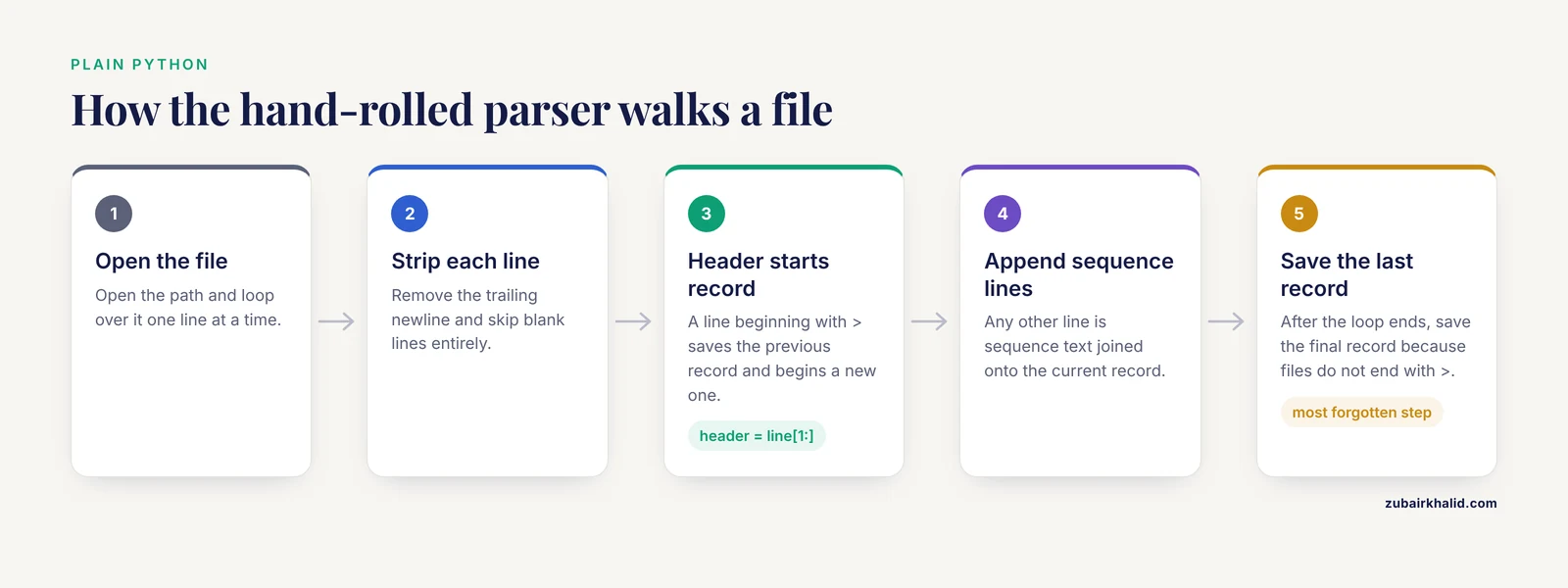
The algorithm is a state machine with two states. When you see a line starting with >, you finalize the previous record and start a new one. Any other line is sequence text that gets appended to the current record. In pseudocode:
- Open the file.
- For each line, strip the trailing newline.
- If the line starts with
>, save the previous record and begin a new one with this header. - Otherwise, append the stripped line to the current sequence.
- After the loop ends, save the final record, because files do not end with a
>line.
That last step is the one beginners forget most often.
Step 2. Write the parser
Create a file called parse_plain.py with this content:
def parse_fasta(path):
    records = []
    header = None
    seq_lines = []

    with open(path, "r") as handle:
        for line in handle:
            line = line.strip()
            if not line:
                continue
            if line.startswith(">"):
                if header is not None:
                    records.append((header, "".join(seq_lines)))
                header = line[1:]
                seq_lines = []
            else:
                seq_lines.append(line)

    if header is not None:
        records.append((header, "".join(seq_lines)))

    return records

records = parse_fasta("hbb.fasta")
for header, seq in records:
    print(header.split(), len(seq))
Step 3. Run it and read the output
python parse_plain.pyExpected output:
sp|P69905|HBA_HUMAN 141
sp|P68871|HBB_HUMAN 147
Each record came back as a tuple of the full header (without the >) and the joined sequence. Splitting the header on whitespace with .split() extracts the identifier, which is the convention Biopython follows as well. The lengths, 141 and 147 amino acids, are the canonical lengths of the mature alpha and beta hemoglobin chains you would expect from these UniProt entries, which is a quick sanity signal that the parser works.
Step 4. Convert it to a dictionary
Many workflows want keyed access to sequences. Return a dictionary instead of a list:
def parse_fasta_dict(path):
    records = {}
    header = None
    seq_lines = []

    with open(path) as handle:
        for line in handle:
            line = line.strip()
            if line.startswith(">"):
                if header is not None:
                    records[header.split()] = "".join(seq_lines)
                header = line[1:]
                seq_lines = []
            elif line:
                seq_lines.append(line)

    if header is not None:
        records[header.split()] = "".join(seq_lines)

    return records

seqs = parse_fasta_dict("hbb.fasta")
print(seqs["sp|P68871|HBB_HUMAN"][:30])
Output:
VHLTPEEKSAVTALWGKVNVDEVGGEALGRThe dictionary version silently overwrites duplicate identifiers, which is fine for curated files and dangerous for raw pipeline output. That trade-off comes back in the mistakes section.
Parsing FASTA Files with Biopython
Biopython is a mature, open-source, volunteer-developed collection of Python libraries covering sequence input and output, alignments, interactions with tools such as BLAST, and access to online databases [1]. Its Bio.SeqIO module is the standard way to parse fasta python workflows in production code, and it is the subject of nearly every serious biopython tutorial.
SeqRecord objects
SeqIO yields SeqRecord objects. The attributes you will use constantly are:
| Attribute | What it holds | Example value | ||
|---|---|---|---|---|
record.id | First word of the header | `sp\ | P68871\ | HBB_HUMAN` |
record.description | Full header without > | `sp\ | P68871\ | HBB_HUMAN Hemoglobin subunit beta` |
record.seq | The sequence as a Seq object | a Seq you can slice and translate | ||
record.name | Identifier with some parsing variations | usually matches id for FASTA | ||
record.annotations | Structured metadata, mostly empty for FASTA | {} | ||
record.letter_annotations | Per-residue values such as quality scores | {} |
The key insight is that record.id is only the first whitespace-delimited token of the header. Everything after it lives in record.description.
Reading all records
from Bio import SeqIO

for record in SeqIO.parse("hbb.fasta", "fasta"):
    print(record.id, len(record.seq))
Output:
sp|P69905|HBA_HUMAN 141
sp|P68871|HBB_HUMAN 147
SeqIO.parse takes two arguments: the file path (or an open file handle) and the lowercase format string "fasta". It returns an iterator, so records stream through your loop one at a time.
Reading exactly one record
When a file should contain a single sequence, use SeqIO.read:
from Bio import SeqIO

record = SeqIO.read("hbb.fasta", "fasta")
Because hbb.fasta holds two records, this raises an error, and that behavior is useful:
ValueError: Multiple records found in fileIf the file were empty or contained no > lines at all, SeqIO.read reports ValueError: No records found in file. Both messages tell you immediately that your assumptions about the file were wrong, which is exactly what you want from a parser.
Extracting identifiers and sequences into useful structures
A common python for bioinformatics task is turning a file into a lookup table:
from Bio import SeqIO

id_to_seq = {}
for record in SeqIO.parse("hbb.fasta", "fasta"):
    id_to_seq[record.id] = str(record.seq)

for seq_id, seq in id_to_seq.items():
    gc_count = seq.count("G") + seq.count("g") + seq.count("C") + seq.count("c")
    print(seq_id, len(seq))
str(record.seq) converts the Seq object to an ordinary string. For these protein sequences the GC calculation is meaningless, but the same pattern applied to a nucleotide file gives you GC content, which is covered explicitly below.
Computing GC content and length statistics
For nucleotide FASTA, GC content is the percentage of bases that are guanine or cytosine:
GC content = 100 × (count of G + count of C) / total sequence length
from Bio import SeqIO

lengths = []
gc_values = []

for record in SeqIO.parse("contigs.fasta", "fasta"):
    seq = record.seq.upper()
    length = len(seq)
    gc = 100.0 * (seq.count("G") + seq.count("C")) / length
    lengths.append(length)
    gc_values.append(gc)

print(f"records: {len(lengths)}")
print(f"total bp: {sum(lengths)}")
print(f"longest: {max(lengths)}")
print(f"mean GC: {sum(gc_values) / len(gc_values):.1f}%")
Expected output for a small assembly:
records: 42
total bp: 184512
longest: 21403
mean GC: 51.7%
Record count, total length, and longest contig are the first three numbers any assembly QC step looks at, and you have now computed them in eight lines.
Filtering and writing records back out
SeqIO.write takes a list or iterator of records, an output path, and a format string. Combined with a filter, it becomes a one-pass subsetting tool:
from Bio import SeqIO

long_records = (
    record for record in SeqIO.parse("contigs.fasta", "fasta")
    if len(record.seq) >= 1000
)
count = SeqIO.write(long_records, "contigs_1kb.fasta", "fasta")
print(f"wrote {count} records")
Expected output:
wrote 17 recordsSeqIO can also convert between formats in one call, for example from FASTA to GenBank, which is handy when a downstream tool insists on a particular format.
Reverse complements and translation
Because record.seq is a Seq object rather than a plain string, standard manipulations are method calls:
from Bio import SeqIO

for record in SeqIO.parse("contigs.fasta", "fasta"):
    rc = record.seq.reverse_complement()
    print(record.id, str(rc[:12]))
Slicing a Seq returns a Seq, indexing returns a single-letter Seq or character depending on version, and arithmetic on sequences is not defined, so convert with str() whenever you need ordinary string behavior.
Handling Large Files Without Running Out of Memory
The single biggest performance question in parse fasta python work is whether your parser holds every record in memory or streams them. SeqIO.parse streams by design, which means memory use stays flat no matter how big the file is. This streaming, event-driven style of parsing is the same architectural idea behind memory-efficient libraries for other phylogenetic formats, where an event-based reader keeps memory bounded on large datasets regardless of the application's own data structures [3].
The anti-pattern looks like this:
text = open("genome.fasta").read()      # loads the whole file
records = text.split(">")               # doubles the memory again
A 3.1-billion-character genome becomes several billion characters of Python string objects per copy. On a typical laptop this fails with MemoryError or pushes the machine into swap long before that.
The fix is to never collect records unless you truly need them all in memory at once.
from Bio import SeqIO

total = 0
count = 0
for record in SeqIO.parse("genome.fasta", "fasta"):
    total += len(record.seq)
    count += 1

print(count, total)
If you do need random access by identifier, Bio.SeqIO.index builds an on-disk index instead of loading sequences:
from Bio import SeqIO

record_dict = SeqIO.index("genome.fasta", "fasta")
rec = record_dict["chr12"]
print(rec.id, len(rec.seq))
SeqIO.index stores only file offsets, so retrieval pulls one record from disk on demand. This is the right choice for BLAST-style lookup workflows over genomes or large read sets.
When raw speed on very large genomic files matters more than convenience, dedicated high-performance parsers exist. The eccLib library, implemented in C with the Python/C API, was designed for exactly this and reports itself as the fastest Python-based solution for parsing GTF and FASTA files, trading GPL-3.0 licensing and a C dependency for speed [4]. Most beginners should stay with Biopython until profiling proves parsing is the bottleneck.
Everyday Tasks You Can Build On
Once parsing works, most practical scripts combine it with a filter, a calculation, and an output. Here are three patterns worth memorizing.
Split a multi-FASTA into one file per record
from Bio import SeqIO
import os

os.makedirs("split", exist_ok=True)
for record in SeqIO.parse("hbb.fasta", "fasta"):
    out_name = f"split/{record.id.replace('|', '_')}.fasta"
    SeqIO.write(record, out_name, "fasta")
Identifiers often contain characters that are illegal in filenames, such as the pipe in UniProt IDs, so sanitize them as shown.
Extract a subsequence by coordinate
from Bio import SeqIO

record = next(SeqIO.parse("hbb.fasta", "fasta"))
print(record.seq[0:30])
Output:
VLSPADKTNVKAAWGKVGAHAGEYGAEALCoordinates are zero-based with the end position excluded, matching Python slicing, not the one-based inclusive coordinates used in most genome databases. Off-by-one errors here are so common they deserve their own habit: always test a known short slice before trusting coordinate extraction in a new script.
Count records without any library at all
For a fast sanity check from the shell, count header lines:
grep -c "^>" hbb.fastaOutput:
2This number should match the record count your Python parser reports. When they disagree, the file has formatting problems, usually a stray > inside a description or a header line that lost its newline.
Quick Reference: Choosing a Parsing Approach
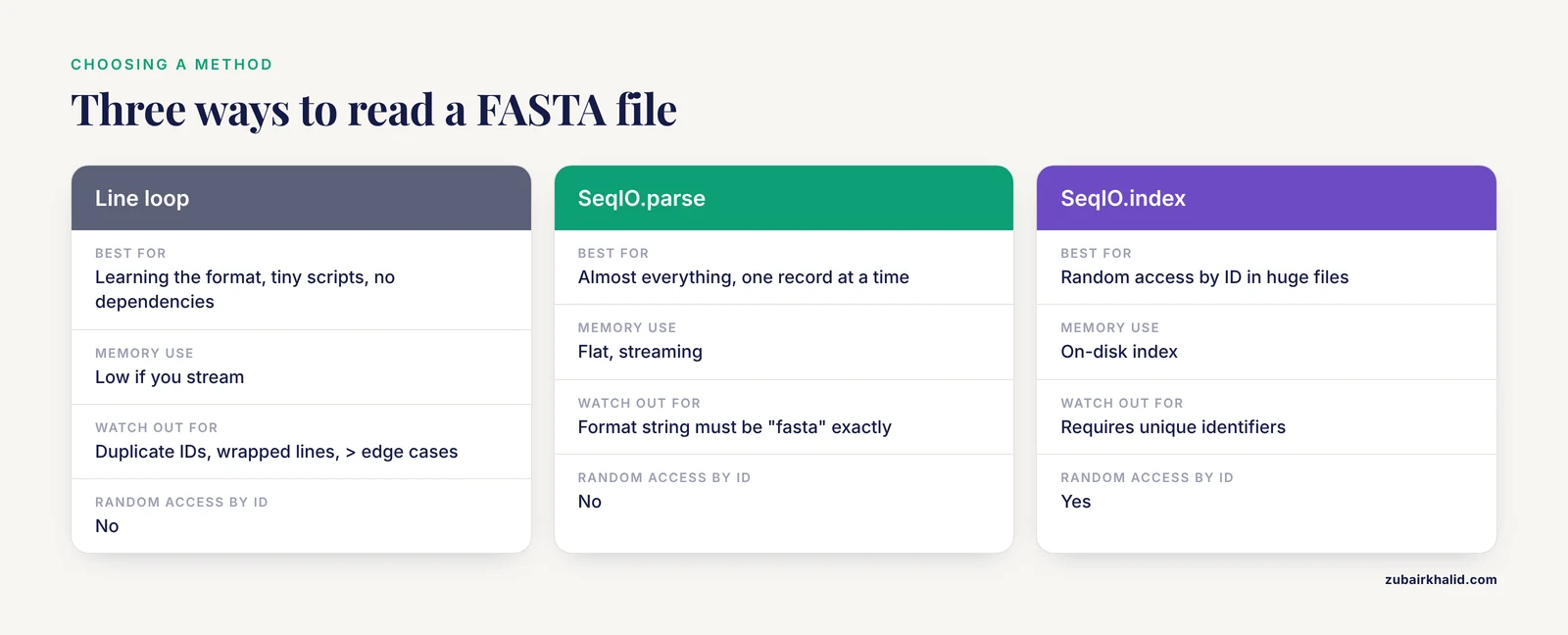
| Approach | Best for | Memory use | Watch out for |
|---|---|---|---|
| Hand-rolled line loop | Learning the format, tiny scripts, no dependencies | Low if you stream | Duplicate IDs in dicts, wrapped lines, > edge cases |
SeqIO.parse | Almost everything, one record at a time | Flat, streaming | Format string must be "fasta" exactly |
SeqIO.read | Single-record files | One record | Raises on multiple or zero records |
SeqIO.index | Random access by ID in huge files | On-disk index | Requires unique identifiers |
SeqIO.write / SeqIO.convert | Filtering, format conversion | Depends on input | Output format string matters |
| C-accelerated parsers such as eccLib | Extreme throughput on large genomic files [4] | Low | Extra install and license constraints |
Common Mistakes and Limitations
These are the failures that show up repeatedly in real parse fasta python workflows, with fixes you can apply immediately.
Reading the entire file into memory. The read().split(">") pattern works on homework-sized files and dies on real ones. Stream with for record in SeqIO.parse(...) or a line-by-line loop. If a workflow genuinely needs every sequence simultaneously, such as an all-against-all comparison, load once, measure memory as you go, and consider an indexed approach.
Assuming each sequence occupies one line. Wrapped FASTA is the norm. Parsers that assign lines[i + 1] as the sequence produce truncated records wherever wrapping occurs. The fix is accumulation: keep appending lines until the next > appears. Biopython handles this correctly, which is a core reason to prefer it once past the learning stage [1].
Trusting record.id as the full header. record.id is the first token only. Descriptions with spaces, pipe-separated database identifiers, and version suffixes get cut. Use record.description when you need the whole line, and be explicit in your own output files about which form you write.
Wrong or misspelled format strings. SeqIO.parse("file.fa", "fa") raises:
ValueError: Unknown format 'fa'The format argument must be the literal string "fasta". The file extension is irrelevant to the parser. A file named .txt containing valid FASTA parses fine, and a file named .fasta containing FASTQ does not.
Silent duplicate identifiers. Dictionaries and SeqIO.index both key on identifiers. Raw reads, de novo assemblies, and concatenated databases frequently contain duplicate IDs, and keyed access then returns an arbitrary one. Detect duplicates first:
from Bio import SeqIO
from collections import Counter

ids = Counter(record.id for record in SeqIO.parse("input.fasta", "fasta"))
dupes = [i for i, n in ids.items() if n > 1]
print(len(dupes), "duplicate identifiers")
Windows line endings and invisible characters. Files edited on Windows can carry carriage returns. A sequence that ends with \r breaks coordinate math and BLAST input. Always line.strip() in hand-rolled parsers, and if Biopython complains about unexpected characters, open the file in a plain text editor set to show line endings. Non-UTF-8 encodings raise UnicodeDecodeError, which you fix by opening with an explicit encoding or by re-saving the file as UTF-8.
Parsing an HTML error page as FASTA. A batch download from a web API that failed often returns an HTML page saved with a .fasta name. SeqIO.parse then yields zero records. Check the first line of any file that behaves strangely:
head -1 suspicious.fastaA line starting with <!DOCTYPE or <html is not sequence data.
Treating Seq objects as mutable strings. You cannot append to record.seq. Build new sequences with str operations or construct a new Seq. Mutation attempts raise TypeError rather than failing quietly, so you will notice.
Forgetting that FASTA carries almost no metadata. Unlike richer formats, FASTA stores one free-text header per record. Anything structured, such as organism, taxonomy, or annotations, lives outside the file or inside header conventions you define yourself. When a project needs rich, reusable annotation, that is precisely the gap more advanced formats and event-based parser libraries were built to address [3].
Assuming all input is clean. Real files contain lowercase sequence, N bases, asterisk stop characters in protein files, blank lines, and occasionally non-IUPAC characters. Decide explicitly in your code whether these are errors or tolerated values, and record how many you tolerated. A parser that accepts everything without reporting is a bug waiting for an analysis.
How to Verify Your Parsing Is Correct
Verification takes minutes and saves hours. Four checks cover most situations:
- Count check.
grep -c "^>" file.fastamust equal the number of records your parser yields. Any mismatch means malformed headers or lost records. - Length check. Sum of record lengths should equal the total non-header characters in the file. Compute it with a short script rather than by eye.
- Round-trip check. Parse the file, write it back out with
SeqIO.write(..., "fasta"), then parse both versions and compare record counts, identifiers, and sequence lengths. A stable round trip catches stripping and wrapping bugs. - Known-answer check. Keep one tiny file with records of known sequence and length. Run your pipeline on it after every code change. If the known values drift, you introduced a bug.
For coordinate-sensitive work, also spot-check a few extracted subsequences against the source file manually. Off-by-one errors survive every automated check that shares their convention.
Sensible Next Steps
Once SeqIO.parse feels routine, the natural progression in python for bioinformatics is:
- Read and write multiple sequence alignments with
Bio.AlignIO, which sharesSeqIOconventions. - Run and parse BLAST results through
Bio.Blast, keeping everything in one language. - Fetch records from NCBI databases with
Bio.Entrez, then parse them with the sameSeqIOcalls you already know. - Profile your parser on your actual largest file before reaching for C-accelerated alternatives such as eccLib.
- Standardize how your own tools emit identifiers so downstream parsers never need to guess, the same motivation that drove the design of structured interchange formats for specialized domains [2].
Frequently Asked Questions
Do I need Biopython to parse FASTA files in Python?
No. A ten-line loop over the file handles well-formed FASTA, as shown in the plain Python walkthrough. Biopython earns its keep through correct handling of wrapped lines, edge cases, dozens of formats, and sequence manipulation methods.
What does the ">" line in a FASTA file mean?
It marks the start of a new record. Everything after > on that line is the identifier plus optional free-text description, and all following non-> lines belong to that record's sequence.
How do I parse a very large FASTA file without running out of memory?
Iterate rather than load. SeqIO.parse streams records one at a time with flat memory use, and SeqIO.index gives random access by identifier without holding sequences in memory.
How do I compute GC content while parsing?
For each nucleotide record, count G and C in the uppercased sequence, divide by the record length, and multiply by 100. The formula and working code appear in the statistics section above.
Why does my parser skip sequences or produce empty records?
The usual causes are a missing final record when the hand-rolled loop never saves the last one, sequences split across multiple lines treated as single lines, or blank lines mistaken for data. The state-machine loop in the walkthrough handles all three.
Can Biopython read compressed FASTA files (.gz)?
Yes. Open the file with Python's built-in gzip module in text mode and pass the handle to SeqIO.parse(handle, "fasta") instead of a filename.
How do I split a multi-FASTA file into separate files?
Loop over SeqIO.parse and call SeqIO.write(record, filename, "fasta") for each record, sanitizing identifier characters that are illegal in filenames as shown in the splitting example.
Is SeqIO.parse faster than reading lines manually?
For well-formed files the difference is usually small, since both stream line by line. If parsing is genuinely your bottleneck on very large genomic files, a C-implemented parser such as eccLib targets exactly that problem [4].
Sources
- Biopython: freely available Python tools for computational molecular biology and bioinformatics.
- VDJML: a file format with tools for capturing the results of inferring immune receptor rearrangements.
- JPhyloIO: a Java library for event-based reading and writing of different phylogenetic file formats through a common interface.
- Parsing GTF and FASTA files using the eccLib Library.