BLAST XML Parsing in Python: How to Extract Alignment Data
By Dr. Zubair Khalid, DVM, MS, PhD ·

By the end of this guide you will be able to take any NCBI BLAST XML file, parse it in Python with Biopython's SearchIO module, and extract every piece of alignment data BLAST reports: hit identifiers, E values, bitscores, query and subject coordinates, strand, percent identity, gap counts, and the aligned sequence strings themselves. You will also build a reusable script that writes those values into a tab separated table you can load into R, pandas, or a database.
This is one of the most common tasks in python for bioinformatics, and it rewards a careful setup. Here is what you need on hand before you start:
- A recent Python 3 installation
- The Biopython package, installable with pip or conda
- The NCBI BLAST+ command line tools, if you run local searches
- A BLAST XML output file, either from your own search or downloaded from the NCBI BLAST web service
Why BLAST Writes XML and Why You Need a Parser
BLAST, the Basic Local Alignment Search Tool from NCBI, is the preferred utility for sequence alignment and identification across bioinformatics and genomics research. A recurring problem, documented by developers who built tooling around it, is that analyzing the results of a large BLAST search is tedious and time consuming, and few ready made parsers exist, so the task often falls to the researcher to write or adapt software for each analysis [1]. Learning to parse BLAST XML in Python once, well, removes that repeated cost from every project that follows.
XML is one of BLAST's machine readable output formats. You request it from the command line with -outfmt 5 or from the NCBI web interface by choosing XML as the output format. Unlike the human readable pairwise view, XML preserves the full structured result: every query, every hit, every alignment segment, with numeric fields you can compute on directly.
Two alternatives exist, and knowing when to use each matters:
- Tabular output (
-outfmt 6) is compact and easy to grep, but it truncates information. You do not get the aligned sequences or the full parameter block unless you extend the format string. - XML (
-outfmt 5) carries everything BLAST computed, including the alignment strings, the statistics block, and the raw parameters. That completeness is exactly why biopython SearchIO treats it as a first class format.
The tradeoff is that XML files from large searches grow quickly, which is why parser speed and streaming behavior matter when you parse BLAST XML at scale [1].
Understanding the Structure of BLAST XML Output
Before parsing, know what the file looks like. BLAST XML is a strict hierarchy: one output document contains one or more iterations, each iteration is one query, each iteration contains hits, and each hit contains one or more HSPs. HSP stands for High-scoring Segment Pair, which is a single maximal local alignment between the query and that hit. One hit can align to a query in several disjoint regions, and each region is its own HSP with its own coordinates and statistics.
Here is a trimmed example of the tags you will actually read:
<BlastOutput>
  <BlastOutput_program>blastn</BlastOutput_program>
  <BlastOutput_db>/data/db/subjects</BlastOutput_db>
  <BlastOutput_iterations>
    <Iteration>
      <Iteration_query-def>COI_seq1</Iteration_query-def>
      <Iteration_query-len>300</Iteration_query-len>
      <Iteration_hits>
        <Hit>
          <Hit_num>1</Hit_num>
          <Hit_id>gnl|BL_ORD_ID|0</Hit_id>
          <Hit_def>Seba_coi_01 Cytochrome oxidase subunit 1</Hit_def>
          <Hit_accession>Seba_coi_01</Hit_accession>
          <Hit_len>300</Hit_len>
          <Hit_hsps>
            <Hsp>
              <Hsp_num>1</Hsp_num>
              <Hsp_bit-score>549.853</Hsp_bit-score>
              <Hsp_score>594</Hsp_score>
              <Hsp_evalue>0.0</Hsp_evalue>
              <Hsp_query-from>17</Hsp_query-from>
              <Hsp_query-to>300</Hsp_query-to>
              <Hsp_hit-from>1</Hsp_hit-from>
              <Hsp_hit-to>284</Hsp_hit-to>
              <Hsp_query-frame>1</Hsp_query-frame>
              <Hsp_identity>276</Hsp_identity>
              <Hsp_positive>276</Hsp_positive>
              <Hsp_gaps>3</Hsp_gaps>
              <Hsp_align-len>284</Hsp_align-len>
              <Hsp_qseq>ATGAC...CGA-T</Hsp_qseq>
              <Hsp_hseq>ATGAC...CGATT</Hsp_hseq>
              <Hsp_midline>ATGAC...CGA T</Hsp_midline>
            </Hsp>
          </Hit_hsps>
        </Hit>
      </Iteration_hits>
    </Iteration>
  </BlastOutput_iterations>
</BlastOutput>
Three structural facts drive most parsing decisions:
- The nesting is fixed. Query wraps hits, hits wrap HSPs. Any correct parser mirrors that three level loop.
- Coordinates in raw BLAST XML are 1-based and inclusive.
Hsp_query-fromis the first residue of the alignment on the query, counting from 1. - When a query has no hits, BLAST writes
<Iteration_message>No hits found</Iteration_message>and noIteration_hitsblock. A robust parser must expect empty queries.
Your Toolkit: SearchIO, Legacy NCBIXML, and Raw ElementTree
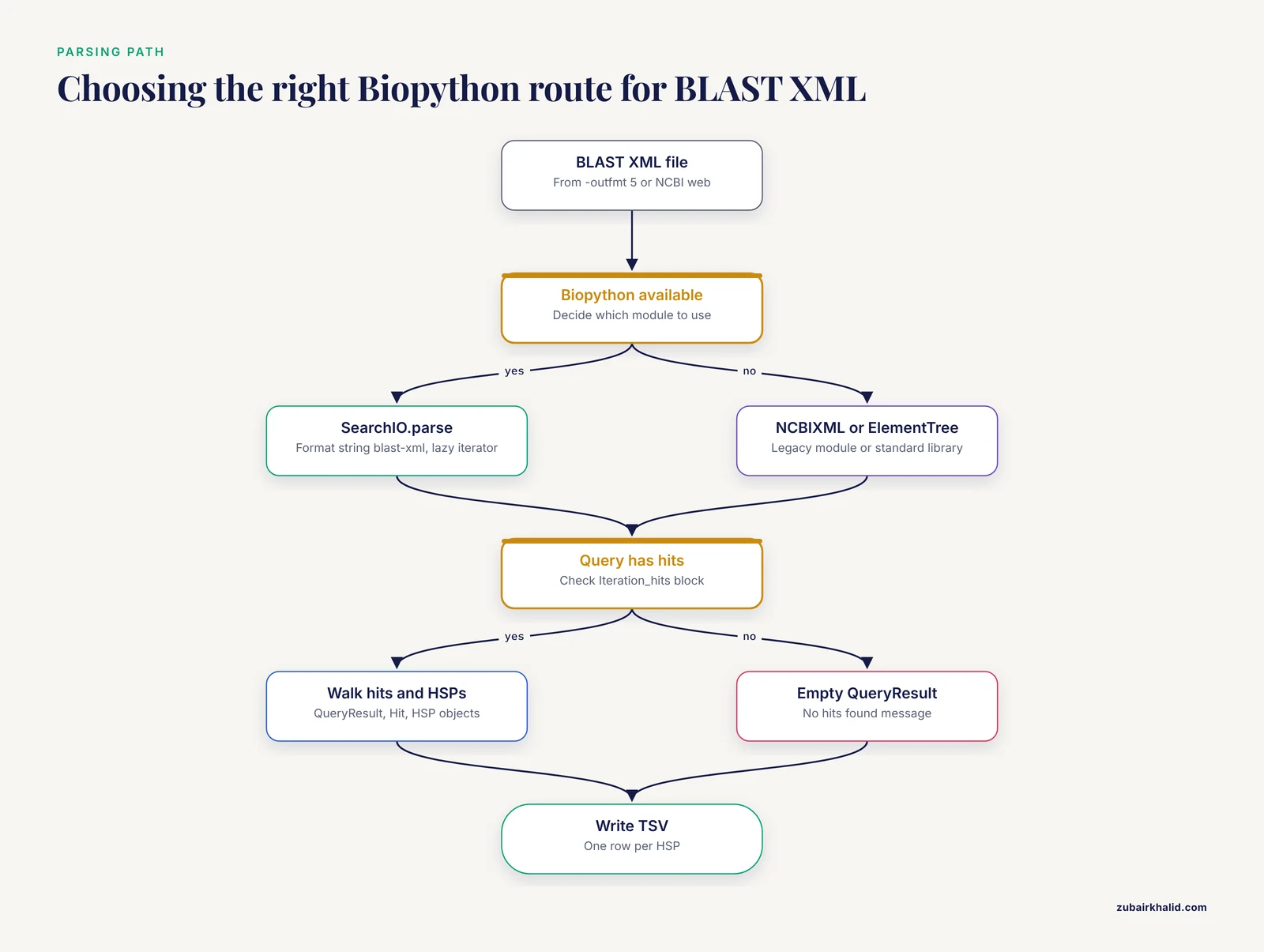
Biopython, the standard Python library for computational molecular biology, gives you three routes to BLAST XML parsing.
Bio.SearchIO is the recommended interface. It parses BLAST XML through a unified object model that also handles HMMER, BLAT, and other search tool outputs, so code you write for BLAST XML generalizes to other formats. It normalizes coordinates to 0-based, Python style indexing, which we will handle carefully below.
Bio.Blast.NCBIXML is the older module. It still parses BLAST XML in current Biopython releases and much published code uses it, but SearchIO is the maintained, general purpose interface and the better choice for new work.
xml.etree.ElementTree is the standard library XML parser. It has no BLAST awareness at all. You use it when you cannot install Biopython, when you need a single obscure field, or when you are debugging a malformed file. It is also the fastest way to count elements cheaply.
For a biopython tutorial aimed at everyday work, the rest of this guide centers on SearchIO, with an ElementTree fallback shown for verification.
Setup and Running the Search
Install the dependencies first:
pip install biopython
# or, if you use conda
conda install -c conda-forge biopython
conda install -c bioconda blast
Confirm the versions:
python -c "import Bio; print(Bio.__version__)"
blastn -version
If you are running a local search, build a database and run blastn with XML output:
makeblastdb -in subjects.fasta -dbtype nucl -out /data/db/subjects -parse_seqids

blastn -query queries.fasta -db /data/db/subjects \
  -outfmt 5 -out results.xml \
  -evalue 1e-5 -num_threads 4
Two parameter choices here deserve attention. -evalue 1e-5 is a conventional reporting threshold, but it is a choice you make, not a law of the tool, and you should set it according to your question. -max_target_seqs limits how many hits BLAST reports, and its effect on the search process has been the subject of active discussion in the community, so the number of hits in your XML reflects your parameters, not necessarily an exhaustive ranking of the database [1]. Write the output with -out rather than shell redirection so the file is written cleanly and atomically by BLAST itself.
Step by Step: Parsing BLAST XML with Biopython SearchIO
This walkthrough builds a complete extraction pipeline in eight steps, using the sample values shown above as expected output.
Step 1. Open the file with SearchIO.parse
from Bio import SearchIO

qresults = SearchIO.parse("results.xml", "blast-xml")
The second argument is the format string, and it must be exactly blast-xml with a hyphen. If you pass an unknown name, SearchIO raises a ValueError that lists the valid format identifiers, which is a quick way to discover what it supports.
SearchIO.parse returns a lazy iterator over query results. It reads the file incrementally rather than loading it all into memory, which is the behavior you want for large searches. Use SearchIO.read instead only when the file is guaranteed to contain exactly one query result, because read raises an error if the stream holds more than one.
Step 2. Walk the object hierarchy
SearchIO mirrors the XML nesting with three object types. A QueryResult holds Hit objects, and each Hit holds HSP objects.
from Bio import SearchIO

for qresult in SearchIO.parse("results.xml", "blast-xml"):
    print("Query:", qresult.id, "length:", qresult.seq_len)
    print("Hits found:", len(qresult.hits))
    for hit in qresult:
        print("  Hit:", hit.id, "|", hit.description)
        print("  HSPs in this hit:", len(hit.hsps))
Expected output for the sample file:
Query: COI_seq1 length: 300
Hits found: 1
  Hit: gnl|BL_ORD_ID|0 | Seba_coi_01 Cytochrome oxidase subunit 1
  HSPs in this hit: 1
Note two things. First, qresult.seq_len gives the query length directly from the XML, which you will need for coverage calculations. Second, hit.id can be an opaque database identifier such as gnl|BL_ORD_ID|0 when the database was built without -parse_seqids. The human readable name lives in hit.description. If you need stable, meaningful hit names, build your BLAST database with -parse_seqids so the original sequence identifiers survive.
Step 3. Extract core statistics from each HSP
from Bio import SearchIO

for qresult in SearchIO.parse("results.xml", "blast-xml"):
    for hit in qresult:
        for hsp in hit.hsps:
            print(f"evalue     {hsp.evalue}")
            print(f"bitscore   {hsp.bitscore}")
            print(f"raw score  {hsp.score}")
            print(f"aln_span   {hsp.aln_span}")
            print(f"identities {hsp.ident_num}")
            print(f"gaps       {hsp.gap_num}")
Expected output:
evalue     0.0
bitscore   549.853
raw score  594.0
aln_span   284
identities 276
gaps       3
These names map one to one onto the XML tags. The mapping is the single most useful reference table for this task, so it appears later in full.
An E value of exactly 0.0 is common and is not a bug. BLAST reports 0.0 when the computed expectation is smaller than the representable floor, and it means the match is far too strong to occur by chance given the database size.
Step 4. Extract alignment coordinates
for qresult in SearchIO.parse("results.xml", "blast-xml"):
    for hit in qresult:
        for hsp in hit.hsps:
            print("query", hsp.query_start, "to", hsp.query_end)
            print("hit  ", hsp.hit_start, "to", hsp.hit_end)
Expected output:
query 16 to 300
hit   0 to 284
Compare these to the XML, where Hsp_query-from was 17. SearchIO subtracts 1 and treats the end as exclusive, following Python slicing conventions. This is deliberate: with 0-based, end exclusive coordinates, seq[hsp.query_start:hsp.query_end] extracts exactly the aligned region, and interval arithmetic such as overlap detection between HSPs works without constant adjustment. It is also the single most common source of off-by-one confusion, covered in the mistakes section.
Step 5. Handle strand and direction
For nucleotide searches, the XML frame tags tell you the direction of the alignment. SearchIO exposes this as strand values:
for qresult in SearchIO.parse("results.xml", "blast-xml"):
    for hit in qresult:
        for hsp in hit.hsps:
            print("query strand:", hsp.query_strand)
            print("hit strand:  ", hsp.hit_strand)
Strand is 1 for the forward direction, -1 for the reverse complement, and 0 for protein sequences, which have no strand. When you need absolute genomic positions regardless of direction, sort the pair rather than trusting the order:
q_from, q_to = sorted((hsp.query_start, hsp.query_end))Because SearchIO carries the strand as an explicit attribute, you never need to infer direction from coordinate order. Print all three values together once on your own file to confirm the convention your Biopython version uses, then rely on query_strand thereafter.
Step 6. Get the aligned sequence strings
The XML stores the aligned sequences in Hsp_qseq and Hsp_hseq, gap characters included. SearchIO surfaces them as sequence records:
for qresult in SearchIO.parse("results.xml", "blast-xml"):
    for hit in qresult:
        for hsp in hit.hsps:
            print("query seq:", str(hsp.query.seq))
            print("hit seq:  ", str(hsp.hit.seq))
Expected output shape:
query seq: ATGACC...CGA-T
hit seq:   ATGACC...CGATT
These strings are the aligned, gapped versions, not the full original sequences. They are exactly what you need to extract motifs, build gap profiles, or compute identity yourself. SearchIO also exposes additional alignment annotation through hsp.aln_annotation, a dictionary whose contents depend on the format and parser version. Print it once on your file to see what your version provides, since the midline row BLAST writes into raw XML is accessed through this annotation mechanism rather than a dedicated attribute.
Step 7. Compute derived values: identity percent and coverage
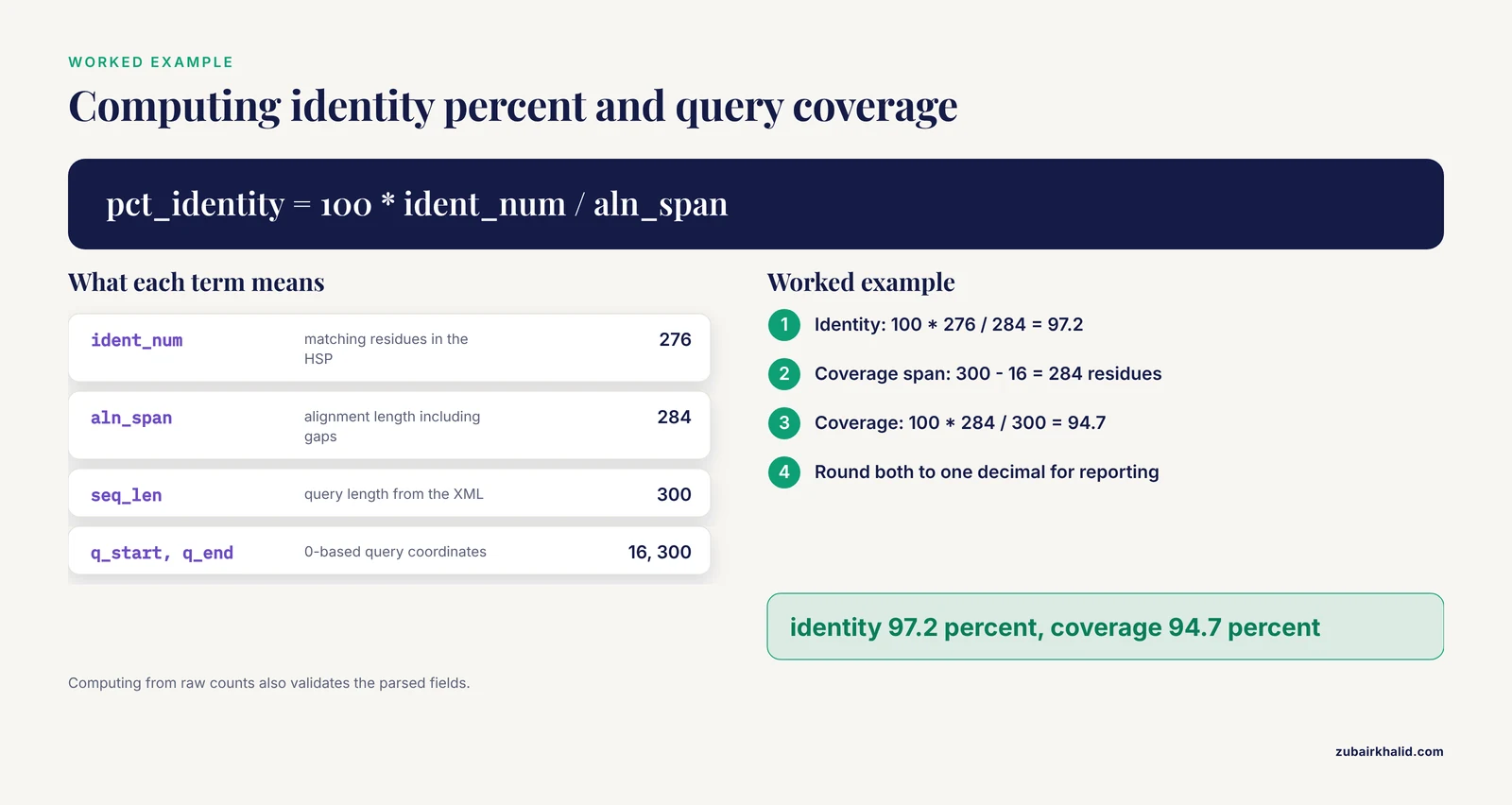
BLAST gives you identity as a count. Two derived numbers come up constantly.
Percent identity is the matching residues divided by the alignment length, which includes gaps:
pct_identity = 100 * hsp.ident_num / hsp.aln_spanQuery coverage is the fraction of the query covered by the HSP:
q_from, q_to = sorted((hsp.query_start, hsp.query_end))
qcov = 100 * (q_to - q_from) / qresult.seq_len
With the sample values, the alignment spans query positions 16 through 300 in 0-based coordinates, which is 284 residues of a 300 residue query:
# pct_identity = 100 * 276 / 284 = 97.2
# qcov         = 100 * (300 - 16) / 300 = 94.7
Both numbers round to one decimal for reporting. Computing them from raw counts, rather than trusting a single field, also doubles as a validation step, covered later.
Step 8. Write everything to a tab separated file
Putting the pieces together, here is a complete, reusable script:
#!/usr/bin/env python3
"""Extract alignment data from BLAST XML into a TSV file."""
import sys
from Bio import SearchIO

xml_path, tsv_path = sys.argv[1], sys.argv[2]

header = ["query", "query_len", "hit", "hsp_num", "evalue", "bitscore",
          "identity_pct", "query_cov_pct", "q_start", "q_end",
          "h_start", "h_end", "aln_span", "gaps", "qseq", "hseq"]

with open(tsv_path, "w") as out:
    out.write("\t".join(header) + "\n")
    for qresult in SearchIO.parse(xml_path, "blast-xml"):
        for hit in qresult:
            for i, hsp in enumerate(hit.hsps, start=1):
                q_from, q_to = sorted((hsp.query_start, hsp.query_end))
                h_from, h_to = sorted((hsp.hit_start, hsp.hit_end))
                row = [
                    qresult.id,
                    str(qresult.seq_len),
                    hit.id,
                    str(i),
                    f"{hsp.evalue:.3g}",
                    f"{hsp.bitscore:.1f}",
                    f"{100 * hsp.ident_num / hsp.aln_span:.1f}",
                    f"{100 * (q_to - q_from) / qresult.seq_len:.1f}",
                    str(q_from),
                    str(q_to),
                    str(h_from),
                    str(h_to),
                    str(hsp.aln_span),
                    str(hsp.gap_num),
                    str(hsp.query.seq),
                    str(hsp.hit.seq),
                ]
                out.write("\t".join(row) + "\n")

print("wrote", tsv_path)
Run it and inspect the first rows:
python blast_xml_to_tsv.py results.xml parsed_hits.tsv
head -2 parsed_hits.tsv | cut -f1-12
Expected output (columns split onto two lines here for readability):
query    query_len  hit           hsp_num  evalue  bitscore  identity_pct  query_cov_pct
COI_seq1 300        Seba_coi_01*  1        0       549.9     97.2          94.7

q_start  q_end  h_start  h_end  aln_span  gaps
16       300    0        284    284       3
The hit column shows the description was used for readability in this sample. In your own runs, decide once whether hit.id or hit.description is the identifier your downstream tools expect, and be consistent. This tabular output is also what you would hand to any downstream filtering workflow, a pattern that scales from ad hoc scripts to stored, queryable result databases built specifically so BLAST results can be filtered repeatedly without rerunning the search [2].
Every Alignment Value and Where It Lives
This table is the field reference you will return to. The left column is what you usually want, the middle columns show where the value lives in the raw XML and in SearchIO, and the notes column flags anything that behaves unexpectedly.
| Data you want | Raw XML tag | SearchIO attribute | Notes |
|---|---|---|---|
| Query name | Iteration_query-def | qresult.id | Truncated at first whitespace, full text in qresult.description |
| Query length | Iteration_query-len | qresult.seq_len | Denominator for coverage |
| Hit identifier | Hit_id, Hit_accession | hit.id | Opaque IDs without -parse_seqids |
| Hit description | Hit_def | hit.description | Usually the informative name |
| E value | Hsp_evalue | hsp.evalue | Float, 0.0 means below the representable floor |
| Bitscore | Hsp_bit-score | hsp.bitscore | The standard ranking score |
| Raw score | Hsp_score | hsp.score | Scaled bitscore, rarely used directly |
| Alignment length | Hsp_align-len | hsp.aln_span | Includes gap columns |
| Identity count | Hsp_identity | hsp.ident_num | Divide by aln_span for percent |
| Positive count (proteins) | Hsp_positive | hsp.pos_num | Conservative substitutions included |
| Gap count | Hsp_gaps | hsp.gap_num | Total gap columns in the HSP |
| Query coordinates | Hsp_query-from, Hsp_query-to | hsp.query_start, hsp.query_end | 0-based, end exclusive in SearchIO |
| Hit coordinates | Hsp_hit-from, Hsp_hit-to | hsp.hit_start, hsp.hit_end | Same 0-based convention |
| Strand or frame | Hsp_query-frame, Hsp_hit-frame | hsp.query_strand, hsp.hit_strand | 1, -1, or 0 for proteins |
| Aligned query string | Hsp_qseq | str(hsp.query.seq) | Gaps included as dashes |
| Aligned subject string | Hsp_hseq | str(hsp.hit.seq) | Gaps included as dashes |
| Midline | Hsp_midline | via hsp.aln_annotation | Print the dict to confirm keys |
One reminder that saves debugging time: a single hit can contain multiple HSPs. If your downstream logic assumes one alignment per hit, decide explicitly whether you want only the best HSP (hit.hsps, which BLAST reports first) or all of them.
Tips for Large Files and Real Pipelines
These are the practical tips that separate a working one off script from a parser that survives contact with a real project.
Keep the loop lazy. Never do list(SearchIO.parse(...)) on a large file. SearchIO.parse streams query by query, so process and write each QueryResult as it arrives and let the file object be garbage collected. Peak memory then tracks the largest single query result, not the whole file.
Archive the raw XML, summarize aggressively. Disk is cheaper than BLAST compute time. Keep the original XML, write your parsed summary to a tabular file or a database, and do all exploratory filtering against the summary. This is the same design logic behind servers built to store parsed BLAST results in queryable form so that filtering, such as finding reciprocal best hits between two sequence sets, happens without rerunning the search [2].
Choose the parser with performance in mind for very large results. Parser runtime is a real cost at scale, and comparisons of BLAST parsing tools have found meaningful differences between implementations, including dedicated tools that outperform generic Biopython and BioPerl loops on large result sets [1]. For most analyses SearchIO is fast enough and its clarity wins. If you are routinely parsing gigabyte scale XML, benchmark your exact workload before committing to an architecture.
Sanity check with tabular output. Run the same search twice, once with -outfmt 5 and once with -outfmt 6. The tabular file is a fast, independent reference for spot checking your parsed XML values.
For remote searches, parse the same way. When you submit searches through Biopython's web service helper, the returned XML parses identically:
from Bio.Blast import NCBIWWW
from Bio import SearchIO
import io

result_handle = NCBIWWW.qblast("blastn", "nt", my_sequence, hitlist_size=10)
qresult = SearchIO.read(io.StringIO(result_handle.read()), "blast-xml")
Do not re-derive what BLAST already computed. Recomputing identity from the sequence strings is a validation exercise, but in production pipelines trust hsp.ident_num and spend your compute on something else.
Common Mistakes and Limitations
This section collects the specific errors that account for most of the frustration people have with blast xml parsing in python. Each one has a concrete symptom and a fix.
Off-by-one coordinates. The single most common error. Raw BLAST XML is 1-based and inclusive. SearchIO converts to 0-based with an exclusive end. If your extracted coordinates look shifted by one position, or a subsequence extraction starts one residue late, you have mixed the two conventions. The fix is a rule: once data enters SearchIO objects, treat all coordinates as 0-based and never add or subtract 1 again. If you cross check against raw XML or against tabular BLAST output, remember that both are 1-based, so SearchIO values will be exactly one less at the start.
Exhausted iterators. SearchIO.parse returns a generator. If you write qresults = SearchIO.parse(...) and then iterate over qresults twice, the second loop silently does nothing. Symptom: a script that prints a summary correctly and then writes an empty table. Fix: nest your loops inside a single pass, or re-parse the file for the second pass. Related trap, SearchIO.read on a multi query file raises an error because it expects exactly one query result. Use read only for single query files.
Wrong format string. SearchIO.parse(path, "blast_xml") or "blastxml" fails. The identifier is blast-xml. The ValueError message lists valid names, so read it before guessing.
Assuming hit order is a guarantee you can build on. It is safer to sort your parsed hits explicitly by bitscore or E value in Python than to rely on the order BLAST happened to write them. Explicit sorting also makes your script's behavior independent of BLAST version changes.
Treating -max_target_seqs as an honest top N. The effect of this parameter on the heuristic search process has been questioned in the literature, and parsers alone cannot recover hits BLAST never reported [1]. If your analysis depends on finding the best hit in the database, verify that your parameter choices support that goal rather than assuming the XML contains a complete ranked list.
Parsing a truncated or non-XML file. If BLAST was killed mid-write, or if a script accidentally saved a web page as XML, the standard library fails with xml.etree.ElementTree.ParseError: not well-formed (invalid token). The two quick checks are whether the file ends with </BlastOutput> and whether its first line is an XML declaration. Fix the upstream cause, usually the file transfer or the command that produced the file, rather than trying to salvage partial XML.
Forgetting empty queries. Queries with no hits carry the message No hits found and produce an empty QueryResult. A script that assumes every query has at least one hit will produce rows for only the queries that hit something, and your output row count will not match your input sequence count. Handle the empty case explicitly if you need a complete record of what was searched.
Assuming one HSP per hit. Multi domain proteins and fragmented matches produce multiple HSPs per hit. Scripts that read hit.hsps and move on silently discard alignments, and scripts that assume every HSP covers the whole query compute coverage incorrectly. Sum or merge coordinates when a hit aligns in multiple regions.
Mixing coordinate systems across tools. If one part of your pipeline uses SearchIO coordinates and another uses raw XML or tabular BLAST values, document which is which in your code. The cheapest insurance is a comment at every coordinate conversion.
A limitation worth stating plainly. Parsed alignment data tells you what BLAST reported under your parameters. It does not by itself resolve database completeness, sequence annotation quality, or the biological meaning of a hit. Those judgments live downstream of parsing.
How to Check Your Parsed Results Are Right
Verification takes minutes and catches nearly all of the mistakes above.
Count hits independently. The XML tag count is a ground truth for how many hits the file contains:
grep -c "<Hit>" results.xmlThen count in Python:
total_hits = sum(len(q.hits) for q in SearchIO.parse("results.xml", "blast-xml"))
print(total_hits)
The two numbers must match.
Cross check one row against tabular output. Run the same search with -outfmt "6 qseqid sseqid evalue bitscore qstart qend sstart send" and compare one HSP. Remember the tabular coordinates are 1-based, so your SearchIO start values should each be one less than the tabular start values.
Recompute identity from the strings.
ident = sum(1 for a, b in zip(str(hsp.query.seq), str(hsp.hit.seq)) if a == b)
print(ident, hsp.ident_num)   # these should be equal
If your recomputed count matches hsp.ident_num, your parsing of the sequence strings, the alignment length, and the identity field are all internally consistent, and the identity percent you derived is trustworthy.
Check the extremes. Confirm that a query with zero hits appears as an empty QueryResult, and that your best hit's E value and bitscore are consistent with what BLAST printed in the pairwise view, if you kept one.
Where to Go Next
Once alignment data lands in a clean table, standard next steps open up. Common ones include filtering by E value and coverage thresholds, collapsing multiple HSPs per hit into a single best or merged alignment, computing reciprocal best hits between two sequence sets to suggest orthologs, and loading results into a database so they can be re-filtered with new criteria without rerunning BLAST. The reciprocal best hit pattern in particular is a well established application of stored BLAST results, and prebuilt servers exist that implement exactly that filtering over serialized parsed results [2]. Your own parsed TSV supports the same logic with a few lines of pandas.
If you work across many search tools, invest an hour in the rest of the SearchIO object model. Because QueryResult, Hit, and HSP behave like dictionary and list hybrids, the same traversal code handles BLAST tabular, HMMER domain tables, and other formats, which turns this BLAST-specific skill into a general one.
Frequently Asked Questions
What is the easiest way to parse BLAST XML in Python?
Use Bio.SearchIO.parse(path, "blast-xml") from Biopython and iterate over the resulting QueryResult, Hit, and HSP objects. It is the maintained interface, it streams large files, and it normalizes coordinates to 0-based Python style values.
Why are my BLAST coordinates off by one in Biopython?
Raw BLAST XML coordinates are 1-based, while SearchIO converts them to 0-based with an exclusive end. Subtract nothing once data is in SearchIO objects, and when cross checking against raw XML or tabular output, expect SearchIO starts to be one less.
Should I use XML output or tabular output for BLAST?
Use XML when you need aligned sequences, strand, the full parameter block, or a single self-documenting archive, and use tabular output when you only need identifiers and statistics and want a compact greppable file. Both are valid, and many pipelines run both.
How do I extract the aligned sequence strings from BLAST XML?
Read str(hsp.query.seq) and str(hsp.hit.seq) from each SearchIO HSP. These are the aligned, gapped strings corresponding to the XML Hsp_qseq and Hsp_hseq tags, with gaps shown as dashes.
Why does Biopython return multiple HSPs for one hit?
BLAST reports one HSP per distinct local alignment, and a sequence can align to a query in several disjoint regions. Iterate over all of hit.hsps and decide explicitly whether your analysis wants the best HSP or all of them.
How do I parse a very large BLAST XML file without running out of memory?
Iterate lazily with SearchIO.parse and process each query result as it arrives, writing summaries incrementally. Avoid converting the iterator to a list, and keep peak memory proportional to the largest single query rather than the whole file.
Can I parse BLAST XML without installing Biopython?
Yes, with the standard library's xml.etree.ElementTree, walking the Iteration, Hit, and Hsp tags with iter and findtext. You must handle 1-based coordinates, strand frames, and the no-hits case yourself, which is exactly the work SearchIO does for you.
How do I check that my BLAST XML parsing is correct?
Count hits with grep -c "<Hit>" and compare with your parsed count, cross check one HSP against tabular BLAST output of the same search, and recompute identity by comparing the query and hit strings position by position against hsp.ident_num.