Parallelization Strategies for Bioinformatics Workflows in the Cloud
By Dr. Zubair Khalid, DVM, MS, PhD ·

By the end of this article you will be able to identify the four levels of parallelism in a genomics pipeline, choose a workflow engine that can exploit them, run a containerized workflow on AWS Batch with real commands, tune thread counts so you stop paying for idle cores, and recognize the failure patterns that waste cloud budgets. You will need an AWS account with permissions to create S3 buckets and Batch resources, AWS CLI version 2, Docker or Apptainer installed locally, Java 11 or later for Nextflow, and a small test dataset such as a handful of FASTQ files from a pilot run.
Why Parallelization Is the Core Skill in Cloud Bioinformatics
A single human whole genome sequence is roughly 200 GB of raw data [1]. At that scale, analysis can no longer happen on a typical desktop computer, and moving the data to the compute is itself the bottleneck. The standard answer in cloud bioinformatics is the opposite move: send the compute to where the data already live, and run many independent pieces of work at the same time [1]. This shift drove the development of cloud platforms, web services, and containerized workflows that now dominate large-scale genomics [2].
Parallelization is what turns that architectural shift into actual speed. A workflow engine that runs every step one after another on one machine leaves the elastic nature of cloud computing unused. Systems built for scale do the opposite. The Globus Genomics system, an enhanced Galaxy deployed on Amazon's cloud infrastructure, uses elastic scaling of compute resources to run multiple workflows in parallel and meet the scale-out needs of translational genomics [3]. At the far end of the spectrum, the Celeste infrastructure for the All of Us Research Program processed fluctuating workloads of up to 9,000 whole genome sequencing samples per month using serverless technology and container orchestration, coordinating around 200 million serverless functions and 1.8 million bioinformatics and quality control jobs over 12 months inside a single AWS Region [4].
Those numbers set the frame for everything below. Parallelization is not an optimization you bolt on at the end. It is the design decision that determines whether your pipeline finishes in hours or weeks, and whether your bill is dollars or thousands of dollars.
The Four Levels of Parallelism
Every parallelization strategy for bioinformatics workflows in the cloud reduces to one or more of four levels. Getting the levels straight, and knowing which one your pipeline needs, is the first step in any concrete plan to parallelize a bioinformatics workflow in the cloud.
| Level | What gets split | Typical mechanism | Where it matters most |
|---|---|---|---|
| Sample-level (scatter) | Independent samples run as separate jobs | Scatter-gather or channel-per-sample design | Cohorts of 50 to 100,000 samples |
| Task-level (fan-out) | Steps within one sample run concurrently | DAG scheduling by the engine | Multi-step pipelines with independent branches |
| Thread-level | One tool uses many cores | cpus directive, -t or -@ flags | Alignment, assembly, sorting |
| Data-level (sharding) | One large input split into chunks | FASTQ splitting, interval lists, chromosome sharding | Very large single samples, joint calling |
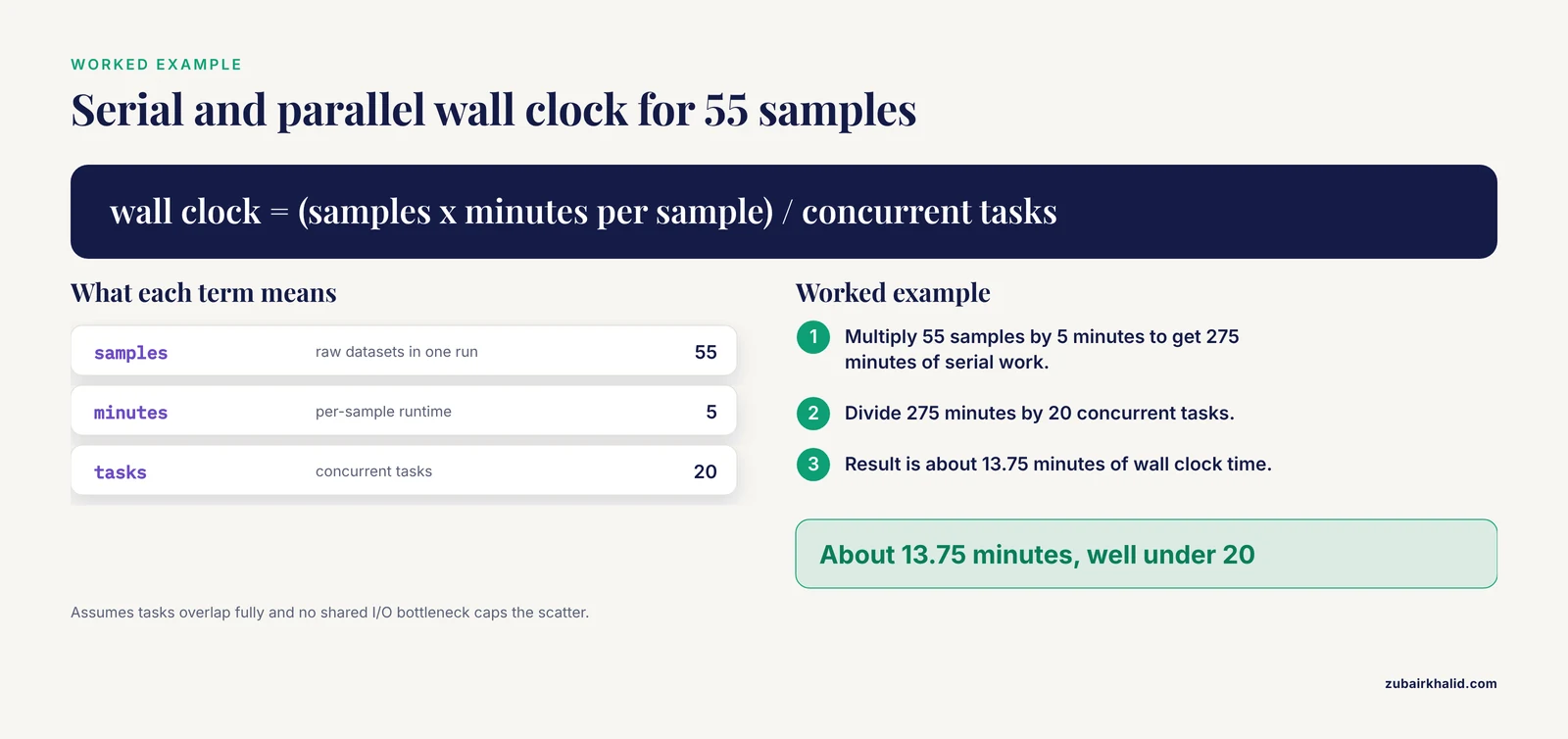
Sample-level parallelism is usually the biggest win because sequencing projects are naturally batch shaped. A workflow built on the Common Workflow Language for SARS-CoV-2 identification processed each raw sequencing sample in about 5 minutes at a cost of roughly US$0.01 per sample by leveraging cloud parallelization [5]. A separate cloud workflow for SARS-CoV-2 mutation profiling executed 55 raw Illumina datasets in one run under resource-limited settings by harnessing parallel cloud computing [6]. The arithmetic is simple. Fifty-five samples at 5 minutes each is about 275 minutes of serial work. With 20 tasks running concurrently, wall clock time falls to well under 20 minutes because most of those minutes overlap.
Task-level parallelism comes from the structure of the workflow itself. Breaking a complex experiment into small, well defined tasks with explicit inputs, parameters, and outputs makes it possible to identify bottlenecks and pinpoint sections that could benefit from parallelization [7]. Once the dependency graph is explicit, the engine runs everything that has no dependency between them at the same time, automatically.
Thread-level parallelism is the easiest to enable and the easiest to get wrong. A section below shows why simply giving every tool 16 threads can make things slower, not faster.
Data-level sharding splits one overwhelming input into manageable pieces. The classic example is splitting a large FASTQ file or processing genome intervals independently so each shard fits comfortably in one container. MapReduce-style frameworks formalize this pattern, distributing data across machines and supporting parallel processing of large analytical jobs [9], and hybrid platforms have combined traditional tools with MapReduce-based analysis programs in a single pipeline so that analytics algorithms can be parallelized end to end [10].
Choosing a Workflow Engine That Can Parallelize
You do not need to write your own scheduler. Modern workflow engines handle dependency tracking, retry logic, caching, and execution across local machines, clusters, and clouds. A widely cited comparison demonstrates the same analysis written in four engines, the Common Workflow Language (CWL), the Guix Workflow Language, Snakemake, and Nextflow, each of which can run tasks in parallel, with software bundled in containers such as Docker, Guix, and Singularity so the same workflow deploys anywhere [11].
Practical guidance for choosing:
- Nextflow is the most common choice for cloud genomics today. It has native support for AWS Batch, S3-backed work directories, and resume semantics. Open source pipelines such as nf-encyclopedia, a Nextflow pipeline for proteomics, demonstrate reproducible execution on either a cloud platform or a local workstation, and benchmarked scaling to large experiments in the cloud by leveraging parallelized compute resources [12].
- CWL is a declarative standard that separates workflow description from execution. The COWID system, repurposed from a cancer genomics cloud platform for SARS-CoV-2 surveillance, is a CWL workflow designed to be implemented without prior programming knowledge [5].
- Snakemake is Python based and excels when your analysis mixes files, rules, and custom scripts. It runs tasks in parallel given a core limit and supports Singularity or Docker containers [11].
- Specialized engines exist for particular niches. Kronos compiles a text configuration file into executable Python applications whose run manager executes workflows locally, on a cluster, or on a cloud, and parallelizes tasks as part of the framework [13]. COSMOS, a Python library for massively parallel workflows, provides formal description of pipelines, partitioning of jobs, abstraction of the queuing system, and fine grained control, running on traditional clusters as well as cloud services [14]. Swift/T was evaluated for production genomic variant calling at hundreds to thousands of samples at a time and operates transparently across PBS Torque, SLURM, and Cray scheduling environments with portability to the cloud [15].
For most teams the decision is Nextflow or Snakemake for interactive development and Nextflow or CWL for production cloud deployment. The remaining sections use Nextflow against AWS because it makes each parallelization level visible in configuration.
Step-by-Step: Parallelizing a Genomics Workflow on AWS
This walkthrough parallelizes an alignment step for a cohort of samples using Nextflow on AWS Batch. The same logic transfers to Snakemake or CWL.
Step 1. Install Nextflow and verify the environment
curl -s https://get.nextflow.io | bash
./nextflow -v
Expected output:
Nextflow installation completed. Please note down the executable full path

nextflow version 24.10.0.5928
Confirm Docker works, because every process will run in a container, which is what makes the workflow portable between your laptop and the cloud [11]:
docker run --rm biocontainers/bwa:v0.7.17 bwa 2>&1 | head -5Expected output begins with:
Program: bwa (alignment via Burrows-Wheeler transformation)
Version: 0.7.17-r1188
Step 2. Move data and references to S3
In cloud bioinformatics you bring compute to the data rather than the reverse [1]. References and indexes belong in a versioned bucket so every run uses the same build.
aws s3 sync ./data s3://my-lab-bucket/demo/data
aws s3 sync ./ref   s3://my-lab-bucket/demo/ref
Expected output:
upload: data/sample1_R1.fastq.gz to s3://my-lab-bucket/demo/data/sample1_R1.fastq.gz
upload: data/sample1_R2.fastq.gz to s3://my-lab-bucket/demo/data/sample1_R2.fastq.gz
Step 3. Define the sample channel so each sample becomes its own task
This is sample-level parallelism in its simplest form. One channel entry equals one scattered job.
reads = Channel.fromFilePairs("s3://my-lab-bucket/demo/data/*_R{1,2}.fastq.gz",
                              checkIfExists: true)
fromFilePairs pairs forward and reverse reads by the {1,2} glob and emits tuples like [sample1, [sample1_R1.fastq.gz, sample1_R2.fastq.gz]]. The checkIfExists: true flag fails fast if the glob matches nothing, which prevents a silent empty run.
Step 4. Write a parallel process with resource directives
process ALIGN {
    cpus      8
    memory    32.GB
    container 'biocontainers/bwa:v0.7.17'

    input:
    tuple val(sampleId), path(reads)

    output:
    tuple val(sampleId), path("${sampleId}.sorted.bam"), emit: bam

    script:
    """
    bwa mem -t ${task.cpus} -R '@RG\\tID:${sampleId}\\tSM:${sampleId}' \\
        ref/HG38.fa ${reads} | samtools sort -@ ${task.cpus} -o ${sampleId}.sorted.bam
    """
}
Each directive matters. cpus 8 tells both the container and the underlying scheduler how many cores the task reserves, and ${task.cpus} injects that number into the tool so BWA and samtools agree with the reservation. memory 32.GB prevents the scheduler from placing your task on a node without room for it. The read group string keeps downstream GATK steps happy by labeling every alignment with its sample.
Step 5. Add an AWS Batch execution profile
Create a nextflow.config alongside your pipeline:
profiles {
    awsbatch {
        process.executor = 'awsbatch'
        process.queue    = 'my-genomics-queue'
        process.region   = 'us-east-1'
        workDir          = 's3://my-lab-bucket/demo/work'
        docker.enabled   = true
    }
    local {
        docker.enabled = true
    }
}
The executor setting is what moves scheduling from your laptop to AWS Batch. Each parallel task becomes an independent Batch job, so the fleet scales out to run as many concurrently as your queue and compute environment allow. This is the same elastic scaling principle that let Globus Genomics run many workflows in parallel on Amazon's infrastructure [3].
Step 6. Run the workflow and watch the scatter
nextflow run main.nf -profile awsbatchExpected output:
Launching `main.nf` [adoring_curie] DSL2 - revision: 8a1f2c3d4e
executor >  awsbatch (12)
[7a/1f3b92] ALIGN (sample1) | 1 of 12, 1 cached
[7a/9c44d1] ALIGN (sample2) | ...
[7a/e0b7f5] ALIGN (sample12) | 100% 12 of 12 ✔
Read this output the way a pilot reads instruments. The number in parentheses after the executor is how many task instances AWS launched, which confirms scatter worked. The short hash like 7a/1f3b92 is the work directory key for each task on S3.
Step 7. Add more samples and resume
aws s3 sync ./more_data s3://my-lab-bucket/demo/data
nextflow run main.nf -profile awsbatch -resume
Expected output shows old tasks skipped and new ones run:
executor >  awsbatch (3)
[7a/1f3b92] ALIGN (sample1)  | Cached
[8b/2a4c31] ALIGN (sample13) | 100% 3 of 3, 12 cached ✔
Caching is the quiet hero of cloud parallelization. -resume reuses every task whose inputs, container, and script are unchanged, so adding samples to a finished cohort costs only the new work.
Step 8. Stage results out and verify
aws s3 sync s3://my-lab-bucket/demo/results ./results
ls results/*.sorted.bam | wc -l
Expected output:
12Then run a quality gate such as samtools flagstat on each BAM and compare read counts against the input FASTQ read counts to confirm nothing was lost in the scatter.
Tuning Threads, Memory, and I/O
Thread-level parallelism has a ceiling, and hitting it costs money. The clearest evidence comes from a holistic optimization study of a UMI RNA-seq pipeline with split, align, and merge steps. Optimizing all three steps yielded a 40 percent speed increase on a single thread. At 16 threads, the holistically optimized pipeline ran 4-fold faster than the original parallel implementation and more than 8-fold faster than the original single-threaded version. Optimizing only the alignment step, by contrast, improved the 16-thread workflow by just 13 percent [8]. The lesson is concrete: aligners such as BWA are already heavily optimized, so the return on giving them every core is small compared with fixing the cheap steps around them.
Practical tuning rules that follow from this and from standard practice:
- Start each tool at 4 to 8 threads and measure before increasing. Beyond a tool's internal scaling limit, extra reserved cores sit idle while the cloud bills them.
- Sorters and compressors often scale differently than aligners. In the pipeline above,
samtools sort -@gets its own scaling curve, so tune it separately from BWA. - Watch I/O saturation. When many concurrent tasks read the same S3 objects or write to the same volume, wall time stops dropping no matter how many cores you add. If adding tasks no longer shortens the run, you have moved the bottleneck to data transfer or storage throughput, and sharding inputs or adding transfer infrastructure is the fix. One cloud platform solved exactly this with a purpose built high speed transfer solution reporting file transfer speeds up to 10 times normal transfers [10].
- Size memory from measured peaks, not guesses. Run one sample, record peak memory with the engine's reporting or the operating system, then set the directive with roughly 20 percent headroom.
- Use per-task metrics, not aggregate node metrics, when tuning. Nextflow writes
.command.tracestyle runtime files and usage reports (-with-report) that show real CPU and memory per task, which is what you need to right-size directives.
Scatter-Gather at Population Scale
When cohorts grow from dozens to thousands of samples, engine choice and architecture start to matter as much as tool choice. Swift/T was designed and evaluated against exactly this regime, variant calling across large batches with fans, merges, and conditionals, and its authors formalized design criteria for robust, maintainable workflows that must function at scale in production settings such as large sequencing facilities and hospital systems [15]. The criteria they emphasize translate directly to cloud work: explicit task boundaries, fault tolerance that survives individual task failure, and portability across schedulers and clouds.
Celeste shows what the ceiling looks like. Built on serverless technology and container orchestration, it routinely handled workloads of up to 9,000 whole genome sequencing samples per month and orchestrated roughly 200 million serverless functions and more than 20 million messages in a year of production within a single AWS Region [4]. You do not need that scale to borrow the design ideas: separate orchestration from execution, keep every step stateless and containerized, and let a queue absorb the fluctuating arrival of samples.
The economics of per-sample parallelism also become visible at scale. A CWL based viral identification workflow that processes each sample in about 5 minutes at roughly US$0.01 per sample turned pandemic-scale surveillance into a cheap, repeatable operation that researchers can run without prior programming knowledge [5]. Speed per sample and cost per sample are the two numbers to track once your scatter works, because they let you forecast any cohort size before you launch it.
Layered architectures keep this manageable as pipelines multiply. The NMDC EDGE resource for standardized multi-omics workflows separates a web application layer, an orchestration layer, and an execution layer, with containers in the orchestration and execution layers so the system accommodates both high performance computing and cloud services [16]. Separation of concerns like this means adding a new parallel pipeline does not require rebuilding the platform.
Serverless, Spot, and Other AWS Genomics Cost Levers
AWS genomics workloads have three common execution shapes, and each changes how you parallelize:
- Provisioned fleets with Batch. AWS Batch keeps a compute environment sized to your queue. This is the default Nextflow profile shown above and suits steady pipelines with predictable daily volume.
- Serverless orchestration. Functions and queues replace long-lived schedulers. This is the pattern behind Celeste's ability to absorb fluctuating workloads of thousands of monthly samples with hundreds of millions of function invocations [4]. It shines when arrivals are bursty and idle capacity would otherwise sit billed and unused.
- Spot capacity for fault-tolerant scatter. Because sample-level scatter produces hundreds of independent, retryable tasks, spot interruptions cost you a single task rerun rather than a whole pipeline. This only works if your engine supports retries and caching, which is a direct argument for running cloud work under a real workflow engine rather than a shell script [11].
A useful discipline regardless of shape: run your entire pipeline on one sample first, then two, then a small pilot batch, and only then scale the scatter. Elastic scaling on demand is powerful precisely because it removes the excuse for skipping the pilot. Globus Genomics demonstrated how elastic scale-out serves end-to-end NGS analysis without a standing cluster [3].
Practical Tips for Parallelizing Bioinformatics Workflows in the Cloud
These are the tips that separate pipelines that scale cleanly from pipelines that stall at 3 a.m.
- Model samples as first-class channels, not loops. If your workflow contains a
forloop over samples, rewrite it as a channel or scatter construct. Loops serialize, channels parallelize. - Make every step restartable. At scale, individual task failure is normal, not exceptional. Set engine-level retries (for example
errorStrategy 'retry'withmaxRetries 2in Nextflow) so a spot interruption or a transient S3 timeout reruns one task silently. - Cache aggressively. Work directories on object storage plus
-resumemean incremental cohorts and failed reruns cost a fraction of a full run. This is what makes iterative exploration affordable on the cloud. - Pin tool versions in containers. Every process should declare its container image. Parallelism multiplies whatever behavior your container has, including subtle version drift if you leave the tag floating.
- Optimize the slow cheap steps, not just the famous ones. The RNA-seq evidence shows holistic optimization of all pipeline steps beat aligner-only optimization by a wide margin at 16 threads [8]. Profile the whole pipeline before spending money on bigger instances.
- Use declarative configuration for anything you might change. Engines that compile configuration into execution, such as Kronos, make workflows easy to modify through configuration editing rather than code surgery [13]. Keep resources, references, and parameters in config files checked into version control.
- Track two numbers per sample: minutes and dollars. The COWID project's per-sample figures of about 5 minutes and US$0.01 made scaling decisions trivial [5]. Your pipeline will have different numbers, but you should know them to the same precision.
- Lower the barrier for collaborators deliberately. Packages that wrap cloud platform workflows behind a few R functions, such as AnVILWorkflow, demonstrate that setup, submission, and result retrieval can be simplified to the point where exploratory or bulk processing no longer requires deep platform expertise [17]. If your parallel pipeline will be used by others, invest in that wrapper layer early.
- Convert rather than rewrite when inheriting pipelines. Tools exist to represent command line tools in structured descriptors and convert workflows between engines, preserving parameters and I/O while gaining parallel execution on larger infrastructure [7]. Rewriting from scratch is usually the more expensive option.
Common Mistakes and Limitations
These are the errors that show up repeatedly when teams parallelize bioinformatics workflows in the cloud.
- Serial code wearing a parallel costume. A workflow that scatters samples but then funnels every sample through one merge process on one large node has a serialization point you built yourself. Look for single tasks downstream of your scatter and shard them (for example, merge by chromosome interval) or accept them as the critical path.
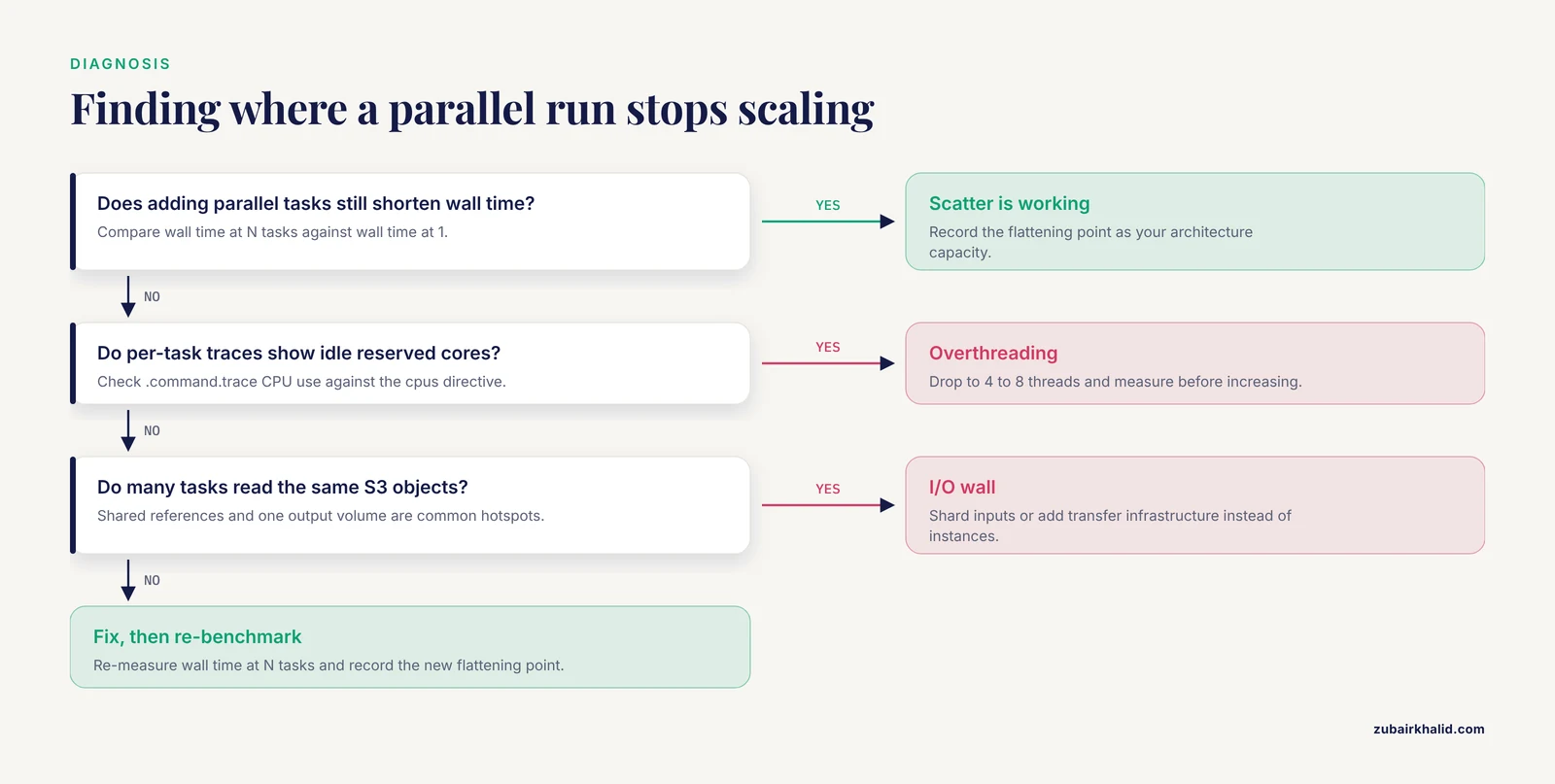
- Overthreading. Giving every process 16 or 32 threads because the instance has them wastes reserved capacity on tools that stop scaling at 4 or 8 threads, and the measured cost of aligner-only thread tuning is a 13 percent improvement while holistic tuning reaches 4-fold [8]. Measure, then allocate.
- Ignoring the I/O wall. If doubling parallel tasks no longer halves wall time, the bottleneck is data transfer, storage throughput, or a shared reference hotspot. Adding instances will not help and will only increase cost. Diagnose with per-task runtimes before buying capacity.
- Monolithic scripts instead of tasks. One giant bash script cannot be retried per step, cached per step, or moved to the cloud per step. Breaking work into defined tasks is what exposes parallelization opportunities and bottlenecks in the first place [7].
- No container pinning. Running tool versions unpinned means a rerun of a parallel batch can produce different results than the first run, silently. Containers plus version tags are the standard fix.
- Forgetting that cloud costs are per unit time of reserved resources. Idle reserved cores and idle memory cost the same as busy ones. Right-sizing from measured task metrics is a continuous activity, not a one-time setup.
- Skipping the pilot batch. Launching a 5,000-sample scatter on an untested pipeline converts configuration bugs into a 5,000-fold multiplication of the bug. The published large-scale systems all validate on small inputs first, and so should you.
- A limitation to state plainly. Parallel cloud execution accelerates computation. It does not validate your biology, your reference build, or your parameter choices, and published cloud pipelines still require domain expertise to configure correctly for a new organism or assay [17][16]. Reproducibility requires the container, the config, and the input checksums, not just the engine [11].
How to Verify a Parallel Run Is Correct
Parallel execution adds failure modes that serial execution does not have, so verification is part of the strategy, not an afterthought.
- Count outputs against inputs. Every input sample should produce exactly one final artifact. A loop over expected sample IDs that checks file existence is a two-line script that catches silent scatter failures.
- Compare cached and uncached outputs. After a
-resumerun, rerun one task with cached results cleared and confirm the output is byte-identical or checksum-identical. Determinism here is your reproducibility evidence. - Check per-task logs, not just exit codes. Nextflow preserves
.command.err,.command.out, and*.command.traceper task in the work directory. Scan for warnings that appear across many tasks, since a repeated warning in 500 parallel tasks is a systematic problem, not noise. - Benchmark the scale-up you actually got. Compare wall time at N concurrent tasks against wall time at 1. If the ratio is far below N, record where the curve flattens. That flattening point is the true capacity of your current architecture, and it is the number you quote when planning the next scale-out, just as published systems benchmark their scaling in the cloud [12].
Frequently Asked Questions
What does it mean to parallelize a bioinformatics workflow in the cloud?
It means structuring an analysis so many independent pieces of work, whether samples, tasks, threads, or data shards, run at the same time on cloud machines instead of sequentially on one computer. Cloud infrastructure makes this practical because you can rent as many concurrent machines as the workload needs and release them afterward [3].
Which workflow engine should I pick, Nextflow, Snakemake, or CWL?
Pick Nextflow or Snakemake for development speed and Nextflow or CWL when cloud deployment is the priority. All three support parallel task execution and containers, and the same analysis can be expressed in each of them [11]. CWL suits teams wanting a declarative standard with platform support, while Nextflow has first-class AWS Batch integration.
How many threads should I give each cloud genomics task?
Start with 4 to 8 threads per task and increase only after measuring. Evidence from RNA-seq pipeline optimization shows optimizing only the alignment step with many threads gave just a 13 percent improvement, while holistic optimization of all steps reached a 4-fold gain at 16 threads [8].
Do I need containers to run parallel cloud workflows?
Yes, in practice. Containers make each parallel task identical regardless of where it lands, which is the foundation of reproducible, scalable execution across local machines, clusters, and clouds [11], and they are the basis of large production cloud architectures [16][4].
What is scatter-gather and when should I use it?
Scatter-gather splits a batch of independent samples (or shards of one large input) into parallel tasks, then merges their outputs. Use it whenever your workload is a cohort of similar samples, which is the dominant shape of sequencing projects. It is the mechanism behind per-sample cloud workflows that finish each sample in minutes [5] and behind large-scale variant calling systems [15][4].
How does AWS Batch fit into genomics pipelines?
AWS Batch acts as the execution layer that runs each parallel task as an independent managed job, scaling the fleet up and down with queue demand. Nextflow and similar engines submit tasks to it directly through an awsbatch executor profile, which is the standard path for AWS genomics pipelines [4].
How do I know my parallel cloud run produced correct results?
Verify output counts against input counts, confirm cached and freshly recomputed tasks agree, and read per-task error logs rather than trusting exit codes alone. Deterministic, containerized reruns that reproduce identical outputs are the practical test of a correct parallel workflow [11].
How much does parallel cloud genomics cost?
It depends on your pipeline, but track cost per sample as your core metric. Published cloud workflows have demonstrated per-sample costs as low as about US$0.01 for lightweight viral identification at roughly 5 minutes per sample [5], while heavier analyses such as whole genome variant calling cost proportionally more. Measure your own per-sample minutes and dollars from engine reports before committing to a large cohort.
Sources
- Improving data workflow systems with cloud services and use of open data for bioinformatics research.
- Eras of bioinformatics technologies from command-line interfaces to artificial intelligence (AI) chatbots.
- A case study for cloud based high throughput analysis of NGS data using the globus genomics system.
- Celeste: A cloud-based genomics infrastructure with variant-calling pipeline suited for population-scale sequencing projects.
- COWID: an efficient cloud-based genomics workflow for scalable identification of SARS-COV-2.
- Robust Mutation Profiling of SARS-CoV-2 Variants from Multiple Raw Illumina Sequencing Data with Cloud Workflow.
- From the desktop to the grid: scalable bioinformatics via workflow conversion.
- Holistic optimization of an RNA-seq workflow for multi-threaded environments.
- Enabling big geoscience data analytics with a cloud-based, MapReduce-enabled and service-oriented workflow framework.
- Closha: bioinformatics workflow system for the analysis of massive sequencing data.
- Scalable Workflows and Reproducible Data Analysis for Genomics.
- nf-encyclopedia: A Cloud-Ready Pipeline for Chromatogram Library Data-Independent Acquisition Proteomics Workflows.
- Kronos: a workflow assembler for genome analytics and informatics.
- COSMOS: Python library for massively parallel workflows.
- Managing genomic variant calling workflows with Swift/T.
- Standardized and accessible multi-omics bioinformatics workflows through the NMDC EDGE resource.
- AnVILWorkflow: A runnable workflow package for Cloud-implemented bioinformatics analysis pipelines.