How to Organize a Bioinformatics Project on Linux
By Dr. Zubair Khalid, DVM, MS, PhD ·
Organizing a bioinformatics project on Linux means placing every file a study depends on, raw data, code, software environments, parameters, and results, into a fixed directory structure, then driving the analysis with scripts so any result can be traced back to its inputs and regenerated from scratch. A well-organized project is a self-describing record of the study that a collaborator can pick up and rerun without asking you a single question.
That definition matters because bioinformatics exists to combine biology with computing in order to collect, organize, store, analyze, and interpret biological data [1], and the organizing part is where most projects quietly fail. A single sequencing experiment moves through quality control, alignment, quantification, and statistics, and every stage depends on the versions, parameters, and inputs of the stages before it. When those details live only in a researcher's memory, results cannot be checked, students cannot resume a colleague's work, and journal expectations for reusable analyses become painful. Project frameworks built for this problem, such as PM4NGS, treat a standard directory structure, pinned tools, and scripted pipelines as the baseline for reproducible next-generation sequencing analysis [2]. This guide turns that baseline into concrete commands you can run on any Linux machine, from a laptop to a cluster login node.
Organizing a Bioinformatics Project on Linux, Explained
In plain terms, an organized bioinformatics project on Linux has five components that work together:
- A directory layout that separates data, code, configuration, and results.
- Raw data that nobody can edit by accident.
- A pinned software environment, meaning an exact, recorded set of tool versions.
- A scripted workflow that rebuilds every result from the raw data.
- Written documentation and metadata that explain the samples and the decisions.
If any one of them is missing, the project still runs, but it stops being reproducible, which means a different person on a different day cannot get the same numbers from the same inputs. The daily loop then looks like this: data arrives into a locked folder, you experiment freely in scratch commands, every command that works gets promoted into a script the same day, the scripts get wired into a workflow, and the workflow rebuilds the results folder on demand. Organization is not a filing task performed once. It is the shape of how you work every day.
Why Linux for Bioinformatics
Linux dominates this field for practical reasons. Most servers, cloud instances, and high-performance computing (HPC) clusters, which are shared machines that run many analyses at once through a job scheduler, run Linux, and large-scale frameworks such as Hadoop were adopted in genomics precisely because they deliver scalable analysis on commodity Linux clusters [3]. The shell makes repetitive work scriptable, package managers install scientific software cleanly, and containers wrap a whole software stack into a portable image. Even a Windows laptop can join in, because the Windows Subsystem for Linux (WSL) runs a Linux environment inside Windows, and project frameworks such as PM4NGS are designed to work through it [2].
What Project Organization Is Often Confused With
Students frequently blur project organization together with neighboring concepts. The table below separates them.
| Term | What it actually is | How it relates to project organization |
|---|---|---|
| , - | , - | , - |
| Workflow engine (Snakemake, Nextflow, CWL) | Software that runs analysis steps in order, skips finished steps, and restarts failed ones | Automates the project, but only as well as the layout and scripts you feed it |
| Container (Docker, Apptainer) | A packaged snapshot of software plus a base operating system | Pins tool versions inside the project, does not organize your files |
| Git repository | Version history for text files such as code and configuration | Tracks code changes, is the wrong tool for large data files |
| LIMS or analysis database (IRIDA, JUICE) | A system that stores samples, metadata, and results across many projects | Sits above individual projects and manages access at scale |
| HPC cluster account | Permission to run jobs on shared hardware through a scheduler | Supplies compute, supplies no structure |
A useful rule of thumb: the workflow engine and the container live inside your organized project, the Git repository tracks its text files, and the LIMS or cluster sits outside it.
The Anatomy of an Organized Project
Seven principles separate a project that survives from one that collapses after the first personnel change.
- One project, one directory. Everything the study needs lives under a single root folder. If a script reaches into /home/yourname/old_stuff, the project is not portable.
- Raw data is read-only. The files the sequencing facility delivered are the ground truth. Analysis outputs can be regenerated, raw data often cannot.
- Code, data, and results live apart. Mixing them makes it impossible to tell what was given to you and what you produced.
- Every step is scripted. A step you performed by clicking through a tool exists only in your memory. A step written in a script exists for the whole team.
- Software versions are pinned. Two versions of the same aligner, the software that maps sequencing reads to a reference genome, can produce different alignment counts. Record exact versions, never "whatever was installed."
- Provenance is written as you go. Provenance is the recorded chain of which data, code, parameters, and software versions produced each result. Reconstructing it after the fact rarely works.
- The project is written for a stranger. The most likely future reader is you, six months from now, with no memory of what final_v3_REAL.fastq contained.
These principles are old, and they persist because they work. Large collaborative efforts run on the same logic: the Linux kernel itself is built by thousands of contributors coordinating through shared, openly licensed records rather than face-to-face instruction. A four-person lab project needs the same discipline at smaller scale.
How to Organize a Bioinformatics Project on Linux, Step by Step
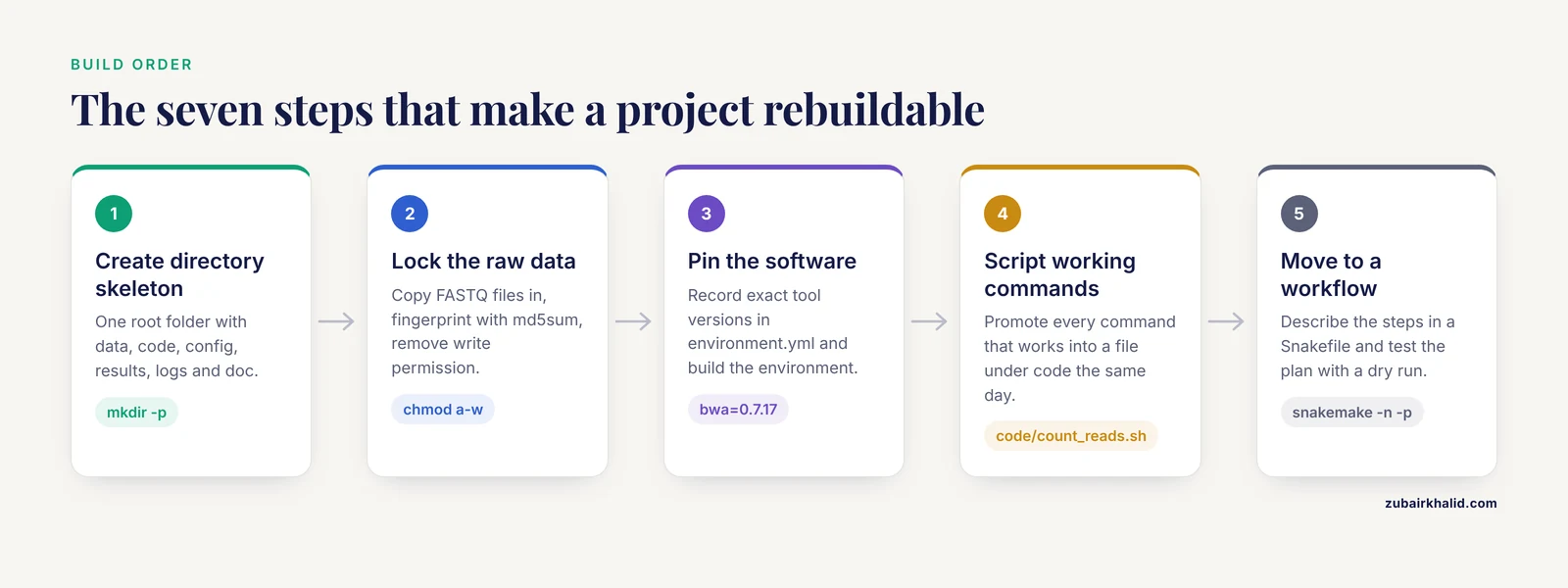
The following walkthrough is a set of worked examples you can copy. It builds a small variant-analysis project, meaning one that identifies differences between a sample's reads and a reference genome, with two samples. The same skeleton fits RNA-seq (sequencing of a sample's RNA content), metagenomics, or any other pipeline. Run the commands in order on any Linux machine with Conda installed.
Step 1. Create the Directory Skeleton
mkdir -p variants-demo/{data/raw,data/metadata,data/ref,code,config,results,logs,doc}
cd variants-demo
The braces are a shell shortcut called brace expansion that turns one command into a list of paths. Each path has one job:
| Path | Holds | Rule |
|---|---|---|
| , - | , - | , - |
| data/raw | FASTQ files exactly as delivered | Never edit, never rename, never delete |
| data/metadata | Sample sheet, checksums | One row per sample, tracked in Git |
| data/ref | Reference genome and its index | Built once, record the download source and genome build |
| code | Scripts, notebooks, the workflow file | Everything needed to regenerate results |
| config | Parameter files | No parameters hard-coded inside scripts |
| results | All generated output | Safe to delete at any time |
| logs | Console output of each run | One timestamped file per run |
| doc | README and protocols | Written for a new lab member |
FASTQ is the standard text format for raw sequencing reads, with four lines per record, almost always stored compressed as .fastq.gz. Two more files go in the project root: environment.yml, which pins the software, and a Snakefile, which drives the workflow. Both appear in the steps below.
File naming deserves a decision on day one. Use stable sample identifiers such as S1 and S2, avoid spaces and parentheses in filenames, and keep the original facility filenames untouched in data/raw. If the facility names differ from your sample IDs, map them in the sample sheet rather than renaming anything.
Step 2. Add Raw Data, Checksums, and a Lock
Copy the delivered files in, fingerprint them, then remove write permission from the folder:
cp /path/from/facility/*.fastq.gz data/raw/
md5sum data/raw/*.fastq.gz > data/metadata/raw_md5.txt
chmod a-w data/raw
A checksum is a short fingerprint computed from a file's bytes. If even one byte changes, the fingerprint changes, so the checksum file is your evidence that the raw data are untouched. Recheck at any time:
md5sum -c data/metadata/raw_md5.txtThe chmod a-w command removes write permission from the data/raw directory, which blocks accidental creation, replacement, or deletion of files inside it. Treat it as a seatbelt rather than a vault, because the owner can restore the permission and some transfer tools need write access. Also resist the urge to unpack FASTQ files to look at them. Read compressed files directly:
zcat data/raw/S1_R1.fastq.gz | head -8
zless data/raw/S1_R1.fastq.gz
The head -8 shows the first two records, because each record spans four lines.
Step 3. Pin the Software with Conda or Containers
The largest single source of irreproducibility is silent software drift. The practical fix is an environment file. Conda is a package and environment manager, and Bioconda is a Conda channel that distributes thousands of bioinformatics tools. Project frameworks commonly pair this with Docker for full-stack reproducibility [2].
Create environment.yml in the project root:
name: variants
channels:
  - conda-forge
  - bioconda
dependencies:
  - bwa=0.7.17
  - samtools=1.19
  - bcftools=1.19
  - fastqc=0.12.1
Then build and activate it:
conda env create -f environment.yml
conda activate variants
Capture the exact package list into the logs:
conda list > logs/conda_list_$(date +%F).txtContainers go one step further by packaging the software together with an entire base operating system. Dugong, for example, is a Docker image built on Ubuntu Linux with the explicit goal of supporting reproducible and replicable bioinformatics analyses [4]. On HPC systems where Docker daemons are not permitted, the equivalent tool is Apptainer, which runs container images without administrator rights. Once results start accumulating as interactive reports, platforms such as Kiosc organize containerized web apps into projects with access control, and one maintained instance has served 321 containers across 150 projects for more than five years [5].
Whichever route you take, the rule is the same: a stranger must be able to recreate your software stack from files stored in the project, not from your memory.
Step 4. Turn Working Commands into Scripts
Most analyses start as typed commands. The organizational move is to promote every command that works into a file under code/ the same day. A first useful script counts reads in every FASTQ file. Because each FASTQ record spans four lines, the line count divided by four is the read count:
mkdir -p results/qc
for f in data/raw/*.fastq.gz
do
  printf "%s\t" "$(basename "$f")"
  zcat "$f" | wc -l | awk '{print $1 / 4}'
done > results/qc/read_counts.tsv
Save it as code/count_reads.sh, make it executable, and run it:
chmod +x code/count_reads.sh
./code/count_reads.sh
Shell scripting scales far beyond this example. Scripts can sort files into directories by type, size, or other attributes automatically, which removes the most error-prone manual step in file management [6]. Two habits make scripts trustworthy. First, reference files relative to the project root, such as data/raw/S1_R1.fastq.gz, never /home/yourname/. Second, send the console output of every run into logs/ so failures leave a trail:
./code/count_reads.sh 2>&1 | tee logs/count_reads_$(date +%F).logFor long jobs, work inside tmux, a terminal multiplexer that keeps sessions alive after you disconnect:
tmux new -s analysis
./code/count_reads.sh
Detach with Ctrl-b then d, and reattach later with tmux attach -t analysis.
Step 5. Promote Scripts into a Workflow
When the analysis grows past a handful of steps, hand the ordering problem to a workflow engine, a program that runs steps in the right order, skips steps whose outputs already exist, and restarts cleanly after a failure. Snakemake is a common choice on Linux, and published pipelines show why it matters. WeavePop, a Snakemake workflow for population variant analysis, was built because multi-step variant calling is difficult to reproduce across projects and laboratories, and it integrates all results into a shareable database with a web interface [7].
Build the reference index once and record the genome source in doc/:
bwa index data/ref/genome.faThen describe the pipeline in a file named Snakefile:
rule all:
    input:
        "results/qc/S1.flagstat.txt",
        "results/qc/S2.flagstat.txt"

rule align_sort:
    input:
        reads="data/raw/{sample}.fastq.gz",
        ref="data/ref/genome.fa"
    output:
        "results/aligned/{sample}.bam"
    shell:
        "bwa mem {input.ref} {input.reads} | samtools sort -o {output}"

rule flagstat:
    input:
        "results/aligned/{sample}.bam"
    output:
        "results/qc/{sample}.flagstat.txt"
    shell:
        "samtools flagstat {input} > {output}"
BAM is the compressed binary format for aligned reads, and samtools flagstat summarizes alignment statistics for each sample. Test the plan before running it:
snakemake -n -pThe -n flag performs a dry run that prints every planned command without executing anything, and -p prints the commands. Run for real with four cores:
snakemake -c 4 -p 2>&1 | tee logs/snakemake_$(date +%F).logTo add a sample, drop its FASTQ files into data/raw, extend the rule all input list, and rerun. Snakemake rebuilds only what changed. If you prefer standards-based descriptions, the Common Workflow Language (CWL) is an open format for the same purpose, and PM4NGS ships CWL pipelines for RNA-seq, ChIP-seq (a protein-DNA binding assay), and ChIP-exo alongside preconfigured notebooks that produce project reports and publication-ready figures [2]. Teams that want runs to happen without anyone remembering them can adopt continuous integration, in which a GitLab server executes the pipeline automatically on each commit, an approach used to organize joint work on shared repositories and keep builds off personal workstations [8].
Step 6. Record Metadata and Provenance
Metadata are the descriptions of your samples: condition, batch, tissue, collection date. Keep them in one table, data/metadata/samples.csv, with one row per sample:
sample_id,condition,batch,read1,read2
S1,control,1,data/raw/S1_R1.fastq.gz,data/raw/S1_R2.fastq.gz
S2,treated,1,data/raw/S2_R1.fastq.gz,data/raw/S2_R2.fastq.gz
Every script and workflow rule reads sample identities from this file rather than from hard-coded names. Provenance then falls out almost for free: raw checksums prove the inputs, the environment file proves the software, the Git history proves the code, and the logs prove the runs.
Spreadsheets and logs work well up to a few thousand files. Beyond that, dedicated data management systems take over. JUICE, an open source system built on Apache, PHP, and MySQL on Linux, was written for an expressed sequence tag (EST) project and lets a team upload, organize, visualize, and search the data flowing through a branched pipeline [9]. In public health and One Health settings, where human, animal, and environmental data meet, the IRIDA platform pairs project-based data management with fine-grained access control and tracks the software versions and options behind every analysis for auditing [10]. The lesson transfers to any project size: record versions and parameters at run time, because audits and reviewer questions arrive months later. At national scale, the same idea reappears as digital platforms that combine information repositories, software repositories, and organized access to computing infrastructure [11].
Step 7. Put Code and Configs Under Version Control
Git records the history of text files, which means code, configuration, documentation, and the environment file, not the data. Initialize the repository and exclude anything large or generated:
git init
printf "data/\nresults/\nlogs/\n*.fastq.gz\n" > .gitignore
git add .gitignore code config doc environment.yml Snakefile
git commit -m "Initial project structure"
The .gitignore file keeps raw data and results out of the repository, which keeps it small and avoids problems with protected or licensed data. From now on, every change to code or parameters gets a commit with a message that says why.
Commit messages and code comments deserve more care than they usually get. Research on the Linux kernel shows that experienced reviewers reason about design trade-offs, not just local correctness, and that design reasoning recorded in past review discussions is hard to reuse when it was never written down [12]. A commit message that says "switched aligner because it kept dropping reads with Ns" is design knowledge your future self can use.
Version control also lowers the cost of onboarding, and onboarding is where organized projects either spread or die. Studies of bioinformatics training consistently find that hands-on practice with prompt help from enough teaching assistants is what makes skills stick [13]. Structured training scales: in 2024 the AfricaBP Open Institute ran 31 workshops that drew more than 3,500 registered attendees across 50 African countries and trained 401 researchers in genomics and bioinformatics skills [14]. A README with three tested commands is the smallest possible version of that idea. Write it to answer four questions: what this project produces, how to set up the environment, how to run the workflow, and whom to ask when something breaks.
Essential Linux Commands for Bioinformatics
The walkthrough used a working subset of the command line. The table below collects the Linux commands for bioinformatics that cover most day-to-day project work, grouped by job: look, move, verify, search, and run.
| Task | Command | What it does |
|---|---|---|
| , - | , - | , - |
| Show current location | pwd | Prints the directory you are in |
| List files | ls -lh | Lists files with human-readable sizes |
| Measure a folder | du -sh data | Total size of a directory |
| Check free space | df -h | Space left on each mounted filesystem |
| Find files by name | find data -name "*.fastq.gz" | Locates files matching a pattern |
| Find large files | find data -size +1G | Lists files larger than one gigabyte |
| Fingerprint files | md5sum data/raw/* | Prints one checksum per file |
| Verify fingerprints | md5sum -c data/metadata/raw_md5.txt | Rechecks files against the checksum list |
| Protect a directory | chmod a-w data/raw | Removes write permission |
| Copy robustly | rsync -av source/ target/ | Copies and resumes interrupted transfers |
| Unpack archives | tar -xzvf bundle.tar.gz | Extracts a compressed archive |
| Read compressed text | zcat file.fastq.gz | Prints contents without unpacking |
| Count lines | wc -l | Counts lines, four per FASTQ record |
| Search text | grep -i error logs/*.log | Finds lines matching a pattern |
| Extract columns | cut -f1 samples.tsv | Prints one column of a tab-separated file |
| Sort and deduplicate | sort -u | Sorts lines and removes duplicates |
| Survive disconnects | tmux new -s analysis | Keeps a session running after logout |
| Run after logout | nohup command & | Keeps a single job running unattended |
Three habits turn these commands into organization. First, inspect before you analyze, because a quick look with zcat, head, and wc catches corrupt downloads before they cost a night of compute. Second, prefer find over a file browser once a project passes a few hundred files, because find composes with other commands. Third, when you notice yourself renaming or sorting files by hand for the second time, stop and write a small script instead, which is exactly the gap shell scripting is designed to close.
Scaling Up: Clusters, Schedulers, and Big Data
A laptop handles tens of samples. Past that, move the project to an HPC cluster, where a scheduler allocates compute to many users at once. The project organization travels unchanged, because the directory layout, environment file, and workflow are all plain files. You add one thing: job scripts for the scheduler. On the widely used SLURM scheduler, a job script looks like this:
#!/bin/bash
#SBATCH -J align
#SBATCH -c 8
#SBATCH -m 32G
#SBATCH -t 4:00:00
module load bwa samtools
bwa mem data/ref/genome.fa data/raw/S1_R1.fastq.gz | samtools sort -o results/aligned/S1.bam
Submit it with sbatch align.sh and watch the queue with squeue. Modern workflow engines integrate with schedulers, so Snakemake can submit one cluster job per rule instead of you submitting by hand, which keeps the Snakefile as the single source of truth.
For data volumes where even clusters strain, distributed frameworks enter the picture. MapReduce-based tools such as Hadoop were adopted in genomics because they provide scalable, fault-tolerant analysis on Linux clusters and cloud services, especially for next-generation sequencing workloads [15]. Reviews of Hadoop in bioinformatics attribute its uptake to cost-effectiveness on commodity Linux clusters and to the ease of parallelizing many analysis algorithms in the MapReduce style [3]. The organizational implication does not change with scale: distributed or not, every job still reads from data/raw, writes to results, and logs its versions.
How to Test Whether a Project Is Organized
Organization is testable, not a feeling. Run these checks before you call a project finished.
- The rebuild test. Clone the repository into a fresh directory, create the Conda environment from environment.yml, run the workflow, and confirm the key outputs appear. If any step needs a command that lives only in your shell history, the project is not finished.
- The dry run. snakemake -n prints the full execution plan without running anything. Read the plan. If it touches files outside the project, or if the order surprises you, fix the workflow.
- The checksum check. md5sum -c data/metadata/raw_md5.txt confirms the inputs are still the inputs you started with.
- The log sweep. grep -i error logs/*.log finds failures you forgot about. Empty output is the goal.
- The stranger test. Hand the project to a colleague with no explanation and a thirty-minute timer. If they cannot get the pipeline to run, the README needs work, not the colleague.
A practical target: a project passes when a fresh clone plus two commands, conda env create -f environment.yml and snakemake -c 4, produces every figure and table in the manuscript. Re-run the checks at three moments: before submission, after any software upgrade, and whenever a new person joins the project. Anything short of a clean rebuild will cost you a weekend during revision, when a co-author asks for one more plot.
Misconceptions Students Often Hold
- "I will organize it at the end." Organization created after the analysis is archaeology. The directory skeleton costs two minutes on day one and saves days later.
- "I will remember what I did." Nobody does. Memory-based provenance decays within weeks, which is why logs and commit messages exist.
- "Reproducible means I can rerun it on my machine." Reproducible means a stranger can rerun it on an unfamiliar machine from the files in the project.
- "More folders mean more organization." Deep nesting hides files. If a path needs three scrolls to display, flatten it.
- "The workflow engine organizes the project for me." The engine automates the steps you define. It inherits whatever structure, or mess, you give it.
- "Containers make everything reproducible automatically." Containers pin software. They do nothing about data integrity, parameters, or metadata, which is why checksums and sample sheets still matter.
- "Cleaning raw data in place is fine, I have a backup." In-place edits destroy the ground truth that checksums are supposed to protect. Copy, filter, and write to a new path instead.
Quick Review
Memorize these seven points.
- One project, one self-contained directory with data, code, config, results, logs, and doc.
- Raw data is read-only and fingerprinted with md5sum.
- Software versions are pinned in environment.yml and captured with conda list.
- Every working command becomes a script under code/ the same day.
- Multi-step analyses move into a workflow engine, tested first with a dry run.
- Git tracks code and configs, never large data, and .gitignore enforces that boundary.
- A project is organized when a stranger can rebuild it from a fresh clone with two commands.
Common Mistakes and Limitations
Mistakes that show up again and again:
- Editing raw files. The single most damaging error. Once a FASTQ file is filtered in place, no checksum can restore trust in it. Keep the lock on data/raw and write filtered outputs elsewhere.
- Hard-coded absolute paths. Scripts containing /home/jsmith/ break on every other machine and for every new student. Use paths relative to the project root.
- Spaces and odd characters in filenames. A file named S1 final (2).fastq.gz will bite every script that assumes clean names. Use S1_final_v2.fastq.gz.
- Committing results and data to Git. Repositories balloon to gigabytes and protected data can leak. The .gitignore file exists precisely for this.
- Environment drift. Installing a new tool version in the project environment midway through the analysis silently changes future results. If you must upgrade, bump the version in environment.yml, commit the change, and rerun.
- One giant script. A 400-line script that does everything cannot be tested stepwise. Split it at natural boundaries, one script or rule per output.
- No backup policy. Checksums detect corruption, they do not prevent loss. Keep at least one copy of data/raw on a different disk, synced with rsync.
Limitations to keep in mind:
Organization is necessary and not sufficient. A tidy project with a confounded sample sheet still produces a confounded analysis, so the experimental design deserves the same rigor as the file layout. Workflow engines carry a real learning curve, and for a three-step analysis a plain shell script is the honest choice. Containers add setup overhead and image maintenance, which is why small projects often do well with Conda alone. HPC centers differ in schedulers, module systems, and storage quotas, so cluster-specific job scripts always need local adaptation. Tools with graphical interfaces resist scripting, and forcing them into a pipeline is sometimes impossible, in which case record the exact clicks, settings, and version in doc/ and acknowledge that gap in your methods section.
Frequently Asked Questions
What directory structure should I use for a bioinformatics project on Linux?
Use one project folder with data (split into raw, metadata, and ref), code, config, results, logs, and doc subfolders, and keep the raw data read-only. This layout separates what must never change from what can be regenerated, so you can delete the results folder entirely and rebuild it from code. Create it in seconds with mkdir -p and the brace expansion shown in Step 1.
Do I need to master the Linux command line to organize a bioinformatics project?
You need a working set of about twenty commands rather than mastery. Navigation and inspection (pwd, ls -lh, du -sh), file operations (cp, rsync -av, chmod, md5sum), text tools (grep, cut, sort, wc), and job control (tmux, nohup) cover most daily work. Everything else you can look up as needed, and the command table in this article is a reasonable starter set.
How do I protect raw sequencing data from accidental edits?
Fingerprint the files with md5sum, store the checksum list in data/metadata, then remove write permission with chmod a-w data/raw. Read compressed files with zcat or zless instead of unpacking them, and never write analysis output into data/raw. The checksum check, md5sum -c, gives you proof of integrity whenever you want it.
What is the difference between Conda environments and Docker containers for bioinformatics?
Conda installs and pins individual software packages inside a named environment on your existing system, while a container packages the software together with an entire base operating system into a portable image. Conda with the Bioconda channel is usually faster to set up and is enough for most projects. Containers give stronger isolation and travel better between very different systems, which is why reproducibility-focused images such as Dugong exist and why Apptainer is common on clusters.
When should I move from shell scripts to a workflow engine such as Snakemake?
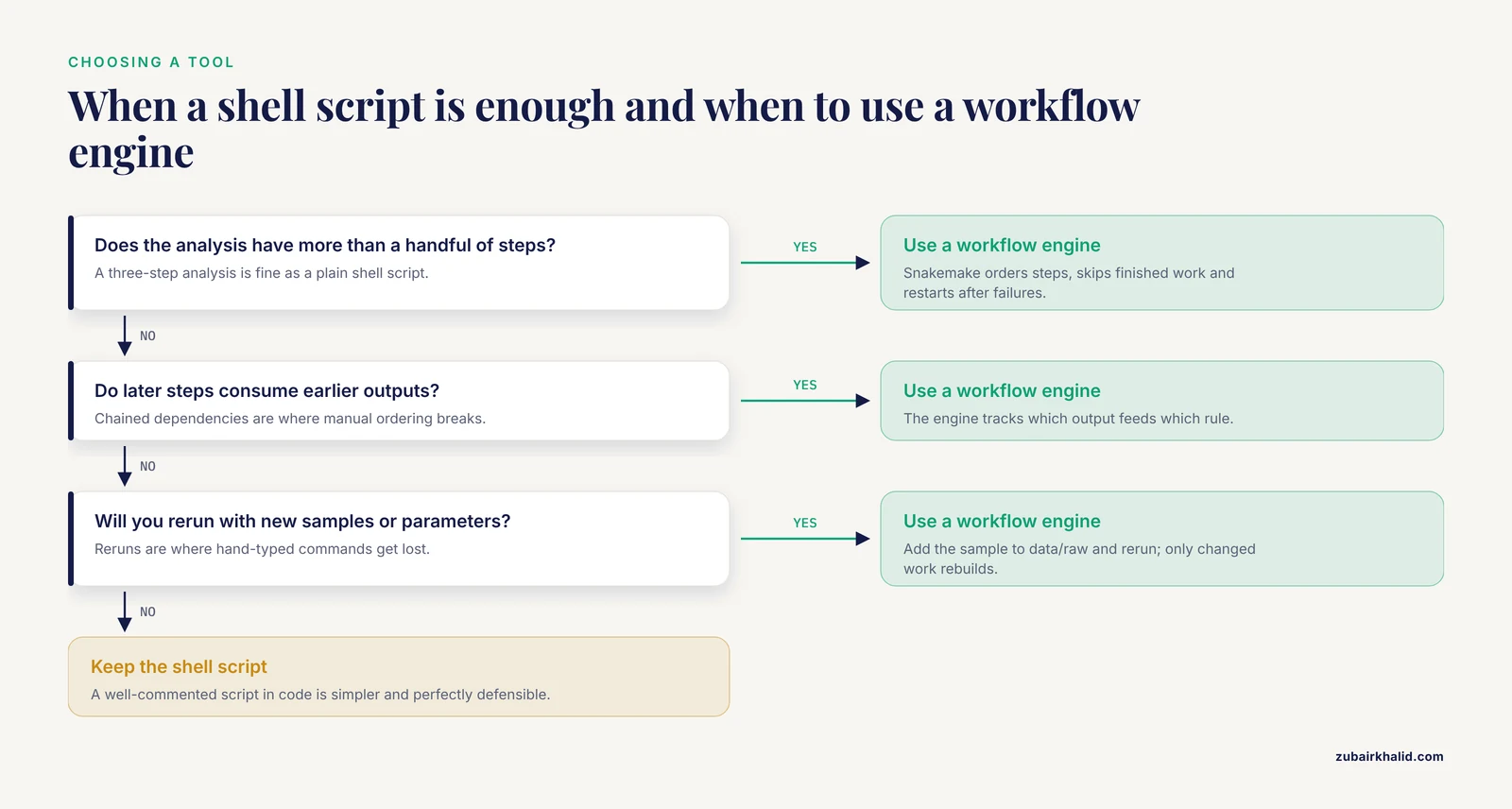
Move when the analysis has more than a handful of steps, when later steps consume outputs of earlier steps, or when you expect to rerun with new samples or parameters. The engine then handles ordering, skips finished work, and restarts cleanly after failures. Below that threshold, a well-commented shell script in code/ is simpler and perfectly defensible.
How do I share an organized bioinformatics project with a collaborator?
Push the repository with code, config, doc, environment.yml, and Snakefile to a Git host, and describe the data in a README or data availability statement. The collaborator then clones, creates the environment, and runs the workflow, which is exactly the rebuild test from this article. For ongoing multi-party work with access control and auditing, a platform such as IRIDA extends the same ideas across many projects at once.
Sources
- Bioinformatics Approach in Biological Sciences: History and Uses
- PM4NGS, a project management framework for next-generation sequencing data analysis.
- An overview of the Hadoop/MapReduce/HBase framework and its current applications in bioinformatics
- Dugong: a Docker image, based on Ubuntu Linux, focused on reproducibility and replicability for bioinformatics analyses
- Kiosc: an integrated platform for managing bioinformatics data analysis containers
- Development of a Linux-Based Shell Script for File Management on Varying Specifications
- WeavePop: A bioinformatics workflow to explore and analyze genomic variants of eukaryotic populations
- AUTOMATING BUILD OF EMBEDDED LINUX BINARIES IN A HIGH-PERFORMANCE COMPUTING CLUSTER
- JUICE: a data management system that facilitates the analysis of large volumes of information in an EST project workflow
- Practical aspects of implementing the IRIDA system as a solution for One Health bioinformatics analyses
- To the question of the digital platform “bioinformatics” creating and its system-forming solutions
- Benchmarking and Enhancing Design-Aware Code Review in the Linux Kernel
- Introducing evolutionary biologists to the analysis of big data: guidelines to organize extended bioinformatics training courses
- Unlocking the African bioeconomy and strengthening biodiversity conservation through genomics and bioinformatics
- Survey of MapReduce frame operation in bioinformatics