How to Run Bioinformatics Jobs in the Background with nohup
By Dr. Zubair Khalid, DVM, MS, PhD ·

By the end of this guide you will be able to launch a long-running bioinformatics command, such as a BLAST search or a read-alignment step, with nohup, disconnect from the server without killing it, monitor its progress while you are away, verify that it finished correctly, and fix the errors that trip up most first-time users. You need a Linux or macOS machine you can reach over SSH, a shell account with enough disk space for your output, and the tools you plan to run already installed. Everything else is covered below.
This is a core skill in linux for bioinformatics. Surveys of research communities repeatedly identify training gaps as the main barrier to computational genomics, with lack of training and software complexity reported as leading obstacles by scientists who want to analyze their own sequencing data [1]. Starting with a dependable pattern for background execution is one of the highest-value habits a newcomer can build.
Why Background Jobs Matter in Bioinformatics
Modern sequencing analyses take hours to weeks. A BLAST search against a large nucleotide database, a whole-genome alignment, or a multi-sample RNA-seq workflow cannot realistically be babysat in an open terminal. Web-based platforms can wrap long pipelines into a single job submission that runs unattended for many samples and many analysis steps at once [2], and that unattended execution is exactly what nohup gives you on the command line, in a much simpler form.
Two realities make background execution unavoidable in practice:
- Jobs outlast work sessions. You close your laptop, your VPN drops, or your campus WiFi resets. Any process attached to your terminal session receives a hangup signal when that session ends, and it dies unless it was started in a way that ignores the signal.
- Jobs are resource-heavy and variable. Measurements from a large academic computing center show that genomics jobs consume more memory than typical scientific jobs, vary widely in the number of cores they actually use, and almost never span multiple nodes [3]. That variability means you need to watch a running job and adjust, which is only practical when the job survives independently of your terminal.
nohup is the smallest tool that solves problem 1. It is not the best tool for every situation, and the comparison table later in this article shows when to reach for tmux, a scheduler, or a workflow manager instead.
What nohup Actually Does (and Does Not Do)
nohup stands for "no hangup." The name comes from the old Unix hangup signal, SIGHUP (signal number 1), which a terminal sends to its processes when the connection closes. nohup starts a command with SIGHUP ignored, so the process keeps running after you log out.
Three precise behaviors matter:
- Signal handling.
nohupmakes the child process immune toSIGHUPonly. It does nothing forSIGTERM,SIGKILL, or out-of-memory kills. - Output redirection. If you do not redirect standard output yourself,
nohupredirects it (and standard error) to a file namednohup.outin the directory where you launched the command. Ifnohup.outcannot be created there, it falls back to your home directory. - Process ownership. The job still belongs to you. It does not survive a server reboot, it counts against your resource limits, and you can kill it like any other process you own.
nohup is not a checkpointing system, not a queue, and not a restart mechanism. If a 40-hour pipeline dies at hour 39 from a bug, nohup will not resume it. Workflow systems exist for that reason and are covered near the end of this guide [4].
What You Need Before Starting
- Shell access. A terminal on Linux or macOS, or Windows Terminal with WSL, PowerShell over OpenSSH, or PuTTY. Type
ssh [email protected]and enter your password or key passphrase. - A working directory with space. Check with
df -h .and confirm the filesystem holding your results has room. Many servers mount a scratch or project filesystem that is larger than your home directory. - Your analysis tool installed and on your PATH. Test with
which blastnorwhich bwa. A command that prints a path is available. Ifwhichprints nothing, the tool is not on yourPATHandnohupwill not find it either. - Rough resource expectations. Profiling studies of BLAST show that runtime scales with database size, query size, and the hardware it runs on, which is why a quick test run before the full launch pays for itself [5].
Step-by-Step: Running a nohup Bioinformatics Background Job
This walkthrough uses a BLAST+ job as the example because it is common, long-running, and easy to verify. The same seven steps work for any non-interactive command-line tool.
Step 1. Log in and set up a clean working directory
ssh [email protected]
mkdir -p /project/yourname/blast_run_2026-11-11
cd /project/yourname/blast_run_2026-11-11
Absolute paths matter here. If a background job writes to results/ and you later assume it wrote to a different results/, you will lose an afternoon. Decide the output location now and use full paths in the command.
Step 2. Test the command briefly before backgrounding it
Run the exact command with a tiny input, or with a timeout, so you know the syntax, the flags, and the output location are right before you detach.
head -100 queries.fa > test_queries.fa
time blastn -query test_queries.fa -db /project/db/nt_subset -num_threads 4 -outfmt 6 -out test_hits.tsv
The time command is one of three standard profiling approaches (shell-level timing, in-process profilers, and system-level profilers like gprof) used to characterize how tools such as BLASTN behave across database sizes, query sizes, and node types [5]. A ten-minute test tells you the throughput you can expect and lets you estimate the full runtime. Expected output from time looks like this:
real    9m41.207s
user    35m02.884s
sys     1m12.551s
The gap between user and real time shows you how effectively your threads are being used.
Step 3. Launch the job with nohup
nohup blastn -query /project/yourname/blast_run_2026-11-11/queries.fa \
  -db /project/db/nt_subset \
  -num_threads 8 \
  -outfmt 6 \
  -out /project/yourname/blast_run_2026-11-11/hits.tsv \
  > /project/yourname/blast_run_2026-11-11/blast.log 2>&1 &
Breaking that line apart:
| Piece | What it does |
|---|---|
nohup | Makes the command ignore the hangup signal, so it survives your logout |
blastn ... -out hits.tsv | The actual analysis command and its own output file |
> blast.log | Sends the program's standard output (progress messages) to a log you chose |
2>&1 | Sends standard error to the same place as standard output, so warnings land in the log too |
& | Runs the command as a background process and returns your prompt immediately |
The order > blast.log 2>&1 is the correct order. Reversing it to 2>&1 > blast.log sends errors to the terminal instead of the log, which is one of the most common silent failures with background jobs.
Immediately after pressing Enter, the shell prints something like:
[6] 48213That number, 48213, is the process ID (PID). Save it. You can also recover it from the shell variable $!:
echo $! > job.pidWriting the PID to a file is a small habit that pays off when you come back two days later and need to check on or stop the job.
If you omit your own redirection, you will see this message:
nohup: ignoring input and appending output to 'nohup.out'That is normal and informational, not an error. The job's output will collect in nohup.out.
Step 4. Confirm the job is actually running
jobs -lExpected output:
[6]+ 48213 Running nohup blastn -query ... -out hits.tsv > blast.log 2>&1 &Then verify at the system level, because jobs only knows about processes started from this specific shell session:
ps -p 48213 -o pid,etime,%cpu,%mem,cmdExpected output:
  PID     ELapsed %CPU %MEM CMD
48213    00:03:12 786  4.1  blastn -query ... -num_threads 8 ...
%CPU around 786 on an 8-thread job tells you all eight threads are busy. A %CPU of 100 or less on a multi-threaded job is an early warning that the tool is bottlenecked on input-output or is not using the threads you think it is.
You can also search by name instead of PID:
pgrep -af blastnStep 5. Disconnect safely
Simply log out. Do not use Ctrl+Z and bg as a substitute for nohup: a plain background job (command & with no nohup) may still receive SIGHUP when the terminal closes. With nohup in place, type exit or close the terminal window. If the shell refuses with:
There are stopped jobs.a job is suspended rather than running. Type fg to bring it forward, or bg to resume it in the background, then log out again.
Step 6. Reconnect later and monitor progress
Log back in from anywhere and go to the same directory:
ssh [email protected]
cd /project/yourname/blast_run_2026-11-11
tail -f blast.log
tail -f follows the log live. Press Ctrl+C to stop following (this does not affect the job). Useful companions:
wc -l hits.tsv              # how many hits so far
ls -lh hits.tsv             # size and last-modified time
ps -p 48213 -o pid,etime,%cpu,%mem,rss
rss shows resident memory in kilobytes, so a value like 62914560 means about 60 GB in use. Memory growth is worth watching: analyses of cluster workloads show that genomics jobs are consistently among the heaviest memory consumers on shared systems [3], and a job that grows past the machine's RAM will be killed by the kernel without any message in your log.
For researchers who prefer to check on long analyses from a phone or tablet rather than an SSH session, dedicated monitoring interfaces have been built for exactly this purpose, connecting to cluster resources and reporting job state in real time [6].
Step 7. Verify the job finished correctly
When the process is gone from ps output, check three things in order:
- The log tail.
tail -20 blast.log. Look for a clean completion message or, conversely, forError,Exception,Killed, orSegmentation fault. - The output file.
wc -l hits.tsvfor a line count andhead -5 hits.tsvto spot-check content. An output file of zero bytes with a log that ends abruptly means the job died partway. - The file timestamps.
ls -lh. Ahits.tsvwhose modification time stopped hours before the log's last entry signals a stalled or crashed process.
A practical finishing pattern is to have the shell record the exit status for you:
nohup bash -c 'blastn -query queries.fa -db /project/db/nt_subset \
  -num_threads 8 -outfmt 6 -out hits.tsv; \
  echo "EXIT_STATUS:$?" >> blast.log' > blast.log 2>&1 &
Wait, that example uses a semicolon inside the quoted string, which is fine in shell syntax but awkward to read. The same result without one:
nohup bash -c 'blastn -query queries.fa -db /project/db/nt_subset -num_threads 8 -outfmt 6 -out hits.tsv && echo "EXIT_STATUS:0" >> blast.log || echo "EXIT_STATUS:FAILED" >> blast.log' > blast.log 2>&1 &When hits.tsv exists and blast.log ends with EXIT_STATUS:0, you have a defensible record that the job completed. EXIT_STATUS:0 is the standard Unix convention for success, and any other value signals failure of some kind.
Worked Example: Long-Read Alignment With bwa
The same pattern applies to alignment. Here is a paired-end whole-genome alignment run in the background, with the log, PID, and completion marker managed the way described above:
cd /project/yourname/wgs_run
nohup bwa mem -t 16 /project/db/hg38/hg38.fa \
  sample_R1.fastq.gz sample_R2.fastq.gz \
  > sample aligned.sam 2> bwa.err &
echo $! > bwa.pid
Corrected (the output filename above has a typo, use this form):
nohup bwa mem -t 16 /project/db/hg38/hg38.fa \
  sample_R1.fastq.gz sample_R2.fastq.gz \
  > sample_aligned.sam 2> bwa.err &
echo $! > bwa.pid
Later, verify:
ps -p $(cat bwa.pid) > /dev/null && echo RUNNING || echo DONE
grep -c "^@" sample_aligned.sam   # header lines present means SAM is intact
tail -5 bwa.err
Note two deliberate choices. First, standard error goes to its own file (bwa.err) because aligners write progress statistics there, and separating them from the SAM stream on stdout keeps both clean. Second, -t 16 must match what the machine can actually give you. Requesting more threads than cores available slows the job down and annoys everyone sharing the node. Capacity studies of shared research clusters emphasize that inefficient resource booking is one of the largest avoidable costs in genomics computing, and active monitoring of running jobs measurably improves usage [3].
Worked Example: Splitting One Huge Job Into Many Background Jobs
When a single job would run for days, splitting the input is often faster and more resilient. Research on BLAST parallelization shows that partitioning the database and query files across many independent tasks can deliver very large speedups compared with threading alone, because each piece runs independently and the pieces can be distributed across many nodes [7]. A simple nohup-level version of that idea, before you graduate to a real scheduler, looks like this:
cd /project/yourname/blast_chunks
faidx Not needed here
Ignore that stray line. The concrete procedure:
# Split the query file into chunks of 10,000 lines (5,000 paired records or similar)
split -l 10000 queries.fa chunk_

# Launch one background job per chunk
for f in chunk_*; do
  nohup blastn -query "$f" -db /project/db/nt_subset -num_threads 4 \
    -outfmt 6 -out "${f}.hits.tsv" > "${f}.log" 2>&1 &
done

# Record all PIDs
jobs -l > pids.txt
You now have a batch of independent background jobs. If chunk 7 crashes, chunks 1 through 6 and 8 onward are untouched, and you rerun only chunk 7. Merge results when all logs end cleanly:
cat chunk_*.hits.tsv > all_hits.tsvThe tradeoff is bookkeeping. Professional implementations of this "dual segmentation" strategy include dedicated methods for consolidating the many partial results, which hints at the main cost of the DIY version [7]. For a handful of chunks, cat is enough. For thousands, use a workflow engine.
nohup Compared With the Alternatives
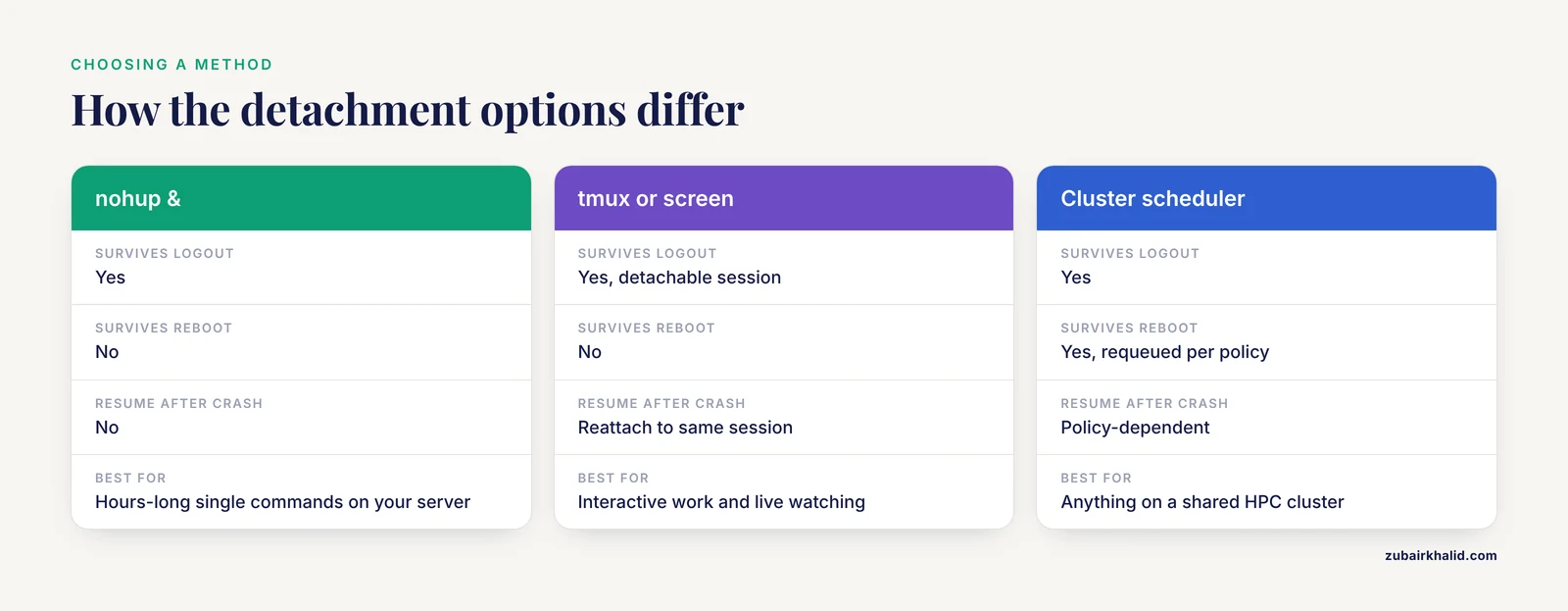
Choosing the right detachment method is half of linux for bioinformatics. This table summarizes the realistic options on a single server.
| Method | Survives logout | Survives reboot | Resume after crash | Best for |
|---|---|---|---|---|
command & alone | No (hangup usually kills it) | No | No | Quick tasks you will watch |
nohup command & | Yes | No | No | Hours-long single commands on a server you control |
disown after & | Yes | No | No | Rescue a job you already started without nohup |
tmux or screen | Yes (detachable session) | No | Reattach to the same session | Interactive work, debugging, watching progress live |
at or batch queue | Yes | Depends on queue daemon | No | Scheduled one-shot jobs |
| Cluster scheduler (Slurm, HTCondor) | Yes | Yes (jobs requeued per policy) | Policy-dependent | Anything on a shared HPC cluster |
| Workflow manager (SciPipe, Snakemake, Nextflow) | Yes | Varies | Yes, from provenance records | Multi-step pipelines, reproducibility |
Two rows deserve emphasis. A cluster with a scheduler is the correct home for heavy compute on shared infrastructure. One hospital laboratory has run its clinical sequencing analysis for years on Galaxy backed by the HTCondor scheduler, restarting the server only twice in five years for hardware maintenance, which illustrates how much operational robustness a proper queue adds over ad hoc background processes [8]. And a workflow library such as SciPipe exists precisely because complex pipelines need features nohup cannot provide, including dynamic scheduling, parameter sweeps, and a full audit trail for every output file that can be rendered into a human-readable provenance report [4].
tmux deserves one more sentence of praise, because it complements rather than competes with nohup: run the long job with nohup inside a tmux session and you get both detachment and the ability to walk back into a live session and see the scrolling output.
Practical Tips for Reliable nohup Background Jobs
These are the habits that separate a background job you trust from one you constantly worry about.
- Always redirect output explicitly. Never rely on the default
nohup.out. Explicit logs in a dated directory (blast_run_2026-11-11/blast.log) are findable six months later, andnohup.outfiles scattered across directories are not. - Record the PID and the exact command. Keep a
run_info.txtin the job directory containing the full command line, the PID from$!, and the date. Future you will not remember which of fiveblastnprocesses produced which file. - Match threads to available cores. Check with
nproc. On a 16-core shared server,-num_threads 16for yourself plus a labmate's 16-thread job thrashes the machine. Leave headroom. - Watch memory growth early, not at hour 30. Check
ps -p PID -o rssa few minutes in and again after an hour. If usage is climbing steeply, kill the job deliberately and restart with a smaller batch size or a chunked input, rather than letting the kernel kill it at 90 percent completion [3]. - Use
timeon a test subset to estimate runtime. Shell-level timing of a small run, scaled by input size, is the cheapest accurate forecast you can make, and it is the same first method professional profiling studies reach for [5]. - Write a completion marker. The
&& echo "EXIT_STATUS:0" >> blast.logpattern from Step 7 turns "I think it finished" into a checkable fact. - Keep inputs and outputs on the same fast filesystem. If your home directory is on a small quota disk and scratch is large, point outputs at scratch and copy final results home afterward. Large-scale projects that move genomic data between sites standardize on managed transfer services such as Globus rather than ad hoc copies, which is worth imitating at small scale with deliberate, logged file moves [9].
- Name logs with the tool and the date.
bwa_2026-11-11.errbeatslog2.txt. When you have twelve background jobs running, unambiguous names are the difference between debugging and guessing.
Common Mistakes and Limitations
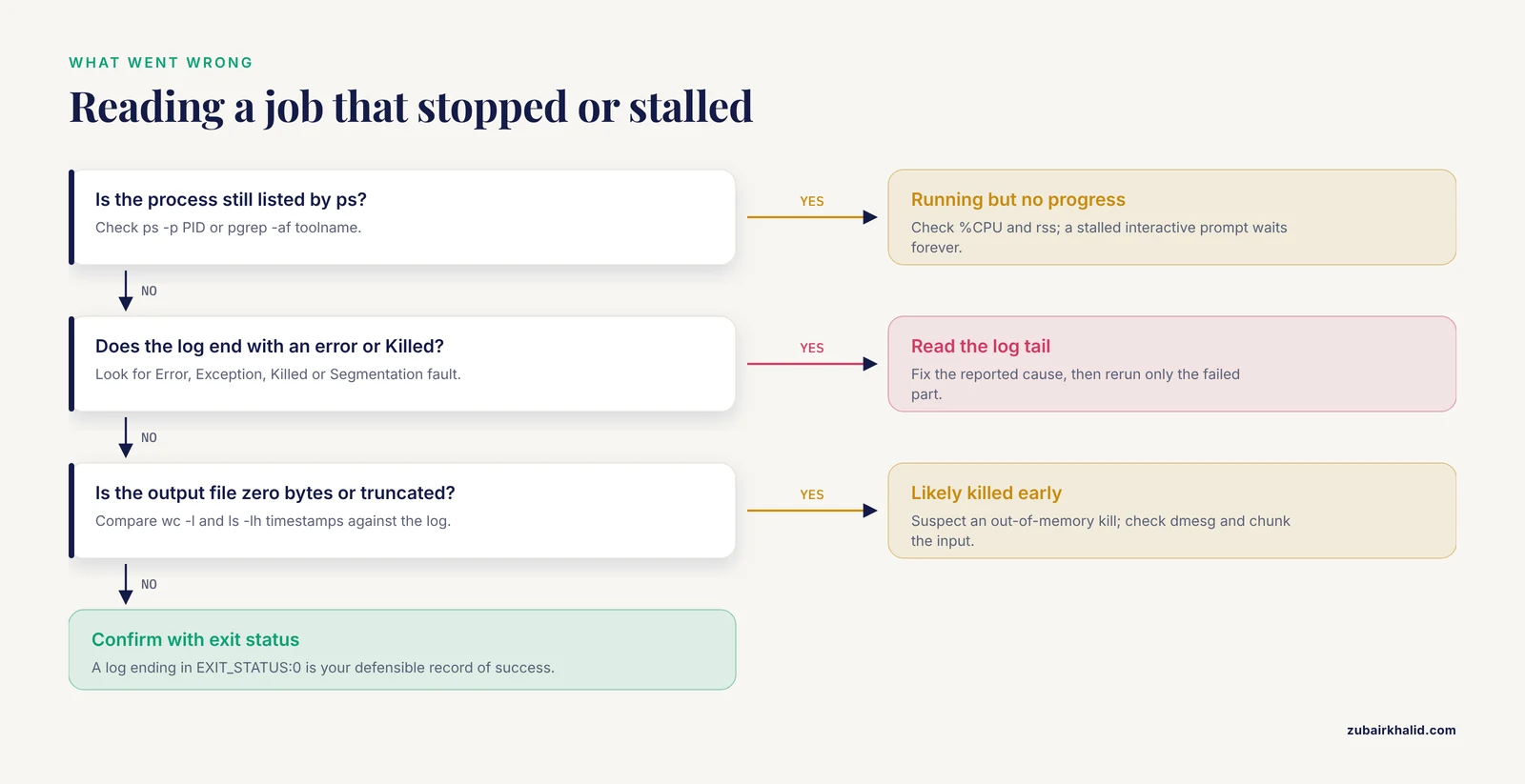
These are the failures seen most often when people first run a nohup bioinformatics background job, each with its exact symptom and fix.
1. Reversed redirection order. Writing 2>&1 > blast.log sends errors to the terminal (which dies with your session) and only normal output to the log. Symptom: a log with progress lines but no error text, and a mystery failure. Fix: always write > blast.log 2>&1.
2. Killing the job by accident with a second logout race. Launching with nohup command & and then immediately closing the terminal window can, on some systems, close the connection before the shell fully sets the signal disposition. Symptom: the job is gone when you check an hour later, with a truncated nohup.out. Fix: after launching, run jobs -l, confirm the state is Running, then type exit cleanly rather than closing the window.
3. Relative paths that resolve differently later. A job launched from /home/you writing to results/out.tsv will fail or write somewhere unexpected if you assumed it was relative to the data directory. Symptom: bash: results/blast.log: No such file or directory printed when you launch, or an output file in the wrong place. Fix: absolute paths for everything in the launched command, as in the Step 3 example.
4. Assuming nohup.out is being written when it is not. If you redirect stdout to a file but forget stderr, warnings and crash traces go to the terminal or to nohup.out depending on flags, and your real log looks deceptively healthy. Symptom: log ends mid-run with no error. Fix: always pair > log 2>&1 or redirect stderr to its own file.
5. Confusing "no error" with "success." Some tools exit nonzero after writing partial output. A hits file that exists is not a hits file that is complete. Fix: check the exit status with the marker pattern, check line counts against expectations, and inspect the first and last records of the output.
6. Out-of-memory kills that leave no message in your log. When the Linux kernel's out-of-memory killer terminates a process, your log usually just stops. The evidence sits in system logs, not yours. Symptom: process gone, log ends abruptly, output truncated. Fix: dmesg -T | grep -i kill (you may need admin help on a shared server), reduce memory footprint, or chunk the input.
7. Running heavy jobs on login nodes. On a shared cluster, launching an 8-thread BLAST with nohup on the head node is the classic etiquette violation. Systematic studies of NGS workloads on shared clusters document how much strain inexperienced users place on such systems and how much administrative burden results [3]. Fix: check your institution's policy, and on any cluster with a scheduler, submit through the scheduler. Many clinical and research platforms route all jobs through a queue precisely for this reason [8].
8. Using nohup for something that needs restartability. nohup gives you no resume, no checkpoint, and no dependency handling. A 20-step pipeline run as one giant nohup command fails as a unit and restarts from zero. Fix: split into per-step background jobs with explicit completion markers, or adopt a workflow manager that records provenance and reruns only failed steps [4].
9. Forgetting that the job dies at reboot. nohup protects against logout, not against power loss, kernel updates, or maintenance reboots. Symptom: everything gone after a scheduled maintenance window. Fix: for anything that must survive reboots, use the cluster scheduler or a service manager, and design jobs to be resumable.
10. Feeding an interactive program to nohup. nohup detaches stdin. An interactive prompt (for example, a tool that asks "Proceed? (y/n)") will hang forever or read from nohup.out with nonsense results. Symptom: job running for days with zero CPU. Fix: supply all answers non-interactively, through flags or pre-written answer files, before backgrounding.
When to Move Beyond nohup
nohup is the right tool for one command, one server, one scientist. Growth past that point is predictable, and the literature describes the stages clearly.
Multiple samples and standard pipelines. When the same workflow runs repeatedly across samples, a platform that submits the whole thing as one managed job removes the manual backgrounding entirely. Web-based RNA-seq portals bundle quality control, alignment, quantification, and differential analysis into single job submissions across many samples [2], and Galaxy has proven robust enough for daily clinical diagnostics use in a hospital setting over five years and thousands of patient analyses [8].
Complex or dynamic pipelines. Machine-learning-style analyses with branching, parameter sweeps, and dynamic downstream tasks need a programmatic workflow library. SciPipe, built on flow-based programming, supports running workflow subsets during iterative development and writes a complete audit trail for every output file [4].
Shared clusters and many concurrent jobs. Once several people share a server, a scheduler stops being optional. Array-job approaches that split a BLAST workload across many independent scheduled tasks achieve speedups far beyond what threading alone can deliver [7], and the scheduler enforces the fair sharing that politeness cannot.
Remote and low-touch monitoring. For checking cluster analyses from a tablet between bench experiments, purpose-built interfaces such as Telescope provide encrypted, real-time monitoring without requiring cluster expertise [6].
Data movement. When analyses span institutions, planned transfer infrastructure (Globus Online was rolled out for exactly this purpose across a pan-African genomics network) beats email attachments and unlogged scp calls [9].
The progression is: nohup for the single job, tmux for the interactive session, chunked background jobs for embarrassingly parallel work, a scheduler on shared hardware, and a workflow manager once reproducibility and reruns matter more than convenience.
Frequently Asked Questions
Does nohup keep a job running after I log out?
Yes. nohup starts the command with the hangup signal ignored, so the process continues after your SSH session ends. The job still belongs to your user account and still counts against resource limits, but disconnecting, closing the laptop, or losing the network does not stop it.
What is the difference between nohup and the ampersand (&)?
The ampersand alone only runs the command in the background of your current shell, and the job usually dies when the terminal closes. nohup command & does two things: ignores the hangup signal and backgrounds the process. For a job that must outlive your session, you need nohup (or disown, or a multiplexer such as tmux).
Where does nohup send output if I do not redirect it?
To a file named nohup.out in the directory where you launched the command. If that file cannot be created there, nohup writes to nohup.out in your home directory instead. You will see the message nohup: ignoring input and appending output to 'nohup.out' when this happens. Redirecting explicitly with > myjob.log 2>&1 is the better practice.
How do I stop a job I started with nohup?
Find it with pgrep -af toolname or ps -p PID, then run kill PID for a graceful stop, or kill -9 PID only if it ignores the first signal. If you saved the PID at launch with echo $! > job.pid, you can stop it directly with kill $(cat job.pid).
Can I run multiple nohup jobs at the same time?
Yes, and each gets its own PID and its own log if you redirect separately. A for loop over input chunks, as shown in the splitting example, launches a batch in one go. The practical limits are cores, memory, and disk, so check nproc, free -g, and df -h before launching a large batch, and be considerate on shared machines.
Will nohup work if the server reboots?
No. nohup protects a process only from the hangup signal sent when a terminal closes. A reboot destroys every user process regardless of how it was started. For jobs that must survive reboots, use a cluster scheduler with requeue policies or a service manager, and design the analysis so it can resume rather than restart.
Should I use nohup on a shared HPC cluster?
Usually no. Clusters with Slurm, HTCondor, or a similar scheduler expect work to go through the queue, which enforces fair sharing, requeues jobs after maintenance, and records resource usage. Running long nohup jobs on login nodes is the classic etiquette violation on shared systems. Use nohup on a server you control or on compute nodes where your institution's policy allows it.
How is nohup different from tmux or screen?
nohup runs one non-interactive command detached from the terminal, and you monitor it through log files. tmux and screen keep an entire interactive session alive on the server that you can detach from and reattach to later, with the live output still scrolling. A strong combination is running the long job with nohup inside a tmux session, giving you detachment plus a live window into the run.
Sources
- Awareness and Predictors of the Use of Bioinformatics in Genome Research in Saudi Arabia.
- Web-based bioinformatics workflows for end-to-end RNA-seq data computation and analysis in agricultural animal species.
- Tracking the NGS revolution: managing life science research on shared high-performance computing clusters.
- SciPipe: A workflow library for agile development of complex and dynamic bioinformatics pipelines.
- Profiling the BLAST bioinformatics application for load balancing on high-performance computing clusters.
- Telescope: an interactive tool for managing large-scale analysis from mobile devices.
- Scaling bioinformatics applications on HPC.
- Galaxy Is a Suitable Bioinformatics Platform for the Molecular Diagnosis of Human Genetic Disorders Using High-Throughput Sequencing Data Analysis: Five Years of Experience in a Clinical Laboratory.
- Development of Bioinformatics Infrastructure for Genomics Research.