Caching in Nextflow vs. Snakemake
By Dr. Zubair Khalid, DVM, MS, PhD ·

Nextflow caches every successful task automatically and reuses it when you relaunch the pipeline with -resume, while Snakemake decides what to rerun from the timestamps and recorded history of the output files themselves, with optional explicit caching for the rules you mark. A practical rule of thumb: pick Nextflow when you want the engine to handle resume for you across runs, containers, and schedulers, and pick Snakemake when you want results that live in place and fine control over what counts as changed.
Both tools are open source and widely used as a bioinformatics workflow manager. Snakemake was first described in the journal Bioinformatics in 2012, and its pipelines are written in Python. Nextflow was introduced in Nature Biotechnology in 2017, and its pipelines are written in Groovy, a language that runs on the Java virtual machine. Both engines execute a DAG, short for directed acyclic graph, which is a dependency graph of steps in which no step feeds back into an earlier one. Both can skip work that was already done correctly, and both let you rerun a pipeline after adding samples, changing parameters, or fixing code without paying for the whole computation again.
Caching covers two related questions. The first is what a tool recomputes when you run the same pipeline again after a change. The second is whether results can be reused across separate runs, separate projects, or separate users. Nextflow and Snakemake answer both questions differently, and those differences drive most day-to-day decisions about disk layout, failure recovery, and team workflows.
Why the Two Caching Models Differ
Nextflow is task centric. When a process runs over one specific set of inputs, that execution is a task. Each task writes its outputs into a private folder under the work directory, which defaults to work/ in the launch directory and can be changed with the -w flag or a workDir setting in nextflow.config. Nextflow computes a fingerprint for every task, called the task hash, and records the outcome in an embedded key-value database (LevelDB by default). Publishing, done with the publishDir directive, copies selected files out of the work directory into a results folder, but the cache itself always lives in the work directory. Memoization, meaning recording a computed result so identical work can be skipped later, is therefore built into the engine and applies to every task by default.
Snakemake is file centric. A rule declares how to produce named output files from named input files, and the outputs land at their final paths inside the project. The filesystem itself is the primary record. An output file that exists, with a timestamp at least as recent as its inputs, is treated as current. A per-project metadata folder, .snakemake/metadata, adds recorded history on top of the timestamps, including which code, parameters, inputs, and software environment produced each file. Reuse across separate runs is not automatic. It has to be requested per rule.
Three consequences follow from this split. Nextflow can resume a pipeline anywhere the original work directory is reachable, even if you deleted every published result. Snakemake survives project moves gracefully, because outputs and their metadata travel together, but deleting an output file normally means recomputing it. Nextflow needs no per-rule decisions to enable reuse, while Snakemake trades a small amount of bookkeeping for transparency about exactly what changed.
How Caching Works in Nextflow
The task hash
According to the Nextflow documentation, the task hash is computed from the session ID, the process name, the input values, the input files, the script text, the container image, the conda environment, the environment module, and any environment variables declared in the env block. A container here is a packaged software environment such as a Docker or Apptainer image, a conda environment is a pinned set of installed packages, and a module refers to Environment Modules on HPC clusters. The hash is a 64-character string, and a task's outputs live under the work directory in a two-character subfolder named from its first characters, for example work/3c/5f9c1a0b7d2e/.
Because the session ID is part of the hash, cache entries belong to a single run lineage. A resumed run extends the lineage of the run it resumes, so unrelated pipelines never collide and never share entries with each other.
Resume in practice
Add -resume to relaunch a pipeline with reuse:
nextflow run main.nf -resumeNextflow skips every task whose hash matches a successful record, links the cached outputs into the new work directory, and re-executes failed or interrupted tasks. The progress output reports how many tasks were cached. You can also target an earlier run by name, for example nextflow run main.nf -resume cranky_lovelace, which is useful when several runs share one work directory.
Editing orchestration code, such as channel logic or the workflow blocks that wire processes together, does not invalidate tasks by itself. A task is invalidated when its own script text, its directives, or its inputs change. Inserting a new process changes the hashes of that process's tasks and of every downstream task whose inputs change as a result. This per-task design is why large community pipelines such as nf-core can be updated between reruns while most tasks stay cached.
File hashing: default, deep, and lenient
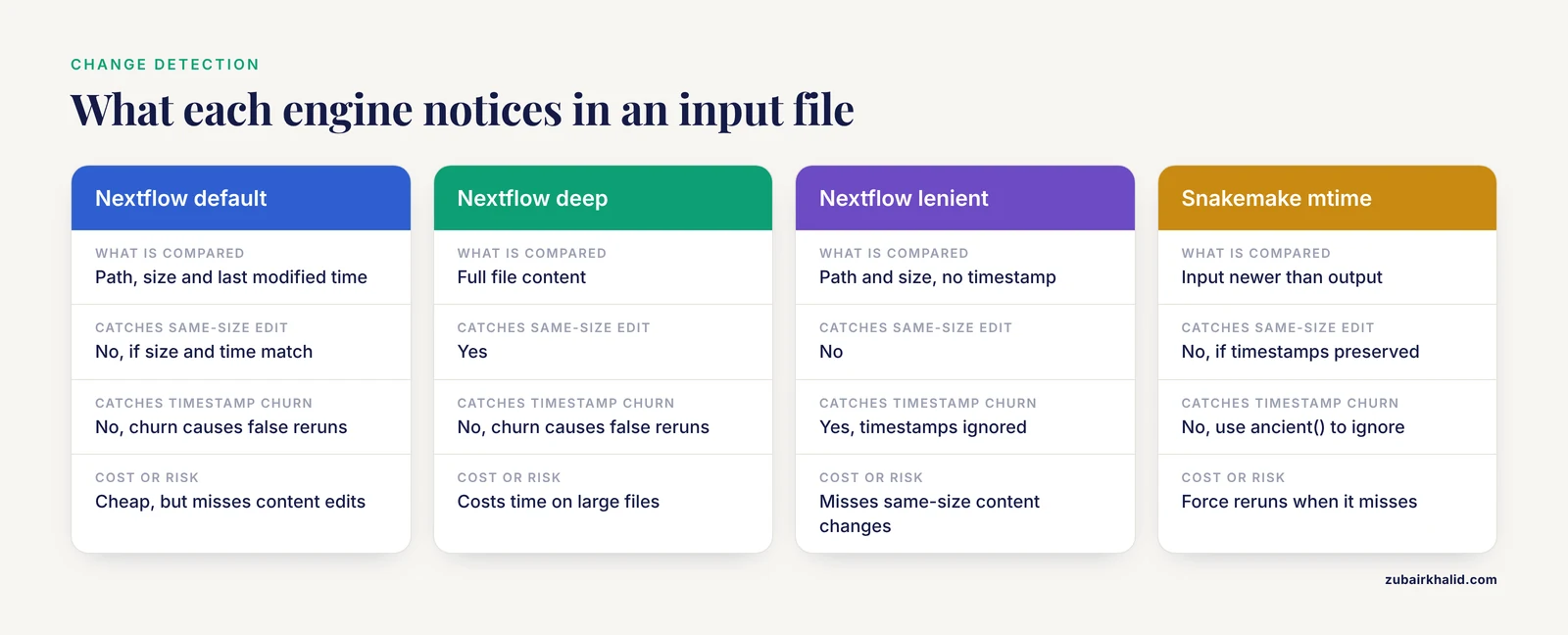
By default, Nextflow hashes input files using their path, size, and last modified timestamp. Two optional modes change this behavior. The cache 'deep' process directive switches to hashing the full file content, which catches content changes that preserve size and timestamp but costs time on large files. The cache 'lenient' directive drops the timestamp from the key, which prevents false invalidation when files are copied or synced and their timestamps churn, at the cost of missing same-size content changes.
process FASTQC {
    cache 'deep'
    input:
    path reads
    output:
    path "*_fastqc.html"
    script:
    """
    fastqc ${reads}
    """
}
Disabling caching
Set cache false on processes that must never be reused, such as tasks with random seeds, tasks that bake timestamps into results, tasks with side effects outside the filesystem, or tasks that call services whose responses change over time.
Inspecting and pruning
nextflow log lists executed tasks with their hash and status, including cached entries, which makes it the first stop when a task re-runs unexpectedly. nextflow clean prunes work directory files that no recent run needs, and it offers a dry-run mode so you can preview deletions before anything is removed. Recent releases also provide nextflow inspect, which renders the pipeline without executing it.
How Caching Works in Snakemake
Incremental rebuilds by default
When you run snakemake, cores 8, the engine walks the DAG and treats an output as up to date when the file exists, its timestamp is not older than its inputs, and the recorded history in .snakemake/metadata still matches. Metadata records are small JSON files keyed by output path. Delete an output and Snakemake rebuilds it, pulling upstream files from wherever they exist. Because outputs and metadata both live inside the project, you can archive or move a Snakemake project and its change history moves with it.
Rerun triggers
Timestamps alone missed too many real changes, so modern Snakemake added rerun triggers. Five triggers exist:
mtime: an input file is newer than the output.params: a parameter value differs from the recorded value.input: the set of input files differs from the recorded set.code: the rule's code differs from the recorded code.software-stack: the container or conda environment differs from the recorded one.
Current releases enable all five by default. Older tutorials that describe Snakemake as purely timestamp based reflect earlier versions. Pass a subset to -rerun-triggers to relax the checks, for example timestamps and parameters only.
Previewing is built in. snakemake -n performs a dry run that lists what would execute. snakemake, summary reports, per output file, why it would be rerun. snakemake, list-code-changes and snakemake, list-params-changes isolate single causes.
Explicit between-run caching
For reuse across runs and projects, mark a rule as cacheable:
rule bwa_index:
    input:
        "references/genome.fa"
    output:
        multiext("references/genome.fa", ".amb", ".ann", ".bwt", ".pac", ".sa")
    cache: True
    shell:
        "bwa index {input}"
The first execution stores the outputs in a cache directory, which defaults to .snakemake/cache inside the project, organized by rule. Later executions of the same rule over the same inputs copy the stored outputs into place instead of recomputing them. You can also enable caching for rules from the command line with -cache.
The cache becomes a team asset when you point the SNAKEMAKE_OUTPUT_CACHE environment variable at a shared location, including an S3 bucket path such as s3://my-bucket/cache. S3 is Amazon's object storage, and many providers expose compatible buckets. Because the cache key is derived from the rule and its inputs, shared caches work best for expensive, deterministic steps that consume a common reference held at a stable path, such as genome indexes or downloaded databases. This is the intended use case described in the Snakemake documentation.
Repair and maintenance
Crashed runs leave outputs flagged as incomplete in the metadata. Rerun with -rerun-incomplete to recompute them. -touch marks outputs up to date without executing commands, which repairs timestamp churn after you have verified the files are actually correct. -cleanup-metadata removes stale records for files you no longer manage. Inside the Snakefile, ancient() tells Snakemake to ignore timestamp changes for a specific input, and protected() marks outputs read-only so nothing downstream can corrupt them silently. temp() marks intermediates for automatic deletion after use, and -notemp suspends that deletion when you need to debug.
Side-by-Side: Caching in Nextflow vs. Snakemake
| Aspect | Nextflow | Snakemake |
|---|---|---|
| Unit of reuse | A task, meaning one process execution over one set of inputs | An output file at its final path |
| Default behavior | Every successful task is recorded automatically | Incremental rebuild from timestamps plus recorded metadata |
| Reuse across runs | Opt in per launch with -resume | Automatic for rebuilds, opt in per rule for cross-run caching |
| Cache key | Task hash: session ID, process name, script text, inputs, container, conda, module, env vars | File history via mtime, params, input, code, and software-stack triggers. Between-run cache key: rule plus inputs |
| Where state lives | work/ directory plus a database under .nextflow/cache | The output files plus .snakemake/metadata and .snakemake/cache |
| File change detection | Path, size, and mtime by default, cache 'deep' for content, cache 'lenient' to drop mtime | mtime trigger, plus params, input, code, and software-stack triggers |
| Code changes | Any edit to the process script invalidates its tasks | code trigger reruns affected outputs, between-run cache entries are not auto-invalidated |
| Parameter changes | New values flow into the affected task hashes | params trigger reruns the affected rules |
| Failed or killed tasks | Re-run on the next -resume, never served from cache | Flagged incomplete, re-run with -rerun-incomplete |
| Sharing across users | Shared work directory and cache location, or platform tooling | SNAKEMAKE_OUTPUT_CACHE on a shared path or S3 bucket |
| Deleting outputs | Published copies are not restored by resume, work directory copies persist | Rebuilt from upstream, or fetched from the between-run cache |
| Disk management | nextflow clean prunes old work directories | temp() intermediates auto-delete, the cache grows until cleared |
The table condenses the difference between Nextflow and Snakemake caching. Nextflow stores results away from their final location and keys them by a fingerprint of everything that defined the computation. Snakemake keeps results at their final location and keys them by the history of the files. Neither design dominates. The fingerprint model costs disk space and a work directory you must keep, and it buys automatic resume. The file-history model costs explicit decisions about what to cache, and it buys a project directory that is self-describing and easy to archive.
Choosing Between Nextflow and Snakemake for Caching
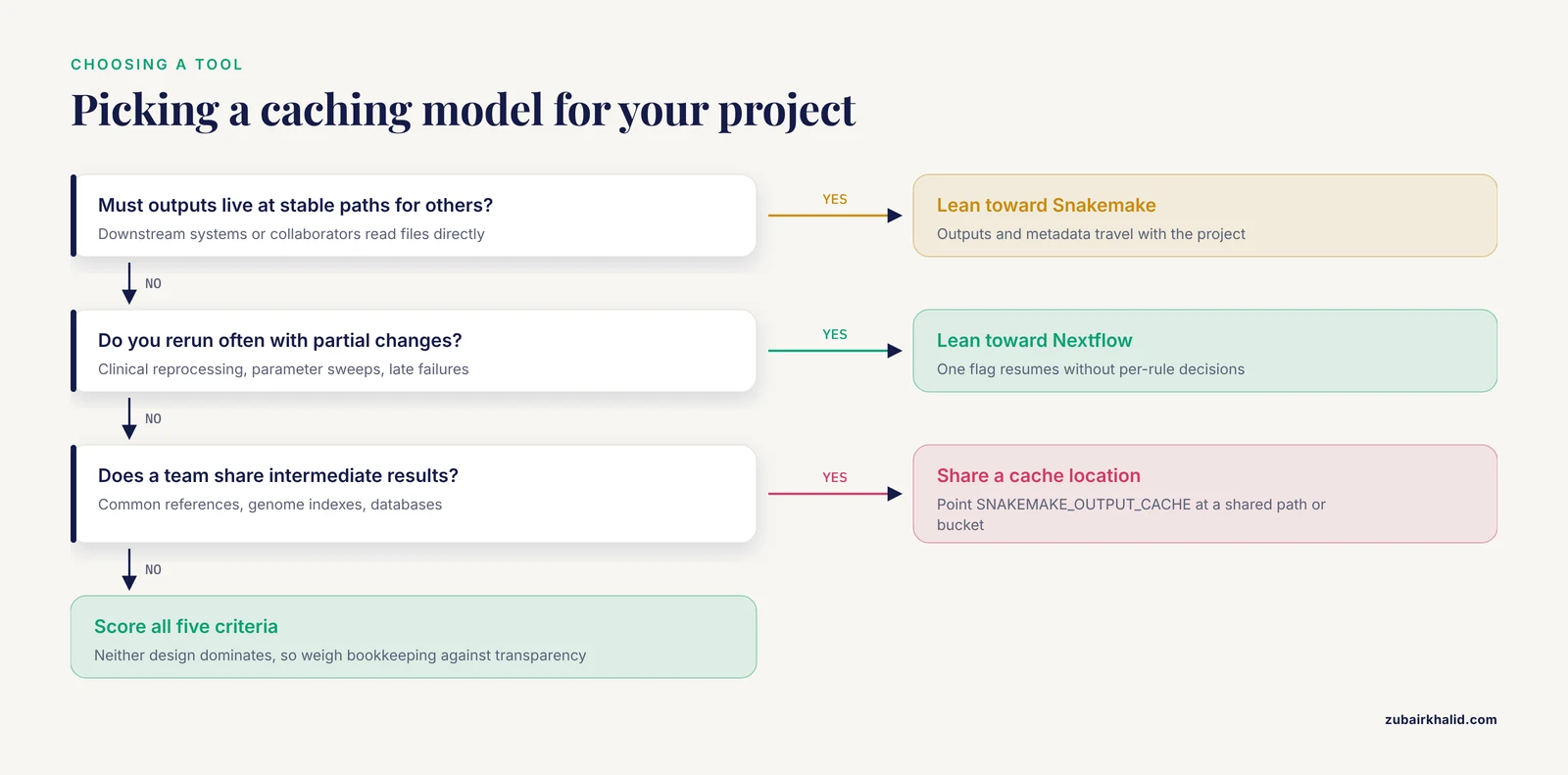
If you are choosing between Nextflow or Snakemake mainly on caching behavior, score your project against five criteria: how often you rerun with partial changes, whether outputs must live at stable paths, whether a team shares intermediate results, how you recover from failures, and how much bookkeeping you accept.
When to Use Nextflow
Choose Nextflow when reruns are frequent and partial. Clinical reprocessing, iterative parameter sweeps, and long pipelines that fail late all benefit from resume that requires one flag and no per-rule decisions. Choose it when results are produced in containers and move between a laptop, an HPC scheduler, and cloud batch services, because the hash follows the container and the resume chain follows the work directory on shared storage. An executor is the layer that submits tasks to a compute backend such as local, SLURM, or a cloud service, and Nextflow resume works across executor changes as long as the work directory is reachable. Choose it when a team shares pipelines, since the nf-core collection demonstrates the pattern at scale with community pipelines designed around resume and shared work directories. Choose it when you do not want to decide which steps are cacheable, because every task is fingerprinted by default and the decision is per launch rather than per rule.
When to Use Snakemake
Choose Snakemake when outputs must live at stable paths, for example when downstream systems or collaborators consume files directly from the project. Choose it when data grows incrementally and you want the project directory to be the record, archivable and movable with its history intact. Choose it when you want explicit control over what counts as changed, tuning rerun triggers per project and previewing the effect with dry runs and summaries. Choose it for Python-centric teams, since rules are plain Python and every caching decision is visible in the Snakefile rather than hidden in a database.
Worked Scenarios
Scenario 1: You fix a plotting bug
You edit only the plotting step at the end of a variant calling pipeline. With Nextflow, run nextflow run main.nf -resume. The plotting task re-runs because its script text changed, and every upstream task matches its recorded hash and is skipped. With Snakemake, edit the plot rule, then run snakemake -n, summary to confirm that only the figure is flagged under the code trigger, then run snakemake, cores 8. Both engines recompute one step. Nextflow did it with no preview step, Snakemake did it with a visible reason for every rerun.
Scenario 2: You add samples to a cohort
A new sample arrives after most of the cohort is processed. In Nextflow, the new sample's tasks get fresh hashes and execute, the aggregation tasks re-run because their inputs changed, and all other samples' tasks stay cached. In Snakemake, the new sample's outputs are missing and get built, the aggregate rule re-runs through the input trigger, and untouched outputs are left alone. Both models handle this well. The practical difference is that Nextflow reuses the old tasks even if you deleted the published results, while Snakemake reuses them only while the output files still exist.
Scenario 3: You change a parameter
You raise a mapping quality threshold from 20 to 30. In Nextflow, change the value in your params file and relaunch with -resume. Tasks that receive that parameter recompute, their downstream tasks recompute, and unrelated branches stay cached. In Snakemake, run snakemake, list-params-changes to preview the affected outputs, then rerun. The params trigger recomputes exactly the rules whose recorded parameter values differ. Both engines scope the rerun to affected steps, which is the main payoff of either caching model.
Scenario 4: A reference file changes under you
A collaborator replaces the reference FASTA at the same path. In Nextflow, the default file hashing sees the new size or timestamp and recomputes the affected tasks. If the replacement preserved both size and timestamp, the change slips through, so add cache 'deep' to the processes that consume critical inputs. In Snakemake, the mtime trigger fires when the new file is newer. If a restore tool preserved the original timestamps, the trigger misses, so force the affected targets with -force or delete their outputs. For the opposite problem, spurious timestamp updates on an unchanged reference, wrap the input in ancient() so it never triggers reruns. Content-only changes with preserved metadata are the blind spot of both default models, and both engines require a deliberate choice to close it.
Scenario 5: A cluster job dies at 80 percent
A preemption or a scheduler timeout kills a long run. With Nextflow, relaunch the same command with -resume. Completed tasks are served from the work directory, and only failed and interrupted tasks execute again. This works after switching executors, for example from local testing to SLURM, provided the work directory sits on storage both can read. With Snakemake, rerun with -rerun-incomplete. The metadata distinguishes complete outputs from partial ones, so partial files are recomputed rather than trusted. Both engines treat failure conservatively. Neither will ever hand you a result from a task that did not finish.
Common Mistakes and Limitations
- Treating published files as the cache in Nextflow.
publishDirwrites copies or links of work directory files. Deleting published results invalidates nothing, and a resume will not recreate published files for tasks it skips. The work directory is the cache, so keep it until you are done. - Deleting the work directory and expecting resume to work. The cached outputs and the database live there. Use
nextflow cleanselectively instead of wholesale deletion. - Editing a Nextflow script block casually. Comments and whitespace are part of the hashed script text, so cosmetic edits cause re-runs. Batch cosmetic changes deliberately.
- Renaming processes or bumping container tags in Nextflow. Both enter the task hash, so either change invalidates every task of that process.
- Assuming content changes are always detected. Nextflow's default key uses path, size, and mtime, and Snakemake's mtime trigger compares timestamps. Same-size edits and preserved timestamps slip through both. Use
cache 'deep'in Nextflow, or forced reruns and metadata hygiene in Snakemake, for inputs where correctness matters more than speed. - Marking everything cacheable in Snakemake. The between-run cache fits deterministic, expensive, input-stable rules such as genome indexes and database downloads. Nondeterministic rules, or rules whose inputs change often, will serve stale results or churn the cache.
- Forgetting
SNAKEMAKE_OUTPUT_CACHEin Snakemake. The default.snakemake/cacheis per project, so teammates see no hits until the variable points at a shared path or bucket. - Expecting the Snakemake between-run cache to notice code edits. The key is derived from the rule and its inputs, so changing a cached rule's code does not reliably invalidate stored entries. Clear the cache or relocate it when you change a cached rule.
- Deleting
.snakemaketo tidy up in Snakemake. You lose the recorded code, params, input, and software-stack history, and change detection falls back to timestamps alone. - Resuming Nextflow across machines without shared storage. The work directory must be reachable at the paths recorded in the cache database, and relocating a project breaks the resume chain. Plan a shared filesystem or persistent work directory before launching long pipelines.
- Running nondeterministic tasks without guards. Pin random seeds, avoid embedding timestamps in results, or disable reuse with
cache falsein Nextflow and by leaving the cache directive off in Snakemake.
Exact hash composition, default triggers, and flag behavior vary between releases. Both projects evolve quickly, so verify against the documentation for the version you run. Individual pipelines add their own layers on top of the engine, such as nf-core's version pinning and container digests, so real behavior can differ from engine defaults.
Frequently Asked Questions
Does Nextflow cache results automatically?
Yes. Every successful task is recorded in the work directory and the cache database as soon as it completes. Reuse is opt in per launch with -resume, so a plain rerun without the flag executes everything again.
Does Snakemake cache results between runs?
By default it rebuilds incrementally from the files on disk rather than caching task results. Results are reused across runs and projects only for rules you mark with the cache directive or enable from the command line.
How do I resume a crashed Nextflow pipeline?
Rerun the same command with -resume. Completed tasks are skipped, and failed or interrupted tasks are executed again. Nothing from a failed task is ever served from the cache.
How do I share a Snakemake cache across a team?
Set the SNAKEMAKE_OUTPUT_CACHE environment variable to a shared directory or an S3 bucket, then mark the rules you want shared with the cache directive. Teammates get cache hits when they run the same rule over the same inputs.
Why does Nextflow re-run tasks that did not change?
The task hash covers more than file contents. Script text, process name, container image, conda environment, module, declared environment variables, and file metadata all count. Check nextflow log for the hash and status, and consider the lenient cache mode when timestamps churn on shared file systems.
Which tool has better caching, Nextflow or Snakemake?
Neither is universally better. Nextflow gives automatic, task-level resume with almost no bookkeeping. Snakemake gives transparent, file-based incremental rebuilds with explicit control over what counts as changed. Pick based on whether you want resume-style reuse or in-place incremental updates.