Nextflow and Snakemake Executors: HPC and Cloud Compared
By Dr. Zubair Khalid, DVM, MS, PhD ·

Nextflow and Snakemake are both bioinformatics workflow managers that turn a pipeline script into a graph of dependent tasks, and the executor is the backend that decides where each task actually runs, from a laptop core to a SLURM partition to an AWS Batch queue. The rule of thumb for choosing is simple. On a SLURM-class cluster, both engines are first-class citizens, so pick by language preference and local expertise. If you expect to burst into the cloud or run on Kubernetes, Nextflow's built-in cloud and container backends are more turnkey, while Snakemake's executor plugins give you more transparent control in exchange for more assembly work.
The stakes are practical rather than academic. A single high-throughput sequencing run can carry hundreds of samples that must each pass through the same dozen steps, which is exactly the shape of workload that executors were built to parallelize. Workflow managers exist to make analysis pipelines reproducible, scalable, and shareable [1], and the executor choice determines whether they deliver on the scalable part on your infrastructure.
What an Executor Actually Does
A workflow manager reads a pipeline definition, resolves the dependency graph (the DAG, or directed acyclic graph), runs independent tasks in parallel, tracks what succeeded, and reruns only what failed or changed. Resuming after an interruption without redoing unaffected work, and explicit support for containers and package managers, are now baseline expectations across the field rather than differentiators [2].
An executor is the adapter between that task graph and real compute. A scheduler, such as SLURM, PBS Pro, LSF, Altair Grid Engine, or HTCondor, owns the resources of a cluster, queues submitted jobs, and enforces site policy like fairshare (proportional sharing of capacity among users) and concurrent job limits. The executor inside a workflow manager translates each task into a submission that the scheduler or a cloud service understands, then watches for completion. The manager keeps the DAG, the caching, and the resume logic. The executor handles submission, monitoring, and teardown.
Both engines follow the same head-and-workers pattern. A head process (the nextflow or snakemake command) runs on a login or submit node, holds the DAG in memory, and submits worker tasks. Each task gets its own work directory for logs and intermediate files. If the head process dies, workers may keep running, and the two engines recover differently, which is one reason to learn the details rather than treat them as interchangeable.
Scheduling is a research problem in its own right. Systems such as PSO-DS exist specifically to improve how scientific workflow managers assign tasks to resources [3], which is a hint that out-of-the-box defaults are not always the last word on throughput.
Nextflow and Snakemake Executor Options for HPC and Cloud
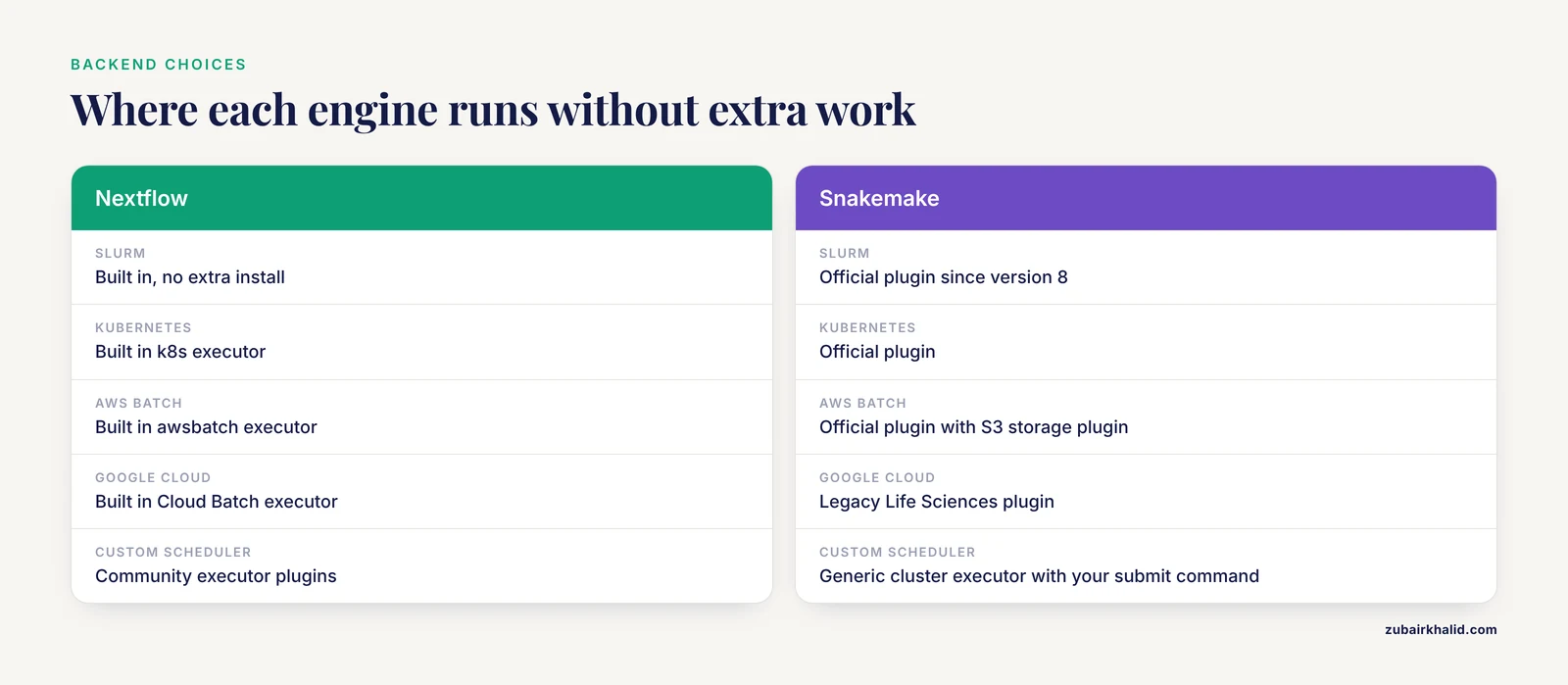
The table below is the core of this comparison. It maps every backend worth knowing to both engines.
| Backend | Nextflow | Snakemake | Best fit | Main caveat |
|---|---|---|---|---|
| Local (laptop or VM) | Built in | Built in | Development, testing, small cohorts | No isolation or quota protection by default |
| SLURM | Built in | Official plugin | University and institute clusters | Site queue policy and unit conventions vary |
| SGE, LSF, PBS, PBS Pro, Moab | Built in | Community plugins or the generic cluster executor | Sites standardized on legacy or vendor schedulers | Plugin maturity varies, test before production |
| HTCondor | Built in | Community plugin | High-throughput pools and campus grids | Data staging to execute nodes needs care |
| Kubernetes | Built in | Official plugin | Containerized services and institutional clouds | Work directory must live on persistent or object storage |
| AWS Batch | Built in | Official plugin | Bursting and production genomics on AWS | You own the queue, spot, and S3 setup |
| Google Cloud Batch | Built in | Legacy Life Sciences plugin | GCP-standard organizations | The Life Sciences API is being retired in favor of Cloud Batch |
| Azure Batch | Official plugin | No official backend, use Kubernetes | Azure-standard organizations | Fewer turnkey references than AWS |
| Custom or exotic scheduler | Community executor plugins | Generic cluster executor with your submit command | Vendor systems and special sites | You own the integration and its failure modes |
Read the table as a map of defaults, not a verdict. Nextflow ships a broad set of native scheduler executors, so an HPC site usually needs no extra install. Snakemake moved executors into plugins starting with version 8, which keeps the core lean and makes each integration an explicit dependency. Both approaches work. The practical differences show up in maturity and in how much you must configure yourself.
Community plugins and generic executors fill the gaps. Snakemake's generic cluster executor accepts your own submit command, which is how sites with unusual schedulers integrate. Before betting production time on any non-default backend, run a small test pipeline through it on the target system.
Nextflow on HPC Schedulers
Nextflow runs its head process on a login or submit node and, by default, submits one scheduler job per task. Resource requests live in the process block of nextflow.config:
process {
    executor      = 'slurm'
    queue         = 'standard'
    errorStrategy = 'retry'
    maxRetries    = 2

    withLabel: bigmem {
        cpus   = 16
        memory = 120.GB
        time   = 24.h
    }
}
Three things do most of the work on HPC. The executor directive selects the backend. queue names the partition. The withLabel block attaches cpus, memory, and time to tasks tagged with that label in the pipeline code. errorStrategy and maxRetries matter more than they look, because cluster nodes fail and preemption exists even on owned hardware. clusterOptions passes native flags (account names, QOS strings, reservations) straight through to sbatch when a site requires them.
A typical launch looks like this:
nextflow run nf-core/rnaseq -profile test -resumeThe -profile test variant validates the install with a tiny dataset. Real runs swap in a samplesheet and a cluster profile that carries the config above. Nextflow reports per-task status through its trace and timeline reports, and every task leaves its logs in the work directory, which makes post-mortem debugging on a cluster straightforward.
Beyond SLURM, native executors cover SGE, LSF, PBS and PBS Pro, Moab, and HTCondor, among others. Containers on HPC usually mean Apptainer (the successor to Singularity), enabled in config with apptainer.enabled = true in recent versions, so the same image that runs on a laptop runs on the cluster.
Snakemake on HPC Schedulers
Snakemake 8 moved executors into plugins, and the SLURM plugin is the official, best-maintained path. The head process still runs where you launch it, typically inside tmux on a submit node, and the plugin translates each job into scheduler calls:
snakemake --executor slurm --jobs 100 \
    --default-resources "slurm_partition=standard" "mem_mb=8000" "runtime=120" \
    --use-apptainer
A rule's threads become the SLURM CPU request. mem_mb is the memory request in mebibytes. runtime is minutes, which the plugin maps onto time limits. Per-rule overrides keep the defaults small:
snakemake --set-threads align=16 --set-resources "align:mem_mb=120000"Profiles (a YAML file passed with -profile) store these defaults per site, which is how labs share one pipeline across clusters without editing code. Snakemake writes a per-job log under .snakemake and can produce a self-contained HTML report of the whole run.
Two Snakemake features matter specifically on HPC. Job grouping with -group-components bundles many short tasks into a single scheduler allocation, which is the workflow-level equivalent of the scheduler's own array jobs (one submission that fans out into many near-identical tasks). On sites that cap concurrent jobs per user, grouping can be the deciding feature, because a fan-out of thousands of one-minute steps otherwise floods the queue. Rerun behavior is also explicit: Snakemake decides what to rerun from triggers covering code, parameters, inputs, the software environment, and file timestamps, so a resumed run redoes only work that actually changed.
What HPC Reality Adds
Scheduler behavior varies more across sites than newcomers expect. Documented experience running different workload managers across Cray platforms shows how much site-specific integration (scheduler versions, native launchers, topology) differs between vendor systems [4]. Validate any pipeline against the target cluster with a small test cohort before promising results, and expect to touch queue names, account strings, and launcher details per site.
On leadership-class systems, the site software stack dominates. On Frontier, the first US exascale supercomputer, workflow components that used the system-installed MPI and parallel I/O stacks ran with near-zero overhead, while a portable language runtime gave up roughly half of native GPU stencil performance on the MI250X accelerators [5]. The lesson for executor design is to keep the workflow layer thin. Neither Nextflow nor Snakemake manages MPI ranks or GPU placement inside a job. They request an allocation of nodes and hand it to the job's own launcher.
Nextflow in the Cloud
Nextflow's cloud story is its strongest card. First-party plugins provide executors for AWS Batch, Azure Batch, and Google Cloud Batch (the successor to the Life Sciences API), and a built-in executor targets Kubernetes. The AWS Batch configuration shows the shape:
workDir = 's3://my-bucket/work'

aws.region = 'us-east-1'

process {
    executor  = 'awsbatch'
    queue     = 'my-batch-queue'
    container = 'quay.io/biocontainers/samtools:1.21'
}
The work directory lives on S3, tasks launch as Batch jobs, and logs land in CloudWatch. Two Nextflow technologies smooth the transition. Fusion lets the work directory live on object storage (S3, Azure Blob, Google Cloud Storage) without a POSIX mount, so tasks read and write paths that are actually object operations. Wave provisions containers on demand, including building images from Conda-style requirements. Both are developed by Seqera and work with the open-source engine.
The head process itself can run as a Batch job (the head job pattern), so nothing depends on your laptop staying awake. Seqera Platform adds an optional managed control plane for launching, monitoring, and cost visibility on top of the engine.
Azure Batch and Google Cloud Batch follow the same pattern: point workDir at the cloud's object storage, set the executor, and name the queue. On Kubernetes, the k8s executor needs a namespace, a service account with job permissions, and a work directory on a persistent volume or object storage with Fusion enabled.
Snakemake in the Cloud
Snakemake reaches the cloud through the same plugin architecture it uses for SLURM. The official AWS Batch executor plugin pairs with the S3 storage plugin:
snakemake --executor aws-batch --jobs 200 \
    --storage-provider s3 --default-storage-prefix s3://my-bucket/results
You must create the Batch queue, compute environment, roles, and buckets yourself, often with Terraform or CloudFormation. The plugin then submits each job to Batch and resolves remote paths through the storage layer. A Kubernetes executor plugin works the same way for institutional clusters, and community plugins add other targets such as Tibanna for AWS.
Google support deserves a caveat. Snakemake's Google executor plugin targets the Life Sciences API, which Google has been phasing out in favor of Cloud Batch. Verify the plugin's current status before committing a GCP project to it.
Compared with Nextflow, expect more assembly. Snakemake gives you a thinner, more transparent layer, which many teams prefer for exactly that reason, but you own the provisioning and the glue.
What Actually Changes in the Cloud
Three properties of cloud infrastructure change how executors behave.
First, storage. Object stores (S3, Azure Blob, Google Cloud Storage) are not POSIX filesystems. Relative paths, symlinks, and rename-heavy patterns that work on Lustre or NFS break or perform badly. Nextflow's Fusion and Snakemake's storage plugins exist to bridge that gap, and both engines want the work directory on object storage rather than on a mounted volume.
Second, provisioning delay. A cloud task may wait for a virtual machine to be provisioned before it starts, and workflow management research treats that delay as a first-class scheduling variable because it can dominate the runtime of short tasks [6]. Batch services mitigate it with pre-warmed pools. Both engines mitigate it by keeping tasks coarse enough that startup overhead amortizes.
Third, volatile capacity. Spot and preemptible instances cost less and can vanish at any moment. The lessons from Lobster, a workflow manager that scaled to 25,000 non-dedicated opportunistic cores, transfer directly: classify tasks by resource needs, cap concurrency per class, monitor actual usage, and be willing to terminate and recover partial work [7]. Modern engines implement the same ideas as retry strategies and resume caches rather than as separate tooling.
Data locality becomes a scheduling input at scale. The justIN system built for the DUNE experiment assigns work just in time, letting each running job ask a central service for the optimal file to process next given its location, across hundreds of thousands of files and jobs on four continents [8]. Genomics against multi-region cloud storage raises the same question, and the practical answer is the same: put compute near the bucket, or the bucket near the compute.
Cloud and HPC are converging, which is why this comparison matters now. A recent cross-platform usability study assessed 11 HPC proxy applications and benchmarks across AWS, Azure, and Google Cloud, six environments, and CPU and GPU configurations, with scaling tests up to 28,672 CPUs and 256 GPUs, all measured against on-premises clusters at Lawrence Livermore National Laboratory [9]. The study's premise is that converged cloud-HPC environments demand portability, reproducibility, dynamism, and automation, and its design is a template for benchmarking your own executor choices instead of assuming them. The same convergence shows up in particle physics, where CMS prototyped a declarative, interactive analysis facility that leverages existing grid infrastructure while scaling toward opportunistic resources like public cloud or HPC centers.
Cost behavior differs from HPC accounting. You pay for provisioned capacity, data transfer out (egress), and storage, and an idle Batch compute environment or an orphaned work directory bills quietly. Neither engine ships a cost model, so budget for monitoring from day one.
Nextflow vs Snakemake: Pros and Cons by Decision Criteria
| Criterion | Nextflow | Snakemake |
|---|---|---|
| Pipeline language | Groovy-based DSL built on dataflow channels | Python-based DSL built on file targets |
| Execution model | Asynchronous tasks communicating through channels | A DAG resolved from rule inputs and outputs |
| HPC scheduler coverage | SLURM, SGE, LSF, PBS, PBS Pro, Moab, HTCondor built in | Official SLURM plugin, community plugins and a generic executor for the rest |
| Cloud backends | AWS Batch, Azure Batch, Google Cloud Batch, Kubernetes first-party | Official plugins for AWS Batch and Kubernetes, legacy Google Life Sciences |
| Object storage | Native work directories on S3, Blob, and GCS, with Fusion for mountless access | Storage plugins map remote paths into the DAG |
| Resume | Content-hashed caching with -resume | Rerun triggers over code, parameters, inputs, software environment, and timestamps |
| Containers | Docker, Apptainer, Podman, Charliecloud | Apptainer, Conda, and Docker |
| Small-task handling | One scheduler job per task by default | Job grouping bundles short tasks into shared allocations |
| Ecosystem | nf-core curated pipelines, optional managed platform | Wrappers repository, deep Conda integration, HTML reports |
Portability and reproducibility
Both engines let one pipeline definition run on a laptop, a cluster, and a cloud bucket through profiles, and both integrate containers and Conda. The gap between promise and practice is version pinning. A pipeline that runs anywhere still needs pinned container images, pinned Conda environments, and recorded engine versions. Whichever engine you choose, treat the executor config as part of the reproducible artifact and commit it to version control alongside the pipeline.
Scheduling behavior and throughput
Throughput on shared infrastructure is decided less by the engine than by task granularity and scheduler interactions. A DAG of thousands of one-minute tasks wastes more time in queue overhead than it saves in parallelism. Snakemake's grouping addresses this directly. Nextflow's answer is to encourage coarser processes and to rely on retry logic for resilience. Dedicated scheduling research such as PSO-DS exists because these decisions measurably change makespan [3], and the opportunistic-computing experience shows throughput also depends on capping concurrency per task class and monitoring real resource use. The practical rule is to profile one sample end to end, then size tasks so the average task runs tens of minutes, not seconds.
Ecosystem and community
Nextflow has nf-core, the largest curated collection of community bioinformatics pipelines, with standardized configs, container recipes, and test profiles. Snakemake has the wrappers repository and a strong convention of single-file Snakefiles that are easy to read and fork. Both communities publish pipelines for RNA-seq, variant calling, assembly, and metagenomics, and both engines sit at the center of the bioinformatics workflow manager field [1]. Adoption matters for hiring, for help forums, and for whether a pipeline you need already exists.
Self-hosting versus managed control planes
Nextflow can run entirely self-hosted (engine plus head node on your own VM) or with the managed Seqera Platform on top. Snakemake is self-hosted by design, with no first-party managed service. Evidence from adjacent tooling supports the self-hosting tradeoff: an evaluation of self-hosted n8n, a general workflow automation platform, found measurable gains in execution speed and reliability with predictable resource usage and minimal external dependencies compared with cloud-based alternatives [10]. The same logic drives labs that keep workflow control planes on institute hardware for data governance reasons. The counterweight is operational burden, which is what managed platforms sell back to you.
Choosing Between HPC and Cloud: Worked Scenarios
Scenario 1: A 30-sample RNA-seq project on a university SLURM cluster
Either engine handles this comfortably. If your group already uses nf-core, run nf-core/rnaseq with a cluster profile:
nextflow run nf-core/rnaseq -profile test
nextflow run nf-core/rnaseq --input samplesheet.csv -profile mycluster
If your group is Python-first and the analysis is bespoke, a Snakefile with a SLURM profile is equally solid. The deciding criteria are language preference and which pipeline collection already solves your problem, not executor capability.
Scenario 2: A 400-sample variant campaign that outgrows the cluster queue
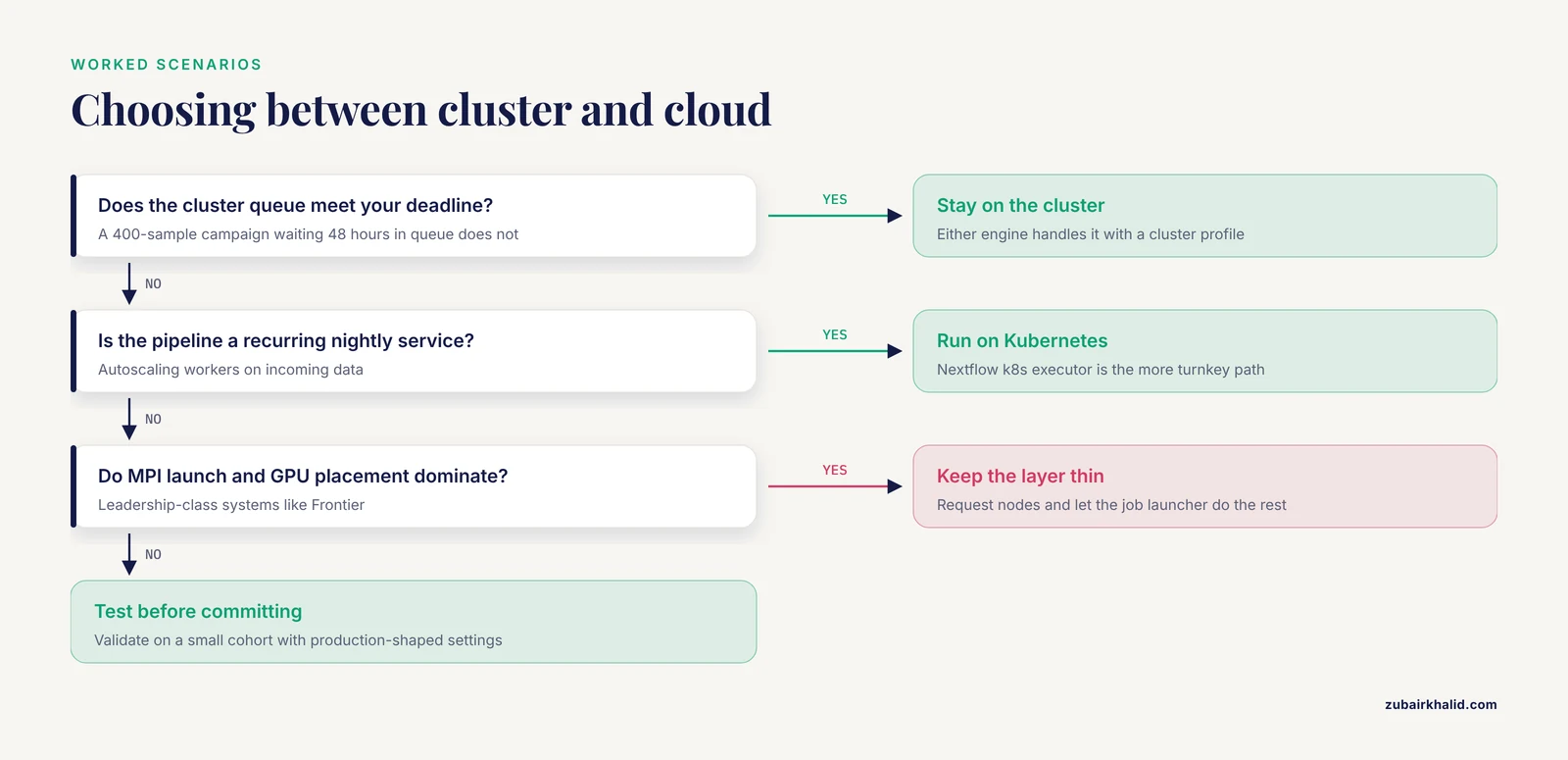
Your joint-calling workflow waits 48 hours in queue and the deadline is fixed. This is the burst-to-cloud case. With Nextflow, add an awsbatch profile, point workDir at S3, enable Fusion, and set errorStrategy to retry with maxRetries to survive spot reclamation. The same pipeline code runs on both backends, and -resume carries completed work across. With Snakemake, the aws-batch executor plugin plus the S3 storage plugin achieves the same result with more manual setup of Batch queues and roles. Budget for data movement either way: copying hundreds of BAM files into the cloud takes real time, so decide early whether the campaign lives in the cloud or on the cluster, not both.
Scenario 3: A recurring analysis service on Kubernetes
A center runs a pipeline nightly on incoming data with autoscaling workers. Nextflow's k8s executor plus object storage work directories and a CI-triggered launch is the more turnkey path, with Seqera Platform or your own cron-and-API scripts handling scheduling. Snakemake's Kubernetes plugin works, but you assemble more of the operational layer yourself. For multi-tenant production services, the managed ecosystem around Nextflow usually wins on operational cost.
Scenario 4: Leadership-class HPC with MPI and GPU codes
Neither engine manages what matters most here, the MPI launch and GPU placement inside each job. The workflow manager requests node allocations, and the job's launcher does the rest, so keep the workflow layer thin and the HPC-native launch inside the task, as the Frontier experience above shows. Campaigns at this scale often outgrow general engines entirely and move to purpose-built stacks.
Common Mistakes and Limitations
- Running the head process on a login node against policy. Many sites forbid long-running processes on login nodes. Use a submit node, a persistent allocation, or a small long-running job for the head process, always inside tmux or screen so a dropped SSH session does not kill the run.
- Unit mismatches. Memory and time units differ between the engine config, the scheduler, and cloud instance types. A request that means one thing in
nextflow.configcan mean another insbatch. Read your site's conventions and test with a deliberately oversized small job before trusting the numbers. - Assuming POSIX semantics in the cloud. Symlinks, append writes, and rename operations behave differently on object storage. Test the storage layer before the pipeline layer.
- Flooding the queue with tiny tasks. Thousands of sub-minute jobs waste more time in scheduler overhead than they save. Group tasks (Snakemake) or merge steps (both engines) until average task runtime reaches tens of minutes.
- No retry strategy. Nodes fail and spot instances vanish. Set
errorStrategyretry with sensiblemaxRetriesin Nextflow, and rely on Snakemake's resume-from-state behavior. Design tasks to be idempotent so a retried task cannot corrupt outputs. - Version drift between head and workers. The engine version, Python, Conda, and container runtime on the submit node must match what tasks expect. Pin engine versions in your profile and record them.
- Work directories on home quotas. Default work directories under home fill quotas and slow shared filesystems. Point scratch and work directories at the site's parallel filesystem.
- Testing only on the dev queue. Development queues often have different limits, node types, and preemption behavior than production. Validate with production-shaped settings on a small cohort.
- Cloud cost surprises. Idle compute environments, egress, orphaned buckets, and log storage all bill. Neither engine attributes spend per pipeline without extra tooling.
- Overstating reproducibility. An executor is not a provenance system. Sample metadata, reference versions, and manual steps outside the pipeline remain your responsibility. And no engine choice removes the need to benchmark on your own site, because scheduler policy and storage performance dominate real-world results.
Alternatives Worth Knowing
Nextflow and Snakemake do not exhaust the field, and the neighbors clarify what they are for.
WDL with Cromwell is a workflow language with strong genomics heritage (the GATK ecosystem) and a mature executor of its own. Choose it when your pipelines come from that world. CWL is a standards-track way to describe tools and workflows portably, popular where strict tool metadata matters. Galaxy provides an interactive web interface that hides the executor entirely, strong for training and for labs that want point-and-click reproducibility.
Pegasus is the reference point for campaigns beyond what general bioinformatics engines target. SCEC's CyberShake platform runs physics-based seismic hazard campaigns on a stack of Pegasus, HTCondor, Globus, and custom tools, coordinating more than 15 heterogeneous codes, from short serial tasks to large GPU jobs, over months of around-the-clock execution on leadership-class supercomputers [11].
Domain-specific systems fill niches. Watchdog 2.0 targets lab-scale bioinformatics with a graphical interface, shared module repositories, extensive execution logging, and resume after interruption [2]. Lobster exploited volatile opportunistic resources for high-energy physics. justIN orchestrates just-in-time data processing for DUNE at extreme scale. General-purpose orchestrators such as Airflow and Prefect lack bioinformatics-native handling of containers, files, and resume, and are usually the wrong tool for primary analysis.
Frequently Asked Questions
Do I need containers to run Nextflow or Snakemake on an HPC cluster?
No. Both engines run with environment modules or Conda, and many cluster pipelines do exactly that. Containers are still the safer default because they pin tool versions and remove module drift, and Apptainer is the usual choice on HPC. On cloud executors, containers are effectively required because batch services launch tasks from images.
Which is better on a SLURM cluster, Nextflow or Snakemake?
Both are first-class. Nextflow gives you nf-core pipelines and broader built-in scheduler coverage. Snakemake gives you a Python-native DSL, job grouping for small tasks, and a lighter plugin model. Choose by language preference, existing local pipelines, and which pipeline collection already solves your problem.
Can one pipeline run on both HPC and cloud without a rewrite?
Yes, that is the design goal of profiles in both engines. Expect to touch storage paths, work directory locations, and resource directives, and to test the cloud backend separately, but the task logic stays the same.
How do the engines handle spot or preemptible interruptions?
Through retries and resume. Nextflow uses errorStrategy retry with maxRetries, and its content-hash cache lets -resume skip finished work after a crash. Snakemake resumes from its recorded state and reruns only incomplete or changed jobs. Design tasks to be idempotent so a retried task cannot corrupt outputs.
Is one engine faster than the other?
No engine is inherently faster. Throughput is dominated by task granularity, scheduler policy, storage performance, and the tools inside each task. Profile your own workload before switching engines for speed.
What is the difference between an executor and a scheduler?
A scheduler (SLURM, LSF, HTCondor) owns cluster resources and queues jobs under site policy. An executor is the adapter inside a workflow manager that submits each task to a scheduler or to a cloud service and tracks the result. One pipeline can use many executors across its lifetime, but a single run talks to one backend at a time.
Sources
- Reproducible, scalable, and shareable analysis pipelines with bioinformatics workflow managers
- Watchdog 2.0: New developments for reusability, reproducibility, and workflow execution
- PSO-DS: a scheduling engine for scientific workflow managers
- Experiences running different work load managers across Cray Platforms
- Julia as a unifying end-to-end workflow language on the Frontier exascale system
- Developing a Workflow Management System Simulation for Capturing Internal IaaS Behavioural Knowledge
- Opportunistic Computing with Lobster: Lessons Learned from Scaling up to 25k Non-Dedicated Cores
- Just-in-time workflow management for DUNE
- Usability Evaluation of Cloud for HPC Applications
- A Practical Evaluation of Self-Hosted n8n for Secure and Scalable Workflow Automation
- Using open-science workflow tools to produce SCEC CyberShake physics-based probabilistic seismic hazard models