Executor Configuration for Nextflow and Snakemake
By Dr. Zubair Khalid, DVM, MS, PhD ·

Nextflow and Snakemake are both bioinformatics workflow managers, meaning they turn an analysis into a directed acyclic graph (DAG) of steps and run those steps in dependency order, but they configure SLURM execution differently. Nextflow ships a built-in SLURM executor that you configure centrally in a Groovy-style nextflow.config file, while Snakemake (version 8 and later) submits jobs through a SLURM executor plugin that you configure with per-rule resources and a YAML profile.
Rule of thumb: choose Nextflow when you want centralized, operations-style control from one config file and you run community pipelines such as nf-core. Choose Snakemake when your team writes Python, wants resource requests declared next to each rule, and prefers a lightweight controller. Both are excellent on SLURM clusters, and the real deciding factors are where configuration lives, how retries behave, and how politely the controller treats the scheduler.
Workflow runs on high-performance computing (HPC) clusters routinely last hours or days, so the quality of the execution control layer, including task scheduling and state tracking, shapes both performance and how easily you can intervene mid-run [1]. This guide defines every moving part, gives a side-by-side comparison, walks through the full option set for each tool with real commands, and ends with worked scenarios and the mistakes that fill HPC help queues.
What an Executor Does in a Bioinformatics Workflow Manager
The two layers that run your pipeline
A bioinformatics workflow manager is software that models an analysis as a graph of steps and executes the steps in dependency order, caching results and rerunning only what changed. Nextflow is written in Java and Groovy, with pipelines expressed in a Groovy-based domain-specific language (DSL). Snakemake is Python-based, with pipelines expressed as rules in a Snakefile.
An executor is the component of the workflow manager that takes tasks which are ready to run and hands them to an execution backend, then tracks them to completion. On an HPC cluster, that backend is a batch scheduler, almost always SLURM (Simple Linux Utility for Resource Management). SLURM accepts job scripts through the sbatch command, holds them in partitions (SLURM's term for queues, each with its own node types, walltime limits, and access rules), and starts them on compute nodes as resources free up.
You interact with this world from a submit node (also called a login or head node). The workflow manager's controller process runs there, submits jobs, and polls for status. The actual pipeline commands run on compute nodes. A walltime is the maximum time a job may run, and fair-share accounting is the scheduler's method of balancing usage across users and groups.
Why configuration decides whether runs succeed
A 200-sample pipeline can spawn thousands of sbatch jobs. Configuration errors scale with it. Request more memory than the largest node offers and jobs sit pending forever. Set no walltime and long jobs die at the partition default. Submit hundreds of jobs per second and your cluster administrators will email you. Designing the execution control layer of a parallel workflow management system is a recognized problem, because the system must manage task scheduling and workflow data efficiently while supporting hybrid workloads [1]. Executor configuration is where you, the pipeline author, control your share of that problem.
Side-by-Side Comparison: Nextflow vs Snakemake on SLURM
| Aspect | Nextflow | Snakemake |
|---|---|---|
| Core language | Groovy-based DSL, config in nextflow.config | Python, rules in a Snakefile |
| SLURM integration | Built-in executor, enabled with one directive | Plugin package, snakemake-executor-plugin-slurm |
| Resource declarations | Process directives, centralized | resources in each rule, plus defaults |
| Memory syntax | memory = '16 GB' | mem_mb = 16000 |
| Time syntax | time = '4h' | runtime = 240 (minutes) |
| Partition selection | queue directive | slurm_partition resource |
| Account code | clusterOptions = '-A myaccount' | slurm_account = "myaccount" |
| Retries | errorStrategy = 'retry' with task.attempt escalation | -retries, reruns with the same resources |
| Concurrency cap | executor.queueSize (default cap is 100) | -jobs |
| Submission throttle | executor.submitRateLimit | -max-jobs-per-second |
| Status polling | executor.pollInterval | -max-status-checks-per-second |
| Resume semantics | -resume, content-based hashing | Automatic, timestamp plus rerun triggers |
| Task files | work/ directory with .command.* files | .snakemake/ metadata and slurm_logs |
| Containers | -with-apptainer, container directive | -software-deployment-method apptainer |
| Reports | -with-report, -with-timeline, -with-trace | -report report.html |
| Ecosystem | nf-core pipelines and shared cluster configs | Wrappers, plugins, and shared profiles |
Reading notes: the table shows surface syntax, not capability gaps. Both tools can express the same SLURM job. The differences that matter in practice are covered under the criteria section below.
Nextflow SLURM Executor Configuration
Nextflow requires no plugin for SLURM. All cluster behavior is configured in nextflow.config files, which merge by location: the pipeline directory, your home directory, and any file passed with -c. Later definitions override earlier ones, which is how profiles work.
Core options and what they map to in sbatch
A minimal SLURM configuration looks like this:
process {
    executor = 'slurm'
    queue = 'standard'
    time = '4h'
    cpus = 2
    memory = '8 GB'
}
Launch it with:
nextflow run main.nf -profile hpc -resumeNextflow translates each directive into an sbatch flag. queue becomes -partition (the directive is named queue for historical reasons across schedulers), time becomes -time, cpus becomes -cpus-per-task, and memory becomes -mem. Anything without a native directive goes through clusterOptions, which appends raw flags verbatim:
process {
    clusterOptions = '-A myaccount'
}
Every task becomes its own SLURM job. Nextflow writes the generated submission script into the task's work directory as .command.run, with the #SBATCH headers visible at the top, so you can always inspect exactly what was sent to the scheduler. Task stdout, stderr, and exit code land in .command.out, .command.err, and .exitcode in the same directory.
Per-process and per-label overrides
Real pipelines need different resources per step. FastQC wants 1 CPU and 2 GB, splice-aware alignment wants 16 CPUs and 64 GB. Use withLabel for groups of processes tagged with a label, and withName for individual processes:
process {
    executor = 'slurm'

    withLabel: fast {
        cpus = 1
        memory = '2 GB'
        time = '30min'
    }

    withLabel: high_mem {
        cpus = 8
        memory = '128 GB'
        time = '24h'
        queue = 'bigmem'
    }

    withName: MULTIQC {
        cpus = 2
        memory = '8 GB'
    }
}
Process names are conventionally uppercase, and withName matches them exactly. Labels travel with the pipeline, so a single config file with label-based rules can drive many different pipelines on the same cluster.
Throttling and polling for cluster etiquette
The executor scope controls how the controller behaves toward the scheduler:
executor {
    queueSize = 50
    submitRateLimit = '5 sec'
    pollInterval = '2 min'
    cpus = 120
    memory = '480 GB'
}
queueSize caps how many jobs are in flight at once, with a default cap of 100. submitRateLimit spaces out sbatch calls, which keeps you under cluster submission rate limits. pollInterval spaces the squeue checks Nextflow uses to follow job state. executor.cpus and executor.memory cap the total resources your run can hold across all in-flight jobs, which matters on clusters with fair-share accounting, where holding 500 CPUs you barely use damages your group's priority.
Retries and memory escalation
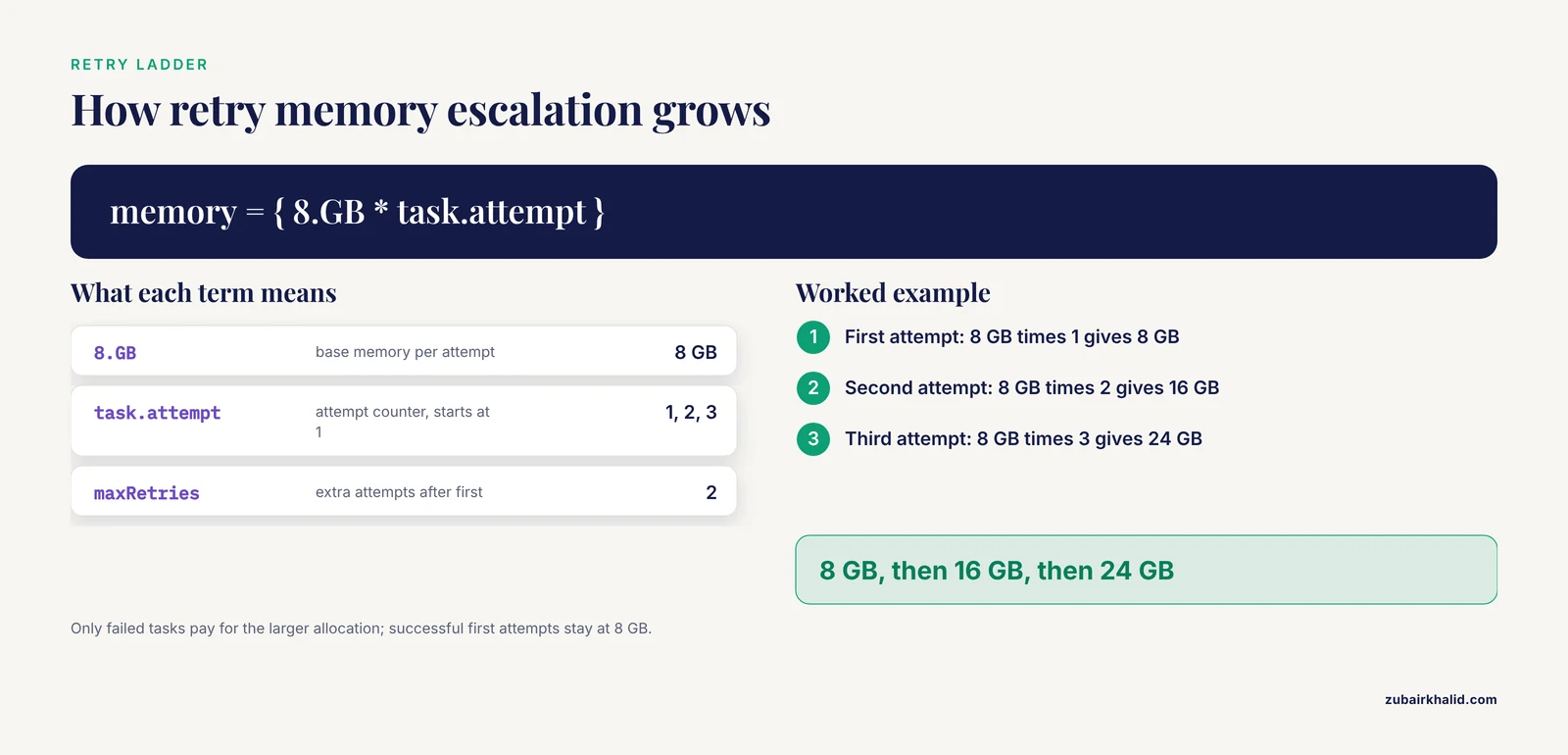
By default, a failed task terminates the run. The standard SLURM pattern is retry with escalating resources, driven by task.attempt, which counts attempts starting at 1:
process {
    errorStrategy = 'retry'
    maxRetries = 2
    memory = { 8.GB * task.attempt }
    time = { 4.h * task.attempt }
}
The first attempt asks for 8 GB, the second for 16 GB, the third for 24 GB. This absorbs out-of-memory (OOM) kills, which SLURM enforces through cgroups (control groups, the kernel mechanism SLURM uses to enforce per-job limits), without paying for the larger allocation on tasks that succeed the first time. Nextflow can also resubmit sbatch calls that fail for transient scheduler reasons, controlled by the submitRetryLimit setting in the executor scope.
When a run goes wrong
Three commands answer most questions:
squeue -u $USER -o "%.10i %.9P %.24j %.8T %.10M %R"
sacct -j 123456 --format=JobID,State,ExitCode,Elapsed,MaxRSS
scancel 123456
squeue shows your jobs, their state, and the pending reason. sacct shows whether SLURM killed a job for memory and how much resident memory (MaxRSS) it actually used, which is the number you need to right-size the request. nextflow log lists past runs, and nextflow clean -before <run_name> -f reclaims work directory space from earlier runs.
Snakemake SLURM Executor Configuration
Snakemake rules describe inputs, outputs, and commands, and Snakemake derives the DAG from file dependencies. Since version 8, executors are plugins, and SLURM support lives in a separate package installed alongside the core tool.
The plugin workflow in Snakemake 8 and later
pip install snakemake snakemake-executor-plugin-slurm
snakemake --executor slurm --jobs 100 \
  --software-deployment-method conda \
  --default-resources slurm_partition=main mem_mb=8000 cpus_per_task=2 runtime=60
-executor slurm activates the plugin. -jobs caps how many SLURM jobs may run concurrently. -default-resources fills in values for any rule that does not declare its own. -software-deployment-method conda runs each job inside its declared conda environment on the compute node.
The controller runs on the submit node, submits one sbatch job per rule instance, and follows progress by querying the scheduler. Job logs land under .snakemake/slurm_logs, organized by rule, which is the first place to look when a job fails.
A legacy note for older pipelines: Snakemake 7 and earlier used a generic cluster mode driven by -cluster "sbatch ..." plus a jobscript and, for robust status tracking, a separate status script. Many older READMEs still show that style. It works, but do not mix the two styles in one invocation, and prefer the plugin on version 8 and later.
Declaring resources in rules
Resources live next to the code they describe:
rule bwa_mem:
    input:
        r1="results/reads/{sample}_1.fastq.gz",
        r2="results/reads/{sample}_2.fastq.gz"
    output:
        "results/aligned/{sample}.bam"
    threads: 8
    resources:
        mem_mb=32000,
        runtime=240,
        cpus_per_task=8,
        slurm_partition="main"
    shell:
        "bwa mem -t {threads} {input.r1} {input.r2} > {output}"
Units are fixed: mem_mb is megabytes, runtime is minutes, and threads doubles as cpus_per_task when you do not set that resource separately. The plugin converts these values into sbatch flags at submission time. Keep the thread count in your shell command tied to {threads} so the requested CPUs are actually used.
Profiles for reproducible cluster settings
Cluster settings belong in a profile, a YAML file you pass with -profile profiles/slurm:
executor: slurm
jobs: 100
default-resources:
  slurm_partition: main
  mem_mb: 8000
  cpus_per_task: 2
  runtime: 60
retries: 3
latency-wait: 60
max-status-checks-per-second: 1
software-deployment-method: conda
set-threads:
  bwa_mem: 8
set-resources:
  bwa_mem:
    mem_mb: 32000
set-threads and set-resources override values baked into the Snakefile without editing it, which is how you tune a published pipeline for a specific cluster. latency-wait matters on parallel filesystems, where a finished job's output files can take seconds to become visible to the controller, and without a wait Snakemake may wrongly mark outputs as missing. retries reruns failed jobs automatically. Snakemake waits only briefly for filesystem latency by default, so set this explicitly on shared parallel filesystems.
Grouping, throttling, and logs
Thousands of tiny jobs annoy schedulers and waste allocation overhead. -group-components "fastqc=20" packs 20 instances of the fastqc rule into a single SLURM job. -max-jobs-per-second throttles submissions and -max-status-checks-per-second throttles polling. For reporting, snakemake, report report.html produces a self-contained HTML summary of the run after it finishes.
Choosing Between Them: Criteria That Decide Real Choices
Executor configuration for Nextflow and Snakemake comes down to five criteria. Both tools pass all five, but they distribute the effort differently.
Where configuration lives
Nextflow centralizes cluster behavior in config files that are separate from pipeline logic. One nextflow.config with profiles for test, standard, and bigmem clusters can drive any pipeline that uses conventional labels. Snakemake splits configuration: resource requests sit inside rules in the Snakefile, while cluster knobs sit in the profile. The Snakemake approach puts requests next to the code they protect, which reads well, but tuning a published pipeline for your cluster means reaching for set-resources overrides in the profile.
Resource units and sbatch mapping
| Resource | Nextflow | Snakemake | sbatch flag |
|---|---|---|---|
| Memory | memory = '16 GB' | mem_mb = 16000 | -mem |
| CPUs | cpus = 8 | threads: 8 or cpus_per_task = 8 | -cpus-per-task |
| Walltime | time = '4h' | runtime = 240 | -time |
| Partition | queue = 'main' | slurm_partition = "main" | -partition |
| Account | clusterOptions = '-A acct' | slurm_account = "acct" | -account |
| Escape hatch | clusterOptions | slurm_extra | any |
Nextflow uses human-readable strings with units, Snakemake uses integers with unit-bearing names. Both are unambiguous once you know the convention. The escape hatches matter: clusterOptions in Nextflow and slurm_extra in Snakemake pass raw sbatch arguments for site-specific requirements such as GPU generic resources (GRES) or quality of service (QOS) flags.
Failure handling and retries
Nextflow's errorStrategy supports terminate (the default), ignore, finish, and retry, and retry pairs naturally with attempt-based resource escalation as shown above. Snakemake's -retries reruns failed jobs with the same resources, so there is no built-in escalation ladder. If a Snakemake job dies of memory pressure, you right-size the resource and rerun, or bump the value through the profile. Snakemake also records incomplete jobs, and -rerun-incomplete cleans up the metadata after a controller crash.
Head-node load and scalability
Both controllers run on the submit node and poll the scheduler, so both can be made polite with the throttles described above. The deeper issue is internal. At thousands of concurrent tasks, the manager's own execution control, meaning how it tracks task state and workflow data, becomes a scaling factor in its own right [1]. Research on this problem produced SchalaDB, an architecture that uses distributed in-memory data management for workflow execution control, implemented in the d-Chiron workflow management system and evaluated on an HPC cluster with up to 960 computing cores, where scheduling stayed scalable and the overhead remained negligible even while analysts ran data analyses against running workflows to steer them [1]. Neither Nextflow nor Snakemake uses that architecture, but the lesson transfers: cap concurrency, throttle submissions, and favor tools that keep incremental state rather than rescanning everything on each poll. In practice, Nextflow keeps run state in an internal cache under the launch directory and Snakemake keeps per-file metadata under .snakemake, and both handle lab-scale concurrency comfortably when throttled.
This same research tradition emphasizes user steering, the ability to inspect and adapt running workflows rather than treating them as black boxes [1]. On SLURM, your steering tools are the SLURM commands plus the managers' own reporting: Nextflow's -with-trace, -with-timeline, and -with-report, and Snakemake's -report.
Portability across clusters
Both tools reward the same discipline. Never hardcode partition names, account codes, or node-specific limits in pipeline logic. Put them in profiles, keep one profile directory per cluster, and version it with the pipeline. The nf-core ecosystem demonstrates the Nextflow end of this, with community-maintained configs for many institutional clusters. For Snakemake, shared profiles and the plugin's defaults play the same role.
Pros and Cons for Real Cluster Work
Nextflow pros and cons
The pros of a Nextflow SLURM executor configuration are a mature built-in executor with no extra install, centralized config with profiles and strong per-label overrides, retry with resource escalation built in, rich reporting out of the box, and the nf-core ecosystem of tested cluster configs. The cons are a JVM controller that must stay alive on the login node (use tmux, a terminal multiplexer that keeps sessions running after disconnect), a Groovy config syntax that is a second language for Python-heavy teams, a work directory that grows large enough to need cleanup discipline, and directive behavior that shifts between versions, which makes version pinning necessary.
Snakemake pros and cons
The pros of a Snakemake SLURM executor configuration are Python-native rules with resources declared next to the code, a plugin architecture that keeps cluster code out of the core tool, incremental reruns by default with no resume flag to remember, and a readable YAML profile. The cons are a plugin that must be installed in every environment that runs the controller, retries that rerun with unchanged resources so escalation is manual, settings split between the Snakefile and the profile, and legacy cluster-mode examples still circulating in older documentation that do not mix with the plugin.
Worked Scenarios
Scenario 1: RNA-seq on a university SLURM cluster
A lab runs a 200-sample RNA-seq pipeline on a cluster with a standard partition (64-core, 512 GB nodes) and a bigmem partition. Nextflow fits well because the pipeline has many small QC steps and a few heavy alignment steps, and the lab wants one config file.
- Write a config with two profiles,
test(local executor, tiny inputs) andhpc(SLURM), with label-based resources and retry escalation:
profiles {
    test {
        process.executor = 'local'
    }
    hpc {
        process {
            executor = 'slurm'
            queue = 'standard'
            errorStrategy = 'retry'
            maxRetries = 2
            memory = { 8.GB * task.attempt }
            time = { 4.h * task.attempt }

            withLabel: high_mem {
                memory = { 64.GB * task.attempt }
                time = { 12.h * task.attempt }
                queue = 'bigmem'
            }
        }
    }
}- Validate cheaply with
nextflow run main.nf -profile test, then launch withnextflow run main.nf -profile hpc -resume -with-report report.html -with-timeline timeline.htmlinside a tmux session. - The genome index job dies.
sacctshows stateOUT_OF_MEMORYand MaxRSS near the 8 GB cap. The process carries thehigh_memlabel, so the escalation ladder already resubmitted it at 64 GB and it succeeded. - Add three new samples a week later.
-resumereuses every cached task whose inputs and code are unchanged, and only the new samples run.
Scenario 2: A Python-heavy lab pipeline with many small jobs
A lab with strong Python skills builds a variant-calling workflow for 60 samples. Most rules are small (FastQC per file, per-sample trimming), a few are large (alignment, joint calling). Snakemake fits because resources live in the rules and the profile stays tiny.
- Declare
threads,mem_mb, andruntimein each rule, with defaults in the profile. - Set
retries: 3andlatency-wait: 60inprofiles/slurm/config.yaml. - Group the small jobs so the scheduler sees dozens of jobs rather than thousands:
snakemake, profile profiles/slurm, group-components "fastqc=20". - Check failures under
.snakemake/slurm_logs, fix the offending rule's resource, and rerun. Finished outputs are skipped automatically, so the rerun cost is limited to failed and dependent jobs.
Scenario 3: A cluster that allocates memory per CPU
Some sites require -mem-per-cpu rather than -mem. Nextflow handles this natively with the perCpuMemAllocation process directive:
process {
    executor = 'slurm'
    perCpuMemAllocation = true
    cpus = 8
    memory = '32 GB'
}
With this setting, Nextflow divides the requested memory by the requested CPUs and submits -mem-per-cpu=4000. For Snakemake, the SLURM plugin submits per-node memory by default, so on a site that mandates per-CPU allocation, keep mem_mb and cpus_per_task in a fixed ratio, verify the behavior with a single test job, and if the site policy cannot be satisfied, fall back to the legacy cluster mode where you write the sbatch line yourself. This is a real portability limit worth checking before you commit to a tool on a given cluster.
Common Mistakes and Limitations
- Jobs pending forever with the reason
Resources. The request exceeds the largest node in the partition or the partition's memory cap. Checkscontrol show partition <name>forMaxMemPerNodeandsinfo -N -o "%N %m %c"for per-node memory and cores, then lower the request or target a partition that fits. - Jobs killed at the default walltime. Partitions have default and maximum time limits. Set
timeorruntimeexplicitly on every heavy rule or label instead of relying on partition defaults. - OOM kills treated as mysterious failures. SLURM kills processes through cgroups when they exceed the allocation.
sacct -j <jobid>, format=JobID,State,ExitCode,MaxRSSshows the stateOUT_OF_MEMORYand the true peak memory. Right-size from MaxRSS, then let Nextflow's escalation ladder or a bumped Snakemake resource absorb the variance. - Hardcoded partitions and accounts. A config that works on cluster A fails on cluster B. Profiles per cluster are the fix for both tools.
- Losing the controller. If your SSH session drops and the controller dies, running jobs may finish but nothing new submits and nothing resumes cleanly. Run Nextflow or Snakemake inside tmux or screen, or follow your site's policy for long-running login-node processes.
- Assuming a shared filesystem that is not there. Both tools expect the work and output directories to be visible at the same paths on the submit node and the compute nodes. Nextflow stages task files into its work directory, so the work directory must live on shared storage, not on a login-node scratch disk.
- Filesystem latency causing false failures. On parallel filesystems, output files can be delayed briefly after a job finishes. Snakemake's
latency-waitcovers this. Nextflow stages results within the job, but on very slow metadata servers a retry strategy is still cheap insurance. - Flooding the scheduler. Setting
queueSizeor-jobsfar above what your group is entitled to, or polling every second with hundreds of jobs, draws administrator attention. UsesubmitRateLimit,pollInterval,-max-jobs-per-second, and-max-status-checks-per-second. - Threads and CPUs mismatched. In Nextflow, the
cpusdirective feedstask.cpusto the process. In Snakemake,threadsmaps tocpus_per_task. A job that requests 16 CPUs but runs its command single-threaded wastes allocation, so bind the command's thread flag to the requested value. - Mixing Snakemake eras. Passing
-clustertogether with-executor slurmis an error. Pick the plugin on Snakemake 8 and later, and reserve the legacy mode for pinned older versions. - Version drift. Nextflow directives and Snakemake CLI options evolve. Pin the workflow manager version in your profile documentation and retest after upgrades, because a config that parsed last year may warn or fail today.
- Limits of any shared configuration. Every cluster differs in partitions, QOS limits (SLURM's per-account usage caps), accounting rules, and filesystem behavior. Treat any config, including the examples here, as a starting point, and validate with a small test run before launching the full cohort.
Frequently Asked Questions
What is the difference between an executor and a scheduler?
The executor is the component inside Nextflow or Snakemake that submits each task to an outside system and tracks it to completion. The scheduler, such as SLURM, owns the partitions and compute nodes and decides when and where each submitted job actually runs.
Which is better for SLURM, Nextflow or Snakemake?
Both are mature and correct choices, so pick by team and pipeline ecosystem. Nextflow suits centralized operations and nf-core pipelines, Snakemake suits Python-centric labs that want resources next to each rule. The best Nextflow SLURM executor configuration, like the best Snakemake profile, is one tuned per cluster with retries, explicit resources, and throttled submission.
How do I set memory, CPUs, and time per process in Nextflow?
Use the memory, cpus, and time process directives, scoped globally, per label with withLabel, or per process with withName. For retry-based growth, set memory = { 8.GB * task.attempt } so each attempt requests more than the last.
How do I set per-rule resources in Snakemake?
Declare a resources block with mem_mb, runtime, and cpus_per_task in the rule, provide fallbacks with -default-resources or the profile's default-resources, and override published pipelines per cluster with set-resources in the profile.
Why do my SLURM jobs sit in the pending state?
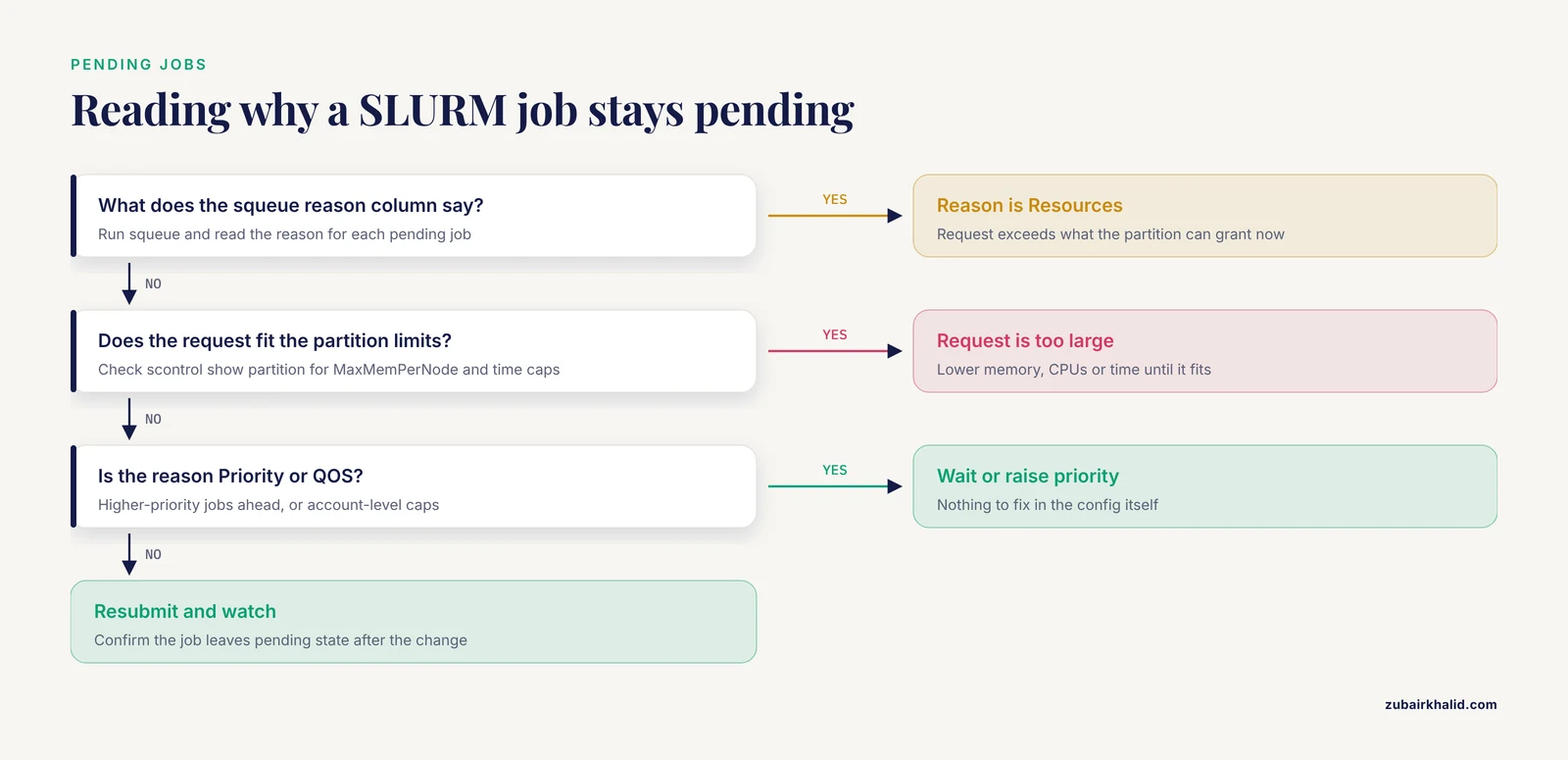
Run squeue and read the reason column. Resources means your request exceeds what the partition can currently grant, Priority means higher-priority jobs are ahead of you, and QOS-related reasons mean account-level caps. Compare your request against scontrol show partition limits and lower the memory, CPUs, or time until it fits.
Can I test a pipeline locally before running it on SLURM?
Yes. In Nextflow, define a test profile with process.executor = 'local' and run it on a login node or workstation with small inputs. In Snakemake, omit -executor and run with -cores 4 locally, or use -dry-run with either tool to check the planned jobs without executing them.