Debugging Nextflow Pipeline Errors in RNA-seq
By Dr. Zubair Khalid, DVM, MS, PhD ·
By the end of this article you will be able to take any failed Nextflow RNA-seq run, locate the exact process that crashed, read the underlying tool error, decide whether the cause is your data, your configuration, your compute environment, or the pipeline itself, and apply a targeted fix. You will also know how to rerun without redoing hours of completed work, and how to recognize the RNA-seq specific failures that generic workflow advice misses.
You need the following installed or available before the commands here will work:
- Nextflow itself, plus a supported Java runtime. Java 17 is the safest choice for current Nextflow releases.
- A container engine. Docker works on a laptop. Singularity or Apptainer works on shared clusters and is what most published Nextflow RNA-seq pipelines ship for reproducibility [1][2].
- A terminal on a Unix-like system, roughly 8 GB of RAM for small test runs, and 10 to 20 GB of free disk in your work directory.
- Optionally, a small public FASTQ pair to test with, so you are not debugging against terabyte-scale data.
Everything below uses real commands and real file names. Where an exact error string depends on your pipeline version, the wording is described qualitatively rather than invented.
How Nextflow Fails: Four Layers to Check
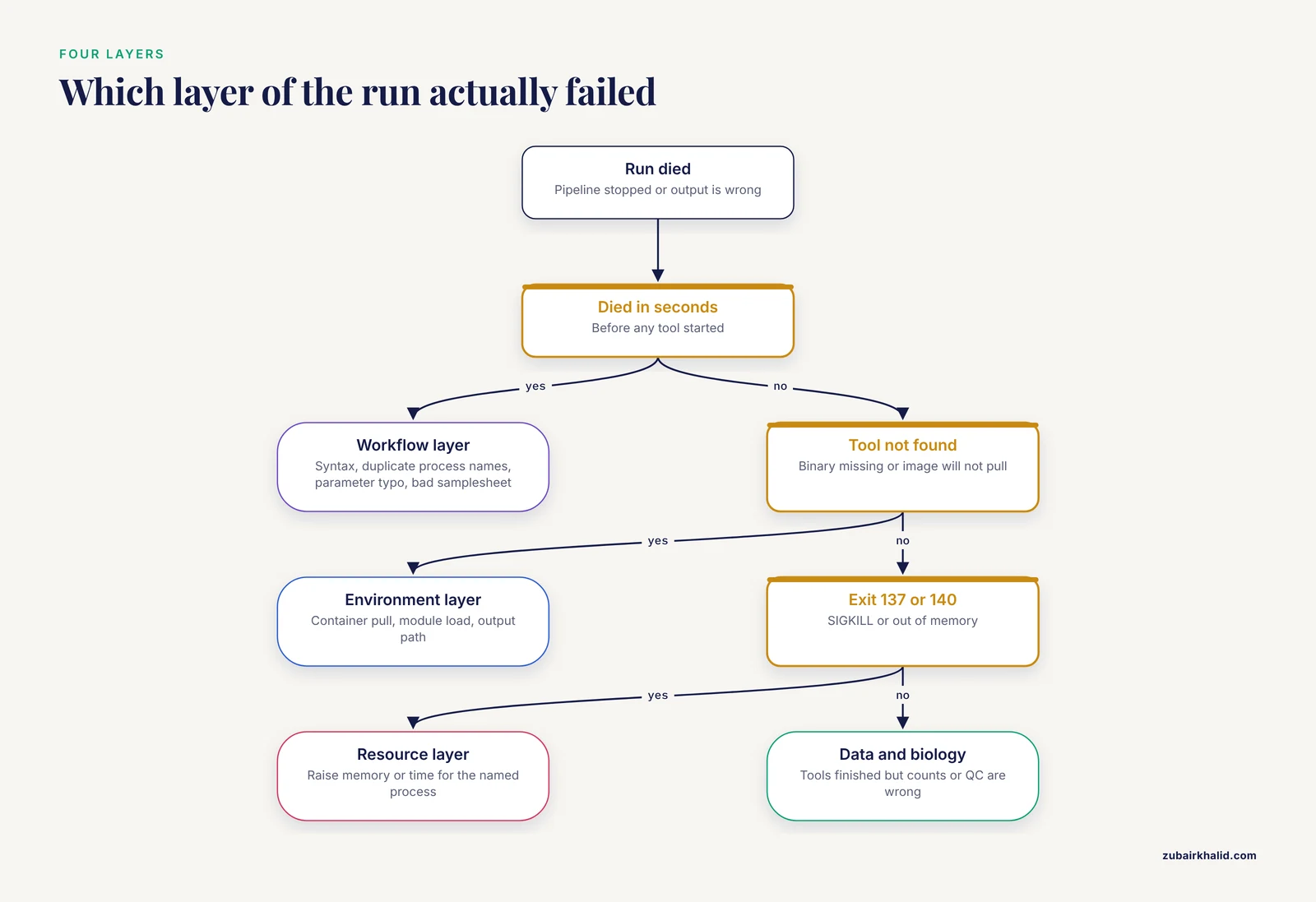
When a Nextflow RNA-seq pipeline dies, the failure lives in one of four layers. Debugging gets much easier once you stop asking "why did the pipeline fail" and start asking "which layer failed".
- The workflow layer. Nextflow itself cannot parse or schedule your run. Symptoms appear in seconds, before any tool starts. Causes include syntax errors in
main.nformodules.nf, duplicate process names in DSL2, a parameter typo, or an invalid samplesheet. Nextflow pipelines written in DSL2 are the current norm for community RNA-seq workflows [3].
- The environment layer. A tool inside a container or module cannot be found, cannot be pulled, or cannot write to a path. This includes container image pull failures, missing software modules on a cluster, and output directories that do not exist.
- The resource layer. The tool started but was killed. On HPC schedulers this usually means SLURM killed a job for exceeding the requested memory or time. The classic symptom is an exit code of 137 or 140, which corresponds to a SIGKILL or an out-of-memory condition.
- The data and biology layer. Every tool ran to completion, but the output is wrong or empty. This is the layer that generic Nextflow tutorials never cover and the one where RNA-seq has the most traps. Published RNA-seq pipelines exist precisely because raw analysis without guardrails is error prone. The RNAflow authors built their differential expression pipeline around automatic handling of common pitfalls such as ribosomal RNA removal and low abundance gene filtering [4]. The SARTools authors make the same point for the statistics side, warning that failing to check dataset characteristics before normalization can lead to spurious results and that normalization methods are not interchangeable between DESeq2 and edgeR [5].
The step-by-step method below walks through these layers in the order a real failure usually reveals them.
Debugging Nextflow RNA-seq Pipeline Errors Step by Step
This is the core walkthrough. Each numbered step assumes the previous one did not resolve the issue. Work through them in order the first time. Once you have experience, you will jump straight to step 4 for most failures.
Step 1. Freeze the failing command before you touch anything
Do not immediately rerun with more memory or different flags. Rerunning on a fresh work directory destroys your best evidence. Instead, capture the run identity.
nextflow logExpected output looks like this:
TIMESTAMP       DURATION  RUN NAME    ...
2026-11-09 ...  1h 12m    mad_curie
Note the run name. If the pipeline crashed on startup and never printed a run name, the failure is almost certainly in layer 1 or 2, and you can skip to the error catalog below.
For large published pipelines, also confirm what stage structure you should expect. Many community pipelines follow the same three stage pattern used in a documented nf-core rnaseq based workflow, with upstream QC, trimming, alignment and quantification, midstream normalization and visualization, and downstream enrichment [6]. Knowing which stage died tells you which tools are suspects before you open a single log file.
Step 2. Read the actual error, not the summary
Nextflow prints a compact summary to the console, for example:
ERROR ~ Error executing process > 'NFCORE_RNASEQ:RNASEQ:ALIGN_STAR (sample_A)'That line tells you the process name and, in parentheses, the sample or task attempt. It does not tell you why the tool inside failed. The real error is in the work directory.
nextflow log mad_curieThis prints one row per task with its hash, process name, status, and exit code. Find the row where the status is FAIL. Then change into that task directory:
cd $(nextflow log mad_curie -q -f work_dir | head -n 1)
ls
You will see up to five key files:
.command.sh, the exact shell script Nextflow ran..command.err, the standard error of the tool. This is where STAR, samtools, and aligner crashes actually live..command.out, the standard output..command.run, the full wrapper including container bindings and scheduler directives. Read this when you suspect an environment layer problem..exit, a file containing just the exit code.
The single most useful command in bioinformatics troubleshooting for Nextflow is:
cat work/ab/1a2b3c.../.command.err | tail -n 30Ninety percent of RNA-seq pipeline crashes are explained by the last 30 lines of that file.
Step 3. Classify the failure by exit code
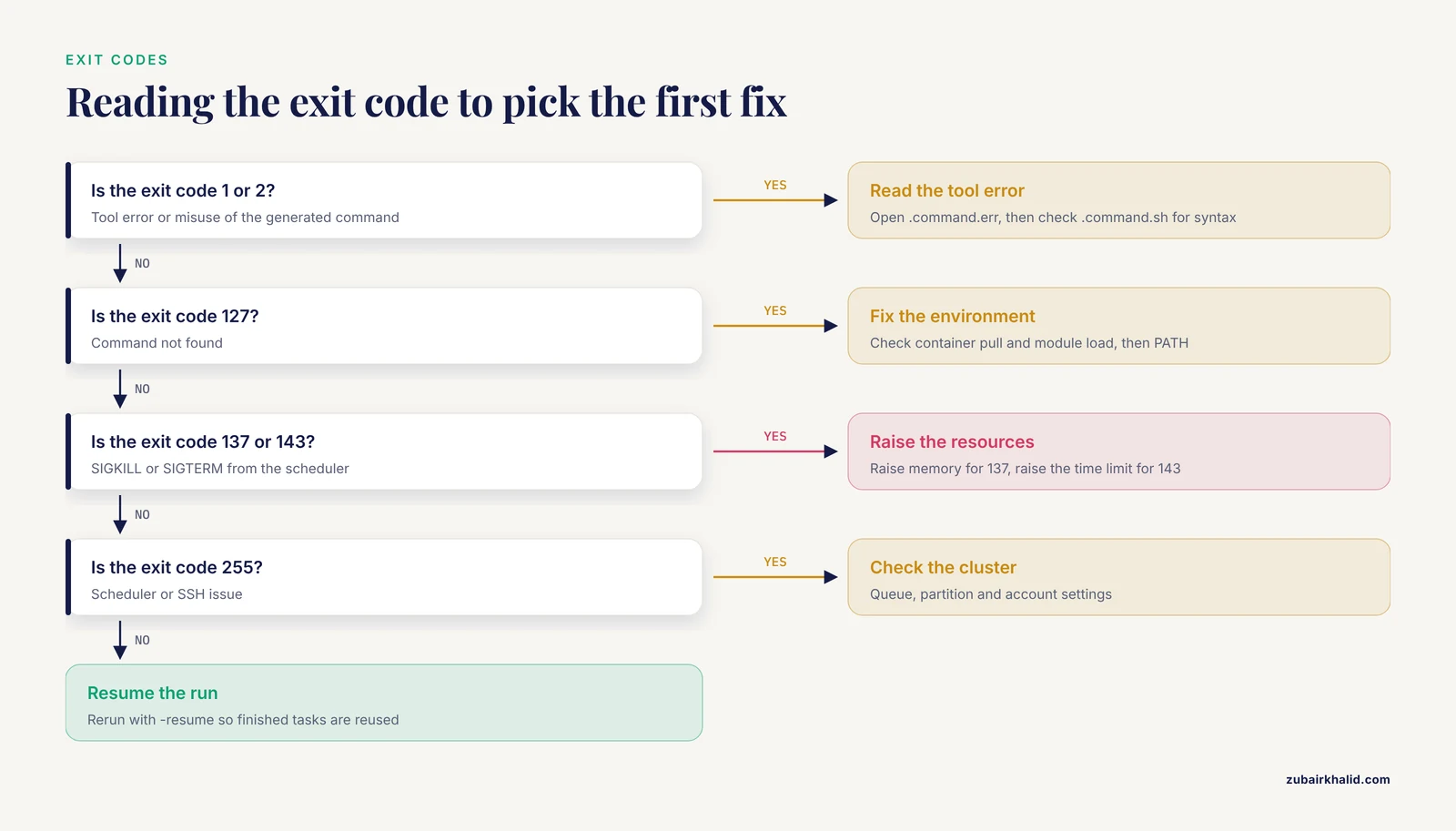
The exit code narrows the layer instantly:
| Exit code | Meaning | Typical cause | First fix to try |
|---|---|---|---|
| 1 | Tool error | Bad input file, wrong arguments, corrupt FASTQ | Read .command.err |
| 2 | Misuse | Syntax problem in the generated command | Check .command.sh |
| 127 | Command not found | Binary missing in container or module | Check container pull, module load |
| 134 | SIGABRT | Assertion failure inside the tool | Tool version or input problem |
| 137 | SIGKILL | Out of memory or scheduler kill | Raise memory, check splice junction index size |
| 143 | SIGTERM | Timeout | Raise time limit |
| 255 | Scheduler or SSH issue | Cluster submission problem | Check queue, partition, account |
Step 4. Fix the four most common causes in order
The following subsections cover the errors that account for most failed RNA-seq runs in practice. Each one gives the symptom, the diagnosis, and the fix.
Symptom 1. Missing or unreadable input files
The error block usually contains text of this form:
Caused by:
  Missing input file(s) `*.fastq.gz` expected by process `FASTQC`
Causes and fixes:
- The samplesheet path is relative to the launch directory, not to the pipeline directory. If you launch from a different directory than where the sheet lives, or use a relative path in the sheet itself, files resolve to nothing. Use absolute paths in the samplesheet during debugging.
- The sample identifiers contain spaces, tabs, or carriage return characters from a Windows-edited CSV. Carriage returns are the classic silent killer. Fix with
sed 's/\r$//' samplesheet.csv > samplesheet.clean.csv. - The file extension does not match what the channel matcher expects. A pipeline matching
*_{1,2}.fastq.gzwill silently produce an empty channel if your files are named*_R1_001.fastq.gz. An empty channel is worse than an error because the pipeline may appear to start and then hang at the first process that depends on the missing data.
Symptom 2. Out of memory and scheduler kills
The console summary often includes text of this form:
Caused by:
  Process exceeded memory limit (req: 8 GB, avail: 8 GB)
On some clusters, instead of a clean Nextflow message you simply see exit status 137. The distinction matters: if Nextflow itself reported the exceeded limit, raise the memory in your config for that process. If the scheduler killed the job, your config asked less than the process actually used.
For RNA-seq, the memory hungry steps are predictable:
- STAR two-pass alignment with a genome that produces hundreds of thousands of splice junctions. A human index with default junction settings typically needs a machine with tens of gigabytes of RAM available. STAR documents that the standard human index requires around 32 GB, which is why STAR is the aligner of choice in clinical RNA-seq pipelines that run on adequately resourced servers [7][8].
- GATK steps in variant-aware RNA-seq pipelines [8].
- Any process that loads a large count matrix into R during the midstream stage [6].
Add a process-scoped override rather than raising memory globally:
process {
    withName: 'NFCORE_RNASEQ:RNASEQ:ALIGN_STAR.*' {
        memory = 40.GB
        cpus   = 8
        time   = 8.h
    }
}
Symptom 3. Container pull and environment failures
Errors look like Error response from daemon: pull access denied for Docker, or FATAL: failed to pull image style messages for Singularity. Common causes:
- No network access on compute nodes. Many clusters have no internet on worker nodes. Pre-pull images on the login node or configure a container cache directory so Apptainer does not re-pull per task.
- A stale or full Singularity cache. Set
export SINGULARITY_CACHEDIR=$HOME/.singularityand check the disk it sits on. - A pipeline pinning an old image tag that a registry no longer hosts. Pin a newer release of the pipeline instead of editing the image name by hand.
Containerization is not decoration here. The published RNA-seq Nextflow pipelines that run portably across platforms rely on Singularity for exactly this reason, including nf-rnaSeqCount [1], nf-rnaSeqMetagen [2], and TAGADA [3]. If you are running bare tools on a cluster without containers, most "command not found" and version-mismatch errors disappear once you switch.
Symptom 4. Corrupt or truncated FASTQ files
Typical tool errors include gzip reporting unexpected end of file, or a QC tool reporting no valid input reads. A run that dies on exactly one sample, always at the first FASTQ-touching process, is almost always a truncated download or an interrupted transfer. Verify integrity before blaming the pipeline:
zcat sample_A_R1.fastq.gz | tail -n 4
gzip -t sample_A_R1.fastq.gz
If gzip -t fails, re-download the file and recompute its checksum against the source. No amount of Nextflow tuning fixes a broken file.
Step 5. Reproduce the failing process in isolation
Once you know the failing task hash, you can rerun just that task by hand. Copy .command.sh into a scratch directory, add the working directory as a prefix, and run it inside the same container:
cd work/ab/1a2b3c...
bash .command.sh 2> manual.err
tail -n 20 manual.err
If it succeeds interactively but failed under Nextflow, the difference is in the environment. Compare .command.run against your interactive shell. Typical hidden differences are an unset PATH, a read-only work directory, or scheduler environment variables that clobber software module settings. If it fails interactively too, you now have a minimal reproducible case, which is exactly what you need if you end up filing an issue with the pipeline developers.
Step 6. Rerun with caching and diagnostics
After your fix, resume:
nextflow run nf-core/rnaseq \
    --input samplesheet.clean.csv \
    --outdir results \
    -profile singularity \
    -resume
The -resume flag reuses every task whose inputs, script, and container are unchanged, which is why you should never wipe the work directory during debugging. Nextflow caches completed tasks by content hash, so fixing one config parameter only re-executes the processes that depend on it. For a clinical scale single-cell pipeline that processed 135,000 cells from 57 donors on a single node with 100 threads over about a week, incremental reruns of this kind are the difference between a usable and an unusable analysis [9].
Turn on the built-in diagnostics for the rerun:
nextflow run nf-core/rnaseq \
    --input samplesheet.clean.csv \
    --outdir results \
    -profile singularity \
    -with-report debug_report.html \
    -with-trace debug_trace.csv \
    -with-timeline debug_timeline.html
The trace CSV is the most underrated file in bioinformatics troubleshooting. It gives one row per task with status, exit code, real CPU time, peak memory, and duration. Use it to find processes that were killed, and processes that requested 16 CPUs while using one, which is how you keep a queue from hating you.
Step 7. Verify the fix produced the right output, not just any output
A pipeline that finishes is not a pipeline that worked. For RNA-seq, check in this order:
- Open the MultiQC report. Every major RNA-seq pipeline aggregates per-sample QC there. Confirm read counts per sample are within the range you expect from the library prep.
- Check alignment rates per sample. A uniformly low uniquely-mapped fraction across all samples points to a reference genome or index problem. A single outlier sample points to sample quality.
- Inspect the count matrix. The counts matrix is the deliverable of the alignment and quantification stage for most users, feeding tools like DESeq2 and edgeR for differential expression [1]. Zero rows, all-zero columns, or a matrix whose total counts differ by orders of magnitude between samples all signal upstream failure.
- Verify the number of samples in the count matrix equals the number of samples in the samplesheet. Silent sample loss during channel merging is one of the sneakiest Nextflow failure modes.
A Field Guide to Common Error Messages
The table below condenses the catalog into a reference you can keep open during a debugging session.
| Error message fragment | Layer | Likely cause | Fix |
|---|---|---|---|
Missing input file(s) | Data or workflow | Samplesheet path, extension mismatch, CRLF endings | Absolute paths, fix extensions, strip carriage returns |
Command error: ... command not found | Environment | Binary absent from container or module system | Fix container profile, add module, check PATH |
Process requirement exceeds available memory | Resource | Config request above node capacity | Lower request or move to a larger node |
| Exit status 137 | Resource | Scheduler OOM kill | Raise memory for the named process |
unexpected end of file from gzip | Data | Truncated FASTQ | Re-download, verify with gzip -t |
EOF marker is absent from samtools | Data | Truncated or non-standard BAM | Reconvert BAM, check upstream tool |
Validation of pipeline parameters failed | Workflow | Samplesheet schema violation | Read the listed row and column, fix the sheet |
There is no process named ... | Workflow | Typo in withName selector | Match the fully qualified process name |
No samples found from MultiQC | Environment or data | Nothing was staged into the report directory | Check upstream process outputs |
| Empty channel, pipeline hangs | Data | Input pattern matches zero files | view() the channel, fix the glob |
Cannot allocate memory in Java output | Resource or workflow | JVM heap exhausted by huge channel operations | Reduce channel materialization, raise JVM heap |
Two workflow layer errors deserve extra explanation because their messages confuse people:
- Input name collisions. DSL2 raises an error when two files with the same name arrive on a process input from different sources, for example two samples whose FASTQ files are both named
R1.fastq.gzbecause you renamed them during staging. The fix is to keep sample identifiers in file names or use tuple inputs with an explicit sample ID as the first element of the tuple. - Duplicate process names across modules. If two included modules define a process with the same name, DSL2 will complain that the name is already in use, or worse, silently alias one for the other. Prefix process names per module or use
include { processName as aliasName }.
RNA-seq-Specific Failure Modes
Generic Nextflow debugging ends where RNA-seq begins. These are the failures that produce a clean green pipeline and a scientifically wrong result.
Strandedness and genome build mismatches
Strandedness errors do not crash anything. They halve or distort your counts. If your count matrix looks plausible but effect directions in differential expression contradict your expectations, test the library against a known-stranded reference sample or run a strandedness inference tool on one sample before trusting downstream results. Correcting strandedness after the fact means rerunning quantification, so it belongs in the debugging phase, not the analysis phase.
A related silent failure is aligning reads against a genome index built from a different genome release than the annotation file. STAR will often run to completion, but a large fraction of reads map to unannotated regions and quantification collapses. When STAR does fail on inconsistent inputs, it prints a fatal error mentioning inconsistent input files before exiting. The rule is mechanical: the FASTA and the GTF must come from the same release of the same reference. Pipelines that generate the index and the quantification from a single bundled reference, such as the SAMI splicing pipeline built on STAR, remove this whole class of error by construction [7][10].
rRNA and annotation contamination inflating counts
The riboCleaner authors showed that incorrectly predicted gene models inside ribosomal DNA regions can make a handful of genes appear to contribute to more than 50 percent of the total transcripts per million in an entire RNA-seq dataset [11]. If one or a few genes dominate your TPM table, or your per-sample QC shows extreme duplication over a small set of loci, suspect annotation artifacts in rDNA regions before suspecting your biology. This failure produces no pipeline error at all, which is why it belongs in any serious rna seq error checklist.
Splicing and fusion outputs that look like errors
Alternative splicing prediction is noisy by nature. A systematic comparison of frequently used splicing tools found little overlap in the splicing changes predicted by different tools, and RT-PCR validation suggested a high number of false positives in each pipeline's predictions, with validation rates improving only for events predicted by several tools [12]. If your splicing pipeline reports thousands of events where you expected tens, that gap is often biology-of-the-method, not a bug. The practical debugging move is consensus filtering, running two callers such as rMATS and Whippet and keeping events both support, which is the strategy behind the rmappet pipeline [12].
For fusion calling, pipelines that combine independent callers such as ARRIBA and FusionCatcher exist because single-caller fusion lists are unreliable, and the same consensus principle applies when triaging fusion calls that look suspicious [8].
Scaling failures unique to large designs
Single-cell and atlas-scale RNA-seq designs fail differently from bulk ones. When you move from tens to hundreds of thousands of cells, per-sample processes that worked fine at bulk scale become the bottleneck, and the fix is usually modular parallelization rather than bigger nodes, which is the design principle reported for the NEXT-scASV allele-specific pipeline [9]. Long-read RNA-seq adds its own failure surface, because coordinating transcript discovery with splicing, isoform switching, and polyadenylation analyses across PacBio and ONT inputs multiplies the number of cross-tool handoffs that can break, which is the explicit motivation for unified frameworks like NextLongIso [13].
Statistical layer failures after the pipeline goes green
Even a perfect count matrix can be misused downstream. SARTools was built because users routinely apply normalization and statistical models without checking that the model matches the design, and because failing to run diagnostic QC steps can hide spurious results until after publication [5]. When your Nextflow run succeeds and the PCA looks wrong, suspect the design table and the normalization choice before suspecting the pipeline. Similarly, pipelines that automatically filter low abundance genes and handle rRNA, as RNAflow does, encode protections that a hand-rolled midstream script often lacks [4].
Resource Tuning for RNA-seq Workloads
Most RNA-seq pipeline failures after the first successful run are resource failures. The table below gives a starting point, and the trace CSV from step 6 tells you where to deviate.
| Process type | CPUs | Memory | Notes |
|---|---|---|---|
| FASTQ QC and trimming | 1 to 2 | 2 to 4 GB | Cheap, high throughput, rarely the bottleneck |
| STAR genome index build | 8 to 16 | 40 to 64 GB human | One time cost, dominated by genome size and junctions |
| STAR alignment | 8 to 16 | 32 to 48 GB human | Largest RAM consumer in short-read pipelines |
| Quantification (Salmon or featureCounts) | 4 to 8 | 8 to 16 GB | Scales with transcriptome index size |
| UMI deduplication | 4 to 8 | 8 to 16 GB | Memory grows with reads per cell in UMI-aware pipelines |
| Differential expression in R | 2 to 4 | 8 to 32 GB | Scales with gene count times sample count |
Two tuning rules prevent most scheduler conflicts:
- Scope overrides to named processes, not globally. A global
memory = 64.GBwill make even FastQC jobs wait for large nodes. - Match
cpusto what the tool actually uses. FeatureCounts with-pand multiple threads uses them, but many R-based midstream steps are effectively single threaded regardless of the request.
Pipelines designed for clinical and regulated environments solve this through modular process-level sizing and explicit per-stage resource profiles, an approach documented for end-to-end single-cell and spatial workflows that can run on a standard laptop in about 1.5 hours for small inputs while scaling to HPC [14]. You can borrow the same pattern in your own config even if your project is a single bulk RNA-seq experiment.
Reproducible Debugging with Containers, Reports, and Issue Reports
Three habits turn debugging from archaeology into engineering.
First, always run with containerized software. Every Nextflow RNA-seq pipeline that advertises portability across platforms does so through its containerized environment, whether with Docker, as in GeneTEFlow [15] and LncPipe [16], or with Singularity, as in nf-rnaSeqCount [1], nf-rnaSeqMetagen [2], and SAMI [7]. When software versions are pinned in images, an error that appears today and vanishes tomorrow is almost never a version drift, which cuts the search space in half.
Second, save the run metadata. Combine nextflow log, the trace CSV, the report HTML, and the timeline HTML in a dated folder per run. If you need help from the pipeline maintainers, an issue report containing the command, the pipeline version, the container profile, the failing task hash, and the tail of .command.err gets answered in hours instead of weeks. A run executed on a laptop, as demonstrated for the NNclinSSOAP single-cell and spatial pipeline [14], is also the fastest way to produce a minimal reproducer for maintainers.
Third, test small before scaling. Use the pipeline's own test profile or a two-sample mini dataset. Nextflow RNA-seq pipelines with strong test profiles let you validate the environment layer in minutes, so that a 48-hour full-scale run only starts after the small one passes. The SAMI developers validated their UMI-aware splicing pipeline against both real control sample data and simulated data generated with ASimulatoR, which is exactly the test-before-scale discipline worth copying for your own debugging [7][10].
Common Mistakes and Limitations
These are the errors people make while debugging Nextflow RNA-seq pipelines, in rough order of frequency.
- Deleting the work directory after a failure. This destroys the task-level evidence and the resume cache. Nothing in debugging is worth more than the failed task directory.
- Raising memory blindly. Doubling memory for a process that actually crashed on a corrupt input wastes hours of queue time and hides the real error. Read
.command.errfirst, always. - Editing the pipeline source to fix a configuration problem. Forking and patching a pipeline because a path was wrong in your config makes every future update painful. Exhaust config-based fixes before touching the code.
- Ignoring the samplesheet. A large fraction of first-run failures are samplesheet problems, especially mixed file naming conventions and spreadsheet-generated commas inside sample names.
- Assuming a completed run means correct biology. Strandedness mismatches, genome and annotation version drift, rDNA annotation artifacts [11], and single-caller splicing false positives [12] all pass silently through a green pipeline.
- Comparing results across normalizations. DESeq2 and edgeR normalization are not interchangeable without transformation, and skipping dataset QC before differential analysis can produce spurious conclusions [5].
- Debugging on full-scale data. Running the full cohort to test a config change wastes cluster time. Reproduce with two samples first.
- Trusting a single count for clinical interpretation. Pipelines built for diagnostics, including UMI-aware splicing detection in low-dimension datasets [10] and subtype classification from RNA-seq profiles [8], exist because informal pipelines are not adequate for clinical decisions. Individual cases require the appropriate qualified professional and validated, regulated processes, and a research pipeline on a laptop is not one of them.
Frequently Asked Questions
Why does my Nextflow RNA-seq pipeline fail on only one sample?
Because the failure is data-specific, usually a truncated FASTQ, a naming mismatch, or a low quality library that crashes a tool with a minimum input requirement. Check the failing task directory for that one sample and run gzip -t on its files.
How do I rerun a failed pipeline without repeating all the finished work?
Add the -resume flag to the same command you used before. Nextflow reuses every task whose inputs, script, and container hash are unchanged and reruns only the failed branch and everything downstream of it.
What does an exit status of 137 mean in Nextflow?
It means the process was killed by the operating system or the scheduler, which on HPC systems almost always means the job exceeded its requested memory. Find the named process, raise its memory in the config, and resume.
Where does Nextflow keep the command that failed?
In the work directory, inside the task folder identified by its hash. The file .command.sh holds the exact script, .command.err holds the tool's error output, and .exit holds the exit code. You can list task paths with nextflow log RUN_NAME.
Can I test a single process instead of the whole pipeline?
Yes. Change into the failed task directory and run .command.sh by hand inside the same container, or use a pipeline's test profile to exercise the whole DAG on tiny inputs. Both approaches isolate the failure in minutes.
Why are my STAR alignment rates near zero?
The most common cause is a mismatch between the genome the index was built from and the genome version of your annotation or reads. Rebuild the index from the same release as the GTF and confirm the reference matches your organism and assembly.
How can I tell whether my library is stranded?
Run a strandedness check on one sample by comparing read orientations against annotated transcripts, or validate against a control sample with a known library type. A wrong strandedness setting produces plausible-looking counts with distorted directionality rather than a pipeline error.
Why does my final count matrix have empty or all-zero columns?
An all-zero column usually means reads from that sample never reached quantification because of an earlier silent channel mismatch or sample loss. Count the rows and columns against your samplesheet, then check the per-sample alignment and QC reports for that sample.
Sources
- nf-rnaSeqCount: A Nextflow pipeline for obtaining raw read counts from RNA-seq data
- nf-rnaSeqMetagen: A nextflow metagenomics pipeline for identifying and characterizing microbial sequences from RNA-seq data
- TAGADA: a scalable pipeline to improve genome annotations with RNA-seq data
- RNAflow: An Effective and Simple RNA-Seq Differential Gene Expression Pipeline Using Nextflow
- SARTools: A DESeq2- and EdgeR-Based R Pipeline for Comprehensive Differential Analysis of RNA-Seq Data
- Pipeline for RNA sequencing data analysis by combination of Nextflow and R
- Detecting aberrant splicing events in short-read RNA-seq with SAMI, an UMI-aware Nextflow pipeline
- Integrateall, a Machine Learning Pipeline for Multi-Level Data Extraction from RNA-Seq Profiles Unravels Novel Drivers and Systematic Subtype Classification in B-Cell Precursor ALL
- NEXT-scASV: a Nextflow pipeline for allele-specific variant calling from single-cell RNA-seq data
- Detecting unannotated splicing events in short-read RNA-seq with SAMI, a UMI-aware Nextflow pipeline
- riboCleaner: a pipeline to identify and quantify rRNA read contamination from RNA-seq data in plants
- One pipeline to predict them all? On the prediction of alternative splicing from RNA-Seq data.
- NextLongIso: a comprehensive Nextflow pipeline for multi-dimensional long-read RNA-seq analysis
- GxP-Ready Single-Cell RNA-seq and Spatial Transcriptomics End-to-End Pipeline for Clinical Research
- GeneTEFlow: A Nextflow-based pipeline for analysing gene and transposable elements expression from RNA-Seq data
- LncPipe: A Nextflow-based pipeline for identification and analysis of long non-coding RNAs from RNA-Seq data.