Nextflow Caching and Resume: Why Processes Re-run
By Dr. Zubair Khalid, DVM, MS, PhD ·

When nextflow run -resume re-executes everything instead of skipping completed work, the most likely cause is that something in the run changed the task hash: the pipeline script, a parameter interpolated into a task command, an input file, or the software environment. The second most likely cause is that you never actually resumed the run you think you resumed, because the command was launched without -resume, from a different directory, or against a different work directory.
The first thing to check takes one minute. Run nextflow log in the directory where you launch the pipeline. It lists every previous execution, its run name, and whether it finished. If the run you expected to resume is not in that list, or if you launched the new command from a different folder, Nextflow has no history to read and nothing can be cached. That single check resolves a large share of "nextflow resume not working" reports before any deeper diagnosis is needed.
This article explains how Nextflow caching and resume actually work, gives a troubleshooting table you can scan quickly, walks through the causes from most common to rarest, and ends with a diagnostic sequence and prevention habits. The approach borrows from research on systematic debugging, which shows that people who narrow the error space step by step fix problems faster and with less frustration than people who change things at random [1],, [2]. The same discipline applies to bioinformatics troubleshooting on a compute cluster. Modern genomics pipelines make this skill urgent. A consensus somatic variant calling pipeline such as SMURFS runs four independent callers plus copy number and structural variant tools [3], and an ancient DNA workflow such as DNAharvester chains metagenomic filtering, competitive mapping, and multiple aligners [4]. Re-running one of those pipelines from scratch because of a resume failure can cost days of cluster time.
How Nextflow Caching and Resume Works
Nextflow caches results at the task level, not the pipeline level. Each task (one execution of one process for one input, for example one sample through FastQC) gets a unique hash key. Nextflow stores the task's outputs and its command files in the work directory, a folder named work by default, inside a subdirectory whose name starts with the hash.
The hash is computed from the things that determine the task's result:
- The process name and the task script (the
script:block, after Groovy interpolation). - The values of all inputs, including
val,path, andtupleinputs. - The contents of input files. By default, Nextflow hashes file contents, not just file names.
- The software environment: the container image, conda environment, or Singularity image attached to the process.
- Any other values the process explicitly includes in its hash definition.
Two properties of this design explain most behavior you will see. First, the hash does not include the run name or the launch directory, so a task can be resumed across runs as long as the same work directory is reachable. Second, parameters passed with - on the command line only affect the hash if they are interpolated into a task script or a hashed directive. A parameter like -outdir that only tells Nextflow where to copy final results usually does not invalidate anything.
When you run with -resume, Nextflow looks up the previous session in its history (stored in the hidden .nextflow directory in the launch folder), then recomputes each task's hash and compares it against completed tasks from the earlier run. Tasks whose hash matches a previously successful execution are marked Cached and skipped. Tasks that failed last time are never cached, because caching only applies to successful execution, so failed tasks always re-run. Tasks that were queued or submitted but never finished are submitted again.
Three things must all be present for resume to work at all:
- The hidden
.nextflowhistory in the launch directory, which records previous sessions. - The work directory containing the cached task folders.
- A pipeline whose code and inputs produce the same hashes as before.
If any of the three is missing or changed, resume silently degrades into a full or partial re-run. That is why the symptom "everything re-ran and I do not know why" almost always reduces to one of those three.
Quick Diagnostic Sequence
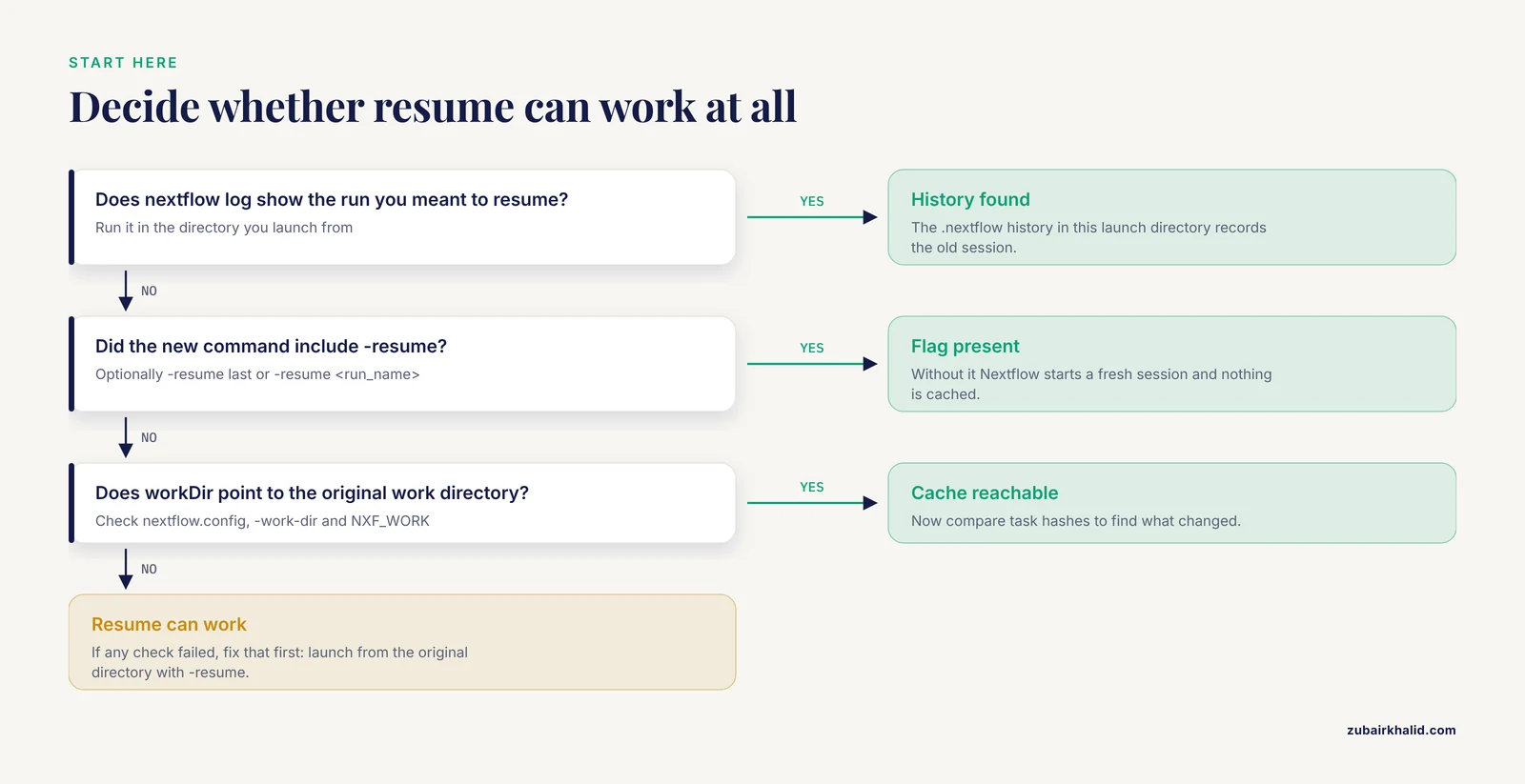
Work through these steps in order. Each one eliminates a class of causes, and research on debugging instruction shows that this kind of structured narrowing beats trial and error,.
- Confirm the launch directory.
nextflow logmust show the run you meant to resume. If you always launch from a job submission script, check which directory that scriptcds into. - Confirm the flag. Interrupted or failed runs are only resumed if the new command included
-resume, optionally-resume lastor-resume <run_name>. Without it, Nextflow starts a fresh session. - Confirm the work directory. Check the
workDirsetting innextflow.config, any-work-dirargument, and theNXF_WORKenvironment variable. All three must point to the same place as the original run, or the cache cannot be found. - Check what actually re-ran. In the
.nextflow.logfile or the terminal output, note which processes re-ran. All of them points to script or environment changes. A subset points to input or parameter changes. - Compare hashes. Run
nextflow log <old_run_name> -f hash,processandnextflow log last -f hash,process, then match processes between the two lists. Tasks whose hashes differ are the ones re-executed, and the hash itself tells you which. - Diff the task scripts. For any re-run task, open the
.command.shfile inside its work subdirectory from the old run and the new run and compare them. The line that differs is your cause. - If no task script differs, look at
.command.run, which records the environment: container image, conda activation, and staging commands. A difference there points to configuration or software changes.
Recent Nextflow versions also provide nextflow inspect, which computes how many tasks would be cached for a given pipeline and configuration before you commit to a run. Use it as a dry run whenever you plan to change something.
Troubleshooting Table
| Symptom | Likely cause | How to confirm | Fix |
|---|---|---|---|
| Nothing is cached, run starts from task 1 | -resume was omitted, or the run was launched from a different directory | nextflow log does not show the old session in the current launch directory | Re-launch from the original directory with -resume, or use -resume <run_name> |
| Everything re-runs, history looks fine | The pipeline script itself changed (local edit, new Git revision, updated release) | diff your local script against the version used before, or check the Git revision with nextflow log | Pin a release tag, revert the edit, or accept the re-run as legitimate |
| Most tasks re-run after a small change | The change touches a shared module included by many processes | nextflow inspect -resume reports very few cached tasks | Scope the change to one process, or accept a legitimate re-run |
| A few tasks re-run | Their input values, sample sheet entries, or ext.args changed | nextflow log old -f hash,process compared with the new run, then diff .command.sh | Revert the change or accept the re-run of the affected samples |
| Tasks re-run after editing input files without changing content | Default lenient or relaxed caching checks path, size, and timestamp rather than content | Check the process cache directive and file modification times | Use cache 'deep' or leave the default standard mode, and avoid touching inputs mid-project |
| Every execution re-runs the same tasks, even with identical inputs | A non-deterministic value (timestamp, random ID, shell date call) is embedded in the script | Read the generated .command.sh files from two runs and compare | Move dynamic values out of the script or make them explicit inputs |
| Tasks show as cached but outputs are missing downstream | The work directory was partially deleted, so cached tasks have no files | Check that .command.out and output files exist in the cached work folder | Restore the work directory from backup or re-run those tasks |
| Resume works on the original machine but not on a new one | The work directory and .nextflow history were not transferred | Check that work/ exists on the new system and the history lists the old run | Transfer both the work directory and the launch directory state |
| Failed tasks re-run every time (correctly) | Failed tasks are never cached | Check .exitcode and .command.err in the work folder | Fix the underlying task error, then resume |
| Everything re-runs after updating the container or conda environment | The software environment is part of the hash | Compare the image tag or conda YAML between runs | Pin exact image tags and package versions for the whole project |
Re-runs after changing -outdir | The parameter is interpolated into a task script somewhere | Search the pipeline scripts for ${params.outdir} or similar | Keep output paths out of task scripts, or accept the re-run |
Why Your Resume Is Not Working, From Most Common to Rarest
1. The run was launched without -resume or from the wrong directory
This is the most common cause of "nextflow resume not working" reports, and it has two variants. In the first, the user runs nextflow run pipeline after a crash, sees familiar output, and assumes resume happened. Nothing was resumed, because -resume was never passed. In the second, the user passes -resume but launches from a different directory, for example the cluster home directory instead of a project scratch folder. Nextflow records its session history in the hidden .nextflow folder of the launch directory, so a new directory means a new history with nothing to resume from.
Both variants are confirmed the same way. Run nextflow log in the directory you are launching from. You should see the previous run's name, when it started, and its status. If the list is empty or missing your run, the history is the problem. The fix is to launch from the original directory, or to pass the run name explicitly with -resume last or -resume cranky_einstein after confirming that run appears in nextflow log. A related trap is a scheduler wrapper. Many people wrap Nextflow in a sbatch script, and each submission script may cd to a different place. Standardize one launch directory per project.
2. The pipeline code changed
Nextflow hashes the task script itself. Any edit to the script: block changes every hash derived from it. This is by design, because a different command is a different computation. The change can be invisible to you at first glance:
- You edited a module file locally, or a collaborator did.
- The pipeline is a Git repository and Nextflow pulled a new revision, or you passed a different
-revision. - A pipeline release was bumped, and the new release reorders or rewrites commands. This happens even in well-maintained pipelines, where a version bump may touch many modules at once.
The mechanism matters for interpretation. If you updated a pipeline and 80 percent of tasks re-ran, the resume did not fail. The resume worked correctly and honestly reported that the code changed. This is a feature, not a bug: it guarantees that a published analysis was produced by exactly the code you ran. Pipelines developed for reproducibility emphasize this coupling between code and results [5], [4].
The fix depends on intent. If you did not mean to change anything, revert the edit or check out the previous release tag and resume again. If you did mean to change one process, expect that process and everything downstream to re-run, and everything upstream to stay cached. That is usually the correct and desirable outcome.
3. A parameter interpolated into the script changed
Parameters passed as -key value on the command line are Groovy variables inside the pipeline. When a script contains ${params.genome} or ${params.aligner}, changing that parameter changes the rendered command text, which changes the hash of every task that uses it. Common examples in RNA-seq and variant calling workflows: switching the aligner, changing a genome build, adding a tool flag through ext.args, or changing a quality threshold.
A frequent surprise is the reverse case. Users change -outdir and expect a full re-run, but if outdir is never interpolated into a task script, all tasks stay cached and only the publishing step adapts. The rule is simple and worth internalizing for all future bioinformatics troubleshooting: only what appears inside the task script or a hashed directive matters for the cache.
To find which parameter caused a re-run, diff the .command.sh files between the old and new task folders. The differing line names the parameter directly. Note the exact syntax as a reminder: pipeline-level parameters use a double hyphen (-genome GRCh38) on the command line, while Nextflow's own settings use a single hyphen (-resume). Confusing these two is a real and common mistake.
4. Input files changed
Because Nextflow hashes file contents by default, any change to an input file invalidates every task that consumes it. This is usually what you want: if a sample sheet was corrected, downstream tasks should re-run. But two scenarios catch people off guard.
First, files that are re-downloaded, re-compressed, re-saved by Excel, or regenerated by an upstream tool can carry identical biological content but a new binary payload or timestamp. A CSV edited in Excel, for instance, often changes line endings, which changes the bytes and therefore the hash of every task reading the sample sheet.
Second, Nextflow offers cache modes that trade accuracy for speed. The default standard mode hashes file content but falls back to a weaker check when hashing fails. The lenient mode checks only the path, file size, and last-modified timestamp. A pipeline that sets cache 'lenient' on some processes will re-run those tasks if an input file was merely touched, even with identical content. If your tasks re-run after files were touched but not modified, check the cache directive in the process definition.
A subtler variant involves symlinks. Nextflow stages inputs by symbolic link by default, so if a process modifies its input file in place (bad practice, but it happens), downstream tasks see different content and re-run. Processes should never write to their inputs. If you inherit a pipeline where a step edits files in place, copy them into the task directory first.
5. Configuration and software environment changes
The container image, Singularity image, or conda environment attached to a process is part of the hash. Update docker.io/library/samtools:1.9 to 1.19 and every SamTools task re-runs, along with tasks downstream if their inputs change. This is correct behavior and is precisely why containerized pipelines can reproduce results across machines, a property that modular Nextflow pipelines in comparative genomics and metagenomics rely on [5], [6].
Configuration changes cause re-runs through a second route. Values defined in nextflow.config often flow into scripts, for example ext.args built from config, database paths, or reference file locations. Changing a profile, such as moving from -profile test to -profile standard, frequently changes input data or reference files, so a full re-run is expected rather than pathological.
One clarification prevents a lot of confusion: scheduler resources such as cpus, memory, and time, and queue selection, describe how and where a task runs rather than what it computes. They generally do not appear in the task hash by default. Changing resource limits alone usually does not force a re-run. If a resource change appears to trigger one, the same config edit probably also changed a script-visible value, so diff the .command.sh files rather than guessing.
6. Non-deterministic values inside the script
If a script embeds something that changes between executions, its hash changes every time, and the task re-runs on every resume, forever. Typical offenders:
LocalDateTime.now()ornew Date()in the Groovy script block.RandomUUID()used to build a file name.- Shell commands like
dateor$$(process ID) interpolated into the command text in a way Nextflow treats as script content. - Reading a mutable external file from Groovy at runtime, so the script text or a script-visible value silently tracks that file.
The tell-tale symptom is that a task re-runs even when its inputs, code, and environment are provably identical. Read the .command.sh from two consecutive runs and compare. If the scripts differ despite no user change, something inside the script is dynamic. The fix is to make the dynamic value an explicit input or parameter, or to move it outside the hashed content. Treating the pipeline as an observable system whose inputs and outputs you can inspect directly, rather than a black box, is the same principle recommended in structured debugging methodology for complex software systems,.
7. The work directory or history was cleaned or moved
Resume depends on two artifacts that cleanup scripts love to delete: the work directory and the hidden .nextflow history. Cluster policies that purge scratch directories, a manual rm -rf work, or a moved work directory all break resume. A related and dangerous hazard: some users, after seeing "resume not working", delete the work directory to start clean. That destroys every cached result, guarantees a full re-run, and loses any intermediate files you might have wanted to inspect.
Safety note: before deleting any work directory or .nextflow folder, confirm you have final outputs safely published and, if there is any chance you will need intermediates, archive the work directory to long-term storage instead. Deletion of a work directory is irreversible on most systems, and scratch storage on shared clusters is often wiped without warning. Check your institution's data retention policy before relying on a scratch volume for anything you cannot regenerate.
If tasks show as Cached but their outputs are missing, the work directory was partially cleaned after the successful run. Nextflow trusts its cache metadata, so a cached entry whose files were removed will not re-execute until you force it. The practical fixes are to restore the work directory from backup, or to delete the specific task's cache by re-running after clearing the affected session, or to remove the work folders for the affected tasks so their hashes no longer match a completed entry.
8. Channel topology and rarer causes
Two rarer causes complete the picture. First, changes to channel structure upstream of a process, such as combining or splitting channels differently, can change the pairing of inputs to tasks, which changes individual task hashes even when the process itself is untouched. This is most visible when a sample sheet column is added or reordered.
Second, resume across a Nextflow version upgrade usually works, because the cache format is stable, but mixing a run started under a much older version with a resume under a new one occasionally produces unexpected invalidations. When this is suspected, resume with the same Nextflow version that started the run, which you can identify from the run's log, before troubleshooting further.
A Worked Example: The RNA-Seq Re-Run
A familiar scenario ties the causes together. Consider an RNA-seq analysis, the kind of workflow where a single mysterious re-run can consume hours of alignment compute. Suppose you ran an nf-core-style RNA-seq pipeline overnight, the run crashed during the count matrix stage, and you resume in the morning. Alignment tasks for all 40 samples re-run from scratch.
Following the diagnostic sequence: nextflow log shows the old run, so history is fine, and you did pass -resume. Next, compare hashes.
nextflow log sleepy_edison -f process,hash > old.txt
nextflow log last -f process,hash > new.txt
diff old.txt new.txt
Every hash for the alignment process differs, while FastQC hashes match. Open the old alignment task's .command.sh and the new one and diff them. If the only difference is a genome index path, you changed the genome parameter, and the index generation task re-ran with new content, cascading downstream. If the scripts are identical, inspect .command.run: a changed container tag would appear there. If neither differs, suspect non-determinism or a timestamp-triggered lenient cache check on the reference files.
This case also illustrates an honest point about resume semantics. If your original "crash" was a genuine data-dependent error, for example a malformed sample sheet entry that produced a corrupted input, then re-running the failed tasks is exactly correct. Nextflow never caches failures. A mysterious "rna seq error" that returns on resume is often the pipeline correctly refusing to skip a task that never succeeded. Read .command.err in the failing task's work folder before assuming the cache is broken.
Reading the Evidence: Logs, Hashes, and Work Directories
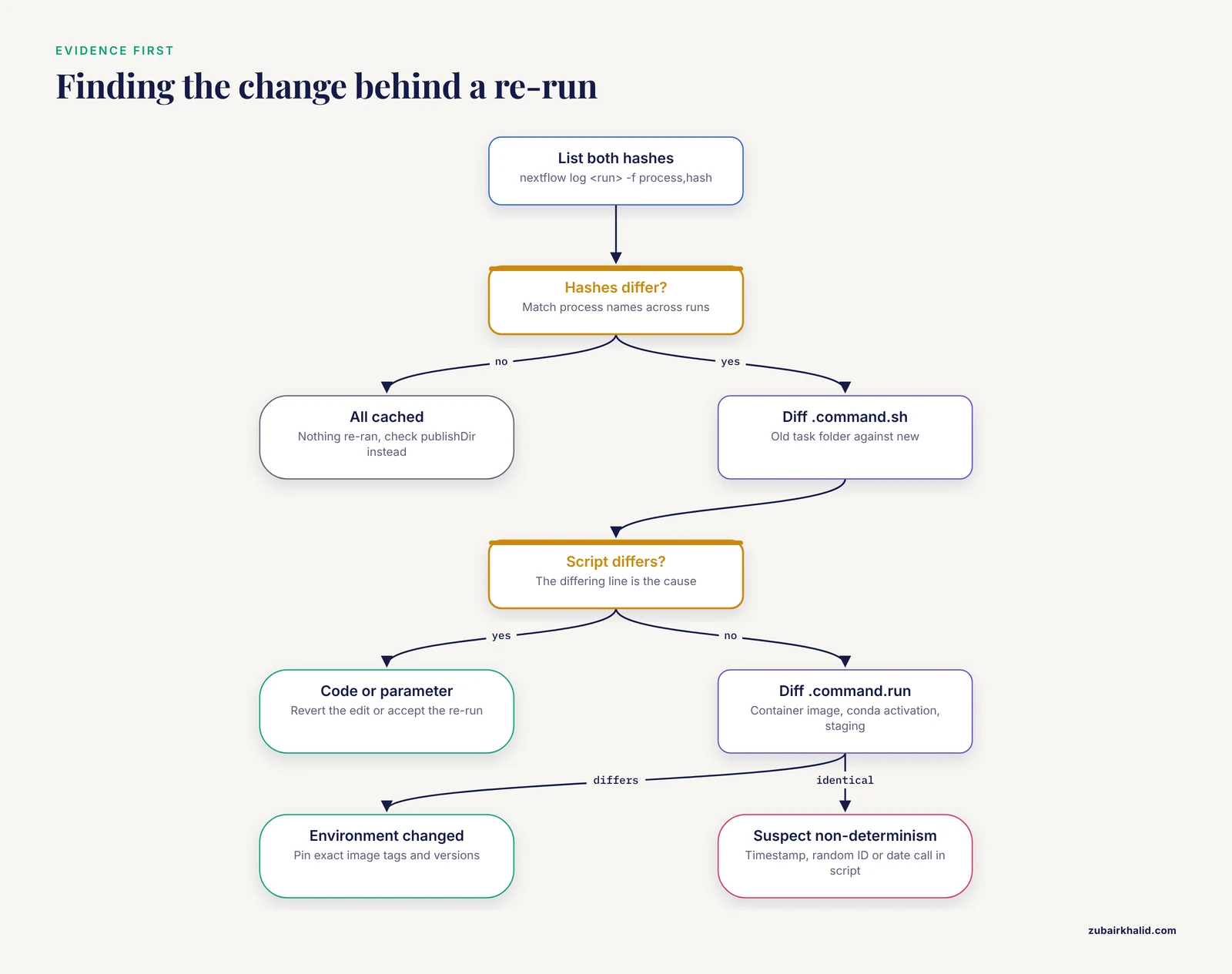
Nextflow gives you three layers of evidence, and using all three is the fastest path to a confident diagnosis.
The run history. nextflow log lists sessions with names, timestamps, and status. nextflow log <run_name> -f process,hash,status,workdir prints one line per task, which you can filter with standard Unix tools. Hashes are stable identifiers for task definitions, so matching a process name across two runs and comparing hashes tells you exactly which tasks changed definition.
The work folder files. Every task directory contains a small forensic kit: .command.sh is the rendered script, .command.run is the wrapper with environment setup, .command.out and .command.err capture standard output and error, and .exitcode records the return code. Diffing .command.sh between a cached and a re-run task is usually the decisive test, because it shows the rendered command text, after all interpolation, which is what the hash is computed from.
Dry-run inspection. nextflow inspect <pipeline> with the same profiles and parameters you intend to use reports how many tasks would be cached before you launch. Run it before and after any planned change. If the cached count drops to zero after a change you thought was trivial, you have found your invalidation in seconds instead of after a wasted run.
A note on interpretation discipline: systematic debugging research emphasizes forming a hypothesis from evidence before acting, and iterating with feedback rather than large blind changes, [1]. Applied here, that means never change two things between resumes. Change one parameter, run nextflow inspect, compare cached counts, and you will know precisely what that parameter costs.
Prevention Practices
The goal is not to avoid re-runs, which are sometimes legitimate, but to make every re-run intentional.
Pin everything. Use release tags for pipelines, exact version tags for container images, and pinned versions in conda environment files. Unpinned environments change hashes silently, and silent hash changes are indistinguishable from resume failures. Pipelines built for reproducible, multi-environment execution make this pinning a design requirement rather than an option [5], [4].
Keep one launch directory per project. Run all nextflow commands from the same project folder so the history accumulates. Document that folder in your project README, especially if job submission scripts are involved.
Protect the work directory. Exclude work/ and .nextflow/ from cleanup jobs. If scratch space is limited, set a deliberate workDir on durable storage, or archive the work directory to object storage at the end of a project before decommissioning it. Remember the hazard note above: deleting the work directory discards every cached result.
Keep dynamic values out of scripts. Ban timestamps, random identifiers, and untracked file reads from task script bodies. If a task needs a timestamp, pass it in as a val input so the value is visible in the hash computation rather than hidden inside the script.
Separate parameters that matter from those that do not. Keep output paths and reporting settings out of task scripts where possible, so that re-running with a new -outdir or a new report name does not trigger compute.
Use dry runs before planned changes. nextflow inspect before and after an edit tells you the cache cost of the edit. Make this a habit in code review for pipeline changes, the same way continuous integration checks code before it ships.
Re-run deliberately when inputs change. If you corrected a sample sheet or a reference, a re-run is correct. The habit to avoid is changing inputs and configurations at the same time and then being unable to say which change caused what.
Common Mistakes and Limitations
- Confusing parameter prefixes. Pipeline parameters use a double hyphen (
-input), Nextflow's own options use a single hyphen (-resume). Typing-resumeas a pipeline parameter, or passing pipeline parameters with a single hyphen, produces either a fresh run or a missing-parameter error rather than the behavior you intended. - Assuming a re-run means resume failed. If you edited a script, updated a container, or changed an interpolated parameter, resume worked exactly as designed. Check the diff before blaming the cache.
- Caching does not cover failures. Tasks that exited non-zero are always re-executed. If a task keeps failing, the problem is inside the task, and the fix belongs in the task's error log, not in cache settings.
- Caching does not guarantee correctness of past results. A cached task is trusted as-is. If a tool version had a silent bug and the container tag never changed, resume will faithfully reuse the flawed output. Resume answers "did anything change", not "was everything right".
- Individual cases differ. The causes here cover the standard failure modes, but cluster-specific wrappers, site-specific storage behavior, and unusual pipeline code produce variants that only a hash-level diff on your own runs can settle. If the diagnostic sequence does not identify your cause, post the
nextflow loghash comparison and the.command.shdiff to the pipeline's issue tracker with details about your Nextflow version and executor, since environment-specific reports are much easier to act on with that evidence attached. - Testing on tiny inputs first. Debugging resume behavior on a full-scale run wastes compute. nf-core-style test profiles exist precisely so that hash behavior can be checked cheaply before a large launch.
Frequently Asked Questions
Does -resume re-run failed tasks?
Yes. Nextflow only caches successful tasks, so anything that failed, or was queued but never ran, is submitted again on resume. If the same task fails on every resume, the failure is real and reproducible, and you should read .command.err in that task's work folder rather than adjusting cache settings.
Why did everything re-run when I only changed the output directory?
If outdir is never interpolated into a task script, changing it should not invalidate the cache. If you saw a full re-run, check whether the pipeline interpolates output or report paths into script text, or whether another parameter or profile changed at the same time. Diffing .command.sh files between runs will name the culprit.
How do I resume a crashed run if I forgot -resume?
Nothing was lost. Launch the same command again from the same directory with -resume, or with -resume last to target the most recent session, or with -resume <run_name> using the name shown by nextflow log. All successful tasks from the crashed run will be skipped.
Can I resume on a different machine or after moving the work directory?
Yes, provided both the work directory and the .nextflow history travel with the project and remain accessible at the paths the new run resolves. Nextflow validates the session history in the launch directory and looks for cached task folders under the configured work directory. If either is missing, resume silently degrades to a full run.
Tasks show as cached but my final outputs are missing. What now?
First confirm where publishDir points, since published results are copied outside the work directory and are not part of the cache itself. If the published files were deleted, some pipelines provide a rerun of publishing only. Otherwise, you may need to force affected tasks to re-execute by clearing their work folders so their hashes no longer resolve to cached entries.
How do I find exactly which change invalidated the cache?
List hashes for both runs with nextflow log <run> -f process,hash, identify the processes whose hashes changed, then diff the .command.sh files in the corresponding work folders. The differing line is the change. If the scripts are identical, check .command.run for environment changes and check input file modification times if the process uses lenient caching.
Does resume work with Docker, Singularity, and conda environments?
Yes, in all three cases. The environment definition is part of the task hash, so the same image or conda specification resumes cleanly, while a changed image tag or dependency version invalidates the affected tasks. Pinning exact versions is what keeps resume stable across a project.
How do I safely clean up when the work directory gets huge?
Wait until final outputs are published and verified, then archive any intermediates you might need, and only then delete. Never delete the work directory while you still expect to resume. On shared clusters, also confirm that scratch purge policies will not remove the work directory during an active multi-day run.
Sources
- Systematic Debugging of Logical Errors in Source Code
- Decoding Debugging Instruction: A Systematic Literature Review of Debugging Interventions
- Abstract LB160: SMURFS: A comprehensive Nextflow pipeline for consensus somatic variant detection
- DNAharvester: a nextflow pipeline for analysing highly degraded DNA from ancient and historical specimens
- EXCON: a scalable, reproducible Nextflow pipeline for CAFE-based gene EXpansion and CONtraction analysis
- deluxpore: a Nextflow pipeline for demultiplexing Illumina dual-indexed Nanopore libraries