Container Errors in Nextflow
By Dr. Zubair Khalid, DVM, MS, PhD ·

A container image bundles a program with every library it needs into one portable unit. A container runtime such as Docker launches each of those units in isolation from the host system. Nextflow runs every task of a pipeline inside a container so that the same tool versions are used on your laptop, on an HPC cluster, and in continuous integration. A registry such as Docker Hub or quay.io stores the images. The Docker daemon is the background service on your machine that actually pulls and runs those images.
When a run stops, the failure lives in one of two places. Either Nextflow never managed to start the container, or the container started fine and the command inside it failed. These two families of failure look completely different on screen and need different fixes. The most common cause of a nextflow docker container error is a Docker daemon that is not running or that your user account cannot reach, followed closely by an image name or tag that does not exist in the registry. The first thing to check is the daemon itself. Open the same shell where you launched the pipeline and run docker info. If that succeeds, go straight to the work directory of the failed task and read the .command.err file, which contains the real error text rather than the summary Nextflow prints to the terminal.
This article covers the most common causes of container errors in Nextflow, from most frequent to rarest, the mechanism behind each one, a short diagnostic sequence you can follow on any run, and the practices that prevent these failures from coming back. The same logic applies whether you are debugging a small test run or a full RNA-seq analysis, and it is the backbone of practical bioinformatics troubleshooting for containerized workflows.
Start Here: The First Two Minutes of Diagnosis
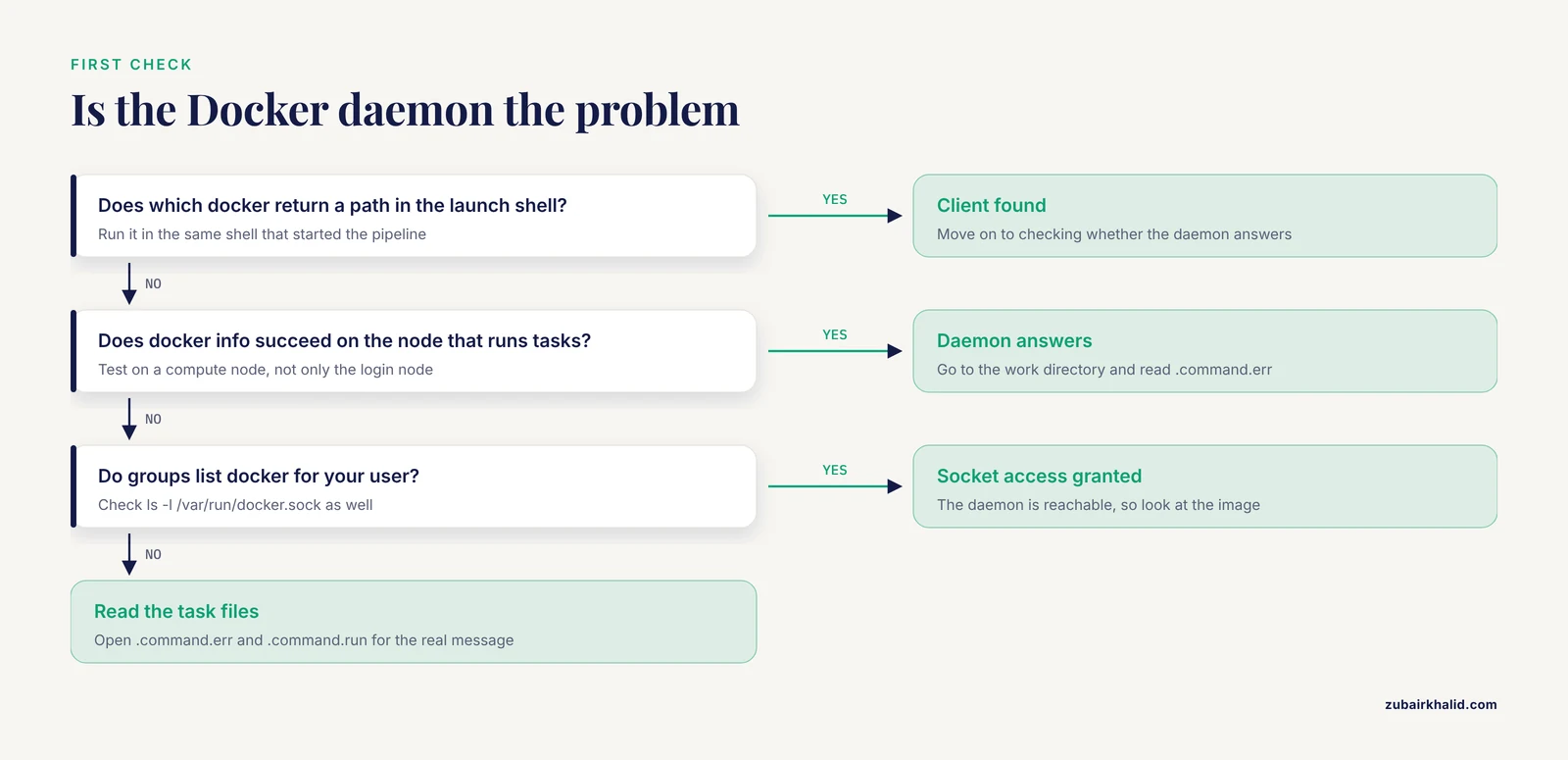
Nextflow already saved the evidence before the pipeline stopped. Every task gets its own directory under work/, and that directory holds the exact command, the standard error, and the standard output of the task. Work through this sequence in order and most container errors identify themselves.
- Read the task summary in the terminal. When a task fails, Nextflow prints the process name, the task hash, and a path like
work/7a/b1c2d3.... That path is your evidence locker. - Change into that directory and read the error files.
   cd work/7a/b1c2d3...
   cat .command.err    # standard error of the command, usually the real message
   cat .command.log    # combined output written by the runtime
cat .command.sh # the exact shell script Nextflow executed- Inspect how the container was invoked. The
.command.runfile shows the fulldocker runorapptainer execcommand Nextflow built, including the image name and all mounts. If the image name there is wrong, you have found the cause. - Confirm the daemon is reachable in this exact environment.
docker infoIf you are on a cluster, run this on a compute node, not only on the login node. Environments differ.
- Pull the image by hand. Copy the image string from
.command.runand rundocker pull <that image>. A manual pull surfaces registry errors that Nextflow summarizes poorly. - Check the run history for patterns.
nextflow log -f process,exit_status,hash,containerOne failing process points at that process. Every process failing points at the daemon, the network, the disk, or the image source.
- Interpret the exit code. Exit status 127 means the command was not found inside the container. Exit status 126 means the command exists but cannot be executed. Exit status 137 means the process was killed, almost always by the operating system out-of-memory (OOM) killer, which terminates a process that exceeds available memory. Exit status 125 usually means Docker itself could not start the container.
If the terminal output shows a long Java stack trace instead of a clean message, read the first lines of the trace, not the last ones. The root cause sits at the top.
Master Troubleshooting Table
This table is the core of this guide. Match your symptom, confirm the cause with the listed check, then apply the fix. Every row is expanded into a full section below.
| Symptom in terminal or logs | Likely cause | How to confirm | Fix |
|---|---|---|---|
Cannot run program "docker": error=2, No such file or directory | Docker is not installed, or it is not on the PATH of the environment where Nextflow runs | which docker and docker version in the launch shell | Install Docker, load the cluster module, or run with an Apptainer profile instead |
permission denied while trying to connect to the Docker daemon socket | Your user is not in the docker group, so it cannot talk to /var/run/docker.sock | groups and ls -l /var/run/docker.sock | Add your user to the docker group and log in again, or use rootless Docker |
Cannot connect to the Docker daemon at unix:///var/run/docker.sock | The daemon is not running (Docker Desktop asleep, service stopped) | docker info | Start Docker Desktop or sudo systemctl start docker |
manifest unknown or pull access denied | Image name or tag does not exist, or the image is private | Pull the exact image string manually | Correct the name, or authenticate with docker login |
toomanyrequests in the pull output | Docker Hub rate limit hit by anonymous pulls | Message text, many parallel tasks pulling at once | Authenticate, pre-pull, or use a mirror |
exec format error when a task starts | Image built for a different CPU architecture | uname -m, compare with the image architecture | Use a multi-architecture image or one built for your platform |
Exit status 1 with tool output in .command.err | The command itself failed inside the container | Read .command.err in full | Fix inputs, parameters, or reference files, not the container |
Exit status 127 or command not found | The binary is missing from the image | Run the binary interactively in the image | Use an image that actually contains the tool |
Exit status 137 | Process killed by the OOM killer | Host memory graphs, dmesg for OOM entries | Raise the memory directive for that process |
no space left on device | Disk full from images, layers, or the work directory | df -h and docker system df | Prune images, clean old work directories, move the work directory to a larger volume |
| Apptainer reports user namespace or setuid errors | The cluster restricts user namespaces or the runtime is misconfigured | apptainer version, cluster documentation | Load the correct module, ask HPC staff, or use the setuid workflow |
Cause 1: The Docker Daemon Is Not Running or Not Reachable
This is the most frequent nextflow docker container error cause, and it produces three distinct messages.
"Cannot run program docker" means the docker client binary was not found at all. The Docker daemon is irrelevant here because Nextflow never even found the client. This happens after installing Docker in a way that did not add it to your PATH, or when launching Nextflow from an environment that lacks your normal shell setup, such as a scheduler submission script or a cron job. Confirm with which docker. If it returns nothing, install Docker or add its location to PATH. On clusters, Docker is often unavailable entirely and you should use the Apptainer profile instead.
"Cannot connect to the Docker daemon" means the client exists but the daemon behind it is down. On macOS and Windows, Docker Desktop must be open. It quits when you log out or when the machine sleeps, and the first pipeline you launch the next morning fails. On Linux servers, the daemon runs as a service and starts with sudo systemctl start docker. Run docker info to confirm the daemon answers. Note that docker info can succeed on the login node of a cluster and fail on compute nodes, where the daemon is often not installed at all. Always test in the environment where tasks actually execute.
"permission denied" on the Docker socket means the daemon runs but your user lacks rights to it. On Linux, the daemon listens on a Unix socket, typically /var/run/docker.sock, owned by root and the docker group. A user outside that group gets this error. Check with groups and with ls -l /var/run/docker.sock. The standard fix is sudo usermod -aG docker $USER, then log out and back in, because group membership is read at login.
Safety note. Membership in the docker group is effectively root access on that machine, because anyone who can talk to the daemon can mount any path on the host. On shared analysis servers, prefer rootless Docker or Apptainer rather than adding many users to the docker group. When you use sudo with Docker commands, understand that the container runs with administrative privileges on the host.
Cause 2: The Image Name or Tag Is Wrong
Every container directive in a Nextflow config names an image in the form registry/repository:tag. If the registry has no image with that exact name and tag, the pull fails and every task that needs it stops. The error text is usually manifest unknown or, for private images, pull access denied.
Three mechanisms produce this.
First, a typo or a renamed repository. Registries are case sensitive in the repository path, and a missing colon leaves Nextflow pointing at the latest tag, which may not exist for that image.
Second, a tag that was deleted or overwritten. Floating tags such as latest and dev change over time. A pipeline that worked last month can fail today because the image under the tag was rebuilt. This is why reproducible pipelines pin either a specific version tag or, better, a content digest, which is a permanent checksum of the image such as repository@sha256:abcdef.... Nextflow supports digest-pinned images in the container directive.
Third, credentials. Private registries require authentication. Nextflow inherits the credentials of the local Docker client, so run docker login on the machine where the pipeline executes. For Amazon ECR, Google Artifact Registry, and GitHub Container Registry, follow the registry's own login procedure, because each uses a different token mechanism.
Confirm any suspicion by pulling the exact string from .command.run by hand:
docker pull yourorg/yourtool:1.0.0A manual pull either succeeds, which means the problem is elsewhere, or reproduces the registry error with full detail. If your organization blocks outbound internet from compute nodes, pre-pull images on a node with access and run Nextflow in offline mode with the -offline flag so it never tries the registry.
Cause 3: Registry Access, Rate Limits, and Network Problems
A large pipeline launches many tasks at once. Each task may need an image, and Docker caches images after the first pull, but the first wave of parallel tasks can all try to pull simultaneously. On Docker Hub, anonymous and unauthenticated clients are subject to pull rate limits enforced per client IP. When the limit is hit, the pull response contains toomanyrequests, and Nextflow reports the task as failed with the daemon's message in the log.
Confirm by reading the full pull output in .command.err or .command.log, where the rate-limit text appears plainly. Fixes in order of preference:
- Authenticate. A free Docker Hub account raises the effective limit. Run
docker loginonce on the execution host. - Pre-pull before the run. Run
docker pullfor each image in the pipeline while you prepare data. The pipeline then uses the local cache. - Use a mirror or a different registry. Many bioinformatics images live on quay.io under the BioContainers project, which packages bioinformatics software as containers, and nf-core pipelines publish their images there as well.
- Reduce parallelism during the first pull. Launch with
-qs 1(one task at a time) for the first minutes, then resume at full speed once images are cached.
Corporate proxies and VPNs cause a related family of errors: TLS handshake failures or DNS resolution errors during pulls. If docker pull fails with a certificate error while a browser reaches the registry fine, your proxy is intercepting traffic, and you need the proxy's certificate added to the Docker daemon configuration. Ask your IT department for that certificate.
Cause 4: The Container Started, and the Command Inside It Failed
This is the category most often misread. The task ran, the container worked, and the tool inside it returned a nonzero exit code. Nextflow shows Command error and Exit status 1. This is not, strictly speaking, a container problem. It is a data or parameter problem that surfaced inside the container.
Read .command.err from the top. Common patterns:
- Missing input file. The tool reports a nonexistent path. Check the upstream process actually produced its output, and check that the path in
.command.shmatches the file staged into the work directory. Nextflow stages inputs into the task directory and mounts that directory into the container automatically, so path translation problems inside a single task are rare with Docker and more common with Apptainer bind mounts. - Wrong parameters. A tool rejects an option or a value, and its usage text fills
.command.err. Compare the command line in.command.shagainst the tool's documentation. - Corrupt or empty upstream output. A truncated FASTQ from a failed download makes the alignment stage the first visible failure. Fix the upstream task, not this one.
- Version behavior differences. The same tool version differences that containers prevent between machines can still exist between two different image tags. If you changed the image tag in your config, expect possible behavior changes.
For exit status 127, the command was not found. Either the image lacks the binary or the task ran without a container at all. The second case is a classic configuration mistake: if neither -with-docker on the command line nor docker.enabled = true in the config is active, Nextflow runs tasks directly on the host, where the tool may not be installed. The error then looks like a missing binary when it is really a missing profile. The .command.run file settles the question instantly, because it contains the container invocation only when containerization was active.
For exit status 137, the operating system killed the task. On a laptop this is the OOM killer responding to a process that requested more memory than the machine has. On a cluster it usually means the task exceeded the memory the scheduler granted it. Fix it by raising the process resource request:
process {
    withName: ALIGN {
        memory = '32 GB'
        cpus   = 8
    }
}
Confirm the OOM diagnosis with dmesg on Linux, where the kernel logs OOM kills, or with your scheduler's accounting output on a cluster.
Safety note for image trust. A container runs its image code with whatever privileges the runtime grants. Pull images only from sources you trust, such as official BioContainers images on quay.io, nf-core pipeline images, or images your own organization builds. Never pull a random image from a personal account to execute on shared infrastructure.
Cause 5: CPU Architecture Mismatch
An image is built for one instruction set, most commonly linux/amd64 for standard x86 servers. Apple Silicon Macs report arm64. If you pull an amd64-only image on an arm64 machine, Docker can run it through emulation, which is slow but works, or it can fail with exec format error, depending on the image and runtime configuration. Some alignment tools in older bioinformatics images have no arm64 build at all.
Confirm the mismatch with uname -m on your machine and by comparing it with the image architecture, which docker image inspect <image> reports in the architecture field. Fixes in order of preference:
- Prefer images that are published for multiple architectures. Most actively maintained bioinformatics images are.
- On an Apple Silicon Mac, run the container under emulation for amd64 by passing the platform flag to Docker (the flag is named
platformand is entered with two leading dashes, followed bylinux/amd64). Emulation works for testing but can be dramatically slower for compute-heavy steps such as alignment. - For serious local work on ARM hardware, build the image natively for arm64, or run the pipeline on an x86 machine or cloud instance.
Cause 6: Disk Space and Filesystem Problems
Container systems consume disk in three places. Pulled image layers live in the Docker storage area. Nextflow caches files in its work directory. Apptainer additionally stores converted image files, with the .sif extension, in its cache directory. A full disk produces no space left on device, sometimes in the middle of a long run after hours of computation.
Diagnose both spaces:
df -h                 # filesystem usage on the host
docker system df      # disk used by Docker images, containers, and caches
du -sh work/          # size of your Nextflow work directory
Fixes, from safest to most aggressive:
- Delete failed task directories you have already inspected. Old work directories from finished runs are the largest reclaimable space in most analysis directories. Nextflow provides
nextflow cleanwith options to keep only the latest successful run. - Prune unused Docker images and build cache with
docker image prune -a. Review withdocker system dffirst. docker system prunereclaims more space but removes stopped containers and unused data, and it can also remove named volumes depending on the options you pass. Safety note: pruning can delete datasets stored in Docker volumes. Check that no database or reference data you need lives in a volume before you prune.
Prevention beats recovery. Put the Nextflow work directory on a large scratch volume by setting the work directory path in your config, and monitor free space on execution hosts as part of routine operations.
Cause 7: Apptainer and Singularity Failures on HPC Clusters
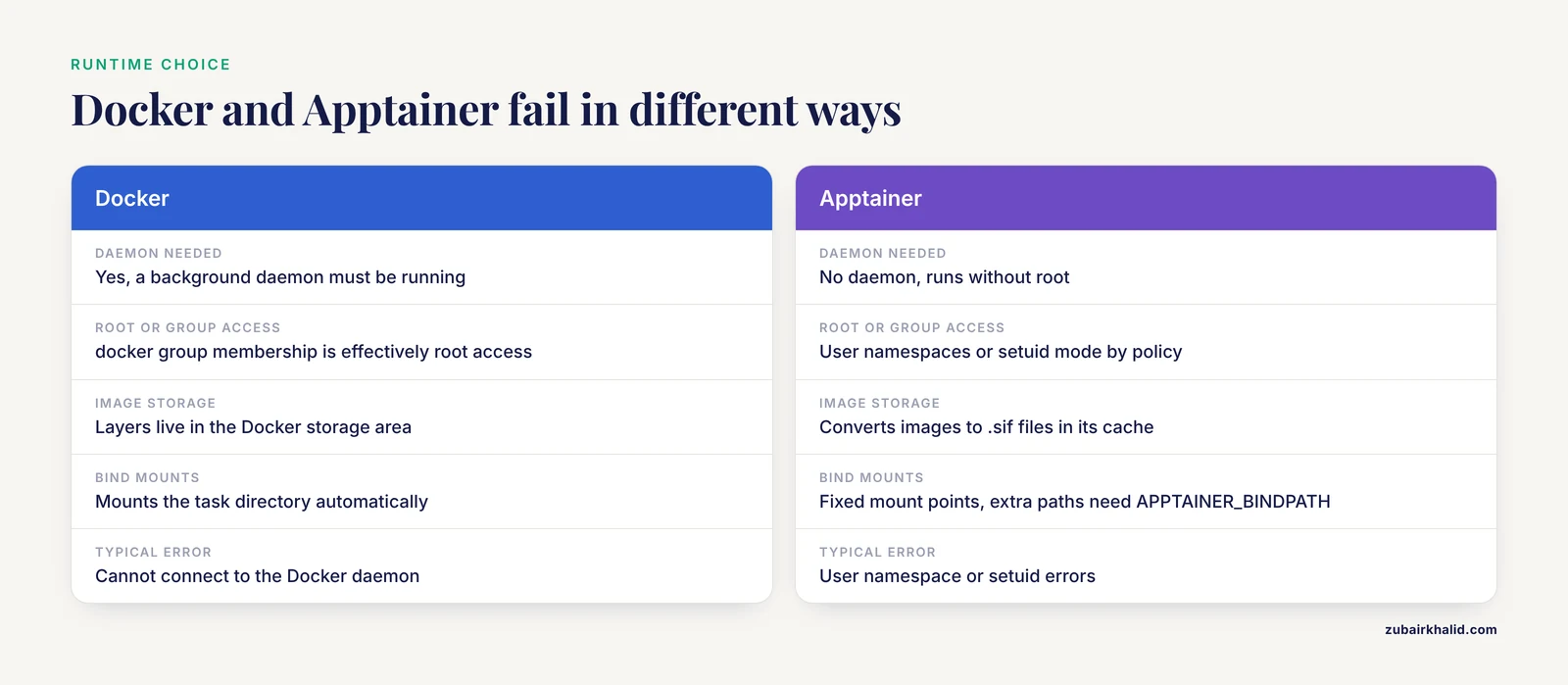
Most HPC centers do not run Docker. The Docker daemon requires root and conflicts with shared scheduler-managed systems. The accepted standard there is Apptainer, the community-maintained continuation of Singularity, which runs containers without a daemon and without root. Nextflow supports it with the -with-apptainer flag or apptainer.enabled = true in the config, and nf-core pipelines ship a matching profile.
The failure modes differ from Docker in ways that surprise newcomers.
The installation check fails. Nextflow verifies the runtime before launching tasks. If it reports an installation check failure, the apptainer binary is missing, too old, or broken in the environment where Nextflow runs. Load the cluster's module with module load apptainer or module load singularity, confirm with apptainer version, and rerun.
User namespaces are restricted. Apptainer can operate in a rootless mode that relies on the Linux user namespace feature, or in a setuid mode managed by administrators. If the kernel or the local policy disables user namespaces, you see namespace errors at the first task. This is an administrator decision, not something to work around alone. Ask HPC staff which mode the cluster supports.
Pull failures on compute nodes without internet. Apptainer converts images to .sif files the first time it uses them. If compute nodes have no outbound network and no cache, every task that needs a new image fails. The standard solution is a shared cache directory on a filesystem visible to all nodes:
export NXF_SINGULARITY_CACHEDIR=/scratch/$USER/apptainerPre-pull images from the login node, where network access usually exists, then submit the pipeline. All nodes then read the same cached .sif files.
Bind mount denials. Apptainer mounts host paths into the container at fixed locations rather than mounting the task directory anywhere it pleases, as Docker does. Reference data stored outside the standard mounted paths can be invisible inside the container. Nextflow handles the task directory itself, but additional paths may need to be listed in the APPTAINER_BINDPATH environment variable. If a tool inside a container cannot see a file that clearly exists on the host, a missing bind path is the first suspect. Site security policies such as SELinux can also block specific bind mounts, which shows up as permission denied errors that do not appear when the same command runs outside the container.
Cause 8: Configuration Mistakes That Look Like Container Errors
Several configuration problems present as container errors while having nothing to do with containers.
Containerization silently off. As described above, running without -with-docker or a profile makes tasks hit the host environment. Tools missing on the host produce exit 127 errors that mimic container failures. Check .command.run to see whether the runtime wrapper is present.
Per-process container overrides. Nextflow allows a container directive inside individual processes, which takes precedence over the global process.container setting. If you changed the global image and one stubborn process still uses an old one, that process has its own directive. Search your config files and the pipeline source for the container keyword.
Profile confusion. nf-core pipelines define profiles such as docker, singularity, conda, and test. Launching nextflow run nf-core/rnaseq -profile test,docker activates both the small test dataset and Docker. Omitting the runtime profile while passing only test runs everything on the host. A quick check with nextflow config shows the resolved configuration for the profiles you intend to use.
Cache invalidation after image changes. Nextflow caches task results. When you change a container image or a resource request, Nextflow invalidates the affected tasks and reruns them, which is correct behavior. But changing a container to fix a broken image means every downstream task reruns as well. Plan for the compute cost of the full downstream re-execution before you swap an image mid-project.
When a Container Error Looks Like an RNA-Seq Error
RNA-seq pipelines make container failures visible in characteristic ways, and an rna seq error that seems mysterious is often environmental.
Everything fails at once. If the first tasks of an RNA-seq run, typically quality control with FastQC and adapter trimming, all fail within seconds of starting, suspect the daemon, the registry, or the architecture. No data-dependent explanation makes thirty tasks fail simultaneously before reading a single read.
Only one stage fails. If QC completes and alignment with STAR or quantification with Salmon fails, read .command.err in that task's directory. If the error is a tool message about the genome index, the reference files, or read groups, the container is innocent and the fix is data-side. STAR, for example, aborts with a version complaint when the genome index was built by a different STAR version than the one executing the alignment. That situation arises most often when the index was built in a different environment than the alignment, for example a conda build versus a container build, or two different image tags. Build the index with the same container image that performs the alignment.
Runs behave differently between two machines. A pipeline that succeeds on the cluster and fails on a laptop, or the reverse, points at environment differences: the Docker daemon version, available memory, CPU architecture, or a profile that was not activated on one machine. Compare .command.run from a successful task on each machine. The difference in the runtime invocation usually explains everything.
The failure moves around. A run that fails at a different stage each time, with no data explanation, suggests resource contention. Exit status 137 in different processes means each run's OOM victim differs. Raise memory requests across the processes that need it rather than chasing the last failing stage.
Common Mistakes and Limitations
- Reading only the Nextflow summary. The terminal message is a pointer, not the diagnosis. The text in
.command.errdecides the fix in the large majority of cases. - Testing on the login node. On clusters, the login node and compute nodes have different software, different mounts, and often different network access. Confirm daemon reachability and image pulls on the node type that executes tasks.
- Trusting
latest. Mutable tags make failures non-reproducible. Pin exact version tags or digests for anything you intend to publish or revisit. - Mixing environments mid-project. Running part of an analysis with conda and part with containers, or switching profiles between runs, creates version inconsistencies that produce errors far from their cause. Pick one execution mode per analysis and keep it.
- Assuming the error names the cause. Docker and registry error strings vary between Docker versions, registry software, and Nextflow versions. Match errors by pattern, such as socket permission errors or manifest errors, rather than by exact wording.
- Blaming the pipeline repository first. Well-maintained pipelines run in continuous integration constantly. A sudden failure on your machine is more likely local than upstream. Still, if you confirm a genuine bug, report it to the pipeline maintainers with the full
.command.errand the Nextflow version. - A limitation to keep in mind: individual clusters, registries, and Docker installations differ in policy and configuration. The patterns in this article cover the overwhelming majority of cases, but site-specific restrictions, such as custom security modules or proxy setups, need the involvement of your local administrators.
Prevention: Practices That Keep Container Errors Away
- Pin images. Use exact version tags or digests in every
containerdirective. Reproducibility and fewer surprises both follow. - Adopt a maintained pipeline. nf-core pipelines ship tested container images, Docker and Apptainer profiles, and a small
-profile testdataset designed to exercise the whole pipeline in minutes. Run the test profile first on every new machine before spending compute on real data. - Keep credentials ready where runs execute.
docker loginon the execution host, with credentials managed by the Docker credential store rather than pasted into scripts. - Set a shared Apptainer cache on clusters. Export
NXF_SINGULARITY_CACHEDIRin your shell profile or job script, pointing to a shared scratch path, and pre-pull from a network-connected node. - Watch disk space. Schedule image pruning and work directory cleanup. Moving the work directory to scratch storage keeps the analysis home directory small.
- Pin the Nextflow version too. Container problems occasionally trace back to a runtime behavior change in a Nextflow upgrade. Keeping the launcher version fixed per project removes one variable.
- Retry transient failures. Add sensible retry behavior so a brief registry hiccup does not kill a twelve-hour run:
   process {
       errorStrategy = 'retry'
       maxRetries    = 2
}- Record your environment. Save the Nextflow version, the Docker or Apptainer version, and the resolved config with
nextflow configalongside your results. Future-you, or a reviewer, will reconstruct the run from those three artifacts.
Frequently Asked Questions
Why does Nextflow say "Cannot run program docker"?
The Docker client binary was not found in the environment where Nextflow runs. Install Docker, add it to PATH, load the cluster module that provides it, or switch to an Apptainer profile if the machine does not support Docker at all.
What does "manifest unknown" or "pull access denied" mean?
The registry has no image matching the name and tag you requested, or the image is private and you are not authenticated. Pull the exact image string by hand with docker pull to see the full registry response, then correct the name or log in.
How do I see the real error behind a failed Nextflow task?
Open the task directory that Nextflow prints when the task fails and read .command.err for the command's standard error and .command.run for the exact container invocation. Those two files contain nearly every diagnosis you need.
Why does the same pipeline work with Docker on my laptop but fail on the cluster?
Clusters usually lack a Docker daemon and use Apptainer instead, with restricted user namespaces, no outbound network from compute nodes, and different filesystem mounts. Compare the .command.run file from a task on each machine and confirm the runtime, cache, and bind paths on the execution node.
What does exit status 137 mean in Nextflow?
The task was killed by a signal, almost always the operating system out-of-memory killer. Raise the memory directive for that process, or reduce its input size, and confirm with kernel logs or scheduler accounting if you need certainty.
How do I fix Docker Hub rate limit errors during a run?
Authenticate with docker login on the execution host, pre-pull all pipeline images before launching, or source the images from another registry such as quay.io. Reducing parallelism during the first minutes also helps while images populate the local cache.
Do I need to pull images myself, or does Nextflow do it?
Nextflow pulls images automatically through the runtime when a task needs one and the image is not already cached. Manual pulls are still useful for diagnosing registry problems, for pre-warming caches on offline clusters, and for staying under rate limits.
Why did my RNA-seq pipeline fail only at the alignment step?
Alignment is the first step with heavy data dependencies, so a data problem such as a corrupt FASTQ, a mismatched genome index, or a version conflict between the index and the aligner surfaces there. Read .command.err in that task's directory. If the message is a tool-level complaint about inputs, the container is working and the fix is on the data side.