How to Make Your Nextflow Pipeline Portable with Containers
By Dr. Zubair Khalid, DVM, MS, PhD ·

By the end of this guide you will be able to take a Nextflow pipeline that runs on your laptop and run it, unchanged, on a server, an HPC cluster, or a cloud VM, with the same software versions producing the same results. You will add container directives to your processes, pin exact image versions, create profiles for Docker, Singularity, and Apptainer, and verify that the containers are actually being used.
Here is what you need on hand before you start:
- A machine with Java 17 or later installed (check with
java -version) - A Linux, macOS, or Windows (WSL2) environment where you can install software
- Docker Desktop or the Docker engine for local testing, or Apptainer/Singularity for cluster work
- About 5 GB of free disk space for images and the Nextflow work directory
- A small test dataset, such as one or two FASTA or FASTQ files
Why Containers Are the Backbone of Nextflow Portability
A Nextflow pipeline is really two programs stacked on top of each other. Nextflow itself orchestrates tasks, resolves dependencies between them, and moves files around. The actual science, such as alignment, quality control, or variant calling, happens inside each task. If those tasks run directly against your operating system, the pipeline inherits every quirk of that system. A library version that differs between your laptop and the cluster can silently change results.
Containers solve this by packaging a tool together with its entire runtime, including libraries, interpreters, and system dependencies, into a single immutable image. That image runs identically on any host with a compatible container runtime. This is the core argument for containerization in bioinformatics: container virtualization improves the portability and reproducibility of software deployment across computing environments [1]. In clinical imaging work, researchers have made the same argument for regulatory-grade reproducibility, since a self-contained image can be distributed and rerun reliably by downstream users [2].
Nextflow pairs naturally with containers because it treats "which container does this process run in" as a first-class configuration option rather than an afterthought. The combination of a workflow manager with packaging and containerization technologies is now the standard architecture for production bioinformatics pipelines, and published best-practice frameworks such as Geniac are built explicitly around Nextflow combined with Conda, Docker, and Singularity [3].
How Container Portability Works in Nextflow
A bioinformatics workflow manager like Nextflow executes each process as an independent task. When containerization is enabled, Nextflow wraps every task script in a container run command, mounts the task's work directory into the container, and runs your script inside that image. You never mount anything manually. Nextflow handles the volume bindings for the work directory, the Scratch folder, and any inputs and outputs that live there.
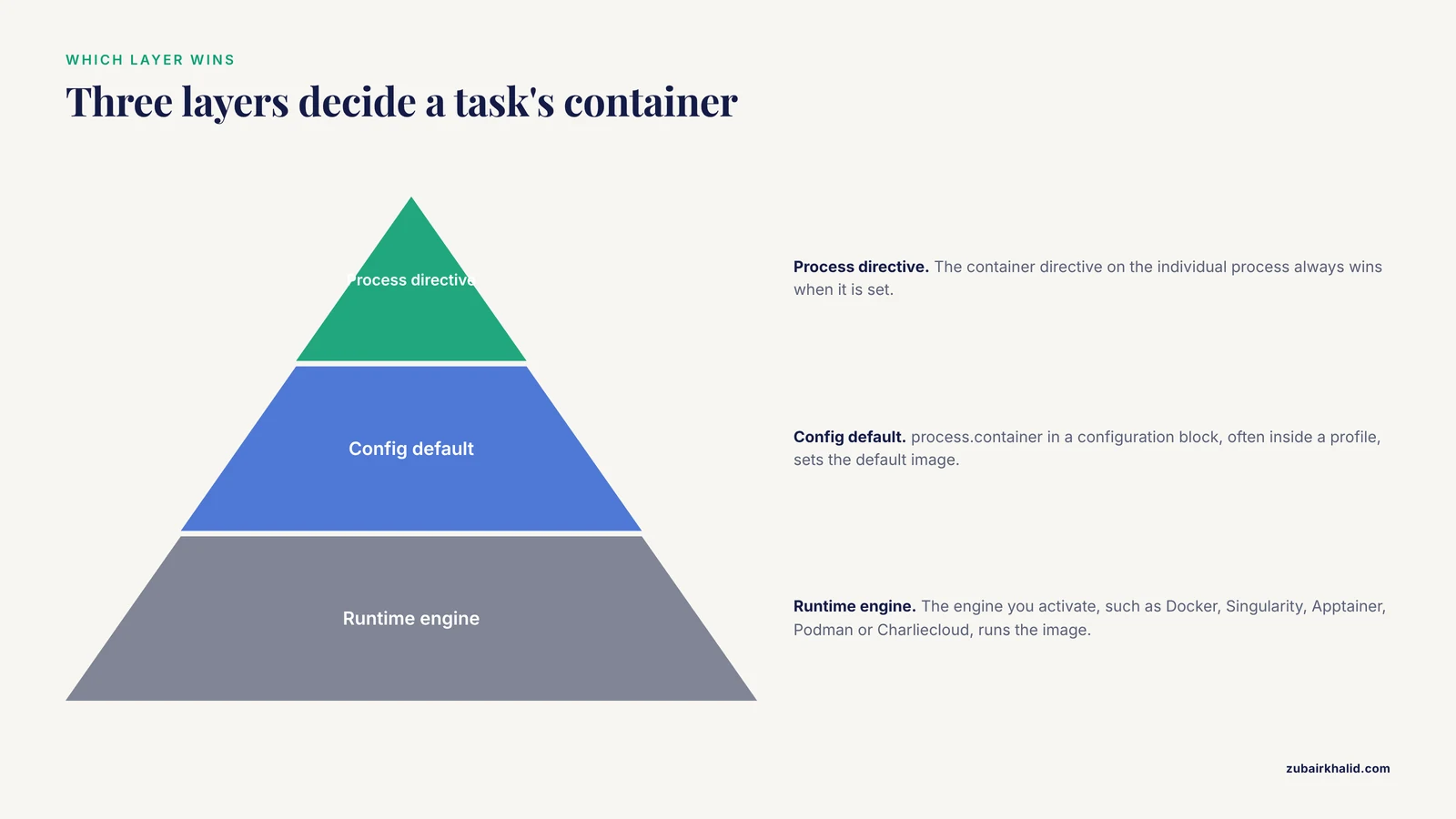
Three layers decide which container a task uses:
- The
containerdirective on the individual process. This always wins when set. - The
process.containersetting in a configuration block, often inside a profile. - The container engine you activate at runtime, such as Docker, Singularity, Apptainer, Podman, or Charliecloud, usually through a profile like
-profile docker.
This layered design is what makes one pipeline source tree portable across a laptop, an HPC queue, and a cloud batch system. You change profiles, not code. The Geniac framework formalizes exactly this pattern, recommending that pipeline source code be organized so that container, Conda, and deployment choices live in configuration and installation layers rather than scattered through the analysis code [3].
Making Your Nextflow Pipeline Portable, Step by Step
The walkthrough below builds a tiny two-process pipeline, containers every step, adds profiles, and verifies the result. Every command is real and the expected output is shown.
Step 1: Install Nextflow and a Container Engine
Install Nextflow with the official bootstrap script:
curl -s https://get.nextflow.io | bash
./nextflow -v
Expected output looks like this, with your own version number:
nextflow version 24.10.5.5887For a container engine, install Docker if you are on a laptop or workstation. On an HPC cluster you almost never have Docker and root access, so you will use Apptainer or Singularity, which your administrator loads as a module. Check availability:
docker version
apptainer version
Step 2: Run a Minimal Pipeline Inside a Container
Create a file named test.nf:
nextflow.enable.dsl = 2

process GREETING {
    container 'python:3.11-slim'

    output:
    path 'result.txt'

    script:
    """
    python -c "print('hello from inside the container')" > result.txt
    """
}

workflow {
    GREETING()
}
Run it with Docker enabled:
nextflow run test.nf -with-dockerExpected output:
N E X T F L O W  ~  version 24.10.x
Launching `test.nf` [soggy_mendel] DSL2 - revision: 1d2e3f4a5b
executor >  local (1)
[8a/1b2c3d] GREETING (1) | 1
Inspect what actually ran:
cat work/8a/1b2c3d*/result.txtYou should see hello from inside the container. To confirm the task ran inside the image and not on the host, open the generated launch script in the same work subdirectory:
grep -A3 "docker" work/8a/1b2c3d*/.command.runYou will see Nextflow invoked a docker run command with the work directory bind-mounted. That mount is automatic. If you saw no container references in .command.run, the engine was not enabled, which is the single most common portability failure in practice.
Step 3: Pin Exact Container Versions
The tag 3.11-slim is a moving target. The maintainer can rebuild it, and two runs a month apart may execute different bytes. Registry tags are mutable, so for reproducibility you pin the image digest, which is a content hash that cannot change.
Pull the image and read its digest:
docker pull python:3.11-slim
docker images --digests python
Expected output (your digest will differ):
REPOSITORY   TAG         DIGEST                    IMAGE ID
python       3.11-slim   sha256:abc123...def456    7f4b1c2d3e5a
Then reference the digest in your process:
container 'python:3.11-slim@sha256:abc123...def456'Nextflow resolves the digest identically no matter which registry mirror serves the request, which closes one of the largest holes in day-to-day reproducibility. Published pipeline frameworks treat version pinning as a requirement rather than a suggestion, and the nf-core community's strict container conventions influenced formal best-practice guidelines for Nextflow pipeline development [3].
Step 4: Assign Containers at Process and Workflow Level
In a real pipeline, each process often needs a different tool, which means a different image. The nf-core convention, which the Geniac guidelines build on, is one purpose-built container per process [3]:
process FASTQC {
    container 'quay.io/biocontainers/fastqc'
    // ... inputs, outputs, script
}

process BWA {
    container 'quay.io/biocontainers/bwa'
    // ... inputs, outputs, script
}
When you look up community-maintained tool images, use the BioContainers registry at quay.io/biocontainers and copy the exact tag for the version you tested with. Never write a container directive from memory.
Two rules keep multi-container pipelines sane:
- Tools in different containers cannot call each other inside a single process. If a script needs three tools, either put all three in one custom image or split the logic into separate processes.
- A process-level
containerdirective overridesprocess.containerfrom the config. Know which layer is in charge for each process.
Step 5: Add Docker, Singularity, and Conda Profiles
Profiles are named configuration blocks that a user selects at runtime. This is where the portability payoff happens. Add this to nextflow.config:
profiles {
    docker {
        docker.enabled = true
    }
    singularity {
        singularity.enabled = true
        singularity.autoMounts = true
    }
    apptainer {
        apptainer.enabled = true
        apptainer.autoMounts = true
    }
    conda {
        conda.enabled = true
    }
    test {
        params.max_reads = 10000
    }
}
With per-process container directives in place, the same pipeline now runs with any of these commands:
nextflow run . -profile test,docker
nextflow run . -profile test,singularity
nextflow run . -profile test,apptainer
nextflow run . -profile test,conda
Apptainer and Singularity can pull Docker images directly. When you write the container directive as a full URI, such as docker://python:3.11-slim, the Singularity profile converts and caches it as a .sif file. Set a shared cache location so your cluster does not re-download images on every job:
export NXF_SINGULARITY_CACHEDIR=/shared/$USER/nxf-singularityKeep Conda as a fallback profile for environments where no container runtime exists, but do not enable a Conda profile and a container profile together, because the two software layers can drift apart. The Geniac best-practice framework ships all three layers, Nextflow plus Conda plus container engines, precisely so that each deployment context can pick one coherent mechanism [3].
Step 6: Build and Publish Your Own Image
When no public image fits, build one. Create a Dockerfile:
FROM python:3.11-slim
RUN pip install --no-cache-dir biopython==1.83
CMD ["python", "-c", "import Bio; print(Bio.__version__)"]
Build, test, and push it to a registry:
docker build -t yourname/seqtools:1.0.0 .
docker run yourname/seqtools:1.0.0
docker push yourname/seqtools:1.0.0
Expected output of the test run:
1.83Now any process can use container 'yourname/seqtools:1.0.0' and any collaborator gets the identical environment. For the strongest reproducibility, capture the pushed digest with docker images, digests and pin that in your config, exactly as in Step 3.
Step 7: Run on an HPC Cluster with Apptainer
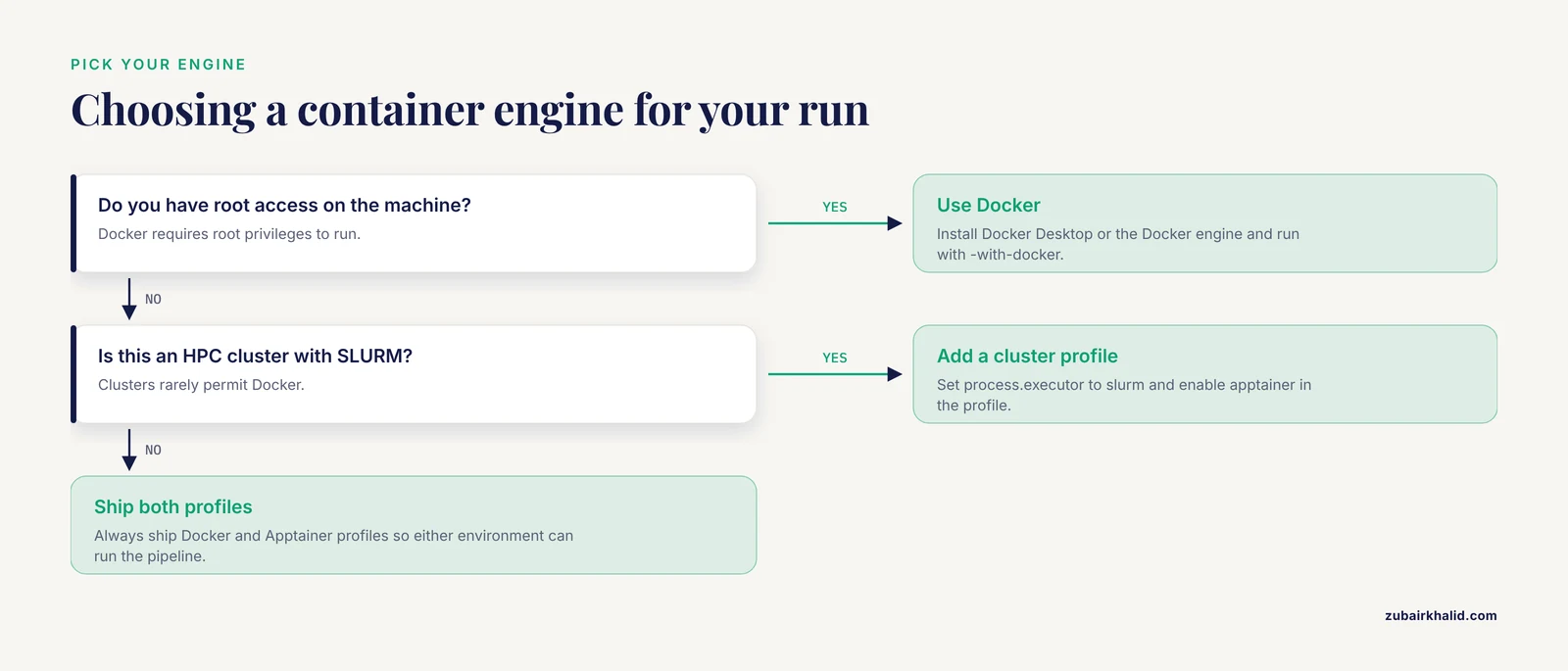
Clusters rarely permit Docker because Docker requires root privileges, which is why rootless runtimes dominate in institutional settings. Linux containers designed for multi-user systems let administrators distribute self-contained images that users without elevated privileges can run repeatably [2].
On a typical SLURM cluster, add this profile to nextflow.config:
profiles {
    cluster {
        process.executor = 'slurm'
        apptainer.enabled = true
        singularity.autoMounts = true
    }
}
Then submit:
nextflow run . -profile cluster -resumeNextflow generates a separate SLURM job per process, and each job executes inside the Apptainer image. The first run pays the cost of pulling and converting images into .sif files. Later runs reuse them from NXF_SINGULARITY_CACHEDIR.
Step 8: Verify Portability Before You Ship
Verification has three layers. First, confirm every process has a container set:
nextflow run . -profile docker -previewNextflow prints the resolved configuration, including each process's container value. Anything missing shows as blank. In recent Nextflow versions the nextflow inspect command renders the fully merged configuration, which is the fastest way to confirm a profile did what you expected.
Second, confirm containers were used at runtime:
nextflow log last -f process,container,tagExpected output:
process      container                                    tag
GREETING     python:3.11-slim@sha256:abc123...            -
Third, confirm identical output. Run the same pipeline twice with -resume after clearing the work directory, or run it on a second machine, and compare published results byte for byte with md5sum. For a stronger check, run the pipeline with two different profiles (docker and singularity) and confirm the outputs match.
Step 9: Profile Resource Usage for Cloud and Cluster Runs
Once a pipeline is portable, the next question is what hardware to point it at. Containerized tasks expose clean runtime boundaries, which makes it straightforward to collect CPU, memory, and wall-clock metrics per task and use them to choose instance types. A study of transcriptome quantification workflows demonstrated that collecting container runtime metrics across six cloud instance types let users pick instances that both lowered financial cost and reduced execution time [1].
Nextflow produces the equivalent data natively. Add the trace flag:
nextflow run . -profile docker -with-trace trace.tsvEach row of trace.tsv contains one task with its CPU hours, peak memory, wall time, and container. Sum those columns across a typical run and you have the evidence base for choosing between instance sizes, or for setting realistic cpus and memory directives so the scheduler stops over-provisioning.
Key Options Reference
The following table summarizes the configuration options that matter most for container portability.
| Option | Where it goes | What it does | Example value |
|---|---|---|---|
container 'image:tag' | Inside a process | Assigns an image to that process only | 'python:3.11-slim' |
process.container | Config block or profile | Default image for all processes | 'python:3.11-slim' |
docker.enabled | Profile | Wraps tasks in Docker runs | true |
singularity.enabled | Profile | Pulls images and runs SIF files | true |
apptainer.enabled | Profile | Same as Singularity, current name | true |
singularity.autoMounts | Profile | Mounts host paths automatically | true |
conda.enabled with process.conda | Profile and process | Dependency fallback without containers | 'env/environment.yml' |
process.accel | Process | Requests GPU resources for the task | 1, 'nvidia.com/gpu' |
NXF_SINGULARITY_CACHEDIR | Shell environment | Shared cache for pulled images | /shared/$USER/nxf-singularity |
-with-trace | Command line | Writes per-task resource metrics | trace.tsv |
Nextflow Container Portability Tips
These tips come up repeatedly when teams move pipelines between environments.
Pin digests, not just tags, for anything that produces published results. Tags are convenient during development and dangerous after publication. A digest is a content address and cannot be rebuilt underneath you.
Keep every container reference in one place per process. When the image name lives in the process directive and nowhere else, a reviewer can audit the entire software stack by grepping for container. Distributed references across scripts are how version drift starts, and dependency drift inside deployed environments is a documented failure mode for containerized computational workloads [4].
Warm the image cache before the real run. On a cluster, run once with a tiny test dataset and an empty NXF_SINGULARITY_CACHEDIR. This populates the cache while nobody is waiting, and it surfaces any image that fails to pull before you burn cluster allocation.
Split heavy dependencies from the driver logic. Keep Python or R glue code inside the same image as the tool that needs it. A process that reaches for the host Python defeats the purpose of the container and will break on a host with a different interpreter.
Use Podman or rootless engines where Docker is unavailable. Rootless container runtimes now support full orchestration of containerized workloads, including GPU-accelerated deep learning inference, without giving users administrative rights, which is how modern clinical and research deployments avoid privilege issues [4].
Treat the container directive as part of your pipeline's public interface. Changing an image tag is a version change to your pipeline. Bump your pipeline version when you change one, and record both in your release notes.
Common Mistakes and Limitations
Running without any engine enabled. If you forget the profile, Nextflow runs tasks on the host with no warning beyond what is in .command.run. Make container usage a test assertion, not an assumption. The nextflow log -f container check in Step 8 catches this in seconds.
Relying on the latest tag. Two collaborators can run "the same" pipeline months apart and get different numbers. Pin versions in every process that contributes to a result.
Assuming a Docker image runs everywhere. Docker images are portable across machines that run Docker. HPC clusters, clinical systems, and many shared servers use Apptainer or Singularity precisely because they do not require root [2]. Always ship both profiles.
Expecting tools from different containers to interact. Each process runs in exactly one image. A script that calls samtools inside a process whose container is python:3.11-slim fails with samtools: command not found. Fix it by splitting the process or by building one image containing both tools.
Ignoring GPUs until the last minute. Containerized GPU workloads need the runtime configured to expose the device, and the process needs a GPU resource request. Deep learning segmentation services deployed in containers ran far faster with GPU acceleration than in CPU fallback, but only after the runtime was correctly wired up [4]. Test one GPU task early, on the actual target hardware.
Hardcoding absolute paths. Containers make software portable, not file paths. Keep inputs and outputs relative to the work and publish directories, and parameterize the rest.
Testing on one machine only. Portability is a property you verify, not one you infer. At minimum, run once with each profile you ship, and ideally once on a machine you do not personally administer.
Forgetting that results depend on more than the container. The same image with different reference data, different parameters, or different input files produces different results. Containers remove software drift, not experimental design differences.
Nextflow vs Snakemake for Portable Pipelines
Both Nextflow and Snakemake are mature open-source bioinformatics workflow managers, and both support containerized execution. The practical differences show up in how each integrates containers and scales out.
Nextflow is written in Groovy, runs on the JVM, and treats containers as a per-process configuration concern with first-class engine profiles for Docker, Singularity, Apptainer, Podman, and Charliecloud. Its scheduler model spans local, SLURM, SGE, and cloud batch systems with the same pipeline source, and container handling is identical across those back ends. Community frameworks such as nf-core, which formalized many of the conventions described here, are built on this model [3].
Snakemake is written in Python, expresses workflows as a rule system, and supports containers per rule as well as Conda environments. Both tools can achieve the same level of portability when configured carefully. In practice, teams choose Nextflow when they want the container and executor layers fully abstracted into profiles and when they plan to move between clusters and cloud, and they choose Snakemake when the team is Python-centric and the workflow logic benefits from rule-based expression. For portability specifically, the deciding factor is less the manager and more whether you pin images, ship multiple engine profiles, and verify on a second environment, which is true for either tool.
Frequently Asked Questions
Do I need Docker to run a Nextflow pipeline?
No. Nextflow supports Docker, Singularity, Apptainer, Podman, Charliecloud, and plain Conda environments. On an HPC cluster you will typically use Apptainer or Singularity, while Docker is convenient on your own machine.
What is the difference between a Docker image and a Singularity or Apptainer SIF file?
A Docker image is a layered image managed by a Docker daemon that requires root privileges. A SIF file is a single-file, read-only container image used by Singularity and Apptainer, which run without root and suit shared systems. Nextflow can convert Docker images into SIF files automatically.
Should I use one container per process or one large container for the whole pipeline?
One container per process is the common convention because it keeps each image small and each dependency set isolated, and it is the pattern used by major community pipelines [3]. A single pipeline-wide image is acceptable for small pipelines but becomes slow to build and hard to audit as it grows.
How do I pin a container version so results stay reproducible?
Pull the image, read its digest with docker images, digests, and reference the image as name:tag@sha256:digest in your container directive. A digest is a content hash that registries cannot change, unlike tags.
Can Nextflow run containers with GPU support?
Yes. Request GPU resources with the process accel directive and use a runtime configured to expose devices, such as Docker with the NVIDIA container runtime or Podman on a GPU host. Containerized deep learning workloads, including medical image segmentation models, have been deployed this way with measurable GPU speedup over CPU execution [4].
How does Nextflow decide which container a process uses?
A process-level container directive takes priority, then process.container from configuration, and the engine you enable at runtime determines how the image is run. Keeping one image per process in the process block makes the mapping explicit and auditable.
Is Nextflow more portable than Snakemake?
Both can be equally portable when configured well. Nextflow integrates container engines and diverse executors directly into profiles, which reduces configuration work when moving between a laptop, a cluster, and the cloud. Snakemake achieves the same result with per-rule container directives and its own flags, so the difference is workflow style rather than capability.
How do I test that my pipeline is actually portable?
Run the full pipeline with each profile you ship, on at least two different environments, and compare outputs byte for byte. Use nextflow log -f container to confirm every task ran inside its image, and treat a missing container value in nextflow inspect output as a bug before release.
Sources
- Accumulating computational resource usage of genomic data analysis workflow to optimize cloud computing instance selection.
- Container-Based Clinical Solutions for Portable and Reproducible Image Analysis.
- Geniac: Automatic Configuration GENerator and Installer for nextflow pipelines.
- Lightweight Container Orchestration for Reproducible AI and Deep Learning Segmentation of Coronary Arteries and the Aorta in Coronary CT Angiography.