How to Use NCBI Virus
By Dr. Zubair Khalid, DVM, MS, PhD ·

By the end of this tutorial you will be able to search the NCBI Virus database by virus taxon, host, geography, and collection date, download a clean set of genome sequences in FASTA format together with a metadata table, verify that the download is complete, retrieve the same records from the command line with E-utilities, and route the sequences into alignment tools, BLAST, and metagenomic read-classification pipelines. You need a web browser for the interface work, a computer with a Unix-style shell (macOS terminal, Linux, or Windows Subsystem for Linux) for the command-line sections, and the Entrez Direct command-line tools installed if you want to follow those examples exactly.
What NCBI Virus Is and Where It Fits Among NCBI Databases
NCBI Virus, found at https://www.ncbi.nlm.nih.gov/labs/virus/vssi/, is the National Center for Biotechnology Information's dedicated virus sequence database. It sits on top of the same underlying GenBank records you would reach through the general Nucleotide database, but it adds a layer of virus-specific annotation and filtering that the general interface cannot match.
The resource did not appear overnight. NCBI first built the Influenza Virus Resource, then extended that technology to non-segmented virus genomes starting with dengue, producing what the developers called the Virus Variation Resources. For dengue, they built an offline pre-alignment procedure that generated a multiple sequence alignment of all dengue sequences in advance, so that any user query could return an alignment of just the requested subset within seconds. The design goal was to let users build complex queries against annotated fields such as host, collection date, and geographic location rather than sifting through raw GenBank results [1]. Modern NCBI Virus carries that same philosophy across thousands of virus taxa.
Knowing where NCBI Virus sits in the wider NCBI landscape saves time. The center maintains dozens of linked databases, and a typical virus project touches several of them:
- Nucleotide and Protein hold the raw sequence records and their translations.
- Taxonomy defines the official virus names and their parent-child hierarchy, which NCBI Virus uses for its taxon searches.
- PubMed holds the literature. Surveillance reviews have used PubMed citation counts to track which viruses are rising in clinical importance in specific patient populations, such as kidney transplant recipients [2].
- Gene Expression Omnibus (GEO) archives transcriptome datasets. Web tools such as eVITTA were built specifically to make GEO data easier to query, analyze, and visualize, including transcriptomes from SARS-CoV-2 infected nasopharyngeal samples [3].
- SRA (Sequence Read Archive) holds the raw sequencing reads that often underlie the consensus genomes you download from NCBI Virus.
The practical division of labor is simple. Use NCBI Virus when you want curated virus genomes with epidemiological metadata attached. Use PubMed when you need the literature context for the same virus. Use GEO or SRA when you need primary experimental data rather than submitted sequences.
Prerequisites
For the browser workflow you need only a modern browser. For the command-line workflow, install Entrez Direct, NCBI's official command-line interface to its databases, with the documented installer:
sh -c "$(curl -fsSL https://ftp.ncbi.nlm.nih.gov/entrez/entrezdirect/install-edirect.sh)"After installation, add the tools to your path by following the instructions the installer prints, then confirm with:
efetch -versionExpected output is a version line beginning with efetch, for example efetch: 21.x. If the command is not found, re-run the installer and add the edirect directory to your PATH as instructed.
You will also want a plain text editor and a directory for the tutorial files:
mkdir ncbi_virus_tutorial && cd ncbi_virus_tutorialThe NCBI Virus Interface at a Glance
The page has three working areas. The search bar at the top accepts a virus taxon name or taxon ID. A filter panel on the left narrows results by structured fields. A data table in the center shows one row per sequence record with sortable columns.
Terms you will meet in this section:
- Taxon (plural taxa): a named group in the NCBI Taxonomy tree, such as "Dengue virus" or a specific serotype under it.
- Accession: the permanent unique identifier assigned to a sequence record, for example
NC_001477.1, where the.1is the version. - FASTA: a plain-text sequence format in which each record starts with a single header line beginning with
>followed by the sequence itself. - GenBank flat file: the fully annotated record format that includes genes, proteins, features, and submission information, not just bases.
Step-by-Step Tutorial: Building a Curated Dengue Virus Dataset
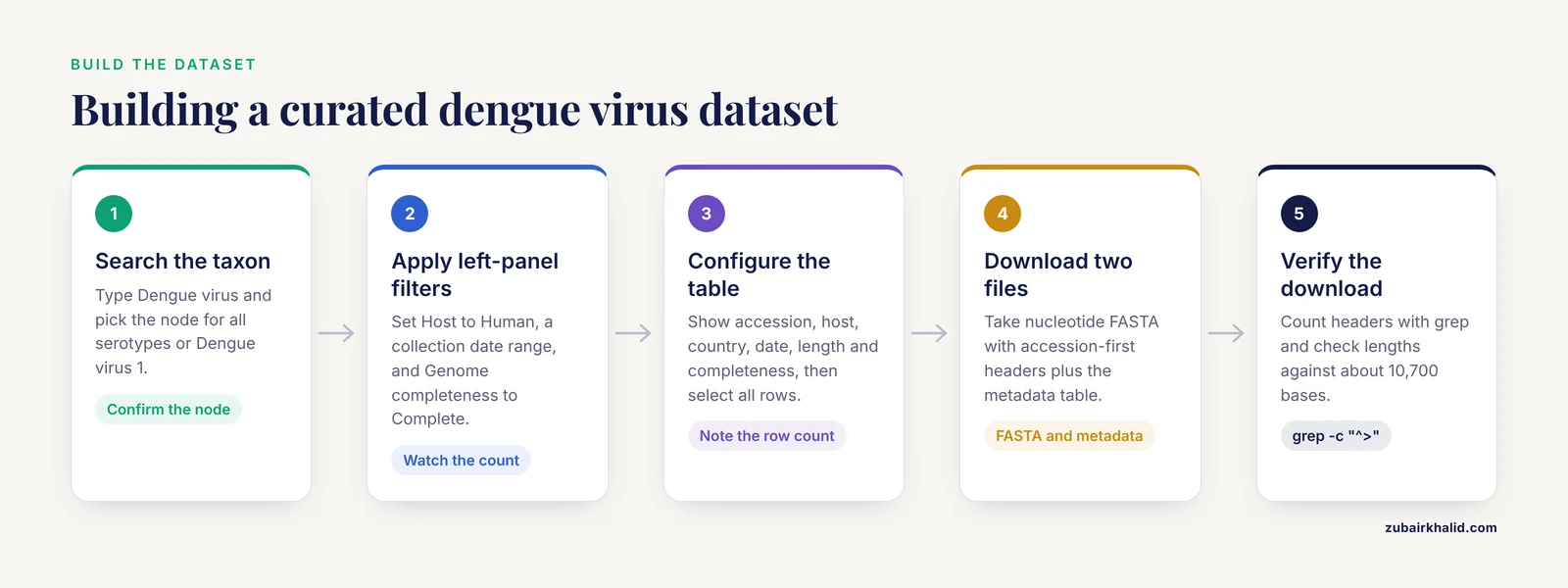
This walkthrough builds a dataset of complete dengue virus 1 genomes from human samples, which mirrors exactly the kind of query the original Virus Variation Resource was built to answer [1]. Every step transfers directly to any other virus.
Step 1: Search by taxon
Go to https://www.ncbi.nlm.nih.gov/labs/virus/vssi/ and type Dengue virus into the search box. The interface suggests matching taxa from the NCBI Taxonomy tree. Choose the node for Dengue virus if you want all serotypes, or a specific serotype such as Dengue virus 1 if you want only that lineage.
A common source of confusion lives here. "Dengue virus" is a parent taxon with four serotypes beneath it, and typing a serotype name picks a narrower node than typing the generic name. Always confirm which node you selected before filtering further, because everything downstream inherits this choice. If you are unsure of the hierarchy, open https://www.ncbi.nlm.nih.gov/taxonomy, search the name, and look at the displayed lineage.
Step 2: Apply filters in the left panel
The filter panel is the main advantage NCBI Virus has over a plain Nucleotide search. Each filter corresponds to a structured, curated field rather than free text.
Apply these filters for the worked example:
- Host: select Human. This restricts records to sequences isolated from human samples, separating them from mosquito isolates and laboratory artifacts.
- Country: choose the countries relevant to your question, or leave open for a global dataset.
- Collection date: set a range. A range is what you want for time-structured analyses, because a sequence with no date is of limited epidemiological use.
- Genome completeness: choose Complete. This is the single most consequential filter in most workflows, discussed in detail under common mistakes.
- Sequence length: optionally set a minimum to drop short fragments that survived the completeness filter.
Each filter updates the result count immediately. Watch that number as you add filters so you know exactly which filter caused a large drop. If the count collapses to zero after one filter, that filter is too narrow, often because submitters did not record the field you are filtering on.
Step 3: Configure and read the data table
The data table lists one row per record. You can choose which columns appear. The columns most useful for a curated dataset are the accession, the virus taxon, host, country, collection date, sequence length, and completeness status. Sort by collection date to see whether your dataset covers the time span you intended.
Click rows to select individual records, or use the select-all control to take every record matching the current filters. The table row count is the authoritative number of records in your current query. Write it down or screenshot it, because you will use it to verify your download in Step 5.
Step 4: Download sequences and metadata
With your selection made, open the download options. For a reproducible analysis dataset you want two files:
- Nucleotide sequences in FASTA format. Before downloading, set the FASTA header content. Include at minimum the accession, and add the fields your analysis will use for labeling, such as host, country, and collection date. A header built this way looks like:
>MZ123456.1|Dengue virus 1|Human|Singapore|2019-03-14Exact field order and separators depend on the options you pick. The critical rule is to include the accession first and to be consistent, because downstream tools parse the first token after > as the sequence identifier.
- A metadata table in a spreadsheet format, containing one row per record with the full set of curated fields. This file is your permanent record of what the dataset contains. Save it alongside the FASTA file and do not edit it by hand. If you later filter the dataset during analysis, update the metadata table in the same step so the two files never disagree.
Download GenBank flat files as well if you need gene annotations, since a FASTA file contains only bases.
Step 5: Verify the download
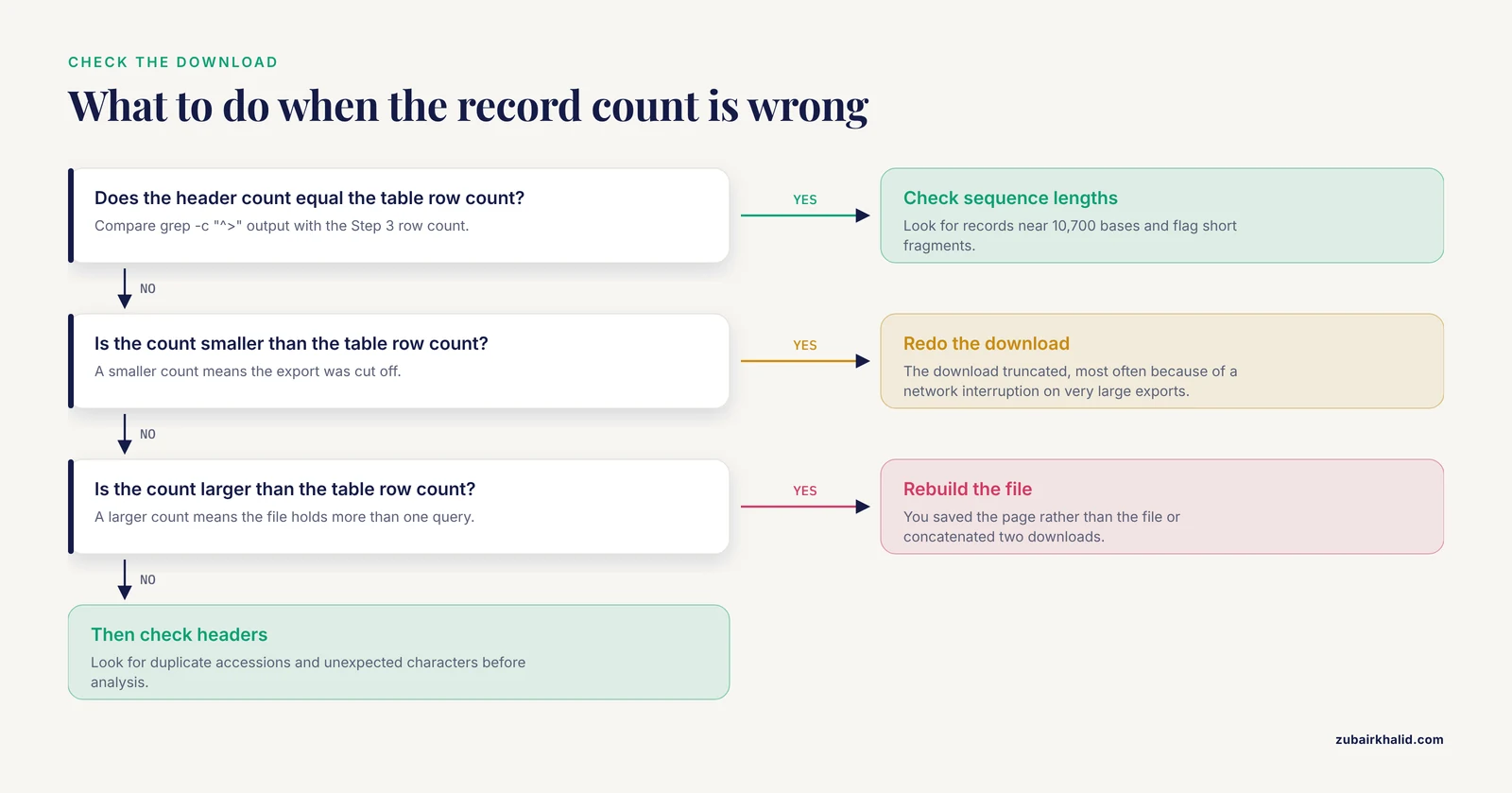
Two quick checks catch almost every download problem. First, count the records:
grep -c "^>" dengue_complete_human.fastaThe output is a single number. It should equal the row count from the data table in Step 3. If it is smaller, the download truncated, most often because of a network interruption on very large exports. If it is larger, you saved the page rather than the file or concatenated two downloads.
Second, check sequence lengths:
awk '/^>/{if(len){print id, len}
id=$1
len=0
next}
{len+=length($0)}
END{print id, len}' dengue_complete_human.fasta | head
This prints the identifier and length of the first several records. Complete dengue virus 1 genomes are roughly 10,700 bases, so a record of 200 bases means an incomplete sequence slipped through and you should revisit the completeness filter. Headers with unexpected characters, empty lines in odd places, or duplicate accessions all show up at this stage, when they cost seconds to fix rather than hours later.
Step 6: Retrieve the same records with E-utilities
Everything NCBI Virus shows is backed by Entrez, and Entrez is reachable from the command line through E-utilities, the official API. This matters when you need to refresh a dataset regularly or reproduce a download on a server.
A single known accession fetches directly:
efetch -db nuccore -id NC_001477.1 -format fastaExpected output is a FASTA record: a header line naming the record, followed by the sequence in lines of 70 bases, about 10,700 bases in total for this reference dengue virus 1 genome:
>NC_001477.1 Dengue virus 1 complete genome
(about 10,700 bases of sequence, 70 per line)
The same request over plain HTTP, useful inside scripts without Entrez Direct, is:
https://eutils.ncbi.nlm.nih.gov/entrez/eutils/efetch.fcgi?db=nuccore&id=NC_001477.1&rettype=fasta&retmode=textTwo parameters matter here. db selects the database, nuccore for nucleotide sequences and protein for protein sequences. rettype selects the format, with fasta for sequences and gb for the annotated GenBank flat file.
To search first and fetch second, chain the tools:
esearch -db nuccore -term "Dengue virus 1[Organism] AND complete genome[Title]" | efetch -format fasta > dengue_edirect.fastaThe esearch step returns structured XML, and the count element at its top shows how many records matched:
<eSearchResult>
  <Count>(number of matching records)</Count>
  ...
</eSearchResult>
Note what Entrez search terms can and cannot express. [Organism] and [Title] are dependable, and [Publication Date] restricts by submission date. But filters such as isolation host, country, or collection date from the patient sample are the structured fields NCBI Virus curates specifically so you can query them [1]. Approximating those filters in raw Entrez searches is fragile. The most reliable pattern is to build and verify the query in the NCBI Virus interface, then use E-utilities to fetch the records you identified, either by accession list or by a search term that provably returns the same count.
Two E-utilities rules keep scripts polite and functional. Requests are limited to a small number per second without an API key, and registering for an API key raises that limit. When fetching many records, batch the requests and pause briefly between them:
while read acc
do
  efetch -db nuccore -id "$acc" -format fasta >> dengue_all.fasta
  sleep 0.4
done < accessions.txt
Built-In Analysis Tools
NCBI Virus includes sequence analysis you can run without installing anything. After retrieving a set of records in the interface, you can launch a multiple sequence alignment built on MAFFT, a standard and well-regarded alignment program, directly on your selected subset. The interface can also construct a dendrogram from the alignment so you can see clustering by serotype, geography, or time before committing to a heavier offline phylogeny.
This design is a direct descendant of the Virus Variation Resource architecture, where pre-calculated alignments of all dengue sequences made subset alignments nearly instantaneous for any user query [1]. The practical consequence for you is that an exploratory alignment of a few hundred selected genomes is a seconds-long task in the browser rather than a local installation and scripting exercise.
The built-in tools have a defined role. Use them for exploration, quality control, and quick checks of whether a subset is worth deeper analysis. Use dedicated local software when you need publication-grade phylogenies, recombination detection, or custom substitution models. A sensible division is to screen candidates in NCBI Virus, export the vetted subset, and do final analysis locally with tools you can pin to a fixed version.
Routing Sequences into BLAST and Downstream Pipelines
Finding homologs and checking uniqueness with BLAST
NCBI's BLAST service at https://blast.ncbi.nlm.nih.gov/ pairs naturally with NCBI Virus data. A worked pattern from published research shows the value. Investigators predicting candidate linear B-cell epitopes from SARS-CoV-2 proteins first predicted candidate peptide regions computationally, then used NCBI Protein BLAST to select the peptides with the lowest sequence identity against human proteins and the proteins of other human pathogens, keeping only candidates unlikely to cross-react [4]. The same logic applies to any virus sequence you pull from NCBI Virus: before declaring a short region virus-specific, BLAST it and inspect the top hits.
Practical settings for this kind of uniqueness screen:
- Choose blastp for protein queries and blastn for nucleotide queries.
- For the uniqueness screen, search the non-redundant protein database and use the organism filter to include human, then repeat without the filter to see what else matches.
- Short queries need adjusted expect-value expectations, since very short sequences match by chance more often. Read the alignment coverage, not just the score, before concluding that a hit is biologically meaningful.
Using NCBI Virus sequences as reference databases
A second common downstream use is building reference databases for metagenomic classification. In a metavirome study of Aedes aegypti mosquitoes from Grenada, researchers deep-sequenced mosquito pools on an Illumina HiSeq 1500 with an average read length of 125 bases, mapped reads to the mosquito genome to remove host sequence, and classified the remaining non-mosquito reads with FastViromeExplorer using the NCBI total virus, RNA virus, and eukaryotic virus databases as references [5]. That workflow is a template for any host-associated virome project.
To build a local reference from NCBI Virus downloads, the core steps are:
bowtie2-build ncbi_rna_virus.fasta ncbi_rna_virus_index
bowtie2 -x ncbi_rna_virus_index -1 reads_R1.fq.gz -2 reads_R2.fq.gz -S virus_hits.sam
The first command builds the searchable index from your FASTA. The second aligns paired-end reads against it. What you do with the alignments, counting, classification, or abundance estimation, depends on the downstream program, but every such program starts from a reference FASTA of exactly the kind this tutorial builds. The choice of which NCBI Virus subsets to include as reference (all viruses, RNA viruses only, or eukaryotic viruses only, as in the Grenada study [5]) is an analysis decision: a narrower reference is faster and produces fewer incidental hits, while a broader reference catches more true positives.
Pairing sequences with literature
For a complete picture, pair the sequence work with literature surveillance. Reviews of emerging viral diseases have systematically used the NCBI PubMed database to identify which viruses are gaining clinical attention, tracking citation counts to rank emerging pathogens in transplant populations [2]. When your NCBI Virus dataset shows an unexpected pattern, such as sequences from a country or host that does not fit expectations, PubMed searches on the same taxon are the fastest way to find out whether a publication already explains it.
Key Options Reference
| Option or parameter | Where it is used | What it controls |
|---|---|---|
| Taxon search box | NCBI Virus search bar | Restricts all results to one node of the virus taxonomy tree |
| Host filter | NCBI Virus filter panel | Isolation host of the sample, such as human or mosquito |
| Country and region filters | NCBI Virus filter panel | Geographic origin of the sample |
| Collection date filter | NCBI Virus filter panel | Date range of sample collection, distinct from submission date |
| Completeness filter | NCBI Virus filter panel | Complete genomes versus partial sequences |
| Sequence length filter | NCBI Virus filter panel | Minimum or maximum nucleotide length |
| FASTA header options | Download dialog | Which metadata fields appear in each > header line |
| Metadata table export | Download dialog | Spreadsheet of all curated fields, one row per record |
db parameter | E-utilities URL and edirect | Target database, nuccore or protein |
rettype parameter | efetch | Output format, fasta or gb for GenBank flat file |
retmax parameter | esearch | Maximum number of record IDs returned per request |
| API key | All E-utilities requests | Raises the permitted request rate above the unauthenticated limit |
Common Mistakes and Limitations
Filtering incompletely. The most frequent error in an NCBI virus database tutorial context is exporting results without setting the completeness filter, then discovering during alignment that the dataset is a mix of full genomes and short fragments. Always verify with the length check shown in Step 5.
Assuming every field is filled in. Host, country, and collection date are curated fields, but curators can only record what submitters provided. Records with missing dates or unspecified hosts exist in every large virus dataset. Decide in advance how you will treat records with missing metadata, either excluding them from analyses that require the field or labeling them explicitly.
Letting FASTA headers break your pipeline. If the first token after > is not unique per record, downstream tools will silently collide records. Put the accession first in every header, and check for duplicate accessions during verification. Accessions with different version suffixes, such as the same base accession at .1 and .2, are different record versions, and keeping both in one dataset double-counts the same sample.
Confusing NCBI Virus with the general Nucleotide database. A Nucleotide search returns the same underlying records but without the structured virus filters, the pre-computed alignments, or the metadata table export. Starting in Nucleotide and hand-filtering costs more time and produces less reproducible queries than starting in NCBI Virus [1].
Assuming record pages carry every annotation. NCBI record pages are complete for sequence, submission, and standard annotation, but specialized model-organism databases add curation on top. The Chinchilla Research Resource Database, for instance, provides disease, Gene Ontology, and pathway annotations on chinchilla gene reports that go beyond what the corresponding NCBI records display [6]. When your question depends on deep functional annotation rather than sequence itself, check whether a specialist database exists for your organism.
Flooding E-utilities. Scripts that fire requests as fast as the loop allows get throttled or cut off, which produces truncated files that fail the record-count check in ways that look like download errors. Register for an API key, batch requests, and pause between them.
Treating downloaded consensus sequences as validated truth. Records are submitted by laboratories worldwide, and quality varies. Before a dataset drives any conclusion, inspect a sample of records, check for frameshifts or unusual lengths, and read the GenBank flat files of representative records rather than trusting the FASTA alone.
Mixing up taxon scope. Searching a genus-level taxon when you meant a species, or a species when you meant a serotype, produces datasets that are wrong from the first step. Confirm the taxonomy node, and check a handful of representative rows before downloading.
One limitation belongs in plain terms. Databases supply data, not interpretation. If the results of a virus sequence analysis will inform decisions about animal or human health, route those findings through the appropriate veterinary or medical professional before acting on them.
Frequently Asked Questions
Is NCBI Virus free to use?
Yes. NCBI Virus, like the rest of the NCBI databases, is free to search and download from over the web, and E-utilities access is free as well. Automated requests are rate-limited unless you register for a free API key.
How is NCBI Virus different from searching the Nucleotide database directly?
NCBI Virus presents the same underlying GenBank records but adds virus-specific structured filters, curated metadata columns, metadata table exports, and built-in alignment tools. The technology descends from the NCBI Influenza Virus Resource and the Virus Variation Resources, which were built specifically so users could query by host, country, and collection date rather than free text [1].
How do I download all complete genomes for one virus?
Search the taxon, apply the genome completeness filter set to complete, select all matching records, and use the download option for nucleotide FASTA plus a metadata table. Then verify with grep -c "^>" that the FASTA record count equals the table row count before moving on.
Can I download raw sequencing reads from NCBI Virus?
NCBI Virus serves submitted consensus sequences and their metadata. Raw reads live in the Sequence Read Archive, and records that derive from sequencing projects link out to those projects. Download the reads from SRA when you need to run your own assembly or variant calling.
How current is the data in NCBI Virus?
The database reflects GenBank updates continuously, so newly submitted and updated virus records appear as they are processed. For a live-changing analysis, refresh your dataset by rerunning the same query rather than reusing an old download, and record the retrieval date with your files.
Can I use NCBI Virus sequences in my publication or commercial project?
The sequences are public records, and citing them in a paper is standard practice. In a manuscript, cite the database, the accession numbers you used, and the original publications linked to the submissions where available. For commercial use, review the NCBI disclaimer policies that apply to the records and any restrictions stated by the original submitters.
Why do some records have missing host, country, or collection date information?
Because those fields depend entirely on what the submitting laboratory reported, and submissions vary in completeness. This is also why filtering on a sparse field can collapse your result count unexpectedly. Treat missing metadata as a data property to plan for, not an interface error.
Do I need programming skills to use NCBI Virus?
No. The full search, filter, download, and built-in alignment workflow runs entirely in the browser. Command-line tools such as E-utilities become valuable only when you need to automate retrieval, refresh datasets on a schedule, or integrate downloads into larger pipelines.
Sources
- Virus variation resources at the National Center for Biotechnology Information: dengue virus.
- Emerging viral diseases in kidney transplant recipients.
- eVITTA: a web-based visualization and inference toolbox for transcriptome analysis.
- Peptide microarray analysis of in-silico predicted B-cell epitopes in SARS-CoV-2 sero-positive healthcare workers in Bulawayo, Zimbabwe.
- High prevalence of Phasi Charoen-like virus from wild-caught Aedes aegypti in Grenada, W.I. as revealed by metagenomic analysis.
- The Chinchilla Research Resource Database: resource for an otolaryngology disease model.