NCBI Taxonomy Link to Sequences: Step-by-Step Guide
By Dr. Zubair Khalid, DVM, MS, PhD ·

By the end of this guide you will be able to take any organism name, resolve it to a stable NCBI taxonomy identifier (taxid), pull every matching sequence record from GenBank, RefSeq, or the Sequence Read Archive (SRA), map a raw list of accessions to taxids offline, and restrict BLAST searches to a single species or an entire clade. If you are learning how to use NCBI for molecular work, this link is the habit that makes every later step, from primer design to phylogenetics, reproducible.
You need a web browser for the interactive parts. For the command-line parts you need curl, the BLAST+ executables, and Entrez Direct (edirect), which installs from the bioconda channel. No local sequence databases are required, because everything in the walkthrough runs against the public NCBI servers and the NCBI FTP site.
The NCBI taxonomy link to sequences works because NCBI attaches one taxonomy identifier to every organism, and every sequence record inherits it. Once you can move between the two, the rest of the NCBI databases become a short list of repeatable queries rather than a maze.
A Short Guide to the NCBI Databases Behind the Link
NCBI runs several interconnected databases, and the taxonomy database is the index that ties them together.
- Taxonomy holds the names, ranks, and identifiers. Each organism node carries a taxid, a stable integer such as 9606 for humans or 9612 for dogs. Names can change, taxids persist.
- Nucleotide (nuccore) and Protein hold the sequence records, both GenBank submissions and curated RefSeq records.
- SRA holds raw sequencing reads from high-throughput instruments.
- BioSample and BioProject hold the metadata layer, including the organism of each sample (its taxid), collection details, and the study that produced the data.
- Assembly holds genome assemblies and their accessions.
- BLAST compares a query sequence against any of these.
Every sequence record in nuccore and protein carries an organism annotation with a taxid. SRA runs inherit their organism from the BioSample they were submitted with. The taxonomy browser page for any taxid shows live counts of linked records in each database, which is the quickest sanity check that a query will return something before you script it.
How a Taxid Connects to a Sequence Record
Open any GenBank flat file and look at the ORGANISM line. It shows the scientific name and, underneath it, the full lineage. The taxid behind that name is stored in the record's source feature and exposed through every NCBI interface.
The chain works like this. A submitter deposits a sequence, NCBI assigns or confirms the taxid, the record is indexed under that taxid in Entrez, and flat-file mirrors of the mapping are published on the FTP site for offline work. When taxonomy changes, for example when a species is reclassified or a name is merged into an older name, the taxid system absorbs the change. Merged taxids redirect to their replacement, and deleted taxids are listed in a dedicated file. Sequence records keep working because they point to taxids, not to strings.
This design matters when you script against NCBI. A query on the string "Canis familiaris" can miss records relabeled "Canis lupus familiaris", while a query on taxid 9612 keeps working through the rename.
Before You Start
Install the command-line tools with conda:
conda install -c bioconda entrez-direct
conda install -c bioconda blast
Confirm curl is available:
curl -VIf you plan to run more than a handful of queries, register for an NCBI API key through your NCBI account settings and send it with every request. NCBI documents a ceiling of three requests per second without a key and ten per second with one.
Step-by-Step: Linking NCBI Taxonomy to Sequences
Step 1. Resolve the Organism Name to a Taxid
Start at the Taxonomy Browser at https://www.ncbi.nlm.nih.gov/taxonomy. Type a scientific name, a common name, or a taxid. Searching for "dog" returns the node for Canis lupus familiaris with taxid 9612, its full lineage, and links labeled Entrez records to every database that holds data for that node. The direct browser URL for any taxid follows the pattern https://www.ncbi.nlm.nih.gov/Taxonomy/Browser/wwwtax.cgi?id=9612.
Confirm the same result from the shell with ESearch:
curl -s "https://eutils.ncbi.nlm.nih.gov/entrez/eutils/esearch.fcgi?db=taxonomy&term=Canis+lupus+familiaris"Trimmed output:
<eSearchResult>
  <Count>1</Count>
  <RetMax>1</RetMax>
  <RetStart>0</RetStart>
  <IdList>
    <Id>9612</Id>
  </IdList>
</eSearchResult>
Parameters that matter: db selects the database, here taxonomy. term is your query, with spaces replaced by + characters. The IdList holds the taxids. If Count is 0, the name is misspelled, is a synonym the database does not index, or belongs to a merged node, so fall back to the browser or search a higher taxon such as the genus.
Step 2. Inspect the Lineage and Rank
Before querying sequences, confirm you have the right node. Fetch the full taxonomy record in XML:
curl -s "https://eutils.ncbi.nlm.nih.gov/entrez/eutils/efetch.fcgi?db=taxonomy&id=9612&retmode=xml"The record includes the scientific name, the rank (species, genus, family), the parent taxid, and the full list of ancestors. Trimmed example:
<Taxon taxId="9612">
  <ScientificName>Canis lupus familiaris</ScientificName>
  <Rank>subspecies</Rank>
</Taxon>
On the browser page, the Entrez records links show per-database counts. For a species with a reference genome, the nucleotide count runs into the hundreds of thousands, which tells you immediately that a raw "download everything" request is rarely what you want.
Step 3. Search Sequence Databases with the Taxid
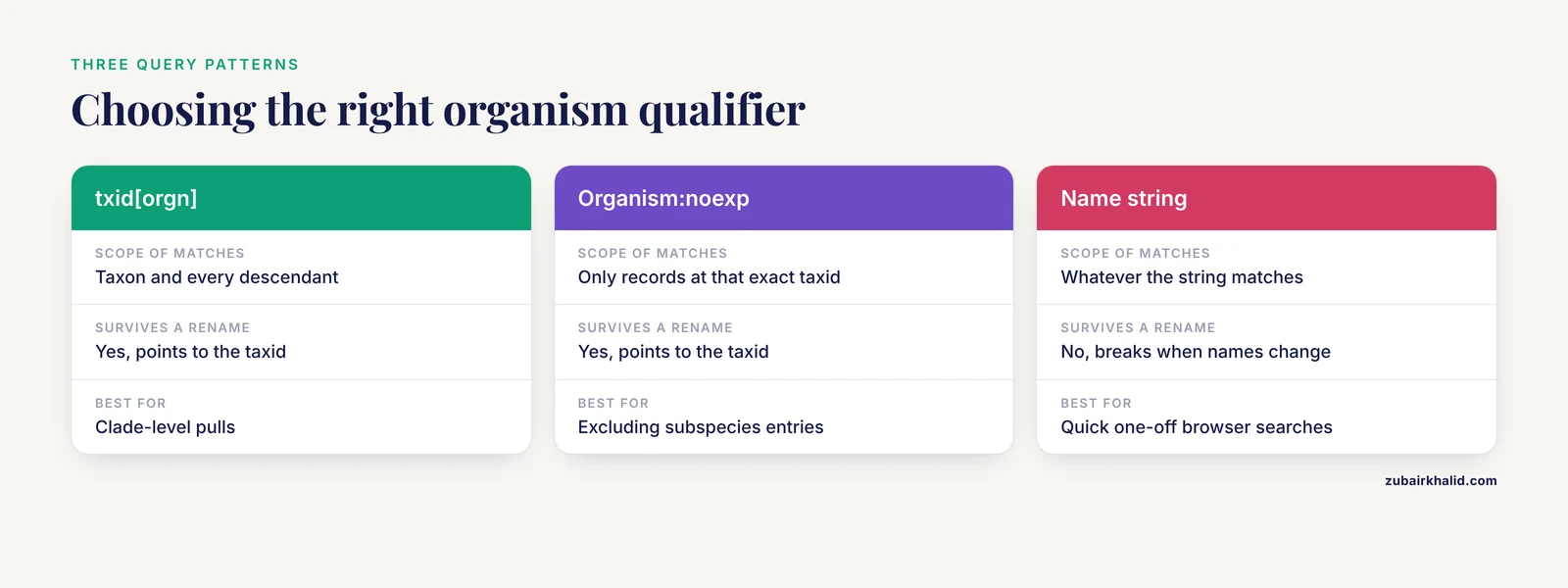
The organism field in Entrez accepts a taxid with the [orgn] qualifier. txid9612[orgn] matches the dog and every taxon below it. Search nucleotide records and ask only for the count:
curl -s "https://eutils.ncbi.nlm.nih.gov/entrez/eutils/esearch.fcgi?db=nuccore&term=txid9612%5Borgn%5D&retmax=0"The brackets must be URL-encoded, %5B for [ and %5D for ]. Trimmed output (your count will differ):
<eSearchResult>
  <Count>482117</Count>
  ...
</eSearchResult>
Three query patterns cover most needs:
- txid9612[orgn] includes all descendants, which is what you want for clade-level pulls.
- txid9612[Organism:noexp] matches only records assigned exactly to that taxid, excluding subspecies and children.
- Combine the organism term with properties and filters, for example txid9612[orgn] AND biomol_mrna[prop] for mRNA records, AND srcdb_refseq[prop] to keep only curated RefSeq sequences, or AND 500:2000[sequence length] for a length window.
The same syntax works in the protein and assembly databases. This is how clade-scale datasets get built. A mitogenomic study of the superfamily Truncatelloidea combined 15 newly sequenced mitochondrial genomes with existing NCBI records spanning 20 genera and 11 families [1], and a survey of avian cathelicidin genes enumerated genome assemblies for 72 species across 26 orders by querying the assembly database [2]. Both depend on taxid-based retrieval to enumerate everything available for a clade before adding new data. For assemblies, the query looks like this:
esearch -db assembly -query "txid8782[orgn] AND latest refseq[filter]"txid8782 is Aves, so this lists current RefSeq bird assemblies in one call.
Step 4. Fetch the Sequences
For a single known record, pass the accession straight to EFetch. NC_001422.1 is the 5,386 bp genome of coliphage phiX174, a classic test record:
curl -s "https://eutils.ncbi.nlm.nih.gov/entrez/eutils/efetch.fcgi?db=nuccore&id=NC_001422.1&rettype=fasta&retmode=text"Output:
>NC_001422.1 Coliphage phiX174, complete genome
GAGTTTTATCGCTTCCATGAG...
For bulk retrieval, use history mode. Search with usehistory=y:
curl -s "https://eutils.ncbi.nlm.nih.gov/entrez/eutils/esearch.fcgi?db=nuccore&term=txid9612%5Borgn%5D+AND+biomol_mrna%5Bprop%5D&retmax=0&usehistory=y"The response now includes WebEnv and QueryKey elements alongside the count. Copy the WebEnv string into EFetch:
curl -s "https://eutils.ncbi.nlm.nih.gov/entrez/eutils/efetch.fcgi?db=nuccore&WebEnv=PASTE_YOUR_WEBENV&query_key=1&rettype=fasta&retmode=text&retstart=0&retmax=500" > dog_mrna_part1.faExpected output, first lines (your accessions and sequences will differ):
>AB123456.1 Canis lupus familiaris isolate 7 cytochrome b (CYTB) gene, complete cds
ATGACATCAAAATCATCAGT...
Parameters that matter: rettype fasta returns FASTA, rettype gb returns the full GenBank flat file with all annotation, and retmode text pairs with both. retstart and retmax page through the result set. If you omit rettype and retmode you get XML by default, which is the most common reason a download "looks wrong".
With Entrez Direct, history handling is automatic:
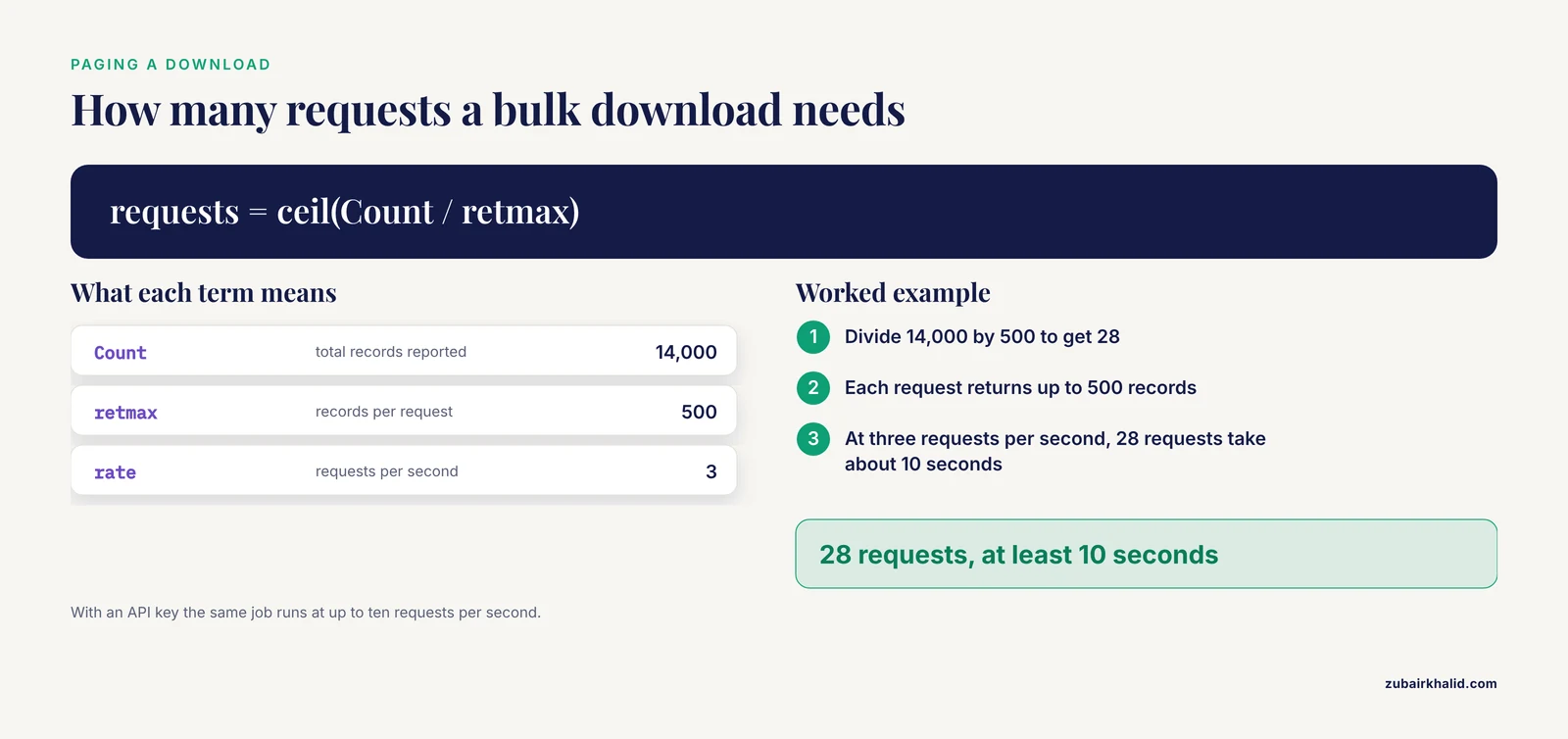
esearch -db nuccore -query "txid9612[orgn] AND biomol_mrna[prop]" | efetch -db nuccore -format fasta > dog_mrna.faWorked pagination calculation: if the Count element reports 14,000 records and you fetch 500 per request, you need 28 requests. At three requests per second that is at least 10 seconds of wall time, and a polite script adds a short sleep between calls. With an API key the same job runs at up to ten requests per second.
Step 5. Pull Read Runs from the SRA
Raw reads live in the SRA, and each run inherits an organism from its BioSample. Search the sra database the same way:
esearch -db sra -query "Sesamum indicum[orgn]" | esummary -format json | head -60Trimmed example of the fields you will see:
{
  "acc": "SRR24681013",
  "organism": {
    "sci_name": "Sesamum indicum"
  }
}
The acc field is the run accession, which carries the SRR prefix. Each summary also carries the taxid, the BioSample and BioProject accessions, the library strategy, and the platform.
Two retrieval patterns cover most projects. By organism, as shown above. By study, when a paper names its BioProject, add the accession to the query, replacing PRJNA000000 with the real accession:
esearch -db sra -query "Theobroma cacao[orgn] AND BioProject:PRJNA000000"Real-world scale shows why these links matter. A sesame genomics study combined five newly resequenced Egyptian genotypes with 19 public genome datasets pulled from the SRA to call variants across 24 genotypes [3], and a cocoa virome survey mined 109 public RNA-seq libraries from nine BioProjects to discover novel viruses [4]. In both cases, organism and BioProject links did the retrieval work.
Keep one caveat in mind: SRA organism metadata is submitter supplied, so a host-pathogen study may index runs under the host, the pathogen, or both depending on how the authors filed it. Check the BioSample attributes when counts look off.
Step 6. Map Accessions to Taxids Offline
With thousands of accessions, per-record Entrez calls are slow and rate limited. NCBI publishes the full mapping as flat files on the taxonomy FTP site:
wget https://ftp.ncbi.nlm.nih.gov/pub/taxonomy/accession2taxid/prot.accession2taxid.gz
wget https://ftp.ncbi.nlm.nih.gov/pub/taxonomy/accession2taxid/nucl_gb.accession2taxid.gz
Each file has four tab-separated columns with no header: accession, versioned accession, taxid, and the legacy gi identifier (a dash for records that never had one). Look up a protein accession, where the pattern ends with a tab character:
zgrep -m 1 "^P69905.1 " prot.accession2taxid.gzOutput (the last column is the legacy gi):
P69905.1 9606 ...The taxid 9606 is human. For nucleotide records from the WGS division there is a separate nucl_wgs file, which is far larger, so grep it only when you must. Withdrawn accessions are covered by the dead_* files in the same directory.
The same FTP area hosts taxdump.tar.gz, the full taxonomy as parseable files:
wget https://ftp.ncbi.nlm.nih.gov/pub/taxonomy/taxdump.tar.gz
tar -xzf taxdump.tar.gz
grep "^9612	" names.dmp
Output:
9612	|	Canis lupus familiaris	|		|	scientific name	|
9612	|	dog	|		|	genbank common name	|
9612	|	domestic dog	|		|	common name	|
names.dmp lists every name class for each taxid, including synonyms, so a grep for an old name can still lead you to the current taxid. nodes.dmp gives the parent taxid and rank for every node. merged.dmp maps retired taxids to their replacements, two columns per line. delnodes.dmp lists deleted taxids. The new_taxdump archive at https://ftp.ncbi.nlm.nih.gov/pub/taxonomy/new_taxdump/ adds lineage files such as taxidlineage.dmp for fast ancestor lookups. Date-stamp these files when you download them, because the contents change as taxonomy is updated.
Step 7. Filter BLAST Searches by Taxonomy
BLAST accepts the same Entrez organism syntax when it runs against online databases. Add -remote and -entrez_query:
blastn -query cytb_query.fa -db nt -remote -entrez_query "txid9612[orgn]" -outfmt "6 qseqid staxid sscinames pident length evalue" -max_target_seqs 20 -out hits.tsvTrimmed tabular output:
cytb_query_1	9612	Canis lupus familiaris	99.8	384	0.0
cytb_query_1	9612	Canis lupus familiaris	99.2	384	0.0
The staxid and sscinames columns report the subject's taxid and scientific name, which lets you audit the taxonomy of every hit. To exclude a clade, use NOT in the query, for example -entrez_query "txid9612[orgn] NOT txid9606[orgn]".
For local databases, build taxonomy in at database creation time. Prepare a two-column map file with one sequence ID and its taxid per line, separated by whitespace, then:
makeblastdb -in refs.fa -dbtype nucl -parse_seqids -taxid_map ref_taxids.txt -out myrefs
blastn -query cytb_query.fa -db myrefs -taxidlist keep_taxids.txt -outfmt "6 qseqid staxid pident evalue" -out local_hits.tsv
-taxidlist filters hits to the taxids (and their descendants) listed in a file, and -negative_taxidlist excludes them.
This is the exact pattern identification studies rely on. A molecular identification study of the digenean parasite Probolocoryphe uca in Kuwait Bay sequenced ITS1 and ITS2 regions from two life-cycle stages, compared them with digenean sequences already deposited in GenBank, and used BLAST alongside ClustalW and MUSCLE alignments, then PHYLIP and MEGA trees, to confirm the species identification [5]. The BLAST step only worked because GenBank records carry taxonomy, so the comparison set could be drawn from the right parasite clade.
Step 8. Automate the Chain with Entrez Direct
Entrez Direct (edirect) wraps E-utilities in Unix filters, so the whole name-to-sequences chain becomes two pipelines:
esearch -db taxonomy -term "Canis lupus familiaris" | efetch -db taxonomy -format xml > dog_taxon.xml
esearch -db nuccore -query "txid9612[orgn] AND srcdb_refseq[prop]" | efetch -db nuccore -format fasta > dog_refseq.fa
For volume work, export your API key so edirect sends it with every call:
export API_KEY=your_key_hereCheck the result before you trust it. Compare the Count from esearch with the record count on the taxonomy browser page, open the first and last records of any download, and confirm the organism in the FASTA headers matches the taxid you queried. A mismatch usually means the query string had a typo or an unencoded bracket.
Worked Example: Build a Genus-Level ITS Reference Set
Here is the full chain applied to a real research pattern. A study of the fungal genus Myochromella combined ITS sequences from NCBI GenBank with fungal amplicon data from the SRA, clustered everything at a 98 percent similarity threshold, and resolved eleven species, eight of them without formal names [6]. You can reproduce the retrieval half of that workflow for any genus.
- Resolve the genus to a taxid:
esearch -db taxonomy -term "Myochromella"The IdList returns the genus taxid. Record it.
- Pull GenBank ITS records:
esearch -db nuccore -query "Myochromella[orgn] AND internal transcribed spacer" | efetch -db nuccore -format fasta > myochromella_its_genbank.fa- Pull matching amplicon runs from the SRA:
esearch -db sra -query "Myochromella[orgn] AND AMPLICON[strategy]"Each hit is a run you can download with prefetch and fasterq-dump from the SRA Toolkit.
- Cluster the combined set at 98 percent:
cd-hit-est -i myochromella_its_all.fa -o myochromella_its_98.fa -c 0.98- Verify. Count the records before and after clustering, BLAST one representative per cluster against nt with -entrez_query "Myochromella[orgn]", and check that the top hits land inside the genus.
The same skeleton, taxonomy lookup, clade-filtered record pull, SRA pull, clustering, verification, transfers to bacterial marker genes, viral contig screening, or any DNA barcode gene.
Key Files and Commands at a Glance
| Resource | What it gives you | Where or command | Watch out for |
|---|---|---|---|
| , - | , - | , - | , - |
| Taxonomy Browser | taxid, lineage, per-database record counts | ncbi.nlm.nih.gov/taxonomy | Ambiguous names, always confirm the taxid |
| ESearch + EFetch | Programmatic search and FASTA or GenBank download | eutils.ncbi.nlm.nih.gov | URL-encode brackets, set rettype and retmode |
| Entrez Direct (edirect) | The same tools as shell filters | conda install -c bioconda entrez-direct | Export API_KEY for volume work |
| taxdump.tar.gz | nodes.dmp, names.dmp, merged.dmp, delnodes.dmp | ftp.ncbi.nlm.nih.gov/pub/taxonomy | Contents change, date-stamp your copy |
| accession2taxid files | Offline accession to taxid mapping | ftp.ncbi.nlm.nih.gov/pub/taxonomy/accession2taxid | nucl_wgs is huge, dead_* files cover withdrawn records |
| BLAST+ taxonomy options | Clade-filtered searches | -entrez_query with -remote, -taxid_map with makeblastdb | Local databases need -parse_seqids and a taxid map |
| SRA with BioSample and BioProject | Read runs tied to organism metadata | esearch -db sra | Organism metadata is submitter supplied |
Practical Tips for Reliable Retrieval
- Prefer taxids over names in every script. Names drift, taxids do not.
- URL-encode brackets in raw E-utilities URLs, %5B and %5D, or your query silently returns nothing.
- Ask for the count first with retmax=0, then decide how to page. This one habit prevents oversized downloads and surprise timeouts.
- Use history mode (usehistory=y, then WebEnv and query_key) for anything over a few hundred records. It is faster and it keeps the server-side result set stable while you page through it.
- Add srcdb_refseq[prop] when you need curated records, and drop it when you need everything, including direct submissions.
- Run einfo -db nuccore to list every indexed field when you cannot remember a filter name.
- Date-stamp every downloaded file, taxdump, accession2taxid, and sequence sets alike. Published analyses that combine new data with NCBI records, like the Truncatelloidea and sesame studies cited above, are only reproducible if the retrieval date and query strings are recorded.
- Sample-verify large pulls. Open three random records, check the organism line and the sequence length, and compare against the query you actually ran.
- Use [Organism:noexp] when descendants would pollute your dataset, for example when a genus taxid would drag in subspecies-level entries you do not want.
- Respect the documented rate limits, three requests per second without an API key and ten with one, and add a sleep between calls in loops.
Common Mistakes and Limitations
- Querying names instead of taxids. Strings like "Canis familiaris" break when nomenclature changes. Resolve the name to a taxid first, then query txid9612[orgn].
- Forgetting that descendants are included. txid9612[orgn] pulls subspecies and children. If you wanted exact matches only, add [Organism:noexp].
- Using a retired taxid. NCBI merges and deletes nodes as taxonomy evolves. An old taxid can return an empty IdList or silently redirect. Check merged.dmp and delnodes.dmp from a current taxdump, and note that the browser redirects merged taxids to the surviving node.
- Leaving brackets unencoded in URLs. The query returns a Count of 0 even though the browser shows thousands of records. Encode [ as %5B and ] as %5D.
- Omitting rettype and retmode in EFetch. You get XML when you expected FASTA. Add rettype=fasta&retmode=text for sequences.
- Passing a taxonomy UID to another database. efetch db=nuccore&id=9612 does not fetch the dog, it fetches whatever nucleotide record happens to carry internal UID 9612. Taxids are only unique within the taxonomy database. Get nuccore UIDs from esearch, or use the txid in the query.
- Running blastn against nt without -remote. The exact error is "No alias or index file found for nucleotide database [nt]". Add -remote for online searches, or install the database locally and keep it updated.
- Exceeding rate limits. E-utilities responds with HTTP 429 when you send too many requests per second. Throttle your loop and use an API key.
- Trusting submitter organism labels blindly. GenBank and SRA annotations are submitter supplied. Environmental samples carry uncultured taxids, and individual records can be mislabeled. Verify unusual identifications with BLAST and the taxonomy browser before you build a tree on them.
- Using stale local mapping files. accession2taxid and taxdump files change as records are added and taxonomy is revised. Re-download for each project, and use the dead_* files when accessions were withdrawn.
- Confusing accession prefixes. PRJNA marks a BioProject, SAMN a BioSample, SRR an SRA run, and GCA or GCF an assembly. Querying the sra database with an assembly accession returns nothing. Match the prefix to the database.
One limitation to carry through every project: the taxonomy database is a curated consensus that changes over time, sequence records can lag behind nomenclature, and SRA metadata reflects what submitters entered. Treat taxonomy-linked retrieval as a well-supported hypothesis about provenance, verify a sample of records, and document your query strings, download dates, and file versions in your methods.
Frequently Asked Questions
What is a taxid and where do I find one?
A taxid is the stable integer identifier that the NCBI Taxonomy database assigns to each organism node. Search the organism name at the Taxonomy Browser or with esearch -db taxonomy, and the number appears in the IdList and in the browser page URL.
Does txid[orgn] include subspecies and child taxa?
Yes, txid9612[orgn] matches records from that taxon and every taxon below it. Add the [Organism:noexp] qualifier when you want only records assigned exactly to that taxid.
How do I download every sequence for a genus in FASTA format?
Resolve the genus to a taxid, run esearch -db nuccore with txidXXXX[orgn] and usehistory=y, then call efetch with the WebEnv and query_key, paging with retstart and retmax. Entrez Direct compresses the same job into one pipe from esearch to efetch.
How do I map a long list of accessions to taxids offline?
Download the accession2taxid files from the NCBI taxonomy FTP site and grep your accessions. Each line gives the bare accession, the versioned accession, the taxid, and the legacy gi, so no network queries are needed after the download.
Why does an old taxid return no results?
NCBI merges or deletes taxids when names change or nodes are retired. Check merged.dmp for the replacement taxid and delnodes.dmp for deletions, and note that the Taxonomy Browser redirects merged taxids to the surviving node.
How do I restrict a BLAST search to one organism or clade?
Add -remote and -entrez_query "txidXXXX[orgn]" to an online search, or build a local database with makeblastdb -taxid_map and filter hits with -taxidlist or -negative_taxidlist. The staxid and sscinames output columns let you audit the taxonomy of every hit.
How do I find sequencing runs for an organism in the SRA?
Search the sra database with the organism name or txidXXXX[orgn], optionally combined with a BioProject accession from the paper. Each result summary carries the SRR run accession, the BioSample, and the library strategy.
How current is the NCBI taxonomy database?
NCBI curates it continuously and regenerates the downloadable files on a rolling schedule. Record the download date of taxdump and accession2taxid files in your methods, and re-download them for each new project.
Sources
- Mitogenomic phylogeny of Truncatelloidea with description of Aenigmula sinensis Tang, Han & Kong, sp. nov. (Mollusca, Gastropoda, Littorinimorpha, Truncatelloidea).
- Exploring diversity in avian immune defence: Insights from cathelicidin clusters.
- Exploring the genetic landscape of sesame: whole genome sequencing reveals distinct Egyptian lineages and SNP variability.
- Theobroma cacao Virome: Exploring Public RNA-Seq Data for Viral Discovery and Surveillance.
- Molecular identification of Probolocoryphe uca (Sarkisian, 1957; Digenea: Microphallidae) from Kuwait Bay using ITS1 and ITS2 sequences.
- Myochromella unveiled: exploring its global distribution through a public database of amplicons.