NCBI Taxonomy Lineage Retrieval: Step-by-Step Guide
By Dr. Zubair Khalid, DVM, MS, PhD ·

By the end of this guide you will be able to take any organism name or taxonomy identifier (TaxID) and produce its complete hierarchical lineage from the root of the tree down to the species or subspecies, using four different methods: the NCBI Taxonomy browser for one-off lookups, E-utilities for scripted retrieval, a local taxonomy dump for offline and large-scale work, and the command-line toolkit TaxonKit for production pipelines. You will also learn how to handle missing taxonomic ranks with Taxallnomy, fix the errors that most often break lineage workflows, and verify that the output is correct.
Here is what you need on hand before you start:
- A Linux, macOS, or Windows (WSL) machine with a terminal
curlor the Entrez Direct suite of Perl tools for E-utilities work- Python 3 if you want the local dump script in Step 4
- Conda or Homebrew if you plan to install TaxonKit
- A text file with one organism name or TaxID per line if you are working with a batch
Taxonomy lineage data is the connective tissue of nearly every sequence analysis. When researchers retrieved 111,350 Staphylococcus aureus genomes from GenBank for a global resistance study, they needed consistent lineage information to group isolates and track lineage dynamics across countries and decades [1]. When a dengue surveillance study in Thailand analyzed 92 envelope-gene sequences alongside all Thai dengue sequences from the NCBI virus database between 2000 and 2024, genotype and serotype assignments rested on having correct organism classification metadata attached to each accession [2]. Learning how to use NCBI properly begins with the Taxonomy database, because every sequence record in INSDC (the International Nucleotide Sequence Database Collaboration) is anchored to a node in this single hierarchical tree [3].
What the NCBI Taxonomy Database Is
The NCBI Taxonomy database is the reference classification that NCBI and INSDC use to organize all organisms that have sequence accessions. Every node in the tree has a unique, stable numeric identifier called a TaxID. Every sequence record in GenBank, the SRA, the Protein database, and NCBI Virus points to one of these nodes. Downstream tools, from BLAST taxonomy reports to metagenomic classifiers to genome assembly metadata, all assume you can map an accession to a TaxID and a TaxID to a lineage.
Within the tree, a node's lineage is the ordered chain of its ancestors, from the root (cellular organisms or the root viral node) down to the node itself. A taxonomic rank is the level a node occupies, such as species, genus, family, order, class, phylum, and superkingdom. Many nodes carry the rank value no rank because NCBI includes clades, like Opisthokonta or Laurasiatheria, that have no formal Linnaean rank but are useful groupings. This detail matters more than most beginners expect, and it drives the missing-rank problem described later.
NCBI Taxonomy is also a living database. Names and ranks change. In recent years NCBI has renamed several major bacterial and archaeal phyla (for example, Proteobacteria became Pseudomonadota), and old TaxIDs are periodically merged into new ones or removed from the tree entirely. Any NCBI taxonomy lineage retrieval workflow needs to cope with this churn, not just retrieve a string once.
Two curated extensions of the database are relevant to this guide:
- TaxonKit, a command-line toolkit written specifically for NCBI Taxonomy manipulation. It provides seven core subcommands that cover TaxID lookup by name, listing descendants, filtering, lineage retrieval and reformatting, and lowest common ancestor computation, and it is distributed under the MIT license through GitHub, Bioconda, and Brewsci [4].
- Taxallnomy, an algorithm that takes the NCBI tree and generates a hierarchically complete taxonomic table with a fixed column for each of the 41 taxonomic ranks currently found in NCBI Taxonomy, filling gaps in lineages where ranks are absent [3].
Core Concepts: TaxIds, Lineages, and Ranks
TaxIDs and Name Resolution
A TaxID is a plain integer. Escherichia coli is 562, Canis lupus familiaris (the domestic dog) is 9615, and SARS-CoV-2 is 2697049. Names are not reliable keys. The same string can refer to different organisms, spellings drift over time, and informal names like uncultured bacterium match many thousands of nodes. Always resolve names to TaxIDs once, store the TaxID in your metadata, and use the TaxID for every later operation.
You can resolve a name to a TaxID in three ways: search the Taxonomy browser by hand, use the E-utilities ESearch endpoint against the taxonomy database, or use taxonkit name2taxid locally [4].
The Lineage String and Why Ranks Go Missing
When you fetch a record, you typically receive two things: a flat lineage string (the ancestor names joined in order) and a structured list of ancestors with their ranks. The structured list is what you should parse. The flat string is convenient for humans but awkward for machines, especially when you want to extract, say, the family name for every record in a table.
The core problem: rank names are not evenly distributed through the tree. A dog's lineage runs through clades like Opisthokonta, Eumetazoa, and Gnathostomata, all marked no rank. If you build a fixed-width table with one column per rank, most rows will not have a value in every column. Taxallnomy was created precisely for this, because the authors found that processing bioinformatics data from a tree structure is far easier when the same information is presented as a table, and because some taxonomic ranks are missing in some lineages [3]. The algorithm either assigns a rank to an existing clade and embeds its name in the rank label (for example, Ord_Ornithischia for the dinosaur order) or interpolates a parent node when needed (for example, Cla_of_Ornithischia), producing a table with 41 hierarchical levels that stays compatible with the original NCBI tree [3].
Merged and Delisted TaxIds
NCBI occasionally merges one TaxID into another (for example, after a taxonomic revision) and, more rarely, delists a TaxID from the tree. The taxonomy dump ships two files that handle this: merged.dmp, which maps old TaxIDs to their replacements, and delisted.dmp, which lists TaxIds no longer in the tree. Any pipeline that joins old accession metadata to the current tree must apply these mappings first, or those records will drop out silently.
Choosing a Retrieval Method
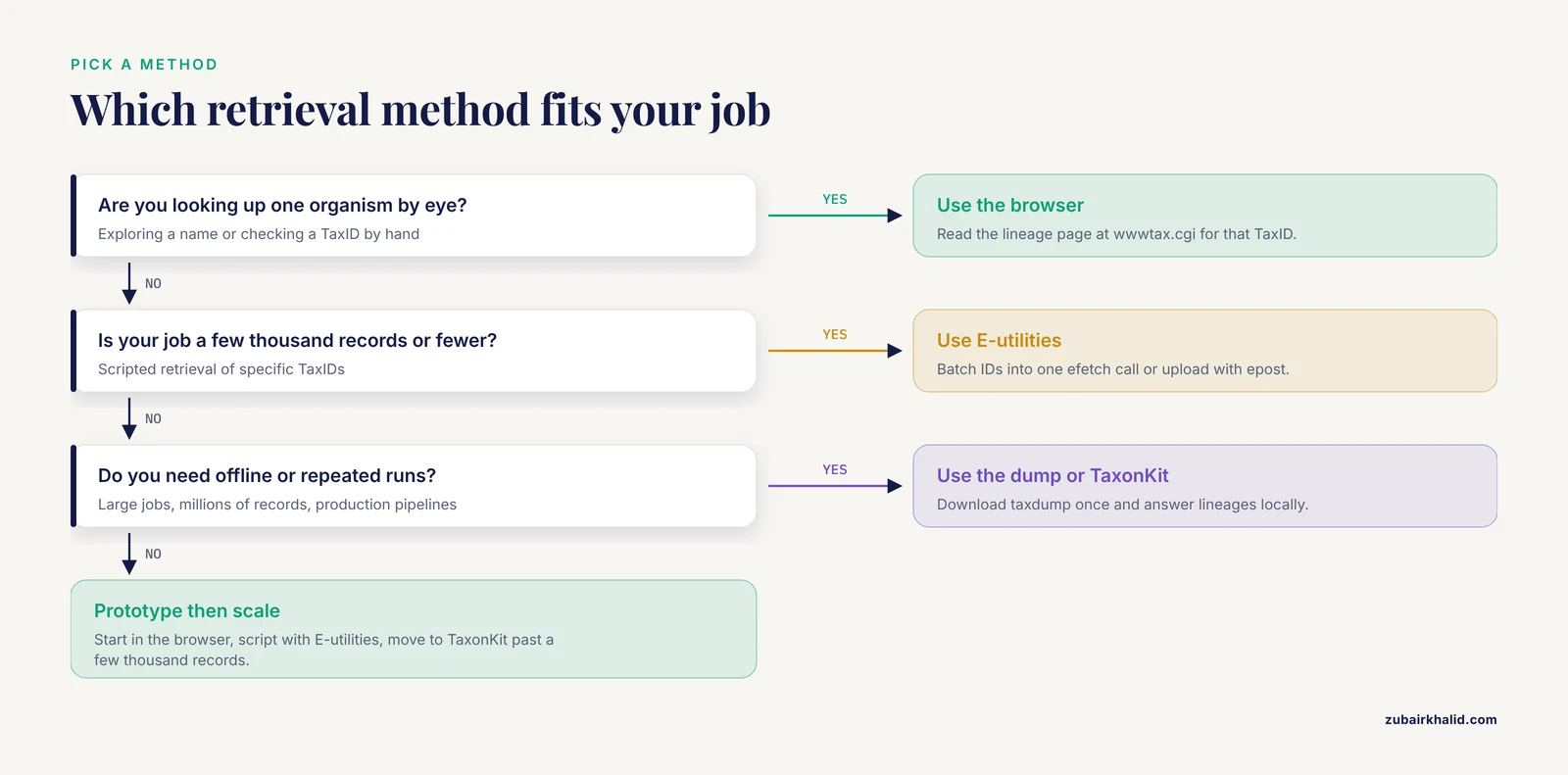
| Method | Best for | Scale | Output | Key caveat |
|---|---|---|---|---|
| , - | , - | , - | , - | , - |
| Taxonomy browser | Looking up one organism by eye | 1 to 10 | Human-readable lineage page | Manual, not reproducible |
| E-utilities (EFetch) | Scripted retrieval of specific TaxIDs | 1 to a few thousand | XML with LineageEx ancestors | Rate limits apply |
| Entrez Direct shell pipeline | Reproducible command-line workflows | Tens to thousands | Same XML through pipes | Requires installing edirect |
| Taxonomy dump + local script | Offline analysis, very large jobs | Millions | Whatever you script | Must refresh files |
| TaxonKit | Production pipelines on large files | Millions per run | TSV lineage and rank columns | Needs a local taxdump [4] |
| Taxallnomy | Rank-complete tables for statistics | Whole database at once | Fixed 41-column table | Rank names may be provisional [3] |
A reasonable rule: use the browser while you are exploring, E-utilities while you are prototyping, and TaxonKit or a local script once your job exceeds a few thousand records.
Step-by-Step NCBI Taxonomy Lineage Retrieval Walkthrough
The following walkthrough uses the domestic dog (TaxID 9615) and E. coli (TaxID 562) as running examples. Work through the steps in order on the first pass. Once you know which method fits your data size, you can jump straight to that step.
Step 1. Confirm the Organism on the NCBI Taxonomy Browser
Open the Taxonomy database at https://www.ncbi.nlm.nih.gov/taxonomy in any browser. This is the friendliest entry point for learning how to use NCBI's taxonomy resources.
- Type the organism name into the search box, for example
Canis lupus familiaris, and press Enter. - The results page lists matching nodes with their TaxIDs in parentheses. Click the correct one.
- On the record page, the
Taxonomy informationlink (or thewwwtax.cgiURL with the TaxID) shows the full lineage read from root to species. For the dog, the page lists entries such ascellular organisms,Eukaryota,Opisthokonta,Metazoa,Chordata,Mammalia,Carnivora,Canidae,Canis,Canis lupus, andCanis lupus familiaris. - Note the TaxID, the rank of the node (for the dog,
subspecies), and any names NCBI flags as synonyms or misspellings.
Why this step matters even if you plan to script everything: the browser is the ground truth for disambiguation. If your name search later returns an unexpected TaxID, check it here. Direct record URLs have the form https://www.ncbi.nlm.nih.gov/Taxonomy/Browser/wwwtax.cgi?id=9615, which you can bookmark for nodes you use often.
Step 2. Retrieve a Single Lineage with E-utilities
E-utilities are NCBI's official HTTP endpoints for programmatic database access. For lineage retrieval you use two of the nine endpoints:
esearch.fcgisearches a database and returns TaxIDs matching a term.efetch.fcgiwithdb=taxonomyreturns the full record for given TaxIDs in XML.
A single fetch with curl looks like this:
curl "https://eutils.ncbi.nlm.nih.gov/entrez/eutils/efetch.fcgi?db=taxonomy&id=9615"The response is an XML document. The parts you care about are the Lineage element (the flat ancestor string) and the LineageEx element (each ancestor as its own Taxon block carrying taxId, parentTaxId, and rank). A trimmed version of the response for the dog looks like this:
<Taxon taxId="9615" parentTaxId="9612" rank="subspecies">
  <TaxonName ClassCName="Binomial">
    <Genus>Canis</Genus>
    <Species>lupus</Species>
    <Subspecies>familiaris</Subspecies>
  </TaxonName>
  <Lineage>cellular organisms; Eukaryota; Opisthokonta; ...; Carnivora; Caniformia; Canidae; Canis; Canis lupus; Canis lupus familiaris</Lineage>
  <LineageEx>
    <Taxon taxId="131567" parentTaxId="1" rank="no rank">
      <TaxonName>cellular organisms</TaxonName>
    </Taxon>
    <Taxon taxId="2759" parentTaxId="131567" rank="superkingdom">
      <TaxonName>Eukaryota</TaxonName>
    </Taxon>
    <!-- ancestors continue down to Canis lupus (TaxID 9612, rank species) -->
  </LineageEx>
</Taxon>
Parse LineageEx, not the flat Lineage string, whenever you need ranks or TaxIDs for ancestors. Each ancestor block gives you the parent pointer, so you can rebuild the exact tree path, filter by rank, and join on stable integers.
Two parameters to know:
id: a single TaxID or a comma-separated list. Keep lists to a few hundred at a time in the URL.retmode: XML is the default fordb=taxonomyand is what you want.
If you need lineages for many organisms, request their TaxIDs in one call rather than looping one call per record. NCBI's E-utilities usage policy limits unauthenticated traffic to 3 requests per second and allows up to 10 requests per second when you include an API key, so always batch where you can and insert a small pause between calls in any loop.
Step 3. Batch Retrieval with Entrez Direct
Entrez Direct (the edirect suite) wraps the E-utilities in shell commands so you can chain them with pipes. Install it following the instructions on NCBI's Entrez Direct page, then put it on your PATH.
A basic chain that turns an organism name into a full XML record:
esearch -db taxonomy -term "Escherichia coli" | efetch -db taxonomy -mode xml | head -20Expected output is the same XML document you saw in Step 2, streamed through head so you can inspect the first 20 lines. The first line of the fetch output is the root <Taxon> tag with taxId="562" and rank="species".
For a file of TaxIDs, one per line:
cat taxids.txt
# 562
# 9615
# 2697049

epost -db taxonomy -input taxids.txt | efetch -db taxonomy -mode xml > lineages.xml
epost uploads the ID list to NCBI's server once and passes a reference downstream, which avoids stuffing thousands of IDs into one URL. The result file lineages.xml contains one Taxon block per input ID. Check completeness by counting blocks:
grep -c "<Taxon taxId=" lineages.xmlThe count should equal the number of lines in taxids.txt. If it is lower, some TaxIDs failed to resolve, which usually means a merged or delisted identifier (see Step 6 for the fix).
Step 4. Build a Local Lineage Service from the Taxonomy Dump
For anything large, offline, or repeated, download the whole tree once and answer lineage questions locally. NCBI publishes the dump as a compressed archive at https://ftp.ncbi.nlm.nih.gov/pub/taxonomy/taxdump.tar.gz. Unpacking it gives you, among others:
nodes.dmp: one row per node, pipe-delimited, with TaxID, parent TaxID, rank, and morenames.dmp: one row per name class per node, including the scientific namemerged.dmp: old TaxID to new TaxID mappingsdelisted.dmp: TaxIds removed from the tree
Download and unpack it:
mkdir -p taxdump
cd taxdump
wget https://ftp.ncbi.nlm.nih.gov/pub/taxonomy/taxdump.tar.gz
tar -zxvf taxdump.tar.gz
ls nodes.dmp names.dmp merged.dmp
Now a small Python script turns those files into a lineage lookup. This version walks parent pointers and joins names, which is the same logic every lineage tool implements:
import sys

def load_nodes(path="nodes.dmp"):
    nodes = {}
    with open(path) as fh:
        for line in fh:
            fields = [x.strip() for x in line.split("|")]
            tax_id = int(fields)
            parent = int(fields[3])
            rank = fields[4]
            nodes[tax_id] = (parent, rank)
    return nodes

def load_names(path="names.dmp"):
    names = {}
    with open(path) as fh:
        for line in fh:
            fields = [x.strip() for x in line.split("|")]
            tax_id = int(fields)
            if fields[2] == "scientific name":
                names[tax_id] = fields[3]
    return names

def lineage(tax_id, nodes):
    chain = []
    cur = tax_id
    while cur != 1:
        chain.append(cur)
        cur = nodes[cur]
    chain.append(1)
    chain.reverse()
    return chain

nodes = load_nodes()
names = load_names()
for tid in (562, 9615):
    chain = lineage(tid, nodes)
    labels = [names[t] for t in chain]
    print(tid, ";".join(labels))
Expected output (abridged with an ellipsis for the mid-tree clades):
562 cellular organisms;Bacteria;Pseudomonadati;...;Enterobacteriaceae;Escherichia;Escherichia coli
9615 cellular organisms;Eukaryota;Opisthokonta;...;Canidae;Canis;Canis lupus;Canis lupus familiaris
A few implementation notes:
nodes.dmpandnames.dmpare plain text, not gzipped, after unpacking. If you parse inside a pipeline, split on the pipe character and strip whitespace from each field.- Add a check for TaxIDs missing from
nodesand route them throughmerged.dmpbefore reporting them as errors. - Record the date you downloaded the dump. Store it next to the data, because the archive is refreshed on a regular basis and results should be traceable to a specific version.
Step 5. NCBI Taxonomy Lineage Retrieval at Scale with TaxonKit
TaxonKit implements this entire local workflow as fast, prebuilt subcommands and is the tool most production pipelines use for NCBI taxonomy lineage retrieval [4]. Install it from Bioconda or Brewsci [4]:
conda install -c bioconda taxonkit
# or
brew install brewsci/bio/taxonkit
TaxonKit reads the same dump files you downloaded in Step 4. By default it looks in the directory ~/.taxonkit, so put the unpacked files there or pass their location with the -d flag:
mkdir -p ~/.taxonkit
cp taxdump/*.dmp ~/.taxonkit/
Then resolve names to TaxIDs, fetch lineages, and reformat them into rank columns:
echo -e "562\n9615\n2697049" > taxids.txt

taxonkit lineage taxids.txt
Expected output is a tab-separated table with five columns: the input TaxID, the rank of the node, the flat lineage string, the lineage as TaxIDs, and the TaxIDs of the ranked ancestors. Abridged output for the first two records:
562	species	cellular organisms;Bacteria;Pseudomonadati;...;Escherichia;Escherichia coli	131567;2;...;561;562	...
9615	subspecies	cellular organisms;Eukaryota;Opisthokonta;...;Canis lupus familiaris	131567;2759;...;9612;9615	...
To convert the flat lineage into fixed rank fields, pipe into taxonkit reformat. The format string S,+,+,+ keeps the species rank plus three levels below it (where a plus sign stands for any rank below species, such as subspecies, serotype, or strain):
taxonkit lineage taxids.txt | taxonkit reformat -f S,+,+,+Other subcommands round out the workflow:
# name to TaxID
taxonkit name2taxid "Escherichia coli"

# list all descendants of a node (here, the genus Escherichia, TaxID 561)
taxonkit list -i 561

# lowest common ancestor of a set of TaxIDs
echo -e "562\n9615\n2697049" | taxonkit lca
The lca call prints the TaxID of the shallowest node all three inputs share, here the root (1), since the three organisms span bacteria, eukaryotes, and viruses. On real data, taxonkit lca is a fast sanity check that a group of TaxIDs really belongs under the clade you think it does.
A typical production pattern: after classification of reads or assemblies, extract the TaxID column from your results and push the whole file through the pipeline in one run:
cut -f3 blast_hits.tsv | sort -u | taxonkit lineage - | taxonkit reformat -f S,+,+,+ > lineages.tsvTaxonKit was benchmarked for speed and scalability across dataset sizes in its original publication, which is why it is the standard choice once files grow beyond the range where per-record E-utilities calls make sense [4].
Step 6. Handle Merged and Delisted TaxIds
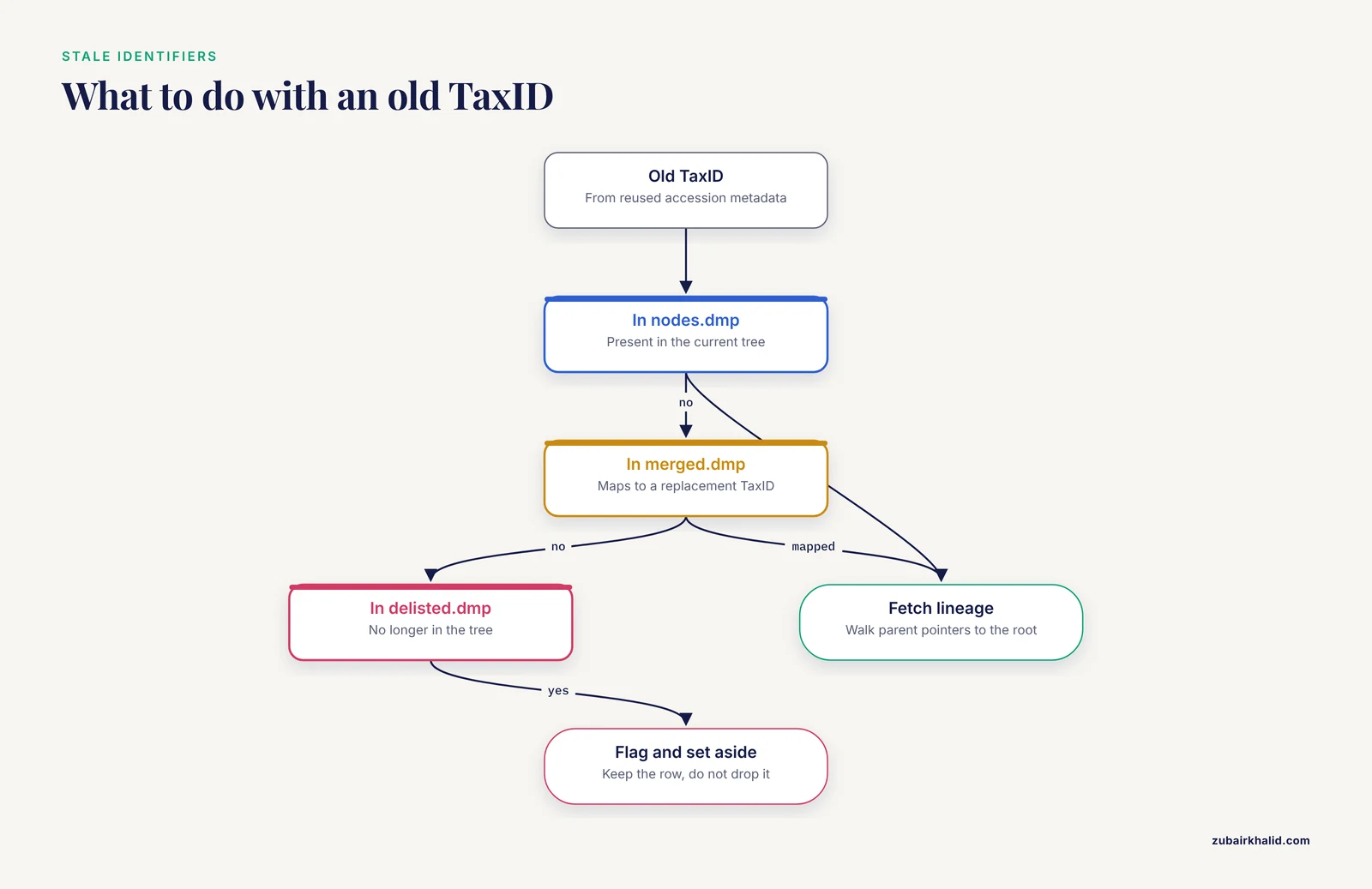
Before joining old metadata to the current tree, apply the change files. With TaxonKit, upgrade your local dump and let the tool resolve current identifiers. In a custom script, do the mapping explicitly:
def load_merged(path="merged.dmp"):
    merged = {}
    with open(path) as fh:
        for line in fh:
            fields = [x.strip() for x in line.split("|")]
            merged[int(fields)] = int(fields[3])
    return merged

merged = load_merged()
old = 72359
tid = merged.get(old, old)
Records whose IDs appear in delisted.dmp cannot be placed in the current tree at all. Keep those rows aside and flag them rather than letting a join drop them without a trace.
Step 7. Fill Missing Ranks with Taxallnomy
If your downstream analysis needs a fixed number of rank columns, for example one column each for the 41 ranks NCBI uses, use Taxallnomy [3]. It takes the NCBI tree and outputs a hierarchically complete table: every lineage gets a value at every rank level. Where an existing clade can plausibly carry a rank, the tool names the level after the clade (as in Ord_Ornithischia). Where a rank has to be inserted between existing nodes, it interpolates a parent node and marks the created level (as in Cla_of_Ornithischia). The result maintains compatibility with the original tree while giving you 41 node levels for every organism [3].
Practically, this means a study-wide table where family for one species and family for another really are comparable positions, which is what you need for plotting composition, filtering by rank, or training models on taxonomic features. Treat the generated names (Ord_, Cla_of_ prefixes) as placeholders for analysis rather than as formal nomenclature.
Step 8. Verify the Results
Three checks catch nearly every lineage error:
- Spot-check against the browser. Pick about one percent of records (or a fixed handful) and compare the command-line lineage to the
wwwtax.cgipage for that TaxID. Ranks and ancestor names should match. - Check cardinality. The number of output rows should equal the number of input TaxIDs. Fewer rows means silent failures, usually merged or delisted IDs.
- Check plausibility with LCA. Run
taxonkit lcaover groups that should share a clade, for example all your bacterial hits. If the result is not what you expect, at least one TaxID is wrong or stale.
Practical Tips for Reliable Lineage Retrieval
These NCBI taxonomy lineage retrieval tips come up again and again in real pipelines:
- Store TaxIDs, not names, in your master metadata table from the first day of a project. Names change and collide, integers do not.
- Snapshot the dump. Copy the
*.dmpfiles into the project directory with a file recording the download date. Re-running a finished analysis against a newer tree can change results, so you want the version that produced them. - Prefer the TaxID columns over the name columns when joining.
taxonkit lineageemits lineage TaxIDs alongside lineage names, and integers join faster and fail loudly rather than matching the wrong text [4]. - Cache aggressively. If a pipeline fetches the same 20 organisms from E-utilities in every run, fetch them once, save the XML, and read from disk thereafter.
- Use
epostfor long ID lists instead of embedding thousands of IDs in a single URL, and stay within NCBI's published request-rate limits. - When you need rank-complete output, decide early between
taxonkit reformat(fills the ranks you specify, leaves gaps where absent) and Taxallnomy (guarantees all 41 rank levels with provisional names) [3][4]. They answer different questions. - Keep strain-level information separate from the lineage. Subspecies, serotype, and isolate designations matter for surveillance work, but they are labile labels, and comparing them across studies requires care.
Common Mistakes and Limitations
These are the NCBI taxonomy lineage retrieval common mistakes that break real analyses, with fixes.
- Keying on names instead of TaxIDs. A search for a bacterial species name can match the species, a subspecies, a bioname variant, or an unrelated node with a similar string. Resolve every name to a TaxID once, eyeball ambiguous cases in the browser, and never re-resolve names midway through a project.
- Assuming every lineage has the same ranks. The most frequent structural error. A dog lineage passes through dozens of
no rankclades, while a viral lineage may have only a handful of ranked nodes between root and species. Building a table with hard-coded positional columns (third field is order, fourth is family) produces shifted, silently wrong data. Use rank-tagged output (taxonkit lineage,LineageEx, or the rank-labeled Taxallnomy table) and select ancestors by rank, not by position [3][4]. - Parsing the flat lineage string carelessly. The flat string is semicolon-delimited, which is convenient, but joining or splitting it without the paired TaxID column invites off-by-one errors. When you need ancestors as data, use the TaxID list that ships with the lineage output.
- Ignoring
merged.dmpanddelisted.dmp. Studies that reuse older accession lists (for example, panels of genomes or sequences collected from NCBI over multiple years [1][5]) will hit retired identifiers. Map old IDs to current ones before joining, and quarantine delisted IDs explicitly. - Letting a stale local dump drift from the live database. If your classifier ran on a 2024 dump and you fetch lineages from the live site in 2026, renamed ranks will not match. Pin one dump version per analysis and document it.
- Treating the lineage as a phylogeny. The NCBI tree is a curated administrative classification, not an inferred evolutionary tree. It is excellent for grouping and metadata, but for phylogenetic questions, studies build trees from the sequences themselves, as the Truncatelloidea mitogenomic framework did with maximum likelihood and Bayesian inference rather than relying on taxonomy ranks alone [6].
- Overloading E-utilities in a loop. One request per record, unthrottled, fails and can get your IP slowed or blocked. Batch IDs, respect the published rate limits, and switch to a local dump for anything large.
- Expecting strain, serotype, and isolate to be lineage ranks. These levels exist for many viruses and bacteria but not consistently across the tree. Tools let you append below-species levels to lineage output, but whether a given organism actually has such a node depends on what NCBI curators have entered.
- Reusing lineage text copied from a paper or a README. Lineages in publications reflect the tree as of the study date. Re-derive lineages from the database yourself, as the sesame population study did by integrating 19 public SRA datasets with its own five Egyptian whole-genome resequencing samples and then re-running downstream analyses [7].
One broader limitation: individual taxonomic judgments (species boundaries, placement of a genus) are curatorial decisions that change over time, and a lineage is only as current as the database snapshot behind it. For any question about a specific isolate or clinical specimen, the taxonomy metadata is a starting point, not a definitive identification.
How Researchers Use Lineage Data in Practice
Seeing where lineage retrieval sits inside published pipelines makes the workflow concrete.
- Viral surveillance and typing. Rift Valley fever virus work retrieved L, M, and S segment sequences from NCBI GenBank to validate a computational typing tool that assigns isolates to one of 15 lineages circulating in Sub-Saharan Africa, available as both a command-line tool and a web application [8]. Rotavirus A researchers pulled more than 8,500 genotype 2 gene sequences from the NCBI Virus Variation Resource to define a reference lineage framework for each gene segment [9]. Dengue surveillance in Thailand combined newly sequenced envelope genes with all Thai sequences from the NCBI virus database to track serotype and genotype turnover across two decades [2].
- Large-scale comparative genomics. The S. aureus resistance study assembled 111,350 GenBank genomes, linked phenotypic data through NCBI BioSample records, and grouped isolates to study lineage-specific evolution of beta-lactam and methicillin resistance [1].
- Biodiversity and phylogenetics. A mitogenomic study of the gastropod superfamily Truncatelloidea integrated 15 newly sequenced mitochondrial genomes with existing NCBI data covering 20 genera from 11 families to resolve two major clades and describe a new species [6]. A fungal study mined ITS sequences from NCBI-GenBank and amplicon data from NCBI-SRA, identifying 11 Myochromella species at a 98 percent sequence similarity threshold and mapping a largely Northern Hemisphere, endemic distribution [10]. An avian immunology study mined NCBI genome assemblies for 72 species across 26 orders, finding 190 putative cathelicidin genes of which 103 were previously undescribed [11].
- Virus discovery. The Theobroma cacao virome project processed 109 public RNA-seq libraries from nine BioProjects and screened assemblies against the NCBI non-redundant database, identifying ten putative novel viruses and a novel Badnavirus species [5].
Every one of these studies needed the same primitive: an accession or organism string resolved to a TaxID and expanded into a consistent lineage. The step-by-step methods above are that primitive.
Frequently Asked Questions
What is a TaxID in the NCBI Taxonomy database?
A TaxID is the unique integer identifier NCBI assigns to every node in its taxonomy tree, including species, genera, and unranked clades. Escherichia coli is 562 and the domestic dog is 9615. Always resolve names to TaxIDs once, store the integers, and use them for all downstream joins, because names collide and change while TaxIDs are stable.
How do I get the complete lineage for a single organism?
Search the name at the NCBI Taxonomy browser, click the correct node, and read the lineage from the record page, or fetch the same record programmatically with efetch.fcgi?db=taxonomy&id=<TAXID>. The XML contains a LineageEx block listing every ancestor with its TaxID and rank, from the root down to the node you requested.
Why do some lineages have missing taxonomic ranks?
NCBI includes many useful clades, such as Opisthokonta in eukaryotes, that carry the rank value no rank, so not every lineage has a node at every formal rank. Use rank-tagged output instead of positional columns, or use Taxallnomy, which generates a hierarchically complete table with one column for each of the 41 NCBI taxonomic ranks and fills gaps with provisional rank names.
What should I do when a TaxID is merged or delisted?
Download the taxonomy dump and consult merged.dmp, which maps retired TaxIDs to their replacements, before joining old metadata to the current tree. TaxIDs listed in delisted.dmp no longer belong to the tree and should be flagged and set aside rather than silently dropped by a join.
How can I retrieve lineages for thousands of sequences at once?
For a few hundred to a few thousand IDs, batch them into one E-utilities call or upload the list with epost and fetch the XML in one pass. Beyond that, download the taxdump and use TaxonKit, which reads a TaxID column and emits rank, lineage, and lineage-TaxID columns in one fast run, or script your own lookup from nodes.dmp and names.dmp.
Is the NCBI lineage the same as a phylogenetic tree?
No. The NCBI lineage is a curated administrative classification used to organize sequence records, not an inferred evolutionary tree. Use it for metadata, grouping, and filtering, but answer phylogenetic questions by building trees from the sequences themselves.
How often is NCBI Taxonomy updated?
The database is updated on an ongoing basis as curators add taxa, rename nodes, and merge or delist identifiers, and the FTP dump archive is refreshed accordingly. Pin a specific dump download for each analysis, record its date, and re-fetch only when you intentionally want the newest tree.
How do I include strain or serotype levels in the lineage output?
Use taxonkit reformat with a format string that extends below the species rank, such as S,+,+,+, where plus signs stand for any node below species including subspecies, serotype, and strain levels. Whether a given organism actually has nodes at those levels depends on curation, so missing fields are normal for many taxa.
Sources
- Comprehensive in silico genomic surveillance of β-lactam and methicillin resistance in Staphylococcus aureus: Machine learning-based analysis of lineage dynamics and global evolution.
- Dengue virus genetic diversity and lineage dynamics in Thailand: implications for surveillance and vaccine implementation.
- Taxallnomy: an extension of NCBI Taxonomy that produces a hierarchically complete taxonomic tree.
- TaxonKit: A practical and efficient NCBI taxonomy toolkit.
- Theobroma cacao Virome: Exploring Public RNA-Seq Data for Viral Discovery and Surveillance.
- Mitogenomic phylogeny of Truncatelloidea with description of Aenigmula sinensis Tang, Han & Kong, sp. nov. (Mollusca, Gastropoda, Littorinimorpha, Truncatelloidea).
- Exploring the genetic landscape of sesame: whole genome sequencing reveals distinct Egyptian lineages and SNP variability.
- Genomic surveillance of Rift Valley fever virus: from sequencing to lineage assignment.
- Sub-genotype phylogeny of the non-G, non-P genes of genotype 2 Rotavirus A strains.
- Myochromella unveiled: exploring its global distribution through a public database of amplicons.
- Exploring diversity in avian immune defence: Insights from cathelicidin clusters.