NCBI Taxonomy Database Download: Step-by-Step Guide
By Dr. Zubair Khalid, DVM, MS, PhD ·

By the end of this guide you will be able to download a single taxonomy record or the entire NCBI Taxonomy Database, turn the raw dump files into a clean taxon-to-lineage table, keep your pipeline safe when taxonomy identifiers get merged or retired, and verify that what you downloaded is complete and current. You will need a terminal with curl or wget, Python 3.8 or later, and optionally the NCBI Datasets command-line tools, EDirect, and taxonkit. Every command below has been written to run on Linux or macOS. Nothing here requires privileged access or paid software.
The NCBI Taxonomy Database is the organism backbone of most NCBI services. Genome assemblies, RefSeq records, GenBank submissions, and BLAST database partitions are all anchored to taxonomy identifiers. If you have ever followed a broader NCBI databases guide, you already know the pattern: identifiers, then bulk files, then programmatic access. Taxonomy follows the same pattern, and this article walks it end to end.
What the NCBI Taxonomy Database actually contains
The database is a curated hierarchy of organism names and classifications covering all taxonomic nodes, with links connecting each node to the sequence, genome, and publication data elsewhere at NCBI [1]. A node is anything with a taxonomy identifier, often called a tax ID. Escherichia coli is tax ID 562. Humans are tax ID 9606. Tax IDs are integers, stable once assigned, and the primary key you should carry through your own pipelines.
Three things inside the database matter most for a download workflow:
- Names and synonyms. One organism can carry a scientific name, several common names, synonyms from older classifications, and misspellings that NCBI preserves so searches still resolve.
- The parent-child hierarchy. Every node points at exactly one parent, which lets you reconstruct the full lineage from any leaf back to the root of life.
- Merge and deletion history. When taxonomists reclassify organisms, old tax IDs are either merged into a replacement or retired entirely. The database ships both change logs as files, and pipelines that ignore them silently lose organisms.
A concrete example shows why the third point matters. In a whole-genome reanalysis of Lacticaseibacillus casei genomes held in the NCBI genome database, ANI analysis and core-gene phylogenetics showed that fewer than half of the 45 genomes labeled as L. casei actually clustered with the species, the rest belonging to related species [2]. The taxonomy strings attached to a record and the biology of the sequence can disagree, and a sound download workflow should expect that.
Four ways to get taxonomy data, and when to use each
| Route | What you get | Best for |
|---|---|---|
| Taxonomy Browser (web) | One node at a time, browsed interactively | Looking up a single tax ID while reading a paper |
| NCBI Datasets (web or command line) | Structured data packages for one taxon or a whole clade | Fast, filtered downloads with metadata, now the recommended interface for taxonomy data at NCBI [1] |
| FTP taxdump archive | The complete database in flat *.dmp files | Building local lookup tables, whole-database analyses, offline pipelines |
| E-utilities and EDirect | XML summaries and full records per tax ID | Scripts that need fresh, per-node detail integrated with other NCBI queries |
Bulk tool developers rely on these same routes. The AlphaFold Structure Extractor accepts NCBI taxonomy IDs, RefSeq accessions, locus tags, and UniProt IDs and maps them to structure files, testing inputs in batches of up to 5,000 accessions drawn from the NCBI RefSeq and Taxonomy databases [3]. FASTA-Fetcher, a GUI tool built on Biopython and Entrez, automates bulk sequence retrieval by accession for users who cannot script, and validates its outputs for downstream tools such as MEGA, MAFFT, and BLAST [4]. The lesson from both tools is the same one that governs a taxonomy download: settle on stable identifiers, then automate retrieval around them.
Step-by-step walkthrough
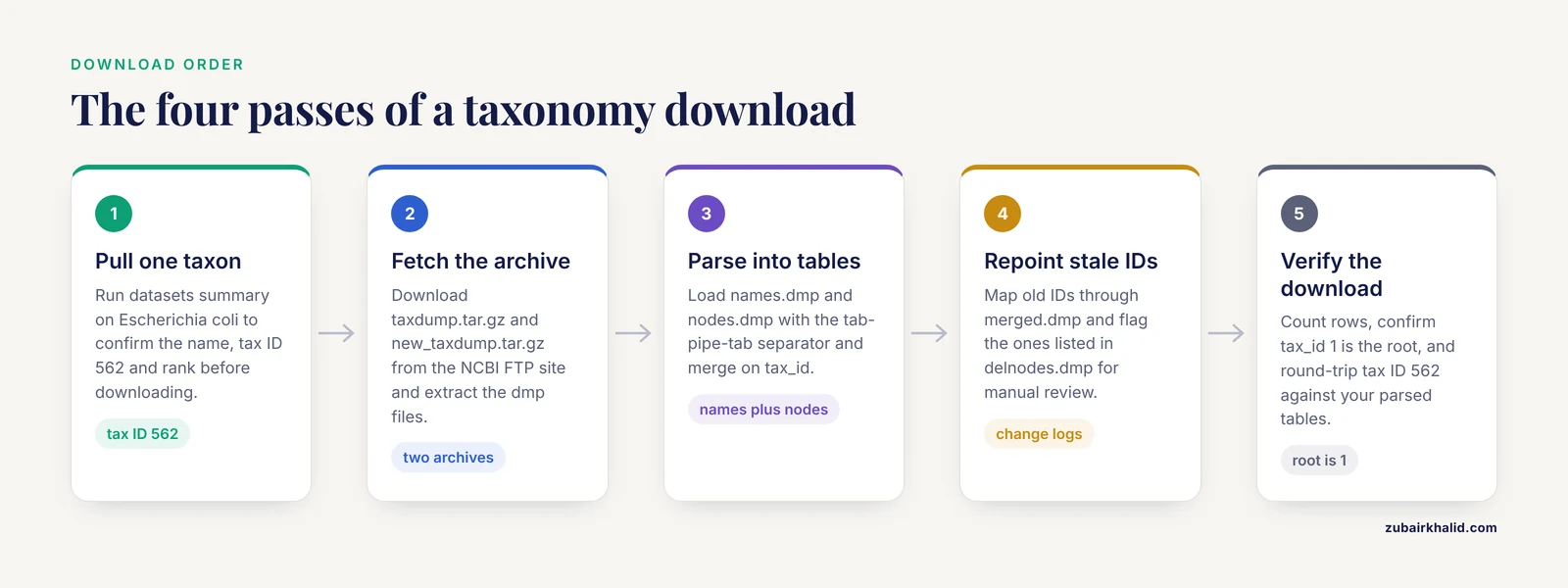
The walkthrough below builds in four passes. First a single record, then the whole archive, then transformation into analysis-ready tables, then verification. Each step lists the command, what the flags mean, and what output to expect.
Step 1. Install the Datasets command-line client
The datasets client is the supported command-line interface to NCBI Datasets, which has expanded programmatic access to taxonomic information through command-line tools and APIs [1].
# Option A, conda
conda install -c conda-forge ncbi-datasets-cli

# Option B, direct binary (Linux)
curl -o datasets \
  "https://ftp.ncbi.nlm.nih.gov/pub/datasets/command-line/v2/linux-amd64/datasets"
chmod +x datasets
Confirm the install:
datasets versionExpected output is a version string such as datasets v16.x.x followed by a note about the datareport version. Exact numbers change with releases, which is one reason to record the tool version in your methods.
Step 2. Pull a single taxon
Query before you download. A summary costs nothing and tells you whether your query resolved the organism you intended:
datasets summary taxonomy taxon "Escherichia coli"You will see a structured report with the current scientific name, the tax ID (562 for E. coli), the rank, the parent tax ID, and counts of children. This single command already answers a surprising number of everyday questions about how to use NCBI taxonomy data, such as which synonym NCBI currently prefers.
To download the record as a package:
datasets download taxonomy taxon "Escherichia coli" \
  --filename ecoli_taxonomy.zip

unzip -o ecoli_taxonomy.zip -d ecoli_taxonomy
The -filename flag sets the archive name, and unzip -o overwrites an existing folder so reruns do not fail. Inside the package you get a catalog listing plus a data report in JSON Lines format, one JSON object per taxonomy node. For pipeline use, ask for the report as raw JSON Lines without the zip wrapper:
datasets summary taxonomy taxon "Escherichia coli" --as-json-lines > ecoli.jsonlEach line is a self-contained record, which streams cleanly through jq, grep, or a per-line parser in Python.
Step 3. Download the complete taxonomy archive
For anything beyond a handful of nodes, download the full dump from the NCBI FTP site:
curl -o taxdump.tar.gz \
  "https://ftp.ncbi.nlm.nih.gov/pub/taxonomy/taxdump.tar.gz"

tar -xzf taxdump.tar.gz
Expected output of the extraction is a directory of files ending in .dmp, described in the next step. Before moving on, check the archive actually unpacked completely:
tar -tzf taxdump.tar.gz | head -20
ls -l *.dmp
A truncated download is the most common silent failure here. tar -tzf lists the archive contents without extracting, and if tar reports an unexpected end of file, delete the archive and re-run curl.
A second archive, new_taxdump, adds fields that the legacy format lacks:
curl -o new_taxdump.tar.gz \
  "https://ftp.ncbi.nlm.nih.gov/pub/taxonomy/new_taxdump/new_taxdump.tar.gz"

tar -xzf new_taxdump.tar.gz
Between the two archives you get every field the database publishes. The table below summarizes the files you will actually touch.
| File | Contents | Typical use |
|---|---|---|
names.dmp | Tax ID, name text, unique variant, name class (scientific name, synonym, common name, and more) | Resolving any name string to a tax ID |
nodes.dmp | Tax ID, parent tax ID, rank, division, genetic code flags, hidden flags | Rebuilding the hierarchy and lineage tables |
division.dmp | Division codes and names | Partitioning records by broad group |
gencode.dmp | Genetic code tables | Translation-aware workflows |
delnodes.dmp | Tax IDs removed from the database | Cleaning stale identifiers |
merged.dmp | Old tax ID paired with its replacement | Repointing identifiers after reclassification |
taxidlineage.dmp (new_taxdump) | Full ancestor list per tax ID | Fast lineage lookup without graph traversal |
rankedlineage.dmp (new_taxdump) | Lineage filtered to named ranks | Species-to-family summaries |
host.dmp (new_taxdump) | Host taxonomy for viruses and parasites | Virus host mapping |
typematerial.dmp (new_taxdump) | Type material designation | Taxonomic curation work |
Step 4. Parse the dump files into analysis-ready tables
The .dmp files are plain text with fields separated by \t|\t and lines terminated by \t|\n. This Python snippet loads the two core files into pandas frames:
import pandas as pd

names = pd.read_csv(
    "names.dmp",
    sep=r"\t\|\t",
    engine="python",
    header=None,
    names=["tax_id", "name_txt", "unique_variant", "name_class"],
)

nodes = pd.read_csv(
    "nodes.dmp",
    sep=r"\t\|\t",
    engine="python",
    header=None,
    names=[
        "tax_id", "parent_tax_id", "rank", "embl_code",
        "division_id", "inherited_div", "genetic_code_id",
        "inherited_gc", "mito_code_id", "inherited_mito",
        "hidden", "hidden_subtree", "comments",
    ],
)

scientific = names[names["name_class"] == "scientific name"]
taxa = nodes.merge(scientific[["tax_id", "name_txt"]], on="tax_id")
print(taxa.head())
Expected output is a table whose first rows are the deep ancestors of all life, such as 1, 1, no rank, root and the superkingdom rows for Bacteria, Archaea, and Eukaryota. If the merge produces more rows than nodes, you have more than one scientific name row per tax ID, which indicates the separator regex failed to strip the trailing field, the most common parsing bug with these files.
The simplest robust lineage lookup avoids graph traversal entirely by using taxidlineage.dmp from the new_taxdump archive. Each line lists a tax ID followed by its full ancestor chain from the root down. Load it into a dictionary keyed by tax ID and you have lineage retrieval in constant time.
If you prefer a maintained command-line tool, taxonkit reads the same dump files:
taxonkit list --ids 562 --indent "" | wc -lThis prints the number of taxa in the entire E. coli clade, the node plus every descendant. A second useful call resolves lineages for a file of IDs:
taxonkit lineage --taxid-field 1 ids.txt > lineages.txtThe taxonomy graph is what powers larger comparative systems. The NAUniSeq diagnostic-sequence algorithm, for example, downloaded complete taxonomy data from the Taxadb database and RefSeq sequences, built a phylogenetic tree with NetworkX, and assigned sequences to graph nodes to find organism-unique markers for detection assays [5]. The same local-hierarchy pattern works with a fresh taxdump: traverse from your target node outward to enumerate close relatives, then use those relatives as the negative set.
Step 5. Handle merged and deleted tax IDs
After every reclassification, NCBI writes the change into merged.dmp (old tax ID, new tax ID) or delnodes.dmp (a lone tax ID with no replacement). Repoint stale identifiers before mapping anything else:
merged = pd.read_csv(
    "merged.dmp", sep=r"\t\|\t", engine="python", header=None,
    names=["old_tax_id", "new_tax_id"],
)
deleted = pd.read_csv(
    "delnodes.dmp", sep=r"\t\|\t", engine="python", header=None,
    names=["tax_id"],
)

stale = ~query_ids.isin(taxa["tax_id"])
repointed = query_ids[stale].map(
    merged.set_index("old_tax_id")["new_tax_id"]
)
still_missing = set(repointed.dropna()) - set(taxa["tax_id"])
print(f"deleted, no replacement: {still_missing & set(deleted['tax_id'])}")
The output separates identifiers that were renamed (safe to repoint) from identifiers that were deleted outright (require manual review). Pipelines that skip this step produce one of two failure modes, either a crash on a missing foreign key or, worse, an organism silently dropped from a count table.
Step 6. Use E-utilities and EDirect for per-record detail
When a pipeline needs a fresh, authoritative record for specific tax IDs rather than a bulk snapshot, E-utilities is the right tool. EDirect wraps the same endpoints in Unix-friendly commands:
# Install EDirect
sh -c "$(curl -fsSL https://ftp.ncbi.nlm.nih.gov/entrez/entrezdirect/install-edirect.sh)"

# Fetch the full record for E. coli as XML
efetch -db taxonomy -id 562 -format xml

# Same thing over plain HTTP, no install required
curl "https://eutils.ncbi.nlm.nih.gov/entrez/eutils/efetch.fcgi?db=taxonomy&id=562"
The XML contains the full lineage, the rank string, and a preformatted LineEx field that spells the lineage out rank by rank, which saves you from walking nodes.dmp for one-off lookups. Searching by name uses esearch:
esearch -db taxonomy -term "Streptococcus pneumoniae[SCIN]" | efetch -format docsumThe [SCIN] field qualifier restricts the search to scientific names, which prevents a common-name synonym from hijacking the query. One operational rule to respect: without an API key, E-utilities allows up to three requests per second, and a registered API key raises that to ten. Sleep between calls in any loop, or NCBI will throttle the script.
Step 7. Verify the download
Verification is quick and worth a fixed place in every run:
- Count rows.
wc -l nodes.dmp names.dmpshould return counts in the low hundreds of thousands for nodes and roughly double that for names, and the counts should be stable or slowly growing between months. - Confirm the root. The row with
tax_idequal to 1 innodes.dmpmust be the root, with itself as parent. - Check the change logs. New entries in
merged.dmprelative to your previous download tell you what your pipeline will encounter in old datasets. - Round-trip a known record. Ask
datasets summary taxonomy taxon 562and confirm the name and lineage match what your parsed tables return.
Researchers who build reference databases on top of the taxonomy perform this kind of check as part of curation. Ribovore, the rRNA quality-control package used in GenBank submissions, includes the ribodbmaker program, which builds high-quality ribosomal RNA datasets from different taxonomic groups by comparing candidate sequences against profile hidden Markov models and covariance models of rRNA sequence and secondary-structure conservation [6]. MetaZooGene, a marine barcode reference portal, stays synchronized with NCBI GenBank and BOLD and provides mapping tools for assembling reference sequence compilations for selected genes, taxonomic groups, and ocean regions [7]. Both projects depend on a taxonomy snapshot that is current and internally consistent, which is exactly what the verification pass above establishes.
Common Mistakes and Limitations
Using name strings as join keys. Names are ambiguous, misspelled, and reclassified. A search for a genus name can also hit species names, homonymous genera in different kingdoms, and historical synonyms. Resolve every name to a tax ID once, at ingest, and carry the tax ID everywhere.
Ignoring merged.dmp and delnodes.dmp. Tax IDs get merged after reclassification and get deleted when a taxon is abandoned. If your pipeline ingests old metadata, an unhandled merged ID is a silent data loss bug. Build the repointing step from the change logs into every ingest.
Treating the NCBI hierarchy as a peer-reviewed phylogeny. The taxonomy is a curation artifact that balances consistency, nomenclatural rules, and the published literature, and it is not a fully resolved evolutionary tree. The Lacticaseibacillus casei example above makes the practical version of this point clear: before using genome records for species-level analysis, the authors recommended reverifying taxonomic assignments with ANI and phylogenetic analysis, because labels in the genome database can disagree with the sequence evidence [2]. Similar caution applies downstream of any taxonomy download that drives species-level inference.
Caching the archive indefinitely. NCBI updates the taxonomy files continuously, and a stale local copy drifts out of sync with current sequence-level annotations. Re-download on a schedule, stamp the archive version in your pipeline logs, and diff merged.dmp against the previous version as your update notice.
Assuming a clade means what the name says. The hidden and hidden_subtree flags in nodes.dmp mark nodes suppressed in the browser, usually unclassified environmental samples or informal groupings. Expanding a node by naive recursion can pull in thousands of uncultured organisms whose placement is provisional. Filter on rank and the hidden flags before expanding.
Bypassing rate limits. Scripts that hammer E-utilities at full loop speed get throttled. Respect the documented request rates, batch IDs into a single efetch call where possible, and prefer the FTP archive or Datasets client for bulk needs.
Expecting the taxonomy alone to solve identification. The taxonomy provides names and structure, not the evidence for species calls. That evidence lives in sequences and genome comparisons. The Ribovore package exists precisely because raw rRNA submissions vary in quality, length, and origin, and its model-based checks are what make taxonomy-based rRNA curation trustworthy [6]. Whole-genome studies similarly verify labels with ANI rather than trusting annotation [2].
Assuming GUI tools remove all complexity. Tools such as FASTA-Fetcher genuinely lower the barrier to bulk retrieval by accession and validated their outputs for compatibility with MEGA, MAFFT, and BLAST [4]. But the identifier list you feed them still has to be correct, which loops back to the taxonomy table you built in Step 4.
A final scope note for applied readers. This guide is about downloading and structuring taxonomy data, and it does not attempt to adjudicate disputed species boundaries, which is a research question that individual studies answer with ANI, core-gene phylogenies, or type-material comparisons [2] [8].
NCBI Taxonomy Database Download Tips
Pin tax IDs in your own schema. Store the tax ID as the primary organism key and treat names as display strings. Every identifier in a well-behaved pipeline resolves through a table you control.
Record the archive date next to every derived artifact. A lineage table built from a January archive is not interchangeable with one built in September. A one-line note in the pipeline log naming the file URL and download date makes results reproducible.
Prefer structured reports over scraping. The NCBI Datasets interfaces were built to make browsing, searching, and downloading more effective, with expanded command-line and API access and improved query handling that connects taxonomy to gene and genome data [1]. A JSON Lines report is machine-parseable and versioned. Copying values out of a browser page is neither.
Use taxonomy as the backbone of bulk retrieval. Clade-aware bulk downloads are a standard pattern across the literature. The AlphaFold Structure Extractor maps taxonomy IDs, RefSeq accessions, and locus tags to predicted structure files in PDB, mmCIF, bCIF, or PAE JSON formats, and separately generates an ID-mapping file that traces every input identifier to a standard accession while reporting unmapped IDs [3]. Avian immune-defense surveys mined the genome assemblies available in NCBI across 72 species from 26 orders to characterize cathelicidin gene clusters [9]. Mitochondrial phylogenomics studies integrate newly sequenced genomes with existing NCBI records to resolve superfamily-level relationships [8]. In every case the taxonomy ID is the query handle that turns a question about organisms into a concrete download.
Plan the mapping file from day one. Any bulk pipeline should emit an identifier-mapping report exactly as the AlphaFold extractor does, tracing each input to its resolved accession and flagging unmapped inputs [3]. When a colleague asks why a sample vanished from the analysis, that file is the answer.
Match marker genes to the right taxonomic breadth. If your goal is a reference set of 16S, 18S, or 28S sequences, remember that the SSU rRNA gene is the standard for bacterial and archaeal identification while the nuclear 18S and 28S genes serve barcode and phylogenetic roles across eukaryotic groups, and that NCBI receives these sequences in high volume with variable quality, which is why model-based curation tools exist before any taxonomy-based filtering [6].
Curate before you publish a derived database. The pattern seen in successful derived resources is consistent. PneumoWiki integrates genomic data for 43 Streptococcus pneumoniae strains with annotation from NCBI RefSeq, curated by hand into interlinked pan-genome pages [10]. OrthoMaM bases its 15,868 orthologous mammalian CDS alignments and one-to-one orthology assignments on NCBI annotation and offers complete or filtered downloads [11]. The Triterpene RDF database of 532 curated plant proteins links records out to the UniProt Knowledgebase [12]. The common thread is deliberate curation layered on top of a bulk NCBI download, never raw download alone.
For workflows you plan to share, encapsulate the environment. The Persea americana Genome Database ships its transcriptome workflows as three Docker-encapsulated Snakemake pipelines to eliminate manual software configuration [13]. A pinned datasets binary, a pinned Python environment, and a pinned taxonomy archive make your taxonomy-dependent workflow behave the same way on someone else's machine.
Automate gene- and genome-level links when the use case demands it. When a project needs predicted genes across many newly available genomes, homology- and ab initio-based pipelines such as TGP-WEB, which used fungal protein sequences from the NCBI RefSeq database among its inputs, recovered over 90 percent of reported genes in the large majority of benchmarked genomes and enabled taxonomy clarification across dozens of strains [14]. The taxonomy download is the front door to that kind of downstream automation.
Frequently Asked Questions
How often is the NCBI taxonomy updated?
NCBI updates the taxonomy files on a rolling basis rather than on a fixed calendar, so the practical rule is to re-download before each analysis cycle instead of caching an old archive. The change logs, merged.dmp and delnodes.dmp, tell you what moved since your last download.
What is the difference between taxdump and new_taxdump?
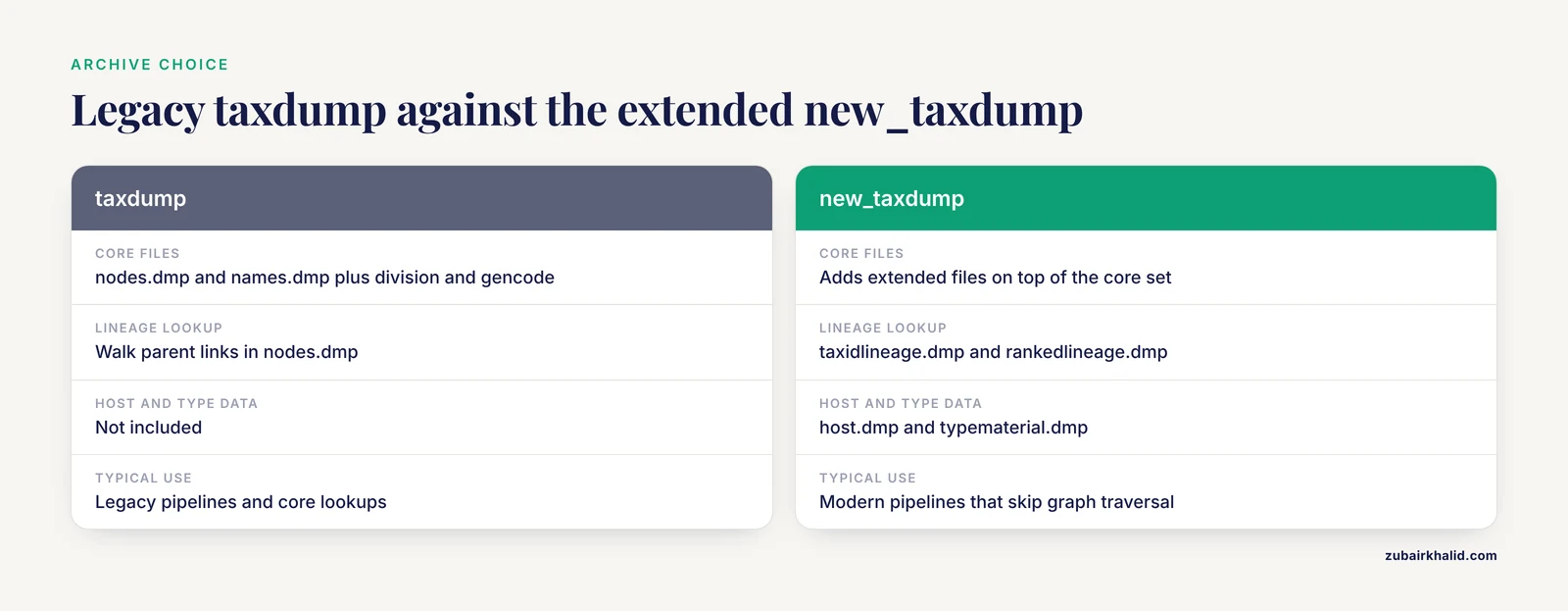
taxdump.tar.gz is the legacy archive with the core *.dmp files such as nodes.dmp and names.dmp. new_taxdump.tar.gz adds extended files such as full lineage tables, host associations, and type material. Most modern pipelines download both, because the extended files save graph traversal work.
How do I find a taxonomy ID without downloading anything?
Search the NCBI Taxonomy Browser on the web, or run datasets summary taxonomy taxon "Escherichia coli" on the command line. Both return the tax ID, the current scientific name, the rank, and the parent node in seconds.
Can I download only a clade, such as all mammals?
Yes. With the Datasets client, summarize or download the clade's root node and work from the returned children, or take the full archive and extract the subtree by walking parent-child links from the mammalian root. The full-archive route gives you the complete subtree in one deterministic file.
Why did a taxonomy ID stop working?
The ID was either merged into a replacement ID after reclassification or deleted when the taxon was abandoned. Check the ID against merged.dmp first and repoint it, then check delnodes.dmp to confirm a true deletion.
Do I need an API key for E-utilities?
Not for light use, but unkeyed access is limited to about three requests per second while a registered API key raises the ceiling to about ten. Any script running a loop over many tax IDs should register for a key and throttle itself.
How should I cite the NCBI Taxonomy Database in a paper?
Cite the taxonomy resource itself with its URL, and cite the current methods paper describing the Datasets interface when you used those tools for retrieval [1]. Follow the citation format your target journal requires and state the download date or archive version in your methods section.
Is the NCBI taxonomy the same thing as a phylogenetic tree?
No. It is a curated naming hierarchy that is broadly consistent with current systematics, but it contains informal and provisional nodes and is not a resolved phylogeny. Build phylogenies from sequences and verified genome data, and use the taxonomy as the indexing layer [2].
Sources
- NCBI Taxonomy: enhanced access via NCBI Datasets.
- [[Evaluating the taxonomy of Lacticaseibacillus casei in National Center for Biotechnology Information genome database based on whole-genome sequence analysis].](https://pubmed.ncbi.nlm.nih.gov/42543226/)
- AlphaFold Database Structure Extractor: a web server and API to download AlphaFold structures using common protein accessions.
- FASTA-Fetcher: A Multicolumn Tool for Bulk Retrieval of NCBI Sequences in Plant-Biotic Stress Research.
- Advancing microbial diagnostics: a universal phylogeny guided computational algorithm to find unique sequences for precise microorganism detection.
- Ribovore: ribosomal RNA sequence analysis for GenBank submissions and database curation.
- MetaZooGene Atlas and Database: Reference Sequences for Marine Ecosystems.
- Mitogenomic phylogeny of Truncatelloidea with description of Aenigmula sinensis Tang, Han & Kong, sp. nov. (Mollusca, Gastropoda, Littorinimorpha, Truncatelloidea).
- Exploring diversity in avian immune defence: Insights from cathelicidin clusters.
- PneumoWiki: a pan-genome-based database for the pathogen Streptococcus pneumoniae.
- OrthoMaM v12: a database of curated single-copy ortholog alignments and trees to study mammalian evolutionary genomics.
- Triterpene RDF: Developing a database of plant enzymes and transcription factors involved in triterpene biosynthesis using the Resource Description Framework.
- PAGD: the Persea americana Genome Database and a Docker-based transcriptome analysis workflow.
- TGP-WEB: A Server for Automatic Gene Prediction of Trichoderma Genomes.