How to Use NCBI Taxonomy to Navigate Related Sequences and Genomes
By Dr. Zubair Khalid, DVM, MS, PhD ·

By the end of this guide you will be able to find a taxonomy ID (taxid) in the NCBI Taxonomy Browser, walk a lineage up to a genus or family, pull every nucleotide and protein record for a species or an entire subtree, follow taxonomy links into the Genome and Assembly databases, and download the full taxonomy tree files for offline work. You will also be able to run the same queries from the command line with E-utilities and the NCBI Datasets command line tools.
What you need on hand:
- A web browser for the point-and-click workflow
- A computer with a Unix-like shell (Linux, macOS, or Windows Subsystem for Linux) if you want the command-line sections
- Optionally, Entrez Direct (also called EDirect) and the NCBI Datasets command line tools installed
- No login or account is required for any query shown here
What the NCBI Taxonomy Database Is
NCBI Taxonomy is the curated classification of every organism represented in NCBI sequence databases. Every sequence in GenBank, RefSeq, the Protein database, the Genome database, SRA, and Assembly is stamped with a single taxonomy ID. The taxonomy covers named species, strains, isolates, and higher ranks, and it is updated continuously as nomenclature and classification change.
Three concepts carry the whole workflow:
- Taxid. A stable integer identifier. Escherichia coli is taxid 562, Homo sapiens is 9606, the dog (Canis lupus familiaris) is 9615, the cat (Felis catus) is 9685, and SARS-CoV-2 is 2697049. Taxids survive most renaming events, which is why scripts should key on taxids rather than names.
- Lineage. Every taxid sits in a chain of ranks. The dog reads as cellular organisms, Eukaryota, Opisthokonta, Metazoa, Chordata, Mammalia, Carnivora, Canidae, Canis, Canis lupus, Canis lupus familiaris. The lineage is what lets one query pull records from a whole clade.
- Entrez linking. Taxonomy is an Entrez database like Nucleotide, Protein, Genome, and Assembly. Because they share the same search engine, a taxid can filter any other database, and a taxon page links directly to the records and genomes filed under that taxon.
This is the backbone of any practical NCBI databases guide. Once you can jump from a taxid to its sequences and genomes, the rest of NCBI becomes navigable.
A Step-by-Step NCBI Taxonomy Browser Tutorial
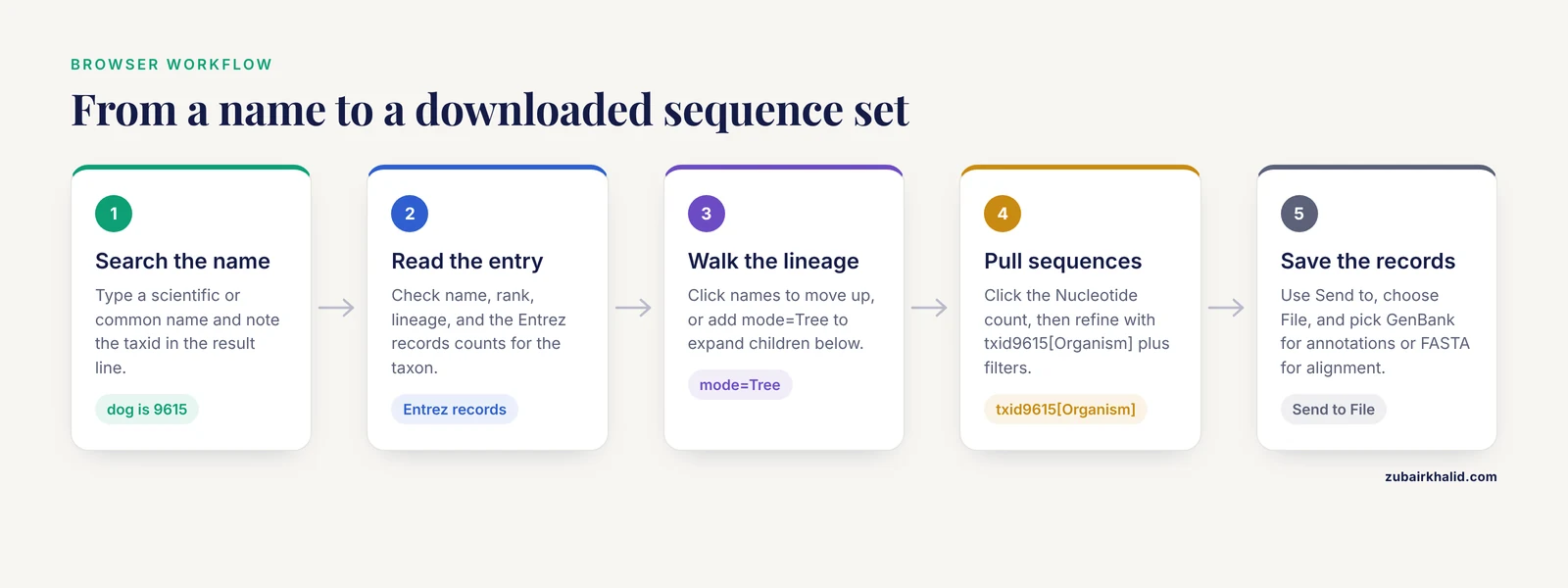
This section walks the browser from an empty search box to a downloaded sequence set, step by step. The dog genome (taxid 9615) is used as the running example because it exercises several rank levels, and E. coli (taxid 562) appears in the command-line steps.
Step 1: Search for an organism
Open the Taxonomy database search page at https://www.ncbi.nlm.nih.gov/taxonomy and type a scientific name, a common name, or a partial name. Searching for Canis lupus familiaris returns one entry. Searching for just familiaris returns a list, because the substring matches taxa across kingdoms.
Two practical habits at this stage:
- Type enough of the scientific name to disambiguate. Identical names exist in unrelated groups, and the search results list shows the rank and division (for example, Mammal versus Insect) next to each hit.
- Note the taxid in parentheses in the result line. You will reuse it constantly. For the domestic dog it is 9615.
You can also jump straight to a known taxid with the browser URL, which takes an id parameter:
https://www.ncbi.nlm.nih.gov/Taxonomy/Browser/wwwtax.cgi?id=9615Step 2: Read the Taxonomy Browser entry
The entry page for taxid 9615 shows several panels that each answer a different question:
- Name and authority. The scientific name, authorship, and homonym disambiguation if any. This tells you which naming convention NCBI uses, which matters because taxonomic opinion changes over time and NCBI tracks one current view.
- Rank and lineage. The full lineage with each rank labeled. The lineage names are clickable links that take you up the tree.
- Entrez records table. A row of counts linking to records in Nucleotide, Protein, Genome, Assembly, Structure, SRA, PubMed, and other databases that are tagged with this taxid or its subtree. These counts are your entry points into sequences and genomes.
- Taxonomy ID and databases line. The taxid itself plus cross-references to resources such as UniProt, GenBank division codes, and the Encyclopedia of Life.
A useful but easy-to-miss control is the Entrez records selector above the lineage display. It changes how the top of the page behaves, letting you switch the record counts and browse mode between the exact taxon and its subtree.
Step 3: Navigate the lineage and the interactive tree
Click any name in the lineage to move up. To explore downward, switch the browser into tree mode by appending mode=Tree to the URL:
https://www.ncbi.nlm.nih.gov/Taxonomy/Browser/wwwtax.cgi?mode=Tree&id=9615&lvl=3Parameters that matter here:
idsets the root taxid of the displayed tree.mode=Treerenders the expandable subtree instead of the single-taxon info page.lvlsets how many ranks below the root are pre-expanded.
In tree view you can click the plus sign next to any node to expand its children, and you can select nodes to feed the Common Tree tool described in a later section. This is the fastest way to answer questions such as which species are listed under the genus Canis or which canid genera are represented at all in NCBI records.
Step 4: Find every sequence for a taxon
From the taxon page, click the Nucleotide count in the Entrez records table. This lands you in the Nucleotide database pre-filtered to that taxon. The search box shows the filter as a structured term:
txid9615[Organism]That term is the single most useful string in this entire tutorial. txid9615[Organism] matches every nucleotide record from the dog taxid and everything below it in the tree, which is exactly the related-sequences behavior most people want. You can combine it with any other Entrez term:
txid9615[Organism] AND mitochondrion[Filter]
txid9615[Organism] AND BRCA1[All Fields]
txid9685[Organism] AND biomol_mrna[PROP]
The first query returns dog mitochondrial records, the second returns dog records mentioning BRCA1, and the third returns mRNA records from the cat. Filters like mitochondrion[Filter] and molecule properties appear as clickable options in the left sidebar of the results page, so you can build these queries without memorizing field names.
To save results, click Send to, choose File, and pick a format. GenBank format (.gb) carries annotations and is best when you need CDS features. FASTA carries sequence only and is best for downstream alignment tools.
Step 5: Follow taxonomy links into genomes
Click the Genome count from the taxon page, or search the Genome database directly with the same taxid filter:
https://www.ncbi.nlm.nih.gov/genome/?term=txid9615This returns genome records for the dog, including the reference assembly. A genome record links onward to its Assembly record (where you will see a RefSeq GCF_ accession and a GenBank GCA_ accession, the reference flag, annotation status, and submitter), and from there to the actual sequence downloads. The same pattern works for any taxon, from E. coli to an entire genus of bacteria.
For bulk retrieval of genome datasets, the NCBI Datasets tools accept a taxon name or taxid directly:
datasets summary genome taxon "Canis lupus familiaris" --referenceThe summary prints one report block per assembly. Expected output, abbreviated, looks like this:
{
  "reports": [
    {
      "accession": "GCF_000002283.3",
      "organism": {
        "tax_id": 9615,
        "common_name": "dog",
        "organism_name": "Canis lupus familiaris"
      },
      "assembly_info": {
        "assembly_level": "Chromosome",
        "assembly_status": "current"
      }
    }
  ]
}
Add -refseq or leave the default to control which archive is searched, and swap summary for download to fetch a ZIP of genome FASTA and annotation files. Because the taxon argument accepts a whole clade, datasets download genome taxon "Felis" will attempt to grab every cat-genus assembly with reference or representative status, depending on your flags.
Step 6: Download the taxonomy subtree itself
Two official files serve nearly every programmatic need:
- The taxdump archive, the complete NCBI taxonomy in flat files:
wget https://ftp.ncbi.nlm.nih.gov/pub/taxonomy/taxdump.tar.gz
tar xzf taxdump.tar.gz
head -3 names.dmp
Expected output from names.dmp:
1	|	all	|		|	synonym	|
1	|	root	|		|	scientific name	|
2	|	Bacteria	|	Bacteria <bacteria>	|	scientific name	|
The key files inside taxdump are names.dmp (taxid to name), nodes.dmp (taxid to parent taxid and rank), merged.dmp (old taxids mapped to current ones), and delnodes.dmp (deleted taxids). The new_taxdump.zip archive in the same FTP directory adds precomputed lineage files such as taxidlineage.dmp.
- The Common Tree tool, which builds a subtree from a list of taxids you paste in, at https://www.ncbi.nlm.nih.gov/Taxonomy/CommonTree/wwwcmt.cgi. Paste taxids, one per line, and the tool returns the smallest tree containing them. You can then request the tree text in a Newick-style format for loading into phylogenetic software.
Step 7: Run the same queries from the command line
Install Entrez Direct, either through conda (conda install -c bioconda entrez-direct) or with the installer linked from NCBI's Entrez Direct documentation. Then the browser workflow translates directly:
Find the taxid for E. coli:
esearch -db taxonomy -term "Escherichia coli" | efetch -db taxonomy -format docsumExpected output includes a JSON document with "taxid": 562 and the scientific name.
Fetch the full record for a taxid as XML:
efetch -db taxonomy -id 562 -format xmlExpected output, trimmed:
<Taxon>
  <TaxId>562</TaxId>
  <ScientificName>Escherichia coli</ScientificName>
  <Rank>species</Rank>
  <LineageEx>
    <Taxon TaxId="2" Rank="superkingdom">Bacteria</Taxon>
    <Taxon TaxId="1224" Rank="phylum">Pseudomonadota</Taxon>
    ...
  </LineageEx>
</Taxon>
Search and download sequences for a taxid:
esearch -db nucleotide -term "txid562[Organism]" \
  | efetch -db nucleotide -format fasta | head -4
Expected output is FASTA text:
>[accession.version] Escherichia coli 16S [ribosomal RNA](/knowledge/bioinformatics/ribosomal-rna-structure-taxonomic-profiling) ...
AATTA...
The exact header depends on which records the database returns, and it always contains the accession, the version, and the organism and description fields. For a quick sanity check, pipe to grep -c ">" to count records, or add | head -20 to eyeball a few headers before committing to a large download.
One parameter matters enormously at this step: the API key. NCBI rate-limits E-utilities to 3 requests per second without a key and 10 requests per second with one, and every script above can accept &api_key=YOURKEY or the -api_key flag. Register for a free key through your NCBI account, then export it once:
export NCBI_API_KEY=your_key_here
efetch --api_key $NCBI_API_KEY -db taxonomy -id 562 -format xml
Key Query Fields and URL Parameters
| Field or parameter | Example | What it does |
|---|---|---|
txid562[Organism] | used in Nucleotide, Protein, Genome, Assembly | Matches records from taxid 562 and its whole subtree |
[ORGN] alias | txid562[ORGN] | Short form of the same filter, seen in saved queries |
mitochondrion[Filter] | txid9685[Organism] AND mitochondrion[Filter] | Restricts to mitochondrial records in Nucleotide |
biomol_mrna[PROP] | txid9615[Organism] AND biomol_mrna[PROP] | Restricts to mRNA molecules |
id= | wwwtax.cgi?id=9615 | Browser parameter selecting the taxon to display |
mode=Tree | wwwtax.cgi?mode=Tree&id=9615 | Renders the expandable subtree view |
lvl= | ...&lvl=3 | Sets tree expansion depth |
has genome property | search in the Taxonomy database | Narrows taxa to those with linked genome records |
Field names beyond txid...[Organism] vary slightly across Entrez databases, so confirm the exact syntax in the Entrez documentation or by checking the search box after building a filter in the web interface.
Common Mistakes and Limitations
These are the errors that cost the most time, listed from most to least frequent.
- Searching the Taxonomy database for a gene or a disease. Typing "BRCA1" into the taxonomy search returns nothing useful because taxonomy indexes organisms, not genes. Search Nucleotide or PubMed for genes, then click through to the taxonomy of the source organism.
- Confusing a species taxid with a strain taxid.
txid562[Organism]returns E. coli records across all strains, but the K-12 strain MG1655 has its own taxid (83333). If you want only one strain, use its taxid. If your query unexpectedly returns thousands more records than you expected, a subtree you did not intend is probably included. - Trusting a taxid copied from an old paper or script. NCBI merges and retires taxids as names change. When a query returns zero records, check
merged.dmpfrom the taxdump archive, which maps retired taxids to their replacements, anddelnodes.dmpfor deletions. The browser itself redirects a merged taxid to the current entry. - Treating the taxonomy as a phylogeny. NCBI Taxonomy is a rank-based classification curated from the literature, not a computational phylogeny, and NCBI states this in its own taxonomy documentation. Ranks are not comparable across lineages and the tree can lag behind current systematic opinion. Use it to group records, not to draw evolutionary conclusions.
- Assuming complete coverage. A taxon with zero sequence records is not a data error. Some species were named in the literature but have never been sequenced, and the taxonomy contains them as leaf nodes without Entrez record counts.
- Ignoring name ambiguity. Identical scientific names exist in unrelated groups, and common names collide across species. The browser resolves this with authority strings and division labels, but a bare name passed to a script is ambiguous. Always resolve names to taxids before automation.
- Scraping the browser HTML. The interactive tree is rendered dynamically and is a poor scraping target. Use E-utilities, the taxdump files, or the Datasets API, which are built for programmatic access.
- Blasting against the whole database when a taxid filter exists. BLAST on the NCBI site has an Organism box that accepts taxids and subtree expansion. Filtering to a clade both speeds the search and makes hit lists interpretable.
A general limitation applies to all of this: NCBI Taxonomy reflects one current curatorial view that changes over time, so results for a query can legitimately differ between the day you build a dataset and the day you repeat it. Record the taxid, the query string, and the date whenever a workflow must be reproducible.
Practical Tips
- Key on taxids everywhere. Names change, taxids persist. Store 562, not "E. coli," in analysis logs and config files.
- Use the browser to design the query, Entrez to run it. Build a filter in the web interface, read the exact structured term out of the search box, then reuse it in
esearch. This is the most reliable way to learn field syntax. - Check the subtree before you trust a count. The difference between the records shown for a taxon page and its subtree can be large. Decide which you mean before downloading.
- Use
mode=Treefor browsing andidalone for sharing. A plainid=URL always lands on the info page regardless of future interface changes, which makes it the more stable link to put in a manuscript or notebook. - Batch taxid lookups with
epost. For thousands of taxids, post them once and fetch in chunks rather than hammeringefetchone ID at a time, and respect the documented request rate limits. - Verify with a known example. Before trusting a new pipeline on your taxon of interest, run it on taxid 9606 or 562 where the expected record counts are enormous and an empty result means the query is broken.
- Cross-check genome completeness on the Assembly record. The Genome page links to the Assembly entry where assembly level (Contig, Scaffold, Chromosome, Complete Genome) and the RefSeq reference flag tell you whether the download is worth your disk space.
Parsing the taxdump Files Yourself: names.dmp, nodes.dmp, and Lineage Reconstruction
The taxdump archive introduced in the main workflow is the single most powerful artifact in this whole ecosystem, because it turns taxonomy from a website into a local data structure you can join against any table. This section goes deeper into the two files that matter most and shows working code.
The names.dmp file has four fields per line: taxid, name text, a unique-name field used when one taxid carries several identical or near-identical names, and a name class such as scientific name, synonym, common name, or includes. The nodes.dmp file has more fields, but the first three carry almost everything: taxid, parent taxid, and rank. Note that many nodes carry the rank no rank or clade, because NCBI Taxonomy stores clades that do not map cleanly onto classical Linnaean ranks.
A minimal Python loader for both files:
names = {}
with open("names.dmp") as fh:
    for line in fh:
        parts = [p.strip() for p in line.split("|")]
        taxid, name_txt, name_class = parts[0], parts[1], parts[3]
        if name_class == "scientific name":
            names[taxid] = name_txt

parent = {}
rank = {}
with open("nodes.dmp") as fh:
    for line in fh:
        parts = [p.strip() for p in line.split("|")]
        taxid, ptaxid, rnk = parts[0], parts[1], parts[2]
        parent[taxid] = ptaxid
        rank[taxid] = rnk
With these three dictionaries loaded, three everyday tasks become one-liners.
Task 1: print the full lineage of a taxid, walking upward.
node = "9615"
chain = []
while node in parent and node != "1":
    chain.append(f"{node}\t{names.get(node, '?')}\t{rank[node]}")
    node = parent[node]
print("\n".join(reversed(chain)))
This reproduces the lineage shown on the browser page for the dog, but locally and for any taxid at once, which is exactly what you need when annotating a results table with thousands of rows.
Task 2: collect every taxid beneath a clade. Start at your taxid of interest and walk downward through the child-of relationships you just inverted from nodes.dmp:
import collections
children = collections.defaultdict(list)
with open("nodes.dmp") as fh:
    for line in fh:
        parts = [p.strip() for p in line.split("|")]
        children[parts[1]].append(parts[0])

def subtree(root):
    out, stack = set(), [root]
    while stack:
        n = stack.pop()
        out.add(n)
        stack.extend(children[n])
    return out

dog_clade = subtree("9615")
The set dog_clade is functionally identical to what the Entrez term txid9615[Organism] expands to on the server side. Having it locally lets you join taxonomy against files that carry taxids, such as BLAST tabular output with the staxids column, Kraken-style reports, or SRA metadata tables.
Task 3: prune a taxdump subtree to a smaller file. Filter both dictionaries to a subtree and write out a reduced pair of files. Tools in the phylogenetics ecosystem accept pruned taxonomy dumps, and keeping only the clade you study makes downstream joins faster and diffing between monthly snapshots tractable.
Two practical caveats when parsing by hand. First, the separator is a pipe surrounded by tabs, and some lines end with a trailing |, so split on the pipe character and strip whitespace from every token rather than assuming fixed columns. Second, always parse merged.dmp before accepting taxids from collaborators or old files; it is a simple two-column table of old taxid to new taxid, and honoring it prevents silent record loss.
A Second Worked Example: a Viral Clade End to End
The main tutorial uses the dog, which behaves nicely because it is a well-annotated model organism. Viral work stresses the taxonomy system differently, so this example walks SARS-CoV-2 (taxid 2697049, stated in the main guide) and its wider family.
Start in the Taxonomy Browser by searching for Coronaviridae and noting the taxid in the results line. Then open tree mode with mode=Tree and a shallow lvl so you can see the genus-level structure of the family without drowning in leaf nodes. Viral taxonomy is where the difference between the classification view and biological reality is most visible: genera are regrouped as metagenomic sequences accumulate, and NCBI publishes those nomenclatural changes through the taxonomy database rather than silently editing records.
Three consequences follow for your queries.
First, a clade-level query such as txid<CORONAVID> [Organism] in the Nucleotide database returns a mix of complete genomes, partial sequences, and lab-generated amplicons. Combine the taxid filter with a molecule property or a length expectation in the search box, or sort and inspect headers before downloading, as described for the E. coli example in the main workflow.
Second, some viral lineages that circulate widely acquire their own taxids once curators characterize them, which means a species-level taxid query for SARS-CoV-2 may not match records filed under a lineage-specific node. If a count looks lower than expected, click the plus sign next to the species in tree view and check whether named lineages sit below it, then widen the query to the parent taxid.
Third, for bulk genome retrieval, the Datasets command line tools accept the taxid directly, which avoids the ambiguity of viral names that sometimes include lineage tags:
datasets summary genome taxon 2697049Viral assemblies are frequently contig-level and are updated rapidly, so treat the assembly_level and assembly_status fields in the report as the primary quality screen before any download, exactly as you would for a mammal but with much lower expectations for chromosome-level completeness.
Choosing Between the Browser, E-utilities, Datasets, and FTP
A recurring question is which of the four access routes to use for a given task. They overlap heavily, and picking the wrong one usually shows up as wasted time rather than wrong results. The table below summarizes the trade-offs.
| Route | Best for | Not ideal for | Programmatic? |
|---|---|---|---|
| - | - | - | - |
| Taxonomy Browser | Exploring a clade, reading lineage, finding a taxid by hand | Anything repeated, anything large | No |
Entrez web search with txid[Organism] | Designing and eyeballing a query, small downloads | Scheduled or bulk retrieval | Click-only |
| E-utilities / EDirect | Scripted queries, pipelines, per-record metadata | Whole-genome package downloads | Yes |
| NCBI Datasets tools | Genome and gene package downloads by taxon | Arbitrary Entrez field searches | Yes |
| FTP taxdump and genome bulk files | Full local copies, offline joins, snapshots | One-off questions | Yes (wget/curl) |
Two rules of thumb fall out of the table. If you are deciding what to download, use the browser to explore and the web search box to design the exact query string. If you are deciding how to download repeatedly, move the same query string into esearch or hand the taxon to the Datasets tools. And if a task touches more than a few hundred records or will be rerun next month, take a dated snapshot from FTP rather than querying live, so that merges and reclassifications between runs cannot silently change your dataset.
A pattern worth adopting in any lab: keep one plain-text file per project that records the taxid list, the exact query strings, the tool versions, and the download date. Every method in this guide is reproducible only to the extent that the taxonomy state at query time is recorded.
Discovering Query Syntax with einfo and Tracing Records with elink
The main tutorial tells you the two most useful Entrez fields. When you need something more specific, einfo from EDirect tells you what each database actually supports, so you never have to guess field names.
Run:
einfo -db nucleotideand read the list of searchable fields and filters. You will find the Organism field, filter-type fields such as the mitochondrial filter shown in the main guide, and property fields. The same command works for protein, sra, assembly, and genome, and the field lists differ between databases, which is a common source of copy-pasted queries that return nothing. A query term that works in Nucleotide can be meaningless in SRA, and einfo is the documented way to check before building a pipeline.
The companion tool elink answers a different question: given records in one database, which records do they point to in another? A frequent need is to recover the taxonomy of a set of accessions. Post or search the accessions, then link to taxonomy:
epost -db nucleotide -input accessions.txt \
  | elink -target taxonomy \
  | efetch -db taxonomy -format docsum
The output gives one taxonomy document per linked record, from which you can extract taxid, scientific name, and lineage. This is the cleanest scripted answer to "what organism is this accession from," and it scales far better than opening each record in a browser.
An alternative that avoids network calls entirely for bulk jobs: if your records are GenBank-format files, the source feature inside each record carries a taxon: cross-reference in its database qualifiers. Fetch a handful of records in GenBank format:
efetch -db nucleotide -id <accession> -format gband look inside the source feature for the taxon cross-reference and the full organism line. This is also a good habit when validating a third-party annotation: the taxid stamped in the record is the authority NCBI itself uses for filing, and it should match the taxid you use to query.
Taxonomy-Aware BLAST: the Web Form and the Command Line in Depth
The FAQ in the main guide covers the basics of organism restriction in BLAST. Two practical extensions deserve full treatment because they change the usability of results dramatically.
On the web form, the Organism box accepts typed names with autocomplete and taxids, and a limit-to-subtree toggle controls whether the filter includes descendants. The subtree toggle is where most confusion happens: leaving it off when you meant to include strains, or leaving it on when you meant only the exact species, produces result sets that differ by orders of magnitude. After running any taxon-restricted search, read the organism breakdown shown with the hits and confirm it matches your intent before interpreting scores.
On the command line, blastn and blastp accept a taxid filter directly:
blastn -query query.fa -db nt -taxids 9615 -outfmt "6 qseqid staxids sskingdoms sscinames pident length" -max_target_seqs 500The staxids and sscinames columns in tabular output report the taxonomy of each subject hit as assigned by NCBI, which turns a raw hit list into something you can summarize per clade. For very large taxon lists, write the taxids one per line to a file and pass it through the taxid-list interface instead of a long comma-separated argument.
If you maintain a local BLAST database built from your own sequences, taxonomy filtering requires that the database carry a taxid mapping. When you build a database from NCBI-provided files, the accompanying taxonomy mapping files supply this automatically; when you build from your own FASTA files, supply a mapping of accession to taxid at database build time so that staxids output and taxid filters behave correctly. Databases built without a mapping will silently ignore taxonomic filters, which is a common and confusing failure mode: the command runs, the filter appears to apply, and nothing is excluded.
Strain-Level Thinking: When a Species Taxid Is and Is Not What You Want
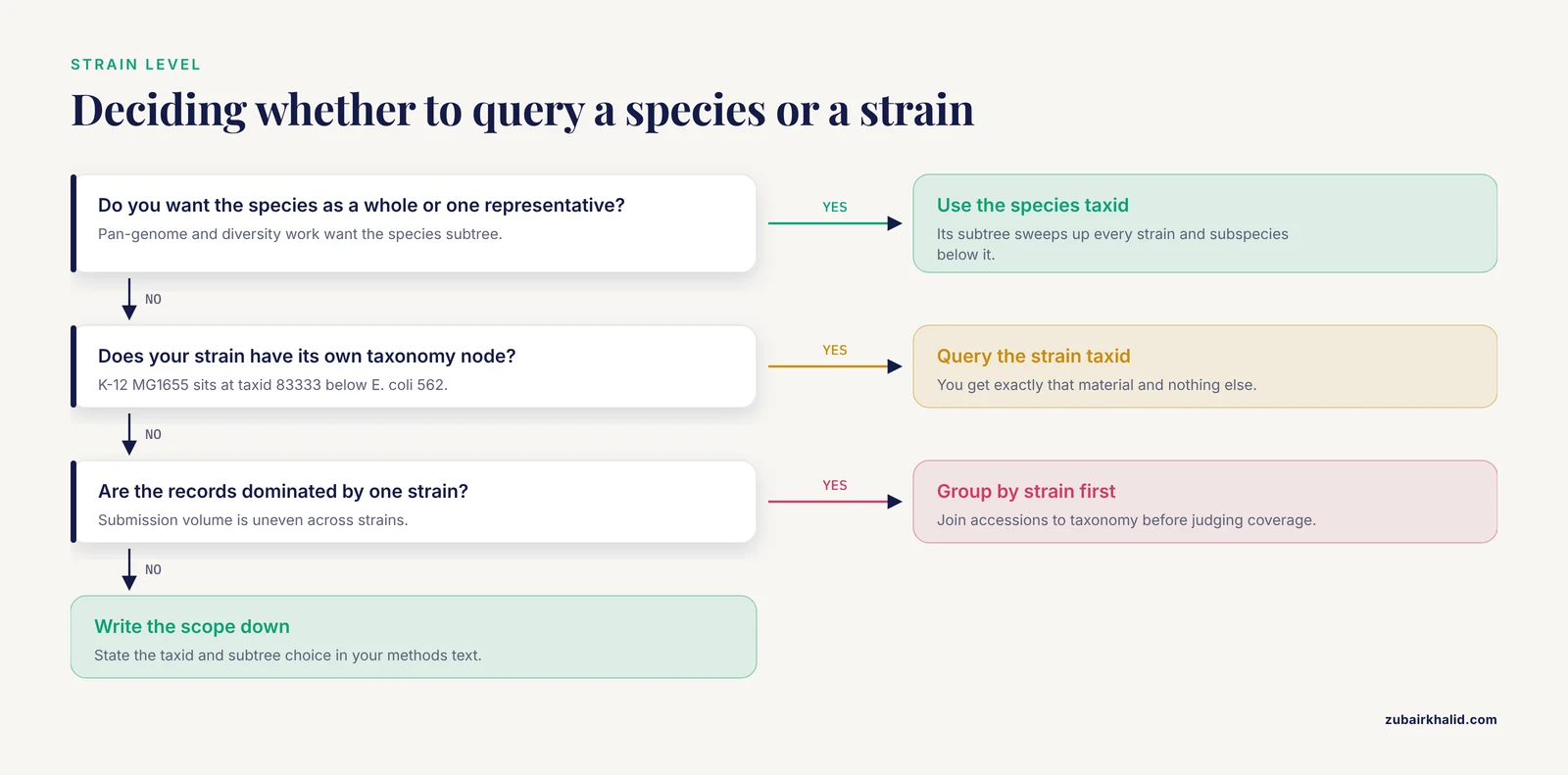
The main guide flags the species-versus-strain confusion with E. coli and K-12. This section expands it into a general decision procedure, because the same issue recurs in every group with dense strain-level sampling.
Ask three questions before running any txid[Organism] query.
Question 1: do you want the species as a biological unit, or one laboratory representative? If you are building a pan-genome or a diversity survey, the species taxid is correct and its subtree is what you want. If you are fetching the canonical reference genome for annotation or primer design, the species taxid is too broad: it sweeps up every strain project ever deposited. In that case, go through the Genome database with the taxid filter, then use the reference flag on the Assembly record to pick a single assembly, or use the Datasets tools with the reference-selection behavior described in the main workflow.
Question 2: does the strain you care about have its own node? Heavily sequenced strains, isolates, and pathovars sit below the species with individual taxids, as K-12 MG1655 does at taxid 83333. Search the Taxonomy database for the strain designation and confirm the rank shown next to the hit. Querying the strain taxid gives you exactly that material; querying the species taxid gives you everything, including the strain.
Question 3: are the records you are seeing dominated by one strain? Because submition volume is wildly uneven, a species-level query can return a record set that is 90 percent one laboratory strain even when dozens of strains have data. Before concluding that a species is well represented, group the returned accessions by strain using the strain field in the records or by joining accessions to taxonomy as shown in the elink section above.
The same logic applies upward: a genus-level taxid query is usually what metagenomics and marker-gene studies want, and a species-level query is usually what reference curation wants. Deciding this explicitly, and writing the decision into your methods text, prevents the most common reviewer complaint about taxonomy-filtered datasets: that the sampling scope is undefined.
Unclassified, Environmental, and Uncultured Taxa: What the Tree Contains
NCBI Taxonomy includes entries that represent material rather than formally named organisms: environmental sample nodes, uncultured organism placeholders, and taxa provisionally placed at higher levels pending formal description. These nodes matter more than newcomers expect.
When you query a broad taxid, records filed under environmental-sample or uncultured nodes within that subtree will be included. In a 16S or metagenomic context this is usually desirable: those sequences are real biology even if the organism has no cultivated representative. In a genome-retrieval context it can surprise you, because a genus-level Datasets download can include draft assemblies from uncultured single-cell projects sitting on poorly resolved branches.
Conversely, sequences whose taxonomy could not be resolved are often filed at high-level or unclassified nodes that your query will miss. If you are surveying a clade and the counts seem low relative to the literature, check the unclassified and environmental-sample branches near your taxon in tree view rather than assuming the data does not exist. The taxonomy documentation describes how such provisional nodes are handled and why they change as nomenclature catches up with sequence data.
A related subtlety: synonyms are searchable. names.dmp stores older names and alternative spellings with the name class synonym, and the Taxonomy database search resolves them to current taxids. A name that returns nothing in your own scripts may still be a valid synonym in NCBI's index, which is one more reason to resolve names to taxids once, centrally, and store the taxids.
SRA and Taxonomy: Finding Reads by Organism and Excluding Host
The Sequence Read Archive is the largest taxid-stamped resource at NCBI, and it is the one where taxonomy filtering most often needs the negative direction: not "give me this organism" but "give me everything except the host."
Positive queries behave as expected:
esearch -db sra -term "txid2697049[Organism]" | efetch -db sra -format runinfo | head -2This returns run-level metadata for SARS-CoV-2 sequencing projects, one row per run, which you can filter locally by library strategy, platform, and date. The runinfo table carries the taxid, so joining against a local subtree built from nodes.dmp, as shown earlier, lets you regroup runs by clade after the fact.
Host exclusion is the standard pattern in pathogen and microbiome work. A metagenomic skin study, for example, wants everything sequenced except the human reads, and the Entrez syntax supports the negation directly:
txid<PROJECT_OR_GROUP>[Organism] NOT txid9606[Organism]used inside an SRA search, where 9606 is the human taxid from the main guide. The same NOT pattern applies in Nucleotide and Protein, and it is the cheapest possible host-decontamination step: it happens before download rather than after alignment.
Two cautions. First, taxid stamping in SRA reflects what submitters declared, and misdeclared or mixed samples exist, so taxonomy filtering reduces but does not eliminate off-target reads. Second, SRA metadata fields evolve, so confirm the exact format of any table you parse with einfo -db sra before writing a parser against it. Read-level host removal, when it is genuinely needed, is a job for alignment-based tools on the data itself, not something taxonomy metadata can guarantee.
Troubleshooting Taxonomy-Filtered Queries: a Symptom-Driven Checklist
The main guide lists common mistakes. This section is organized by symptom instead, because that is how problems actually arrive.
Symptom: zero results from a query that used to work. Work through in order. Confirm the taxid is still valid by opening its browser URL directly; a merged or deleted taxid will redirect or fail, and merged.dmp gives you the replacement. Confirm the database: a term valid in Nucleotide may not exist in SRA, per the einfo section above. Confirm the rest of the query by removing the taxid filter and checking that the remainder alone returns hits. Finally, confirm you are not quoting incorrectly in your shell, since a quote placed one character off can turn txid562[Organism] into a literal phrase search.
Symptom: far more results than expected. A subtree you did not intend is almost always the cause. Open tree view at your taxid with a few levels expanded and look for strain sweeps, environmental-sample nodes, or a species-group node that sits below your query taxid. If the clade is genuinely large, add a second constraint such as molecule property, filter, or publication date rather than fighting the subtree expansion itself.
Symptom: far fewer results than the literature suggests. Check the unclassified and environmental branches near your taxon, as described above. Check whether the taxon was renamed, since searches by old name resolve through synonyms but searches by old taxid do not survive merges. Check whether you are searching the wrong archive: RefSeq is a curated subset, and a taxon can have rich GenBank representation with few or no RefSeq records. Searching without an archive restriction versus restricting to RefSeq are different questions with different answers.
Symptom: intermittent failures in a long script. This is rate limiting, not biology. Without an API key, E-utilities permits a low request rate, and a higher one with a key; both are documented, and scripts should send the key and add pauses between calls. Batch IDs with epost rather than fetching one at a time, and treat any run of empty responses as a signal to back off, not as evidence that your taxid disappeared.
Symptom: a genome download is missing annotation or looks fragmented. Taxonomy got you to the right clade; assembly quality is a separate axis. Return to the Assembly record for each genome and read the assembly level and status fields as the main workflow advises. A clade can contain one chromosome-level reference surrounded by hundreds of contig-level isolate assemblies, and choosing by taxonomy alone guarantees a mixed-quality dataset.
Symptom: results differ between two runs days apart. This is expected behavior, not a bug. The taxonomy and the records filed under it both change continuously. The remedy is procedural: date-stamp every snapshot, store taxids rather than names, and rerun comparisons against the same stored snapshot rather than against the live site.
Reproducibility Practices for Taxonomy-Based Datasets
Because NCBI Taxonomy is a moving, curated view of nomenclature, any dataset defined by a taxon is defined at a point in time. Four habits make that fact manageable rather than fatal.
Store taxids, queries, and dates together. A methods line that reads as a taxid, an exact query string, and a calendar date can be re-executed or at least audited. A methods line that reads "E. coli sequences from NCBI" cannot.
Keep a local taxonomy snapshot per project. Download taxdump once per analysis cycle, record the date, and build all joins against that snapshot. When a collaborator asks why two taxids resolve differently, diffing your snapshot against a fresh one answers the question in minutes.
Version your record lists. After any bulk search, save the accession list itself, not just the derived FASTA. Accessions with versions pin exact sequences; a re-run of the same query months later can return a larger or smaller list, and the saved list is the only way to characterize that drift honestly.
Plan for merges in downstream tables. If a long-running project stores taxids in sample sheets, schedule a periodic pass through merged.dmp and delnodes.dmp so that retired identifiers are updated or flagged before they corrupt a join. The browser redirect handles this transparently for humans; only your own bookkeeping handles it for scripts.
Taken together, these practices are what separate a one-off query from a dataset you can defend in a paper or hand to the next person on the project. Taxonomy filtering is powerful precisely because it is simple; the reproducibility burden it creates is small, but it is real, and it is yours to manage.
Frequently Asked Questions
What is a taxonomy ID and where do I find it?
A taxonomy ID (taxid) is the stable integer NCBI assigns to each organism entry, such as 9615 for the dog. Find it by searching the Taxonomy database at ncbi.nlm.nih.gov/taxonomy or by reading it from the browser URL of a taxon page.
How do I search for every sequence from a species in NCBI?
Use the Entrez term txid9615[Organism] (substituting your taxid) in the Nucleotide, Protein, Genome, or Assembly database. It matches the species and all strains and subspecies below it.
How do I download the complete NCBI taxonomy files?
Download the taxdump archive from https://ftp.ncbi.nlm.nih.gov/pub/taxonomy/taxdump.tar.gz and unpack it to get names.dmp, nodes.dmp, and related files. The new_taxdump.zip archive adds precomputed lineage tables.
Is the NCBI taxonomy a phylogeny?
No. It is a curated rank-based classification that NCBI maintains for organizing records, and NCBI's own documentation distinguishes it from computed phylogenies. Use dedicated phylogenetic methods for evolutionary inference.
Why did a taxonomy ID I used before stop working?
NCBI merges and retires taxids as nomenclature changes. Check the merged.dmp and delnodes.dmp files in the taxdump archive, and note that the browser redirects merged IDs to the current entry.
How do I get a tree file for a group of taxa?
Paste your list of taxids into the NCBI Common Tree tool, which returns the smallest subtree containing them and offers a Newick-style text export. For larger jobs, build the subtree from nodes.dmp yourself.
How do I restrict a BLAST search to one species or genus?
Use the Organism box on the BLAST web form, which accepts a taxid and expands to include the whole subtree. On the command line, add -taxids 9615 to blastn or blastp.
How current is the NCBI taxonomy database?
It is updated continuously as curators process new names, merges, and reclassifications, which means any snapshot you take is a point-in-time copy. Date your downloads and recheck taxids when a project spans months.