How to Find Protein Families on NCBI
By Dr. Zubair Khalid, DVM, MS, PhD ·

By the end of this guide you will be able to take a single protein sequence, identify the protein family and conserved domains it belongs to using NCBI's Conserved Domain Database, pull every related protein out of the NCBI Protein database with controlled Entrez queries, run a batch domain search over hundreds of sequences, and reproduce the same work from a terminal with RPS-BLAST and the E-utilities. You need only a web browser for the core workflow. For the command-line sections you need the BLAST+ suite, the NCBI Datasets and E-utilities command-line tools, and optionally the rpsbproc package, all of which run on Windows, macOS, and Linux.
Everything here uses free, public NCBI resources. No account is required, though an NCBI account lets you save searches and large result sets.
What a "Protein Family" Means on NCBI
Three related terms come up constantly, and mixing them up is the fastest way to get a wrong answer. A domain is a conserved, independently folded segment of a protein, often associated with a specific function, such as an ATP-binding pocket or a DNA-binding helix-turn-helix. A protein family is a broader grouping: proteins that share common ancestry, usually detected through one or more shared domains plus overall sequence similarity. A superfamily is an even broader grouping that connects families with weak sequence similarity but demonstrable structural and functional common ancestry.
NCBI formalizes these relationships through the Conserved Domain Database (CDD), a free resource that annotates sequences with the locations of conserved domain footprints, functional sites, and motifs. CDD contains domain and family models curated by NCBI staff as well as models imported from external sources such as Pfam, SMART, COG, and TIGRFAM. A CDD release in 2019 contained more than 57,000 domain models, of which nearly 15,000 were curated in house, with curation focused on providing finer-grained classification of widely distributed protein domain families [1].
NCBI's second family machinery lives in RefSeq. The Prokaryotic Genome Annotation Pipeline (PGAP) uses a hierarchical collection of protein family models (PFMs) as evidence for functional annotation. That collection includes over 35,000 protein profile hidden Markov models, 12,300 BlastRules, and 36,000 curated CDD architectures, and roughly 79% of RefSeq proteins, more than 122 million sequences, are named based on a match to a curated PFM. The PFMs themselves are exposed to users in a dedicated Entrez database called Protein Family Models [2].
In practice, this means there are two complementary ways to do an NCBI protein family search:
- Query-driven. You have a sequence or a name and want to find the family it belongs to and its relatives. CD-Search and BLAST are your tools.
- Family-driven. You know the family (for example, "CCCH-type zinc finger" or "DUF1664") and want all members in one organism or across taxa. Entrez queries, the Protein Family Models database, and profile HMM searches are your tools.
Published genome-scale studies routinely combine both directions, which is why this guide covers both.
A Quick NCBI Databases Guide for Family Work
NCBI is not one database. It is a federation of linked databases searched through a common interface called Entrez. Understanding which database to point at saves hours.
| Database | What it holds | When you use it for family work |
|---|---|---|
| Protein | Sequences from RefSeq, GenBank, UniProtKB/Swiss-Prot, PDB, and more | Find member proteins, download FASTA |
| Conserved Domains / CDD | Domain and family models, precomputed domain annotations | Assign a sequence to a family, inspect domain footprints |
| Protein Family Models | PGAP protein family models (profile HMMs, BlastRules, CDD architectures) [2] | Browse and download curated family definitions |
| Structure | Experimentally determined 3D structures | Confirm that a domain match has structural support |
| Gene | Gene records linked to genomes | Move from protein family members to genomic context |
| Taxonomy | Organism classification | Restrict any search to a taxon |
| BLAST | Sequence similarity search against any of the above | Find homologs beyond annotated family membership |
Three Entrez search-field qualifiers cover most family queries:
[ORGN]restricts by organism or taxon, for exampletxid3702[ORGN]for Arabidopsis.[Properties]or[PROP]filters by sequence source, for examplesrcdb_refseq[PROP]to keep only RefSeq records.[Gene Name]or[Protein Name]matches the standardized name field rather than free text anywhere in the record.
You can combine these with Boolean operators. The query srcdb_refseq[PROP] AND txid4081[ORGN] AND "sucrose synthase"[Protein Name] returns RefSeq sucrose synthase proteins from tomato. Getting comfortable with this syntax is the single highest-return skill for anyone learning how to use NCBI effectively.
NCBI Protein Family Search Step by Step (Web)
This walkthrough uses a real scenario: you have a protein sequence from a newly sequenced organism and you want to know which family it belongs to, then collect the rest of that family. Any protein FASTA sequence will work as input.
Step 1: Start from a seed protein
Open the NCBI Protein database (www.ncbi.nlm.nih.gov/protein), paste your FASTA sequence or an accession number into the search box, or navigate directly to a known record. If you are starting from a gene name rather than a sequence, search the Protein database with a qualified query such as:
"GDS1"[Protein Name] AND Zea mays[ORGN] AND srcdb_refseq[PROP]The srcdb_refseq[PROP] filter matters. RefSeq records are curated or derived from curated pipelines and carry stable accessions plus PGAP or eukaryotic pipeline annotation, so they are the cleanest seeds for family work.
Pick one well-annotated, full-length protein as your seed. If the record shows a "Conserved Domains" graphical summary on its page, you already have a preview of the answer.
Step 2: Run CD-Search on your seed
From the protein record page, click the Run CD-Search link in the Conserved Domains section, or go directly to the CD-Search tool at www.ncbi.nlm.nih.gov/Structure/cwrwrprf/cgi/cdd_search.cgi from the CDD home page at www.ncbi.nlm.nih.gov/Structure/cdd/cdd.shtml [1]. Paste your sequence in FASTA format and submit.
Two search modes exist. The live search computes domain footprints for your query on demand against the full set of CDD models. The precomputed search returns stored annotations for sequences already tracked by NCBI's Entrez protein database, which is faster and gives you the same annotation other users see on the record page [1].
For a first pass, accept the default database selection. CD-Search can search specific model sets, so if you want only curated NCBI models, or only imported Pfam, SMART, COG, or TIGRFAM models, select them on the form before submitting.
Step 3: Read the CD-Search results
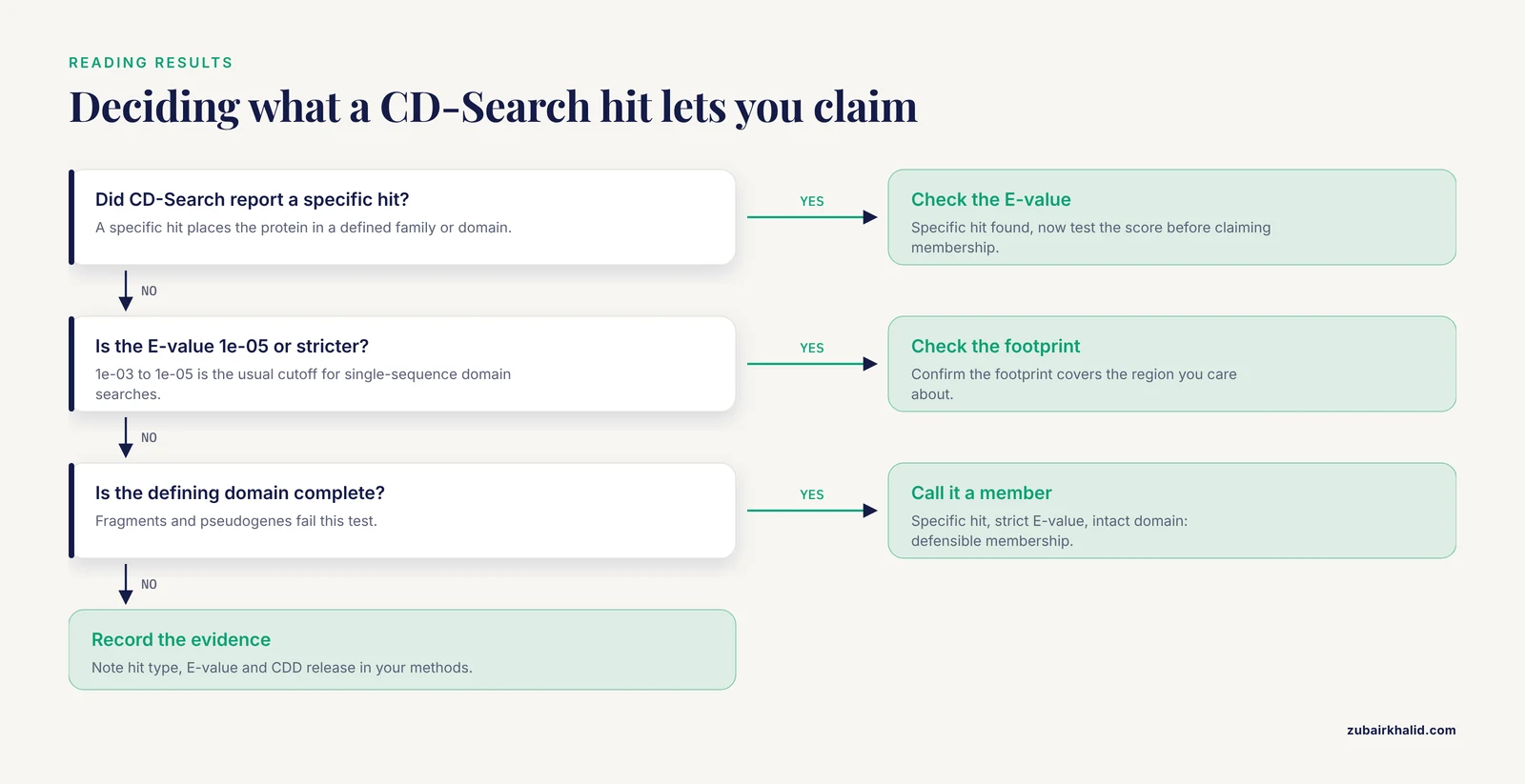
The results page shows a graphical map of your protein with colored bars for each detected domain footprint. Four reading skills matter here.
Hit type. Each hit is labeled as a specific hit, an intermediate, or a superfamily hit. A specific hit means the model set places your protein in a well-defined family or domain with a defensible boundary. A superfamily hit means your protein resembles the broader ancestral group but no specific model clears the threshold, which is common for divergent members or short fragments.
E-value. This is the expected number of chance matches of this score in a database of that size. A CD-Search hit with an E-value of 1e-05 is very unlikely to be coincidence, while a hit at 0.5 deserves suspicion. Convention in the field treats roughly 1e-03 to 1e-05 as a reasonable cutoff for single-sequence domain searches, and most published family-mining pipelines verify candidates against exactly this kind of threshold.
Footprint boundaries. The annotation gives start and end positions on your query for each domain. Check that the footprint covers the region you care about and that the functional sites and motifs inferred from the footprint fall inside it [1].
Family-level pages. Every specific hit links to the CDD model page. That page shows the model's multiple sequence alignment, conserved sequence features, taxonomy distribution, and the hierarchy connecting the family to its superfamily. This is where a domain-level answer becomes a family-level answer.
A concrete example of how this plays out in the literature: an analysis of a hypothetical protein from Staphylococcus aureus used NCBI Conserved Domain Search, alongside InterProScan and Pfam, to assign the protein to the YqeG family of HAD IIIA-type phosphatases within the haloacid dehalogenase (HAD) superfamily, which then guided the rest of the structural and functional analysis [3]. The CD-Search result was the pivot on which the whole study turned.
Step 4: Expand from one protein to the family
Now that you have a family name, retrieve its members. Two routes work well.
Route A, text search. In the Protein database, search the CDD-confirmed family name as a protein name, restricted to your organism:
"HSP20"[Protein Name] AND Eleusine coracana[ORGN] AND srcdb_refseq[PROP]Route B, sequence search. Run BLASTP with your seed as the query against your organism of interest. From the BLAST home page, choose the Protein BLAST (blastp) algorithm, paste your FASTA, set the database to a taxon-restricted set such as RefSeq Proteins with an organism filter, and set the Max target sequences high enough to catch the whole family, for example 5000 for a large family or a genome-scale screen. Adjust the Expect threshold to something strict like 1e-05.
One published example of this combined strategy: researchers mining the small heat-shock protein (HSP20) family in finger millet searched the predicted proteome with the alpha-crystallin domain profile from Pfam (PF00011), then confirmed every candidate with NCBI CD-Search, recovering 76 non-redundant ACD-bearing HSP20 genes that they then classified into ten subfamilies by phylogeny and predicted localization [4]. The same verify-with-CD-Search pattern appears in a maize study that identified the GDS1 family using BLASTP with an Arabidopsis query plus HMMER scanning, then verified the conserved zf-CCCH domain with NCBI CD-Search and SMART [5], and in a peanut study that used a Pfam HMM for DUF1664 (PF07889) to screen the proteome and validated complete domains with the CD-Search online tool [6].
The pattern is worth internalizing because it is essentially the community standard: a sensitive profile-based screen casts a wide net, and CD-Search confirms domain architecture before a sequence is called a family member.
Step 5: Browse the Protein Family Models database
For prokaryotic work especially, go straight to the source of the family definitions. The Protein Family Models Entrez database holds the PGAP evidence models, and because these models carry gene symbols, Enzyme Commission numbers, and supporting publications on a large fraction of entries, a model record is often a one-stop summary of what the family is and which proteins it names [2]. Search it by name, for example a gene symbol or a CDD accession, and each model links to the proteins and genome annotations it supports.
Step 6: Export what you found
From any Entrez results page, use the Send to menu to export. For protein families you typically want:
- FASTA for downstream alignment and phylogeny. Choose "Complete" or a custom range for the sequence portion.
- Tabular (text) or GenBank (full) for accession, definition, taxonomy, and annotation columns.
- File with a check-all selection when the result set exceeds the display limit. Entrez lets you pull tens of thousands of records this way.
Keep the accession list in a plain text file. Almost every downstream tool, and every citation you will write in a manuscript's methods section, starts from that list.
Batch CD-Search for Many Sequences
When you have dozens to thousands of candidate sequences, single-sequence searches become the bottleneck. Batch CD-Search solves this. It accepts a FASTA file of multiple queries, computed either as live searches or against the precomputed annotation archive, and returns a tabular annotation for every sequence: query identifier, model accession, model name, hit type, E-value, and footprint coordinates [1].
The web workflow:
- Prepare a FASTA file with unique sequence identifiers. IDs must be unique within the file or downstream parsing becomes ambiguous.
- Go to the Batch CD-Search page from the CDD site at
www.ncbi.nlm.nih.gov/Structure/cdd/cdd.shtml[1]. - Upload the FASTA file or paste the sequences, choose the target database (full CDD, curated CDD only, Pfam, SMART, COG, TIGRFAM), set the E-value cutoff, and submit.
- Download the tabular results. A typical row looks like:
Q#  Query_ID        Hit_ID      Hit_Name              e-value  From  To
1 EcHSP20-37 cd00298 HSP20_like 4.1e-43 92 187- Filter the table in any spreadsheet or scripting environment by E-value and hit type. Keeping only specific hits with E-values below your cutoff gives you a defensible family membership list.
This batch step is exactly the kind of confirmation step cited studies rely on, and because it returns machine-readable tables it slots cleanly into an automated pipeline rather than a click-by-click session.
Command Line Workflow
The same functionality is available offline, which matters for large jobs, reproducibility, and sensitive data.
Install the tools
On macOS with Homebrew or on Linux with your package manager, install the BLAST+ executables and the NCBI command-line utilities:
# macOS
brew install blast ncbi-datasets-cli entrez-direct

# Ubuntu/Debian
sudo apt-get install ncbi-blast+ ncbi-entrez-direct ncbi-datasets-cli
Verify:
rpsblast -version
efetch -version
Fetch proteins with the E-utilities
The E-utilities are NCBI's official programmatic interface to Entrez. A two-step pipeline searches the Protein database and downloads FASTA:
esearch -db protein -query "srcdb_refseq[PROP] AND txid4081[ORGN] AND 'sucrose synthase'[Protein Name]" | efetch -db protein -format fasta > sus_prot.fastaExpected output is a multi-record FASTA file. Check the first line with:
head -n 1 sus_prot.fasta
>NP_001234567.1 sucrose synthase [Solanum lycopersicum]
Be polite to NCBI: the API guidelines ask for no more than three requests per second, and the above tools throttle themselves by default, so leave the throttling in place.
RPS-BLAST plus rpsbproc
RPS-BLAST is the standalone engine behind CD-Search. It compares each query protein against a database of profile models, position-specific scoring matrices built from multiple sequence alignments. The rpsbproc package post-processes raw RPS-BLAST output into the same curated annotation you would see on the web, including footprint trimming and hierarchy resolution [1].
A minimal pipeline:
# Download and format the CDD database (one-time, large download)
cd /usr/local/data
curl -O https://ftp.ncbi.nlm.nih.gov/pub/mmdb/cdd/cdd.tar.gz
tar xzf cdd.tar.gz
rpsblast -db Cdd -make_db

# Search your proteome
rpsblast -query proteome.faa -db Cdd -evalue 0.01 -out rps_raw.tsv -outfmt 6 -max_target_seqs 5

# Convert raw hits to processed domain annotations
rpsbproc -i rps_raw.tsv -o domains.annot.txt -m std
Useful parameters:
-evalue 0.01sets the expectation threshold. Tighten to 1e-05 for family-calling decisions, loosen to 1e-03 only for exploratory sweeps.-outfmt 6produces tabular output that rpsbproc can consume.-max_target_seqslimits models reported per query, five is ample because domain models overlap in hierarchies.- In rpsbproc, the
-m stdmode emits the standard annotation columns matching the web view [1].
Expected output rows include the query ID, domain model accession such as cd00298, the model name, E-value, bit score, and footprint start and stop coordinates. Anything with a superfamily-level classification but no specific model is flagged as such, mirroring the web display.
Optional: HMMER screening upstream
If you are mining a genome for a family and you have a profile HMM, for example a Pfam model, hmmsearch is the standard screener, and CD-Search or RPS-BLAST then confirms the domain. This two-tool pattern (HMMER screen, CD-Search confirm) is what the finger millet [4], maize [5], and peanut [6] studies all used:
hmmsearch -E 1e-5 PF00011.hmm proteome.faa > hsp20_scan.txtEvery candidate in the table then goes through CD-Search for independent confirmation before you assign family membership in a manuscript.
Genome-Wide Family Mining: The Published Pattern, Assembled
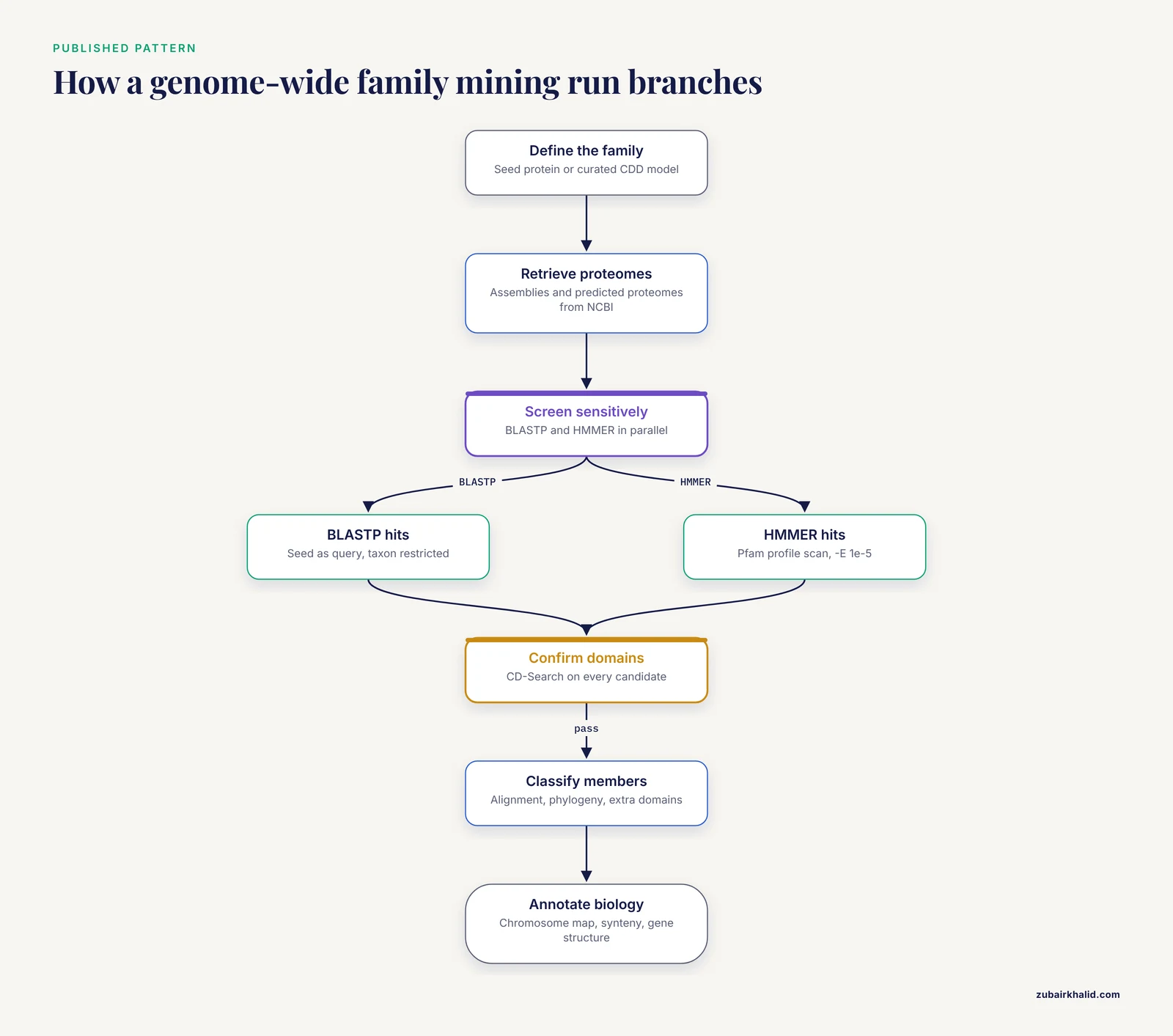
Pulling the strands together, here is the composite workflow that appears across recent family-characterization papers, expressed as a reusable checklist.
- Define the family. Identify a seed protein with literature support or a curated model from CDD or the Protein Family Models database [1][2].
- Retrieve candidate proteomes. Download genome assemblies and predicted proteomes from NCBI, as done in a donkey TGF-beta family study that pulled assemblies and proteomes from NCBI for the target and a reference species before any searching [7].
- Screen sensitively. Run BLASTP with the seed query and, in parallel, an HMMER scan with the family's Pfam profile. Running both catches members that one method alone misses, which is why the maize GDS1 [5] and donkey TGF-beta [7] studies used BLASTP plus HMMER together.
- Confirm domains. Verify each candidate's domain architecture with NCBI CD-Search [4][5][6]. Discard partial or spurious hits.
- Classify. Build a multiple sequence alignment, construct a maximum-likelihood phylogeny, and inspect additional domains. The walnut ERF study used CD-Search for conserved domains, MEME for motifs, and a ClustalX alignment feeding a MEGA phylogeny [8]. A pigeonpea CCT family study classified members into subfamilies based on the presence of additional domains beyond the defining CCT domain [9].
- Annotate biology. Map chromosomal locations, synteny, and gene structure. The finger millet HSP20 study placed its 76 genes across 14 of 18 chromosomes and used duplication analysis and predicted localization to define ten subfamilies [4].
- Validate functionally. Where possible, carry candidates into expression analysis or transgenic assays, as the peanut DUF1664 study did by showing that ectopic expression of one member enhanced salt and drought tolerance in Arabidopsis [6].
Scale varies enormously by family and taxon. Some families are tiny, five sucrose synthase genes in pomegranate [10], or ten DGAT genes in Coix lacryma-jobi [11]. Others are large, thirteen GDS1 genes in maize [5], 33 CCT genes in pigeonpea [9], 21 GPCRs in an entomopathogenic nematode after stringent multi-method filtering [12]. Size alone says nothing about how carefully the list was built. The filtering rigor does.
A note on scope beyond single genomes: profile HMM screening also scales to enormous comparative datasets. One phage study screened 541,986 proteins from 5,167 complete RefSeq tailed-phage genomes to curate a tail-attachment architecture found in 165 phages, combining the HMM screen with synteny, structural evidence, and AlphaFold modeling [13]. If your family question spans thousands of genomes, the same NCBI-sourced building blocks apply, just with automation and manual curation steps scaled up.
Key Options Reference
| Tool or parameter | Where | What it controls | Sensible default for family work |
|---|---|---|---|
| Live vs precomputed search | CD-Search [1] | Compute annotation on the fly vs return stored annotation | Precomputed for NCBI-tracked proteins, live for novel sequences |
| Target model set | CD-Search / Batch CD-Search | Curated CDD only, or Pfam, SMART, COG, TIGRFAM included [1] | Full CDD first, curated-only when publishing |
| E-value | All profile searches | Chance-match expectation threshold | 1e-05 for calls, 0.01 to 1e-03 for exploration |
| Hit type | CD-Search output | Specific vs superfamily classification [1] | Specific hits for family membership claims |
| Max target sequences | BLASTP | Number of database hits returned | 5000 for genome-scale family sweeps |
| Organism filter | BLASTP and Entrez | Taxon restriction | Always restrict to your organism plus close relatives |
srcdb_refseq[PROP] | Entrez queries | Limits results to RefSeq records | Include unless you deliberately want all sources |
-outfmt 6 | RPS-BLAST | Tabular output for downstream tools | Use whenever output feeds another program |
| Batch mode | Batch CD-Search [1] | Many queries in one submission | Use above roughly 20 sequences |
How to Check Your Result Is Right
Three independent checks catch most errors before they reach a manuscript.
Check the domain, not the name. A protein labeled "hypothetical" or carrying a vague name can still belong to a well-defined family, and a protein with an inherited name can lack the domain. Annotation at scale inherits errors, which is precisely why PGAP's model-driven renaming effort reduced spurious annotation across RefSeq [2]. The domain footprint is the evidence.
Reciprocal sanity check. Take your best family hit, run BLASTP with it as the query against your original organism, and confirm it returns your seed. A one-directional match with no reciprocal support frequently turns out to be a paralog from a neighboring family.
Check completeness of the domain. A family member should carry the defining domain intact. The peanut DUF1664 study explicitly verified that complete DUF1664 domains were present before calling a sequence a family member [6]. Fragments and pseudogenes fail this test and should be reported as such or excluded, depending on your question.
Common Mistakes and Limitations
Searching the wrong database. Entrez queries typed into the global search box search everything, including literature and genomes. Family membership questions belong in the Protein, Conserved Domains, or Protein Family Models databases. A hit count of 40,000 in the global search tells you nothing about your family.
Trusting a text-name match as membership. Searching "DGAT"[Protein Name] finds proteins with DGAT in the name, including wrongly inherited names and hypothetical labels. The Coix DGAT study combined name-guided CDS retrieval with BLAST screening against the genome precisely because names alone under-detect [11]. The walnut ERF study similarly screened the transcriptome with the keyword ERF but then required a complete open reading frame and CD-Search domain confirmation [8].
Ignoring the hit-type hierarchy. Calling a protein a member of a specific family when CD-Search reported only a superfamily-level hit is the most common overclaim in family papers. Report the specific hit when you have one and the superfamily hit when you do not.
Mixing up domain and family counts. A protein can carry multiple domains from different families, and one family's defining domain can appear in hundreds of unrelated architectures. Counts reported as "family members" should reflect your stated operational definition, and the classification step, whether by phylogeny as in finger millet HSP20s [4] or by additional domains as in pigeonpea CCTs [9], needs to be described in your methods.
Screening with a single method. BLASTP alone misses remote members that profile HMMs catch, and HMMER alone can overcall borderline cases that CD-Search would reject. The convergent practice across published pipelines, BLASTP plus HMMER screening followed by CD-Search verification [4][5][7], exists because no single method suffices.
Skipping the taxonomy restriction. An unfiltered BLAST against nr pulls in everything from every kingdom, drowning your family in distant homologs. Restrict to your organism and close relatives for membership, and widen deliberately afterward for phylogeny.
Forgetting precomputed annotations. For any protein already in NCBI's Entrez protein database, a precomputed domain annotation already exists [1]. Recomputing it wastes time and can produce minor differences from the stored annotation that confuse reviewers comparing your table to the NCBI website.
Treating domain presence as function. A domain footprint supports membership in a family and inference of associated functional sites and motifs [1]. It does not prove the protein is active, localized where you assume, or expressed. Functional claims need expression data, localization prediction, or experiments, as the peanut study recognized when it moved from in silico identification to transgenic validation [6].
One limitation to state plainly: membership lists are always relative to the database snapshot and the thresholds you chose. When CDD releases new models or a genome assembly is re-annotated, your list can shift. Record the CDD release, tool versions, and E-value cutoffs in your methods section so the list is reproducible.
Frequently Asked Questions
What is the difference between a protein domain and a protein family?
A domain is a conserved, often independently folded functional unit within a protein, while a family is a group of proteins sharing common ancestry, usually inferred from shared domains plus overall similarity. A family member typically carries one or more defining domains, but domains also occur in combinations that define different families.
Which NCBI database should I search first?
Start with the Protein database if you have a name or accession, and with CD-Search if you have a raw sequence. CD-Search assigns your sequence to conserved domain footprints and family models from the Conserved Domain Database, which tells you the family before you search for relatives [1].
How does CD-Search decide my protein's family?
CD-Search compares your sequence against profile models built from curated multiple sequence alignments and reports footprint locations, E-values, and hit types. A specific hit places the protein in a defined family or domain, while a superfamily hit indicates broader, more remote common ancestry without a specific family assignment [1].
Can I search many protein sequences at once?
Yes. Batch CD-Search accepts a multi-sequence FASTA file and returns a tabular annotation for every query, including model name, E-value, and footprint coordinates, suitable for filtering and pipeline use [1]. For very large jobs, standalone RPS-BLAST with rpsbproc performs the same computation locally [1].
What E-value cutoff should I use?
For claiming family membership, 1e-05 or stricter is the common convention, and 0.01 is acceptable for exploratory screening followed by verification. Whatever you choose, report it, and confirm borderline candidates with an independent method such as a reciprocal BLAST or a second domain tool.
How do I download all members of a protein family?
Run a qualified Entrez query in the Protein database, for example a protein name plus organism and srcdb_refseq[PROP], then use the Send to menu or the E-utilities pipeline esearch | efetch -format fasta to export the full set. For prokaryotic families defined by PGAP models, start from the Protein Family Models database, whose models link directly to the proteins they name [2].
Why does CD-Search report only a superfamily hit?
Your sequence resembles the broader ancestral group but lacks the sequence features required by any more specific model, which happens with divergent members, short fragments, or fast-evolving families. Report the superfamily-level result honestly, and consider structural evidence or more sensitive profile methods if the family assignment is central to your question.
Do I need command-line tools to find protein families on NCBI?
No. The web versions of CD-Search, Batch CD-Search, BLAST, and Entrez handle most single-protein and moderate-batch questions. Command-line RPS-BLAST, rpsbproc, and the E-utilities become necessary for thousands of sequences, fully reproducible pipelines, or analyses that must run outside the browser [1].
Sources
- NCBI's Conserved Domain Database and Tools for Protein Domain Analysis.
- RefSeq: expanding the Prokaryotic Genome Annotation Pipeline reach with protein family model curation.
- Bioinformatics Approaches for Functional and Structural Annotation and Molecular Docking Study of a Hypothetical Protein From Staphylococcus aureus.
- Mining the sHSP20 (small heat-shock protein) gene family in finger millet (Eleusine coracana (L.) Gaertn.): structural, evolutionary and predicted abiotic-stress-responsive insights.
- Identification and Analysis of the ZmGDS1 Gene Family in Maize.
- Genome-Wide Analysis of the DUF1664 Family Genes in Peanut (Arachis hypogaea) and Functional Validation of AhDUF1664-1A.
- Genome-Wide Characterization of the TGF-β Gene Family in Donkey (Equus asinus) Reveals Lineage-Specific Gene Duplications and Deleterious Mutations.
- Genome-wide identification and expression analysis of ethylene responsive factor family transcription factors in Juglans regia.
- Structural and functional analysis of CCT family genes in pigeonpea.
- Identification and expression analysis of the sucrose synthase gene family in pomegranate (Punica granatum L.).
- Genome-wide analysis of DGAT gene family in Coix lacryma jobi L. and functional characterization in yeast H1246.
- Stringent in-silico identification of putative G-protein-coupled receptors (GPCRs) of the entomopathogenic nematode Heterorhabditis bacteriophora.
- A conserved distal-tail helical extension defines a tailspike attachment architecture in Gram-negative siphophages.