Why Does My NCBI Genome Search Return No Results?
By Dr. Zubair Khalid, DVM, MS, PhD ·

The single most common cause of an empty NCBI genome search is a database mismatch. You typed an organism name into the search box of one NCBI database when the record you need lives in another, or the data exists only as raw sequencing reads rather than a finished assembly. Almost every "no results found" message traces back to one of a small set of causes, and most of them can be ruled out in under five minutes once you know what to check.
This guide walks through those causes in order of how often they occur, explains the mechanism behind each failure, and gives you a repeatable diagnostic sequence. Published studies illustrate the pattern. A 2025 probiotic strain analysis retrieved and annotated genome data through the NCBI database alongside gene prediction tools [1]. A plant gene-family study searched NCBI for coding sequences across species and then used BLAST screening to find homologs in its target genome [2]. Cattle population geneticists pulled whole-genome sequencing data from NCBI with the SRA toolkit before any alignment or variant calling [3]. In each case the authors found what they needed because they queried the right part of NCBI with the right kind of query. When those two things fall out of alignment, the search box answers with silence.
Start Here: The 60-Second Check
Before anything else, answer three questions.
- Which database box did I type into? NCBI is not one database. It is a family of linked databases (Genome, Assembly, Nucleotide, Protein, SRA, Taxonomy, Gene, BLAST, and more) that share a search interface but hold different record types. A species with no complete genome in the Genome database may still have dozens of contig-level assemblies in the Assembly database and millions of reads in SRA.
- Does the organism exist in NCBI at all? Open the Taxonomy database, search the species name, and confirm the taxon has a Taxonomy ID. If the species is not in Taxonomy, nothing downstream will return results under that name.
- Am I looking for a genome, a gene, or a protein? These are different record types in different databases. A gene symbol search will fail in the Genome database even when the gene is fully annotated in the Gene database.
If all three answers are clear and the search still fails, work down the cause list below.
A Short NCBI Databases Guide for Genome Work
Because so many failures come from database confusion, a brief map of the relevant NCBI databases helps. Think of each database as holding a different stage of the same underlying data.
- Taxonomy holds the organism names and their unique Taxonomy IDs. Every sequence record points back to a taxon here. This is your ground truth for spelling, synonyms, and whether NCBI recognizes the organism at all.
- Genome is the entry-point browser for organism-level genome resources. It aggregates links to assemblies, annotations, and related records.
- Assembly holds the actual genome assembly records, each with an accession, an assembly level (complete genome, chromosome, scaffold, or contig), and a source (RefSeq, the curated reference branch, or GenBank, the archival submission branch).
- Nucleotide and GenBank hold individual sequence records, including complete genomes, organelle genomes, and individual genes submitted as sequences. One study of ground beetle phylogenetics drew 124 mitochondrial genome sequences from NCBI to reconstruct relationships across 21 subfamilies [4]. Those mitogenomes live as Nucleotide records, not as organism-level genome assemblies.
- SRA (Sequence Read Archive) holds raw sequencing reads before assembly. Resequencing studies routinely start here. The Ethiopian cattle adaptation study obtained whole-genome data for 70 animals across seven breeds from the SRA and aligned them to a reference afterward [5]. The Nelore and Gir breed comparison did the same, retrieving reads with the SRA toolkit and then mapping them to the Bos taurus reference [3].
- Pathogen Detection and Isolates browsers hold isolate-level bacterial and viral genomes with metadata. A Salmonella study analyzed 4,611 chicken-associated isolates drawn from the NCBI Pathogen Isolates Browser [6]. A Shiga toxin-producing E. coli study pulled 221 genomes from the NCBI Pathogen Detection database alongside lab-obtained isolates [7]. If your organism is a foodborne or clinical pathogen, these browsers may hold far more than the general Genome search surfaces.
- BLAST searches by sequence similarity rather than by text. It is the correct tool when you have a sequence and want to find matching records, and it doubles as a rescue strategy when text search fails [8].
Knowing which box to type into resolves a large share of empty searches before you touch any query syntax.
Troubleshooting Table: Symptoms, Causes, Confirmation, Fixes
The table below is the core of this guide. Match your symptom to a row, confirm the cause, and apply the fix. The sections afterward explain each mechanism in depth.
| Symptom | Likely cause | How to confirm | Fix |
|---|---|---|---|
| Species name returns nothing in Genome, but the species obviously exists | Wrong database for the record type | Search the same name in Assembly and Nucleotide | Query Assembly for assemblies, Nucleotide for sequence records |
| Nothing in any database under the name you typed | Taxon name is a synonym, an old name, or misspelled | Search the name in the Taxonomy database | Use the accepted name or the Taxonomy ID in your query |
| Recent species or isolate, nothing found | Data not yet released, under embargo, or still processing | Check the publication for an accession number and search that accession directly | Search by accession, or wait for release, or contact the submitters |
| Complex query with quotes and field tags returns nothing | Search syntax error | Simplify the query to a bare organism name, then add terms back one at a time | Rebuild the query incrementally with correct field tags |
| You know an assembly exists but your filtered search hides it | Overly restrictive filters (RefSeq only, complete only, latest only) | Clear all filters and search again | Loosen filters, or accept GenBank-level assemblies |
| Gene symbol search returns nothing in Genome | Gene symbols are ambiguous or the record lives in the Gene database | Search the symbol in the Gene database with the organism as a second term | Use stable identifiers (NCBI Gene IDs) rather than symbols |
| You have a sequence but text search finds nothing | Text search cannot match sequences | Run the sequence through BLAST | Use BLASTn for nucleotides or BLASTp for proteins |
| Bacterial pathogen searches miss known outbreak genomes | Data sits in the Pathogen Detection browsers | Search the Pathogen Detection or Isolates browser | Query those specialized browsers directly |
| Paper says data are on NCBI, but no assembly appears | Data deposited as raw reads only, no assembly submitted | Search the BioProject accession in SRA | Retrieve reads from SRA and assemble yourself |
| Your own pipeline returned thousands of hits, then your filtered set is empty | Overly strict downstream quality filtering | Log how many records each filter step removes | Relax filter thresholds and document each cutoff |
Why Does My NCBI Genome Search Return No Results? The Causes, Ranked
Cause 1: You queried the wrong database
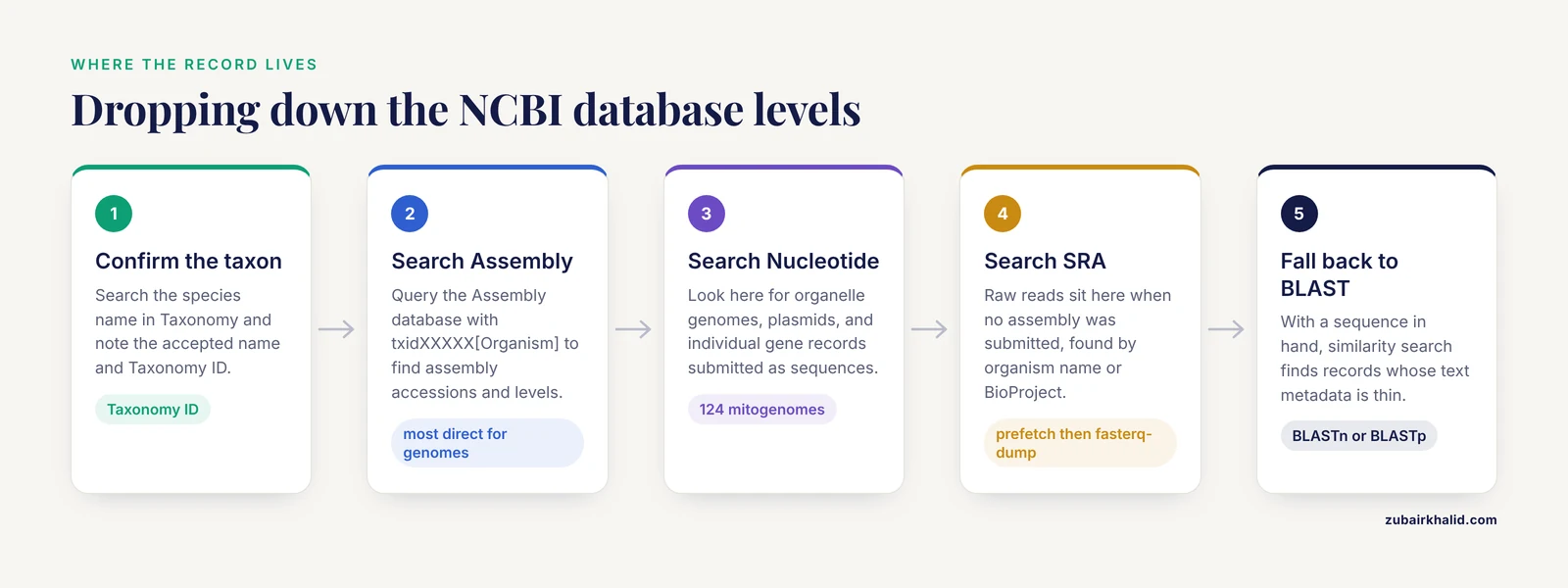
This is the default failure mode and the first thing to rule out. NCBI's unified search bar looks like one search box, but the databases behind it hold fundamentally different record types. The Genome database is an organism-level portal. The Assembly database lists specific assembly accessions. Nucleotide lists individual sequence records. SRA lists sequencing runs. A search that returns nothing in one can return thousands of hits one database over.
The mechanism is straightforward. When a laboratory sequences an organism, the raw reads land in SRA, the assembled contigs land in GenBank assemblies, annotated gene calls land in Nucleotide and Protein records, and a curated copy may later appear in RefSeq. These deposits happen at different times and through different pipelines. A species with a newly submitted, unannotated assembly will show up in Assembly but not with annotation-based records in Nucleotide. A species with only raw reads deposited shows up in SRA and nowhere else.
Practical fix. When an organism-level search fails, drop down a level. Search the Taxonomy database to confirm the organism, then search Assembly for the taxon name or Taxonomy ID. If Assembly is empty, search Nucleotide with the organism name plus a filter for complete genomes or WGS master records. If that is empty, search SRA. This cascade finds data that a single-database search hides.
Cause 2: Taxon name mismatch, synonyms, and renames
Organism names change. Genera get split, species get recombined, and old names persist in the literature for years after NCBI adopts the new taxonomy. A search under a superseded name can return nothing even though hundreds of records exist under the accepted name.
The lactobacilli are a textbook case. The genus Lactobacillus was split into multiple new genera, and the probiotic species Lactobacillus reuteri is now Limosilactobacillus reuteri. A recent whole-genome characterization of the probiotic strain PSC102, isolated from healthy pig feces and sequenced on a PacBio-Illumina platform, describes it under the current genus name [1]. A researcher searching NCBI for "Lactobacillus reuteri" complete genomes will still find records, because NCBI maps synonyms, but a stricter query combining the old name with additional filter terms can silently fail. The failure gets worse with field-restricted searches, where a synonym may not populate the exact indexed field you are using.
Misspellings and strain-name confusion cause the same symptom. Strain designations are not standardized across databases, so a strain name that appears in a paper may not appear verbatim in NCBI metadata.
Practical fix. Always resolve the organism name through the Taxonomy database first. Note the Taxonomy ID and search with it, for example txid1624[Organism] in a query, because the ID is stable across renames. When looking for a specific strain, search the BioProject or BioSample accession from the paper instead of the strain name.
Cause 3: The genome simply is not there yet
Sometimes the honest answer is that the record does not exist in a searchable form. Sequencing data pass through several steps between the instrument and public release: submission, validation, processing, and review. Recent Data Brief-style deposit papers illustrate the endpoint, where the complete genome sequence and raw reads are formally deposited in NCBI before the paper appears [9]. But between a lab finishing an assembly and NCBI releasing it, the record may be invisible to public search. Journals and funders can also hold data under embargo until publication.
A related trap is assuming that every published genome has an assembly. Some groups release only raw reads. If no assembly was submitted, the Assembly and Genome databases will show nothing even though millions of reads sit in SRA. The S. maltophilia resistome study worked from 2,419 publicly available genomes retrieved from GenBank, which shows how dense bacterial coverage can be, but the same retrieval logic applies in reverse: a species with no GenBank assemblies genuinely has none to find [10].
Practical fix. If a paper describes the genome you need, find its accession numbers. Every modern genome paper lists an assembly accession, a BioProject accession, or both. Search the accession directly. If the accession resolves but the record is not yet public, the data are on hold, and your options are waiting for release or contacting the corresponding author.
Cause 4: Search syntax and field tags
NCBI search boxes accept structured queries with field tags in square brackets, quoted phrases, and Boolean operators. Powerful, and unforgiving. A malformed query does not error out. It returns zero results.
Common syntax failures include unbalanced quotes, using an incorrect field tag, combining terms with a Boolean operator in the wrong case (the operators AND, OR, NOT must be capitalized), and pasting queries from word processors that convert straight quotes into curly quotes, which the parser does not recognize. A query like "Escherichia coli"[Organism] AND complete genome behaves differently from the intended "Escherichia coli"[Organism] AND "complete genome"[Assembly Level] because untagged trailing terms are matched against different indexed fields.
Practical fix. Diagnose syntax errors by subtraction. Run the bare organism name alone. If it returns hits, add one term or filter at a time and watch for the point where the count drops to zero. That point is your broken clause. Rebuild it with the correct field tag, which you can find on the database's own search-field documentation page.
Cause 5: Filters and the latest-only trap
NCBI result pages expose filters, and it is easy to leave one active from a previous session. Common culprits include a RefSeq-only filter, a "complete genome" level filter, or a "latest" assembly filter. Each is reasonable in isolation and each can hide records you actually want.
The distinction between RefSeq and GenBank matters here. GenBank is the archival repository where submitters deposit assemblies. RefSeq is the curated branch where NCBI staff produce reference and representative genomes with standardized annotation. A recent reference genome paper for the trapdoor spider Aptostichus stephencolberti reported an assembly of 551 scaffolds spanning 3.63 Gbp with a scaffold N50 of 62.2 Mbp, and its gene set of 14,067 genes came from automated annotation using the NCBI RefSeq pipeline [11]. That annotation exists because the assembly entered the RefSeq pipeline. Many perfectly good assemblies never do. Filtering to RefSeq-only means searching a curated subset and getting nothing for organisms that exist only as GenBank submissions.
Practical fix. Clear all filters, confirm the record exists, then apply filters deliberately and one at a time. If the RefSeq-filtered search is empty but the unfiltered search shows a GenBank assembly, that is your answer: the organism has data, just no curated representation yet.
Cause 6: Gene symbols and ambiguous identifiers
A different flavor of empty search happens when you look for a gene rather than a genome. Gene symbols are messy. A systematic survey of protein-coding gene nomenclature in human, mouse, rat, and pig retrieved from the Ensembl browser found that total symbols and synonyms range from 16,600 in pig to 64,580 in mouse, and that many symbols map to more than one gene, complicating identification of roughly 10% of rat and mouse genes and 18% of human protein-coding genes [12]. The authors concluded that stable gene IDs assigned by bodies such as NCBI are the reliable approach, provided the associated data are pulled directly from the authoritative databases [12].
For NCBI specifically, the failure looks like this. You search a gene symbol in the Genome database, where symbols are not the indexed search key, and get nothing. Or the symbol matches a different gene in a different organism. Or the symbol is a synonym that the database knows but your query syntax does not leverage.
Practical fix. Search gene symbols in the Gene database, with the organism name as a second term. Better, resolve the symbol to an NCBI Gene ID through the Gene database or a nomenclature committee, and use the numeric ID in downstream queries. For cross-database work, stable accessions beat symbols every time.
Cause 7: You need a sequence search, not a text search
If you have a sequence in hand, text search is the wrong tool entirely. Two published workflows show the pattern. The Coix lacryma-jobi DGAT gene-family study searched NCBI for coding sequences of Diacylglycerol Acyltransferase family genes in other plants and then used BLAST screening to find the ten homologous genes in the Coix genome, which they named ClDGAT1_1 through ClWS/DGAT_4 [2]. The neonatal HSV-1 case report took soft-clipped reads that failed to map to the human genome, inspected them in IGV, and ran an NCBI BLAST homology search that identified the sequences as matching the HSV-1 UL47 gene, a detection that changed the diagnosis [8]. In both cases, sequence similarity search found what text search could not.
The mechanism is that BLAST matches by alignment, so it tolerates spelling differences of the biological kind, meaning divergence between homologs, strain variation, and annotation gaps. If your query sequence exists in NCBI under any record, BLAST will usually find it even when the text metadata is thin, wrong, or absent.
Practical fix. Take your nucleotide sequence to BLASTn, or your protein sequence to BLASTp. Limit the search to a taxon if the hits are too broad. Once BLAST returns a hit, you have an accession number, and accession-based retrieval is the most robust search NCBI offers.
Cause 8: Pathogen data lives in specialized browsers
If your organism is a bacterial or viral pathogen of clinical, food, or environmental interest, the general Genome search undercounts what NCBI actually holds. NCBI runs dedicated Pathogen Detection and Isolate browsers that index bacterial isolate genomes with rich metadata and are updated continuously from public submissions. The Salmonella study cited above drew 4,611 chicken-associated isolates from the Pathogen Isolates Browser across seven antimicrobial classes and used them to characterize resistance and virulence gene patterns [6]. The STEC study combined four mastitis isolates with 221 genomes from the Pathogen Detection database and went on to profile virulence markers such as stx1 and stx2 and 105 resistance genes across multiple drug families [7].
These browsers can hold far more isolates of a given pathogen than the Genome database search surfaces, and their metadata, including source, geography, and collection context, support queries the general search does not.
Practical fix. For pathogens, search the Pathogen Detection browser directly, and search by serotype, sequence type, or resistance gene where relevant. Treat the general Genome database as a starting point rather than the full inventory.
Cause 9: The data exists only as raw reads in SRA
Many modern studies deposit raw reads without submitting an assembly, especially for resequencing, population, and pangenome projects. Two cattle studies show the pattern clearly. The Ethiopian high-altitude adaptation study obtained whole-genome data for 70 indigenous cattle from the SRA and aligned them to the ARS-UCD2.0 reference, identifying nearly 50 million high-confidence SNPs [5]. The Indian cattle immunity comparison retrieved Nelore and Gir reads from NCBI with the SRA toolkit, quality-checked them with FastQC, filtered with Fastp, and mapped them with BWA-MEM [3]. Neither study needed an assembly to exist for the organism, because the analysis operated on reads.
If you are searching for an organism whose data were deposited in this mode, Assembly and Genome searches return nothing by design. The data are there, one database over.
Practical fix. Search SRA by organism name or BioProject accession. Download reads with the SRA toolkit, for example prefetch followed by fasterq-dump, then quality-filter and assemble or map them yourself. Budget for this: assembling a genome from raw reads is a compute task, not a browser task.
Cause 10: Your own downstream filtering empties the set
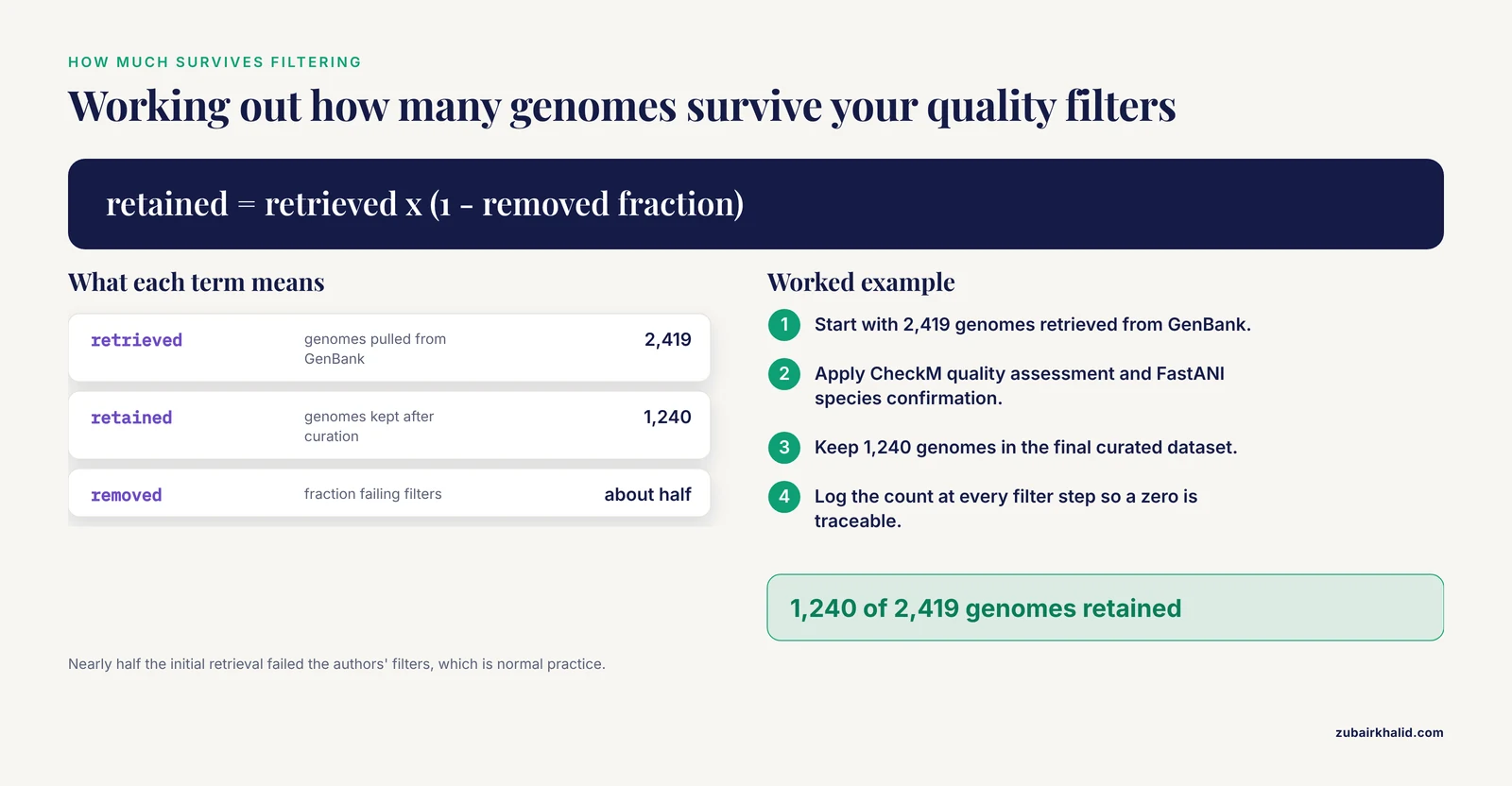
A subtler version of the problem appears during multi-genome retrieval projects. The initial NCBI search returns plenty of records, but after your own quality control the working set shrinks to nothing, or to a set too small for your analysis. The S. maltophilia study is a clean illustration. The authors retrieved 2,419 genomes from GenBank, ran CheckM quality assessment and FastANI species confirmation, and retained a final curated dataset of 1,240 genomes [10]. Nearly half the initial retrieval failed their filters, which is normal and good practice, but a researcher applying stricter thresholds to a rarer organism could end up with an empty final set even though the original search worked.
Practical fix. Log the record count at every filter step. If a single step removes most of your data, inspect a few discarded records and ask whether the threshold is calibrated correctly for your organism's assembly quality norms. Loosen the threshold if the data genuinely cannot meet it, or change the question to fit the data.
A Diagnostic Sequence You Can Follow
Work these steps in order. Each one either finds your data or eliminates a cause.
- Resolve the organism. Search the species name in the Taxonomy database. Confirm spelling, note the accepted name and the Taxonomy ID. If the taxon is missing, the organism is not in NCBI under any name and no query will find it.
- Search Assembly with the Taxonomy ID. A query in the form
txidXXXXX[Organism]in the Assembly database is the most reliable text search NCBI offers for genomes. - Clear all filters and repeat. Compare the hit counts. A large unfiltered count with a zero filtered count means a filter, not the data, is your problem.
- Distinguish RefSeq from GenBank. If the RefSeq-filtered count is zero but the unfiltered count is positive, note the GenBank assembly accession and use it directly.
- Search Nucleotide. For organelle genomes, plasmids, and individual gene records, Nucleotide holds records that Assembly does not. The beetle phylogenetics work that assembled 124 mitochondrial genomes from NCBI records is the model for this kind of retrieval [4].
- Search SRA. Use the BioProject accession from any linked publication. Retrieve reads with the SRA toolkit if an assembly does not exist [3].
- Run BLAST. If you have a sequence, BLASTn or BLASTp against the nucleotide or protein databases, taxon-limited if needed. Follow the resulting accession to its full record.
- For pathogens, search the Pathogen Detection browsers. Isolate-level coverage there routinely exceeds what the Genome database shows [6].
- Search Gene with symbol plus organism. Then convert the symbol to a stable NCBI Gene ID for all later work [12].
- If everything above is empty, the data likely do not exist publicly yet. Check the literature for accession numbers, search those directly, and consider contacting authors.
Worked Examples
Three short walkthroughs show the diagnostic sequence in action.
Example 1: A renamed probiotic species. You search "Lactobacillus reuteri PSC102" in the Genome database and get nothing. Taxonomy search shows the accepted name is Limosilactobacillus reuteri. Repeating the search under the accepted genus, or searching the BioProject accession listed in the strain's genome paper, finds the record, a single circular chromosome of 2,048,626 bp with a GC content of 38.9% and 1,846 protein-coding sequences annotated with NCBI and Glimmer tools [1]. Cause: taxon rename.
Example 2: A gene family, not a genome. You want DGAT genes in Coix lacryma-jobi. A Genome database search on "DGAT" returns nothing useful. The correct workflow, as published, is to search NCBI for the CDS sequences of known DGAT family members in related plants and then BLAST those sequences against the Coix genome to recover the ten homologs [2]. Cause: text search applied to a problem that needs sequence similarity search.
Example 3: Pathogen genomes at scale. You want a collection of Salmonella enterica genomes from poultry. A general search surfaces some assemblies, but nowhere near the known coverage. Searching the NCBI Pathogen Isolates Browser yields the source-level collection, in one published case 4,611 isolates across seven antimicrobial classes, ready for AMR and virulence gene profiling [6]. Cause: specialized browser needed.
Common Mistakes and Limitations
- Treating NCBI as one database. The majority of empty searches are cross-database confusion. The Genome, Assembly, Nucleotide, SRA, Gene, and Pathogen Detection records for one organism can live in four different states of completion.
- Trusting gene symbols. Symbols collide across genes and organisms, and synonym lists are large and uneven. Stable IDs from NCBI and sibling databases are the durable approach, especially because symbol ambiguity touches a substantial fraction of well-annotated genomes [12].
- Assuming publication means public data. Papers describe genomes whose records may still be on hold, or which were never deposited as assemblies at all. Always chase accession numbers, not paper claims.
- Search-box drift. Filters persist between sessions. A filter left from yesterday's session can zero out today's search with no warning.
- Confusing "no results" with "no data". An empty SRA search under a strain name can coexist with thousands of runs under the species name, because strain names are inconsistently captured in metadata.
- Forgetting that curation lags. GenBank accepts submissions rapidly, RefSeq curation follows later and selectively. A missing RefSeq record says nothing about the existence of the underlying GenBank assembly.
- One honest limitation. Metadata quality across millions of submissions is uneven, and NCBI cannot fix records it does not control. Individual searches can fail for idiosyncratic reasons this guide cannot enumerate, and a query that fails today may succeed after the next database update.
Prevention Practices
- Start every genome project with a Taxonomy lookup. Capture the accepted name and Taxonomy ID, and carry the ID through all subsequent queries.
- Record accession numbers, not names. Assembly accessions, BioProject accessions, and NCBI Gene IDs are stable keys. Organism and strain names are not.
- Build queries incrementally. Start with a bare organism name, confirm hits, then add filters one at a time so a zero result always has an identifiable cause.
- Check multiple databases as a habit. Assembly, Nucleotide, SRA, and Gene, in that order, covers nearly every genome-related record type.
- For pathogens, default to the Pathogen Detection browsers. The isolate-level holdings there are the deep reservoir for bacterial work [6].
- Use BLAST as a standing fallback. Any time text search fails and you hold a sequence, BLAST converts the problem into an accession-retrieval problem [8].
- Log your retrieval. Record the database, query string, filters, date, and hit count for every search that contributes to a dataset. Reproducibility in genomics begins with a search log, and your future self, or a reviewer, will ask how the genomes were obtained [10].
- Document every quality filter. When a curated dataset shrinks from thousands to hundreds, the audit trail of thresholds is part of your methods, not an afterthought [10].
Frequently Asked Questions
Why does my NCBI genome search return no results even though the species clearly exists?
The most likely reason is that you searched the wrong database, most often the Genome database when the record lives in Assembly, Nucleotide, or SRA. Confirm the organism in the Taxonomy database, then search Assembly with the Taxonomy ID before concluding the data are absent.
Should I search the Genome, Assembly, or Nucleotide database?
Search Assembly for genome assemblies, Nucleotide for individual sequence records including organelle genomes, and Genome as an organism-level portal that links out to both. If you must pick one for finding genomes, Assembly is the most direct.
How long does it take for a newly submitted genome to appear in NCBI?
There is no fixed interval, because submissions pass through validation, processing, and possible hold periods including publication embargoes. If a paper lists an accession number, search it directly. If the accession resolves without public data, the record is on hold and release timing rests with the submitters.
Why can I not find a gene by name in the Genome database?
Gene symbols are not the primary search key there, and symbols are frequently ambiguous, with many mapping to more than one gene. Search the Gene database with the symbol plus the organism name, then use the stable NCBI Gene ID for all later queries.
What is the difference between RefSeq and GenBank results?
GenBank holds archival submitter deposits, while RefSeq holds NCBI-curated reference and representative genomes with standardized annotation. An organism can have GenBank assemblies and no RefSeq record, so a RefSeq-only filter can return nothing even when data exist.
How do I get genome data if only raw reads are available?
Search the SRA by organism name or BioProject accession and download runs with the SRA toolkit. You will then need to quality-filter and assemble or map the reads yourself, since no assembly record exists.
Can I use BLAST instead of the search box?
Yes, and you should when you have a sequence in hand. BLAST matches by sequence similarity, so it finds records whose text metadata is missing, wrong, or thin, and each hit gives you an accession number for direct retrieval.
Why does an accession number from an older paper return nothing?
The record may still be on hold, may have been superseded by a newer version with a new accession, or may belong to a database your search box does not cover. Search the accession in the database that issued it, and check the paper for a companion BioProject or updated accession.
Sources
- Complete genome sequence and genomic characterization of the probiotic Limosilactobacillus reuteri PSC102.
- Genome-wide analysis of DGAT gene family in Coix lacryma jobi L. and functional characterization in yeast H1246.
- Genetic basis of immunity in Indian cattle as revealed by comparative analysis of Bos genome.
- Mitochondrial Genome Comparison and Phylogenetic Analysis of the Family Carabidae (Coleoptera: Adephaga).
- Whole-Genome Resequencing Reveals Genomic Signatures Underlying High-Altitude Adaptation in Ethiopian Indigenous Cattle.
- Adaptive Genomic Backgrounds of Antimicrobial-Resistant Salmonella enterica from Chicken Sources: Virulence, Stress Response, and Genotype-Phenotype Discrepancy.
- Genomic Profiling of the Virulence Potential and Antimicrobial Resistance of Shiga Toxin-Producing Escherichia coli from Surface Water and Animal Sources.
- From genetic investigation to viral diagnosis: HSV-1 detection through genome sequencing analysis in neonatal intensive care.
- Draft genome dataset of Xylaria sp. KR-3U isolated from leaves of the medicinal plant Catharanthus roseus.
- In silico antimicrobial resistance profiling of 1,240 Stenotrophomonas maltophilia genomes: AMR gene prevalence, temporal evolution, and ST-specific associations.
- Reference genome of the Californian trapdoor spider Aptostichus stephencolberti Bond 2008 (Araneae: Mygalomorphae: Euctenizidae).
- Protein-coding genes in humans and model mammals (mouse, rat and pig): gene identifiers and disambiguation of gene nomenclature retrieved from the Ensembl genome browser.