Why Can't I Find My Gene on NCBI?
By Dr. Zubair Khalid, DVM, MS, PhD ·

The most common reason an NCBI search returns nothing is that the query went to the wrong database or used a name the Gene database does not recognize. NCBI is not one search engine. It is a family of more than thirty linked databases, and a gene symbol that retrieves a clean record in Gene can retrieve zero hits in Nucleotide, or ten thousand irrelevant hits in All Databases. Before assuming a gene is missing, check the database selector at the top of the search box and confirm you are searching Gene, not Nucleotide, Protein, Genome, or All Databases. That single check resolves a large share of failed searches, and the rest of this article works through the remaining causes in order of how often they occur.
This guide covers how NCBI search actually works, a full troubleshooting table, the mechanisms behind each failure mode from most common to rarest, a diagnostic sequence you can follow, and the record-keeping habits that keep these problems from recurring. Every fix is something you can run in a browser, with command-line alternatives where they save time.
The First Two Minutes: What to Check Before Anything Else
Run through this list before reading further. Each item takes seconds and eliminates the most frequent causes.
- Confirm the database. The search box on the NCBI homepage defaults to All Databases. Click the dropdown and switch to Gene. A gene with a curated record almost always appears there if it exists at all.
- Search the Gene ID instead of the symbol. If you have a numeric GeneID (for example, 185 for the human AGTR1 locus), enter it directly. Numbers bypass every naming problem.
- Add the species. Search for the symbol plus the organism name, for example
BRAF AND Homo sapiens. Unqualified symbol searches often bury the record you want under homologs from other species. - Try the official symbol without quotes, then in quotes. NCBI applies automatic spell correction and phrase handling. If
PebSfails, try"PebS"[All Fields]. - Paste the amino acid sequence into BLAST. If the gene has any protein record anywhere in NCBI, blastp against the non-redundant protein database will find it even when every name-based search fails.
- Check the exact spelling and capitalization habits. Gene symbols in vertebrates are conventionally uppercase and italicized in text (BRAF), while mouse symbols use an initial capital (Braf). The search is largely case-insensitive, but incorrect symbols that differ from the official name by a letter will fail.
If all six checks fail, the problem is deeper than a typo. Work through the causes below.
How NCBI Search Actually Works
Understanding the mechanism prevents most confusion. NCBI retrieval runs through Entrez, a unified query system that indexes records, not biological concepts. Each database indexes a specific record type. Gene indexes curated gene records, one per gene per genome, each carrying a stable numeric GeneID. Nucleotide indexes submitted sequence records, including whole-genome shotgun (WGS) contigs. Protein indexes protein records, both translated annotations and direct submissions. Genome and Assembly index genome-level projects. dbSNP indexes sequence variants. GEO (Gene Expression Omnibus) indexes functional genomics datasets such as microarray and RNA-seq experiments.
A name-based search only matches text that appears somewhere in the indexed record fields, including the gene symbol, full name, aliases, product names, and linked publications. If a gene exists in a genome but nobody has annotated it, no record carries its name, so no name-based search can retrieve it. This is the core asymmetry of gene search: absence of a search hit does not prove absence of the gene, only absence of an annotation that mentions the name.
Gene records themselves are built from annotation pipelines and curation. For well-studied organisms with reference assemblies, NCBI produces RefSeq records, which are curated, high-quality reference sequences. For other organisms, gene models come from automated prediction on whatever assembly exists. The quality of your search results is bounded by the quality of the annotation underneath.
Troubleshooting Table
The table below is the core of this article. Work down the rows in order, because the early rows cover the most common failures.
| Symptom | Likely cause | How to confirm | Fix |
|---|---|---|---|
| Zero results in the NCBI homepage search box | Default All Databases search is scattered, or the wrong database was selected | Note which database the results page displays, then re-run the query in Gene specifically | Switch to Gene and search symbol plus species |
| Gene shows results for other species but not yours | The gene has not been annotated in your species, or your species has no assembly in Gene | Check Taxonomy for your species, open its Genome record, and look at the annotation status | BLAST your sequence against Nucleotide or Protein, or use a related reference species |
| Symbol search returns nothing, but you know the gene from a paper | Paper used an alias, an old symbol, or a name from another database | Search the full gene name, search with quotes, or look up the symbol at HGNC for human genes | Search by Gene ID, by alias, or by protein sequence |
| Symbol returns dozens of unrelated hits | The symbol is ambiguous and maps to more than one gene | Read the Also known as field on candidate records and compare species and function | Filter with [gene] or [sym] field tags and the species name, or navigate by Gene ID |
| Gene exists in one assembly version but not another | Assembly has been superseded and gene models were merged, split, or renamed | Compare assembly accessions in the URLs and check the assembly history on the Assembly record | Search the current assembly, then check the previous version's records for remapped coordinates |
| Gene appears in Nucleotide but not Gene | The sequence is in a WGS or draft submission without a gene-level record | Open the Nucleotide record and check whether it carries CDS features and a GeneID link | Work from the nucleotide record directly, or translate and BLAST the protein |
| Gene appears in related species but not the one you study | The gene is genuinely absent, lineage-specific, or acquired horizontally | Search by protein similarity rather than name, and examine genomic context of any hits | Run blastp or HMMER with a profile, then verify identity by phylogeny and gene neighborhood |
| Gene record exists but lacks sequence, function, or refs | Record is predicted with no functional curation | Check the evidence codes and the annotation status on the record | Follow the BLAST links, domains, and cross-references on the record, or use UniProt and the literature |
Cause 1: You Are Searching the Wrong Database
This is the most frequent failure and the easiest to fix. The NCBI homepage search box queries everything at once and returns a results page organized by database. That page answers the question "which databases contain a record matching this text," which is rarely the question a researcher is actually asking. A user looking for a gene record who lands on a page of nucleotide contigs, protein fragments, and literature will often conclude the search failed when it succeeded too broadly.
Each database answers a different question, and mixing them up produces characteristic failures.
- Gene answers: does this organism have a curated gene record for this name? Gene records carry the GeneID, genomic coordinates on a reference assembly, transcripts and proteins, function summaries, and cross-links.
- Nucleotide answers: has anyone submitted a sequence containing this gene? Results include WGS contigs and third-party submissions that carry no GeneID.
- Protein answers: does a protein sequence exist with this name or accession?
- Genome and Assembly answer: has this organism been sequenced, and at what quality?
- dbSNP answers: what variants are known in this gene? A variant such as rs5186 in the AGTR1 gene, used in hypertension association studies, is a dbSNP record, not a Gene record [1]. Variant-centric searches belong in dbSNP, which also hosts population allele-frequency data for SNPs such as those studied in the CD40 gene across six major global populations [2].
- GEO answers: in which experiments was this gene measured? Expression datasets, such as the rat lung transcriptomic series analyzed for crystalline silica response, live in GEO and are retrieved by accession and series metadata, not by gene-name search alone [3]. Tools built on GEO, such as STARGEO, exist specifically to find and process suitable expression datasets [4].
The practical rule is to pick the database that holds the record type you need, then search there. If you want a gene record, search Gene. If you want every sequence fragment containing the gene, search Nucleotide and expect noisy results.
Cause 2: The Gene Exists But Under a Different Name
Gene nomenclature is messier than most people expect. Official symbols, aliases, and synonyms accumulate over decades, and the same symbol can refer to different genes in different species. A systematic survey of protein-coding gene identifiers in human, mouse, rat, and pig found that the total number of symbols, counting official symbols plus synonyms, ranges from 16,600 in pig to 64,580 in mouse, and that a large number of symbols map to more than one gene. Those ambiguous symbols complicate identification for about 10 percent of rat and mouse protein-coding genes and about 18 percent of human protein-coding genes [5].
That ambiguity cuts in both directions. A search can fail because your symbol is a synonym the record indexes under a different primary name, and it can also succeed misleadingly because your symbol matches a synonym of an unrelated gene. Three habits fix most naming failures.
- Search the full name as well as the symbol. A symbol like DGAT2 may fail while the full name, diacylglycerol O-acyltransferase 2, succeeds. Gene-family researchers routinely start from full-name and domain searches for exactly this reason.
- Use field tags. Entrez supports field-limited queries such as
BRAF[sym] AND human[orgn]ordiacylglycerol[All Fields] AND Coix[orgn]. Field tags strip out matches that occur only in publication titles or comments, which is a frequent source of both noise and confusion. - Resolve names through an authoritative registry. For human genes, the HGNC record lists the official symbol, the previous symbols, and the aliases, any of which may be the term that actually retrieves the NCBI record. Stable gene identifiers assigned by bodies such as Ensembl, NCBI, RGD, HGNC, and VGNC exist precisely to sidestep symbol ambiguity, and the recommendation from the identifier survey is to retrieve associated data directly from those databases rather than relying on symbols alone [5].
If a paper gives you only a symbol and a species, look up the symbol in the relevant registry first, obtain the GeneID or the protein sequence, and search NCBI with that.
Cause 3: The Gene Has Never Been Annotated in That Genome
A gene that exists in the DNA of an organism may still be invisible to a name search if the genome assembly has not been annotated with a gene model carrying that name. Annotation is the computational and curatorial process of marking where genes are and what they encode. It is done per assembly, per species, and it lags behind sequencing. A newly assembled crop cultivar or a wildlife species may have an excellent genome with sparse annotation.
The workaround is to stop searching by name and search by sequence or by protein family instead. This is standard practice in gene-family studies, and the published workflows are directly reusable.
- BLAST a homolog. Take the protein sequence of the gene from a well-annotated species and run blastp against your target organism's proteome, or tblastn against its genome. A maize GDS1 family study took the Arabidopsis GDS1 protein as the query, ran BLASTP version 2.11.0+ against the maize B73 reference genome, and recovered thirteen ZmGDS1 genes that a name search alone would never have surfaced [7]. A Coix lacryma-jobi DGAT study followed the same pattern, retrieving CDS sequences of plant DGAT family genes from NCBI and using blast screening to find ten homologs in the Coix genome [6].
- Search by domain, not by name. Many genes are named for their domains. HMMER, a tool that searches sequences against profile hidden Markov models such as the Pfam database, finds all members of a family regardless of what they have been called. A finger millet HSP20 study scanned the predicted proteome of assembly GCA_032690845.1 with the alpha-crystallin domain profile Pfam PF00011 and recovered 76 non-redundant HSP20 genes, then confirmed every candidate with NCBI CD-Search [8]. A donkey TGF-beta family study used BLASTp and HMMER with Pfam PF00019 to identify 40 TGF-beta genes from proteomes retrieved from NCBI [9].
- Confirm candidates independently. NCBI CD-Search compares a protein against conserved domain models and reports which domains are present. Using it as a verification step, as both the finger millet [8] and maize [7] studies did, prevents false positives from loose BLAST hits from being named as family members.
The sequence-first workflow is also the correct answer to the question of why a gene appears in one species search and not another. The gene may be there, unannotated and unnamed.
Cause 4: The Gene Is Not in the Organism You Searched
Sometimes the empty result is biologically correct. Genes are not universally distributed, and assuming that a gene found in one lineage exists in another is a mistake that name-based searching cannot catch, because a missing gene and an unannotated gene look identical from the search box.
The clearest documented example is the phage-encoded gene pebS, which encodes a ferredoxin-dependent bilin reductase that converts biliverdin IXalpha to phycoerythrobilin. Cyanobacteria perform the same overall conversion in two enzymatic steps using the FDBR enzymes PebA and PebB, and pebS had been considered exclusive to cyanophages. When researchers searched the Ocean Gene Atlas and all available cyanobacterial genomes at NCBI using a cyanophage-derived PebS sequence as the query, most hits grouped phylogenetically with PebA or PebB, and the few cyanobacterial assembly sequences that clustered with PebS turned out, on genomic-context analysis, to be of phage origin, consistent with cyanophage infection at the time of sampling. The conclusion was that pebS is absent from cyanobacterial genomes [10].
That case carries two lessons for anyone troubleshooting a search. First, a gene genuinely absent from a lineage will produce either zero hits or near-miss hits from paralogous family members, and phylogenetic placement is the tool that distinguishes the two. Second, genes can cross lineage boundaries through horizontal transfer, so a surprising hit in an unexpected genome may reflect a phage or integrated element rather than host ancestry, and the surrounding genes on the contig reveal that.
A related trap is name transfer across species. Genes with the same symbol in rice and peanut are not always one-to-one orthologs. A groundnut study using rice seed-size genes as candidates found 31 putative homologous sequences through PeanutBase and additional matches through NCBI transcriptome searches, and treated the results as candidates for validation rather than as confirmed equivalents [11]. When a gene search in your species of interest comes up empty, the honest next step is similarity-based searching, not a conclusion about presence or absence.
Cause 5: Search Syntax and Filter Problems
Entrez queries have a grammar, and small syntax errors produce silently wrong results. The common failure modes are these.
- Missing Boolean operators. Terms joined by a space are treated as if connected by AND in most contexts, but explicit
AND,OR, andNOTin capitals behave predictably. WriteBRAF AND Homo sapiens[orgn]rather than relying on defaults. - Quotes and phrases. Multi-word names such as
heat shock proteinshould be quoted,"heat shock protein"[All Fields], or they match records containing the words anywhere. - Field tags. Useful tags include
[sym]for symbol,[gene],[orgn]for organism,[All Fields], and accession-based tags. A plain text search for a common word matches titles, abstracts, and product names across the database. - Filters and limit tabs. The results page applies filters, such as source databases or molecule types, that persist between searches and silently drop records. If a previously productive query suddenly returns nothing, clear all filters first.
- Spell correction. NCBI offers alternative spellings when a term looks misspelled. Accepting a correction for a real but unusual symbol will redirect the search away from the record you wanted. Check the Did you mean suggestion before clicking it.
- Results window and sorting. The default display shows the top-ranked records first. NCBI ranking favors curated, well-documented records, so a low-annotation gene from a draft genome can sit pages deep even when it matches the query exactly. Sort by accession or chromosome, or raise the displayed items per page, before concluding that nothing matched.
If a complex query fails, strip it back. Search the bare symbol, confirm the record exists, and then add filters one at a time to find which condition removed the hit.
Cause 6: Record Changes, Merges, and Discontinued Accessions
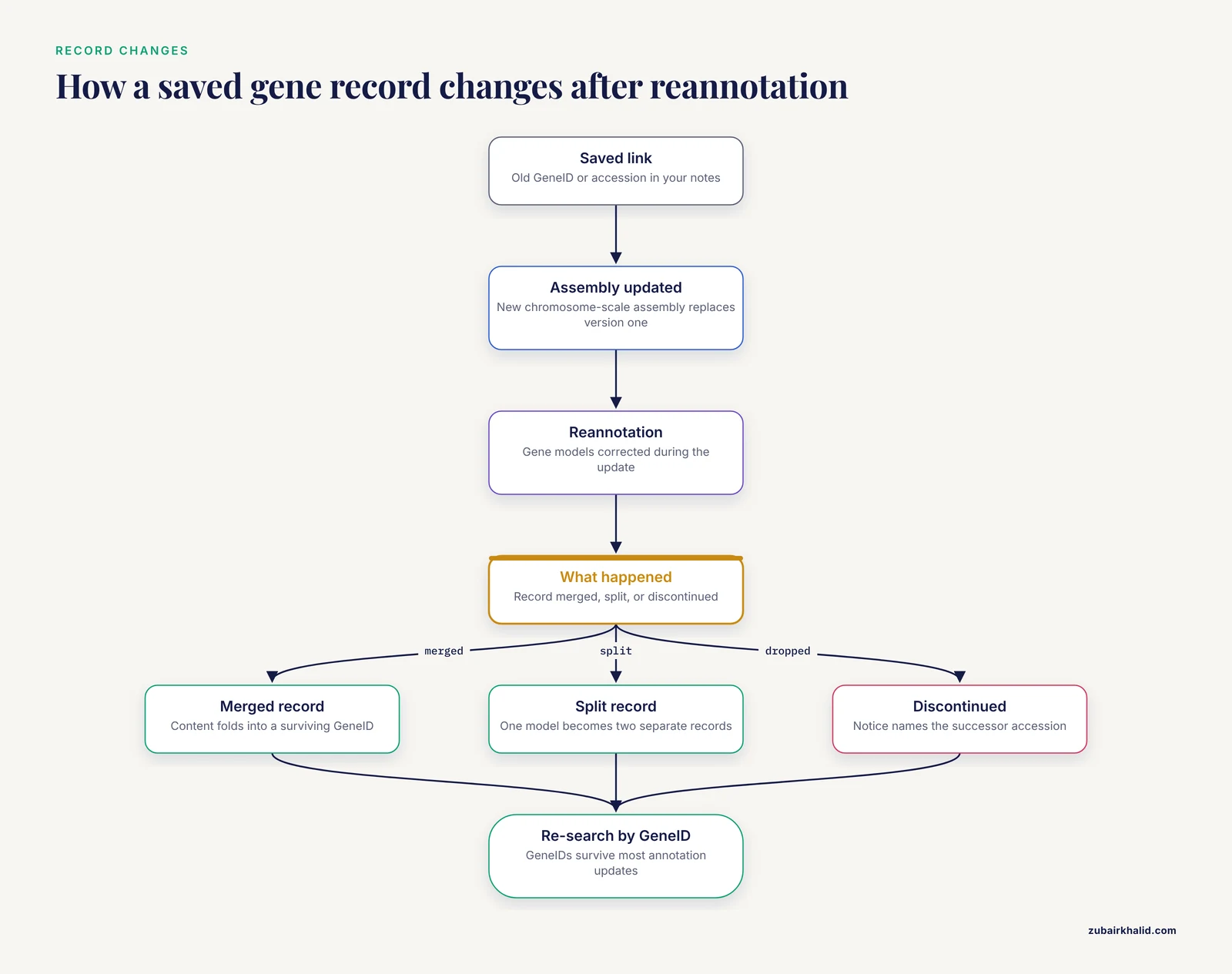
NCBI databases change continuously. Assemblies are replaced, gene models are corrected, records merge when two annotations describe one gene, and records are discontinued when they were artifacts. A search that worked six months ago can fail today for reasons that have nothing to do with your query.
The typical scenario looks like this. You annotated a gene against assembly version one. The species gets a chromosome-scale assembly, version two. During reannotation, two predicted models are merged into one gene, so the GeneID you used is discontinued and its content folds into a surviving record. Your saved link now returns an error page or redirects, and a search for the old model name returns nothing. The same happens in reverse when a merged record is split.
Three practices keep this manageable. Check the assembly accession and version in every URL you save, because a change from one assembly to the next is the most common trigger for vanished coordinates. Use the GeneID as your permanent handle, because GeneIDs survive annotation updates even when model names and accessions change around them. And when a nucleotide accession appears dead, look for the replaced or discontinued notice on the record, which names the successor accession. For proteome-scale work, re-download protein sets at the start of a project rather than reusing old files, since records for a species can shift between releases. Protein-level data mining, such as the FAM111A study that retrieved roughly 1,850 FAM111A protein sequences across species from NCBI/Protein, depends on the current contents of the database at the time of retrieval [12], and those contents move.
Cause 7: Draft Assemblies and Contig-Level Records
Not every sequenced genome is in Gene. NCBI holds over one million bacterial genome sequences [13], a scale that makes per-gene curation impossible for most of them. Gene-level records concentrate on organisms with reference or representative assemblies. A gene in a draft, contig-level WGS submission may exist only as annotation features on a nucleotide record with no Gene record at all.
Confirm the situation in this order. Open the organism's Assembly database record and read the assembly level, which ranges from complete genome down to contig. Check whether the assembly has an annotated RefSeq equivalent. Then search Nucleotide restricted to that organism with the gene name or a protein query. If the gene lives only in WGS contigs, work from the nucleotide records directly, extract the region, and translate it yourself.
For bacterial and other high-volume work, the robust solution is local searching. A pipeline such as GeTPrev, which integrates BLAST-based alignment against curated complete-genome databases and can extend into draft genomes in its heavier mode, exists because web-scale searching cannot answer gene-prevalence questions across large taxonomic collections [13]. The same logic applies at the level of one project: if your target genes live in draft assemblies, download the proteomes or genomes, build a local BLAST database, and query there. Command-line searching against your own copies removes dependence on how NCBI happens to have indexed each record.
Cause 8: Gene Families, Paralogs, and Search Ranking
Family-level searches fail in a quieter way than single-gene searches. The records exist, but a name query retrieves a subset, ranked by criteria that have nothing to do with biological completeness. A search for a family name returns the best-documented members first and can miss the recently duplicated, poorly annotated members entirely, which then look like absent genes.
The documented family sizes show why a name search is not a census. The donkey TGF-beta family analysis found 40 members, exceeding counts in several other mammals, with four segmental duplications showing strong purifying selection [9]. The finger millet HSP20 census found 76 members spread over 14 of the 18 chromosomes, with conspicuous absences from four chromosomes and clustering on three others [8]. Neither of those numbers could have been obtained by searching the family name. Both came from proteome-wide domain scans followed by phylogenetic classification into subfamilies.
The practical consequence is a rule: never treat a name-search hit count as a family size. If you need the complete set, scan the proteome with the domain profile, cluster candidates by phylogeny, and verify domain content with CD-Search [8][7]. If you need one specific gene, blastp your query sequence and inspect the top hits, then confirm identity by phylogenetic placement rather than by percentage identity alone, since paralogs within a family often share high identity.
A Short Diagnostic Sequence
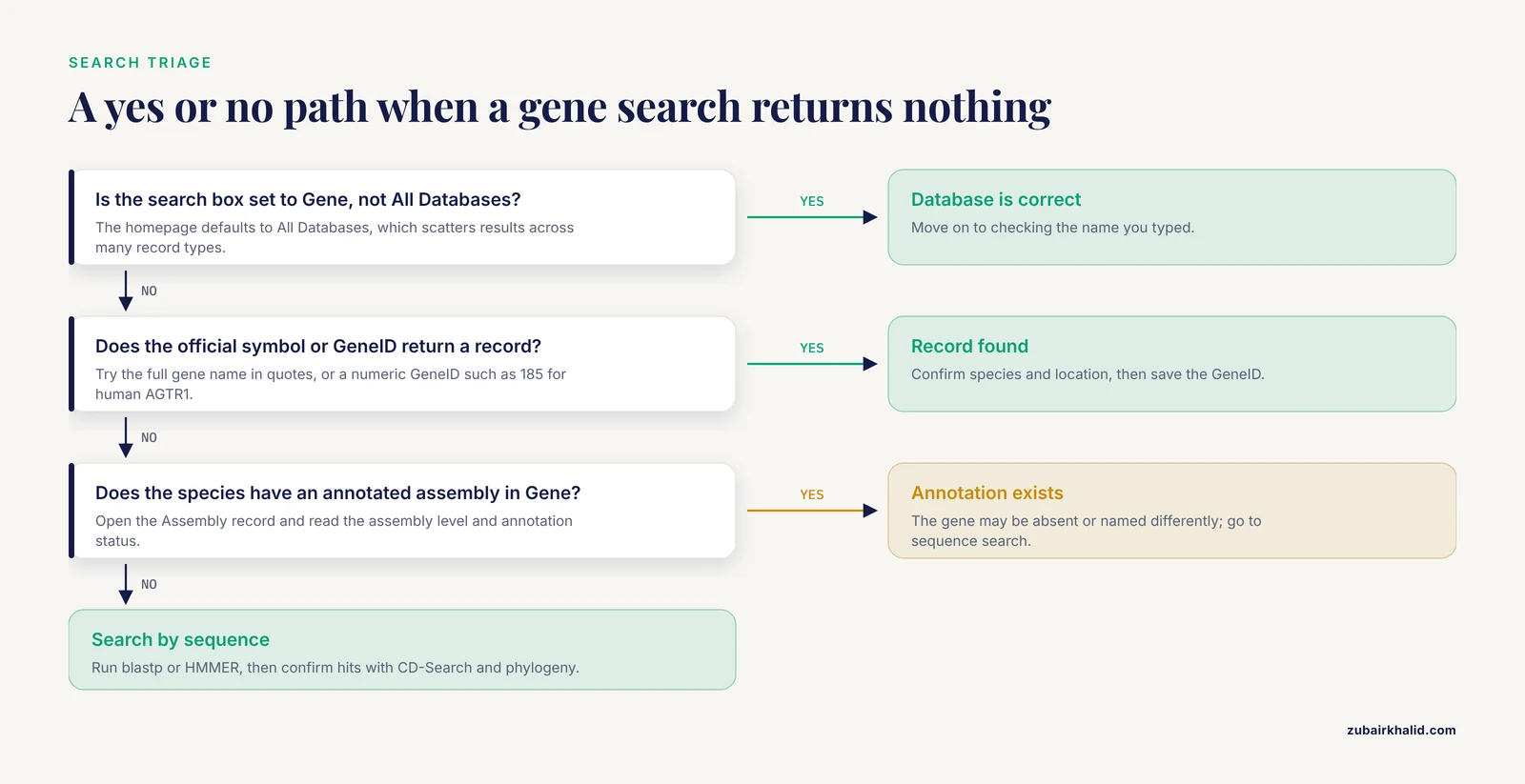
When a search fails, follow this sequence in order. Each step either finds the gene or eliminates a cause.
- In Gene, search the symbol plus the species name.
- Search the GeneID if known, or the full gene name in quotes.
- Clear all filters and limits on the results page and search again.
- Search the same query in Protein and Nucleotide. A hit in Protein with no hit in Gene points to an annotation gap in your species.
- Run blastp with a homologous protein from a reference species against your species' proteome. Record the accession of any hit.
- Run CD-Search on candidate hits to confirm the expected domain [8][7].
- Check the genomic neighborhood of any candidate to rule out phage or transposable-element origin when the hit appears in an unexpected lineage [10].
- Open the species' Assembly record and read the assembly level and annotation status. If the assembly is contig-level, work in Nucleotide or download locally.
- Search GEO for expression evidence using the gene name and species if sequence evidence is thin [3][4].
- Search dbSNP for variant-centered information under the gene's rs numbers if your question is about polymorphisms rather than the gene itself [1][2].
Reaching step 10 without a hit usually means the gene is unannotated in the available sequence, named differently from every term you tried, or genuinely absent from the organism, and only phylogenetic analysis against a curated homolog set will distinguish those possibilities [10].
When the Gene Is Genuinely Missing or New
An empty search occasionally marks a discovery rather than a failure. If your protein is from an organism whose genome has been sequenced and you can find no homolog by BLAST or by HMM profile in any related species, the possibilities are that the gene is specific to a narrow lineage, that it was acquired horizontally, or that existing models misrepresent it.
The pebS case shows how to close the loop properly. The authors did not stop at blast hits. They built protein phylogenies to place each candidate relative to known PebA, PebB, and PebS sequences, which separated true PebS sequences from the two-step cyanobacterial enzymes that superficially resemble it. They then examined the genomic context of the candidate genes, and the neighborhood revealed phage origin, which resolved the apparent contradiction of a phage gene inside cyanobacterial genome assemblies [10]. Identity claims about divergent homologs require exactly that combination: sequence similarity to generate candidates, phylogenetics to classify them, and genomic context to interpret surprises.
If your search ends there, the report you write should say what the search supports and what it does not. Absence of an annotation is not absence of a gene, and absence from a draft assembly is weaker evidence than absence from a complete reference genome.
Working With What You Find: Gene IDs, Accessions, and Cross-Database Follow-Through
Successful searches are only half the workflow. What you do with the record determines whether the next search, six months from now, will work.
Anchor everything to stable identifiers. The GeneID is NCBI's stable gene key. Assembly accessions such as GCA_032690845.1 for the finger millet reference assembly [8] or ASM1607732v2 for the donkey assembly [9] pin your coordinates to an exact sequence version. Variant IDs such as rs5186 pin a polymorphism to an exact nucleotide change [1]. When you write up results, cite these identifiers rather than symbols, because symbols drift and identifiers do not, a recommendation that follows directly from the scale of symbol ambiguity documented across mammalian genomes [5].
Follow the links built into records. A Gene record links outward to Nucleotide and Protein records, to Conserved Domains, to dbSNP, to GEO expression profiles, and to PubMed. For a protein like FAM111A, the documented workflow moves from NCBI/Protein retrieval through multiple alignment and phylogeny to structural resources such as PDB and clinical resources such as ClinVar, using the cross-links as the roadmap [12]. Learning to walk those links turns a single search into a complete picture of a gene without running another query.
For programmatic access, NCBI provides E-utilities, a set of URL-based API endpoints. A minimal retrieval looks like this:
esearch -db gene -term "BRAF[gene] AND Homo sapiens[orgn]" | efetch -format docsumThat command searches Gene for the human BRAF record and fetches a summary document. API access matters when a browser search cannot express the query, for example when you need every gene record on one chromosome of one assembly, and it makes searches reproducible because the exact query is preserved as text.
Common Mistakes and Limitations
These are the errors that cost the most time, stated plainly.
- Trusting a symbol match. Because a large fraction of symbols map to more than one gene, roughly 10 percent of rat and mouse protein-coding genes and about 18 percent of human protein-coding genes are affected by ambiguous symbols [5], a hit is not an identification. Check the species, the function, and the genomic location before accepting a record.
- Treating search results as a census. Name search retrieves records that mention the name. Complete family catalogs require domain scans and phylogenetic confirmation [8][7][9]. A hit count from the search box is neither.
- Concluding absence from an empty search. An unannotated gene, a synonym-only name, and a truly absent gene all return zero name hits. The pebS analysis demonstrated that hits that seem to confirm presence can actually be paralogs, and that only phylogenetic placement settles the question [10].
- Ignoring assembly versions. Coordinates and gene models are assembly-specific. Reporting a location without the assembly accession makes the result unverifiable.
- Searching variants in Gene. Polymorphism work belongs in dbSNP, where allele frequencies across populations are recorded alongside the variant [2].
- Expecting expression answers from sequence databases. GEO holds the functional datasets, and dataset discovery there is its own search task [3][4].
- Over-relying on automatic spell correction. The suggested correction can steer a valid query for an unusual symbol toward a common one.
One limitation applies to every individual case. A persistent failure to locate a gene, especially when it affects a project's core hypothesis, warrants a second opinion from a colleague with genomics curation experience, because the fastest diagnostic is often someone who has seen that organism's annotation quirks before.
Prevention Practices
A handful of habits make future searches reliable.
- Record accessions at the moment of discovery. Store the GeneID, protein accession, nucleotide accession, and assembly accession in your notes or electronic lab notebook. The two minutes this takes eliminates most repeated searches.
- Pin assemblies. When a project depends on specific coordinates, download the FASTA and GFF annotation files for that assembly version and keep them with the project. Database updates will not move your local copy.
- Build a local BLAST database for repeated queries. Using
makeblastdbon your downloaded proteome lets you rerun searches against a frozen dataset, which is exactly the approach large-scale pipelines adopt for reproducibility [13]. - Keep the query sequence, not just the name. A protein sequence in FASTA format is the one query that works across naming changes, species boundaries, and annotation gaps.
- Document the exact search string. For reproducibility, save the Entrez query with its field tags, the database, and the date, since databases change under stable queries.
- Verify family membership before naming. Apply a domain check and a phylogenetic placement as routine steps, following the workflows published for gene-family studies [8][7][6][9].
- Resolve symbols through registries before searching. A registry lookup converts a symbol into identifiers, which converts a fragile search into a robust one [5].
Frequently Asked Questions
Why does my gene show up in BLAST but not in the NCBI Gene database?
BLAST searches sequences, while Gene indexes curated gene records. If your species' genome assembly has not been annotated with a model for that gene, no Gene record exists, but the raw sequence can still be present in Nucleotide or match a protein from another species in BLAST.
How do I search for a gene if I only know its function?
Search by the domain it should contain. Find the Pfam accession for the domain, then run HMMER or NCBI CD-Search against your organism's proteome, or search Gene with the function's full name in quotes as a starting point before moving to sequence-based methods.
What is the difference between searching Gene, Nucleotide, and Protein on NCBI?
Gene returns one curated record per gene per genome with coordinates and function. Nucleotide returns submitted DNA sequence records, including draft contigs with no gene record. Protein returns protein sequence records. Choose the database that holds the record type you need.
Why do I get irrelevant results when I search my gene symbol?
Your symbol probably matches a synonym or partial term in many records. Add the species with the [orgn] tag, restrict the symbol with the [sym] tag, and confirm the correct record by its GeneID and genomic location before using it.
Can a gene exist in a genome without appearing on NCBI?
Yes. Annotation is created per assembly, and genes in draft or lightly annotated assemblies may have no Gene record and no name anywhere in the database. BLAST or HMMER against the sequence itself is the way to find them.
How do I find the official name of a gene when papers use different names?
Look up one of the published symbols in the nomenclature registry for that species, such as HGNC for human genes or VGNC for vertebrate species without an existing committee. The registry lists official symbols, previous symbols, and aliases, and gives you the stable identifier to search with.
Why did my saved NCBI link stop working?
The record was likely merged, split, or discontinued during an assembly or annotation update. GeneIDs survive most changes, so re-search using the GeneID, and check any discontinued notice on the old accession for its replacement.
Should I trust gene symbol matches when comparing genes between species?
Treat symbol matches as leads, not identifications. Symbols are frequently ambiguous across and even within species, so confirm cross-species relationships with protein similarity, conserved domains, and phylogenetic placement before calling two genes orthologs.
Sources
- Genetic determinants of hypertension: A meta-analysis of AGTR1 and CYP11B2 gene polymorphisms.
- The association between CD40 gene polymorphisms and the risk of cancer based on a meta-analysis.
- In silico temporal mapping of fibrogenic and immune gene dynamics in rat lung following crystalline silica exposure.
- Meta-analysis of differential gene expression in idiopathic pulmonary arterial hypertension.
- Protein-coding genes in humans and model mammals (mouse, rat and pig): gene identifiers and disambiguation of gene nomenclature retrieved from the Ensembl genome browser.
- Genome-wide analysis of DGAT gene family in Coix lacryma jobi L. and functional characterization in yeast H1246.
- Identification and Analysis of the ZmGDS1 Gene Family in Maize.
- Mining the sHSP20 (small heat-shock protein) gene family in finger millet (Eleusine coracana (L.) Gaertn.): structural, evolutionary and predicted abiotic-stress-responsive insights.
- Genome-Wide Characterization of the TGF-β Gene Family in Donkey (Equus asinus) Reveals Lineage-Specific Gene Duplications and Deleterious Mutations.
- Phylogenetic support of pebS as a phage-exclusive auxiliary metabolic gene.
- Cross-genera marker transferability, expression dynamics and in silico identification of rice seed size gene orthologs in contrasting groundnut genotypes.
- The FAM111A Gene: Genetic, Epigenetic, and Pharmacological Targets and Mechanistic Insights with Clinical Relevance.
- The Gene Taxonomic Prevalence (GeTPrev) Pipeline for Scalable Gene Prevalence Estimation Across Bacterial Taxa.