NCBI Gene Page Fields: How to Interpret It
By Dr. Zubair Khalid, DVM, MS, PhD ·

The NCBI Gene page is a curated report that summarizes everything the National Center for Biotechnology Information (NCBI) knows about a single gene, organized into labeled fields such as Gene ID, Symbol, Genomic context, RefSeq sequences, Gene Ontology, Pathways, and Bibliography. Interpreting NCBI gene page fields means knowing what each of those labeled sections contains, where the data in it comes from, and how much confidence the evidence behind it deserves.
This matters because the Gene database is the hub of the entire NCBI databases ecosystem. When you search NCBI for a gene, the Gene record is the page that links you outward to nucleotide sequences, protein sequences, PubMed literature, structure data, variation data, and specialized resources such as NCBI Glycans and PubChem [1]. If you misread one field, such as treating a predicted protein accession as experimentally confirmed, every downstream step in your workflow inherits that mistake. Students most often stumble here, so this article walks through each field in the order it appears on a real record, explains what it means, and flags the interpretations that cause problems.
How the Gene Database Fits Into NCBI
NCBI is not one database. It is a family of linked databases connected through the Entrez search system, and Gene is the central node for genes. A Gene record does not hold sequence data itself. Instead, it holds identifiers, names, mapping information, and curated annotations, and it points to the nucleotide, protein, structure, variation, and literature databases where the underlying records live [1].
A practical NCBI databases guide starts with this mental model. You begin at a Gene page, and every field you see is either:
- A stable identifier (Gene ID, taxonomy ID, accession numbers)
- A name or label (symbol, aliases, full name)
- A location statement (chromosome, cytogenetic band, genomic coordinates)
- A functional annotation (GO terms, pathways, conserved domains, summary text)
- A cross-reference to another database (PubMed, OMIM, GEO, external resources)
- A link into the Related information menu on the right side of the page
Cross-database integration is a deliberate design choice at NCBI. Specialized portals such as NCBI Glycans gather glycan-related information scattered across multiple NCBI databases into one entry point, and PubChem links chemical records out to integrated resources such as GlyTouCan, GlyCosmos, and GlyGen [1]. Gene pages follow the same philosophy. The field labeled "Gene Ontology" is a link hub, not a self-contained analysis. Once you understand that, NCBI gene page fields interpretation becomes straightforward: read the field, then ask which database the field is pointing you to.
Getting to a Gene Record
To reach a Gene record, go to the NCBI homepage, choose Gene from the database dropdown, and type a search term. Search terms can be:
- A gene symbol, for example BRCA1
- A Gene ID typed directly, for example 672
- A protein name, for example "insulin receptor"
- A gene name plus an organism, for example "actin AND Homo sapiens"
- An accession number from another database, which NCBI will resolve
The results page lists matching genes with their symbol, full name, organism, and chromosomal location. Use the species filter on the left to restrict to one organism, because the most common search failure is landing on the mouse ortholog when you wanted the human gene, or the reverse. Clicking a result opens the full Gene report, whose URL contains the Gene ID, for example https://www.ncbi.nlm.nih.gov/gene/672 for human BRCA1.
Two navigational habits pay off every time. First, bookmark the record by Gene ID, not by URL from a search, because search URLs contain session parameters. Second, use the "Send to" link at the top right of every Gene record. It exports the record as a file, as a GenBank flat file, or as a tabular report, which is how you get structured data out of the page and into a spreadsheet or script.
The Header Fields: Gene ID, Symbol, and Names
The top of every Gene report carries the identity fields. These are the fields readers misread most often, so they deserve the most careful treatment.
Gene ID. The Gene ID is a stable integer that NCBI assigns to each gene record. Human BRCA1 is Gene ID 672, and human TP53 is Gene ID 7157. The number itself carries no biological meaning. Its value is stability: NCBI does not reuse or reassign Gene IDs, so scripts, pipelines, and published tables use the Gene ID as the unique key for a gene. When a paper says "gene 672," that unambiguously means human BRCA1 in the Gene database, regardless of which gene symbol happened to be in style that year.
Symbol and "Also known as". The symbol is the short, standardized name, such as BRCA1. For human genes, NCBI imports the official symbol from the HUGO Gene Nomenclature Committee (HGNC), which is the body that approves human gene symbols. The field below it, labeled "Also known as," lists aliases and synonyms, including older names, splice-variant names, and informal names that appear in older papers. When you read a 1998 paper that calls the gene BRCC1, that name belongs in the aliases field of the modern record.
Full name. The expanded name, such as "BRCA1 DNA repair associated." The full name is descriptive and changes more often than the symbol. Cite symbols in scientific writing, not full names.
Organism. The species and common name, with the NCBI taxonomy ID. Human is taxonomy ID 9606, mouse is 10090, and Escherichia coli K-12 is 83333. Taxonomy IDs matter in scripts because species names can change while taxonomy IDs do not.
Primary source. This field names the database that supplied the annotation record, for example HGNC for human genes, the Mouse Genome Informatics resource for mouse, or a community model organism database. Knowing the primary source tells you which external curation body to consult for the most authoritative symbol and nomenclature decisions.
Summary. A plain-language paragraph curated by NCBI staff or provided by collaborator databases, describing what the gene does. Summaries are short and cite their sources, which makes them a fast orientation tool. Treat them as a starting abstract, not as a substitute for reading the linked literature.
Genomic Context: Where the Gene Sits
The Genomic context section, near the top right of the record, answers three questions: which chromosome, at what position, and in which direction.
Chromosome and cytogenetic band. BRCA1 sits on chromosome 17 at band q21.31. The band nomenclature (q for the long arm, p for the short arm, numbers for sub-bands) comes from stained chromosome microscopy, and it is still how cytogenetic reports and older papers describe loci.
Coordinates on the reference assembly. The record reports start and stop positions in base pairs on the current reference genome assembly, for example GRCh38 for human. These numbers change between assembly versions, so always record which assembly your coordinates refer to. A coordinate from the GRCh37 build will not line up with the GRCh38 build, and comparing them directly produces silent errors that no software will warn you about.
Strand and exon count. The record shows whether the gene runs on the plus or minus strand and how many exons it contains. Direction matters the moment you design primers or extract a coding sequence, because a minus-strand gene must be reverse-complemented to read in translation orientation.
The graphical map next to these fields shows the gene against its neighbors. Clicking any element in the map opens the sequence viewer, where you can see transcript models overlaid on the genome. For genes with many isoforms, this graphic is the fastest way to see which exons are constitutive and which are alternative.
Sequence Fields: RefSeq Accessions and General Protein Information
Below Genomic context, the record lists the reference sequences. This is where NCBI gene page fields explained properly saves the most grief, because the distinction between record types is exactly what students miss.
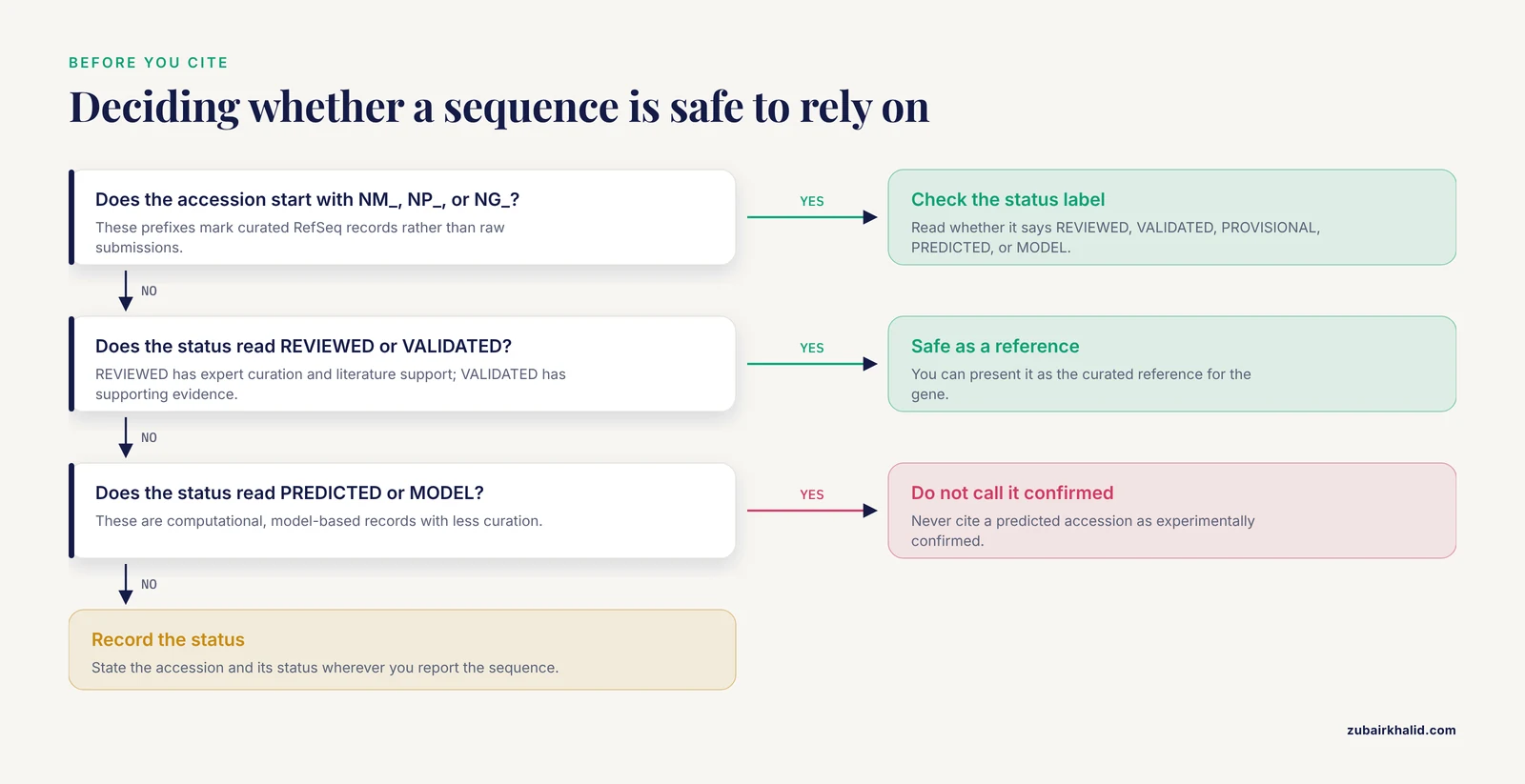
RefSeq (Reference Sequence) records are NCBI's curated, non-redundant standard sequences. They are distinguished from raw GenBank submissions by their accession prefixes:
| Prefix | Record type | Meaning |
|---|---|---|
| NM_ | mRNA | Known protein-coding transcript, transcribed from a genome annotation |
| NP_ | Protein | Protein product translated from an NM_ record |
| NG_ | Genomic | A genomic region curated as a reference locus, often including all transcripts of one gene |
| NR_ | Noncoding RNA | Non-protein-coding RNA transcripts |
| XM_ | Predicted mRNA | Predicted transcript, model-based, less curation |
| XP_ | Predicted protein | Protein predicted from an XM_ model |
The Gene page lists these under headings such as "NCBI Reference Sequences (RefSeq)" and "Related sequences," with a status label on each. Accession numbers also carry version suffixes, for example NM_007294.4, where the .4 means the fourth version. The version number increases every time the sequence itself is revised. Scripts that hardcode versioned accessions break when sequences update, so pipelines generally store unversioned accessions and fetch the current record.
General protein information. For protein-coding genes, this field lists the preferred protein product and its isoforms, with the length in amino acids and the predicted molecular weight. These two numbers are worth checking whenever you plan an experiment. If your western blot band should come from a 190 kDa protein, the molecular weight field tells you the expected size before you run the gel. If a paper reports an open reading frame, you can sanity-check its length here.
Consider how these fields behave in published work. When researchers cloned a new cry1Ab gene from the Bacillus thuringiensis isolate DOR Bt-1, they reported an open reading frame of 3,465 bases encoding a protein of 1,155 amino acids with an estimated molecular weight of 130 kDa [2]. Those are exactly the three numbers a Gene record reports in its protein information section. When they compared their deduced amino acid sequence against known Cry1Ab proteins in the NCBI database and found seven amino acid residue differences, they were doing, manually, what the Conserved Domains and homology fields now support in one click [2]. Reading a Gene record fluently lets you place any new sequence against that same reference framework.
Functional Annotation Fields
The middle of the Gene report carries the interpretation fields. Each one imports its content from a specialist database, and each one carries an evidence trail.
Gene Ontology. This field lists controlled vocabulary terms in three categories: biological process (what the gene is doing, for example "DNA recombination"), cellular component (where the product localizes, for example "nucleus"), and molecular function (the biochemical activity, for example "protein kinase activity"). Every term carries an evidence code. Codes beginning with "IEA" mark inferred electronic annotations with no human review, while codes such as "IDA" (inferred from direct assay) mark experimental support. When you sort or filter genes by GO term in a downstream analysis, knowing the evidence codes tells you which annotations rest on experiments and which are computational predictions.
Pathways from BioSystems. This field links the gene to pathway records, including the curated systems imported from Reactome, KEGG, and other member databases. A gene often appears in several pathways, and each entry states the source. Use this field when you need to place a gene in a network context, then follow the pathway ID back to the pathway database for the full diagram.
Conserved Domains. This field displays the protein's domain architecture as detected against the Conserved Domain Database (CDD), with colored graphics aligned along the protein sequence. Each domain carries an identifier and a name, for example a kinase domain or a DNA-binding domain. For a newly cloned gene, this is the first field that turns a raw sequence into a functional hypothesis. In the cry1Ab study above, the researchers characterized their product as a delta-endotoxin before formal nomenclature assignment [2]. A Conserved Domains lookup on a related sequence would surface the toxin domains that justify that classification.
Interactions. This field lists documented protein-protein and gene-gene interactions drawn from interaction databases integrated at NCBI. Interactions vary in evidence quality, and the linked records state their methods. Treat this field as a lead generator, not as a validated pathway.
Summary. The curated summary paragraph, described above, sits in this functional region of the page and ties the annotations to the primary literature.
Evidence, Expression, Variation, and Bibliography
The lower half of the Gene report aggregates the experimental and clinical data layers.
Expression. Expression fields link to GEO Profiles, which are normalized expression records from the Gene Expression Omnibus, NCBI's public repository for gene expression data. Each profile shows how the gene behaved in a published dataset, condition by condition. This is the field to visit before you design a qPCR experiment, because it shows which tissues or conditions have published expression data for your gene.
Variation. This section links to dbSNP, the archive of single nucleotide polymorphisms and short variants, and to ClinVar, the archive of clinically reported variants. A gene with many ClinVar entries has a substantial clinical genetics literature. The variation field also connects to structural variation archives for larger rearrangements.
Epigenomics. Links to epigenomic datasets, including chromatin marks and regulatory element maps for the gene's locus, drawn from large functional genomics projects.
Bibliography. The Bibliography section lists PubMed citations associated with the gene, organized in categories. Much of this association comes from GeneRIFs (Gene Reference Into Function), which are one-line functional statements extracted from papers and attached to the gene. Scanning the recent GeneRIF-linked citations is the fastest way to update yourself on a gene you have not followed for a while.
Homology and orthologs. Many records include an orthologs table listing the corresponding genes in other species, with their Gene IDs and symbols. For comparative work, this table is the canonical way to map a gene across species, and it removes the guesswork from matching symbols between organisms.
Related Information and External Links
The right-hand "Related information" menu is a live cross-reference panel. It lists the count of records in every linked NCBI database, for example "Nucleotide (23)," "Protein (12)," "PubMed (340)," and clicking a link runs that search in the target database. Practically, this menu is how you use NCBI efficiently. Instead of constructing searches yourself, you let the Gene record construct them, which guarantees you are pulling records that actually correspond to this gene.
The "External Information" section at the bottom of the record lists identifiers in outside databases, such as the HGNC ID for human genes, OMIM entries for genes with inherited disease descriptions, Ensembl IDs, and links into domain-specific resources. The direction of integration is worth noting. When a resource like PubChem links chemical and glycan records out to integrated partners such as GlyTouCan, GlyCosmos, and GlyGen, the pattern is the same: one identifier per database, joined so you can traverse [1]. On a Gene page, your stable anchor for that traversal is always the Gene ID.
Worked Example: A Bacterial Gene Record
Most student exposure is to human genes, so a prokaryotic example is a useful check that the same fields generalize. Consider how a Bacillus protease gene moves through NCBI.
Researchers isolating an alkaline serine protease from a soil Bacillus strain (designated Bacillus sp. RAM) performed zymogram screening on eleven protease-producing strains, selected the strongest producer, characterized the enzyme activity, and then confirmed the genus and nearest species by molecular analysis of the 16S rRNA gene sequence. They searched the NCBI database for bacterial alkaline protease gene sequences, designed primers based on gene homology in close species, and submitted their 16S rRNA gene sequence to NCBI [3].
Trace that story against the Gene page fields. The 16S rRNA submission produces a nucleotide record and, through NCBI's prokaryotic genome annotation pipeline, Gene records for the annotated features of the genome, each with a locus tag and a Gene ID. The homology searches the researchers ran against bacterial alkaline protease genes in NCBI are the manual version of the homology and conserved domain fields [3]. The molecular weight and pH activity optima they measured, with highest activity at pH 9.0 and 50 degrees Celsius [3], are phenotype data that no Gene field carries directly, which is exactly why the Bibliography field links back out to the paper. The Gene record anchors identity and location, while the literature carries phenotype.
The cry1Ab example adds the naming layer. When a new delta-endotoxin gene differs from known sequences, a nomenclature committee assigns it a unique name, as happened when cry1Ab26 was designated by the B. thuringiensis delta-endotoxin Nomenclature Committee [2]. On the Gene page, that committee-approved name appears in the symbol field, older aliases remain in "Also known as," and the distinct seven-residue divergence from known Cry1Ab proteins is reflected in the sequence fields [2]. The fields encode the same organizational decisions a curator and a nomenclature body make.
NCBI Gene Page Fields at a Glance
| Field | What it contains | Most often confused with |
|---|---|---|
| Gene ID | Stable integer unique to the gene record (BRCA1 is 672) | Accession numbers, which belong to sequence records |
| Symbol | Official short name from the nomenclature authority | The full name, which is longer and changes more often |
| Also known as | Aliases, synonyms, and historical names | The official symbol |
| Primary source | Database that supplied the annotation (HGNC, MGI, others) | The organism or taxonomy ID |
| Genomic context | Chromosome, band, coordinates, strand, exon count | The sequence itself, which lives in Nucleotide |
| RefSeq status | Curation level of the reference sequence (REVIEWED through PREDICTED) | The publication status of papers about the gene |
| Accessions (NM_, NP_, NG_) | Versioned identifiers for curated reference sequences | GenBank submission accessions, which are uncurated individual deposits |
| General protein information | Isoform names, amino acid length, predicted molecular weight | Measured molecular mass, which can differ from predicted |
| Gene Ontology | Standardized function terms with evidence codes | The Summary paragraph, which is prose |
| Conserved Domains | Detected protein domains against CDD | Full-length protein homology |
| Expression | Links to GEO expression profiles | Absolute abundance, which depends on the dataset |
| Variation | Links to dbSNP and ClinVar variant records | Genotype of any individual |
| Bibliography | PubMed citations and GeneRIFs linked to the gene | A systematic review of the literature |
| External IDs | Cross-references (HGNC ID, OMIM, Ensembl) | The Gene ID itself |
Common Mistakes and Limitations
Treating the symbol as unique. Symbols are reused across species and, occasionally, within a species over time. The Gene ID is the unique key. Any table of genes you build should carry Gene IDs, not symbols alone.
Confusing Gene IDs with accession numbers. A Gene ID identifies the gene record. An accession identifies a sequence record. One gene can have many accessions. Conversely, an accession belongs to exactly one sequence record, which may or may not be the current reference for the gene.
Ignoring RefSeq status. A PREDICTED or MODEL sequence is computational. A REVIEWED sequence has passed expert curation. Citing a predicted protein accession as if it were experimentally confirmed is one of the most common errors in student reports, and the status label on the Gene page exists precisely to prevent it.
Mixing genome builds. Coordinates are assembly-specific. State GRCh37 or GRCh38 (or the relevant build for your organism) wherever you report positions, and never compare coordinates across builds without a lift-over step.
Assuming protein molecular weight is measured. The molecular weight in General protein information is predicted from sequence. Post-translational modifications, signal peptide cleavage, and processing shift the observed mass on a gel.
Reading the Summary as the final word. Summaries are curated starting points. For any contested or fast-moving question, go to the Bibliography field and read the primary papers.
Expecting phenotype on the Gene page. Gene records carry sequence, structure, and annotation. Phenotype, enzyme activity, clinical measurements, and experimental conditions live in the linked literature and in specialist databases. The Gene page is the index, not the full text.
Forgetting that annotation is incomplete. Genes without experimental characterization carry inferred annotations, and some organisms have sparser curation than others. Check evidence codes and RefSeq status before you lean on any annotation.
Quick Review
- The Gene ID is the stable unique identifier for the record. Symbols and names change, Gene IDs do not.
- Genomic coordinates are assembly-specific. Always record GRCh37, GRCh38, or the equivalent for your organism.
- NM_, NP_, and NG_ accessions mark curated RefSeq records. XM_ and XP_ mark predictions. Read the RefSeq status before you rely on a sequence.
- Accession version suffixes track sequence revisions. Pipelines should store unversioned accessions.
- GO terms carry evidence codes. IEA means computational inference, not experiment.
- Protein length and molecular weight fields are predicted from sequence. Measured masses can differ.
- Every functional field on the Gene page is a curated link into a specialist database. Follow the link when you need the underlying data.
Frequently Asked Questions
What does the Gene ID on an NCBI Gene page mean?
It is a stable integer that NCBI assigns to each gene record, and it never changes or gets reassigned. Human BRCA1 is Gene ID 672 and human TP53 is Gene ID 7157. Use the Gene ID as the unique key in any table, database, or pipeline that references genes.
Why does a gene have more than one name or symbol?
The official symbol comes from a nomenclature authority such as HGNC, but older papers and other databases used different names, and those survive in the "Also known as" field. Committees also rename genes over time, and the old symbol moves into the alias list rather than disappearing.
What is the difference between RefSeq and GenBank accessions on a Gene page?
RefSeq accessions (NM_, NP_, NG_, and related prefixes) identify curated reference sequences maintained by NCBI, while GenBank accessions identify individual laboratory submissions. RefSeq records are non-redundant and standardized, which is why the Gene page presents them as the reference for the gene.
What does the RefSeq status REVIEWED or PREDICTED mean?
The status describes curation level. REVIEWED sequences have expert curation and literature support, VALIDATED sequences have supporting evidence such as full-length mRNA, and PROVISIONAL, PREDICTED, and MODEL sequences are increasingly computational. Never cite a PREDICTED accession as experimentally confirmed.
Why do the genomic coordinates differ between two papers describing the same gene?
The papers were probably written against different reference genome assemblies, for example GRCh37 versus GRCh38. Coordinates are build-specific, so check which assembly each record states and use a lift-over tool to convert between builds before comparing positions.
How do I download a gene sequence from an NCBI Gene page?
Open the Gene record, go to the Genomic context or reference sequence region, and use the "GenBank" or "FASTA" links on the sequence of interest, or use "Send to" at the top right to export the record. For batch downloads, use the "Send to File" option or access the record programmatically through NCBI's E-utilities by Gene ID.
Sources
- Glycoscience data content in the NCBI Glycans and PubChem.
- Cloning, characterization, and expression of a new cry1Ab gene from DOR Bt-1, an indigenous isolate of Bacillus thuringiensis.
- Cloning, expression and characterization of a novel alkaline serine protease gene from native Iranian Bacillus sp.; a producer of protease for use in livestock.