How to Find the Genomic Location of a Gene on NCBI
By Dr. Zubair Khalid, DVM, MS, PhD ·

By the end of this guide you will be able to locate any gene on its chromosome, read its exact base pair coordinates, download the annotated sequence, and verify the result with an independent method. You will need a web browser for the graphical approaches and either curl or the Entrez Direct command-line tools for the programmatic ones. No prior experience with NCBI is required, though familiarity with basic molecular biology terms (exon, CDS, contig) helps.
The NCBI (National Center for Biotechnology Information) hosts the most widely used collection of genomic databases in biology. Researchers routinely pull gene coordinates from NCBI to design experiments, annotate newly assembled genomes, and compare findings across studies. A phylogenetic study of StY-genomic Elymus species retrieved GBSS1 gene sequences from NCBI GenBank to resolve subgenome relationships across Russian and Central Asian taxa [1]. A genomic survey of carbapenem-resistant Klebsiella pneumoniae compared its isolates against 19,060 genomes from the NCBI Assembly database to trace the global spread of ST15 lineages [2]. Both workflows started with the same basic skill covered here: finding where a gene sits in a genome and recording that position reproducibly.
What "Genomic Location" Means on NCBI
Chromosomes, Contigs, and Assemblies
A genomic location is the position of a gene on a DNA molecule, expressed as a start coordinate, an end coordinate, a strand, and the identifier of the molecule it sits on. That identifier might be a chromosome (for well-assembled eukaryotes), a contig (a contiguous stretch of assembled sequence), or a scaffold (contigs joined with gaps of unknown sequence).
For a gene to have a meaningful chromosomal location, the genome it belongs to must be assembled and annotated. Annotation is the process of identifying genes and other features on the assembled sequence. NCBI uses the Prokaryotic Genome Annotation Pipeline (PGAP) for bacterial and archaeal genomes. Eukaryotic genomes are annotated through a separate process that combines ab initio prediction with evidence from transcripts and homologous proteins. A Trichoderma gene prediction server benchmarked its results against annotated gene sets available on NCBI and recovered more than 90 percent of reported genes in 37 of 42 genomes tested, distributing its predictions as GFF3 files that carry the same gene location data NCBI provides [3].
Reference Assemblies and Version Numbers
Coordinates change between assembly versions. The human reference genome GRCh38 (also called hg38) has different coordinates for the same gene than the earlier GRCh37 (hg19). When you report a gene location, always state the assembly accession and version. A human gene at a given position on chromosome 17 in GRCh38 will sit at a different number in GRCh37.
Assembly accessions follow two conventions at NCBI. RefSeq assemblies (the curated reference set) carry GCF_ prefixes. GenBank assemblies (the archive of submitted assemblies) carry GCA_ prefixes. A RefSeq assembly for human is GCF_000001405.40, which corresponds to GRCh38.p14. The version number after the dot increments when the assembly is updated.
NCBI Databases Guide: Which One Do You Need
Learning how to use NCBI effectively starts with knowing which database answers your question. NCBI is not a single database. It is a federation of linked databases, each designed for a different query type.
| Database | What It Contains | Best For | Typical Accession |
|---|---|---|---|
| Gene | Curated gene records with chromosomal location | Eukaryotic gene lookup | Gene ID (integer) |
| Nucleotide | GenBank flat files and FASTA sequences | Reading feature annotations | NC_, NG_, NM_ prefix |
| Assembly | Complete genome assemblies with annotation | Downloading whole genomes | GCF_ or GCA_ prefix |
| BLAST | Sequence similarity search against databases | Mapping unknown sequences to genomes | N/A (query-based) |
| Genome | Genome-level views and Genome Data Viewer | Visualizing gene context | Taxonomy ID or assembly accession |
| SRA | Raw sequencing reads | Reprocessing with your own pipeline | SRR prefix |
The Gene database is the fastest route when you know the gene name and species. The Nucleotide database is the right choice when you have an accession number and want the raw annotated sequence. The Assembly database is the entry point when you need an entire genome with all its annotated genes. BLAST answers the question "where does this sequence match in a genome?" when you have a sequence but no gene name.
Finding a Gene's Genomic Location on NCBI: Step by Step
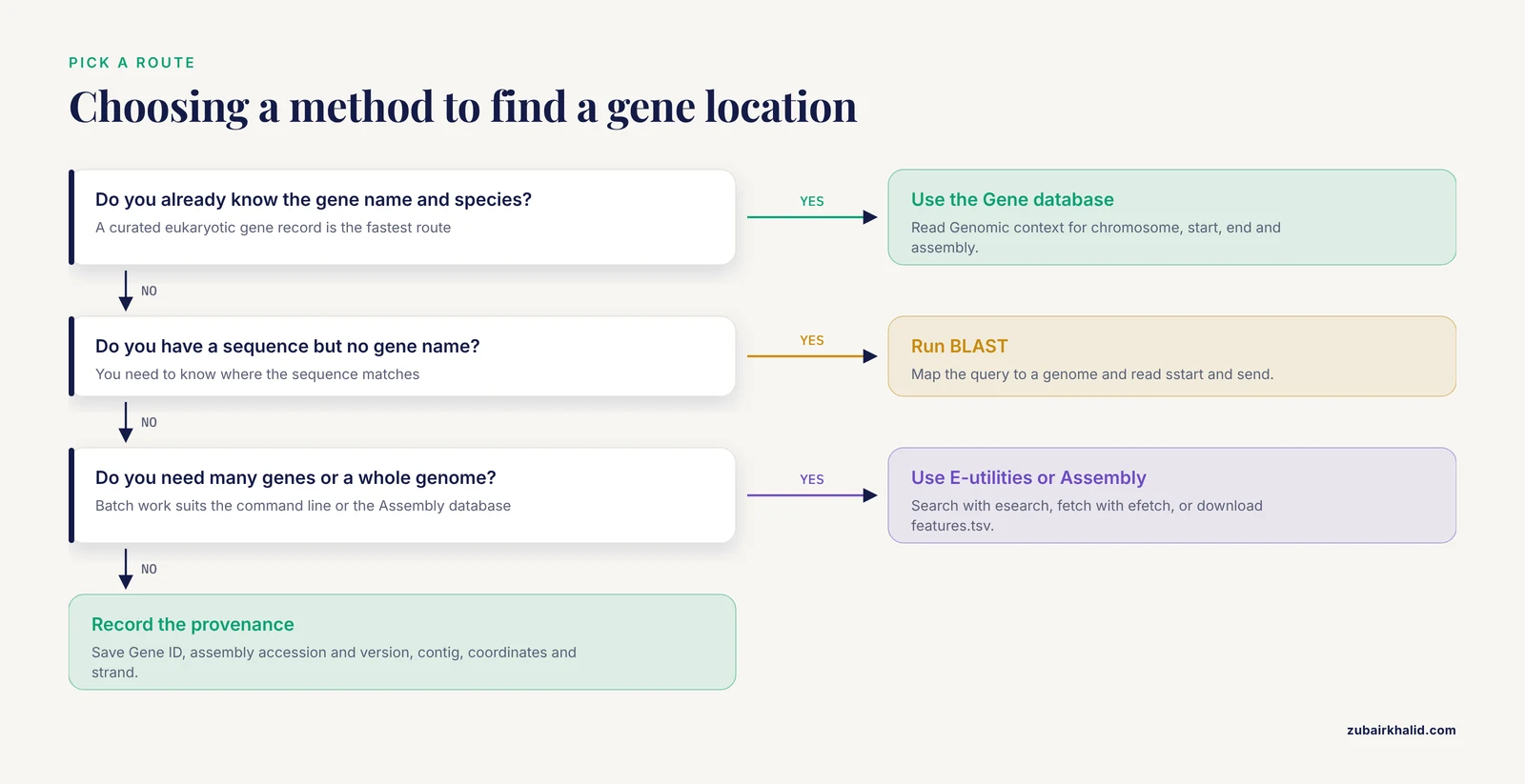
The following six methods cover the range of scenarios from "I know the gene name" to "I have a DNA sequence and no idea where it belongs." Each method includes the commands, the expected output, and how to verify the result.
Method 1: The NCBI Gene Database
This is the most direct approach for eukaryotic genes with curated annotations. The NCBI Gene database covers human, mouse, rat, zebrafish, and hundreds of other species.
Step 1: Navigate to NCBI Gene
Open a browser and go to https://www.ncbi.nlm.nih.gov/gene/. You will see a search bar at the top.
Step 2: Enter Your Search
Type the gene name followed by the organism name in square brackets. For example:
BRCA1[Gene Name] AND Homo sapiens[Organism]Press Enter. The search returns a list of matching gene records. For BRCA1 in human, you get one primary record with Gene ID 672.
Step 3: Read the Genomic Context
Click the gene name to open the full record. Scroll to the "Genomic context" section. This shows the chromosome number, the start and end positions on that chromosome, the assembly version, and the total gene span in base pairs. The location line also includes the cytogenetic band (for BRCA1, 17q21.31), which tells you the gene is on the long arm (q) of chromosome 17 at band 21, sub-band 31.
Step 4: Read the Genomic Regions Section
Below Genomic context, the "Genomic regions, transcripts, and products" section shows a graphical view of the gene on its chromosome. Exons appear as boxes, introns as lines connecting the boxes, and the strand is indicated by the direction of the arrows. Hover over any exon to see its exact coordinates.
Step 5: Download the Genomic Sequence
On the right side of the gene record, find the "Download" panel. Click "FASTA" under "Genomic" to download the full genomic sequence of the gene, including introns and exons. The header line of the FASTA file contains the accession, the gene symbol, and the coordinates. A lowercase "c" before the coordinates indicates the gene is on the complement (minus) strand.
Step 6: Verify with a Second Source
Scroll down to the "NCBI Reference Sequences (RefSeq)" section. Note the mRNA accession (starts with NM_) and the protein accession (starts with NP_). Cross-check the chromosomal location against Ensembl or the UCSC Genome Browser to confirm consistency between databases.
Method 2: Reading a GenBank Flat File
The GenBank flat file format is the standard annotated sequence format at NCBI. It contains the raw DNA sequence plus a structured annotation section listing every gene, CDS (coding sequence), exon, and regulatory element with its exact coordinates.
What the Format Looks Like
Fetch a GenBank record through the web interface or the command line. Here is the structure you will see:
LOCUS       NC_000017.11            83257 bp    DNA     linear   PRI
DEFINITION  Homo sapiens chromosome 17, GRCh38.p14 Primary Assembly.
ACCESSION   NC_000017.11
VERSION     NC_000017.11
FEATURES             Location/Qualifiers
     source          1..83257
                     /organism="Homo sapiens"
     gene            complement(<1..>83257)
                     /gene="BRCA1"
     CDS             complement(join(43044295..43045884,
                     43046145..43046236,43046512..43046654))
                     /gene="BRCA1"
                     /codon_start=1
The CDS line tells you three things. The word complement means the gene is on the minus strand (the reverse complement of the displayed sequence). The join(...) operator means the coding sequence is split across multiple exons, and the numbers inside the parentheses list each exon's start and end. The pair 43044295..43045884 means the first exon starts at base 43044295 and ends at base 43045884 on the chromosome.
How to Fetch a GenBank Record
Through the web, go to https://www.ncbi.nlm.nih.gov/nuccore/, enter the accession (for example, NC_000017.11), change the display format from "FASTA" to "GenBank," and search within the page for your gene name to find its CDS feature.
Through the command line:
curl -s "https://eutils.ncbi.nlm.nih.gov/entrez/eutils/efetch.fcgi?db=nuccore&id=NC_000017.11&rettype=gb&retmode=text" > chromosome17.gb
grep -A 5 'gene="BRCA1"' chromosome17.gb
Expected output:
     gene            complement(<43044295..>43045884)
                     /gene="BRCA1"
                     /gene_synonym="BRCC1; IRIS; PPP1R53; RNF53"
The angle brackets (< and >) indicate that the feature extends beyond the range shown in this particular record, which can happen when you download only a subsequence rather than the full chromosome.
Method 3: Command-Line Retrieval with E-utilities
E-utilities are NCBI's programmatic API. They allow you to search and retrieve records without a web browser, which is essential for batch queries and automated pipelines.
The Two-Step Pattern
Every E-utilities workflow follows the same pattern: search first, then fetch.
Step 1, search with esearch:
curl -s "https://eutils.ncbi.nlm.nih.gov/entrez/eutils/esearch.fcgi?db=gene&term=BRCA1%5BGene+Name%5D+AND+Homo+sapiens%5BOrganism%5D&retmode=json"The %5B and %5D are URL-encoded square brackets. The expected output is:
{
  "esearchresult": {
    "count": "1",
    "retmax": "1",
    "idlist": ["672"]
  }
}
The idlist contains the Gene ID. In this case, 672.
Step 2, fetch with efetch:
curl -s "https://eutils.ncbi.nlm.nih.gov/entrez/eutils/efetch.fcgi?db=gene&id=672&rettype=gene_table&retmode=text"This returns a tab-delimited table of the gene's genomic location, including chromosome, start, end, and orientation.
Batch Retrieval
To find the locations of multiple genes at once, search for all genes matching a criterion and set a high retmax:
curl -s "https://eutils.ncbi.nlm.nih.gov/entrez/eutils/esearch.fcgi?db=gene&term=chromosome+17%5BChromosome%5D+AND+Homo+sapiens%5BOrganism%5D&retmax=5000&retmode=json"This returns up to 5000 Gene IDs for genes on human chromosome 17. You can then fetch each one individually or use epost to upload the full list and download them in a single batch.
Using Entrez Direct
For frequent command-line use, install Entrez Direct through conda:
conda install -c bioconda entrez-directThen the same query becomes a single pipe:
esearch -db gene -term "BRCA1[Gene Name] AND Homo sapiens[Organism]" | efetch -format=gene_tableThis pipes the search result directly into the fetch command. The output is the gene location table with chromosome, start, end, and strand.
Method 4: Using BLAST to Map a Sequence to a Genome
BLAST (Basic Local Alignment Search Tool) answers a different question from the Gene database. Instead of asking "where is gene X?", BLAST asks "where does this sequence match?" This is the method you use when you have a DNA or protein sequence but no gene name, or when you want to confirm that a gene annotation is correct.
When to Use BLAST
Use BLAST when you sequenced a PCR product and want to know which gene it hit, when you have a resistance gene sequence and want to find its copy number and location in a bacterial genome, or when you want to verify that an annotated gene is at the expected position.
Researchers characterizing antibiotic resistance genes use BLAST against NCBI GenBank to confirm the genetic context of resistance determinants. A study of Enterobacter cloacae used BLAST against Enterobacteriaceae genomes in NCBI GenBank to show that a 49 kb resistance gene island shared high similarity with sequences found in other species [4]. A study of the tmexCD-toprJ tigecycline resistance gene cluster searched the NCBI database to identify 39 additional copies and summarize their genetic structures into three distinct types [5]. A benchmark study of digital signal processing methods for protein-coding region prediction used the Caenorhabditis elegans Cosmid F56F11 sequence from the NCBI database as its evaluation standard [6].
Web BLAST Walkthrough
- Go to
https://blast.ncbi.nlm.nih.gov/ - Choose "Nucleotide BLAST" (blastn) for DNA queries
- Paste your sequence in FASTA format into the query box
- Select the database. For mapping to a specific genome, choose "Nucleotide collection (nr/nt)" or use "Genome assemblies" to pick a specific species
- Click "BLAST"
- Results appear with each alignment showing the subject accession, the start and end positions on the subject sequence, and the percent identity
Command-Line BLAST
For reproducible pipelines, use the standalone BLAST+ tools:
conda install -c bioconda blastRun BLAST against the nt database remotely:
blastn -query my_gene.fasta -db nt -remote -outfmt "6 qseqid sseqid pident length qstart qend sstart send evalue bitscore" -max_target_seqs 10Expected tabular output:
my_gene NC_000017.11 100.000 5793 1 5793 43044295 43050087 0.0 10658Each column means:
| Column | Field | Meaning |
|---|---|---|
| 1 | qseqid | Your query sequence ID |
| 2 | sseqid | Subject (database) sequence accession |
| 3 | pident | Percent identity across the alignment |
| 4 | length | Alignment length in base pairs |
| 5 | qstart | Start position in your query |
| 6 | qend | End position in your query |
| 7 | sstart | Start position on the subject (chromosome) |
| 8 | send | End position on the subject |
| 9 | evalue | Expectation value (lower means more significant) |
| 10 | bitscore | Alignment score (higher means better) |
If sstart is greater than send, the match is on the minus strand of the subject sequence.
BLAST Against a Specific Genome
To BLAST against a single genome rather than the entire nt database, download the genome, build a local BLAST database, and query it:
curl -s "https://eutils.ncbi.nlm.nih.gov/entrez/eutils/efetch.fcgi?db=nuccore&id=NC_000913.3&rettype=fasta&retmode=text" > ecoli_k12.fasta
makeblastdb -in ecoli_k12.fasta -dbtype nucl -out ecoli_k12_db
blastn -query resistance_gene.fasta -db ecoli_k12_db -outfmt 6
This gives you the exact coordinates of your gene within that specific genome, without hits from other organisms cluttering the output.
Method 5: Genome Data Viewer
Genome Data Viewer (GDV) is NCBI's graphical genome browser. It shows genes, transcripts, regulatory elements, and sequence variants in their chromosomal context.
Accessing GDV
From a Gene record, click the "Graphics" button in the "Genomic regions" section. Or go directly to https://www.ncbi.nlm.nih.gov/genome/gdv/ and enter a gene name or accession.
What You See
The viewer displays a chromosome ideogram at the top showing the cytogenetic band, a zoomed-in view of the gene locus, and tracks for RefSeq genes, predicted genes, transcripts, and proteins. The strand indicator uses arrows pointing left for minus strand and right for plus strand. You can zoom in to base-pair resolution or zoom out to see the entire chromosome. Clicking any feature opens a detail panel with its exact coordinates and links to the underlying sequence records.
Exporting Coordinates
Use the "Download" menu in GDV to export the current view as a GFF3 (General Feature Format version 3) file. GFF3 is a tab-delimited format that lists every feature with its start, end, strand, and type in nine columns. This is the same format used by gene prediction pipelines to distribute predicted gene locations [3].
Method 6: Finding a Gene in a Prokaryotic Genome
Prokaryotic genes are usually simpler to locate because bacterial genomes are small (typically 5 to 6 million base pairs for E. coli), have few or no introns, and are annotated automatically by PGAP.
Step 1: Find the Assembly
Go to https://www.ncbi.nlm.nih.gov/assembly/ and search for your organism and strain. For example, searching "Escherichia coli K-12 MG1655" returns the reference assembly with accession GCF_000005845.2. Note the assembly accession and version.
Step 2: Download the Annotation
On the assembly page, click "Download" and select the features table (features.tsv) or the full GenBank flat file. The features table lists every gene with its locus tag, gene name, start position, end position, strand, and product description.
Step 3: Search for Your Gene
Open the features table in a spreadsheet or text editor and search for the gene name. For example, searching for "lacZ" in the E. coli K-12 MG1655 features table gives you the coordinates, strand, and product annotation directly.
Step 4: Verify with the Pathogen Detection Portal
For pathogenic bacteria, the NCBI Pathogen Detection Portal provides pre-analyzed genomic data including resistance gene identification and phylogenetic placement. A study of carbapenem-resistant Salmonella enterica used the NCBI Pathogen Detection Portal alongside other tools to characterize the genomic epidemiology of resistant strains from pediatric patients [7]. The portal automatically identifies antimicrobial resistance genes and reports their contig locations.
Step 5: Compare Across Isolates
To find whether a gene is on the chromosome or a plasmid, and whether its location varies between isolates, retrieve multiple assemblies and compare the gene's context. A study of antibiotic resistance genes in E. coli from wastewater treatment plants found that efflux pump genes were predominantly on the chromosome while beta-lactamase genes were localized on plasmid-derived contigs [8]. A study of blaNDM-5 in Salmonella Thompson confirmed that the gene sat on an IncX3-type plasmid identical to those circulating in E. coli and Klebsiella pneumoniae [9]. This distinction between chromosomal and plasmid locations matters for understanding how resistance spreads horizontally.
Reading Coordinates Correctly
One-Based Numbering
NCBI uses one-based coordinate systems throughout its web interface, GenBank flat files, and BLAST output. Position 1 is the first base of the sequence. This differs from some programming languages and file formats (such as BED) that use zero-based coordinates. When you export data from NCBI and import it into a tool that expects zero-based coordinates, subtract 1 from the start position.
Strand
A gene on the plus strand reads left to right (5' to 3' in the displayed sequence). A gene on the minus strand reads right to left. In GenBank flat files, the minus strand is indicated by the complement() operator. In BLAST tabular output, a minus strand match has sstart greater than send. In the NCBI Gene web interface, the strand is shown as an arrow direction.
Split Features
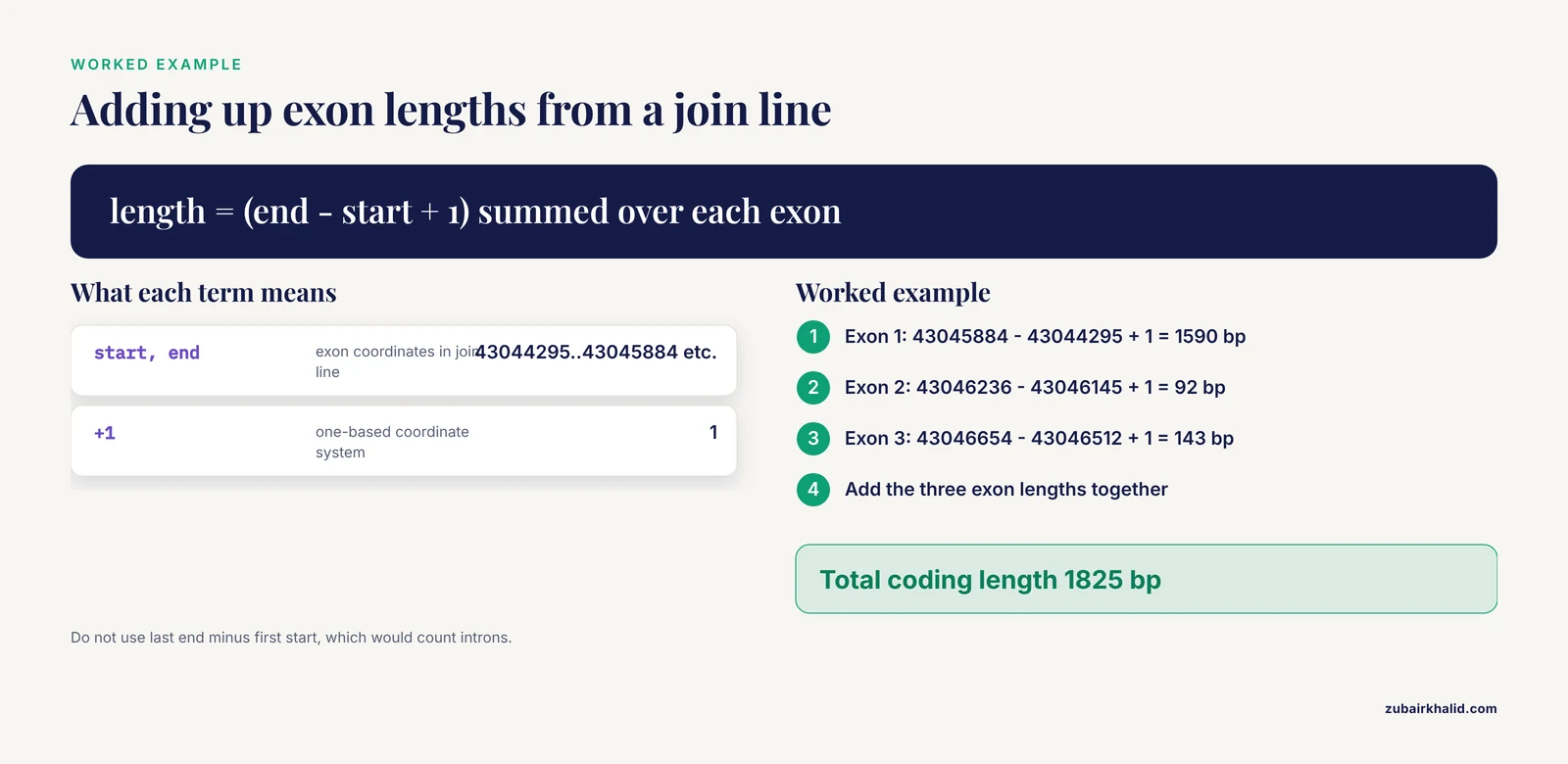
Eukaryotic genes are almost always split across exons. The join() operator in a GenBank flat file lists each exon separately. To get the total coding length, sum the lengths of all exons, not the difference between the first start and the last end. Here is a worked calculation:
join(43044295..43045884, 43046145..43046236, 43046512..43046654)Exon 1: 43045884 - 43044295 + 1 = 1590 bp Exon 2: 43046236 - 43046145 + 1 = 92 bp Exon 3: 43046654 - 43046512 + 1 = 143 bp Total coding length from these three exons: 1825 bp
Common Errors and Their Fixes
E-utilities Returns an Empty Result
If esearch returns "count": "0" and an empty idlist, your search term is too specific or contains a typo. Check the field tags. [Gene Name] must be spelled exactly. Try broadening the search by removing the organism filter or using the gene symbol without brackets.
E-utilities Returns HTTP 400
An HTTP 400 error with the message "Invalid db parameter" means you specified a database name that does not exist. Valid database names include gene, nuccore, protein, assembly, and biosample. Check the NCBI E-utilities documentation for the full list.
BLAST Reports No Hits
If BLAST returns "No hits found," your query sequence may be too short, too divergent from anything in the database, or in the wrong format. Check that your FASTA file contains valid nucleotide characters (A, C, G, T, N). Try increasing the expect value threshold with -evalue 10 or switching from blastn to tblastx if you want to detect distant protein-level similarity.
BLAST Returns Thousands of Hits
If you BLASTed against the full nt database and got too many results, narrow the search. Use -max_target_seqs 10 to limit the output, or BLAST against a specific genome as described in Method 4. You can also add an Entrez query to restrict the database search, for example -entrez_query "Escherichia coli[Organism]".
Common Mistakes and Limitations
Using the Wrong Assembly Version
The most frequent error is reporting coordinates from one assembly alongside data from another. If you download a gene sequence from GRCh38 and compare it to a BED file built on GRCh37, the coordinates will not match. Always record the assembly accession (GCF_ or GCA_ number) and version alongside any coordinate you report.
Confusing Gene Location with Transcript Location
A gene record shows the full genomic span (from the start of the first exon to the end of the last exon, including introns). A transcript record shows only the spliced mRNA. The CDS shows only the coding portion. These are three different coordinate sets for the same gene. Be explicit about which one you mean when reporting or comparing results.
Ignoring the Strand
A gene on the minus strand starts at a higher coordinate number than it ends at when you read the sequence in the 5' to 3' direction of the gene itself. This causes confusion when designing primers or extracting upstream promoter sequences. The promoter of a minus-strand gene lies at coordinates higher than the gene start, not lower.
Treating Contig-Level Coordinates as Chromosomal
In incompletely assembled genomes, genes sit on contigs or scaffolds rather than full chromosomes. A gene at position 45,000 on a 2 million base pair contig cannot be assigned to a specific chromosome unless the contig has been placed. Many bacterial plasmids are assembled as separate contigs. A study of blaNDM-5 in E. coli ST410 found the gene on a 46,161 bp IncX3 plasmid, which was identified as a separate replicon from the chromosome [10]. Reporting "chromosome position 45,000" for a gene on a plasmid contig would be wrong.
Assuming Gene Annotations Are Complete
NCBI annotations are not exhaustive. Predicted genes may lack experimental confirmation. Alternatively spliced transcripts may not all be represented. In non-model organisms, annotation quality varies widely. A gene family analysis in Panax notoginseng identified 98 NAC transcription factor genes using HMMER and the NCBI Conserved Domain Database, then mapped them to chromosomes to show uneven distribution across 12 linkage groups [11]. The researchers validated each prediction rather than accepting database annotations at face value.
Searching Only One Database
A gene may appear in the Gene database, the Nucleotide database (as part of a submitted sequence), and the Assembly database (as part of a genome annotation). These records may have different levels of curation. The Gene database record for a well-studied human gene is manually reviewed. The same gene in a newly submitted genome assembly may be predicted automatically and lack a Gene ID.
Not Recording Accession Numbers
Every sequence and assembly at NCBI has a stable accession number. When you find a gene location, record the accession of the sequence or assembly you used. Without it, the coordinates are meaningless because they could refer to any version of any genome.
NCBI Gene Genomic Location Tips
Record the Full Provenance
Every time you retrieve a gene location, save four pieces of information: the gene name and Gene ID (if available), the assembly accession and version, the chromosome or contig identifier, and the start and end coordinates with the strand.
Use Stable URLs
NCBI provides stable URLs for most records. A gene record can be linked as https://www.ncbi.nlm.nih.gov/gene/672 (Gene ID 672 for human BRCA1). A nucleotide record can be linked as https://www.ncbi.nlm.nih.gov/nuccore/NC_000017.11. These URLs will not break when the database is updated.
Cross-Check with a Second Method
If you find a gene through the Gene database, verify the coordinates by BLASTing the gene sequence against the genome. If you found it through BLAST, check that the coordinates match the Gene database record. Discrepancies usually indicate different assembly versions or different transcript isoforms.
For Promoter Studies, Define the Upstream Region Carefully
When retrieving sequences upstream of a gene for promoter analysis, the strand determines which direction is upstream. A study of the chicken SLC11A1 gene retrieved sequences flanking the transcription start site from the NCBI database and identified a TATA-box at 31 to 28 bp upstream of the TSS on the appropriate strand [12]. Getting the strand wrong would have placed the search on the wrong side of the gene.
For Gene Family Analyses, Use Conserved Domains
To identify all members of a gene family in a genome, search the NCBI Conserved Domain Database (CDD) for the family's signature domain, then BLAST that domain against the genome to find all copies. A study of NAC transcription factors in Panax notoginseng used HMMER and NCBI CDD to identify 98 family members, then determined their chromosomal locations and expression patterns across developmental stages [11].
For Comparative Genomics, Use Assembly-Level Searches
When comparing gene locations across species or strains, download the annotated assemblies rather than individual gene records. A phylogenetic study of Elymus species retrieved GBSS1 gene sequences from NCBI GenBank for multiple species and compared exon and intron regions separately to resolve subgenome relationships [1]. A global survey of NDM-5-producing E. coli retrieved 7,606 genomes from the NCBI RefSeq database for core-genome multilocus sequence typing and SNP-based phylogenetic analysis [10]. Both studies required batch access to annotated genomic data rather than single-gene lookups.
Use the Cattle QTL Database Alongside NCBI for Livestock Genes
For livestock species, specialized databases complement NCBI. A study of selection signatures in Indian cattle breeds used the NCBI database and the Cattle QTL database together to annotate genes under positive selection for reproductive traits, identifying candidates such as CACNA1H, GDF9, and KCNIP4 on specific chromosomes [13]. Cross-referencing NCBI coordinates with trait-specific databases gives functional context to positional information.
Frequently Asked Questions
What is the difference between a Gene ID and an accession number?
A Gene ID is a unique integer identifier in the NCBI Gene database that represents the gene as a biological entity across all its transcripts and sequences. An accession number identifies a specific sequence record (such as a chromosome, a transcript, or a protein) in the Nucleotide or Protein databases. A single gene has one Gene ID but may have multiple accession numbers for its different transcripts and genomic contexts.
How do I find the exact base pair coordinates of a gene?
Open the gene's record in the NCBI Gene database and read the "Genomic context" section, which lists the chromosome, start position, end position, and assembly version. Alternatively, fetch the GenBank flat file for the chromosome and search for the gene name to find its CDS feature coordinates.
Why does NCBI show different coordinates for the same gene?
Different assembly versions place genes at different positions because the reference sequence itself changes between versions. Always check which assembly is displayed and record its accession number and version. Coordinates from GRCh38 will not match GRCh37 for the same gene.
How do I know if a gene is on the plus or minus strand?
In the NCBI Gene web interface, look for the arrow direction in the graphical view. In a GenBank flat file, the complement() operator indicates the minus strand. In BLAST tabular output, sstart greater than send indicates a minus strand match.
Can I download all gene locations for an entire genome at once?
Yes. Go to the Assembly database, find your genome, and download the features table or GFF3 annotation file. These files list every gene with its coordinates, strand, and functional annotation in a single tab-delimited download.
How do I find a gene in a specific bacterial strain?
Search the Assembly database for the strain name, download the annotated assembly, and search the features table for the gene name or locus tag. For pathogenic bacteria, the NCBI Pathogen Detection Portal provides pre-analyzed resistance gene locations across thousands of isolates.
What is the difference between RefSeq and GenBank?
RefSeq records are curated and maintained by NCBI staff as reference standards. GenBank records are submitted by researchers and archived as submitted. RefSeq accessions start with NC_, NG_, NM_, or NP_ prefixes. For gene location queries, prefer RefSeq assemblies (GCF_ prefix) because they have consistent annotation across organisms.
How do I cite NCBI in my publication?
Cite the specific database and accession numbers you used. Include the assembly version for genomic coordinates and the retrieval date for database searches. NCBI recommends citing the specific record URLs rather than the NCBI home page.
Sources
- Differentiation of subgenomes in StY-genomic species of the genus Elymus (Triticeae, Poaceae) from the territory of Russia according to sequencing data of the nuclear gene GBSS1 (waxy).
- Genomic Evolution of the Increasing Prevalent Carbapenem-Resistant Hypervirulent ST15 Klebsiella pneumoniae.
- TGP-WEB: A Server for Automatic Gene Prediction of Trichoderma Genomes.
- Genomic analysis of an extensively drug-resistant Enterobacter cloacae NH77 from Thailand carrying an ∼82-kb chromosomal heavy-metal and antibiotic resistance island.
- Multiple Copies of Tigecycline Gene Cluster tmexC6D6-toprJ1b in Pseudomonas mendocina in a Swine Farm.
- Hadamard code based numerical mapping approach for the identification of protein coding regions in genomic sequences using digital filters.
- Unveiling the Global Threat: Genomic Insights into Carbapenem-Resistant Salmonella enterica subsp. enterica in Human.
- Genomic Insight into the Mobility of Antibiotic Resistance Genes in Multidrug-Resistant Escherichia coli Isolated from Dewatered Sludge Cakes.
- Emergence of bla(NDM-5) and international dissemination of an ST26 Salmonella Thompson resistance gene-enriched sublineage.
- Global genomic epidemiology of NDM-5-producing Escherichia coli ST410 strains.
- Genome-Wide Identification and Expression Pattern of the NAC Gene Family in Panax notoginseng.
- Research note: Identification and characterization of SLC11A1 gene promoter of chicken.
- Genomic Exploration of Selection Signatures Linked to Reproductive Traits in Locally Adapted Indicine, Taurine and Crossbred Cattle of India.