NCBI FTP vs. NCBI Datasets: Which Download Method Should You Use?
By Dr. Zubair Khalid, DVM, MS, PhD ·

NCBI FTP gives you complete, unfiltered collections of raw data files organized into directories you can mirror or script against, while NCBI Datasets gives you filtered, metadata-rich packages assembled around a query for genes, genomes, taxa, and viruses. The rule of thumb is simple. Use NCBI FTP when you need every file for a release, a species, or a database and your pipeline expects specific filenames and formats. Use NCBI Datasets when you need a targeted subset with clean metadata and want to script the selection rather than walk directories.
Most bioinformaticians eventually need both, and the strongest workflows treat them as complements rather than rivals. This guide explains what each service actually is, compares them on the criteria that decide real choices, walks through worked scenarios, and lists the mistakes that cost people the most time.
A Quick Orientation to NCBI Data Access
The National Center for Biotechnology Information (NCBI) hosts the core public sequence resources that modern genomics depends on. GenBank stores submitted sequences, RefSeq provides curated, non-redundant reference genomes and annotations, the Sequence Read Archive (SRA) stores raw reads, and dedicated databases cover genes, taxonomy, chemical structures, and biological assays. Anyone asking "how to use NCBI" for bulk data is really asking which of several retrieval layers fits the task.
Layered on top of those databases are several access routes. The oldest is the FTP site, a directory tree of flat files that has served the community for decades. Newer layers include the E-utilities API, the Datasets service with its command-line tool, and cloud delivery for SRA data on major cloud providers. The pattern is old. PubChem, for example, has long exposed raw files over FTP alongside a programmatic web service, and researchers who needed deeper control built software APIs on top of both [1]. The same division of labor now applies across NCBI. FTP is the raw substrate. Higher-level services such as Datasets sit on top of it and answer specific questions faster.
A useful mental model for any NCBI databases guide is this. The databases hold the data. FTP mirrors them as files. APIs and tools like Datasets query them as structured records. Once you internalize that model, the choice between methods stops being confusing and becomes a design decision.
What the NCBI FTP Site Is
The NCBI FTP site lives at ftp.ncbi.nlm.nih.gov and is served over HTTPS, FTP, rsync, and Aspera. It is a directory tree, not a search engine. You reach it with a browser, wget, curl, lftp, rsync, or any file transfer tool, and you navigate to the exact files you want. There is no query language. The value is completeness, stability, and predictable file naming.
How the directory tree is organized
The directories that matter most in day-to-day work include these.
genomes/refseqholds RefSeq genome assemblies, organized by taxonomic group and then by organism and assembly accession.genomes/genbankholds GenBank assemblies the same way.genomes/refseq/vertebrate_mammalian/Homo_sapiens/shows the pattern for a well-annotated organism, with one subdirectory per assembly accession.refseq/release/holds the periodic full RefSeq releases, with each release frozen as a numbered snapshot.blast/db/holds pre-built BLAST databases such as the nr and nt collections.sra/holds SRA files and supporting metadata.pub/holds assorted tools, data, and documentation.
Within an assembly directory, naming follows a strict convention. For the reference strain of Escherichia coli K-12, assembly GCF_000005845.2, the FASTA file is named GCF_000005845.2_ASM584v2_genomic.fna.gz. Companion files include GFF3 annotation, protein translations, feature tables, an assembly report, and an md5sums.txt checksum file. That naming convention is the reason pipelines love FTP. A script written years ago against one assembly directory will run against the next one, because the file layout does not change.
Downloading a single reference genome is a one-line command.
wget https://ftp.ncbi.nlm.nih.gov/genomes/refseq/bacteria/Escherichia_coli/reference/GCF_000005845.2_ASM584v2/GCF_000005845.2_ASM584v2_genomic.fna.gzFor large collections, rsync is more efficient than repeated web requests because it can resume interrupted transfers and skip files that already exist.
rsync -avP rsync://ftp.ncbi.nlm.nih.gov/genomes/refseq/bacteria/Escherichia_coli/ ./ecoli_refseq/This directory-based model has a long track record in published work. One miRNA discovery study BLASTed small RNA reads against genome files pulled directly from the Caenorhabditis elegans FTP directory at NCBI, then combined that with a separate Brugia malayi dataset from miRBase [2]. The workflow was straightforward precisely because FTP hands you whole organism directories with predictable contents.
Annotation versions and why FTP matters for them
RefSeq genomes are not static. They are processed by the NCBI eukaryotic annotation pipeline, and annotation results change as evidence improves and the pipeline software itself evolves over time [3]. Every assembly accession carries an implicit annotation release, and FTP directories preserve those releases as versioned files. If your publication says "we used RefSeq annotation release 105 for GRCh38", you can reproduce that statement years later by downloading the exact release directory from FTP. Newer query-oriented services generally return the latest annotation and make older releases harder to pin. This versioning behavior is one of the strongest arguments in the ncbi ftp vs datasets comparison.
Checksums and integrity
Every assembly directory includes an md5sums.txt file. Run md5sum -c md5sums.txt after a large transfer and you will know immediately whether a file arrived intact. For multi-gigabyte genome directories or full RefSeq releases, this single habit prevents the classic corrupted-download bug that surfaces hours later as a mysterious parser error.
What NCBI Datasets Is
NCBI Datasets is a retrieval service built for selection, not mirroring. You state what you want in terms of biology, a taxon, a gene, an assembly property, and it returns a coherent package. It exists in three forms. The web interface at the NCBI Datasets site works interactively. The API at api.ncbi.nlm.nih.gov/datasets works for programs. The datasets command-line tool, together with its companion dataformat tool for converting reports, works for scripts and reproducible pipelines.
The current Datasets resources cover genomes, genes, taxonomy, and virus data, including dedicated SARS-CoV-2 data access. A genome package for a taxon returns sequence files, assembly metadata, and data reports in one archive. The command-line interface makes the query expressible in a single line.
datasets summary genome taxon "Escherichia coli" referenceThat command asks for reference assemblies for Escherichia coli and returns a structured JSON summary you can inspect before downloading anything. To fetch the actual data package for those assemblies, the download subcommand uses the same filtering vocabulary.
datasets download genome taxon "Escherichia coli" referenceThe resulting zip archive contains sequence data plus a dataset_report.jsonl file describing every assembly. The dataformat tool converts those reports into tabular output, which is exactly what spreadsheet-minded collaborators and downstream scripts want. Add the include flag to the download command when you want specific file types such as protein translations or GFF3 annotation alongside the genomes, and add the filename flag to control where the archive lands. The CLI documentation on the NCBI Datasets site lists every filtering option, and the options read like biological questions, which is the core design difference between this service and a directory tree.
This style of retrieval has become normal in published pipelines. One machine learning study retrieved 8,273 genomic sequences programmatically from NCBI, 2,000 SARS-CoV-2 sequences plus 6,273 sequences from other viruses, standardized them to a fixed length, and trained classifiers on the result [4]. A scripted, filter-based retrieval method is a natural fit for that kind of work, where you need a defined set of records and their metadata, not an entire database mirror. On the deposit side, well-structured datasets such as triplicate MinION 16S runs of a commercial microbial standard were archived in SRA so future analysts could retrieve them programmatically [5]. Retrieval and archiving mirror each other, and the same care with selection criteria applies to both.
What Datasets does not replace
Datasets covers genes, genomes, taxonomy, and virus resources. It does not currently serve raw SRA reads the way the SRA Toolkit and cloud delivery services do. Large-scale reuse studies of SRA metadata increasingly go through cloud query systems rather than flat file listings. One characterization of gut microbiome metadata in the SRA used Google BigQuery to profile temporal growth, BioSample and BioProject structure, metadata completeness, and publication linkage across the archive [6]. If your task starts with "I need the reads for these runs", plan to use SRA-specific tooling, with Datasets and FTP playing supporting roles for reference genomes and metadata.
Side-by-Side Comparison Table
Here is the core of the ncbi ftp vs datasets comparison, criterion by criterion.
| Criterion | NCBI FTP | NCBI Datasets |
|---|---|---|
| Access model | Directory tree of flat files, no query language | Filtered packages built from a query (taxon, gene, assembly property) |
| Interfaces | Browser, wget, curl, rsync, Aspera, lftp | Web interface, REST API, datasets and dataformat command-line tools |
| Data scope | Every database with a file distribution, full releases and single files | Genes, genomes, taxonomy, and virus data |
| Filtering | Manual, by walking directories or scripting filenames | Native, by organism, reference status, assembly level, annotation property, gene attributes |
| Output formats | FASTA, GenBank flat file, GFF3, feature tables, reports, checksums | Sequence files plus JSON and JSONL data reports, convertible to TSV |
| Metadata | Assembly and annotation reports as standalone files | Integrated, structured reports tied to every record in the package |
| Version pinning | Excellent, release directories and annotation releases stay addressable | Returns current data, older snapshots less directly addressable |
| Reproducibility | High for file-based pipelines, exact paths and checksums | High for query-based pipelines, record the exact CLI command and data version |
| Scale | Scales to full database mirrors via rsync | Scales to large filtered sets, not full mirrors |
| Learning curve | Familiar to anyone who has used a file server | Requires learning the CLI vocabulary and report structure |
| Best for | Mirrors, release snapshots, BLAST databases, legacy pipelines, checksummed archives | Targeted subsets, gene and genome panels, metadata tables, scripted retrieval |
Read the table as two halves. The FTP column optimizes for completeness and file stability. The Datasets column optimizes for question-asking and metadata. Neither half is wrong, and the difference between NCBI FTP and Datasets is best understood as a difference in what you are allowed to assume about the data you receive.
The Real Differences That Decide the Choice
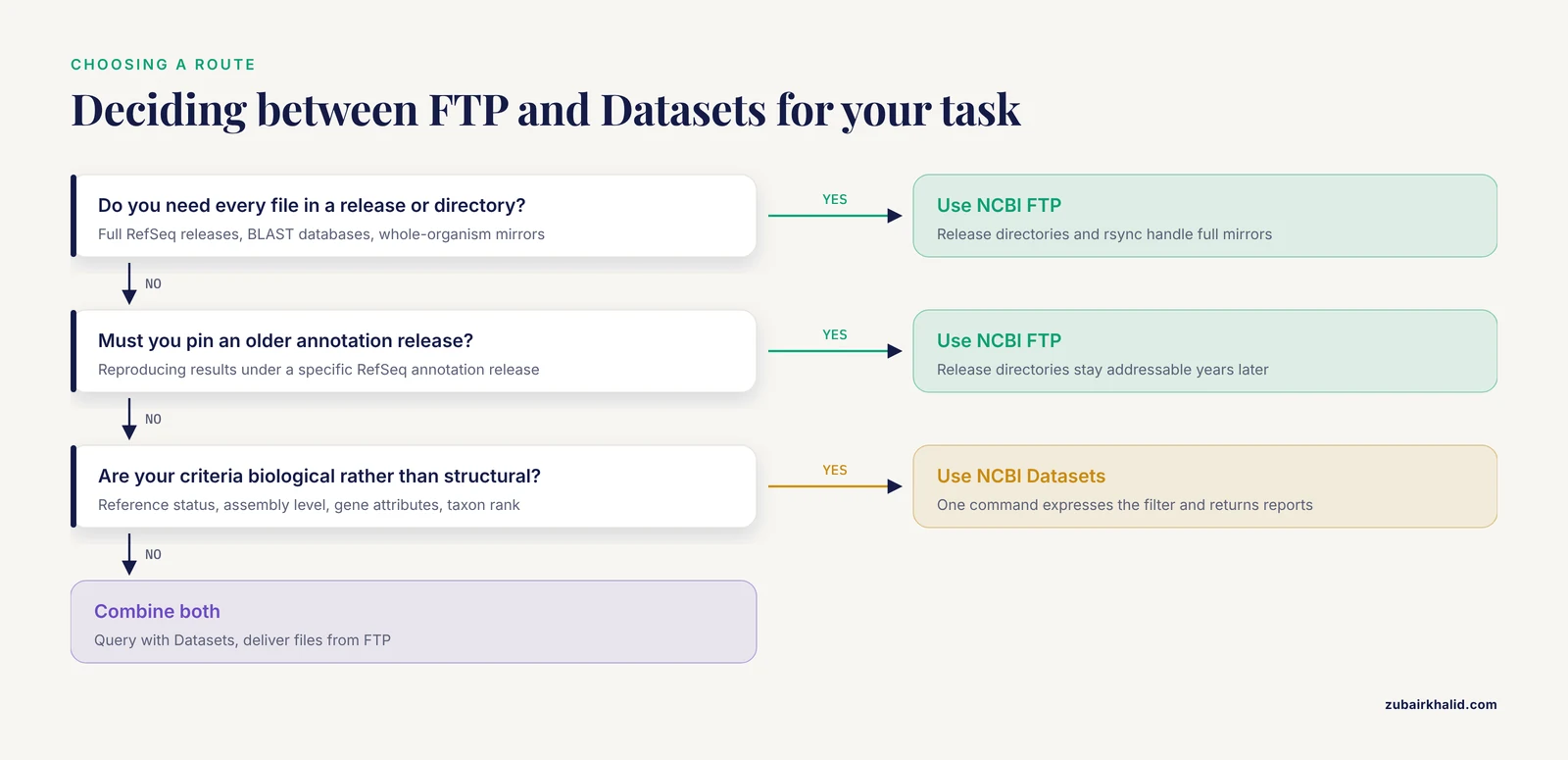
Completeness versus selection
FTP gives you everything in a directory whether you want it or not. Datasets gives you exactly what your query describes and nothing else. If your analysis needs every bacterial genome, FTP wins immediately. If your analysis needs reference assemblies for one genus, Datasets expresses that in one line while FTP needs you to list assembly directories and filter them yourself.
File formats versus structured reports
FTP returns files whose formats are decades old and universally supported. Every aligner, assembler, and annotation tool ever written can read a FASTA file from an FTP directory. Datasets returns sequence files in standard formats too, but its distinguishing output is the structured data report, JSON and JSONL that programs parse directly. That structure is a gift for automation and a minor obstacle for older tools, though dataformat bridges the gap by exporting TSV.
Versioning and reproducibility
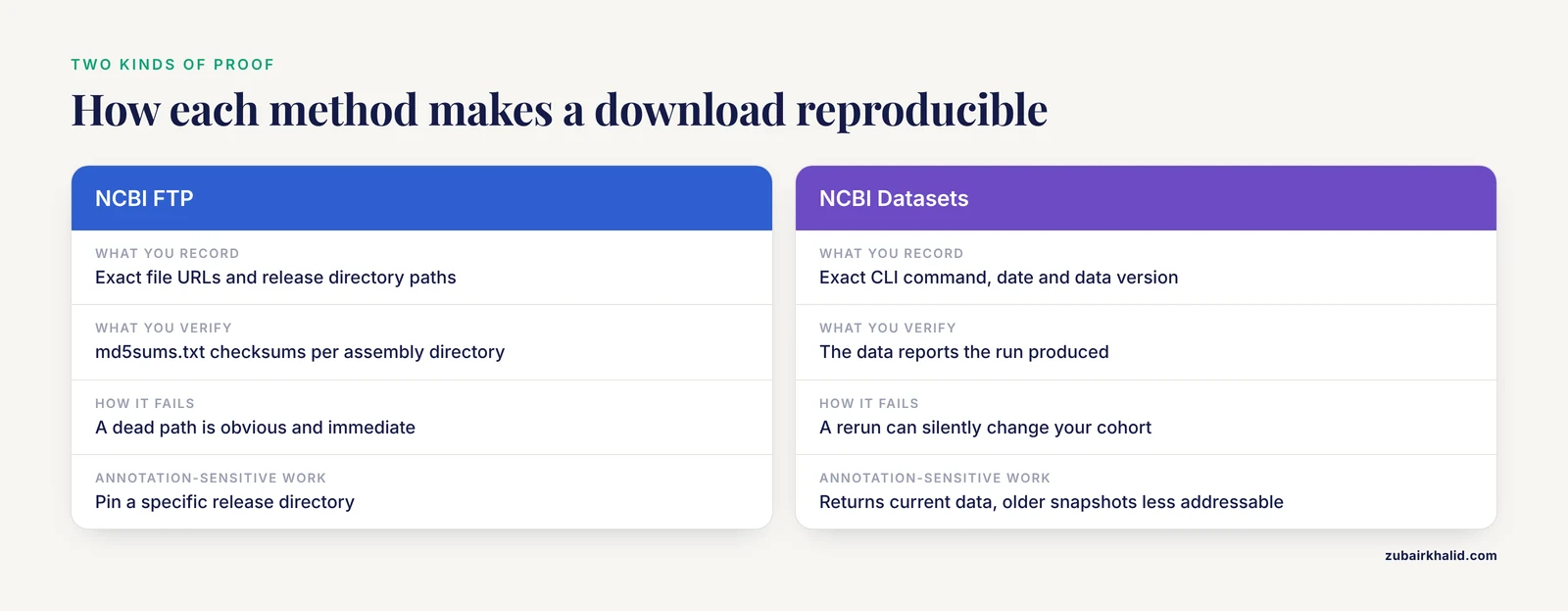
Reproducibility means different things in the two models. With FTP, reproducibility means reproducible files. You record the exact URL and the md5 checksums and you can defend your input data in a review years later. With Datasets, reproducibility means reproducible queries. You record the exact command and the data report it produced. Both are legitimate, but they fail differently. A dead FTP path is obvious, while a query that returns different results after a data update can silently change your cohort. This distinction matters most for annotation-sensitive analyses, because RefSeq annotations do change across pipeline versions and organisms differ in how much annotation support they have [3].
Learning curve and audience
Anyone who has ever downloaded a file can use FTP within minutes. The datasets CLI has a small vocabulary but a real one, and the JSONL reports have a learning curve of an afternoon. Teams with rotating students often standardize on wrapper scripts regardless of the underlying method, which is wise.
When to Use NCBI FTP
The question "when to use NCBI ftp" has five well-defined answers.
1. You need a full database mirror or release snapshot. Building a local BLAST database, maintaining an institutional mirror of RefSeq, or freezing a full RefSeq release for a multi-year project all demand FTP. The release directories let you pin an entire annotation state, which matters because annotations shift as the NCBI pipeline and supporting evidence change over time [3]. Bulk analyses built on RefSeq depend on exactly this. A viral metagenomics study that compared assemblers and annotation tools built its simulated communities from genomes taken from the RefSeq database, and the fidelity of that benchmark rested on having the actual reference files [7].
2. Your pipeline expects specific filenames and formats. Snakemake, Nextflow, and Make-based workflows thrive when inputs have predictable names. FTP file naming is contractual. *_genomic.fna.gz, *_genomic.gff.gz, *_protein.faa.gz, and *_assembly_report.txt never surprise you.
3. You need checksummed, auditable inputs. The per-directory md5sums.txt turns any download into a verifiable event. For core facility work and regulated analyses, this is the honest way to handle data provenance.
4. You are walking one organism or taxonomic group. An FTP directory per organism is a natural unit of work. Many classic studies used it exactly this way, including the C. elegans small RNA analysis described earlier [2].
5. You are downloading very large single files. Pre-built BLAST databases, whole-chromosome FASTA files, and SRA files move more reliably over rsync or Aspera than through query-oriented APIs, because resumable transfer is built into the transfer protocol rather than the service.
The clearest example of FTP-scale work appears in studies that enumerate thousands of assemblies. A core genome multi-locus sequence typing scheme for the Enterobacter cloacae complex was developed from 3,442 publicly available genomes spanning 27 species and subspecies, and the scheme's quality depended on assembling that full collection with consistent metadata [8]. Collections of that size can be assembled through either method, but FTP plus a curated assembly list remains the most controllable route when you need every file to match a recorded accession.
When to Use NCBI Datasets
The case for Datasets rests on three strengths.
1. Your selection criteria are biological, not structural. "Reference assemblies for Streptococcus pneumoniae at complete assembly level", "protein-coding genes on human chromosome 7 with a RefSeq transcript", "all archaeal taxa below a rank" are Datasets queries. Translating them into FTP directory walks takes effort and breaks easily. Translating them into a datasets command takes seconds.
2. You need the metadata as much as the sequences. Every Datasets package ships with a structured report per record. Building the metadata table for a genome panel, a gene list, or a taxonomic scope is part of the download rather than a separate collection chore. Scripted retrieval of this kind powered the SARS-CoV-2 sequence collection described earlier, where 8,273 sequences were gathered programmatically and then standardized for model training [4].
3. You are exploring before committing. The summary subcommand answers "how many genomes exist for this taxon and at what assembly levels" without downloading sequence data. That preview step prevents the most common FTP mistake, which is downloading several gigabytes before realizing the selection was wrong.
Datasets also helps at the project design stage. Reference database choice measurably shapes microbiome results, and comparisons across Greengenes, SILVA, RDP, and NCBI 16S collections show that the database you pick alters alpha-diversity, beta-diversity, and relative abundance profiles in real datasets [9]. When you are deciding which NCBI-derived reference set to build, the ability to query and preview candidate genome sets before downloading them is a genuine advantage. For sequence-level sanity checks, many groups cross-validate taxonomy assignments against the NCBI nr/nt database, as one wastewater 16S study did when it cross-checked Greengenes assignments and found pathogens reported by Greengenes that did not hold up against NCBI records [10]. Retrieval flexibility at the design stage feeds directly into analysis quality later.
Worked Scenarios: NCBI FTP or Datasets?
Scenario 1. Building a population dataset of thousands of bacterial genomes
You are reproducing something like the Enterobacter cloacae complex study, which gathered 3,442 genomes across 27 taxa and required 99.9 percent of isolates to carry at least 95 percent of the final 1,812 cgMLST loci [8]. The selection is heterogeneous and the analysis is SNP- and gene-sensitive.
Recommended path. Use Datasets to enumerate candidate assemblies per species and export their metadata reports to TSV, curate the list against your inclusion criteria, then fetch files by accession from FTP so every input has a checksummed, fixed path. The two methods divide the labor naturally, with Datasets doing the asking and FTP doing the delivering.
Scenario 2. A gene-centric panel for primer or probe design
You need one canonical protein-coding transcript per gene across a set of mammalian species. RefSeq mammalian annotations are highly concordant, with over half of orthologous protein-coding genes showing splicing conservation across at least three reference genomes in a 34-organism analysis, and roughly 7,500 ortholog sets forming a stable mammalian core set [3].
Recommended path. Datasets. The gene resource is query-first by design, filtered outputs map directly onto the ortholog framing of the problem, and the metadata reports carry the transcript and protein accessions your design records need.
Scenario 3. Building a local 16S reference database
You need a full bacterial genome collection to derive a 16S reference set, and you know from the literature that the choice of reference collection changes diversity and composition outcomes, sometimes statistically so, across stool, milk, and vaginal microbiota datasets [9].
Recommended path. FTP. You want a complete, frozen, checksummed slice of RefSeq bacteria that you can reprocess identically for years. Selection at this scale is about completeness and versioning, which is where FTP is strongest.
Scenario 4. A scripted machine learning dataset
You need a few thousand labeled viral sequences with consistent lengths and a testable split. The published example standardized 8,273 retrieved sequences to 30,000 bases and trained CNN and LSTM classifiers, reaching 99.75 percent accuracy with the CNN and 97.04 percent with the LSTM under a shared pipeline [4].
Recommended path. Datasets or E-utilities for retrieval, because the unit of work is the individual sequence record with metadata. Record the exact query and date in your methods section.
Scenario 5. Recomputing annotation-dependent results
A reviewer asks whether your gene counts depend on the annotation release. You must show results under a specific older release.
Recommended path. FTP, without hesitation. Release and annotation directories remain addressable on FTP in a way that filtered query services, which generally return current data, do not match.
Combining Both Methods in One Workflow
The strongest practical answer to "ncbi ftp or datasets" is usually both, in a specific order.
- Frame the biological question as a Datasets query. Use
datasets summaryto preview counts and assembly levels before any download. - Download a small pilot package with the
datasetsCLI and inspect the data reports. Confirm the metadata fields you need are populated. - Convert reports to TSV with
dataformatand curate your final accession list. Record the command, the date, and the data version in your methods. - Resolve the final accessions to FTP paths and download the actual sequence and annotation files there, where checksums and fixed filenames give you auditable inputs.
- Verify everything with
md5sum -c, then build your analysis inputs from the verified files. - Freeze the accession list, the checksums, and the report files in your project repository. Any future rerun starts from those three artifacts rather than from a fresh query.
This hybrid pattern gets the query ergonomics of Datasets, the file stability of FTP, and a provenance trail that survives both data updates and personnel changes. It also mirrors how the wider ecosystem has always worked. PubChem's raw files over FTP coexisted with web service APIs precisely so that researchers could build query-oriented layers on top of stable file distributions [1], and that layered pattern is now standard across NCBI resources.
Common Mistakes and Limitations
Assuming Datasets covers raw reads. Datasets serves genes, genomes, taxonomy, and virus data. SRA reads require the SRA Toolkit or cloud delivery, and archive-scale SRA work increasingly happens in query engines rather than flat file listings [6]. Mixing these up wastes an afternoon.
Ignoring annotation versioning. Two downloads of "the human genome" can carry different gene models if they came from different annotation releases, and annotation output changes as the NCBI pipeline and evidence base evolve [3]. Record the release with every download and treat annotation differences as an analysis variable, not noise.
Skipping checksums. Every FTP assembly directory ships md5sums.txt. Verifying costs seconds. Not verifying risks hours of debugging a corrupted FASTA that half-loads into your aligner.
Walking FTP directories by hand for large selections. Clicking through directories works for one assembly. For a hundred, script it. For a few thousand, as in the 3,442-genome typing scheme [8], automate the whole path from accession list to verified files.
Treating a Datasets query as a frozen dataset. A query returns whatever matches today. If the underlying data change, rerunning the command can change your cohort silently. Archive the data reports from the original run so you can detect drift.
Expecting uniform metadata. Even within well-trodden resources, biological context is unevenly recorded. In the gut microbiome SRA characterization, core technical fields were largely complete but host identity, phenotype, and study design were often inconsistently encoded, and host identity could be assigned for only 13 percent of BioSamples in the broad gut metagenome cohort [6]. Budget curation time for metadata regardless of retrieval method.
Forgetting that the database itself is a variable. Cross-database comparisons show that taxonomic assignments can disagree between reference collections, as when wastewater 16S calls made with Greengenes failed confirmation against the NCBI nr/nt database [10]. Your download method does not fix database choice, so document which database underlies your analysis.
One limitation to name plainly. Both methods reflect the same upstream NCBI data. Neither tool corrects incomplete submissions, uneven annotation support, or missing metadata at the source, and neither substitutes for reading the assembly reports before you commit a dataset to analysis.
Frequently Asked Questions
Is NCBI Datasets replacing the NCBI FTP site?
No. NCBI Datasets is an additional, query-oriented layer on top of NCBI data, not a replacement for the file distribution. FTP continues to serve full releases, assembly directories, BLAST databases, and archive files, and it remains the only route for complete mirrors and version-pinned releases.
Can I download SRA read data with NCBI Datasets?
Not in the way you download genomes and genes. Datasets covers genes, genomes, taxonomy, and virus resources. For raw SRA reads, use the SRA Toolkit or cloud delivery services, and use FTP or Datasets for the reference genomes and metadata that frame the analysis.
Which method is faster for getting a whole reference database?
NCBI FTP, by a wide margin. Full releases and whole-organism directories are designed for bulk transfer over rsync or Aspera, with resumable downloads and checksum verification. Datasets is built for filtered subsets, and using it to enumerate an entire database defeats its purpose.
Do I need the datasets command-line tool, or can I just use the web interface?
The web interface is fine for interactive exploration and small packages. Use the command-line tool when a download must be scripted, repeated, or embedded in a reproducible pipeline, because the command itself becomes part of your methods record.
How do I make an NCBI download reproducible?
For FTP, record the exact file URLs and verify against the directory checksums. For Datasets, record the exact CLI command, the date, and archive the data reports the run produced. For both, keep the accession list in your project repository. That trio of command, report, and accession list lets anyone reconstruct your input data.
Why does my gene list differ between FTP files and a Datasets download?
The most common cause is annotation versioning. RefSeq annotations change as the annotation pipeline and supporting evidence evolve, and different retrieval paths can surface different annotation states. Check the annotation release associated with each source, and pin a specific release from FTP if your analysis requires a frozen gene model set.
Sources
- A Java API for working with PubChem datasets.
- Identification and characterization of microRNAs in Trichinella spiralis by comparison with Brugia malayi and Caenorhabditis elegans.
- Comparison of RefSeq protein-coding regions in human and vertebrate genomes.
- Performance Analysis of CNN and LSTM for SARS-CoV-2 Detection Based on Genomic Sequence Data
- MinION 16S datasets of a commercially available microbial community enables the evaluation of DNA extractions and data analyses
- From Public Archive to Reusable Resource: Characterizing Gut Microbiome Metadata in the NCBI SRA
- Comparison of different assembly and annotation tools on analysis of simulated viral metagenomic communities in the gut
- Development and evaluation of a core genome multi-locus sequence typing scheme for the Enterobacter cloacae complex
- A comparison between Greengenes, SILVA, RDP, and NCBI reference databases in four published microbiota datasets
- Evaluation of 16S next-generation sequencing of hypervariable region 4 in wastewater samples: An unsuitable approach for bacterial enteric pathogen identification.