NCBI CD-Search Tutorial: Step-by-Step Guide
By Dr. Zubair Khalid, DVM, MS, PhD ·

After working through this guide you will be able to annotate a protein sequence with conserved domain footprints using NCBI CD-Search, submit a large FASTA file through Batch CD-Search, run the standalone RPS-BLAST and rpsbproc tools on your own machine, and read a domain graph without over-interpreting it. For the web sections you need only a browser plus a protein sequence or an accession number. For the standalone section you need command-line access on Linux, macOS or Windows and a few gigabytes of free disk space.
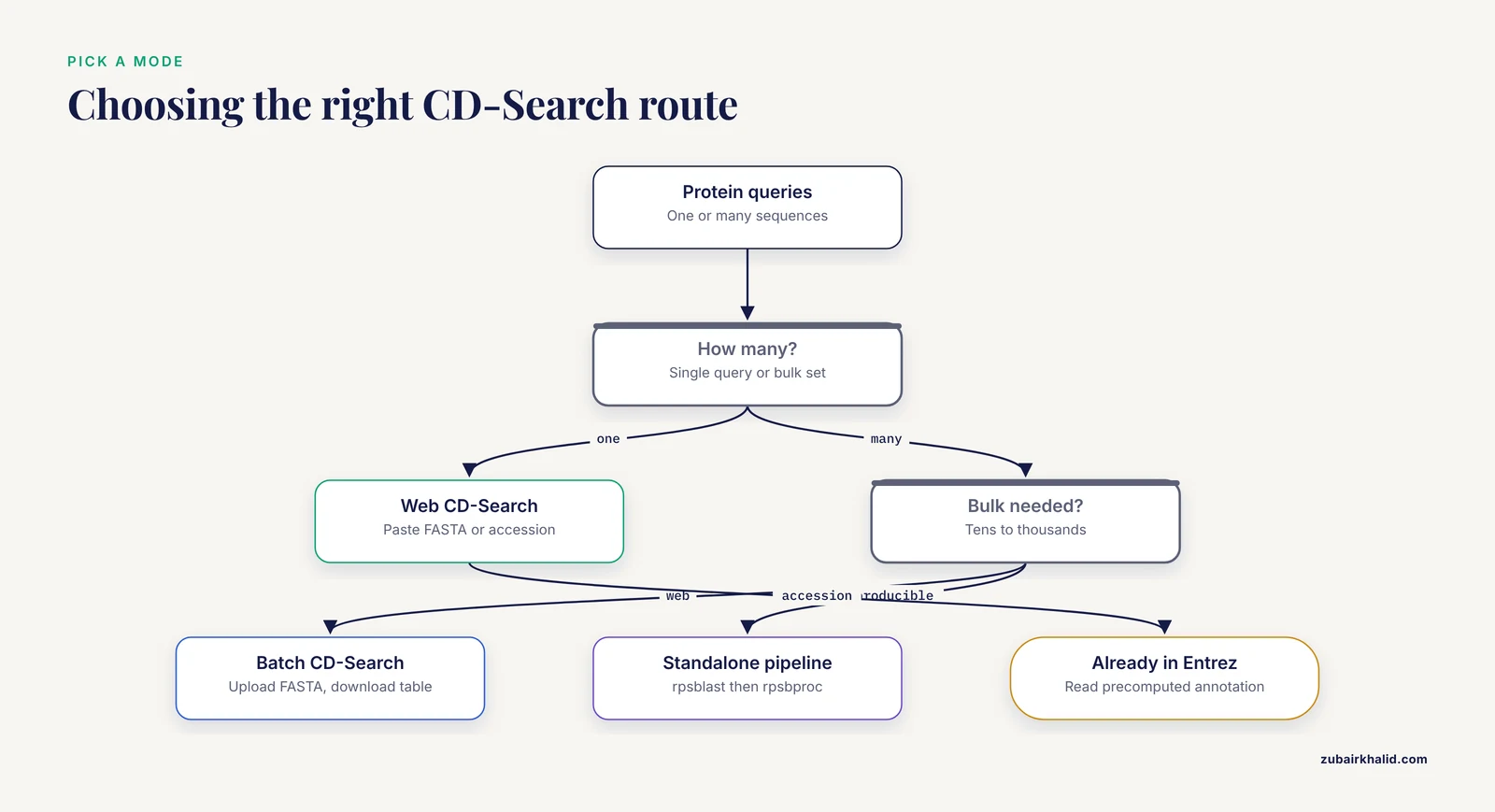
CD-Search is the National Center for Biotechnology Information (NCBI) web service that scans a protein query against the Conserved Domain Database (CDD), a public collection of multiple sequence alignments and profile models that represent conserved protein domains [1][2]. A domain is an evolutionarily conserved unit of protein structure and function, and a footprint is the interval of your query that a domain model matches [1][3]. The service runs in three modes, a single-sequence web search, a batch web service for large query sets, and a standalone command-line pipeline built on RPS-BLAST plus rpsbproc [1]. This walkthrough covers all three in a step-by-step format, with the parameters that matter, the errors you are likely to hit, and checks that keep your annotations honest.
What CD-Search Is and When to Use It
The CDD annotates protein sequences with the locations of conserved domain footprints and with functional sites inferred from those footprints [1]. The database combines two kinds of models. Imported models come from public collections such as Pfam, SMART and COG [2][4]. Curated models are built in house by NCBI staff, who use protein 3D structures to refine domain boundaries and to annotate conserved sequence features [5][3][6]. In the April 2019 release (v3.17), CDD held more than 57,000 domain models, of which almost 15,000 were curated by CDD staff [1]. Curation concentrates on common, well-studied families where structural and functional data are rich, and it organizes related models into hierarchies of finer-grained family and subfamily models [1][4]. Large families such as the seven-transmembrane GPCR superfamily are handled through this hierarchical curation [7].
Because many models describe the same or overlapping families, CDD clusters redundant and homologous models into superfamilies. By default, a footprint is annotated at the superfamily level, and a "specific" annotation is added only when the match to a family or subfamily model is strong enough to imply molecular function with high confidence [8][3].
Use CD-Search when you want to do any of the following:
- Check whether a new or hypothetical protein contains recognizable domains.
- Decide which region of a protein to clone, mutate or delete before an experiment.
- Annotate a genome or transcriptome assembly at the domain level.
- Understand why a BLAST hit matters, since protein BLAST queries are scanned against CDD by default and the BLAST results page shows the domain graph [2][4].
- Retrieve pre-computed domain annotation for proteins already tracked in Entrez, without recomputing anything [1][5].
How CD-Search Works Under the Hood
CD-Search does not compare your sequence to single protein sequences the way BLASTp does. It compares your sequence to precomputed position-specific scoring matrices (PSSMs), which are profile representations of each CDD multiple sequence alignment [4][6]. The search engine is RPS-BLAST, reverse position-specific BLAST, so called because the profile is the database and the plain sequence is the query [6]. Profiles are more sensitive than pairwise comparison for remote homology, because conserved positions in the family score strongly even when the query itself is divergent. This is the same principle behind the classic protein kinase catalytic domain classification of Hanks and Quinn, an early domain-family database that today's curated kinase models in CDD build on [9].
Two numbers matter when you read results:
- E-value (expectation value). The number of matches with a score at least this good that you would expect to see by chance in a database of this size. An E-value of 1e-45 means chance matches at this score are essentially absent, while an E-value of 0.5 means roughly half of the matches at this score are expected from chance. Lower is better.
- Bit score. A normalized score in bits, reported alongside the E-value. Higher bit scores indicate more significant matches, and the scale is roughly logarithmic, so a bit score of 200 reflects a far stronger match than 100.
CD-Search reports a footprint for each model that passes the threshold. Some models are multi-domain models, meaning a single model matches two or more discontinuous intervals of your query, drawn as a bar with gaps. For the decision between a specific hit and a superfamily-level hit, CD-Search incorporates assignment heuristics that consider the hierarchy of homologous models and domain-specific thresholds. In the published test set, these heuristics replaced almost 90 percent of misclassifications caused by missing subfamily models with more generic, and therefore safer, superfamily-level assignments [10].
Where CD-Search Fits in the NCBI Database System
If you are learning how to use NCBI, it helps to see CD-Search as one node in the Entrez system rather than a standalone page. The CDD is cross-linked with Entrez databases such as Protein, Taxonomy, Structure and PubMed [2][4]. In practice you will enter the domain-annotation world from three doors:
- The CDD home page at https://www.ncbi.nlm.nih.gov/Structure/cdd/cdd.shtml, which links to CD-Search, Batch CD-Search and documentation [1][5].
- An Entrez Protein record. Domain annotation for proteins tracked by Entrez is pre-computed, so the record already carries a domain graphic and Conserved Domains links that you can retrieve without running any search [1][5][2][3].
- A BLASTp run. Protein queries submitted to NCBI BLAST are scanned for conserved domains by default, and the results page includes the CDD domain graph [2][4].
The interactive search services accept single protein queries, and the web service also accepts nucleotide queries, which it processes before scanning [6]. Batch and standalone workflows are protein-centric, so convert nucleotide queries to protein first. For network-level work, the cddApp extension loads CDD domain and site information into Cytoscape for nodes annotated with NCBI or UniProt identifiers [11], and the CDTree helper application supports analysis of curated domain hierarchies for protein classification [4].
Before You Start: Prepare a Clean Protein FASTA
FASTA format is a header line beginning with the greater-than character, followed by the sequence in single-letter amino acid code. A minimal example of the format, with a toy header, looks like this:
>my_protein_1 description of the protein
MEEPQSDPSVEPPLSQETFSDLWKLLPENNVLSPLPSQAMDDLMLSPDDIEQWFTEDPGP
Rules that prevent most submission failures:
- Use only the 20 standard amino acid letters, plus X for unknown positions if needed.
- Remove line numbers, spaces inside the sequence, and characters copied from PDF or word processor files, which often insert smart quotes or non-breaking spaces.
- Give every sequence in a batch file a unique header, because the tabular output is joined on those identifiers.
- Keep the header on one line.
If your protein already has an NCBI accession, for example P00533 for human epidermal growth factor receptor, you can often skip FASTA handling entirely and submit the accession directly.
Step 1: Run a Single-Sequence NCBI CD-Search on the Web
This is the fastest route and the one most people need. Worked example, human EGFR, accession P00533.
- Open the CD-Search page at https://www.ncbi.nlm.nih.gov/Structure/cdd/wrpsb.cgi, or follow the CD-Search link from the CDD home page [1][2].
- Enter your query. Either paste a FASTA sequence into the query box, or type the accession P00533 into the accession field.
- Leave the expectation value threshold at its default of 0.01 and the maximum number of hits at 500 unless you have a specific reason to change them.
- Submit the search. The form offers a concise view and a full view of results. Start with the concise view, which shows specific hits plus superfamily representatives, then switch to the full view when you want every model that passed the threshold [8][3].
- Read the domain graph. For P00533 you should see a horizontal bar representing the 1,210 residue query, with colored segments for specific hits. The intracellular kinase domain, roughly residues 712 to 979 in standard annotations, appears as a strong specific hit to a tyrosine kinase catalytic model nested inside the PKinase superfamily, and the extracellular receptor domains appear as further bars.
- Click any specific hit bar. This opens an alignment of your query against the domain consensus, with conserved features such as active-site and binding-site residues marked. Switching on the annotation view projects the functional sites inferred from the curated alignment onto your sequence [8][3][6]. For the EGFR kinase domain, confirm that the conserved lysine of the VAIK motif and the aspartate of the DFG motif are present in your query at the aligned positions.
- Save the result. The results page provides download options for the hit table, which is what you should archive for your records.
- If your protein is already in Entrez Protein, compare your live search against the pre-computed annotation on the Entrez record, which is generated by the same system [1][5].
Expected output, in words: a query ruler with residue numbers, colored bars for specific hits, gray bars grouped under superfamily clusters for nonspecific hits, and a table listing each hit with its model name, description, E-value and alignment boundaries. Multi-domain models appear as bars with gaps where the model skips unaligned insert regions.
Step 2: Batch CD-Search for Many Sequences
Batch CD-Search computes and downloads domain annotation for large sets of protein queries [3][1]. It is the right tool when you have tens to thousands of sequences from an assembly, a proteome download or a differential expression experiment.
- Prepare a protein FASTA file with one unique header per sequence. For example, collect records in Entrez Protein and use the Send to File option, or assemble the file from your own annotation pipeline.
>protein_001 hypothetical protein contig_12
<sequence lines here>
>protein_002 chaperonin GroL-like
<sequence lines here>
In practice the sequence lines are the actual residues, one header followed by its sequence, repeated for every record.
- Open Batch CD-Search at https://www.ncbi.nlm.nih.gov/Structure/bwrpsb/bwrpsb.cgi.
- Upload your FASTA file or paste the sequences, set the E-value threshold, and submit. The same default threshold logic as the single-sequence service applies, and 0.01 is a sensible starting point.
- Wait for the job to finish. Large jobs run on NCBI servers and can take minutes. Keep the results page open, or download before closing the tab.
- Inspect the per-sequence graphical summaries, then download the tab-delimited annotation table. The table lists, for each query, the matched model, the footprint coordinates on the query, and the significance values, which makes it straightforward to open in a spreadsheet or parse with Python or R.
- Collapse redundant hits before counting. Because CDD is intentionally a partially redundant collection, one region of your protein can be covered by several models that all belong to one superfamily [3]. Count superfamilies, or use the processed output described in Step 3, rather than counting raw hit rows.
Step 3: Standalone RPS-BLAST and rpsbproc on Your Own Machine
For reproducible pipelines, run the search locally. The published protocol for this workflow uses two pieces of software, the RPS-BLAST+ search engine and the rpsbproc post-processor, which converts raw hits into readable domain and site annotation [1].
- Install the BLAST+ toolkit, which includes rpsblast. Download the archive for your platform from the NCBI FTP index at https://ftp.ncbi.nlm.nih.gov/blast/executables/blast+/LATEST/, then:
wget https://ftp.ncbi.nlm.nih.gov/blast/executables/blast+/LATEST/ncbi-blast-2.15.0+-x64-linux.tar.gz
tar -xzf ncbi-blast-2.15.0+-x64-linux.tar.gz
export PATH=$PWD/ncbi-blast-2.15.0+/bin:$PATH
rpsblast -version
Check the FTP index for the current release number rather than copying the version string above. Expected output looks like:
rpsblast: 2.15.0+- Download the CDD database files from https://ftp.ncbi.nlm.nih.gov/mmdb/cdd/. rpsblast needs the search index files, and rpsbproc additionally needs the annotation files:
mkdir -p ~/cdd_db
cd ~/cdd_db
for f in Cdd_NCBI.phr Cdd_NCBI.pin Cdd_NCBI.psq Cdd_NCBI.anto Cdd_NCBI.a2i
do
  wget "https://ftp.ncbi.nlm.nih.gov/mmdb/cdd/$f"
done
On macOS, substitute curl -O for wget if wget is not installed. Check the FTP directory listing for the current file set, because it can change between releases.
- Put your queries in a protein FASTA file, for example
proteins.faa. - Run the search:
rpsblast -query proteins.faa -db ~/cdd_db/Cdd_NCBI -evalue 0.01 -outfmt "6 qseqid sseqid evalue bitscore stitle" -out cdd_hits.tsv
head -n 5 cdd_hits.tsv
Illustrative output, with your identifiers and scores differing:
sp|P00533|EGFR_HUMAN	pfam00069	1.4e-171	514	Protein kinase domain
sp|P00533|EGFR_HUMAN	smart00220	2.8e-166	507	S_TKc, serine/threonine protein kinase catalytic domain
The second column holds the CDD model identifier, with prefixes such as cd for curated models, and pfam, smart, cog or tigr for imported collections. If your BLAST+ build rejects a format field, run rpsblast -help to list the fields it supports.
- Produce readable, site-annotated output with rpsbproc, which you can obtain from the NCBI FTP site linked from the CDD documentation:
cd ~/cdd_db
rpsbproc -i proteins.faa -o cdd_annotation.txt -m std -e 0.01
Run rpsbproc from the folder holding the Cdd_NCBI files, or set the BLASTDB environment variable to that folder. In the default std mode, each query gets a block of tab-delimited lines with family-level annotation, domain hits with query start and end coordinates, model accessions and names, E-values and bit scores, and functional site annotations where the curated model provides them. The -m flag also offers domain-only and family-centric output modes, and -t restricts output to specific or nonspecific hits. Run rpsbproc -h to see the exact flag list for your build.
- Record versions for reproducibility. Save the output of
rpsblast -versionand the date you downloaded the CDD files. CDD is updated on a release cycle [1], so identical commands can give slightly different annotations across releases.
Key Parameters at a Glance
| Parameter | Web CD-Search | Batch CD-Search | rpsblast | rpsbproc | What it controls |
|---|---|---|---|---|---|
| E-value threshold | Expectation value field, default 0.01 [1] | Same field | -evalue | -e | Chance-level cutoff for reporting hits |
| Maximum hits | Max hits, default 500 [1] | Available | Reports all passing hits | n/a | Clutter control on the graph |
| Result view | Concise vs full buttons | Per-sequence graphs plus tables | -outfmt 6 columns | -m std, dom or fam | Specific hits only versus all models |
| Hit type filter | Color coding, gray for superfamily | Flagged in table | Read from identifiers | -t all, spe or non | Specific versus nonspecific annotation |
| Database | CDD, fixed | CDD, fixed | -db Cdd_NCBI | Uses Cdd_NCBI files | Model set searched |
| Input | Paste, accession or upload | FASTA file or paste | -query FASTA | -i FASTA | Protein standard, web also accepts nucleotide [6] |
How to Check That Your Results Are Right
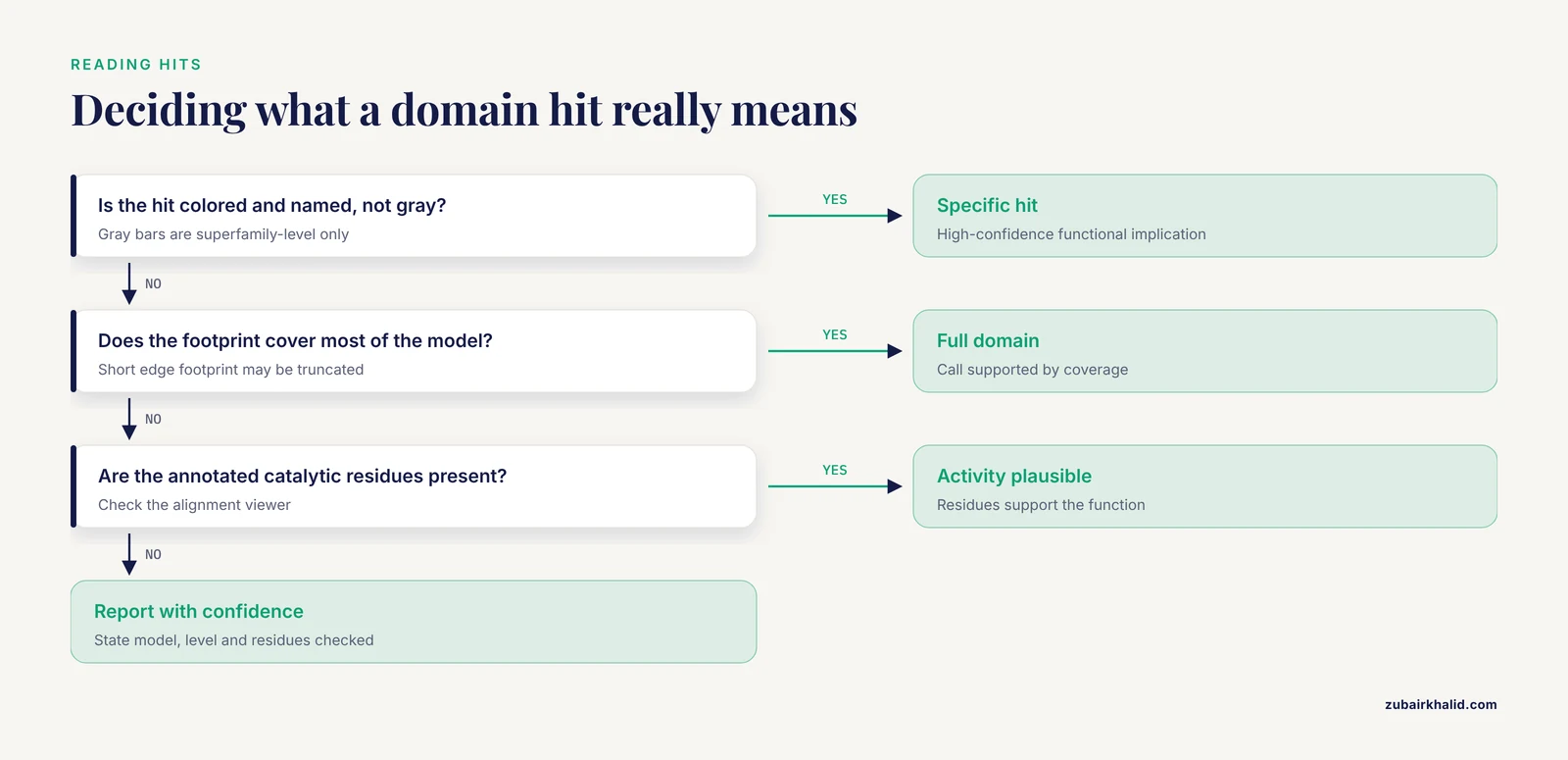
- Check the annotation level. A colored, named hit is a specific assignment with high-confidence functional implications. A gray superfamily bar says only that the region belongs to a known structural superfamily [8]. Reporting a superfamily hit as a molecular function is the single most common over-interpretation.
- Check footprint coverage. A footprint that covers most of the model length supports the call. A short footprint at the edge of a contig or fragment may be a truncated domain, which you should report as partial.
- Check the hierarchy logic. When a deep subfamily model and a generic family model both match, the assignment heuristics prefer the deepest well-supported model and fall back to generic assignment when evidence is weak [10]. If your query hits only the superfamily, do not claim the subfamily.
- Check the functional sites. Open the alignment for the specific hit and confirm that the annotated catalytic or binding residues are present in your query. Domain presence without the catalytic residues often means a pseudoenzyme or an inactive paralog. The value of this check is illustrated by the nidovirus NiRAN domain, where substitution of the invariant lysine severely diminished nucleotidyl binding and crippled viral replication, confirming that the conserved residue carried the activity [12].
- Cross-check with a second resource. Published workflows commonly run CD-Search alongside Pfam and InterProScan and treat agreement between methods as supporting evidence [13]. A quick BLASTp against nr also shows the CDD graph by default [2][4].
- Compare live versus precomputed results. For Entrez proteins, the pre-computed annotation comes from the same system, so discrepancies usually mean a CDD release difference rather than an error [1][5].
Practical Tips for Better CD-Search Runs
- Start at the CDD home page and bookmark both the CD-Search and Batch CD-Search URLs, since these are the two entry points NCBI documents for live searching [1][3].
- Use accession input when the protein exists in Entrez. It removes FASTA formatting errors and connects your run to the pre-computed annotation.
- Read the concise view first. It surfaces the specific hits and superfamily structure without burying you in redundant models [8][3].
- For genome-scale work, prefer Batch CD-Search or the standalone pipeline over repeated single-sequence runs, because both were built for bulk annotation [1][3].
- Pin versions in your methods. Write down the CDD release and the BLAST+ version, because curation is active and annotations evolve [1][5].
- Turn footprints into testable hypotheses. Domain-informed mutagenesis is standard practice, for example targeted deletion and point-mutation studies built on annotated domain boundaries and conserved residues [14]. Expect some mutants to show no phenotype, which is a result about the protein, not about the annotation.
- For protein interaction networks, load CDD domain and site data into Cytoscape with cddApp rather than copying annotations by hand [11].
- For family-level classification projects, combine CDD with CDTree to analyze sequences in the context of curated hierarchies [4].
- Conserved segments identified through domain analysis can support applied goals, for example the highly conserved 94 amino acid region characterized across RND multidrug efflux pumps, which the authors proposed as a diagnostic and therapeutic target [15].
Common Mistakes and Limitations
- Treating superfamily hits as functional assignments. Superfamily membership identifies a structural lineage, not a molecular function. Only specific hits carry high-confidence functional annotation [8]. Fix, report the superfamily as such and look for a specific hit or experimental data.
- Claiming a subfamily the evidence does not support. Choosing among closely related models is harder than choosing between non-overlapping ones, which is exactly why CD-Search falls back to generic assignments [10]. Fix, quote the model you actually matched.
- Dirty query sequences. Line numbers, spaces, smart quotes and FASTA headers merged into the sequence cause rejected submissions or garbage alignments. Fix, keep one header line and bare sequence lines, and remove everything copied from formatted documents.
- Pasting many sequences into the single-sequence page. The single-sequence service handles one query, extra sequences are wasted or rejected. Fix, use Batch CD-Search for anything beyond one sequence [3].
- Nucleotide confusion. The web service accepts nucleotide queries [6], but batch and standalone workflows expect protein. Fix, translate first, and check which reading frame produced the hit.
- Reading multi-domain bars as separate domains. A bar with gaps is one model matching discontinuous parts of your query. Fix, check the model description before counting domains.
- Counting every hit row as an independent domain. Redundant models from different source collections cover the same region [3]. Fix, collapse by superfamily or use rpsbproc std output.
- Missing database files in standalone runs. The most common local error is a wrong -db path or an incomplete download:
BLASTDB error: Protein blast database located at ~/cdd_db/Cdd_NCBI does not exist or is not properly formattedFix, confirm the phr, pin and psq files are present, point -db at the full path including the Cdd_NCBI prefix, or set BLASTDB to the folder. rpsbproc additionally fails if the annotation files are missing, so download the complete set.
- Assuming domain presence proves activity. The footprint tells you where to look, the residues tell you whether the activity is intact [12]. Fix, always open the alignment and inspect annotated sites.
- Ignoring release drift. Curation is ongoing, model sets and boundaries change between releases [1][5]. Fix, record versions and re-run critical annotations after major updates.
Limitations to keep in mind. RPS-BLAST is a heuristic method, so a handful of true remote matches can be missed. CD-Search can only report domains represented in CDD, so proteins with unusual or rapidly evolving domains may return nothing, which is why complementary tools such as Pfam and InterProScan appear together with CD-Search in published characterization workflows [13]. Low-complexity and coiled-coil regions can produce weak, broad matches that deserve skepticism. Finally, a domain call is a hypothesis about function, not a measurement of it.
Worked Example: From Hypothetical Protein to Function
The value of this workflow is easiest to see in published pipelines. A 2024 study of a hypothetical Monkeypox virus protein ran CD-Search alongside Pfam and InterProScan, assigned the protein to the Chordopox_A20R domain, and used that annotation to justify 3D modeling on template 6zyc.1, followed by quality assessment and docking [13]. A 2025 study of placental proteins used the NCBI conserved domain database to predict functional domains before protein-protein docking and molecular dynamics [16]. And in work that discovered the NiRAN domain, bioinformatic analysis of the nidovirus replicase subunit revealed a previously unrecognized domain adjacent to the RNA polymerase, and experimental mutagenesis of its invariant lysine confirmed an essential activity [12]. The pattern is consistent, CD-Search supplies the domain footprint, the footprint supplies the residues and boundaries, and experiments or structure modeling supply the function.
Frequently Asked Questions
What is the difference between CD-Search and BLASTp?
CD-Search compares your sequence against profile models (PSSMs) built from CDD multiple sequence alignments using RPS-BLAST, while BLASTp compares it against individual protein sequences. Profiles are more sensitive for remote homologs, and BLASTp results include the CDD graph by default anyway [4][2].
Why does my protein only get a gray superfamily-level hit?
The evidence supports membership in a structural superfamily but not a confident match to any curated family or subfamily model. Report it as superfamily membership only, since specific functional annotation requires a specific hit [8][10].
Can CD-Search accept nucleotide sequences?
The interactive web service accepts nucleotide queries and processes them before scanning [6]. Batch CD-Search and the standalone tools expect protein, so translate your nucleotide sequence first and confirm the reading frame.
How many sequences can Batch CD-Search handle?
Batch CD-Search was built for large query sets and supports computation and download of annotation for bulk protein queries [3]. For routine genome-scale pipelines with thousands of sequences, the standalone RPS-BLAST plus rpsbproc route gives you local control [1].
Which E-value threshold should I use?
Start with the default of 0.01 used by the web service. Tighten it for large, well-populated families where chance hits are more likely, and loosen it only when you inspect the alignments manually.
Why do multiple domain models overlap on the same region of my protein?
CDD is a partially redundant collection by design, combining imported Pfam, SMART and COG models with curated ones, and clustering them into superfamilies [3][2]. Pick the deepest specific hit the evidence supports, or report the superfamily [8].
How do I add CD-Search annotations to an automated pipeline?
Use Batch CD-Search for bulk web annotation, or install BLAST+ with rpsblast and rpsbproc locally and script against their tabular output [1]. Record the CDD release and tool versions with your results.
Does CD-Search annotate functional sites such as active sites?
Yes. Curated models carry conserved functional sites, and the alignment viewer projects those sites onto your query sequence, so you can check whether catalytic or binding residues are conserved in your protein [8][3][5].
Sources
- NCBI’s Conserved Domain Database and Tools for Protein Domain Analysis
- CDD: a Conserved Domain Database for protein classification
- CDD: a Conserved Domain Database for the functional annotation of proteins
- CDD: a conserved domain database for interactive domain family analysis
- CDD: NCBI's conserved domain database
- CDD: conserved domains and protein three-dimensional structure
- Abstract 1090: Evolutionary, structural, and functional insights into the seven-transmembrane GPCR superfamily through NCBI's Conserved Domain Database
- CDD: specific functional annotation with the Conserved Domain Database
- Protein kinase catalytic domain sequence database: identification of conserved features of primary structure and classification of family members.
- Protein subfamily assignment using the Conserved Domain Database
- cddApp: a Cytoscape app for accessing the NCBI conserved domain database
- Discovery of an essential nucleotidylating activity associated with a newly delineated conserved domain in the RNA polymerase-containing protein of all nidoviruses
- In-silico approach to characterize the structure and function of a hypothetical protein of Monkeypox virus exploring Chordopox-A20R domain-containing protein activity
- Exploring the role of RRM domains and conserved aromatic residues in RGG motif of eIF4G-binding translation repressor protein Sbp1
- The highly conserved domain of RND multidrug efflux pumps in pathogenic Gram-negative bacteria.
- Exploring Placental Protein-Target Protein Interactions: In Silico and In Vitro Approaches for Osteoarthritis Therapy.