Organizing Raw Sequencing Data for Multi-Omics Projects
By Dr. Zubair Khalid, DVM, MS, PhD ·
By the end of this guide you will be able to set up a project directory that separates raw, processed, and metadata files, build a sample sheet that ties every file to a biological sample, verify file integrity with checksums, estimate storage needs before the sequencer runs, and prepare raw data for public deposition. The commands assume a Linux or macOS shell with GNU coreutils installed. You will also want pigz for parallel compression, seqkit for read summaries, samtools for alignment files, FastQC and MultiQC for quality control, and Illumina BCL Convert if you demultiplex your own runs. Have two storage targets available, one for active work and one for archive, before the first run lands.
Why Multi-Omics Data Organization Decides Whether the Project Succeeds
A multi-omics project profiles the same biological system at several molecular layers, for example genome sequence, transcriptome, chromatin accessibility, proteins, and metabolites. Reviews of multi-omics and spatial methods describe the payoff as the ability to connect regulation, transcription, protein activity, and metabolism within one framework, with spatial assays adding preserved tissue architecture on top [1]. Each layer brings its own instrument, file formats, and failure modes. The scientific value comes from joining the layers, and joining is only possible when every file can be traced back to the same biological sample.
Raw data means the unmodified output of the instrument. For sequencing that is BCL files (per-tile, per-cycle binary base calls) or the FASTQ text files produced from them. For mass spectrometry it is the vendor raw file from each injection. For spatial assays it is the original images plus the raw count matrices. Raw data is the only thing you cannot regenerate without re-running the instrument, which is why multi-omics data organization treats raw files as immutable from the moment they arrive.
The stakes are practical, not abstract. Reviews of artificial intelligence in biological research identify technical errors, bias, and inconsistent analytical methods as the main reasons findings fail to reproduce, and they emphasize that reliable analysis depends on high-quality, consistent data [2]. Most of those errors enter through data handling rather than through the algorithms. A mislabeled sample or an overwritten FASTQ file poisons every result downstream of it.
Organization also determines whether your project becomes reusable infrastructure. GallMine consolidated information scattered across 301 publications, including 124 multi-omics studies on gallbladder cancer, into a single structured repository [3]. AnnelidaDB pulled omics resources dispersed across repositories and papers into one platform covering 1,121 annelid species, including 591 species with transcriptome data and 5 with single-cell datasets [4]. Both resources exist because someone had to reconstruct scattered data. Projects that organize raw data well from day one become the resource other people reconstruct from.
What Raw Multi-Omics Data Actually Looks Like
Sequence data: BCL and FASTQ
Illumina instruments write BCL files (Base Call files, one small binary file per tile per imaging cycle) plus RunInfo.xml, RunParameters.xml, and completion markers. BCL output is close to one byte per sequenced base, so a high-output run can land in the terabytes. Demultiplexing (splitting the pooled run into per-sample FASTQ files using the index reads) converts BCL to FASTQ.
FASTQ is the working raw format for almost all downstream tools. Each record has exactly four lines:
@A00552:123:HTKWLDSX7:1:1101:2423:1000 1:N:0:ATCACG
GATCGGAAGAGCACACGTCTGAACTCCAGTCACATCACG
+
FFFFFFFFFFFFFFFFFFFFFFFFFFFFFFFFFFFFFFF
Line 1 is the header: instrument, run number, flowcell ID, lane, tile, and cluster coordinates, followed by the read number, a filtering flag, and the index sequence. Line 2 is the sequence. Line 3 is a separator. Line 4 holds per-base quality as printable characters in Phred+33 encoding: subtract 33 from the ASCII code to get the Phred score. The character F is ASCII 70, so it encodes Q37, an error probability of about 1 in 5,000. The sequence and quality lines must have equal length. A mismatch means the file is corrupt.
Alignment formats: BAM and CRAM
BAM is the compressed binary form of SAM, the standard text format for reads aligned to a reference genome. CRAM compresses further by encoding each read as differences from a reference sequence, often 30 to 40 percent smaller than BAM. CRAM requires that reference to be available every time the file is read, so a CRAM without a recorded, checksummed reference is a future failure. BAM and CRAM are processed data, not raw, but they inherit the organization of the FASTQ files that produced them.
Non-sequence modalities
Liquid chromatography tandem mass spectrometry (LC-MS/MS) runs produce vendor raw files such as Thermo .raw files or Bruker .d directories, which convert to the open mzML format. Spatial transcriptomics produces microscopy images plus per-spot or per-cell count matrices. Single-cell assays produce FASTQ plus cell-by-gene matrices. All of these are raw data in the sense that matters: they are the instrument output you cannot regenerate. Quality frameworks for mass spectrometry-based omics treat the file chain from sample collection through data release as a controlled process with defined inputs and records at each stage [5], and sequencing files deserve exactly the same treatment.
Plan the Inventory Before the First Run
Write the modality inventory before sequencing starts, because the directory layout and sample sheet must accommodate modalities you have not run yet. Real projects show how wide that range gets. One oral squamous cell carcinoma atlas combined single-cell RNA sequencing, single-cell T-cell receptor sequencing, spatial transcriptomics, and bulk RNA sequencing into a 88,442-cell atlas with 63 cell subclusters [6]. A metabolic dysfunction-associated steatotic liver disease pipeline anchored on liver expression combined differential meta-analysis, transcriptome-wide Mendelian randomization, transcriptome-wide association studies, proteome-wide association studies, and single-nucleus RNA sequencing [7]. Neither analysis would have been possible if the raw files for each layer lived in inconsistent places under inconsistent names.
For each modality, record five things in a planning document: the assay name, the instrument, the raw file types it produces, the approximate raw size per sample, and who processes it. Longitudinal designs add a dimension that is easy to miss. The Open-IBD inception cohort plans to recruit up to 2,000 adults before diagnosis, collect blood, stool, and intestinal biopsy samples at baseline, and follow roughly 1,000 participants with repeated biosampling for up to 48 months [8]. A design like that needs timepoint and visit as explicit columns in the sample sheet from the first day, not reconstructed from file names two years later.
A Directory Layout That Survives the Project
The layout below separates immutable raw data from everything derived from it. Create it with:
mkdir -p project_multiomics/{metadata,scripts,docs,qc,refs}
mkdir -p project_multiomics/raw/{sequencing,proteomics,metabolomics,imaging}
mkdir -p project_multiomics/processed/{reads,alignments,matrices,reports}
find project_multiomics -type d | sort
Expected output:
project_multiomics
project_multiomics/docs
project_multiomics/metadata
project_multiomics/processed
project_multiomics/processed/alignments
project_multiomics/processed/matrices
project_multiomics/processed/reads
project_multiomics/processed/reports
project_multiomics/qc
project_multiomics/raw
project_multiomics/raw/imaging
project_multiomics/raw/metabolomics
project_multiomics/raw/proteomics
project_multiomics/raw/sequencing
project_multiomics/refs
project_multiomics/scripts
The directories have fixed jobs. raw/ holds instrument output and nothing else, and it becomes read-only once verified. processed/ holds everything derived from raw data, organized by stage. metadata/ holds sample sheets, manifests, and checksum logs, ideally under version control. scripts/ holds the code that produced every processed file. qc/ holds FastQC, MultiQC, and similar outputs. docs/ holds the planning inventory and decisions. refs/ holds reference genomes and their checksums, which CRAM files and annotation steps will need. If a collaborator sends a drive of FASTQ files, they land under raw/sequencing/ with the same rules as your own runs.
Step-by-Step: From Instrument Output to a Verified Archive
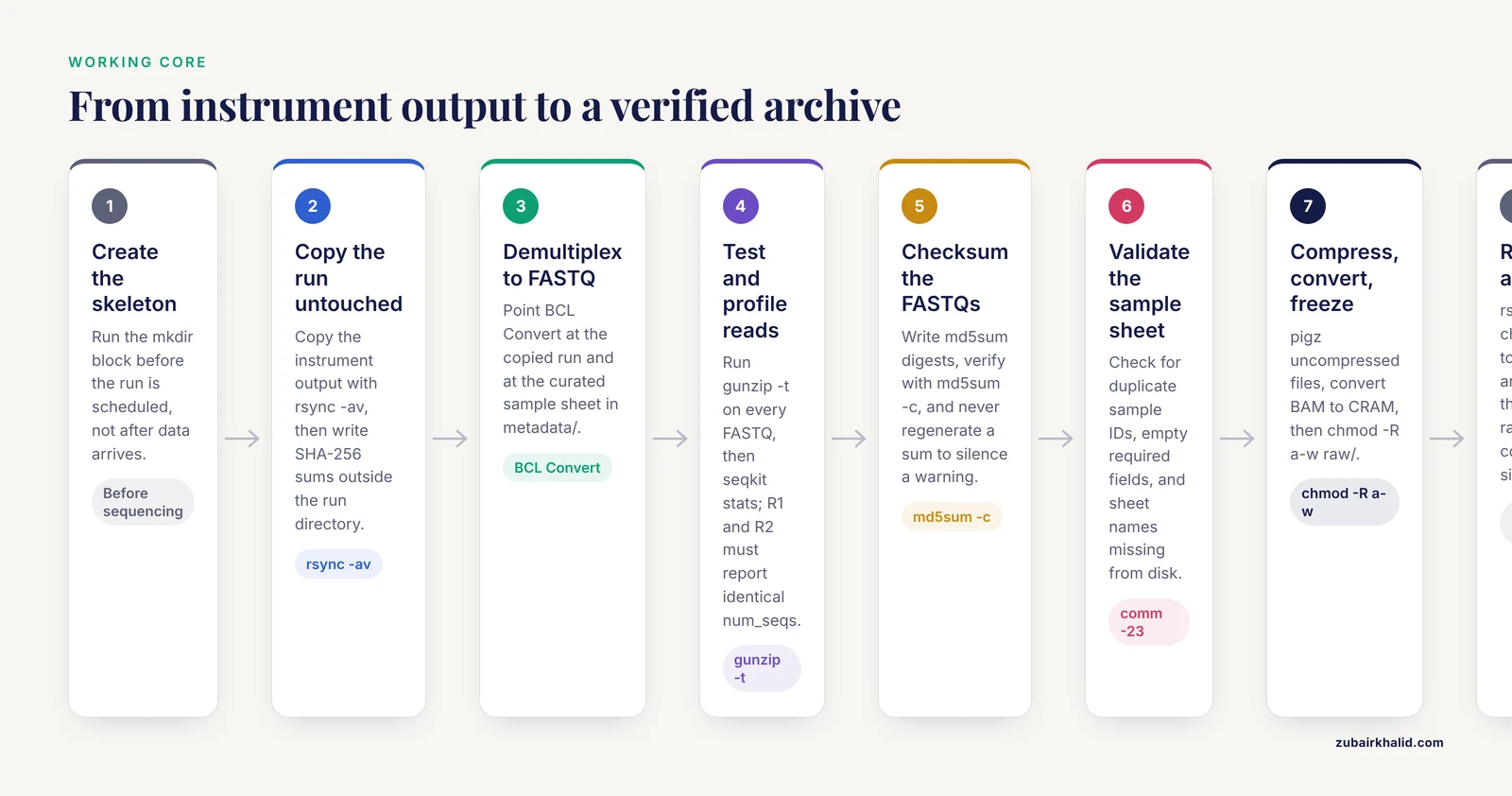
The commands below are the working core of bioinformatics data management for a sequencing project. The table collects them for reference, and the steps explain each one.
| Task | Command | Key option | What it does |
|---|---|---|---|
| Copy a run directory | rsync -av src/ dest/ | -a | Preserves timestamps and permissions while copying |
| Verify a copy by content | rsync -av, checksum src/ dest/ | -checksum | Compares file contents, catches silent corruption |
| Create SHA-256 sums | sha256sum file > file.sha256 | none | Writes a 64-character digest per file |
| Verify sums | md5sum -c checksums.md5 | -c | Re-computes and compares every listed digest |
| Test gzip integrity | gunzip -t file.fastq.gz | -t | Decompresses in memory without writing output |
| Parallel compression | pigz -k -p 8 file.fastq | -p | Compresses using 8 threads, keeps the original |
| Summarize reads | seqkit stats files | none | Prints sequence counts and lengths per file |
| Check BAM integrity | samtools quickcheck -v f.bam | -v | Verifies the EOF marker, names bad files |
| Convert BAM to CRAM | samtools view -C -T ref.fa in.bam -o out.cram | -C | Writes CRAM against the given reference |
| Freeze a directory | chmod -R a-w raw/ | -R | Removes write permission recursively |
| Measure usage | du -sh raw/* | -s | Prints one total size per argument |
Step 1: Create the skeleton
Run the mkdir block from the layout section. Do this before the run is scheduled, not after data arrives. A layout that exists on the day of sequencing gets used. A layout created during a crunch gets skipped.
Step 2: Land the run directory untouched
Copy the entire instrument output as-is, then prove the copy is complete before anything else touches it:
rsync -av /mnt/sequencer/260114_A00552_0123_BHTKWLDSX7/ \
  project_multiomics/raw/sequencing/run_20260114_A00552_0123/

cd project_multiomics/raw/sequencing
find run_20260114_A00552_0123 -type f -print0 | \
  xargs -0 sha256sum > run_20260114_A00552_0123_checksums.sha256
The -a flag preserves timestamps, which matter when debugging instrument issues. The checksum file lives outside the run directory on purpose. If it lived inside, the second verification pass would try to checksum the checksum file itself. Expected output from verification looks like this:
run_20260114_A00552_0123/RunInfo.xml: OK
run_20260114_A00552_0123/Data/Intensities/BaseCalls/L001/C1.1/L001_1.bcl.bgzf: OK
The digest itself is a 64-character hexadecimal string, for example 9f86d081884c7d659a2feaa0c55ad015a3bf4f1b2b0b822cd15d6c15b0f00a08 RunInfo.xml. SHA-256 (a 256-bit hash function) and MD5 (an older 128-bit hash) are both standard for file verification. SHA-256 is the better default for new archives.
Common errors at this step: rsync fails with No space left on device when the destination is full. Check df -h, free space or stage to object storage, and rerun. A Permission denied error means the destination is not writable by your user, which is usually a mount or group membership problem rather than a reason to work as root.
Step 3: Demultiplex to FASTQ
Point BCL Convert at the landed run and at your curated copy of the sample sheet:
bcl-convert \
  --input-directory raw/sequencing/run_20260114_A00552_0123 \
  --output-directory raw/demultiplexed/run_20260114_A00552_0123 \
  --sample-sheet metadata/SampleSheet_run_20260114.csv
The -sample-sheet flag matters because BCL Convert otherwise reads the sheet inside the run directory. Keeping the authoritative sheet in metadata/ means the version you edit is the version that runs. Output FASTQ files follow a fixed grammar: {SampleName}_S{sample number}_L{lane, three digits}_R{read}_001.fastq.gz, for example PT001_T0_RNA_S1_L001_R1_001.fastq.gz. Sample names should avoid spaces and punctuation. Underscores are tolerated because parsers match the lane and read tokens from the right, but simpler names are safer.
Check two things when it finishes. First, Demultiplex_Stats.csv in the output directory gives per-lane, per-sample read counts, which belong in your manifest. Second, look at the undetermined reads:
ls -lh raw/demultiplexed/run_20260114_A00552_0123/Undetermined_S0_L00*.fastq.gzA large undetermined file relative to your samples signals index errors or index hopping. Fix the sheet and rerun while the flowcell is still fresh. BCL Convert exits nonzero and names the offending sheet row when the [Data] header or index columns are malformed, so open the CSV in a plain text editor, confirm the [Data] section header, and check that index sequences contain only A, C, G, and T.
Step 4: Test every FASTQ and profile the reads
Truncated FASTQ files are the most common silent failure, usually caused by a full disk during demultiplexing. Test compression integrity first, then count:
gunzip -t raw/demultiplexed/run_20260114_A00552_0123/*.fastq.gz
seqkit stats raw/demultiplexed/run_20260114_A00552_0123/*.fastq.gz \
  > qc/seqkit_stats_run_20260114.tsv
gunzip -t decompresses in memory and reports corruption without writing files. A truncated file produces gzip: stdin: unexpected end of file, which means the demultiplex step failed partway, usually from a full disk. Delete the truncated outputs, free space, and rerun the demultiplex. Expected seqkit stats output:
file                                  format  type  num_seqs   sum_len     min_len  avg_len  max_len
PT001_T0_RNA_S1_L001_R1_001.fastq.gz  FASTQ   DNA   52300000   7845000000  150      150      150
PT001_T0_RNA_S1_L001_R2_001.fastq.gz  FASTQ   DNA   52300000   7845000000  150      150      150
R1 and R2 must report identical num_seqs. A mismatch means one mate file is incomplete. Then run quality control:
fastqc -t 8 -o qc/fastqc/run_20260114 raw/demultiplexed/run_20260114_A00552_0123/*.fastq.gz
multiqc -o qc/multiqc qc/fastqc
MultiQC produces multiqc_report.html summarizing every file. Check per-base quality and adapter content first, since those decide whether trimming is needed downstream.
Step 5: Checksum the FASTQs
cd raw/demultiplexed/run_20260114_A00552_0123
md5sum *.fastq.gz > checksums.md5
md5sum -c checksums.md5
Expected output:
PT001_T0_RNA_S1_L001_R1_001.fastq.gz: OK
PT001_T0_RNA_S1_L001_R2_001.fastq.gz: OK
PT002_T0_RNA_S2_L001_R1_001.fastq.gz: OK
If verification fails you will see md5sum: WARNING: 1 computed checksum did NOT match. That message means the file changed after the sum was written. Do not regenerate the sum to make the warning go away. Re-transfer or re-demultiplex the file, because a changed FASTQ is a corrupt FASTQ until proven otherwise.
Step 6: Build and validate the sample sheet
The sample sheet is the join table between files and biology. A minimal but sufficient version:
sample_id,source_id,omics,assay,tissue,timepoint,batch,lot,instrument,run_id,read1,read2,checksums
PT001_T0_RNA,PT001,transcriptome,bulk_rna_seq,tumor,baseline,B1,L2231,NextSeq2000,run_20260114_A00552_0123,PT001_T0_RNA_S1_L001_R1_001.fastq.gz,PT001_T0_RNA_S1_L001_R2_001.fastq.gz,checksums.md5
PT001_T0_ATAC,PT001,chromatin,sc_atac_seq,tumor,baseline,B1,L2231,NextSeq2000,run_20260114_A00552_0123,PT001_T0_ATAC_S2_L001_R1_001.fastq.gz,PT001_T0_ATAC_S2_L001_R2_001.fastq.gz,checksums.md5
PT001_T0_MS,PT001,proteome,lc_msms_dda,plasma,baseline,B1,L2231,QExactiveHF,ms_batch_2026_02_03,PT001_T0_MS.raw,,checksums.md5
source_id carries the pairing. Both the RNA and ATAC rows point at PT001, so the same-cell relationship is a column, not a convention someone has to remember. The mass spectrometry row shows the pattern for non-sequence modalities: one raw file, empty read2. Validate the sheet before anything consumes it:
cut -d, -f1 metadata/sample_sheet.csv | tail -n +2 | sort | uniq -d
awk -F, 'NR>1 && ($1=="" || $2=="" || $3=="" || $6=="" || $7=="") {print "missing required field, line " NR}' metadata/sample_sheet.csv
The first command prints duplicate sample IDs, and no output means the IDs are unique. The second prints the line number of any row with an empty required field, for example missing required field, line 4. Then confirm every listed file exists on disk:
ls raw/demultiplexed/run_20260114_A00552_0123/*.fastq.gz | xargs -n1 basename | sort > /tmp/on_disk.txt
cut -d, -f11,12 metadata/sample_sheet.csv | tail -n +2 | tr ',' '\n' | sort -u > /tmp/in_sheet.txt
comm -23 /tmp/in_sheet.txt /tmp/on_disk.txt
comm -23 prints names listed in the sheet but missing from disk. Empty output means the sheet and the directory agree. Keep the sheet under version control, because it changes over the life of the project and the history is part of the record.
Step 7: Compress, convert, and freeze
Compress anything that arrives uncompressed, convert large alignments to CRAM, and then remove write permission from the raw tree:
pigz -k -p 8 collaborator_fastq/PT09_RNA_R1.fastq
samtools view -C -T refs/hg38.fa processed/alignments/PT001_T0_RNA.bam \
  -o processed/alignments/PT001_T0_RNA.cram
samtools quickcheck -v processed/alignments/*.bam
chmod -R a-w raw/
pigz -k compresses with 8 threads and keeps the original, which matters when the original came from a collaborator and you have not verified the compressed copy yet. The -C flag writes CRAM, and -T names the reference, which must stay available and checksummed in refs/ or the CRAM becomes unreadable. samtools quickcheck is silent for healthy BAM files and prints the names of truncated ones. It only verifies the end-of-file marker, so it is a fast screen rather than a full validation. If it flags a file, rerun the alignment step that produced it. The chmod -R a-w command removes write permission for every user. This is a guardrail against accidents, not security. The owner can restore permissions, and root bypasses them, but it stops the overwhelming majority of accidental overwrites.
Step 8: Replicate offsite and audit sizes
rsync -av --checksum project_multiomics/raw/ /mnt/archive/project_multiomics/raw/
du -sh project_multiomics/raw/*
The -checksum option makes rsync compare file contents rather than size and modification time, which is what catches silent corruption on the destination. It is slower, and it is worth it for raw data. Expected du output:
1.1T	raw/demultiplexed
3.2T	raw/sequencing
Keep at least two copies on different systems, with one offsite or on object storage. From here, the sensible next steps are to run the full QC review, hand the sample sheet to your processing pipeline, and schedule the first checksum audit for the archive copy.
Sample Sheets and Metadata: The Part That Decides Whether Integration Works
Metadata (the structured description of every sample and file) is where multi-omics projects are won or lost, because integration methods assume the layers describe the same samples in the same terms. Reviews of single-cell multi-omics methods distinguish same-cell paired designs, matched-but-unpaired designs, imputed designs, and single-modality designs, and each design makes different assumptions and introduces different artifacts [9]. Your sample sheet has to record which design applies, per sample, or the integration step will silently assume the wrong one.
Longitudinal designs raise the bar again. A cohort like Open-IBD, with baseline sampling and repeated collections over years, only works if visit, timepoint, and tissue are first-class columns rather than conventions embedded in file names [8]. The same rule applies at far smaller scale: if you plan to compare baseline and post-treatment biopsies, the timepoint column must exist before the first biopsy is sequenced.
Batch and reagent metadata deserve special attention because they are invisible in the files themselves. A multi-omics study of fetal bovine serum grades integrated proteomics, peptidomics, metabolomics, and lipidomics datasets, and the authors flagged that each grade was represented by a single commercial lot, so grade and batch were confounded and the differences should be read as lot-associated pending validation [10]. That confounding was visible only because the lot information existed. If lot numbers are not recorded in the sample sheet, the same confounding happens invisibly in your project. Record batch, lot, operator, and instrument for every sample, every time.
Consistency is the whole point. The reproducibility problems that undermine computational biology, including technical errors and biased or inconsistent data, enter through exactly this layer [2]. A sample sheet with a stable ID grammar (one immutable base ID per biological sample, modality and timepoint as suffixes) and a fixed column set is the cheapest reproducibility intervention available.
Genomics Data Storage: Tiers, Formats, and Space Math
Genomics data storage works best as three tiers. Hot storage is fast scratch (local NVMe or a high-performance filesystem) for active compute. Warm storage is the project filesystem where raw and processed files live during the project. Cold storage is the archive (tape, cloud archive tiers, or a dedicated server) holding verified, checksummed copies. Raw data belongs in warm storage while the project is active and in cold storage afterward. Scratch space should never be the only copy of anything.
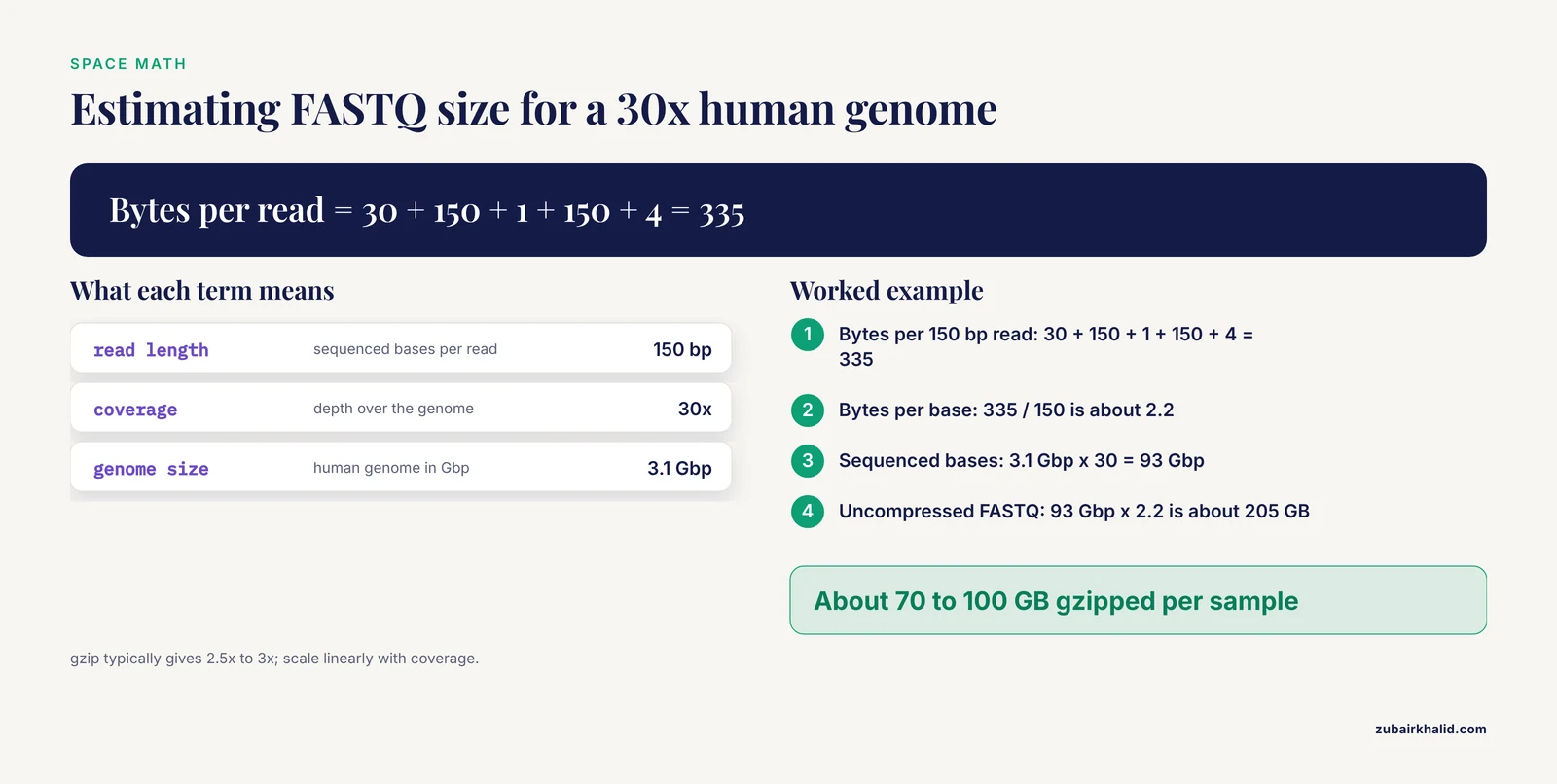
Format choices are your biggest lever. FASTQ is text and compresses well, so .fastq.gz is the working standard. For the space math, work it through:
Bytes per 150 bp read ≈ header 30 + sequence 150 + "+" 1 + quality 150 + newlines 4 = 335
Bytes per sequenced base ≈ 335 / 150 ≈ 2.2
30x [human genome](/blog/guides/human-genome): 3.1 Gbp x 30 = 93 Gbp sequenced
Uncompressed FASTQ ≈ 93 Gbp x 2.2 ≈ 205 GB
After gzip (typically 2.5x to 3x) ≈ 70 to 100 GB per sample
So budget on the order of 100 GB of FASTQ per 30x human genome, and scale linearly with coverage. Single-cell libraries are smaller per sample but arrive in the hundreds of samples, which adds up to the same problem. Mass spectrometry raw files typically run from a few hundred megabytes to a few gigabytes per injection, and spatial transcriptomics adds image data that often exceeds the count matrices by a wide margin.
Cohort scale makes per-sample organization non-negotiable. The LIGOR hepatocellular carcinoma resource integrates 719 spatially resolved tumor sectors from 136 patients together with 43 inter-patient cohorts comprising 6,068 patients [11]. At that scale, an ID scheme that works for one sample and breaks under aggregation wastes the entire resource. Plan IDs, paths, and manifests so that adding sample 700 is as boring as adding sample 7.
Integrity: Checksums as Chain of Custody
Storage media fail quietly. Silent corruption (often called bit rot) alters bytes without any error message, and the only practical detection is comparing against a recorded digest. That is why every transfer in the steps above ends with a checksum verification, and why the checksum files live in metadata/ under version control.
The mass spectrometry quality framework formalizes this habit well: each stage has a checkpoint, acceptance criteria set in advance, a corrective action when criteria fail, and a record that is kept [5]. Apply the same structure to sequencing. The acceptance criterion for any copy is a clean checksum verification. The corrective action for a failed verification is re-transfer from the source, never regenerating the sum. The record is a verification log with date, file set, and result. Re-verify the archive copy on a schedule, for example quarterly, and log the result even when it is uneventful. An uneventful log is the evidence that your raw data is still raw data.
Preparing for Deposition and Reuse
Plan deposition at project start, because accession numbers take time to issue and belong in the sample sheet as another column. The standard homes are stable: raw reads go to the Sequence Read Archive (SRA) at NCBI or a partner archive, processed matrices to the Gene Expression Omnibus (GEO), proteomics mass spectrometry to PRIDE, and metabolomics to MetaboLights, both at EMBL-EBI. Keep the mapping between public accession numbers and any sensitive identifiers inside your institution, and deposit human data deidentified under controlled access where the consent terms require it.
The payoff for doing this is concrete. The fetal bovine serum multi-omics study deposited all raw data and analysis code openly, explicitly so that other laboratories could rerun the framework on their own samples [10]. That is what good organization turns into: a project that outlives the grant. When you prepare deposition, the raw files, the sample sheet with public IDs, the checksums, and the processing scripts are the package. If those four things are consistent, the deposit is straightforward. If they are not, deposition becomes archaeology.
Common Mistakes and Limitations
- Renaming or moving files after analysis has started. Pipelines record paths, and a rename breaks every downstream reference silently. Never rename raw files. Add a manifest row, or create a symlink in the old location if a path must change.
- Treating metadata as optional. The lot-and-grade confounding in the fetal bovine serum study was only detectable because lot numbers existed in the record [10]. Without batch, lot, operator, and instrument columns, the same confounding happens invisibly in your project.
- Overwriting raw with processed files. Quality trimming, filtering, or "cleaning" happens in
processed/. Raw FASTQ is never edited in place, and the raw tree is write-protected the day it is verified. - Skipping checksums. Silent corruption has no symptoms until an analysis fails months later in a way that looks like a bug. Checksums at every transfer are the only practical defense.
- Spaces and special characters in file names. Spaces, parentheses, and punctuation break shell commands and pipeline parsers. Use lowercase letters, digits, hyphens, and underscores.
- Ignoring non-sequence modalities. Mass spectrometry raw files and spatial images need checksums, immutability, and manifest entries exactly like FASTQ files [5]. Projects that organize only the sequencing half discover the gap during integration.
- Assuming pairing relationships are obvious. Same-cell paired, matched-unpaired, imputed, and single-modality designs make different assumptions and produce different artifacts [9]. Record the design per sample in the sheet.
- Flattening longitudinal designs into file names. Timepoints embedded in names cannot be queried, joined, or audited. Timepoint and visit are columns, as longitudinal cohort designs make unavoidable [8].
- Keeping one copy. A single copy of raw data is a plan to redo the experiment. Two copies on different systems, one offsite, is the minimum.
- Organizing later. Organization performed after data collection is archaeology performed on incomplete records. The layout, the sheet, and the checksum habit cost minutes per sample when done as data lands and days per sample when reconstructed.
A limitation worth stating once: every institution layers its own data governance, consent, and security requirements on top of any layout. Treat the structure here as a starting point and clear it with your data governance office before human or clinical data reach disk.
Frequently Asked Questions
Should I keep BCL files after demultiplexing to FASTQ?
Keep them when storage allows, because BCL files let you rerun demultiplexing with a corrected sample sheet without re-sequencing. If space is tight, keep them until the FASTQ files pass verification, then move them to cold storage or follow your institutional retention policy.
What counts as raw data for deposition?
Unmodified instrument output counts: BCL or FASTQ for sequencing, vendor raw files for mass spectrometry, and original images plus raw count matrices for spatial assays. Processed matrices are derived files and live in your processed tree, not in the raw archive.
How do I name samples across multiple omics modalities?
Use one stable base ID per biological sample, with modality and timepoint as suffixes, and record every ID as a row in the sample sheet. The pairing between layers comes from a shared source ID column, never from a naming convention people have to remember.
Do I need to gzip FASTQ files?
Yes. All standard tools read .fastq.gz directly, compression typically cuts FASTQ size to about a third, and uncompressed FASTQ in a project directory is a sign that organization has slipped.
When should I use CRAM instead of BAM?
Use CRAM when alignment files are large and a fixed reference genome exists, since CRAM is often 30 to 40 percent smaller. Record the reference path and checksum, because a CRAM without its reference cannot be read.
How often should I verify checksums?
Verify at every copy and before any analysis reads a file, then re-verify archive copies on a schedule such as quarterly. Log every verification with a date and result, including the uneventful ones.
What metadata is mandatory in a sample sheet?
The floor is a stable sample ID, a source ID, the omics layer, the assay, the tissue, the timepoint, the batch, the file paths, and a checksum reference. Batch and lot columns are what make confounding visible, so treat them as mandatory too.
Can I reorganize data in the middle of a project?
Yes, by updating the manifest, moving files with rsync, and re-verifying checksums afterward. Never rename or move files while pipelines are running, and never reorganize by editing file names in place without updating the sheet that references them.
Sources
- Multi-omics, spatial omics and artificial intelligence in chronic diseases: current applications and future directions.
- Harnessing big data and artificial intelligence for personalized medicine: from multi-omics integration to clinical decision-making.
- GallMine: an integrated knowledgebase and data repository on gallbladder cancer.
- AnnelidaDB: a comprehensive platform of taxonomic and multi-omic resources across annelids.
- Mass Spectrometry-Based Omics: An Integrated Framework for Analytical Quality, Data Integrity, and Biological Interpretation.
- Study on tumor ecology and precision medicine strategy of oral squamous cell carcinoma based on multi-omics cell atlas.
- Integrative multi-omics and multi-trait analysis prioritizes regulatory mechanisms and genes for metabolic dysfunction-associated steatotic liver disease.
- Open-IBD: protocol for a longitudinal multi-omics inception cohort in inflammatory bowel disease.
- AI and computational methods for reconstructing cell-state-specific gene regulatory networks from single-cell transcriptome and chromatin accessibility data in cancer: methods, applications, and perspectives.
- Multi-Omics Network Integration Reveals Cross-Domain Molecular Correlates of Fetal Bovine Serum Grade.
- LIGOR: A Geospatial Multi-omic Atlas of Intra-tumor Spatial Heterogeneity in Hepatocellular Carcinoma.