How to Migrate from Galaxy to Nextflow: Examples
By Dr. Zubair Khalid, DVM, MS, PhD ·

By the end of this guide you will have turned a Galaxy point-and-click workflow into a working Nextflow pipeline: a small read-prep analysis with FastQC, fastp, BWA-MEM, samtools, and MultiQC that runs from the command line on a laptop, a Slurm cluster, or the cloud, with pinned tool versions, Conda or container environments, and cached reruns. You will also know when to skip the rewrite and run an nf-core pipeline instead, and how Nextflow compares with Snakemake if you are still choosing a bioinformatics workflow manager.
Have the following on hand before you start:
- Java 11 or later (Java 17 works well)
- Nextflow, installed in Step 2
- Conda through Miniforge, or Docker or Apptainer for containers
- Two small paired-end FASTQ files (raw sequencing reads) and a reference FASTA for testing
- Your Galaxy workflow exported as a
.gafile - The tool versions your Galaxy server used, read from the workflow or from job details
Migration is a rewrite, not an import. Galaxy stores workflows in the .ga JSON format and runs them on a Galaxy server. Nextflow stores workflows as Groovy-based scripts and modules that you run with the nextflow command. No button converts one to the other, but the mapping between the two systems is small and learnable, and this guide walks it end to end with real code.
Why labs migrate from Galaxy to Nextflow
Galaxy and Nextflow solve the same problem from opposite ends. Galaxy gives every analysis a web interface, a history (the recorded sequence of steps and output datasets for one run), and one-click sharing. That is ideal for non-programmers and core facilities. Nextflow is a bioinformatics workflow manager: you write the analysis as code, and the engine runs each step on your laptop, an HPC scheduler, Kubernetes, or a cloud batch service.
Teams usually migrate for a handful of concrete reasons:
- Scheduler-native execution. Nextflow submits tasks directly to Slurm, SGE, LSF, Kubernetes, AWS Batch, Google Batch, and other backends, so the same script runs unchanged from a laptop to a cluster.
- Version control. The pipeline lives in Git, where you can review changes, tag releases, and roll back.
- Caching. The built-in
-resumeflag reuses the results of any task whose inputs, script, container, and resources have not changed. - Containers. Every task can run in a pinned Docker or Apptainer image, so software versions travel with the code.
- Testing and CI. You can run the pipeline on a tiny test dataset in continuous integration on every commit.
- Scale. The same pipeline handles ten samples or ten thousand without UI clicks.
Galaxy remains excellent for what it does. If your users need the graphical interface and the shared server works, staying is a valid choice. The biggest mental shift in migrating is moving from "a history of datasets" to "channels streaming files between processes". A channel is an asynchronous queue that feeds files and values into tasks.
| Galaxy concept | Nextflow equivalent | Notes |
|---|---|---|
| History | work/ directory plus published results | The work directory holds every task folder, inputs, logs, and outputs |
| Dataset collection | Channel | Built with fromFilePairs, splitFastq, collect, and friends |
| Tool form parameters | params block plus val and path inputs | Overridable on the command line |
| Tool wrapper from the Tool Shed | A process in a module file | You write the shell command yourself |
| Wrapper-pinned tool version | conda or container directive | You pin versions explicitly |
| Bundled reference genomes | Your own FASTA plus index processes | Record the genome build and its source |
Workflow file (.ga) | main.nf plus modules/ | The .ga file becomes documentation of intent |
| Run provenance | nextflow log, work directory, -with-trace | Comparable detail, different location |
| Job destinations | Executor settings in nextflow.config | Slurm, SGE, LSF, Kubernetes, cloud batch |
| Interactive tools and visualizations | No direct equivalent | Seqera Platform or external notebooks fill this gap |
The migration walkthrough, step by step
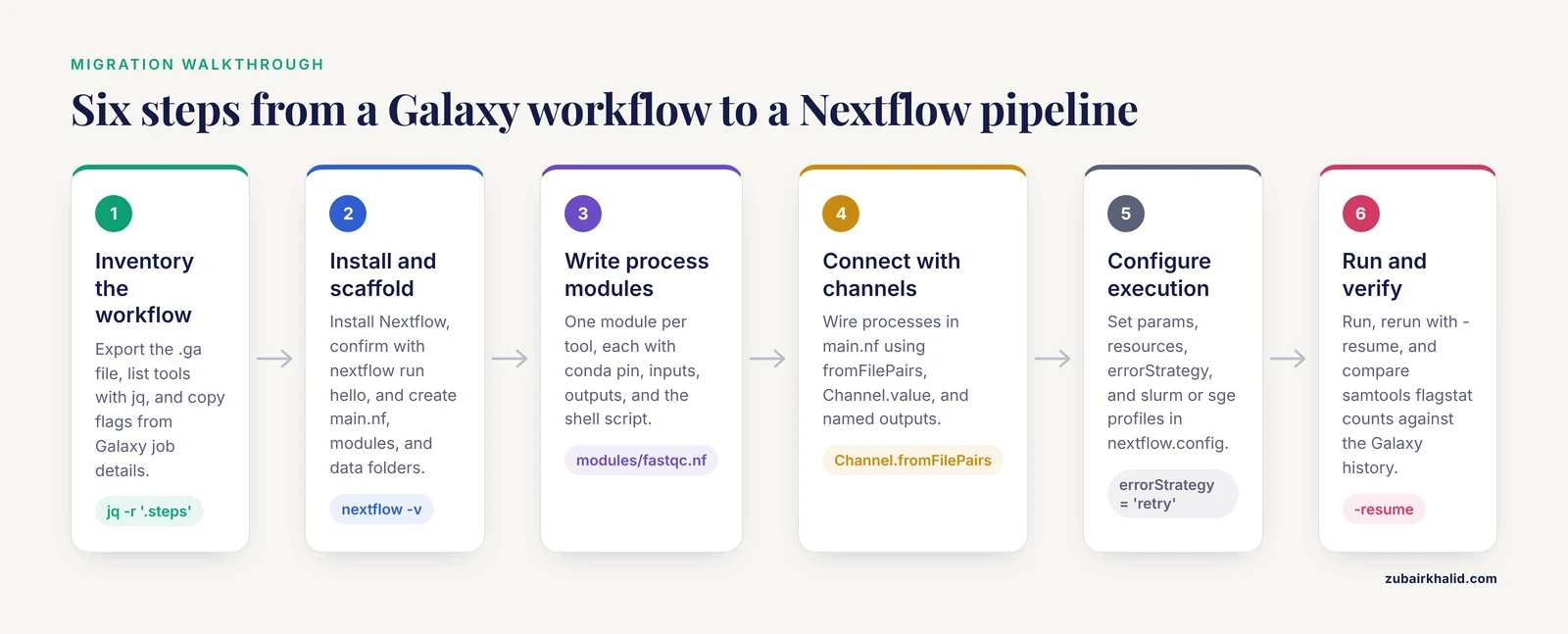
The running example is a paired-end DNA read-prep workflow that is common on Galaxy: FastQC quality control, fastp adapter and quality trimming, BWA-MEM alignment, samtools sorting and indexing, and a MultiQC summary report (MultiQC aggregates tool outputs into one HTML report). The example stops at sorted, indexed BAM files ready for variant calling, which keeps it small. The same pattern ports any Galaxy workflow: one process per tool, channels for the data flow, config for the execution.
Step 1: Inventory the Galaxy workflow
Export the workflow first. On the Galaxy Workflows page, open the menu for your workflow and choose the export or download action to get a .ga file. The .ga format is JSON with one entry per step. A trimmed excerpt looks like this:
{
  "a_galaxy_workflow": "true",
  "steps": {
    "0": { "type": "input", "tool_id": null },
    "1": {
      "type": "tool",
      "tool_id": "toolshed.g2.bx.psu.edu/repos/devteam/fastqc/fastqc/0.72+galaxy1",
      "tool_state": "{}",
      "input_connections": { "input_file": { "id": 0, "output_name": "output" } }
    }
  }
}
The tool_state field holds the tool form choices as a nested JSON string, emptied above for brevity. input_connections records which step feeds which, which is the wiring you will rebuild with channels.
List the tools in the file with jq (a command-line JSON processor, installable with conda install -c conda-forge jq):
jq -r '.steps | to_entries[] | "\(.key)\t\(.value.tool_id)"' my_workflow.gaExpected output, truncated, with identifiers that will differ for your workflow:
0	null
1	toolshed.g2.bx.psu.edu/repos/devteam/fastqc/fastqc/0.72+galaxy1
2	toolshed.g2.bx.psu.edu/repos/iuc/fastp/fastp/0.23.2+galaxy0
3	toolshed.g2.bx.psu.edu/repos/iuc/multiqc/multiqc/1.21+galaxy0
A null tool_id marks an input step. Next, capture three things the JSON does not show well:
- Tool versions. In the old Galaxy history, open a dataset, expand the job details, and read the Tool Version and Command Line fields. The command line is gold: it shows the exact flags the Galaxy wrapper set, including defaults you never clicked. Copy those flags into your Nextflow scripts later.
- Parameters. Walk each step in the workflow editor and note non-default choices, such as adapter sequences or minimum lengths.
- Reference data. Record which genome build Galaxy used (for example GRCh38 or a specific mouse build) and that the index came from the Galaxy bundled indexes. When you supply your own FASTA in Nextflow, use the same build.
Finally, download two small FASTQ pairs from the history into a data/ folder. They become your test dataset, and you will use the Galaxy outputs of these files as ground truth in Step 6.
Step 2: Install Nextflow and set up the project
Install Nextflow and put it on your PATH:
curl -s https://get.nextflow.io | bash
sudo mv nextflow /usr/local/bin/   # or move it somewhere already on your PATH
nextflow -v
The version command prints the installed release, for example nextflow version 24.04.2. Releases move quickly, so pin the one you test with when it matters, using NXF_VER=24.04.2 nextflow run .. Confirm the install with the bundled hello pipeline:
nextflow run helloExpected output (order can vary):
Ciao world!
Hola world!
Bonjour world!
Hello world!
Hola world!
On Windows, use WSL2, the Windows Linux subsystem, since Nextflow expects a Unix-like shell.
Create the project with the layout most Nextflow pipelines use. This is the practical answer to "what format does a migrated pipeline take":
main.nf, the workflow definition and includesnextflow.config, parameters and execution settingsmodules/, one file per tool processbin/, helper scripts that tasks can callconf/, extra profiles if the project growsdata/andtest-data/, your inputsresults/, published outputs (created on the first run)
Initialize Git in this folder now. Version control is half of what you gain from the migration.
Step 3: Write the process modules
A process is a task template: it declares inputs, outputs, and a script, and Nextflow instantiates it once per incoming item. Create modules/fastqc.nf first, because it shows every element you need:
process FASTQC {
    tag "${meta.id}"
    conda "bioconda::fastqc=0.11.9"
    publishDir "${params.outdir}/fastqc", mode: 'copy'

    input:
    tuple val(meta), path(reads)

    output:
    path "*_fastqc.zip",  emit: zip
    path "*_fastqc.html", emit: html

    script:
    """
    fastqc \\
        --outdir . \\
        --threads ${task.cpus} \\
        ${reads}
    """
}
Each parameter matters:
tag "${meta.id}"labels each task with the sample name in the console and in trace files, replacing the Galaxy dataset name.conda "bioconda::fastqc=0.11.9"pins the exact tool version, which Galaxy used to do for you through its wrappers. BioConda is the community channel that packages bioinformatics software.publishDircopies outputs intoresults/fastqc. The default behavior is a symlink into the work directory, which breaks if you later deletework/, so usemode: 'copy'for anything you want to keep.tuple val(meta), path(reads)takes a metadata map (a small Groovy map with the sample id) plus the read files. The meta map is the Nextflow equivalent of the sample columns in a Galaxy collection.emit: zipnames the output so downstream code can writeFASTQC.out.zip.${task.cpus}passes the configured CPU count into the tool.
The remaining modules follow the same shape. modules/fastp.nf:
process FASTP {
    tag "${meta.id}"
    conda "bioconda::fastp=0.23.4"
    publishDir "${params.outdir}/fastp", mode: 'copy'

    input:
    tuple val(meta), path(reads)

    output:
    tuple val(meta), path("${meta.id}_R1_trimmed.fastq.gz"), path("${meta.id}_R2_trimmed.fastq.gz"), emit: reads
    path "${meta.id}.fastp.json", emit: json
    path "${meta.id}.fastp.html", emit: html

    script:
    """
    fastp \\
        --in1 ${reads[0]} \\
        --in2 ${reads[1]} \\
        --out1 ${meta.id}_R1_trimmed.fastq.gz \\
        --out2 ${meta.id}_R2_trimmed.fastq.gz \\
        --json ${meta.id}.fastp.json \\
        --html ${meta.id}.fastp.html \\
        --thread ${task.cpus}
    """
}
modules/bwa_index.nf replaces the bundled Galaxy reference index. BWA is the aligner, and BWA-MEM is its mode for Illumina-scale reads:
process BWA_INDEX {
    tag "index"
    conda "bioconda::bwa=0.7.17"

    input:
    path reference

    output:
    path reference,        emit: fasta
    path "${reference}.*", emit: index

    script:
    """
    bwa index ${reference}
    """
}
modules/bwa_mem.nf writes an uncompressed SAM file (the text alignment format that BAM compresses). Publishing the SAM is skipped on purpose, because these files are large:
process BWA_MEM {
    tag "${meta.id}"
    label "process_high"
    conda "bioconda::bwa=0.7.17"

    input:
    tuple val(meta), path(reads)
    path reference
    path index

    output:
    tuple val(meta), path("${meta.id}.sam"), emit: sam

    script:
    """
    bwa mem \\
        -t ${task.cpus} \\
        ${reference} \\
        ${reads[0]} \\
        ${reads[1]} \\
        > ${meta.id}.sam
    """
}
modules/samtools_sort.nf and modules/samtools_index.nf use samtools, the standard BAM utility kit:
process SAMTOOLS_SORT {
    tag "${meta.id}"
    conda "bioconda::samtools=1.19.2"
    publishDir "${params.outdir}/bam", mode: 'copy'

    input:
    tuple val(meta), path(sam)

    output:
    tuple val(meta), path("${meta.id}.sorted.bam"), emit: bam

    script:
    """
    samtools sort \\
        -@ ${task.cpus} \\
        -o ${meta.id}.sorted.bam \\
        ${sam}
    """
}
process SAMTOOLS_INDEX {
tag "${meta.id}"
conda "bioconda::samtools=1.19.2"
publishDir "${params.outdir}/bam", mode: 'copy'
input:
tuple val(meta), path(bam)
output:
tuple val(meta), path("${bam}.bai"), emit: bai
script:
"""
samtools index ${bam}
"""
}modules/multiqc.nf collects everything into one report:
process MULTIQC {
    tag "report"
    conda "bioconda::multiqc=1.21"
    publishDir "${params.outdir}/multiqc", mode: 'copy'

    input:
    path reports

    output:
    path "multiqc_report.html", emit: report
    path "multiqc_data",        emit: data

    script:
    """
    multiqc .
    """
}
Two production notes. First, in real pipelines you would usually pipe BWA straight into samtools sort inside one process to avoid writing large SAM files, and add duplicate marking before variant calling. Separate processes are used here because they mirror the Galaxy steps and teach the wiring. Second, to run under Docker or Apptainer instead of Conda, add a container directive to each process with an image tag copied exactly from the BioContainers registry, whose tags follow the pattern quay.io/biocontainers/<tool>:<version>-<build>.
Step 4: Connect the processes with channels
Create main.nf at the project root:
#!/usr/bin/env nextflow

include { FASTQC }         from './modules/fastqc'
include { FASTP }          from './modules/fastp'
include { BWA_INDEX }      from './modules/bwa_index'
include { BWA_MEM }        from './modules/bwa_mem'
include { SAMTOOLS_SORT }  from './modules/samtools_sort'
include { SAMTOOLS_INDEX } from './modules/samtools_index'
include { MULTIQC }        from './modules/multiqc'

workflow {

    reads_ch = Channel.fromFilePairs(params.reads, checkIfExists: true)
        .map { id, reads -> tuple([id: id], reads) }

    reference_ch = Channel.value(file(params.reference, checkIfExists: true))

    FASTQC(reads_ch)
    FASTP(reads_ch)

    BWA_INDEX(reference_ch)
    BWA_MEM(reads_ch, BWA_INDEX.out.fasta, BWA_INDEX.out.index)

    SAMTOOLS_SORT(BWA_MEM.out.sam)
    SAMTOOLS_INDEX(SAMTOOLS_SORT.out.bam)

    MULTIQC(FASTQC.out.zip.mix(FASTP.out.json).collect())
}
What each line does:
Channel.fromFilePairsreads the globdata/*_R{1,2}.fastq.gz, pairs R1 with R2 by filename prefix (the default pair size is 2), and emits one tuple per sample.checkIfExists: truestops the run immediately if nothing matches, which catches typos before they waste an hour..map { id, reads -> tuple([id: id], reads) }attaches the metadata map that processes reference asmeta.Channel.value(file(...))turns the reference into a single-item value channel, so the index process runs exactly once.- In DSL2, the current Nextflow language (the default on all recent releases), one channel can feed several processes, so
reads_chdrives FASTQC, FASTP, and BWA_MEM. FASTQC.out.zipand friends access the named outputs from Step 3..mix(...).collect()gathers the FastQC zips and fastp JSON summaries into one list for MultiQC, which is the channel equivalent of feeding a Galaxy dataset collection into one tool.
If you copy old DSL1 examples from the internet that use operators like >>, they will fail on current releases. Modern code uses the include and out style shown here.
Step 5: Configure execution in nextflow.config
Create nextflow.config:
params.reads     = "data/*_R{1,2}.fastq.gz"
params.reference = "data/reference/genome.fa"
params.outdir    = "results"

conda.enabled = true
mamba.enabled = true   // optional, faster env builds, requires Mamba

process {
    cpus   = 2
    memory = 4.GB
    time   = '2 h'
    errorStrategy = 'retry'
    maxRetries    = 2

    withLabel:process_high {
        cpus   = 16
        memory = 64.GB
        time   = '8 h'
    }
}

profiles {
    slurm {
        process.executor = 'slurm'
        process.queue    = 'general'
    }
    sge {
        process.executor = 'sge'
    }
}
The key options in one table:
| Setting | Example | What it controls |
|---|---|---|
params.outdir | 'results' | Root folder for published outputs |
process.executor | 'slurm' | Where tasks run: local, slurm, sge, lsf, k8s, awsbatch, and others |
process.cpus, process.memory | 2, 4.GB | Default resources per task, consumed by tools through task.cpus |
process.queue | 'general' | Partition or queue on cluster executors |
process.errorStrategy | 'retry' | Retry transient failures, paired with maxRetries |
conda.enabled | true | Build the environments named in conda directives |
mamba.enabled | true | Use Mamba for faster environment solves |
singularity.enabled, singularity.autoMounts | true | Run tasks in Apptainer (formerly Singularity) images |
profiles | slurm { ... } | Named bundles you select with -profile |
Parameters set under params are defaults you override on the command line with double-hyphen flags, quoting globs so the shell does not expand them:
nextflow run . --reads 'data/*_R{1,2}.fastq.gz' --outdir results_v2On a cluster, run from a login node inside tmux or screen, or submit a launcher job, because the Nextflow driver process stays alive while tasks run. Apptainer is the usual container engine on shared clusters, and singularity.autoMounts = true plus a singularity.cacheDir keep image storage sane.
Step 6: Run, resume, and verify
Run the pipeline from the project root:
nextflow run .Expected output, with hashes and timing that will differ on your machine:
N E X T F L O W  ~  version 24.04.2
Launching `./main.nf` [soggy_einstein] DSL2
executor >  local (12)
[4a/b1c2d3] process > FASTQC (sampleA)         [100%] 2 of 2 ✔
[5b/c2d3e4] process > FASTP (sampleA)          [100%] 2 of 2 ✔
[6c/d3e4f5] process > BWA_INDEX (index)        [100%] 1 of 1 ✔
[7d/e4f5a6] process > BWA_MEM (sampleA)        [100%] 2 of 2 ✔
[8e/f5a6b7] process > SAMTOOLS_SORT (sampleA)  [100%] 2 of 2 ✔
[9f/a6b7c8] process > SAMTOOLS_INDEX (sampleA) [100%] 2 of 2 ✔
[a0/b7c8d9] process > MULTIQC (report)         [100%] 1 of 1 ✔
Completed at 11-Nov-2026 14:32:07
Duration    : 1m 32s
Succeeded   : 12
The first run with Conda pauses while environments are built, which takes a few minutes. Check the published tree:
ls resultsbam fastp fastqc multiqcNow the part that replaces Galaxy's history: caching and provenance. Rerun with -resume after changing only the fastp thread count or adding a sample, and finished tasks print as cached:
[4a/b1c2d3] process > FASTQC (sampleA) [100%] 2 of 2, cached: 2 ✔A task is reused when its inputs, script text, container or Conda environment, and resource settings all match a previous run. Add -with-trace -with-report -with-timeline to produce a task table, an HTML run report, and a timing chart, which gives you the provenance you used to read from Galaxy job details. nextflow log lists past runs, and nextflow log <run_name> -f hash,process,status,duration drills into tasks.
Verify correctness against Galaxy rather than trusting the green checkmarks:
samtools flagstat results/bam/sampleA.sorted.bam196608 + 0 in total (QC-passed reads + QC-failed reads)
190054 + 0 mapped (96.68% : N/A)
196608 + 0 primary mapped (96.68% : N/A)Compare the total and mapped counts with a samtools flagstat run on the same input inside your old Galaxy history. With the same tool versions and the same reference build, deterministic tools such as fastp, BWA, and samtools produce identical numbers. Do not compare raw MD5 checksums of BAM files, because BAM headers embed the command line and program records, so checksums differ between systems even when the alignments are identical. Flagstat counts and the MultiQC report are the right comparison points.
When something fails, the work directory is your debugging window. Each task folder under work/ contains .command.sh (the rendered script), .command.err (standard error), .command.run (the job wrapper), and the outputs. Reading .command.err is the equivalent of opening a failed job in Galaxy. When you are done experimenting, reclaim disk by deleting work/ or by removing old runs with nextflow clean -f <run_name>.
Sensible next steps after this walkthrough: push the project to Git, add a tiny test dataset and a CI job that runs it, replace hand-written modules with nf-core modules where they exist, and consider Seqera Platform (the commercial UI from the Nextflow developers) if your team misses the Galaxy-style web view.
Exact error messages and how to fix them
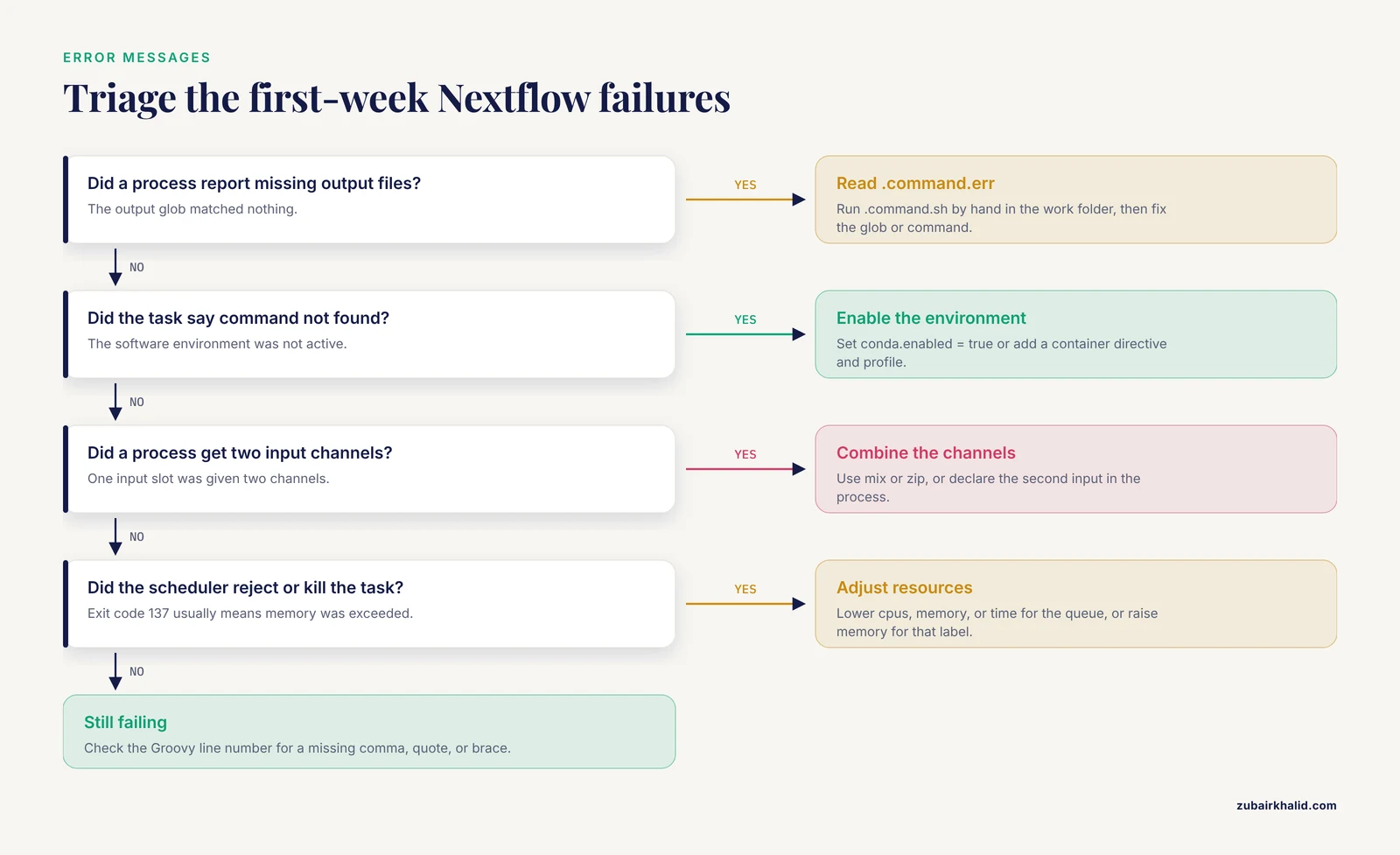
These are the failures you will actually hit in the first week, with the messages as Nextflow prints them (wording varies slightly between releases):
- **
Missing output file(s)_fastqc.zipexpected by processFASTQC (1)*. The output glob matched nothing, usually because the tool wrote different filenames or failed earlier in the script. Read work/<hash>/.command.err, run.command.sh` by hand inside that folder, and correct the glob or the command. .command.sh: line 2: fastqc: command not found. The task ran without its software environment. Enable Conda withconda.enabled = trueand run with a profile that activates it, or add acontainerdirective and a container profile.ProcessFASTQCdeclares1input channel, but2were specified. You passed two channels into a process with one input slot. Combine them withmixorzip, or declare the second input in the process.Input file name collision, There are multiple input files for each of the following file names: sampleA_R1.fastq.gz. Two files with the same basename are staged into one task directory. Rename one at staging time withstageAsin the input declaration.There is no process namedFASTQC. The include path or name does not match. Confirm the module file defines process FASTQCand that thefrom` path points at it.- Scheduler rejections and kills. A submission error that starts with
sbatch: error:or an SGE equivalent means your requested resources exceed the partition limits, so lowercpus,memory, ortime, or target another queue. A task that dies with exit code 137 was usually killed for exceeding memory, so raise the memory directive for that label. - Groovy compile errors such as
unexpected inputat a specific line are almost always a missing comma, quote, or closing brace inmain.nfor a module. The line number is accurate.
A faster path: adopt an nf-core pipeline instead of rewriting
Before hand-porting anything, check nf-core, the community project that maintains a large collection of peer-reviewed Nextflow pipelines built from shared, tested modules. If your analysis exists there, adopting it beats rewriting it. Common starting points for Galaxy users include nf-core/rnaseq for differential expression, nf-core/sarek for germline and somatic variant calling, nf-core/viralrecon, nf-core/ampliseq for amplicon data, nf-core/mag for metagenome assembly, and nf-core/fetchngs for pulling raw reads and metadata from SRA and ENA.
Smoke-test any pipeline with its bundled test data:
nextflow run nf-core/rnaseq -profile test,docker --outdir resultsA real run takes a samplesheet, the nf-core equivalent of a Galaxy collection with metadata columns. For the RNA-seq pipeline the columns are sample, fastq_1, fastq_2, and strandedness:
sample,fastq_1,fastq_2,strandedness
CONTROL_A,data/control_A_R1.fastq.gz,data/control_A_R2.fastq.gz,auto
CONTROL_B,data/control_B_R1.fastq.gz,data/control_B_R2.fastq.gz,auto
TREATED_A,data/treated_A_R1.fastq.gz,data/treated_A_R2.fastq.gz,auto
nextflow run nf-core/rnaseq \
--input samplesheet.csv \
--outdir results \
-profile singularity,slurmnf-core pipelines ship with container pins, CI tests, a MultiQC report, and a software versions file under results/pipeline_info, which restores the tool-version provenance you had in Galaxy. If you do need your own pipeline, two nf-core tools help: nf-core create scaffolds a new pipeline from the community template (the best available answer to a migration template), and nf-core modules install fastqc drops a tested, containerized module into your modules/ tree, which you can compare against the hand-written versions from Step 3.
Automated conversion: what tools can and cannot do
Neither the Galaxy Project nor the Nextflow maintainers ship an official Galaxy-to-Nextflow converter. Two community tools get you part of the way. galaxy2cwl, developed in the Galaxy community, converts a .ga file into CWL (Common Workflow Language), a portable workflow description format. ya2wf, an ELIXIR-backed converter, translates between workflow formats and can emit a Nextflow skeleton from a .ga file.
Treat their output as scaffolding. Automated conversion captures process names and rough wiring, but it does not recover the tool form parameters hidden in tool_state, does not pin containers, does not set resources, and does not build tests. The reliable workflow is: generate the scaffold, then finish it by hand with Steps 3 through 6 of this guide, using the Command Line field from your Galaxy job details as the parameter reference. Keep the .ga file and one golden Galaxy history around as the specification and ground truth for your new pipeline.
Nextflow vs Snakemake: choosing the target
Nextflow and Snakemake are the two most widely adopted bioinformatics workflow managers, and both are sound migration targets from Galaxy. The honest differences:
| Aspect | Nextflow | Snakemake |
|---|---|---|
| Language | Groovy on the JVM | Python |
| Mental model | Dataflow channels feeding processes | Rules forming a DAG resolved from target files |
| Caching | Built-in -resume, content-aware | Rerun decisions from configurable triggers |
| Containers | Docker, Apptainer, Podman, and Conda directives | -use-conda and -use-singularity |
| Cloud and schedulers | Native object storage support and AWS Batch, Google Batch, Azure Batch, Kubernetes executors | Strong cluster support, cloud through profiles and plugins |
| Ecosystem | nf-core, with hundreds of curated, tested modules and pipelines | A community catalog of workflows and shared rule repositories |
| Reporting | Built-in trace, report, timeline, and DAG outputs, plus Seqera Platform | HTML reports and external dashboards |
| License | Apache 2.0 | MIT |
Choose Nextflow if you want the nf-core catalog, cloud or Kubernetes execution, or a UI layer for non-coders. Choose Snakemake if your team is Python-first and your analyses map naturally onto file-target rules. Both handle containers and HPC schedulers well, and consistency inside one lab matters more than the choice between them.
Common Mistakes and Limitations
- Porting the tool name but not the tool settings. Galaxy wrappers bake in defaults you never saw. Open the job details in your old history and copy the exact command line into your process before you change anything.
- Leaving software unpinned. Galaxy pinned versions through its wrappers. In Nextflow, an unpinned
condadirective or a floating container tag will silently change your results months later. Pin everything. - Reference genome drift. Galaxy alignments used bundled indexes for a specific build. If your new FASTA is a different build or even a differently prepared file for the same build, read counts and alignments shift. Match the build and record where the FASTA came from.
- Symlinked published results. Without
publishDir mode: 'copy', results are symlinks intowork/, and deletingwork/to save space destroys them. Copy anything you keep. - Heavy runs on login nodes or the Galaxy host. Running without an executor profile executes everything locally on the machine that launched Nextflow. Use a Slurm or SGE profile for real workloads.
- Expecting
-resumeto survive every edit. Changing a script, an input file, a container, or a resource setting invalidates the cache for that task and everything downstream. Changing onlypublishDirdoes not, which surprises people in both directions. - Skipping the test dataset. Build the two-sample test dataset and expected flagstat counts before migrating the real cohort. A pipeline without a test is a Galaxy history with extra steps.
- Expecting feature parity. Galaxy interactive tools, built-in visualizations, and history sharing have no Nextflow equivalent. UI needs are met by Seqera Platform or by notebooks outside the pipeline, and migration is a rewrite you budget for, not an import you click through.
Frequently Asked Questions
Can I convert a Galaxy .ga file to Nextflow automatically?
Only partially. Community tools such as ya2wf and galaxy2cwl produce a scaffold or an intermediate CWL description, and you then finish the pipeline by hand with real parameters, pinned software, and tests.
Do I need to learn Groovy to use Nextflow?
Not much for basic pipelines. Most of a simple pipeline is Nextflow's own declarations, but closures, string interpolation, and maps appear early, so a short Groovy primer pays for itself in the first week.
How do I pick between Nextflow and Snakemake?
Pick Nextflow if you want the nf-core catalog, cloud or Kubernetes execution, or a UI layer, and Snakemake if your team is Python-first and thinks in file-target rules. Both are mature, so team skills should decide.
Will my Galaxy data transfer to Nextflow by itself?
No. Download the datasets you need from the history, or export a history archive, place the files in your project folder or object storage, and point params at them.
Can Nextflow run on the same machine as Galaxy?
Yes, anywhere Java runs, including the Galaxy host. For real workloads, submit through a scheduler or cloud executor instead of competing with the Galaxy web server for resources.
What happens to my Galaxy tool versions after migration?
You pin them yourself with conda or container directives, matching the versions recorded in your Galaxy job details as closely as BioConda and BioContainers allow.
How long does a Galaxy to Nextflow migration take?
A five-tool workflow takes an experienced person an afternoon to a day, mostly spent matching parameters and building the test dataset. Larger workflows scale with the number of tools, and adopting an existing nf-core pipeline is often faster than any rewrite.
How do I run the migrated pipeline on a Slurm cluster?
Add a profile with process.executor = 'slurm', set the queue and resource directives, enable Apptainer or Conda, launch inside tmux on a login node, and run with -profile slurm.