Merging Genomic Annotations with Expression Data in pandas
By Dr. Zubair Khalid, DVM, MS, PhD ·

When a merge between a gene annotation table and an expression matrix goes wrong, the most likely cause is an identifier mismatch. One file carries Ensembl gene IDs with version numbers such as ENSG00000141510.16, the other carries the same IDs without them, or one side has trailing whitespace from a spreadsheet export. The first thing to check is how many keys the two tables actually share. Three lines of code settle it:
common = set(counts.index) & set(annotation["gene_id"])
len(common), len(counts.index), len(annotation)
If that intersection is near zero, you have a key problem, not a merge problem. This article walks through the full set of failure modes when merging genomic annotations with expression data in pandas, ordered from the most common to the rarest, with the mechanism behind each one, a diagnostic sequence, and the prevention habits that stop the failures from coming back.
Everything here assumes you are working in Python with pandas, the standard tabular data library documented by the pandas development team. The examples use gene-level RNA-seq data, but the same logic applies to proteomics tables, methylation arrays, variant lists, or any per-feature measurements joined to a reference annotation.
The Two Files You Are Joining
Before troubleshooting, be clear about what each file actually contains. Most failed merges trace back to assumptions about one of these two inputs.
Annotation files: GTF, GFF3, and gene metadata tables
A GTF or GFF3 file from Ensembl, GENCODE, NCBI RefSeq, or a genome annotation pipeline describes genomic features in a tab-delimited format with nine columns: sequence name, source, feature type, start, end, score, strand, frame, and an attribute field that carries identifiers such as gene_id and transcript_id as key-value pairs. The attributes are the part you need for merging, and they live inside a quoted string in the last column.
Loading a GTF into pandas looks like this:
gtf_cols = ["seqname", "source", "feature", "start", "end",
            "score", "strand", "frame", "attribute"]
gtf = pd.read_csv(
    "gencode.gtf.gz",
    sep="\t",
    comment="#",
    header=None,
    names=gtf_cols,
    dtype={"seqname": str, "attribute": str},
)
Three details matter. The comment="#" argument skips the header lines that Ensembl and GENCODE files start with. The header=None and names arguments are required because GTF files have no header row. And the compression is detected automatically from the .gz extension.
A gene-level extract keeps only rows where the feature column equals "gene" and pulls the gene_id out of the attribute string:
gtf["gene_id"] = gtf["attribute"].str.extract(r'gene_id "([^"]+)"')
genes = gtf[gtf["feature"] == "gene"].copy()
Alternatively, many analysts prefer a pre-collapsed gene metadata table exported from BioMart, the Ensembl web interface, or the NCBI Datasets tool. These tables already have one row per gene with columns for gene ID, gene symbol, chromosome, start, end, and biotype. They are easier to merge with but hide the transcript-level structure, so know which representation your analysis needs before you choose.
Expression matrices
An expression matrix is a table with features as rows and samples as columns. A raw count matrix from featureCounts, HTSeq, Salmon, or a sequencing provider usually has one row per gene or transcript, a gene identifier column, and one integer column per sample. Normalized tables carry floats instead of integers. Single-cell matrices, once exported from an AnnData or loom file, follow the same shape.
A typical load looks like this:
counts = pd.read_csv("counts.tsv", sep="\t", index_col=0)The index_col=0 argument moves the gene identifier into the DataFrame index, which is where the merge key problems usually start. Most of this article is about what is inside that index.
Choosing the Right Merge Key
The single highest-leverage decision in this workflow is which column you merge on. There is a clear hierarchy.
Stable database identifiers come first. Ensembl gene IDs (format ENSG followed by digits) and Entrez Gene IDs (plain integers maintained by NCBI) are stable across releases for the same gene in most cases. They are the correct join key for analysis.
Gene symbols come second. Symbols such as TP53 or BRCA1 are human-readable and convenient for display, but they change over time, some genes have historical aliases, and a handful of symbols are shared by more than one identifier. Symbols are a label, not a key.
Genomic coordinates come third. A coordinate join is the right choice when your expression data has no shared identifier with the annotation at all, for example when joining a ChIP-seq peak set or a variant list to genes. Coordinates require you to handle chromosome naming and coordinate-system offsets, covered below.
Use symbols for reading, identifiers for joining, and coordinates only when no identifier exists. Keep both the original and the normalized identifier columns in every intermediate file so you can always audit a merge after the fact.
Troubleshooting Table
This table is the core of the article. Each row is one failure mode you are likely to hit when merging genomic annotations with expression data in pandas, ordered roughly by how often they occur.
| Symptom | Likely cause | How to confirm | Fix |
|---|---|---|---|
| Merge returns almost zero matched rows | Identifier mismatch: version suffixes, whitespace, case differences, or symbol versus ID | Compare set intersection sizes for the keys on both sides, print sample keys with repr() to expose hidden characters | Strip version suffixes, apply str.strip(), cast both keys to str, and re-merge |
| Row count explodes after the merge | The annotation has one row per transcript or exon, not per gene, so the merge is many-to-many | Run value_counts() on the join key, or add validate="one_to_one" and read the MergeError | Collapse the annotation to one row per gene before merging |
| Matched rows exist but annotation columns are all NaN | The merge succeeded on a key that never overlaps, or how="left" filled missing right-side values | Check annotated["_merge"].value_counts() after merging with indicator=True | Fix the key on the right table and re-merge |
| Some genes match, most do not | Mixed identifier types in one column, for example symbols and Ensembl IDs jumbled together | Group unmatched keys by pattern with str.match(r"^ENSG") versus everything else | Separate the table by ID class, map each class with the right reference, then concatenate |
| Coordinate joins find no overlaps | 1-based inclusive versus 0-based half-open coordinate confusion | Manually compare one known position against the interval you built | Subtract 1 from GTF starts before building BED-style intervals |
| Merge works for main chromosomes but drops some genes | Chromosome naming mismatch such as 1 versus chr1, or unplaced and alt contigs with scaffold names | Compare value_counts() of the chromosome column on both sides | Normalize prefixes with str.replace and decide a consistent policy for alts |
| MergeError about cardinality | Unintended duplicates on one side that validate caught | Inspect df.index.duplicated() and df["gene_id"].duplicated() | Deduplicate deliberately or aggregate before merging |
| Merge is slow or exhausts memory | Keys stored as objects, wide frames with unused columns, or a full cross-product from a many-to-many merge | Check df.memory_usage(deep=True) | Cast low-cardinality columns to category, drop unused columns, merge on the minimum key set |
| Results differ between runs | Duplicate resolution with keep="first" depends on file row order | Run the merge twice and compare with assert_frame_equal | Sort deterministically and use an explicit tie-break before drop_duplicates |
| A few well-known genes behave oddly on the sex chromosomes | Pseudoautosomal region genes have one symbol but two Ensembl IDs, one on X and one on Y | Filter value_counts() on gene_symbol where the count exceeds one | Merge on the Ensembl ID, keep the symbol as a display column only |
Fixes From Most to Least Common
1. Strip version suffixes, whitespace, and case from keys
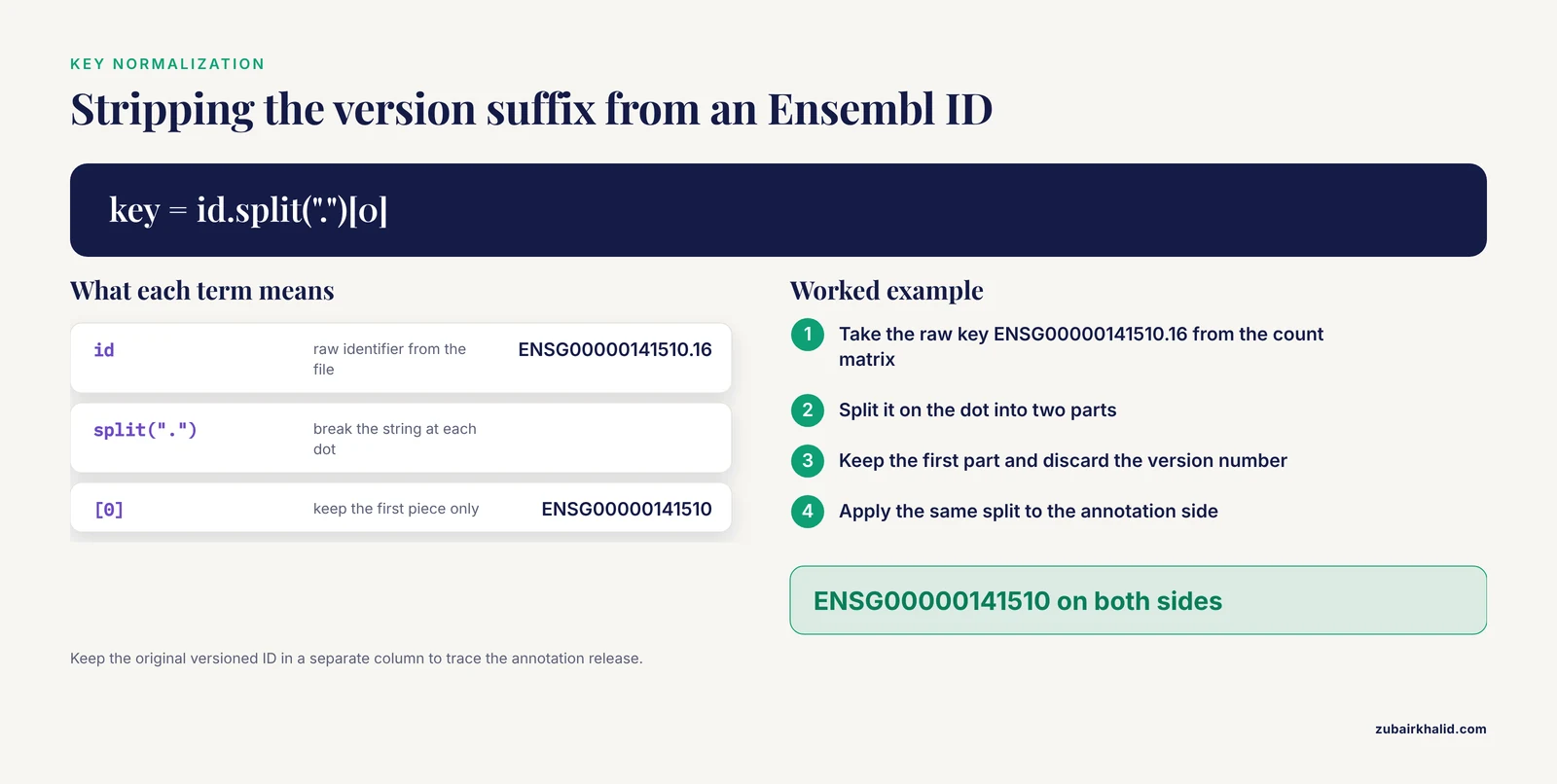
Ensembl releases identifiers with a version number after a dot. A count matrix produced by featureCounts may carry ENSG00000141510.16 while a BioMart export carries ENSG00000141510, and pandas treats those as different strings because they are different strings. This single issue causes the majority of failed merges between genomic data and expression data.
The standard fix normalizes both sides the same way:
counts.index = counts.index.str.split(".").str[0]
genes["gene_id"] = genes["gene_id"].str.split(".").str[0]
A more defensive version uses a regular expression that also removes whitespace and normalizes case in one pass:
counts.index = counts.index.str.strip().str.upper()
genes["gene_id"] = genes["gene_id"].str.strip().str.upper()
Apply normalization to both tables, never just one, and do it before any merge. Keep the original ID in a separate column if you may need the version number later, for example to trace which annotation release a result depends on.
Whitespace deserves its own mention because it is invisible in a notebook. A tab-separated file exported from Excel with an extra trailing space in every gene name will produce a merge with zero matches and no error. The repr() function is your friend here:
print(repr(counts.index[0]))If the output shows 'ENSG00000141510 ' with a trailing space, you have found the bug.
2. Collapse the annotation to one row per gene
A GTF file contains one row per feature. A single gene contributes rows at the gene, transcript, exon, and CDS levels, so a raw GTF load can have hundreds of rows for one gene_id. Merging a count matrix against that table multiplies every expression row by the number of annotation rows for its gene, silently turning a 20,000-row matrix into a million-row one.
Confirm the problem with a cardinality check before merging:
genes["gene_id"].duplicated().sum()Or let pandas enforce it for you. The validate parameter raises a MergeError instead of silently duplicating rows:
annotated = expr.merge(genes, on="gene_id",
                       how="left", validate="one_to_one")
The fix depends on what you need. If you want one annotation row per gene, filter the GTF to gene rows and drop any residual duplicates:
genes = gtf[gtf["feature"] == "gene"].drop_duplicates("gene_id")If you want derived per-gene summaries such as exon counts or gene span, aggregate explicitly:
per_gene = (gtf[gtf["feature"] == "exon"]
            .groupby("gene_id")
            .agg(n_exons=("transcript_id", "nunique"),
                 gene_start=("start", "min"),
                 gene_end=("end", "max"),
                 chrom=("seqname", "first"),
                 strand=("strand", "first")))
Aggregation is deterministic and auditable. Filtering to feature == "gene" is faster but assumes the annotation file has gene rows at all, which RefSeq-derived and older GFF3 files sometimes do not. Check before you rely on it.
3. Fix data types before you merge
A merge on keys of different dtypes can return zero matches without any warning. The classic case is an Entrez Gene ID read as an integer on one side and as a string on the other, or a column of numeric-looking IDs where one stray non-numeric value forces pandas to store the whole column as object dtype.
Check dtypes on both sides first:
expr["gene_id"].dtype, genes["gene_id"].dtypeThen force both to str and merge. For Entrez IDs, watch for a second trap: leading zeros and missing values. A column read as float because it contains NaN will display 672.0 instead of 672. Read identifiers as strings at load time and the problem disappears:
counts = pd.read_csv("counts.tsv", sep="\t",
                     dtype={"gene_id": str}, index_col="gene_id")
If identifiers must be numeric for downstream work, convert to the pandas nullable integer type Int64, which preserves missing values without coercing everything to float.
4. Normalize chromosome names
Human annotations use several competing chromosome naming schemes. Ensembl files write 1, 2, and X. UCSC-derived files write chr1, chr2, and chrX. Both may include scaffold and alternative contig names such as KI270728.1 or CHR_HG2037_PATCH. A coordinate join between files with different conventions silently matches nothing on every chromosome, or matches main chromosomes while dropping everything on contigs.
Normalize with a targeted replacement:
gtf["seqname"] = gtf["seqname"].str.replace(r"^chr", "", regex=True)Then decide a policy for contigs before the merge. Common choices are keeping only the canonical chromosome names, keeping everything and labeling contigs explicitly, or splitting alt-contig genes into a separate table. Whichever you choose, write the policy into your pipeline code rather than leaving it as an unspoken step.
Cast the chromosome and strand columns to category dtype once the values are normalized. These columns have very few distinct values, and category storage cuts memory use substantially on large annotation tables.
5. Handle coordinate systems in interval joins
When no shared identifier exists, you join by genomic position. Genomic coordinate systems are the classic off-by-one trap in bioinformatics. GTF and GFF3 use 1-based, fully inclusive coordinates, so a gene listed as start 1000 and end 2000 covers exactly those bases. BED files use 0-based, half-open coordinates, so a BED interval of start 999 and end 2000 describes the same bases. If you build intervals from a GTF without converting the start, every interval is shifted by one base and low-overlap queries miss.
Convert, then build the index:
genes["bed_start"] = genes["start"] - 1
intervals = pd.IntervalIndex.from_arrays(
    genes["bed_start"], genes["end"], closed="left")
genes = genes.set_index(intervals).sort_index()
A single query point can then be tested directly:
genes.index.contains(7676594)For many-to-many interval overlap queries at scale, pandas alone gets awkward, and tools built for interval algebra such as bedtools or the bioframe library handle the join more directly. The pandas IntervalIndex approach is appropriate for small sets and for teaching the coordinate concept, which is the point: understand the offset once, and every downstream tool makes sense.
Note that merge_asof is not a coordinate join. It matches on the nearest key value in sorted order and has no concept of intervals, so it will produce plausible-looking but wrong results if used for genomic overlap.
6. Resolve gene symbols and aliases
If you must work with symbols, for example because a collaborator sent a spreadsheet keyed by symbol, map them to stable identifiers through a reference database before merging. NCBI Gene, the HGNC database, and Ensembl all provide current symbol to identifier mappings, and the MyGene.info API offers programmatic lookup for batches of symbols. A small Biopython script can query NCBI Entrez for the current names and aliases attached to a GeneID, which is often enough to resolve a mismatched list. The Biopython section below shows the basic call.
Two rules make symbol handling survivable. First, map symbols to identifiers once, at ingestion, and never merge on symbols downstream. Second, log every symbol that fails to map rather than silently dropping it, because unmapped symbols are where data loss hides.
7. Rarer causes worth knowing
A few failure modes appear less often but cost more debugging time when they do.
Pseudoautosomal region genes sit on both the X and Y chromosomes and are annotated with one symbol but two distinct Ensembl IDs. A merge on symbol duplicates these rows. A merge on ID does not.
RefSeq annotations can carry multiple transcripts per gene with conflicting coordinates, and some annotation releases include genes on unplaced scaffolds whose sequence names differ between releases. If a count matrix was quantified against one release and you merge against another, genes present in only one file will show up as left_only or right_only in the merge indicator. This is expected, and the correct response is to record which annotation release each file came from, not to force a match.
Nondeterministic duplicate resolution is the subtlest failure. Calling drop_duplicates(keep="first") on an unsorted table keeps whichever row happened to come first in the file. If the file order changes between downloads, your merged table changes with it. Sort on a stable key before deduplicating:
genes = genes.sort_values(["gene_id", "start"]).drop_duplicates("gene_id")A Diagnostic Sequence You Can Follow
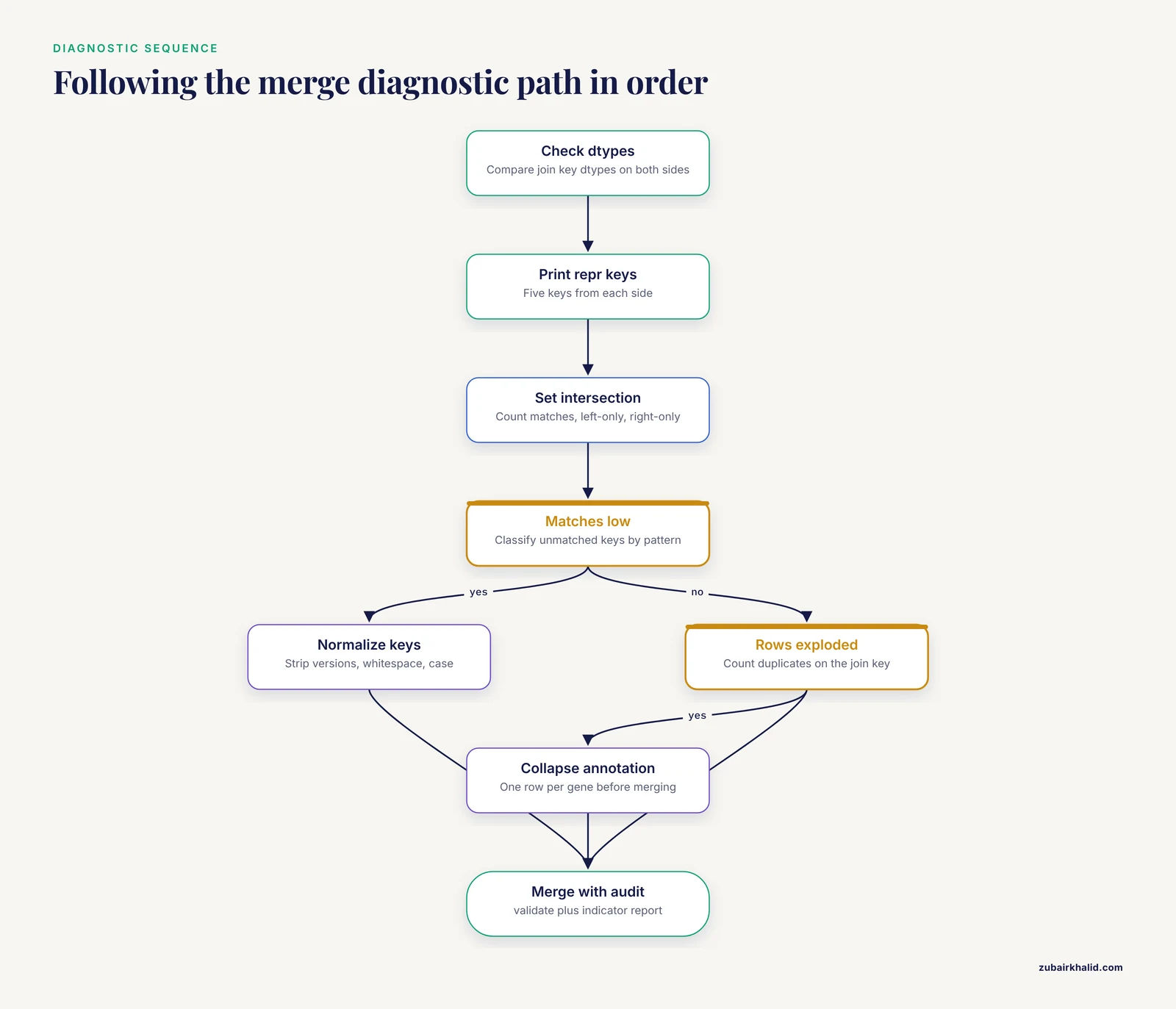
When a merge misbehaves, run this sequence in order. It takes five minutes and resolves most cases without guessing.
- Print dtypes of the join key on both sides. Mismatched str and int or object and float dtypes explain many zero-match merges.
- Print repr() of five keys from each side. Hidden whitespace, case differences, and version suffixes become visible.
- Compute the set intersection and both set differences. Record how many keys match, how many are left-only, and how many are right-only.
- If matches are low, classify the unmatched keys by pattern using str.match(r"^ENSG"), str.match(r"^\d+$"), and a fallback, to see whether the column mixes identifier types.
- If matches are high but rows exploded, count duplicates on the join key with value_counts() and collapse the duplicated side before merging.
- Add validate="one_to_one" or the correct expected cardinality to the merge call so pandas raises instead of silently multiplying rows.
- Merge with indicator=True and inspect annotated["_merge"].value_counts(). The both, left_only, and right_only counts are your merge report card.
Adopting steps 6 and 7 permanently, in every merge you write, is the single best prevention practice in this article.
A Complete Worked Example
The following end-to-end script merges a GENCODE-style GTF gene annotation with a raw count matrix and produces one annotated expression table with one row per gene. It incorporates every fix described above.
import pandas as pd

# Load the expression matrix, forcing the key to string
counts = pd.read_csv(
    "counts.tsv", sep="\t", index_col="gene_id", dtype={"gene_id": str})

# Normalize the expression-side key: strip whitespace, drop version
counts.index = counts.index.str.strip().str.split(".").str[0]
counts = counts[~counts.index.duplicated(keep="first")]

# Load the GTF
gtf_cols = ["seqname", "source", "feature", "start", "end",
            "score", "strand", "frame", "attribute"]
gtf = pd.read_csv(
    "gencode.gtf.gz", sep="\t", comment="#", header=None,
    names=gtf_cols,
    dtype={"seqname": str, "attribute": str, "strand": str})

# Extract gene_id from the attribute field
gtf["gene_id"] = gtf["attribute"].str.extract(r'gene_id "([^"]+)"')
gtf["gene_name"] = gtf["attribute"].str.extract(r'gene_name "([^"]+)"')
gtf["gene_type"] = gtf["attribute"].str.extract(r'gene_type "([^"]+)"')

# Collapse to one row per gene
genes = (gtf[gtf["feature"] == "gene"]
         .dropna(subset=["gene_id"])
         .sort_values(["gene_id", "start"])
         .drop_duplicates("gene_id")
         [["gene_id", "gene_name", "gene_type",
           "seqname", "strand", "start", "end"]])
genes["gene_id"] = genes["gene_id"].str.split(".").str[0]

# Diagnostics before merging
common = set(counts.index) & set(genes["gene_id"])
print(f"counts genes: {len(counts)}, annotation genes: {len(genes)}, "
      f"shared: {len(common)}")

# Merge with cardinality enforced and an audit column
expr = counts.reset_index()
annotated = expr.merge(
    genes, on="gene_id", how="left",
    validate="one_to_one", indicator=True)
print(annotated["_merge"].value_counts())

# Drop the audit column and persist
annotated = annotated.drop(columns="_merge")
annotated.to_parquet("annotated_counts.parquet")
A few choices in this script are deliberate. The version suffix is stripped from both sides. The annotation is deduplicated deterministically by sorting before dropping. The merge enforces one_to_one cardinality and produces an audit column, and the script prints both the pre-merge intersection size and the post-merge indicator counts, so a failure is diagnosed at the step that caused it rather than three steps later.
Safety note
Expression matrices and annotations for human samples are identifiable data even after de-identification attempts, because expression patterns can re-identify individuals. Handle human genomic files under your institutional review board protocol and data use agreement, keep them off personal cloud storage, and never commit them to a public repository. On the computational side, avoid loading untrusted files with pickle. Prefer CSV, TSV, or Parquet inputs, which are data formats rather than executable code, and pin your environment with a conda environment file or a requirements.txt so collaborators reproduce the exact merge you ran.
Where Biopython Fits in a pandas Workflow
Python for bioinformatics usually means pandas for tables and Biopython for anything touching sequences or online databases. The two libraries complement each other in exactly this workflow. Biopython is the standard open-source toolkit for biological computation in Python and is documented by its own development community.
pandas handles the annotation and expression tables. Biopython handles tasks pandas does not, such as reading and writing sequence files with Bio.SeqIO, fetching records from NCBI databases through Bio.Entrez, and working with sequence objects directly. When you need to look up a gene record to resolve a symbol or confirm an identifier, Biopython gives you a documented programmatic route:
from Bio import Entrez

Entrez.email = "[email protected]"
handle = Entrez.efetch(db="gene", id="672", retmode="xml")
record = Entrez.read(handle)
NCBI asks that every programmatic Entrez request carry a contact email and requests reasonable request rates, so set Entrez.email before any call and add a short delay between batch requests. A practical pattern in a merge workflow is to collect the small set of ambiguous or unmapped identifiers after your diagnostics, fetch their current records from NCBI Gene, build a small mapping table, and merge that table in as an extra key-repair step. Keep the fetched mapping as a cached local file so repeated pipeline runs do not hammer the API.
For GTF parsing itself, Biopython is not the right tool, since its core modules center on sequences rather than genome annotation. Load the GTF with pandas as shown above, or use a dedicated parser if your annotation has exotic attributes.
Prevention Practices
The fixes above solve problems one at a time. These habits prevent them.
Normalize identifiers at ingestion. Every file that enters your project gets its keys stripped, case-normalized, and version-suffix-processed once, in one documented function. Downstream steps never re-normalize.
Merge on stable IDs, always. Symbols are display columns. If a source file only has symbols, map to IDs through a reference database before any merge.
Enforce cardinality on every merge. Adding validate="one_to_one", "one_to_many", or "many_to_one" to each merge call converts silent row multiplication into a loud error at the exact line that caused it.
Audit every merge with indicator=True. Store or print the _merge value counts. A merge report that says 19,847 both, 12 left_only, 0 right_only is a result. A merge report that says nothing is a risk.
Keep raw key columns. Never overwrite the original identifier with a normalized one in place. Add a normalized column alongside it, so a later bug can be traced against the raw file.
Version-stamp your inputs. Record the annotation release, genome build, and tool versions in a metadata file next to every intermediate output. Most unresolvable merge mysteries turn out to be two files from different annotation releases.
Test with a tiny fixture. Keep a ten-gene mini count matrix and a matching mini GTF in your repository. Run your merge function on it in a unit test with a known expected output. When pandas or an annotation format changes behavior, the test tells you before your analysis does.
Persist intermediates in stable formats. Write merged tables to Parquet with explicit dtypes rather than re-running fragile merge chains, and re-read from the Parquet file downstream.
Common Mistakes and Limitations
These are the errors seen most often in real analysis sessions, stated plainly.
Merging on symbols because it works for most genes. Most symbols map one-to-one, which is exactly why the handful that do not, such as shared symbols and historical aliases, survive unnoticed until a reviewer or replicate run finds them. The error rate is low but the errors are systematic.
Trusting a successful merge with no validation. A merge that returns rows is not a correct merge. Without validate and indicator, pandas will happily produce a many-to-many cross product or fill an entire annotation side with NaN.
Assuming one coordinate system. Mixing 1-based GTF intervals with 0-based BED positions shifts every interval by one base. The effect is invisible in summary statistics and wrong in every per-base calculation.
Dropping duplicates with keep="first" on unsorted data. The surviving row depends on file order, which is not stable across downloads or annotation releases.
Filtering GTF to feature == "gene" without checking. Some annotation files lack gene rows or use different feature vocabulary. Always confirm the feature column values with value_counts() before relying on a filter.
Forgetting that how="left" fills with NaN. A left merge is the right default for keeping all your expression rows, but the resulting NaN annotation values are a signal about unmatched keys, not noise to drop. Investigate them before dropping.
Ignoring memory until it fails. Reading a full GTF with default dtypes stores every chromosome and strand value as a full Python string object. Casting low-cardinality columns to category and merging on the minimum column set keeps merges of multi-gigabyte files practical.
On limitations. This article covers tabular merge logic in pandas, not the statistical questions downstream of it. Annotation choice, biotype filtering, and how you handle genes present in one reference but not another are analysis decisions that depend on your question and should be documented in your methods section. Annotation releases change, symbols change, and coordinate conventions differ between file formats, so any merged table is a snapshot of specific input files and versions. Reproducibility comes from recording those versions, not from the merge itself.
Frequently Asked Questions
Why does my pandas merge return fewer rows than my count matrix?
The most common cause is that the join keys do not actually match, usually because one side carries Ensembl IDs with version suffixes, whitespace, or different case. Compute the set intersection of the two key collections and print sample keys with repr() to see the differences, then normalize both sides identically and merge again.
How do I join a GTF file to a count matrix?
Load the GTF with pd.read_csv using sep="\t", comment="#", header=None, and explicit column names, extract gene_id from the attribute column with a regular expression, filter to one row per gene, normalize the key on both sides, and merge with how="left", validate="one_to_one", and indicator=True.
Should I merge on gene symbols or Ensembl IDs?
Merge on Ensembl IDs or Entrez Gene IDs, because they are stable database identifiers, and keep gene symbols as display columns. Symbols change over time and some are shared by multiple identifiers, so symbol-based merges produce both false duplicates and silent mismatches.
How do I remove the version number from Ensembl gene IDs?
Apply counts.index.str.split(".").str to the index or key column on both tables before merging. Keep the original versioned identifier in a separate column if you need to trace which annotation release your results depend on.
Why does my merge create duplicate rows?
Your right-hand table has more than one row per key, which happens when a GTF contains one row per transcript or exon rather than per gene. Count duplicates with value_counts() on the join key, collapse the annotation to gene level with a filter or groupby aggregation, and add validate="one_to_one" so pandas raises an error instead of multiplying rows.
What is the difference between merge, join, and concat in pandas?
merge joins two tables on columns with a SQL-style operation, join merges on indexes with a DataFrame-method interface, and concat stacks tables along an axis without matching keys at all. For genomic annotation work, merge on an explicit key column is the right default, and concat is for adding samples or batches, not for joining features to annotations.
How do I join data by genomic coordinates in pandas?
Convert GTF starts by subtracting 1 to move to 0-based half-open coordinates, build a pd.IntervalIndex from the start and end columns, set it as the index, and test positions with the index contains method or interval overlaps. For large-scale interval queries, use a dedicated interval tool rather than forcing pandas to do set algebra.
Is pandas enough for bioinformatics or do I need Biopython?
pandas covers tabular work such as annotation and expression merging, while Biopython covers sequence file parsing and programmatic access to NCBI databases through Bio.Entrez. Most merge workflows need both, with pandas doing the table algebra and Biopython supplying reference lookups for the identifiers pandas cannot resolve on its own.