How to Load a GTF File in pandas: Step-by-Step Guide
By Dr. Zubair Khalid, DVM, MS, PhD ·

By the end of this guide you will be able to load a GTF (Gene Transfer Format) annotation file into a pandas DataFrame, split the attributes column into usable columns such as gene_id and transcript_id, validate that coordinates and feature counts look correct, and export the result to a fast binary format for reuse. Everything runs with Python 3 and pandas. No database, no command-line annotation tools, and no prior pandas experience beyond basic Python syntax are required.
This is a core skill in python for bioinformatics. Nearly every RNA-seq, variant annotation, or interval-overlap workflow starts with an annotation file, and GTF is the most common format for gene annotations from Ensembl and GENCODE.
What You Need Before Starting
Install the following, ideally in a dedicated environment so your system Python stays clean:
python -m venv gtf-env
source gtf-env/bin/activate      # On Windows use: gtf-env\Scripts\activate
pip install pandas pyarrow
Versions are flexible. Any pandas release from the last few years supports every command in this guide. pyarrow is optional and only needed for the parquet export step near the end.
You also need a GTF file. Good public sources include GENCODE for human and mouse, Ensembl for a wide range of species, and NCBI RefSeq if you need NCBI transcript identifiers. Download the annotation that matches the genome assembly you are working with. For practice, any small GTF works, and even the compressed human annotation is a single file of roughly 50 to 80 MB.
A GTF file is plain text, tab separated, and usually gzip compressed with a .gtf or .gtf.gz extension. If your file ends in .gtf.gz, keep it compressed. pandas reads gzip files directly, and you save disk space.
Understanding the GTF Format Before You Parse It
A GTF file is a tab-delimited text file with nine fixed columns. Lines beginning with a hash character are comments, and most annotation files start with several comment lines describing the source and genome version. Here is a typical excerpt from a GENCODE-style file, which follows the same column layout as Ensembl:
#!genome-build GRCh38.p14
#!genome-version GRCh38
#!annotation-source Ensembl 112
chr1    Ensembl exon    11869   12227   .   +   .   gene_id "ENSG00000223972"; transcript_id "ENST00000456328"; ...
The nine columns, in order, are:
| Column | Name | Example value | Notes |
|---|---|---|---|
| 1 | seqname | chr1 | Chromosome or scaffold name |
| 2 | source | Ensembl | Annotation source |
| 3 | feature | exon | gene, transcript, exon, CDS, start_codon, stop_codon, Selenocysteine, UTR, or similar |
| 4 | start | 11869 | 1-based, inclusive |
| 5 | end | 12227 | 1-based, inclusive |
| 6 | score | . | A score or a missing-value dot |
| 7 | strand | + | Plus, minus, or a dot when unknown |
| 8 | frame | . | Reading frame 0, 1, or 2 for CDS features, dot otherwise |
| 9 | attributes | gene_id "ENSG..." | Semicolon-separated key value pairs with values in double quotes |
Two details cause the most trouble for newcomers, so fix them in your mind now.
First, coordinates are 1-based and inclusive on both ends. Python and most downstream formats such as BED are 0-based with an exclusive end. When you convert, a GTF feature spanning 11869 to 12227 becomes the half-open interval 11868 to 12227 in 0-based coordinates. The UCSC Genome Browser documentation describes this distinction in its file format FAQ, and getting it wrong shifts every interval by one base pair.
Second, the attributes column is not a fixed set of columns. It is a free-form string of key "value" pairs separated by semicolons. Ensembl and GENCODE use gene_id and transcript_id first. NCBI RefSeq GTF files use the same core keys but add different extras such as product and exon_number. Your parsing code must tolerate keys that appear in some rows and not others.
Step-by-Step: Loading a GTF File in pandas
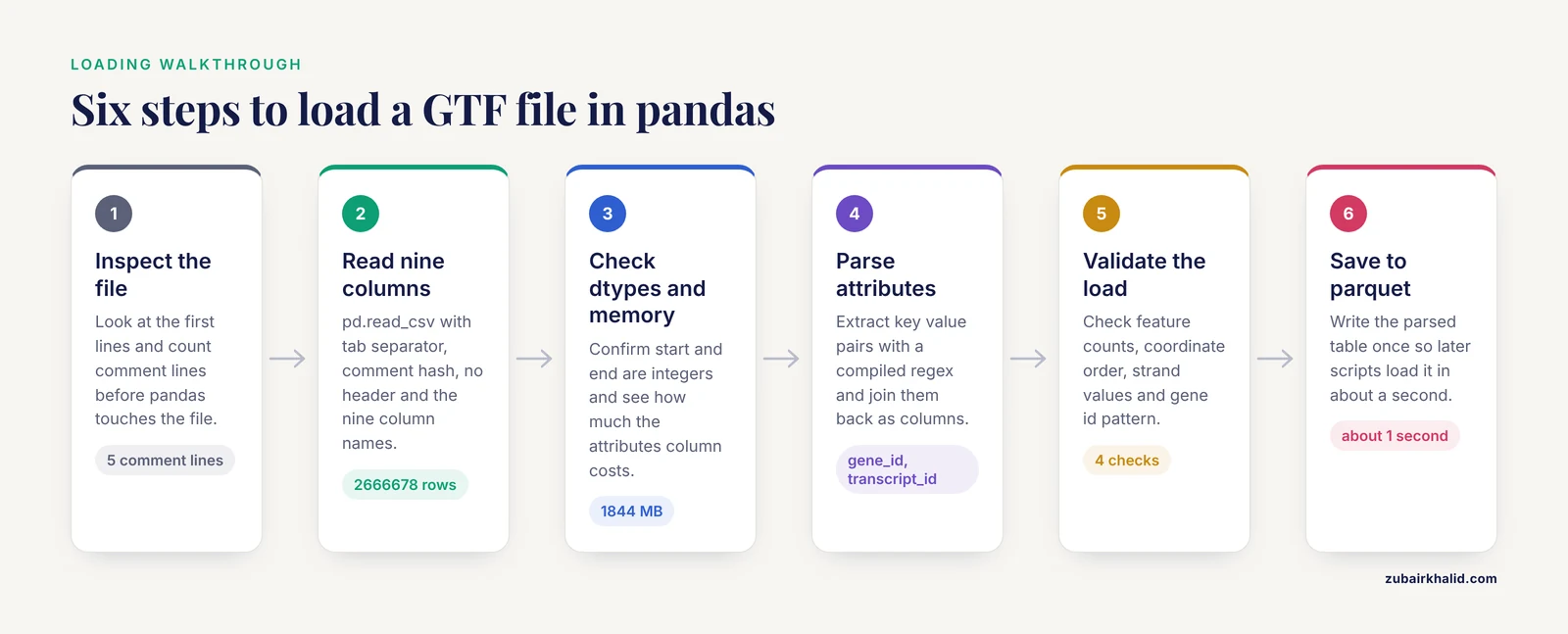
The walkthrough below uses a file named gencode.v47.annotation.gtf.gz as the example. Substitute your own filename everywhere it appears.
Step 1: Inspect the File Before Loading It
Never load a large annotation file blind. Look at the first lines and count the comment lines so you know what pandas is about to encounter:
zcat gencode.v47.annotation.gtf.gz | head -6
zcat gencode.v47.annotation.gtf.gz | grep -c "^#"
zcat gencode.v47.annotation.gtf.gz | wc -l
Expected output looks like this:
#!genome-build GRCh38.p14
#!genome-version GRCh38
#!annotation-source Ensembl 112
chr1    Ensembl gene    11869   14409   .   +   .   gene_id "ENSG00000223972"; ...
chr1    Ensembl transcript  11869   14409   .   +   .   gene_id "ENSG00000223972"; ...
chr1    Ensembl exon    11869   12227   .   +   .   gene_id "ENSG00000223972"; ...
5
2666683
Two facts from this inspection drive the next step. The file has comment lines that pandas must skip, and it has roughly 2.6 million feature rows, which tells you to keep dtypes tight so the DataFrame does not balloon in memory. If you are on Windows without zcat, open the file in any text editor that handles large files, or run the same checks in Python with gzip and a small loop.
Step 2: Load the Nine Columns with pd.read_csv
The single function call that correctly loads a GTF file in pandas is pd.read_csv with four key parameters. The tab separator is the critical one, because the default separator is a comma and GTF is tab separated:
import pandas as pd

gtf_cols = [
    "seqname", "source", "feature", "start", "end",
    "score", "strand", "frame", "attributes",
]

df = pd.read_csv(
    "gencode.v47.annotation.gtf.gz",
    sep="\t",
    comment="#",
    header=None,
    names=gtf_cols,
    low_memory=False,
)

print(df.shape)
print(df.head(3))
Expected output:
(2666678, 9)
  seqname   source feature   start     end score strand frame                                         attributes
0    chr1  Ensembl    gene   11869   14409     .      +     .  gene_id "ENSG00000223972"; gene_type "transcribed...
1    chr1  Ensembl    transcript   11869   14409     .      +     .  gene_id "ENSG00000223972"; transcript_id "ENST000...
2    chr1  Ensembl    exon   11869   12227     .      +     .  gene_id "ENSG00000223972"; transcript_id "ENST000...
Each parameter matters, and the table below summarizes the options you will actually use when you load a GTF file in pandas.
| Parameter | What it does | Recommended GTF value |
|---|---|---|
| sep | Field delimiter | "\t" (tab), never the default comma |
| comment | Skip lines starting with this character | "#" so version header lines are ignored |
| header | Whether the first data row is a header | None, because GTF has no header row |
| names | Column labels to apply | The nine standard GTF column names |
| dtype | Force column types | int32 for start and end, string for the rest, when loading in chunks |
| quoting | Quote handling | QUOTE_NONE is usually safest, because attributes contain double quotes that confuse the CSV parser |
| compression | Transparently decompress | "gzip" or leave as "infer", which detects .gz from the filename |
| na_values | Strings treated as missing | Keep the default, then fill score and frame dots yourself if you need them |
One subtlety about quoting. GTF attribute values are wrapped in double quotes, and the pandas CSV parser may try to treat quote characters as field delimiters. In practice, the tab separator plus the fixed nine-column structure means quoting rarely breaks a well-formed file. If you ever see corrupted attribute text, add quoting=csv.QUOTE_NONE to read_csv and the problem disappears.
Step 3: Check Dtypes and Memory Immediately
Confirm that pandas assigned sensible types before you do anything else:
print(df.dtypes)
print(f"Memory: {df.memory_usage(deep=True).sum() / 1e6:.0f} MB")
Expected output:
seqname       object
source        object
feature       object
start          int64
end            int64
score         object
strand        object
frame         object
attributes    object
dtype: object
Memory: 1844 MB
pandas assigned int64 to start and end automatically because those columns contain only integers and dots are absent from them. The score and frame columns came in as object because they contain dots. That is fine for most work.
The attributes column dominates memory in a full human annotation. If memory is tight, convert the small text columns to pandas string dtype or pandas category dtype right away:
for col in ["seqname", "source", "feature", "strand", "frame"]:
    df[col] = df[col].astype("category")
Category dtype stores each distinct string once and encodes rows as small integers. Chromosome names, features, and strands have few unique values, so this typically cuts memory for those columns by more than 90 percent.
Step 4: Parse the Attributes Column
The attributes column is the only part of a GTF that needs real parsing. Every key value pair matches the pattern key "value" with a trailing semicolon, so a compiled regular expression extracts all pairs efficiently:
import re

attr_pattern = re.compile(r'(\S+) "([^"]*)')

def parse_attributes(attr_string):
    return dict(attr_pattern.findall(attr_string))

attr_dicts = df["attributes"].map(parse_attributes)
attr_df = pd.DataFrame.from_records(attr_dicts, index=df.index)

print(attr_df.columns.tolist())
Expected output for a GENCODE file:
['gene_id', 'gene_type', 'gene_name', 'transcript_id', 'transcript_type',
 'transcript_name', 'exon_number', 'exon_id', 'level', 'havana_gene', ...]
Now join the parsed columns back and drop the raw string:
df = pd.concat([df.drop(columns="attributes"), attr_df], axis=1)
print(df[["gene_id", "transcript_id", "exon_id"]].head(2))
Expected output:
            gene_id          transcript_id                 exon_id
0  ENSG00000223972                    NaN                    NaN
1  ENSG00000223972  ENST00000456328.2  ENSE00002234955.1
Gene rows have no transcript_id, so those cells are NaN, which is the correct and expected behavior. Filter with notna() when you need transcript-level rows.
The regex approach is fast, but for a 2.6 million row file you can do better by parsing attributes once during file reading. The chunked loader later in this guide shows how. If you want the fastest pure-pandas trick for one attribute, use str.extract with a targeted pattern, for example gene name alone:
df["gene_name_fast"] = df["attributes"].str.extract(r'gene_name "([^"]+)')That one-liner is often all a downstream script needs, and it avoids materializing every attribute as a column.
Step 5: Validate That the Load Worked
A silent parse error in an annotation file propagates into every downstream result. Run these four checks after every load. They take seconds.
Check the feature counts. A human GENCODE file should show transcripts outnumbering genes by roughly ten to one, and exons outnumbering transcripts several fold:
print(df["feature"].value_counts())Expected output shape:
exon            1454288
CDS              708128
UTR              276552
transcript       228283
gene              64234
Selenocysteine       123
start_codon        51018
stop_codon         50984
Check the coordinate ranges. Start must always be less than or equal to end, and coordinates must be positive:
assert (df["start"] <= df["end"]).all()
assert (df["start"] > 0).all()
Check strand values. Only plus, minus, and dot are legal in GTF:
print(df["strand"].value_counts(dropna=False))Check gene identifiers. Every row in a GENCODE or Ensembl GTF should carry a gene_id matching the ENSG prefix pattern:
assert df["gene_id"].str.match(r"ENSG\d{11}").all()If any assertion fails, your file is malformed, truncated, or not a GTF at all. Stop and investigate rather than patching downstream.
Step 6: Save the Parsed Result for Reuse
Parsing a full human GTF takes tens of seconds and parsing attributes dominates that time. Do it once, save to parquet, and every later script loads in about a second:
df.to_parquet("gencode_v47_parsed.parquet")
df2 = pd.read_parquet("gencode_v47_parsed.parquet")
Parquet preserves dtypes, including category columns, and compresses the data below the size of the original gzip text in most cases. This single habit, parse once then read parquet, saves more cumulative time than any other tip in this guide.
Working with the Loaded Annotation
Once the GTF is a DataFrame, the common annotation tasks reduce to one-liners.
Extract only protein-coding gene rows:
coding_genes = df[(df["feature"] == "gene") & (df["gene_type"] == "protein_coding")]Count exons per gene:
exons_per_gene = (
    df[df["feature"] == "exon"]
    .groupby("gene_id")
    .size()
    .sort_values(ascending=False)
)
print(exons_per_gene.head())
Expected output shape:
gene_id
ENSG00000237613.6    44
ENSG00000225880.5    32
...
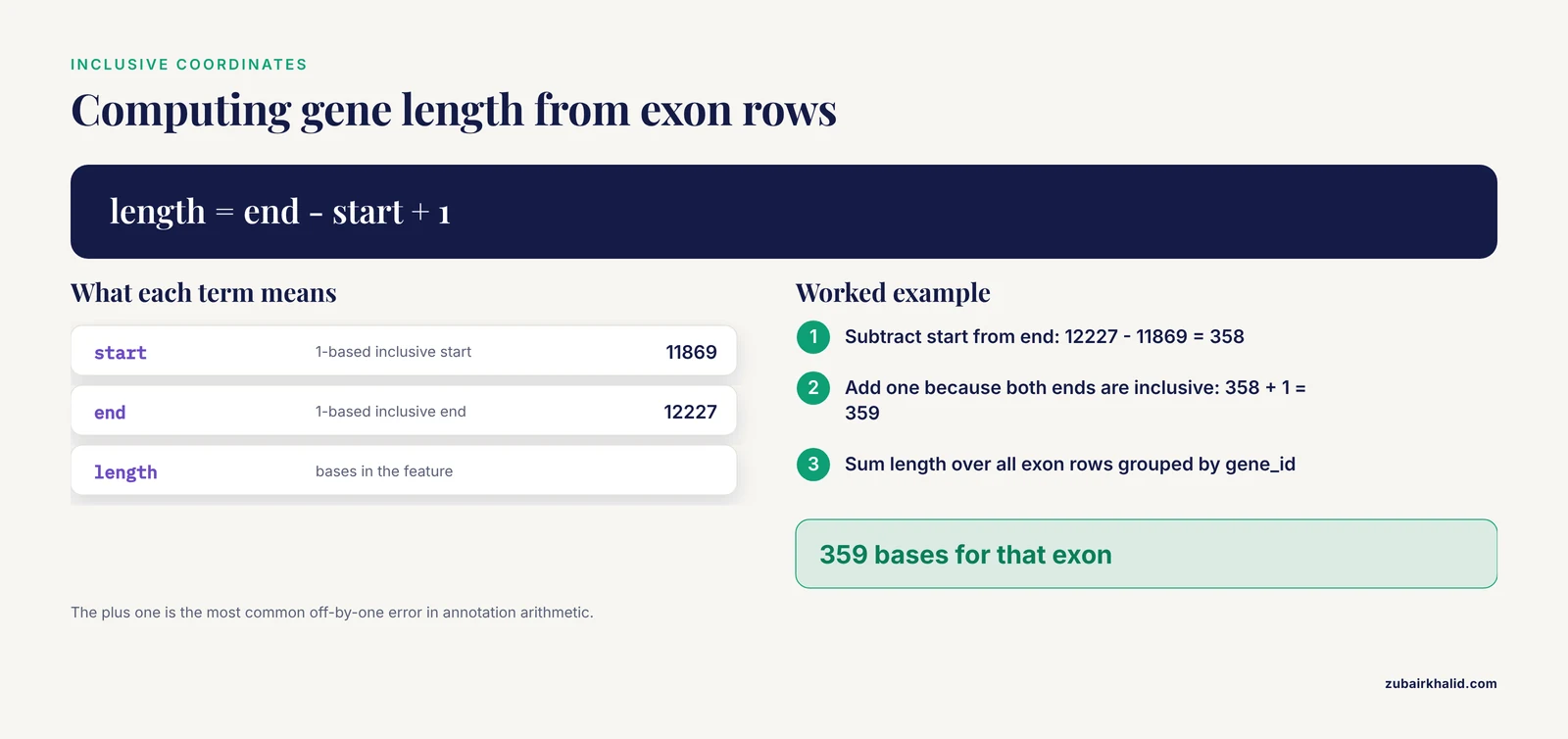
Compute gene lengths, the sum of exon bases per gene, which is what most RNA-seq differential expression workflows expect as an effective length input:
exons = df[df["feature"] == "exon"].copy()
exons["length"] = exons["end"] - exons["start"] + 1
gene_lengths = exons.groupby("gene_id")["length"].sum()
The plus one is there because GTF coordinates are inclusive on both ends. This is the most common off-by-one error in annotation arithmetic, and writing the plus one explicitly in your code makes the convention visible to whoever reads it later.
Loading Large GTF Files in Chunks
A full human or mouse annotation loads comfortably on a machine with 8 GB of RAM if you parse attributes during reading rather than storing the raw strings. Chunked reading with a generator does this cleanly:
import re
import pandas as pd

attr_pattern = re.compile(r'(\S+) "([^"]*)')

def read_gtf_chunks(path, chunksize=500_000):
    cols = ["seqname", "source", "feature", "start", "end",
            "score", "strand", "frame", "attributes"]
    for chunk in pd.read_csv(
        path, sep="\t", comment="#", header=None,
        names=cols, dtype={"start": "int64", "end": "int64"},
        chunksize=chunksize,
    ):
        attrs = pd.DataFrame.from_records(
            chunk["attributes"].map(
                lambda s: dict(attr_pattern.findall(s))
            )
        )
        yield pd.concat(
            [chunk.drop(columns="attributes").reset_index(drop=True), attrs],
            axis=1,
        )

df = pd.concat(read_gtf_chunks("gencode.v47.annotation.gtf.gz"), ignore_index=True)
Peak memory stays near the size of one chunk plus the final assembled table, which avoids the raw attributes string ever being held for the whole file. For most annotations the plain single-shot read from Step 2 is fine, so reach for chunking only when you hit a MemoryError or when you are working inside a memory-limited container.
Reading GFF3 Files with the Same Approach
GFF3 is the sibling format that shares the nine-column layout but differs in details. The generic feature format version 3 specification maintained by the Sequence Ontology project defines it. The practical differences are:
- Attribute values in GFF3 are URL encoded and separated by equals signs, so key=value pairs replace the GTF key "value" style. Adjust the regex to r'([^=;]+)=([^;]*)' and apply urllib.parse.unquote to values.
- GFF3 uses a pragma line starting with ##gff-version and may include ##FASTA, after which the file contains raw sequence rather than feature lines. Stop parsing at that marker or strip everything after it first.
- Directive lines starting with a single hash carry genome metadata, and the comment parameter in read_csv skips them all.
Ensembl distributes GTF, NCBI distributes both formats, and many bacterial and plant annotation pipelines use GFF3. Knowing the equals sign difference is usually enough to reuse the same loading code on either format.
Where Biopython Fits
This guide stays within pandas because pandas gives you the full DataFrame toolkit immediately after loading. The wider biopython tutorial ecosystem also offers GFF parsers. The BCBio GFF package, which builds on Biopython, reads GFF3 and GTF into feature objects. It is convenient when you want intervals paired with sequence objects, and it handles the URL encoding of GFF3 for you. For bulk tabular work such as counting features or computing lengths, pandas is faster and simpler, because you avoid building thousands of Python feature objects. Use the tool that matches the task: Biopython for sequence-aware work, pandas for annotation tables. Many production scripts use both, loading the GTF with pandas for filtering and reaching for Biopython when sequences enter the picture.
Common Mistakes and Limitations
These are the errors that appear repeatedly when people first load a GTF file in pandas, along with the exact fixes.
Mistake 1: Using the default comma separator. The error looks like this:
ParserError: Error tokenizing data. C error: Expected 1 fields in line 12, saw 9The message means pandas found one comma-delimited field per line and then unexpectedly hit the tab-separated fields. The fix is sep="\t". Always.
Mistake 2: Treating the first feature line as a header. Without header=None, pandas discards your first gene row and uses it as column names, so every coordinate becomes a string. If your dtypes show object for start and end, you ate a data row into the header. Set header=None and pass names explicitly.
Mistake 3: Reading a gzipped file with open() in text mode. You get a UnicodeDecodeError full of replacement characters, because gzip bytes are not UTF-8 text. Pass the .gtf.gz path directly to read_csv and let the compression="infer" default handle decompression, or use the gzip module explicitly.
Mistake 4: Confusing 1-based and 0-based coordinates. GTF start is 1-based and inclusive, so a feature at start 11869 begins one base after position 11868 in Python indexing. If you slice a genome sequence with df["start"] directly, every feature is off by one. Subtract one from start when converting to 0-based half-open intervals and leave end alone.
Mistake 5: Assuming attribute keys are uniform. An Ensembl GTF and a NCBI RefSeq GTF carry different attribute sets, and even within one file, some feature types lack keys that others carry. Code that assumes every row has transcript_id will fail on gene rows. Filter to the feature type you need before extracting attributes, or tolerate missing keys with a parser that returns a dict and let pandas fill NaN.
Mistake 6: Ignoring the genome build. A GTF from GRCh38 does not align to a GRCh37 or T2T genome. Coordinate systems, chromosome naming (1 versus chr1), and transcript versions differ across sources. Match annotation to assembly before any interval operation, and strip or retain transcript version suffixes deliberately rather than accidentally, because a gene_id with a version suffix will not string-match the same id without one.
Mistake 7: Assuming the file is sorted by coordinate. Ensembl and GENCODE files are grouped by chromosome in order, but feature types within a gene are interleaved, and not every provider sorts identically. Sort explicitly with df.sort_values(["seqname", "start"]) before any operation that assumes order, such as merging overlapping intervals or writing a BED output.
Mistake 8: Treating malformed warnings as noise. pandas may emit a DtypeWarning about mixed types, or silently parse an extra column if a line contains stray tabs. The validation checks in Step 5 exist precisely to catch this. If value_counts on feature shows unexpected entries, or if df.shape has a tenth column, look at the offending raw lines before proceeding.
On limitations. A DataFrame of annotation features is an input, not an analysis. Decisions about which annotation release, feature hierarchy, or gene model to use for a specific experiment depend on the experiment design and the downstream tool, and those choices deserve a deliberate review rather than a default. When the stakes of an analysis are high, have someone with domain experience in the organism and platform review the annotation choices.
Frequently Asked Questions
Can pandas read a gzipped GTF file directly?
Yes. Pass the .gtf.gz filename to pd.read_csv and pandas infers gzip compression from the extension, decompressing transparently during the read. You never need to gunzip first, and keeping the file compressed saves disk space.
How do I load only exons or genes instead of the whole file?
Add usecols and a filter in a chunked read, or simplest of all, pre-filter at the command line with zcat and awk to stream only the rows where column 3 equals exon or gene, then load that smaller file. Filtering before pandas is the fastest option for very large annotations.
Why does my gene_id or transcript_id column contain NaN values?
Gene rows carry gene_id but not transcript_id, and transcript rows carry both, so NaN in transcript_id for gene rows is correct behavior. If gene_id itself is NaN everywhere, your regex or equals sign separator does not match the file's attribute style, which happens when a GFF3 file is parsed with GTF rules.
Should I use Biopython instead of pandas to load a GTF?
Use pandas when you want tabular filtering, counting, and joins, which covers most annotation work. Use Biopython-based GFF parsers such as BCBio GFF when you need feature objects connected to sequences or full GFF3 pragma handling. The two approaches coexist in the same script without conflict.
How do I convert GTF coordinates to 0-based BED format?
Subtract one from the start coordinate, keep the end coordinate, and write seqname, start minus one, end, and your chosen name columns as a tab-delimited file. A GTF exon at 11869 to 12227 becomes BED 11868 to 12227, preserving the same bases.
How much memory do I need for a human GTF file?
A full human annotation with roughly 2.6 million rows and parsed attribute columns occupies on the order of one to two gigabytes in pandas. With category dtypes for the categorical columns and chunked attribute parsing, a machine with 8 GB of RAM handles it comfortably.
How do I count exons per gene after loading?
Filter the DataFrame to rows where feature equals exon, then group by gene_id and call size(). Sort descending to see the genes with the most exons, which doubles as a sanity check that long multi-exon genes like titin sit at the top where you expect them.
What is the difference between GTF and GFF3?
Both are nine-column tab-delimited annotation formats with the same coordinate convention. GTF writes attributes as key "value" pairs separated by semicolons, while GFF3 writes URL-encoded key=value pairs and adds pragma directives and an optional embedded FASTA section. Ensembl and GENCODE ship GTF, and NCBI and many prokaryote annotations ship GFF3.