The 15 Essential Linux Commands Every Bioinformatician Must Know
By Dr. Zubair Khalid, DVM, MS, PhD ·
Linux commands for bioinformatics are the short text instructions a researcher types at a shell prompt to move through directories, inspect files, and filter or reformat the large FASTQ, FASTA, BAM, and VCF files that sequencing instruments generate. The 15 commands collected here, from pwd and ls through grep and chmod, cover the file handling work that fills most of a bioinformatician's day.
Sequencing runs produce datasets that often reach tens of gigabytes per sample, and the analysis software built for them assumes a Unix-style command line. A review of post-sequencing analysis in DNA barcoding describes the available tools as a mix of graphical, command-line, and web interfaces, with command-line programs such as BLAST, MrBayes, and RAxML carrying the similarity searches and tree building that species identification depends on [1]. A book chapter devoted specifically to command-line tools in Linux for handling large data files exists for the same practical reason, because these utilities move and filter multi-gigabyte text files on ordinary hardware where graphical editors stall [2]. Training programs treat the terminal as core material. A three-day genomics workshop on antimicrobial resistance surveillance in Cameroon included a quick introduction to the Linux command line alongside lessons on sequencing concepts and data file formats, and reported a substantial rise in participant confidence afterward [3]. The commands below are the vocabulary that makes every later tool, from FastQC to samtools, readable instead of mysterious.
What Linux Commands for Bioinformatics Mean in Practice
Linux is a family of open-source operating systems built on Unix design principles. The shell, usually a program called bash, reads what you type and executes it. The terminal is the window that runs the shell. Bioinformatics settled on this environment for three practical reasons. Pipelines were written for it, computing clusters and cloud instances run it, and typed commands can be saved into scripts so an analysis can be repeated exactly, which is the basis of reproducibility.
The data formats explain why text tools dominate. A FASTQ file stores raw reads as four lines per record, an identifier line starting with @, the sequence itself, a separator line starting with +, and a quality string. A FASTA file stores reference sequences with header lines starting with >. A SAM file stores alignment records, and its compressed form is a BAM file. A VCF (Variant Call Format) file stores variant calls against a reference. GFF and GTF files store genome annotations. Nearly all of these are plain text or lightly compressed text, which is exactly what the commands in this guide manipulate.
Graphical and web alternatives are real, and choosing one is not a failure. re-Searcher gives VCF data a point-and-click interface and pre-processes files in chunks so large variant datasets do not exhaust memory [4]. GEGVIC wraps common cancer genomics analyses in a Shiny web interface to remove the coding barrier for non-R users [5]. HipSTR-UI puts a graphical front end on short tandem repeat genotyping [6]. The Biodepot Launcher starts containerized workflows from a desktop icon rather than a typed startup command [7]. Command-line skills stay central for two reasons. HipSTR-UI reproduced the original HipSTR command-line tool with 100 percent genotype concordance precisely because the interface runs the same commands underneath [6], so a GUI is often a wrapper and the commands are the substance. Pipeline developers also describe their work in command-line terms. esATAC supports one-command execution of preset ATAC-seq pipelines, the standard assay for chromatin accessibility [8]. esMPRA ships a one-line command-line interface for quality control of massively parallel reporter assays [9]. SEDA added a complete command-line interface in its 2024 update so it could participate in automated pipelines [10].
Windows users do not need to switch computers. The BTW package runs a full marker gene pipeline, from raw reads to diversity conclusions, inside the Windows Subsystem for Linux, and its authors note that the computational demands of next-generation sequencing usually push researchers toward Linux systems and command-line familiarity [11]. Cloud notebooks provide another path. A published bulk RNA-seq protocol runs SRA Toolkit, FastQC, Trimmomatic, HISAT2, samtools, and Subread in Google Colab so students need little local hardware [12].
The 15 Commands at a Glance
| # | Command | Purpose | Typical bioinformatics job | Example | |
|---|---|---|---|---|---|
| 1 | pwd | Print the current directory | Confirm your location before moving or deleting files | pwd | |
| 2 | ls | List directory contents | Check sample file sizes before analysis | ls -lh raw/ | |
| 3 | cd | Change directory | Move between project folders | cd results/alignments | |
| 4 | mkdir | Create directories | Build a project skeleton | mkdir -p proj/{raw,refs,results} | |
| 5 | cp | Copy files or folders | Back up a reference before editing | cp -r refs refs_backup | |
| 6 | mv | Move or rename | Rename files to match a sample sheet | mv S1.fq.gz sample01_R1.fq.gz | |
| 7 | rm | Delete files | Clear intermediates when disk space runs low | rm -i temp_*.tsv | |
| 8 | cat | Print or join files | Rejoin split FASTQ parts | cat R1_p1.fq R1_p2.fq > R1.fq | |
| 9 | less | Page through a file | Inspect a VCF without loading it | less -S variants.vcf | |
| 10 | head and tail | Show the start or end of a file | Check FASTQ record structure | zcat R1.fq.gz \ | head -n 4 |
| 11 | grep | Search text with a pattern | Count FASTA records | grep -c "^>" genes.fa | |
| 12 | wc | Count lines, words, bytes | Count reads per FASTQ | zcat R1.fq.gz \ | wc -l |
| 13 | sort and uniq | Sort lines, collapse duplicates | Tally assignments per species | sort hits.txt \ | uniq -c |
| 14 | tar | Archive and compress | Pack results for transfer | tar -czvf results.tar.gz results/ | |
| 15 | chmod | Change permissions | Make scripts executable, protect raw data | chmod +x run.sh |
Two pairs cause the most confusion. cat and less overlap in appearance but not in job, since cat prints or joins whole files while less pages through them one screen at a time. cp and mv differ the same way, because cp copies and leaves the original in place while mv moves or renames and does not.
Anatomy of a Command
Every command has the same shape, a name, optional flags that modify behavior, and arguments that name the files or folders to act on.
grep -c "^>" refs/transcripts.fagrep is the command. The -c flag changes the output from matching lines to a count. "^>" is the search pattern, and refs/transcripts.fa is the file to search. Flags are usually one letter with a single hyphen, and many can be combined. Arguments can be single files, folders, or wildcard patterns such as sample*.fastq.gz.
Commands can be chained. The vertical bar, called a pipe, sends the output of one command into the next.
zcat sample_R1.fastq.gz | head -n 8zcat streams the decompressed contents of a gzipped file to the screen without writing an uncompressed copy to disk, and head shows the first lines. The angle bracket redirects output into a file.
grep -c "^>" refs/transcripts.fa > seq_counts.txtA single > overwrites whatever is in the target file. A double >> appends to it. Checking which one you typed before pressing enter is a habit to build from day one.
Three conveniences carry most of the daily load. Tab completion finishes file and folder names and prevents typos. The up arrow recalls previous commands. The man command opens the manual for any tool, as in man grep, and q closes it. One more fact matters constantly. Commands and filenames are case sensitive, so Sample01.fastq.gz and sample01.fastq.gz are two different files.
The 15 Essential Commands, One by One
Two entries pair natural companions, head with tail and sort with uniq, because they are almost always used together.
1. pwd, Print Working Directory
pwd prints the full path of the folder you are in.
pwd
/home/zkhalid/projects/amplicon_2026
That path is called an absolute path because it starts from the root of the filesystem. Run pwd before any destructive operation so you know exactly which folder rm or mv will touch.
2. ls, List Contents
ls lists what is in a folder, and its flags turn it into a reporting tool.
ls -lh raw/
-rw-r--r-- 1 zkhalid lab 4.7G Mar  3 09:12 sample01_R1.fastq.gz
The -l flag gives the long format with permissions, owner, size, and date. The -h flag prints sizes in human units such as 4.7G instead of raw byte counts. Add -t to sort by time, -S to sort by size, and -a to show hidden files. The leading characters in the output preview file permissions, a topic that returns under chmod below. A quick ls -lht after a download confirms the file arrived and shows its size at a glance.
3. cd, Change Directory
cd moves you to another folder.
cd results/alignments
cd ..
cd
cd -
cd results/alignments descends into a subfolder using a relative path. cd .. moves up one level. cd with no argument returns to your home folder. cd - jumps back to the previous folder, which is useful when you keep toggling between a data folder and a results folder.
4. mkdir, Make Directories
mkdir creates folders, and the -p flag creates any missing parent folders at once.
mkdir -p amplicon_project/{raw,refs,scripts,results}The braces expand into four subfolders in one line. Re-running mkdir on an existing folder normally returns an error, and -p suppresses that error, which makes the command safe inside scripts. Keeping raw reads, references, scripts, and results in separate folders is the simplest form of pipeline hygiene.
5. cp, Copy
cp copies files, and -r copies folders recursively.
cp refs/transcripts.fa refs/transcripts_v2.fa
cp -r refs refs_backup
Copy small things freely, references, annotation files, and scripts. Think twice before copying raw reads, because duplicating a 30 GB FASTQ pair consumes 30 extra gigabytes. If you need the same input in two places, ask whether a move, a symbolic link, or simply running the tool from the file's current location would do.
6. mv, Move and Rename
mv moves files between folders and renames them in place. Renaming with mv is instant regardless of file size on the same disk, because the system updates a directory entry rather than rewriting the data.
mv draft_pipeline.sh run_pipeline.sh
mv sample01_R1.fastq.gz ../raw/
mv overwrites silently if the destination name already exists, so add -i to make it ask first. Renaming files to match a sample sheet, for example turning S1.fastq.gz into sample01_R1.fastq.gz, is one of the most common mv jobs in bioinformatics.
7. rm, Remove
rm deletes permanently, and servers and clusters have no trash can.
rm -i temp_*.tsv
rm -r old_alignments
The -i flag asks for confirmation on each file, and -r removes folders. The habit that prevents accidents is to preview a wildcard with ls before deleting it. Run ls temp_*.tsv first, read the list, then run rm on the same pattern. Treat rm -rf as a command you type only when you can say out loud exactly which folder it will erase.
8. cat, Print or Join Files
cat prints a file to the screen and, given several files, joins them in order.
cat R1_part1.fastq R1_part2.fastq > R1_full.fastqRejoining split FASTQ parts is the classic use. cat also feeds pipes, as in cat counts.tsv | sort. Do not use cat to read a large file, because it pours every line into the terminal at once. Reading is the job of the next command.
9. less, Page Through a File
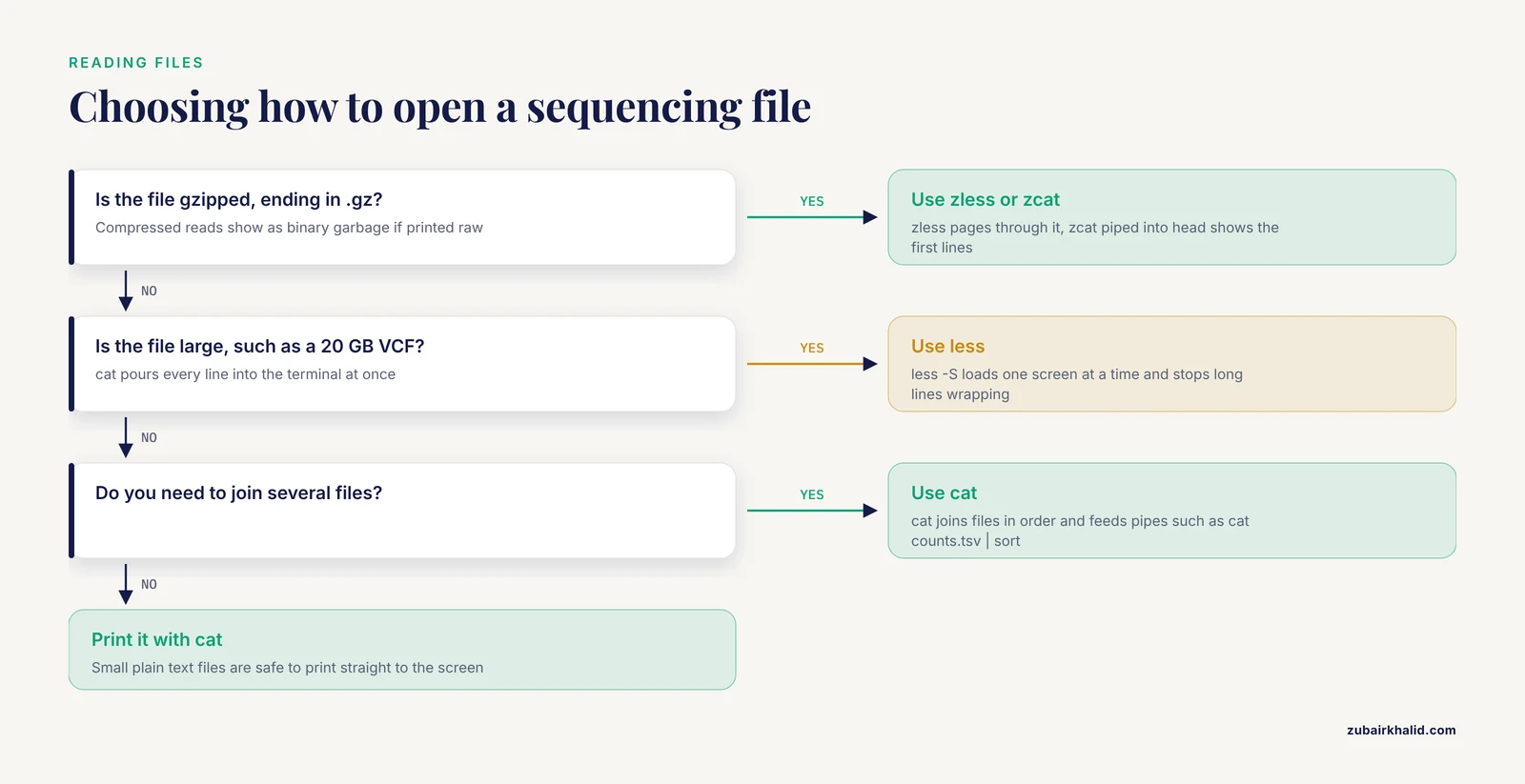
less opens a file one screen at a time and loads more content only as you scroll, so a 20 GB VCF opens instantly.
less -S variants.vcf
zless sample_R1.fastq.gz
Space moves down a page, b moves up, / searches forward, n jumps to the next match, G jumps to the end, and q quits. The -S flag stops long VCF lines from wrapping across the screen. For gzipped files, zless and zcat decompress on the fly.
10. head and tail, Peek at the Ends
head prints the first lines of a file and tail prints the last.
zcat sample_R1.fastq.gz | head -n 8
tail -n +2 counts.tsv | wc -l
tail -f pipeline.log
Because each FASTQ record is four lines, head -n 8 shows exactly two complete records, which is the standard way to confirm a file contains real reads and sensible quality characters. tail -n +2 starts printing at line 2, which skips a header row, and piping that into wc -l counts the data rows. tail -f follows a log file live so you can watch a long job report progress.
11. grep, Search Text
grep prints every line matching a pattern, and its flags turn it into a counter and a filter.
grep -c "^>" refs/transcripts.fa
grep -v "^#" joint.vcf | less
grep -in "trna" annotation.gff | head
The -c flag counts matches, so grep -c "^>" counts FASTA records, since every FASTA header starts with > and the ^ anchor restricts the match to the start of a line. The -v flag inverts the match and prints lines that do not match, which strips comment lines starting with # from a VCF. The -i flag ignores case and -n reports line numbers.
12. wc, Count Lines, Words, and Bytes
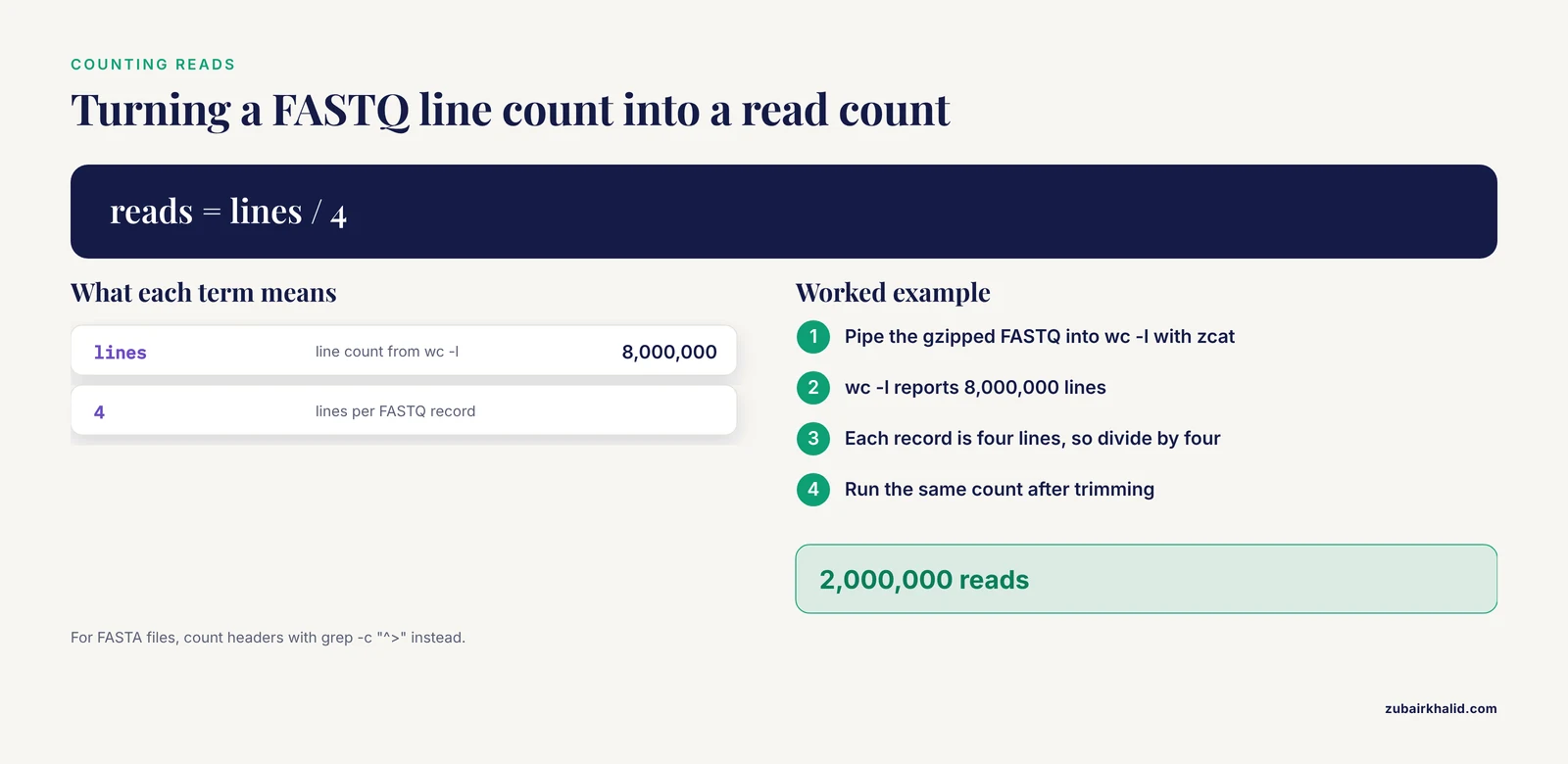
wc counts. The -l flag counts lines, -w counts words, and -c counts bytes.
zcat sample_R1.fastq.gz | wc -l
wc -l counts.tsv
Counting reads is the canonical example. A FASTQ has four lines per record, so the line count divided by four is the read count. If zcat reports 8,000,000 lines, the file holds 2,000,000 reads. Run the same count after trimming to confirm how many reads survived.
13. sort and uniq, Sort and Collapse
sort orders lines and uniq collapses adjacent duplicates. They are taught together because uniq only removes duplicates that sit next to each other, so a sort must come first.
sort species_hits.txt | uniq -c
sort -u sample_ids.txt
The -c flag prefixes each unique line with its count, which turns a list of per-read species assignments into a tally table in one line. sort -u outputs unique lines directly. The -n flag sorts numerically and -k sorts by column for tabular files. On very large files, sort automatically uses temporary files on disk, and prefixing the command with LC_ALL=C forces a fast byte-order comparison for plain text.
14. tar, Archive and Compress
tar bundles many files into one archive, and the -z flag compresses it with gzip.
tar -czvf results_2026-05.tar.gz results/
tar -xzvf results_2026-05.tar.gz
tar -tzvf results_2026-05.tar.gz
The letters mean create, extract, gzip, verbose, and file. The first line packs a results folder, the second unpacks it, and the third lists the contents without extracting, which is a sensible safety check before unpacking an archive from a collaborator. For single files, gzip and gunzip compress and decompress directly, which is how the standard .fastq.gz files are produced.
15. chmod, Change Permissions
chmod changes who can read, write, or execute a file. The letters r, w, and x stand for read, write, and execute, and ls -l shows them at the start of every line.
chmod +x run_pipeline.sh
./run_pipeline.sh
chmod a-w raw/sample01_R1.fastq.gz
chmod +x makes a script executable so you can run it as ./run_pipeline.sh. The numeric form compresses the same information, and chmod 755 gives the owner read, write, and execute while everyone else gets read and execute. The a-w form removes write permission for all users, which is a simple way to make raw sequencing reads read-only and protect them from accidental edits.
Just Past the Core 15
A handful of neighbors round out daily work. man opens any manual page. wget and curl download files from a URL, and for NCBI sequence data the SRA Toolkit's prefetch command retrieves raw reads from the Sequence Read Archive, as used in the Colab-based RNA-seq protocol [12]. ssh connects to a computing cluster and scp copies files to it. top or htop shows running jobs and memory use, df -h shows disk space remaining, and du -sh folder/ shows how much space a folder consumes. cut, awk, and sed pull out and edit columns in tables. nano provides simple file editing. history lists your recent commands so a working analysis can be copied into a script.
Those scripts are the bridge to real pipelines. Workflow engines such as Snakemake chain tools together with Singularity or Docker containers for reproducibility, and the ILIAD suite uses that design to carry raw genomic data through to a quality-controlled VCF [13]. One-command pipelines such as esATAC [8], esMPRA [9], and PathoSeq-QC, a decision-support workflow for genomic surveillance that consolidates quality checks that would otherwise require manual evaluation of multiple tool outputs [14], all sit on top of the same file-handling foundation.
A Worked Mini-Workflow, First Hour with a New Dataset
The sequence below uses most of the 15 commands in the order a real analysis would.
- Build the project skeleton.
mkdir -p rnaseq_demo/{raw,refs,scripts,results}
cd rnaseq_demo- Download data and references. Fetch reads with prefetch from the SRA Toolkit and place a reference transcriptome in refs/ [12].
- Inspect what arrived.
ls -lht raw/
zcat raw/sample01_R1.fastq.gz | head -n 8
Two complete records should appear, with quality characters that look like printable punctuation rather than nonsense.
- Count the reads.
zcat raw/sample01_R1.fastq.gz | wc -lDivide by four for the read count and write the number down.
- Run quality control and trimming. FastQC summarizes per-base quality, Trim Galore or Trimmomatic removes adapters and low-quality tails, and MultiQC aggregates reports across samples, following published best-practice workflows [15][12].
- Align and process. HISAT2 or BWA-meth aligns reads to the reference, samtools converts and sorts the output, and Picard marks duplicates, again following published workflow structure [15][12].
- Watch the job.
tail -f results/logs/align.log- Verify. Re-count reads after trimming and compare with step 4. Count reference sequences with grep -c "^>" refs/transcripts.fa so you know the size of the target before interpreting alignment rates.
- Tally results. For a table of per-read assignments, extract the assignment column and count categories in one line.
cut -f2 assignments.tsv | sort | uniq -c- Protect and pack.
chmod a-w raw/*
tar -czvf results_2026-05.tar.gz results/
Published pipelines formalize exactly these habits. A best-practices protocol for targeted methylation sequencing builds quality-control checkpoints between stages and reports intermediate outputs explicitly so every step can be audited [15]. The point of the 15 commands is that you can perform each audit yourself.
Where These Commands Sit in Published Pipelines
- Amplicon and metataxonomics. BTW carries raw reads through quality filtering, clustering, and taxonomic assignment to diversity results [11].
- Transcriptomics. The Colab RNA-seq protocol moves from SRA download through alignment and counting to plots and differential expression [12].
- Epigenomics. The targeted methylation protocol runs Trim Galore, BWA-meth, Picard, and MethylDackel in a defined order with checkpoints [15].
- Chromatin accessibility. esATAC executes a preset ATAC-seq pipeline with one command [8].
- Regulatory assays. esMPRA monitors massively parallel reporter assay quality stage by stage [9].
- Variant calling. ILIAD moves raw data of several types to a merged, quality-controlled VCF [13].
- Surveillance. PathoSeq-QC consolidates raw-read and variant-level quality decisions for pathogen genomics [14].
- Species identification. DNA barcoding analyses lean on similarity tools such as BLAST and tree-building programs such as MrBayes and RAxML [1].
In every one of these, the day-to-day actions are the 15 commands, listing files, peeking at records, counting lines, filtering tables, and packing results.
Misconceptions Students Bring to the Terminal
- "Bioinformatics requires Linux, so I need a new computer." No. The Windows Subsystem for Linux runs a full Linux environment inside Windows and has hosted a complete published amplicon pipeline [11]. macOS ships a Unix terminal, and cloud notebooks run entire RNA-seq workflows in a browser [12].
- "I must memorize hundreds of commands." The 15 here cover most file work, and man pages document the rest. Short training interventions measurably raise confidence. In the antimicrobial resistance workshop, 64 percent of participants reported low confidence with next-generation sequencing concepts before instruction, and confidence rose substantially after it [3].
- "Graphical tools have made the terminal obsolete." GUIs and command lines are complementary. HipSTR-UI matches its command-line parent exactly because it runs the same commands [6], re-Searcher exists because many VCF tools offered only a command-line interface [4], and SEDA added a command-line interface precisely to join automated pipelines [10].
- "The terminal is dangerous." Specific commands are dangerous, mainly rm with wildcards. Preview with ls, use -i flags, and keep raw data read-only with chmod.
- "uniq removes duplicates by itself." It removes only adjacent duplicates. Sort first.
- "Reading a file means cat." cat streams everything at once. less is the reading tool, and cat is the joining and piping tool.
Common Mistakes and Limitations
- Confusing > with >>. A single > replaces the target file. Rerunning a counting command with > wipes the previous counts, while >> appends to them.
- Running cat on a .fastq.gz file. The output is compressed binary garbage on the screen. Use zcat or zless.
- Treating wc -l on a FASTQ as the read count. It is the line count. Divide by four, or count records in a FASTA with grep -c "^>".
- Running uniq without sort. Duplicates scattered through the file survive.
- Leaving spaces in filenames. Spaces break loops and wildcards. Rename with mv or quote the name.
- Deleting with untested wildcards. Run ls with the pattern first, read the list, then delete.
- Using mv without -i on important files. It overwrites without asking.
- Working directly inside raw/. Keep raw reads read-only with chmod a-w, write all outputs elsewhere, and keep at least one untouched copy of the raw data.
- Defaulting to chmod 777. Give scripts 755 and data files read-only permissions instead of opening everything to everyone.
- Ignoring memory limits. Tools that load a whole file can exhaust RAM on large VCFs, which is why chunked designs such as re-Searcher process files in pieces [4].
- Assuming identical behavior everywhere. Flags differ slightly between shells, operating systems, and tool versions. man is the referee.
- Expecting the commands to do the science. pwd and grep handle files, not biology. Pipeline choices, parameters, and interpretation require domain expertise and validated workflows of the kind cited above.
Quick Review
- pwd, ls, and cd answer where am I, what is here, and how do I move.
- Read large files with less, or zless for gzipped files. Never cat a multi-gigabyte file to the screen.
- grep -c "^>" counts FASTA records. zcat file.fastq.gz piped into wc -l, divided by four, counts FASTQ reads.
- sort before uniq, always.
- > overwrites and >> appends. Look before you redirect.
- tar -czvf creates an archive, tar -xzvf extracts one, and tar -tzvf lists one safely.
- chmod +x makes a script runnable, chmod a-w makes data read-only, and ls previews a wildcard before rm uses it.
Frequently Asked Questions
What are Linux commands for bioinformatics?
They are text commands typed at a shell prompt to navigate folders, inspect files, and filter or reformat sequencing data such as FASTQ, FASTA, BAM, and VCF files. The core set includes pwd, ls, cd, mkdir, cp, mv, rm, cat, less, head, tail, grep, wc, sort, uniq, tar, and chmod. Chained with pipes, they handle most daily file work before any specialized pipeline starts.
Do I need to install Linux to learn these commands?
No. The Windows Subsystem for Linux runs a full Linux environment inside Windows and has hosted complete published pipelines [11]. macOS includes a Unix terminal, and cloud notebooks such as Google Colab run entire RNA-seq workflows in a browser [12].
Which commands should a beginner learn first?
Start with pwd, ls, and cd so you always know where you are. Add less for reading files, then grep and wc for counting. Those five support almost every inspection task in an early analysis.
How do I view a large FASTQ or VCF file without freezing the terminal?
Use less, which loads the file one screen at a time, and add -S for long VCF lines. For gzipped FASTQ, use zless or pipe zcat into head. Avoid cat, which prints the entire file at once.
How do I count the reads in a FASTQ file from the command line?
Run zcat sample.fastq.gz piped into wc -l and divide the line count by four, because each FASTQ record has four lines. For FASTA files, count headers with grep -c "^>" file.fa.
Are command-line skills still necessary with modern GUI and web tools?
Yes, for pipelines, clusters, and any automated or reproducible analysis. Graphical tools remain useful complements, and some reproduce command-line behavior exactly because they run the same commands internally [6], while tools such as SEDA added command-line interfaces specifically to participate in automated pipelines [10].
Sources
- Bioinformatics and computational tools for post-sequencing data analysis in DNA barcoding studies - A review
- Command-Line Tools in Linux for Handling Large Data Files
- Enable, empower, succeed: a bioinformatics workshop Harnessing open web-based tools for surveillance of bacterial antimicrobial resistance.
- re-Searcher: GUI-based bioinformatics tool for simplified genomics data mining of VCF files
- GEGVIC: A workflow to analyze Gene Expression, Genetic Variations and Immune cell Composition of tumor samples using Next Generation Sequencing data
- HipSTR-UI: A cross-platform graphical interface for accessible str genotyping from next-generation sequencing data.
- Biodepot Launcher: an app to install, manage and launch bioinformatics workflows.
- esATAC: an easy-to-use systematic pipeline for ATAC-seq data analysis
- esMPRA: an easy-to-use systematic pipeline for MPRA experiment quality control and data analysis.
- SEDA 2024 update: enhancing the SEquence DAtaset builder for seamless integration into automated data analysis pipelines.
- BTW-Bioinformatics Through Windows: an easy-to-install package to analyze marker gene data
- Streamline Protocol for Bulk-RNA Sequencing: From Data Extraction to Expression Analysis.
- ILIAD: a suite of automated Snakemake workflows for processing genomic data for downstream applications.
- PathoSeq-QC: a decision support bioinformatics workflow for robust genomic surveillance
- A Guide to Enzymatic Targeted Methylation Sequencing Bioinformatics Workflow: Best Practices.