How to Install BWA and SAMtools on Ubuntu Using apt
By Dr. Zubair Khalid, DVM, MS, PhD ·
By the end of this guide you will have installed BWA and SAMtools on Ubuntu with apt, confirmed the exact versions on your machine, and run a complete smoke test that takes a read from FASTQ (the standard text format that stores sequenced reads with per-base quality scores) through a sorted, indexed BAM file with a QC report. You need a computer, virtual machine, or WSL2 instance running Ubuntu, an account with sudo privileges, an internet connection, and under 100 MB of free space for the packages themselves. Reference genomes and their indexes need far more room later, and this guide shows how to plan for that.
BWA, the Burrows-Wheeler Aligner, maps short DNA sequencing reads (the individual fragments a sequencer produces) onto a large reference genome. It uses the Burrows-Wheeler transform, a compressed index of the reference that makes fast approximate matching of millions of reads practical. SAMtools is the standard utility set for working with alignment data in three formats: SAM (Sequence Alignment/Map, a tab-delimited text format), BAM (the binary, compressed equivalent of SAM), and CRAM (a format that compresses further by storing differences against the reference). apt, the Advanced Package Tool, is Ubuntu's package manager. It downloads signed, prebuilt packages, resolves dependencies automatically, and applies security updates from a single command.
Installing sequence-analysis tools directly on local Linux machines is a long-standing practice in bioinformatics. Protocol literature describes the same pattern for other packages, such as obtaining and maintaining a local BLAST installation on Linux workstations when remote services are impractical [1]. On Ubuntu, apt is the fastest correct route because it handles dependencies and package signing for you.
Why Install BWA and SAMtools with apt
Three practical advantages explain why apt is the default answer to "install bwa samtools ubuntu apt" on Debian-based systems.
- Dependency resolution in one command. Installing samtools pulls in libhts3, the runtime package for HTSlib, the C library that actually reads and writes SAM, BAM, CRAM, VCF, and BCF files. You never manage that library yourself.
- Signed packages and a clean lifecycle. apt verifies cryptographic signatures on every download, records every installed file in a database, and removes everything cleanly when you purge a package.
- Predictable updates. Ubuntu's maintainers backport security fixes, so a routine apt upgrade keeps the tools patched without changing versions in the middle of a project.
The trade-off is version lag. Ubuntu ships one upstream version per release and then mostly applies security fixes. Ubuntu 22.04 LTS (Long Term Support) provides bwa 0.7.17 and samtools 1.13, and 24.04 LTS provides samtools 1.19.2, while upstream releases move faster. If you need a specific upstream version, containers are the standard answer. Container platforms became popular in bioinformatics precisely because they remove the complex, time-consuming installation processes that scientific software traditionally required, while adding isolation and reproducibility across environments [2]. Projects such as Dugong, an Ubuntu-based Docker image that automates installation of more than 3,500 bioinformatics tools with their libraries and dependencies, exist for exactly this reason [3]. For learning, for small servers, and for quick single-machine setups, native apt remains the simplest start, and the rest of this guide covers it step by step.
Prerequisites
Confirm your Ubuntu release:
lsb_release -aExpected output on 22.04 (a harmless note about missing LSB modules may appear above it):
Distributor ID:	Ubuntu
Description:	Ubuntu 22.04.4 LTS
Release:	22.04
Codename:	jammy
Confirm that your account can administer the system:
sudo -vEnter your password when prompted. If you see a message about not being in the sudoers file, ask a system administrator for help.
Check free space on the system volume:
df -h /The packages need well under 100 MB. Plan gigabytes for reference indexes and BAM files once real analyses start.
Windows users can follow every command here inside WSL2 with an Ubuntu distribution. macOS does not have apt, so macOS users should use a macOS package manager or an Ubuntu virtual machine instead.
Step-by-Step: Install BWA and SAMtools on Ubuntu Using apt
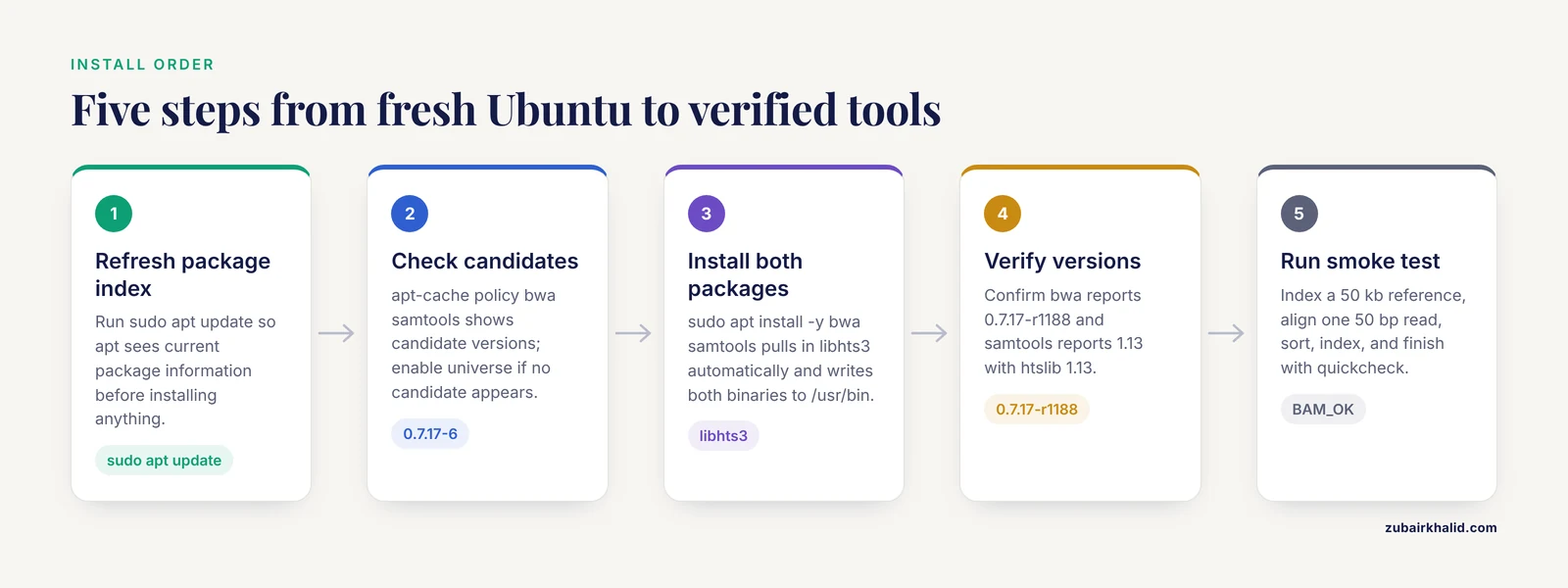
Follow the five steps in order. On a normal connection the whole process takes under five minutes.
Step 1: Refresh the Package Index
sudo apt updateExpected output (trimmed):
Hit:1 http://archive.ubuntu.com/ubuntu jammy InRelease
Hit:2 http://archive.ubuntu.com/ubuntu jammy-updates InRelease
Hit:3 http://security.ubuntu.com/ubuntu jammy-security InRelease
Reading package lists... Done
Building dependency tree... Done
Reading state information... Done
All packages are up to date.
apt update downloads the package index, the catalog of available versions, not the software itself. Run it before every install or upgrade so apt sees current information.
Step 2: Check That Ubuntu Can See the Packages
apt-cache policy bwa samtoolsExample from Ubuntu 22.04 LTS (the numbers after the hyphens are packaging revisions that can differ between point releases):
bwa:
  Installed: (none)
  Candidate: 0.7.17-6
  Version table:
     0.7.17-6 500
        500 http://archive.ubuntu.com/ubuntu jammy/universe amd64 Packages
samtools:
  Installed: (none)
  Candidate: 1.13-8build1
  Version table:
     1.13-8build1 500
        500 http://archive.ubuntu.com/ubuntu jammy/universe amd64 Packages
Both packages live in the universe repository, Ubuntu's community-maintained software collection. Standard desktop and server installs enable universe by default. Minimal images, some cloud images, and some containers do not. If the output shows no candidate versions, or the next step fails with E: Unable to locate package bwa, enable universe and refresh again:
sudo add-apt-repository universe
sudo apt update
If the shell reports sudo: add-apt-repository: command not found, install the helper first:
sudo apt install -y software-properties-commonStep 3: Install the Packages
sudo apt install -y bwa samtoolsExpected output (trimmed, sizes vary between releases):
Reading package lists... Done
Building dependency tree... Done
Reading state information... Done
The following additional packages will be installed:
  libhts3
The following NEW packages will be installed:
  bwa libhts3 samtools
0 upgraded, 3 newly installed, 0 to remove and 0 not upgraded.
Need to get 2,014 kB of archives.
After this operation, 7,236 kB of additional disk space will be used.
Setting up libhts3:amd64 (1.13-8build1) ...
Setting up bwa (0.7.17-6) ...
Setting up samtools (1.13-8build1) ...
Processing triggers for man-db (2.10.2-1) ...
The -y flag answers yes to the confirmation prompt, which keeps the command usable in scripts. bwa depends only on base libraries Ubuntu already provides. samtools brings libhts3, the shared HTSlib runtime. apt installs both executables into /usr/bin, registers their man pages, and records everything in the package database for later upgrades or removal.
Step 4: Verify the Installation
Check that the binaries run and report their versions:
bwa 2>&1 | grep -m1 Version
samtools --version
which bwa samtools
Expected output:
Version: 0.7.17-r1188
samtools 1.13
Using htslib 1.13
Copyright (C) 2021 [Genome Research](/blog/guides/genome-research) Ltd.
/usr/bin/bwa
/usr/bin/samtools
Three details matter here. The bwa version string 0.7.17-r1188 identifies the exact upstream build. The samtools output reports the HTSlib build next to the samtools version, here both 1.13, and the copyright year tracks the release year so it will differ on newer versions. Running bare bwa prints usage to standard error and exits with code 1, which is why the command redirects stderr with 2>&1 before grepping.
Confirm what the package database recorded:
apt list --installed 2>/dev/null | grep -E '^(bwa|samtools)/'bwa/jammy,now 0.7.17-6 amd64 [installed]
samtools/jammy,now 1.13-8build1 amd64 [installed]Step 5: Run a Smoke Test Alignment
A tool that installs cleanly can still fail at real work. This test creates a tiny reference genome in FASTA format (plain text with a > header line followed by the sequence), indexes it, aligns one read, and produces the sorted BAM and QC summary that real analyses produce. Ubuntu ships python3, so no extra installs are needed.
Create and index a 50 kb random reference:
mkdir -p ~/bwa_smoketest && cd ~/bwa_smoketest
python3 - <<'PY' > ref.fa
import random
random.seed(42)
s = ''.join(random.choice('ACGT') for _ in range(50000))
print('>chr1')
print(s)
PY
bwa index ref.fa
The index step prints progress and finishes with lines like these:
[bwa_index] Pack FASTA... 0.00 sec
[bwa_index] Construct BWT for the packed sequence...
[bwa_index] Construct SA from BWT and Occ...
[main] Version: 0.7.17-r1188
[main] CMD: bwa index ref.fa
bwa index creates five files alongside the FASTA:
ls ref.fa*
ref.fa  ref.fa.amb  ref.fa.ann  ref.fa.bwt  ref.fa.pac  ref.fa.sa
The .bwt file holds the Burrows-Wheeler transform and the other four files support the search. Keep all six files together permanently.
Generate one 50 bp read taken directly from position 1001 of that reference, so it must align perfectly, with quality score Q40 on every base:
python3 - <<'PY' > r1.fq
seq = open('ref.fa').read().split()[3]
print('@read1')
print(seq[1000:1050])
print('+')
print('I' * 50)
PY
bwa mem ref.fa r1.fq > aln.sam
bwa mem writes alignment records to standard output, which the redirect captures in aln.sam, and progress to standard error:
[M::bwa_idx_load_from_disk] read 0 ALT contigs
[M::process] read 1 sequences (50 bp)...
[M::mem_process_seqs] Processed 1 reads in 0.000 CPU sec, 0.000 real sec
[main] Version: 0.7.17-r1188
[main] CMD: bwa mem ref.fa r1.fq
Inspect the core alignment fields:
samtools view aln.sam | cut -f1-9read1 0 chr1 1001 60 50M * 0 0Reading left to right: the read name, the FLAG value 0 (a bitwise field here indicating a primary, forward-strand, unpaired alignment), the reference name chr1, the 1-based position 1001, the MAPQ of 60 (mapping quality, bwa mem's ceiling, reserved for unique placements), the CIGAR string 50M (a compact alignment description where M marks 50 aligned matching bases), and trailing asterisk and zero fields that stay empty for single-end reads.
Sort, index, and summarize:
samtools sort -o aln.sorted.bam aln.sam
samtools index aln.sorted.bam
samtools flagstat aln.sorted.bam
Expected flagstat output:
1 + 0 in total (QC-passed reads + QC-failed reads)
1 + 0 primary
0 + 0 secondary
0 + 0 supplementary
1 + 0 mapped (100.00% : N/A)
1 + 0 primary mapped (100.00% : N/A)
0 + 0 paired in sequencing
0 + 0 read1
0 + 0 read2
0 + 0 properly paired (N/A : N/A)
0 + 0 with itself and mate mapped
0 + 0 singletons (N/A : N/A)
0 + 0 with mate mapped to a different chr
0 + 0 with mate mapped to a different chr (mapQ>=5)
One read in, one read mapped, 100.00 percent. samtools sort read the SAM text and wrote BAM because the -o filename ends in .bam. samtools index created aln.sorted.bam.bai, the random-access index that viewers and region queries require. Finish with an integrity check:
samtools quickcheck aln.sorted.bam && echo BAM_OKBAM_OKquickcheck verifies the header and end-of-file marker in milliseconds. When every command above ran clean, the installation is verified end to end.
What apt Installed on Your System
The install touched more than two executables, and knowing the layout helps later troubleshooting:
- /usr/bin/bwa and /usr/bin/samtools, the command-line programs.
- libhts3, the HTSlib shared library under /usr/lib/x86_64-linux-gnu, used by samtools and by bcftools once you install it.
- Man pages, readable with
man bwaandman samtools. - Documentation under /usr/share/doc/bwa and /usr/share/doc/samtools.
Inspect any package further with:
dpkg -L samtools | grep bin
apt show samtools
dpkg -L lists every file the package installed, and apt show prints the description, version, dependencies, and upstream homepage.
Two related packages are worth adding for real work:
sudo apt install -y bcftools tabixbcftools calls variants from alignments and is built on the same HTSlib. tabix provides the bgzip and tabix utilities, which compress and index coordinate-sorted text files such as VCF. The samtools-test package, also in universe, ships example SAM and BAM files that are handy for practicing commands before your own data arrives.
Core BWA and SAMtools Commands
BWA ships a small set of subcommands: bwa index builds the reference index, bwa mem aligns modern reads, and bwa aln with samse or sampe plus bwa bwasw are legacy modes for very short or long reads from earlier eras. Reads of roughly 70 bases and longer, which covers essentially all current Illumina-style data, belong to bwa mem. SAMtools follows the same subcommand pattern with view, sort, index, flagstat, stats, depth, mpileup, and quickcheck, each with its own man page.
| Command | What it does | Key options |
|---|---|---|
| , - | , - | , - |
bwa index ref.fa | Builds the five index files for a reference | Reference must be plain, uncompressed FASTA |
bwa mem ref.fa r1.fq.gz r2.fq.gz | Aligns reads 70 bp and longer, paired or single-end | -t threads, -R read group, -k minimum seed length (default 19) |
bwa aln + samse/sampe | Legacy route for very short reads | Rarely needed with modern data |
samtools view | Converts and filters SAM, BAM, CRAM | -b BAM output, -h keep header, -f/-F flag filters, -q minimum MAPQ |
samtools sort | Sorts by coordinate, writes BAM or CRAM | -o output, -@ threads, -m memory per thread (default 768 MiB), -T temp prefix |
samtools index | Builds .bai or .csi random-access index | Input must be coordinate-sorted |
samtools flagstat | Category-by-category QC counts | -@ threads for large files |
samtools stats | Detailed QC statistics | Complements flagstat for depth and quality distributions |
samtools depth | Per-base read depth | -a include zero-coverage bases, -r region |
samtools quickcheck | Fast header and EOF integrity check | Exits nonzero on corrupt files |
A Production-Ready Alignment Command
This pattern is the workhorse for paired-end Illumina data. It takes gzipped FASTQ directly, aligns with eight threads, attaches a read group, sorts on the fly, and never writes the huge intermediate SAM to disk:
bwa mem -t 8 -R '@RG\tID:S1_L001\tSM:S1\tPL:ILLUMINA' ref.fa sample_R1.fq.gz sample_R2.fq.gz 2> bwa_S1.log | samtools sort -@ 4 -m 2G -o S1.sorted.bam -
samtools index S1.sorted.bam
samtools flagstat S1.sorted.bam > S1.flagstat.txt
Parameter by parameter:
-t 8gives bwa mem eight alignment threads. Match this to the cores you actually own.-Rattaches a read group, a header record that tags every read with its sample and sequencing metadata. ID is a unique unit identifier, SM is the sample name that downstream tools such as variant callers group reads by, and PL names the sequencing platform. The\tsequences inside the single quotes become real tab characters in the header. Omitting SM is one of the most expensive mistakes in pipeline design because variant callers refuse or mislabel ungrouped reads.2> bwa_S1.logsends bwa's progress output to a log file instead of mixing it into the pipe.- The trailing
-tells samtools sort to read from standard input. Forgetting it is a classic hang. -@ 4gives the sorter four compression threads and-m 2Gcaps memory at 2 GB per thread. The sorter spills to temporary files beyond the cap, and-Tredirects those files if the default location is too small.- bwa mem reads gzip-compressed FASTQ without extra flags.
For a human-sized reference, expect the index build to take tens of minutes and produce several gigabytes of files. Index once, store the files beside the FASTA, and reuse them for every sample.
Managing Versions, Upgrades, and Reproducibility
Check for available updates:
sudo apt update
apt list --upgradable 2>/dev/null | grep -E '^(bwa|samtools)/'
If lines appear, upgrade just these two packages:
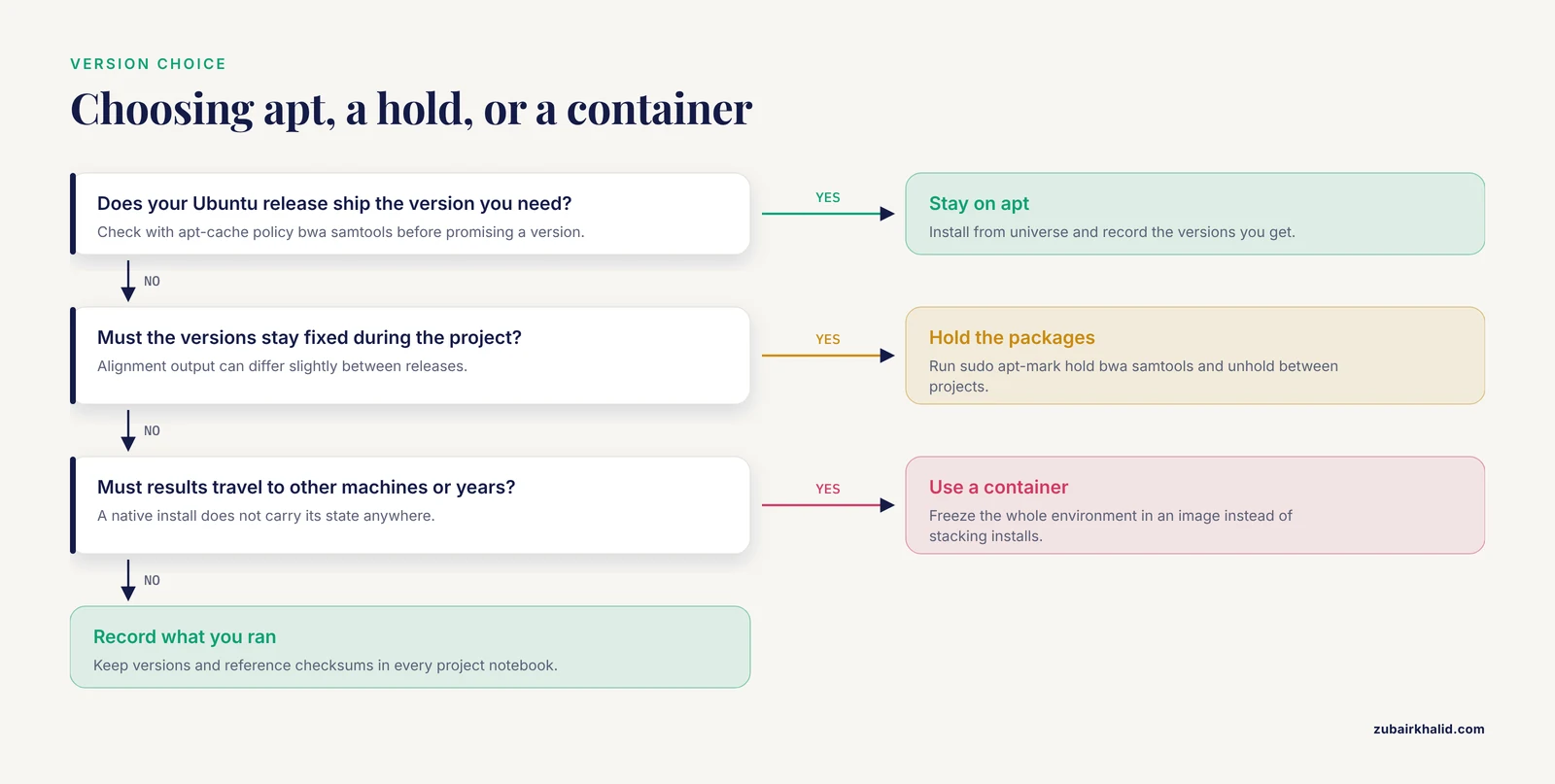
sudo apt install --only-upgrade bwa samtoolsTo freeze versions during an active analysis, hold them:
sudo apt-mark hold bwa samtools
apt-mark showhold
A hold blocks upgrades until you release it with apt-mark unhold. Unhold between projects so security fixes resume.
Record exact versions in every project notebook, because alignment output can differ slightly between releases and methods sections are expected to name versions:
bwa 2>&1 | grep -m1 Version
samtools --version | head -n 2
dpkg-query -W -f='${Package} ${Version}\n' bwa samtools
The dpkg-query form prints the precise packaging versions to cite:
bwa 0.7.17-6
samtools 1.13-8build1
Reproducibility has a spectrum. On one machine, held apt versions plus recorded reference checksums get you a long way. Across machines and over years, the field standard is to freeze entire environments. Bioinformatics-focused container registries publish images with domain metadata so the same tool versions can be redeployed anywhere [2], Ubuntu-based images such as Dugong standardize thousands of tools in one reproducible layer [3], and workflow platforms pin tool versions inside the pipeline definition, which is how the COMBAT-TB Workbench delivers consistent analyses behind a single easy install [4]. Regulated environments go furthest, requiring that analysis procedures be evaluated for consistency and reproducibility with documented software handling [5]. Native apt installs sit at the simple end of that spectrum, which is fine for learning and routine analysis as long as you record what you ran.
Common Mistakes and Limitations
These are the failures that show up repeatedly when people install BWA and SAMtools on Ubuntu with apt, with the exact symptoms and fixes.
- Skipping
sudo apt updateon a fresh system. The classic symptom isE: Unable to locate package bwaon a machine that has never fetched an index, or a candidate version older than the archive actually offers. Run apt update before installing, every time, and enable universe if the error persists. - Assuming apt serves the newest upstream release. Ubuntu freezes versions at release time. If a published protocol requires samtools 1.19 and your release ships 1.13, apt cannot provide it. Check with
apt-cache policybefore promising a version, and switch to containers or a source build for exact versions rather than stacking install methods on one machine. - Collecting multiple copies of the tools. After a later conda install or manual build,
which -a bwa samtoolscan reveal several binaries, and the first one in PATH wins silently. The symptom is a recorded version that disagrees with what dpkg reports. Keep one install method per machine and remove duplicates. - Indexing the wrong file type.
bwa indexrequires plain, uncompressed FASTA. Pointing it at a gzipped FASTA or a FASTQ produces a broken index or a parse error. The gzip convenience applies to input FASTQ in bwa mem, never to the reference. Fix: gunzip the reference, index it, and keep the plain file. - Separating a reference from its index. The index files record the FASTA they were built from. Move or rename ref.fa without its five companions and bwa fails with a message like
[E::bwa_idx_load_from_disk] fail to locate the index files. Keep the six files together and rerunbwa indexafter any edit to the FASTA. - Dropping the trailing dash in a pipe.
bwa mem ref.fa r1.fq | samtools sort -o out.bamwith no input argument sits forever waiting on standard input. End piped sort commands with-. - Indexing an unsorted BAM.
samtools indexon a file that was never coordinate-sorted fails with an error about unsorted positions. Sort first, then index. - Writing giant SAM files to disk. A deep sequencing run dumped to SAM can consume an order of magnitude more space than the equivalent BAM and can fill a volume mid-run, which corrupts outputs. Pipe bwa straight into samtools sort and watch space with
df -hduring your first runs at each new scale. - Running analyses as root. sudo belongs to installation. Analyses run as root create root-owned files that later jobs cannot overwrite and bypass the permissions that protect shared systems.
- Treating an apt install as a reproducibility guarantee. apt gives one machine one consistent, signed state at one moment. It does not carry that state to other machines or preserve it for years. Record versions, checksum references with
md5sum, and move to containers or workflow platforms when results must be portable or validated [2],, [5].
The apt route has three structural limits that follow from how Ubuntu packaging works. Version choice is fixed by your Ubuntu release. Updates within a release are limited to security and critical fixes. Nothing about a native install travels, so every new machine repeats the process. None of these block learning or routine analysis, but they define when to graduate to containers and workflow engines.
Practical Linux for Bioinformatics: Tips That Save Time
The Linux commands bioinformatics relies on are few, and drilling them until they are automatic pays off daily.
- Built-in help.
bwawith no arguments prints usage and the version to standard error,bwa memprints options specific to the mem algorithm,samtoolswith no arguments lists every subcommand, andsamtools help viewdocuments the view flags. The man pages installed by apt are thorough. - History and completion. Tab completion expands command and file names, and Ctrl-R searches your shell history interactively.
history | tail -n 20is often the fastest way to recover the exact command line you used yesterday. - Exit codes.
echo $?prints the exit code of the last command, where 0 means success. Guard pipelines with checks likesamtools quickcheck aln.sorted.bam && echo OKso failures surface immediately instead of propagating. - Long jobs belong in tmux. Install it from the same archive with
sudo apt install -y tmux, start a session withtmux new -s align, launch the alignment, and detach with Ctrl-b then d. If your SSH connection drops, the job keeps running, andtmux attach -t alignbrings it back. - Keep a methods log inside every project directory:
md5sum ref.fa > ref.fa.md5
bwa 2>&1 | grep -m1 Version >> versions.txt
samtools --version | head -n 2 >> versions.txt- Use a simple directory layout. Keep refs for reference FASTA and index files, raw for original FASTQ, aligned for BAM and BAI files, and qc for flagstat and stats output, with one subdirectory per sample in raw and aligned.
- Discover related tooling from the same archive with
apt search bamorapt search aligner, and read descriptions withapt show NAMEbefore installing.
Next Steps After Installation
With BWA and SAMtools verified, the usual next installs are bcftools and tabix, which extend the same HTSlib foundation into variant calling and indexed compressed text files. From there, pick the direction that matches your goal. If you want managed, versioned pipelines with a web interface, workflow platforms provide that layer, and integrated systems such as the COMBAT-TB Workbench show how the IRIDA platform and the Galaxy workflow engine combine behind one Docker-based install [4]. If you want portable environments for servers or clusters, container images are the standard, from curated bioinformatics registries [2] to all-in-one Ubuntu-based images like Dugong [3]. If you want to stay on bare apt, that is a perfectly good home base for learning and routine work, provided you keep recording versions and checksums as you go.
Frequently Asked Questions
Which Ubuntu releases support installing BWA and SAMtools with apt?
Any supported Ubuntu release works, including 20.04, 22.04, and 24.04 LTS, and Ubuntu inside WSL2 on Windows. Both packages live in the universe repository, which standard desktop and server installs enable by default. Minimal and container images sometimes ship without it, and Step 2 shows how to enable it.
Why does apt give me an older BWA version than the BWA website shows?
Ubuntu freezes package versions when a release ships and then applies only security fixes, so apt versions often trail upstream. Run apt-cache policy bwa to see what your release offers. If you need a specific upstream version, use a container image or a source build rather than mixing install methods on one machine.
What is libhts3 and why did apt install it with SAMtools?
libhts3 is the runtime package for HTSlib, the C library that reads and writes SAM, BAM, CRAM, VCF, and BCF files. SAMtools is built on HTSlib, so apt pulled the library in automatically as a dependency. You never call it directly, but samtools, version reports which HTSlib build it uses.
Do I need sudo to install BWA and SAMtools?
Yes, the apt route installs system-wide into /usr/bin and updates the package database, both of which require root. Without sudo rights, use a user-level method such as a conda environment in your home directory. On shared servers, ask the administrator to install the packages once for everyone.
How do I upgrade or remove BWA and SAMtools later?
Run sudo apt update and then sudo apt install, only-upgrade bwa samtools to upgrade just these two packages. Remove them with sudo apt purge bwa samtools and clean orphaned dependencies with sudo apt autoremove. To freeze versions during a project, hold them with sudo apt-mark hold bwa samtools.
Should I use bwa mem or bwa aln for my reads?
Use bwa mem for modern reads of about 70 bases and longer, which covers most Illumina paired-end data. bwa aln with samse or sampe is the legacy route for very short reads and is rarely needed today. For long PacBio or Oxford Nanopore reads, BWA is the wrong tool and a dedicated long-read aligner is the standard choice.
Where should I keep reference genomes and BWA indexes?
Keep each reference FASTA and its five index files (.amb, .ann, .bwt, .pac, .sa) together in a dedicated directory such as ~/refs, one subdirectory per genome. Record an md5sum of the FASTA and the bwa version used for the index. If you move or edit the FASTA, rerun bwa index rather than shuffling index files around.
Does this method work on Windows or macOS?
On Windows, yes, through WSL2 with an Ubuntu distribution, using exactly the commands in this guide. On macOS, apt does not exist, so use a macOS package manager or an Ubuntu virtual machine or container. The tools behave the same once installed.
Sources
- Installing, maintaining, and using a local copy of BLAST for intranet and workstation use.
- BioShaDock: a community driven bioinformatics shared Docker-based tools registry.
- Dugong: a Docker image, based on Ubuntu Linux, focused on reproducibility and replicability for bioinformatics analyses.
- The COMBAT-TB Workbench: Making Powerful Mycobacterium tuberculosis Bioinformatics Accessible.
- Moving analytical ultracentrifugation software to a good manufacturing practices (GMP) environment.