How to Find a Gene Sequence on NCBI
By Dr. Zubair Khalid, DVM, MS, PhD ·

By the end of this guide you will be able to locate any gene of interest on NCBI, distinguish between its genomic DNA, mRNA, and protein sequences, download the correct nucleotide record in FASTA or GenBank format, verify the sequence with BLAST, and retrieve homologous or bulk sequence data using both the web interface and command-line tools. You need a web browser for the basic workflow. For the command-line sections you need the NCBI E-utilities and Datasets command-line tools installed, plus a terminal with internet access.
The National Center for Biotechnology Information (NCBI) hosts the largest public collection of nucleotide and protein sequences in the world. Knowing how to find a gene sequence on NCBI is a foundational skill for primer design, phylogenetic analysis, comparative genomics, cloning, and variant interpretation. Researchers routinely pull sequences from NCBI to design PCR primers for pathogen detection [1], to build phylogenetic trees from marker genes [2], to compare homologs across species, and to identify bacterial isolates by 16S rRNA sequencing [4]. This guide walks through every step with real URLs, commands, and expected outputs.
Understanding NCBI Databases
NCBI is not a single database. It is a collection of interconnected databases, each serving a different purpose. Knowing which database to search is the first step in learning how to use NCBI effectively.
The Gene database is the entry point for gene-level information. Each record represents a single gene from a single organism and carries a stable Gene ID (a numeric identifier). The Gene record links to the underlying nucleotide sequences, protein sequences, phenotypes, publications, and genomic context. A parser built on this database has been used to extract exon and intron structures across all annotated eukaryotic genes, demonstrating the depth of structured data available [5].
The Nucleotide database (also called Nucleotide or CoreNucleotide) stores the actual DNA and RNA sequences. Records here carry accession numbers (for example NM_007294) and are divided into three divisions:
- GenBank sequences submitted by individual researchers. These are not curated by NCBI staff.
- RefSeq (Reference Sequence) records produced and maintained by NCBI. These are curated, reviewed, and updated.
- TPA (Third Party Annotation) sequences assembled from existing data by third parties.
The Protein database stores amino acid sequences linked to coding regions within nucleotide records.
BLAST (Basic Local Alignment Search Tool) compares a query sequence against a database to find similar sequences. It is both a discovery tool and a verification tool.
NCBI Datasets is a newer resource designed for streamlined retrieval of gene, genome, and taxon data packages through web interfaces, command-line tools, and APIs [6].
SRA (Sequence Read Archive) stores raw high-throughput sequencing reads.
dbSNP stores single nucleotide polymorphisms and short variants. Researchers have drawn variant records from dbSNP and evaluated their pathogenicity using downstream bioinformatics tools [7].
Prerequisites
For the web-based workflow you need only a modern web browser. For the command-line workflow you need:
- The NCBI E-utilities command-line tools (available from https://www.ncbi.nlm.nih.gov/books/NBK179288/)
- The NCBI Datasets command-line tool (available from https://www.ncbi.nlm.nih.gov/datasets/docs/command-line/)
- A terminal (macOS, Linux, or Windows with WSL)
- A text editor or sequence viewer for inspecting downloaded files
How to Find a Gene Sequence on NCBI Step by Step
The following walkthrough uses the human BRCA1 gene as a running example. The same steps apply to any gene in any organism.
Step 1: Search the Gene Database
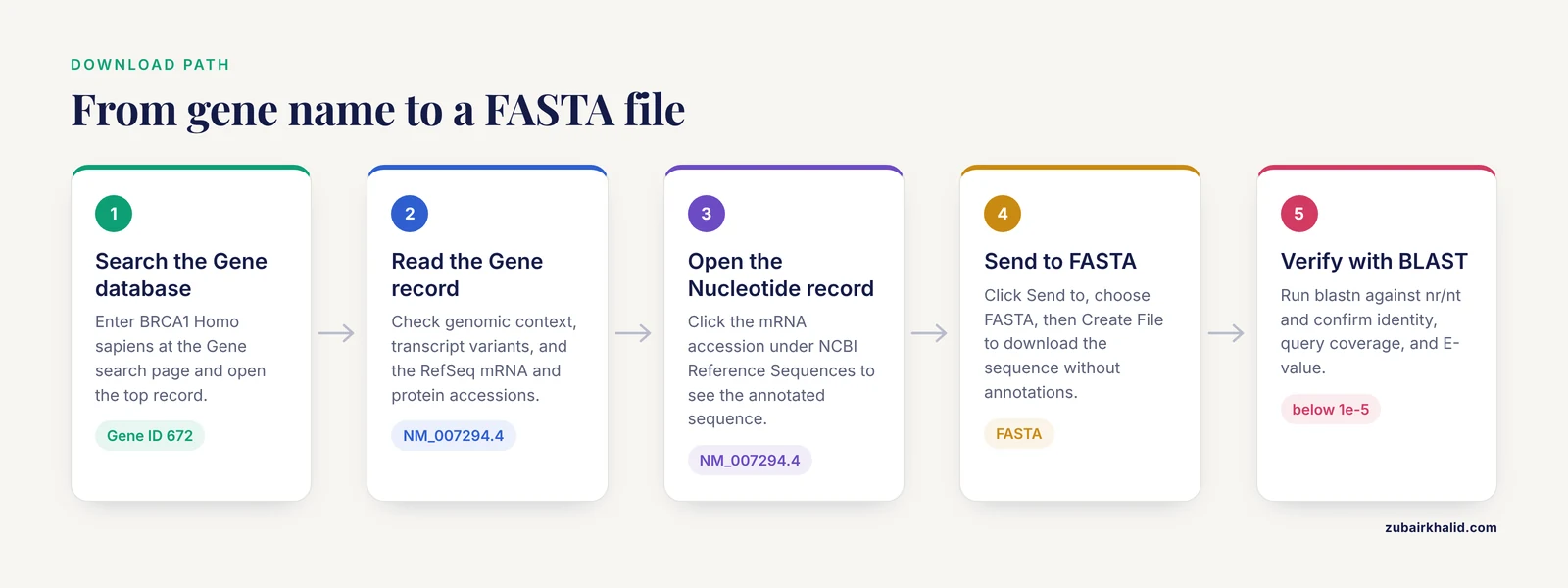
Open your browser and go to:
https://www.ncbi.nlm.nih.gov/geneIn the search box, type the gene name followed by the organism name:
BRCA1 Homo sapiensPress Enter. You will see a results page listing matching genes. The top result should show:
- Gene ID: 672
- Symbol: BRCA1
- Full Name: BRCA1 DNA repair associated
- Organism: Homo sapiens (human)
If multiple results appear, use the species filter on the right sidebar to narrow to your organism of interest. For prokaryotic genes, include the strain name if it matters for your work, since different strains can carry different alleles.
Step 2: Read the Gene Record
Click on the gene name to open the full Gene record. The record contains several sections you should review before downloading any sequence:
Genomic context shows the chromosome, cytogenetic band, and coordinates. BRCA1 sits on chromosome 17q21.31. This section confirms you have the right gene and tells you where it lives in the genome.
Summary provides a one-paragraph functional description written by NCBI curators or imported from model organism databases.
Genomic region, transcripts, and products shows the exon-intron structure graphically. For BRCA1 you will see multiple transcript variants. Each variant represents a different splice isoform.
NCBI Reference Sequences (RefSeq) lists the curated mRNA and protein accessions. For BRCA1 transcript variant 1, the mRNA accession is NM_007294 and the protein accession is NP_009225.
RefSeq Status indicates the curation level:
- REVIEWED: A team of experts has reviewed the record.
- VALIDATED: The annotation is based on evidence from multiple sources.
- PROVISIONAL: The annotation is automated and has not been expert-reviewed.
- PREDICTED: The annotation is computational with limited experimental support.
Always prefer REVIEWED or VALIDATED records when available. PREDICTED records may contain errors.
Step 3: Navigate to the Nucleotide Sequence
From the Gene record, scroll to the NCBI Reference Sequences (RefSeq) section. Under mRNA and Protein(s) you will see entries like:
NM_007294.4 → NP_009225.1Click on the mRNA accession (NM_007294.4). This opens the Nucleotide database record. You now see the full annotated sequence with features such as CDS (coding sequence), exon boundaries, translation, and publication references.
Alternatively, from the Gene record, click the GenBank link under Genomic region to view the entire genomic contig containing the gene, with the gene boundaries annotated.
Step 4: Download the Sequence
At the top right of the Nucleotide record, click Send to. A dialog appears with these options:
- Complete Record (full GenBank format with annotations)
- Coding Sequence (CDS only, in FASTA)
- FASTA (nucleotide sequence only, no annotations)
Choose FASTA for a clean sequence file, or Complete Record for a GenBank file with full annotations. Click Create File to download.
The downloaded FASTA file looks like this:
>NM_007294.4 Homo sapiens BRCA1 DNA repair associated (BRCA1), transcript variant 1, mRNA
ATGGATTTATCTGCTCTTCGCGTTGAAGAAGTACAAAATGTCATTAATGCTATGCAGAAA
ATCTTAGAGTGTCCCATCTGGTAAGTCAGCACAAGAGTGTATTAATTTGGGATTCCTATG
...
The header line (starting with >) contains the accession number, version, organism, gene symbol, and description. The sequence follows in lines of 60 or 70 bases.
A GenBank file looks different. It includes a header block with metadata, a features table listing CDS positions, source organism, publications, and the sequence at the bottom. GenBank format is preferred when you need to know where exons, regulatory elements, or SNPs sit relative to the sequence.
Step 5: Verify the Sequence with BLAST
Before using any downloaded sequence for primer design, cloning, or phylogenetic analysis, verify its identity with BLAST. Go to:
https://blast.ncbi.nlm.nih.gov/Click Nucleotide BLAST (blastn). Paste your FASTA sequence into the query box or upload the file. Under Database choose Nucleotide collection (nr/nt) or RefSeq Genome Database. Under Program selection choose Megablast for near-identical sequences or Discontiguous megablast for more distant matches.
Click BLAST. Results appear within seconds to minutes. Key columns to check:
- Identity: The percentage of aligned bases that match. For a correct BRCA1 mRNA match against the human genome, expect 100%.
- Query coverage: The percentage of your query that aligns to the subject. Expect near 100% for a full-length match.
- E-value: The expected number of random matches of this quality in a database of this size. Values below 1e-5 are generally considered significant.
- Accession: The best hit should be NM_007294 (the same accession you downloaded) or a closely related isoform.
If your best hit is not the gene you expected, you may have downloaded the wrong record or the sequence may be from a different organism.
BLAST is also used to confirm the identity of newly sequenced PCR products. In one study of P. multocida, researchers amplified the ompH gene by PCR, then used BLAST at NCBI to confirm 99% nucleotide homology to the vaccine strain and reference isolates [8]. Similarly, bacterial 16S rRNA sequences from cultured isolates are routinely compared against GenBank using BLAST to find the closest type strain and assign species identity [4].
Step 6: Find Homologous Sequences
To find orthologs (the same gene in other species) or paralogs (related genes within the same species), use the BLAST results from Step 5. Filter results by organism using the Organism field in the results table. Click on interesting hits to open their Nucleotide records, then download them individually.
For a systematic approach, return to the Gene record and look for the Homology section or use the Orthologs table (available for well-annotated genes). This lists curated orthologs in other species with their Gene IDs and RefSeq accessions.
To download multiple homologous sequences for multiple sequence alignment, collect the accession numbers and use the batch download methods described in Steps 7 and 8. Researchers routinely retrieve homologous gene sequences from NCBI for phylogenetic reconstruction. In one study, atp-1 gene sequences from 29 plant species were retrieved from NCBI, aligned with ClustalW, and used to build a maximum likelihood phylogenetic tree in MEGA11 [2]. In another study, metallothionein gene sequences from multiple Poaceae species were obtained from NCBI and compared using BLAST to identify conserved regions [3].
Step 7: Retrieve Sequences in Bulk with NCBI Datasets
For large-scale retrieval of gene sequences, genomes, or metadata, use NCBI Datasets. This resource was designed to provide scalable access to biological sequences and annotations following FAIR (Findable, Accessible, Interoperable, and Reusable) data principles [6].
Web interface:
https://www.ncbi.nlm.nih.gov/datasets/Search for a taxon or gene. Use the download buttons to retrieve data packages.
Command-line tool:
Install the datasets tool, then run:
datasets download gene gene-id 672 --filename brca1_gene.zipThis downloads a ZIP file containing the BRCA1 gene record with sequence data, annotation, and metadata. Unzip and inspect:
unzip brca1_gene.zip
cat ncbi_dataset/data/gene.json
To download all genes for an organism:
datasets download gene taxon "human" --filename human_genes.zipTo download by gene symbol:
datasets download gene symbol BRCA1 --taxon "human" --filename brca1_by_symbol.zipThe datasets tool also supports filtering by chromosome, gene type, and other attributes. Run datasets download gene, help for the full option list.
Step 8: Command-Line Retrieval with E-utilities
E-utilities are a set of nine URL-based programs that access NCBI databases programmatically. The command-line versions (esearch, efetch, einfo, and others) are available as standalone tools.
Search for a gene and retrieve its Gene ID:
esearch -db gene -term "BRCA1[Gene Name] AND Homo sapiens[Organism]"Expected output:
672Retrieve the mRNA sequence in FASTA format:
efetch -db nuccore -id NM_007294 -format fastaExpected output:
>NM_007294.4 Homo sapiens BRCA1 DNA repair associated (BRCA1), transcript variant 1, mRNA
ATGGATTTATCTGCTCTTCGCGTTGAAGAAGTACAAAATGTCATTAATGCTATGCAGAAA
...
Retrieve the sequence in GenBank format with full annotations:
efetch -db nuccore -id NM_007294 -format gbSearch Nucleotide directly and download all matching RefSeq mRNAs:
esearch -db nucleotide -term "BRCA1[Gene Name] AND Homo sapiens[Organism] AND srcdb_refseq[PROP]" | efetch -format fasta > brca1_refseq_mrna.fastaRetrieve a protein sequence:
efetch -db protein -id NP_009225 -format fastaChain esearch and efetch for batch downloads:
esearch -db nucleotide -term "16S [ribosomal RNA](/knowledge/bioinformatics/ribosomal-rna-structure-taxonomic-profiling)[Title] AND Bacillus subtilis[Organism]" | efetch -format fasta > bsubtilis_16s.fastaThis retrieves all 16S rRNA sequences for Bacillus subtilis in one command. The 16S rRNA gene is a standard molecular marker for bacterial identification, and sequences are routinely retrieved from GenBank for phylogenetic placement of newly isolated strains [9].
Respect the API rate limit. NCBI recommends no more than 3 requests per second without an API key, and 10 requests per second with an API key. Register for a free API key at https://www.ncbi.nlm.nih.gov/account/ and pass it with the -api_key flag.
Key NCBI Databases and Tools
| Database or Tool | URL Path | Primary Use | Output Format |
|---|---|---|---|
| Gene | /gene | Find a gene by name, symbol, or ID | Gene record with links |
| Nucleotide | /nuccore | Retrieve DNA or RNA sequences | FASTA, GenBank |
| Protein | /protein | Retrieve amino acid sequences | FASTA, GenBank |
| BLAST | /blast | Find similar sequences, verify identity | Alignment scores and hits |
| Datasets | /datasets | Bulk download genes, genomes, taxa | ZIP, JSON, TSV |
| SRA | /sra | Raw sequencing reads | SRA, FASTQ |
| dbSNP | /snp | Single nucleotide polymorphisms | VCF, tabular |
| Genome Data Viewer | /genome/gdv | Visualize genomic context and annotations | Graphical browser |
Tips for Finding Gene Sequences on NCBI
Use field tags to narrow searches. In the Gene database, BRCA1[Gene Name] searches only the gene symbol field, while BRCA1[All Fields] searches everything. Adding Homo sapiens[Organism] prevents hits from other species. In Nucleotide, srcdb_refseq[PROP] restricts results to RefSeq records only.
Use quotation marks for exact phrases. Searching "breast cancer type 1 susceptibility protein" finds that exact phrase, while the same words without quotes return records containing any of those words.
Check the accession version number. Accession numbers end with a version (for example NM_007294.4). The version increments when the sequence or annotation is updated. Always record the full accession with version in your lab notebook or methods section. If you cite NM_007294.3 in a paper and version .4 has since been released, readers may find a different sequence.
Prefer RefSeq over GenBank for reference work. RefSeq records are curated by NCBI and updated as new evidence becomes available. GenBank records are author-submitted and are not revised by NCBI. For primer design, cloning, or any application where accuracy matters, start with RefSeq.
Look at the transcript variants. Many genes have multiple mRNA isoforms produced by alternative splicing. The Gene record shows all variants under NCBI Reference Sequences. Choose the variant that matches your biological question. For BRCA1, transcript variant 1 (NM_007294.4) encodes the full-length 1863-amino-acid protein.
Use the Gene database as your starting point. Even if you know the accession number, opening the Gene record first gives you context: chromosome location, alternative names, phenotype associations, interacting proteins, and links to related records. This context prevents errors.
Save your search. Click Save Search on any NCBI results page. NCBI will email you when new records matching your query are added. This is useful for tracking new sequences from your organism of interest.
Record the retrieval date. NCBI databases change daily. Note the date you downloaded each sequence so that others can reproduce your analysis.
Use the Gene database to find pseudogenes. Pseudogenes are annotated in the Gene database and flagged in the record. If your BLAST hit lands on a pseudogene, it will not produce a functional protein. Always check the Gene record to confirm you are working with a functional gene.
For bacterial genes, specify the strain. Different strains of the same species can carry different alleles or even different gene complements. When searching for a bacterial gene, include the strain name (for example hlyA Escherichia coli O157:H7) to get the exact sequence variant you need. Researchers studying the yeh fimbrial gene cluster in E. coli O157:H7 searched specifically for that serotype to identify serotype-specific genetic markers [10].
Common Mistakes and Limitations
Downloading mRNA when you need genomic DNA. An mRNA record (NM_ prefix) contains only the spliced exons with introns removed. A genomic record (NG_ prefix for RefSeq, or a chromosome accession) contains the full gene including introns and regulatory regions. If you need the promoter, introns, or untranslated regions for genomic PCR, you need the genomic sequence, not the mRNA.
Downloading the wrong strand. Genes on the reverse strand appear as the reverse complement in the chromosome sequence. If you copy a region from a genomic contig, verify the orientation. The Gene record shows the strand. Use the Reverse complement function in your sequence editor if needed.
Ignoring alternative splice variants. If you design primers to exon sequences that are not present in all isoforms, you may amplify only one variant. Check the exon structure of all transcript variants before designing primers. This matters for genes with many isoforms.
Using unverified or low-quality sequences. Not all sequences in GenBank are accurate. A systematic evaluation of four molecular markers (18S, ITS, 28S, and coxI) downloaded from NCBI for all available Heterodera species found that while the rate of obviously erroneous sequences was low, all four markers failed to differentiate at least one species pair, and some sequences contained errors that affected downstream analysis [11]. Always verify sequences with BLAST and check the source publication before relying on them for taxonomic or diagnostic work.
Assuming the reference genome is complete or correct. Some genomic regions are difficult to assemble due to segmental duplications, high polymorphism, or structural variation. The human defensin gene cluster at 8p23.1 is a well-documented example where segmental duplications and copy number variation led to misassemblies in the reference genome build, requiring manual clone-by-clone alignment to produce an improved assembly [12]. If your gene of interest lies in a duplicated or repetitive region, be aware that the reference sequence may not accurately represent all copies.
Not recording the accession number and version. Without the accession number and version, your work cannot be reproduced. Every published sequence analysis should cite the accession number, version, and retrieval date for each sequence used.
Confusing Gene ID with accession number. A Gene ID (for example 672) is a stable identifier for the gene entity. An accession number (for example NM_007294.4) identifies a specific sequence record. A gene may have multiple accession numbers (one per transcript variant, plus genomic and protein records). Always use accession numbers when downloading sequences.
Overlooking strain-level variation in bacteria. The same gene in different bacterial strains can have different sequences. If you are designing primers for a specific strain, retrieve the sequence from that strain, not from a generic species-level record. In one study, researchers designed primers for the hlyA gene of E. coli based on a specific strain sequence (BAU-MH4) published in NCBI-GenBank [1]. Using a different strain sequence could produce primers that fail to amplify the target.
Not considering repeat polymorphisms. Some genes contain tandem repeat regions (such as CAG or GGC repeats) that vary between individuals. When retrieving a gene sequence that contains repeat tracts, be aware that the reference sequence represents one allele. In studies of the androgen receptor gene, researchers extracted the complete sequence from NCBI and then genotyped the CAG and GGC repeat regions in patient samples to detect polymorphisms affecting treatment response [13]. The reference sequence alone does not capture this variation.
Using outdated sequences when newer versions exist. If a RefSeq record has been updated since you downloaded it, your analysis may be based on superseded data. Check the current version on NCBI before finalizing a manuscript or releasing a dataset.
Forgetting that predicted annotations may be wrong. PREDICTED RefSeq records (XP_ protein prefix, XM_ mRNA prefix) are computationally generated and may contain errors in exon boundaries, start codons, or reading frames. Whenever possible, use REVIEWED or VALIDATED records. For newly sequenced organisms, most annotations are predicted, so additional evidence (RNA-seq, homology) is needed to confirm gene models.
Assuming a single marker is sufficient for species identification. DNA barcoding studies have shown that no single molecular marker reliably differentiates all species in a group. In the Heterodera study cited above, the coxI marker showed the most utility but still failed to separate some species pairs, and the authors recommend combining multiple markers for robust species identification [11]. The same principle applies to any taxonomic or diagnostic application of sequences retrieved from NCBI.
Overlooking the need for experimental validation. Sequences retrieved from NCBI are computational representations. Primer binding sites, restriction sites, and protein-coding regions should be validated experimentally. In one study, researchers retrieved the astaxanthin synthetase gene (crtS) sequence from NCBI GeneBank to design primers for mutant strain analysis, then confirmed their results by PCR amplification and Sanger sequencing [14]. The NCBI sequence served as the reference, but the experimental data confirmed the actual gene structure in their strains.
Frequently Asked Questions
What is the difference between the NCBI Gene database and the Nucleotide database?
The Gene database provides curated gene-level information including genomic location, function, phenotype associations, and links to sequences. The Nucleotide database stores the actual DNA and RNA sequence records. Use Gene to find a gene and understand its biology, then follow the links to Nucleotide to download the raw sequence.
How do I download a gene sequence in FASTA format from NCBI?
Open the Nucleotide record for your gene, click Send to at the top right, select FASTA as the format, and click Create File. Alternatively, use the command efetch -db nuccore -id [accession] -format fasta to download directly to a file.
What is the difference between mRNA and genomic DNA sequences on NCBI?
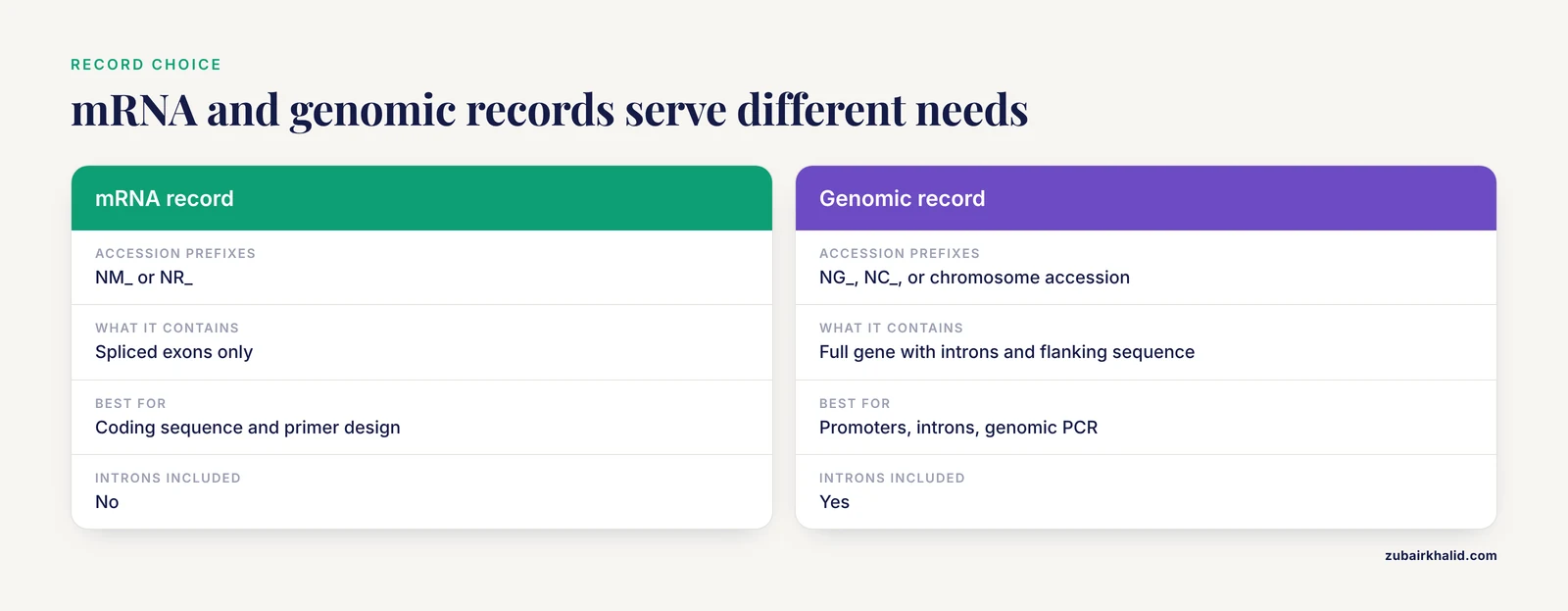
mRNA sequences (accessions starting with NM_ or NR_) contain only the spliced exons. Genomic DNA sequences (accessions starting with NG_, NC_, or chromosome-level accessions) contain the full gene with introns, untranslated regions, and flanking regulatory sequence. Choose based on whether you need the coding sequence or the full genomic context.
What is the difference between RefSeq and GenBank sequences?
RefSeq records are curated and maintained by NCBI staff. GenBank records are submitted by individual researchers and are not revised by NCBI. RefSeq accessions start with NM_, NR_, NP_, NG_, or NC_. GenBank accessions typically start with two letters followed by five or six digits. For reference-quality sequences, prefer RefSeq.
How do I find a gene sequence for a non-model organism on NCBI?
Search the Gene or Nucleotide database using the organism name as a filter. If no RefSeq record exists, look for GenBank submissions from research groups. Use BLAST with a homologous sequence from a related organism as the query to find matching sequences in the non-model organism. Check the Taxonomy browser to confirm the organism is represented in NCBI.
Can I use NCBI gene sequences to design PCR primers?
Yes. Retrieve the target sequence in FASTA format and use primer design software such as Primer3 to select primer pairs. Confirm that the primer sequences match only the target gene by running them through BLAST. Many published studies have used NCBI-GenBank sequences as the basis for primer design in pathogen detection and gene expression analysis.
How do I verify that the sequence I found is correct?
Run the sequence through BLAST against the appropriate database. The best hit should match the expected gene and organism with high identity and coverage. Check the RefSeq status (REVIEWED or VALIDATED is preferred). Compare the sequence to the source publication if one is cited. For critical applications, confirm by Sanger sequencing of your own PCR product.
How do I download multiple gene sequences at once from NCBI?
Use the NCBI Datasets command-line tool to download all genes for a taxon or a list of gene IDs. Alternatively, use E-utilities to chain an esearch (which returns multiple IDs) with an efetch (which downloads all matching records in one call). On the web, use the Send to feature with multiple records selected in the Nucleotide database.
Sources
- Find Out the Determination in Intestinal and Urinary Tract Infection by Detection Molecular for Gene Hlya
- Phylogenetic Study of Several Parasitic Plant Species Based on The atp-1 Gene Sequence
- Sequence Variation of Metallothionein (MT) Gene in Poaceae Family
- Identification and Phylogenetic Analysis of Bacterial Isolates from Litopenaeus vannamei Shrimp Culture System and Gut Environment Based on 16SrRNA Gene Sequence Data
- Identification of minimal eukaryotic introns through GeneBase, a user-friendly tool for parsing the NCBI Gene databank
- Exploring and retrieving sequence and metadata for species across the tree of life with NCBI Datasets
- Consideration of pathogenicity of nsSNVs in CDKN2A gene, as a new tumor marker for leukemia, using bioinformatics methods
- Sequence Homology and Epitope Prediction of 37 kDa Outer Membrane Protein H(ompH) Gene of Pasteurella Multocida Type B Isolate from Nusa Tenggara Timur (NTT)
- Assessment of phylogenetic affiliation using 16S rRNA gene sequence analysis for Pseudomonas aeruginosa in patients of lower respiratory tract infection
- Analysis of yeh Fimbrial Gene Cluster in Escherichia coli O157:H7 in Order to Find a Genetic Marker for this Serotype
- Reliability and Utility of Standard Gene Sequence Barcodes for the Identification and Differentiation of Cyst Nematodes of the Genus Heterodera.
- Polymorphic segmental duplications at 8p23.1 challenge the determination of individual defensin gene repertoires and the assembly of a contiguous human reference sequence
- The effect of GGC and CAG repeat polymorphisms on the androgen receptor gene in response to finasteride therapy in men with androgenetic alopecia
- The effect of gamma irradiation on astaxanthin synthetase encoding gene in two mutant strains of Phaffia rhodozyma