Handling Missing and Corrupt Input Files: Best Practices
By Dr. Zubair Khalid, DVM, MS, PhD ·

Most missing-input errors in a Snakemake or Nextflow pipeline come down to one cause: the file is not at the path the workflow is checking, almost always because the run was launched from a different directory than the one where the path makes sense. The first thing to check takes ten seconds. Copy the exact path from the error message, go to the directory where you launched the workflow, and run ls -lh on that path. If the file is not there, you have found the problem. If it is there, either the workflow is looking somewhere else, or the file exists but its contents are unusable, which is the corrupt-file half of this guide.
A bioinformatics workflow manager is software that turns a pipeline into a directed acyclic graph (DAG), a schedule of jobs in which each job reads input files and writes output files. Snakemake and Nextflow are the two workflow managers most widely used in genomics. Both track files, decide what needs to run, and skip work that is already finished. Both also fail in characteristic ways when an input is missing, unreadable, or corrupt. If you need to handle missing input files in Snakemake or Nextflow, start with the ten-second check above, then work through the causes in order of how often they appear, follow the diagnostic sequence, apply the concrete solutions for each tool, and adopt the prevention practices at the end.
What Counts as a Missing or Corrupt Input
Two failure classes hide behind the same frustration. A missing input is absent, misspelled, renamed, moved, unreadable, or a symlink (a filesystem entry that points to another path) whose target no longer exists. A corrupt input is present and openable at the filesystem level, but the bytes are wrong: a truncated gzip archive, a zero-byte file, an HTML error page saved as a FASTQ (the compressed text format of raw sequencing reads), a BAM (the binary alignment format) missing its end-of-file (EOF) marker, the trailing bytes that close the compressed stream, or a samplesheet (the table listing sample names and their file paths) with Windows line endings.
The key asymmetry is that workflow managers check existence and metadata, not content. Snakemake verifies that declared inputs exist when it builds the DAG. Nextflow resolves and stages files passed to path inputs when it creates each task. Neither tool parses your FASTQ or BAM. A corrupt file therefore sails through every workflow-level check and fails later, inside a tool, with a message that may not mention the pipeline at all. Handling missing and corrupt input files takes two different habits: path-level debugging for missing files, and content-level validation for corrupt ones.
How Snakemake and Nextflow Detect Missing Input Files
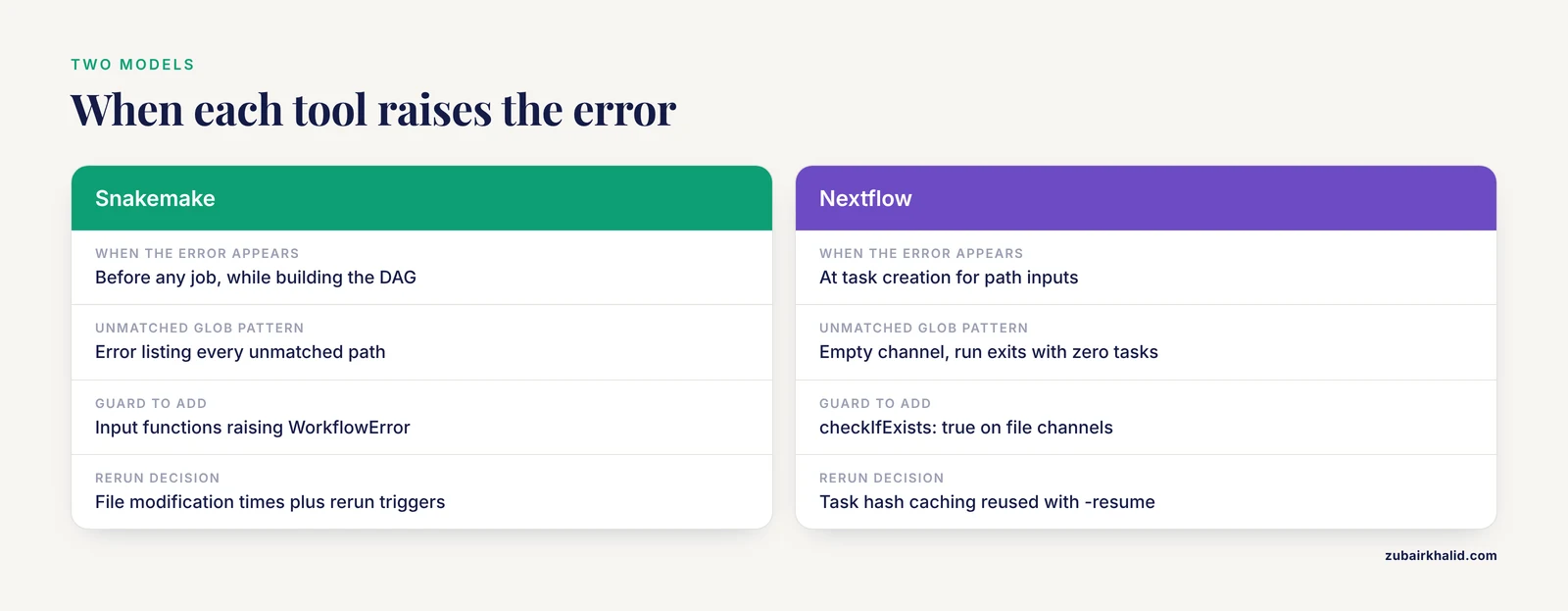
Snakemake reads your Snakefile, resolves wildcards (placeholders such as {sample} that get filled in per job), and builds the complete DAG before it runs anything. If any input in that DAG neither exists on disk nor is produced by some rule, Snakemake raises MissingInputException and stops. The message names the rule and lists the paths, which makes it one of the most useful errors in bioinformatics. Because the check happens before any job, a typo in one sample name costs you seconds, not an hour of compute.
Snakemake decides what to rerun by comparing file modification times (mtime, the timestamp the filesystem updates whenever a file changes). An output counts as up to date when it is newer than all of its inputs. Recent Snakemake versions also record rerun triggers, meaning the rule code, the params, the inputs, and the software environment, and rerun a job when any of those change. Three helpers matter here: ancient() excludes a file from mtime comparisons, protected() marks an output read-only after the job finishes, and touch() marks an output up to date without rerunning anything. Checkpoints, a special rule type, let Snakemake rebuild the DAG mid-run when the set of files is unknown until a job finishes.
Nextflow works differently. Channels are asynchronous queues of items, and processes run once per item that arrives. This design has a famous consequence: if a channel is empty, every downstream process simply never runs, and the pipeline exits successfully having done nothing. Nextflow does verify files passed to path inputs. When a task is created, Nextflow resolves those paths and stages them (copies or links them) into the task work directory, and a path that does not exist produces an error similar to Missing input file(s) for process. But nothing forces a channel to be non-empty unless you ask. Channel.fromPath and Channel.fromFilePairs accept checkIfExists: true, which turns silent emptiness into a loud error at the start of the run. Tasks execute in isolated directories under the work directory (work by default), each containing .command.sh (the script), .command.out (standard output), and .command.err (standard error). With -resume, Nextflow reuses cached results for tasks whose hash, built from the task definition and its inputs including file paths and metadata such as size and modification time, matches a previous successful task.
| Aspect | Snakemake | Nextflow |
|---|---|---|
| , - | , - | , - |
| Pipeline model | Declarative DAG built before the run | Dataflow channels feeding processes |
| Missing declared input | Hard error before any job runs | Error at task creation for path inputs, silent skip for empty channels |
| Glob that matches nothing | Error listing every unmatched path | Empty channel, the run exits successfully with zero tasks |
| Guard you should add | Input functions that raise WorkflowError, plus a validation rule | checkIfExists: true on file channels, error() checks, deliberate when: guards |
| Rerun logic | File modification times plus recorded rerun triggers | Task hash caching reused with -resume |
| Where tasks run | A shared working directory by default | Isolated directories under work/ |
The nextflow vs snakemake differences that matter for this problem come down to three things: when an error is raised (before any job versus at task creation), what happens when a pattern matches nothing (loud error versus silent empty channel), and how reruns are decided (file timestamps versus task hashes). Everything that follows builds on those three.
Causes, From Most Common to Rarest
1. The run was launched from the wrong directory
Relative paths resolve against a reference point, and the two tools pick different ones. Snakemake resolves them against the directory where you invoked snakemake, unless the Snakefile sets a workdir directive, which overrides your launch directory. Run Snakemake from a subdirectory out of habit, or leave a workdir line in place from a test, and every relative path in the pipeline now points somewhere you did not intend. Absolute paths that encode a specific home directory, such as /home/alice/data, fail on any other account or node.
Nextflow splits the reference points in two. Glob patterns in channels resolve against the launch directory, while the script inside a process executes in the task work directory under work/. A script line such as zcat data/sample_R1.fastq.gz therefore looks for the file inside the task directory, not in your data folder, and fails with No such file or directory even though the file exists in the repository. The fix is always the same: pass files through declared path inputs so Nextflow stages them, and keep channel globs relative to the launch directory.
This cause produces two different symptoms, a missing-input error at DAG or task level, and a file-not-found error inside a script, which is why it tops the list.
2. Glob patterns and samplesheets that match nothing
A glob is a pattern with wildcards such as * that the shell or the workflow expands against real filenames. Patterns fail to match for boring reasons that are hard to see: _R1 versus _1, .fq.gz versus .fastq.gz, Sample1 versus sample1 on a case-sensitive filesystem, a brace expression such as {1,2} that does not match the actual suffixes, or a samplesheet that lists files someone renamed last week.
Samplesheets add their own failure modes. A table edited in Excel on Windows carries CRLF line endings (carriage return plus line feed), so every sample name ends with an invisible carriage return and the workflow looks for sample1\r.fastq.gz. A CSV saved with a BOM (byte order mark, invisible bytes at the start of a file) breaks the first column name. Trailing spaces and inconsistent column headers do the rest.
Snakemake turns these problems into a missing-input error that lists the mangled paths, and the carriage return in the message is the clue. Nextflow turns them into an empty channel and a suspiciously fast, successful run. Partial matches are the worst case: 190 of 192 samples have both reads, two samples lack read 2, so the DAG fails on exactly two files, or the channel quietly carries 190 pairs instead of 192.
3. Upstream data that was never generated
Missing inputs are often downstream casualties. You request results/counts/S1.tsv, Snakemake walks the chain backward, and somewhere the chain breaks: a producing rule was renamed or deleted in an edit, an intermediate file exists but is empty because its job died right after creating it, or the file was removed by a cleanup script that assumed it was regenerable and the regeneration now fails for an unrelated reason.
In Nextflow, an upstream process fails, its output channel stays empty, and downstream processes skip. With the default error strategy the pipeline aborts at the failure, so you usually see the real error first. The silent variant happens when an upstream process is skipped by a when: guard (a conditional that filters items before the process runs), or when a channel is built from a directory that the producing process has not written yet. Cluster users see a third variant: a preempted or timed-out job that the scheduler killed after it had created partial outputs, which combines this cause with the next one.
4. Stale timestamps and cached results
Both tools skip work to save time, and both can skip work you actually needed. Snakemake compares modification times: an output newer than its inputs is up to date. Replace a FASTQ with a corrected version while the counts table is still newer, and Snakemake will tell you nothing to be done. The reverse also bites: a run killed mid-job leaves incomplete markers in .snakemake/incomplete, and the next run reports output files modified by another job until you rerun with the rerun-incomplete option after confirming nothing else is running.
Nextflow caches results. With -resume, a task whose hash matches a previous successful task is marked CACHED and skipped. The hash includes the task definition and its inputs, including file paths and metadata such as size and modification time, not a full content checksum. A replacement file with the same size and timestamp can therefore produce a stale cache hit. A cached task can also mask a corrupt input that an earlier, buggy tool version consumed without complaining. When a result looks wrong after an input changed, check nextflow log to see which tasks were cached, then touch the input or clear the affected task directory and resume again.
5. Corrupt files from interrupted transfers and failed jobs
Corruption has a short list of mechanisms, and most of them involve a write that started and never finished. A download interrupted by a dropped connection leaves a truncated gzip archive. A job that hits a disk quota (the storage limit assigned to your account) partway through writing leaves a partial BAM. A job killed by the scheduler after opening its outputs leaves files that exist and pass every existence check. A link that now serves an HTML login or error page, saved faithfully as S1_R1.fastq.gz, is a corrupt FASTQ in a valid-looking filename. A repository that stores FASTQs in git LFS (Large File Storage) yields tiny text pointer files instead of data when LFS was never installed and pulled. Cloud sync placeholders that appear in listings but hold no local bytes do the same.
A checksum is a short digest computed from the file bytes, where any change to the file changes the digest, and it is the only cheap way to prove a file matches its source. Transfers without checksum verification are the biggest source of corrupt inputs in practice. Stale indexes are a related trap: a .bai built from an older BAM, or a missing .tbi for a VCF (the variant call format), produces index errors that look like data corruption but are not.
6. Permissions, mounts, and filesystem quirks
A file can exist and still be unusable. Read permission may be missing, or a parent directory may lack search permission, which blocks the path at that level. Network filesystems add their own failures: a stale NFS handle after storage maintenance, an automount path that was never triggered on a compute node, or attribute caching that makes a just-written file invisible for a few seconds. Case sensitivity differs between systems: the default filesystem on macOS ignores case, most HPC filesystems do not, so Sample1.fastq.gz works on a laptop and fails on the cluster. Filenames with spaces, unicode look-alike characters, hidden extensions such as sample.fastq.gz.txt, and broken symlinks round out the list. Containers add one more: a path visible on the login node may not be bind-mounted (mounted into the container so its contents are visible inside) into an Apptainer container, so the file vanishes inside the task while existing everywhere else.
7. Dynamic inputs that do not exist yet
Snakemake checks inputs when it builds the DAG, but some files only exist after a job runs. A rule that splits a BAM into per-chunk files, or a step whose output count depends on the data, produces files whose names cannot be known at parse time. A static expand() or a parse-time os.path.exists check then fails on files that would exist an hour later. The designed fix is a checkpoint, a rule type after which Snakemake re-evaluates the DAG. Nextflow handles this case more naturally because channels are built at runtime, but building a channel from a directory before the producing process has finished is the same race in different clothing.
A Diagnostic Sequence You Can Follow
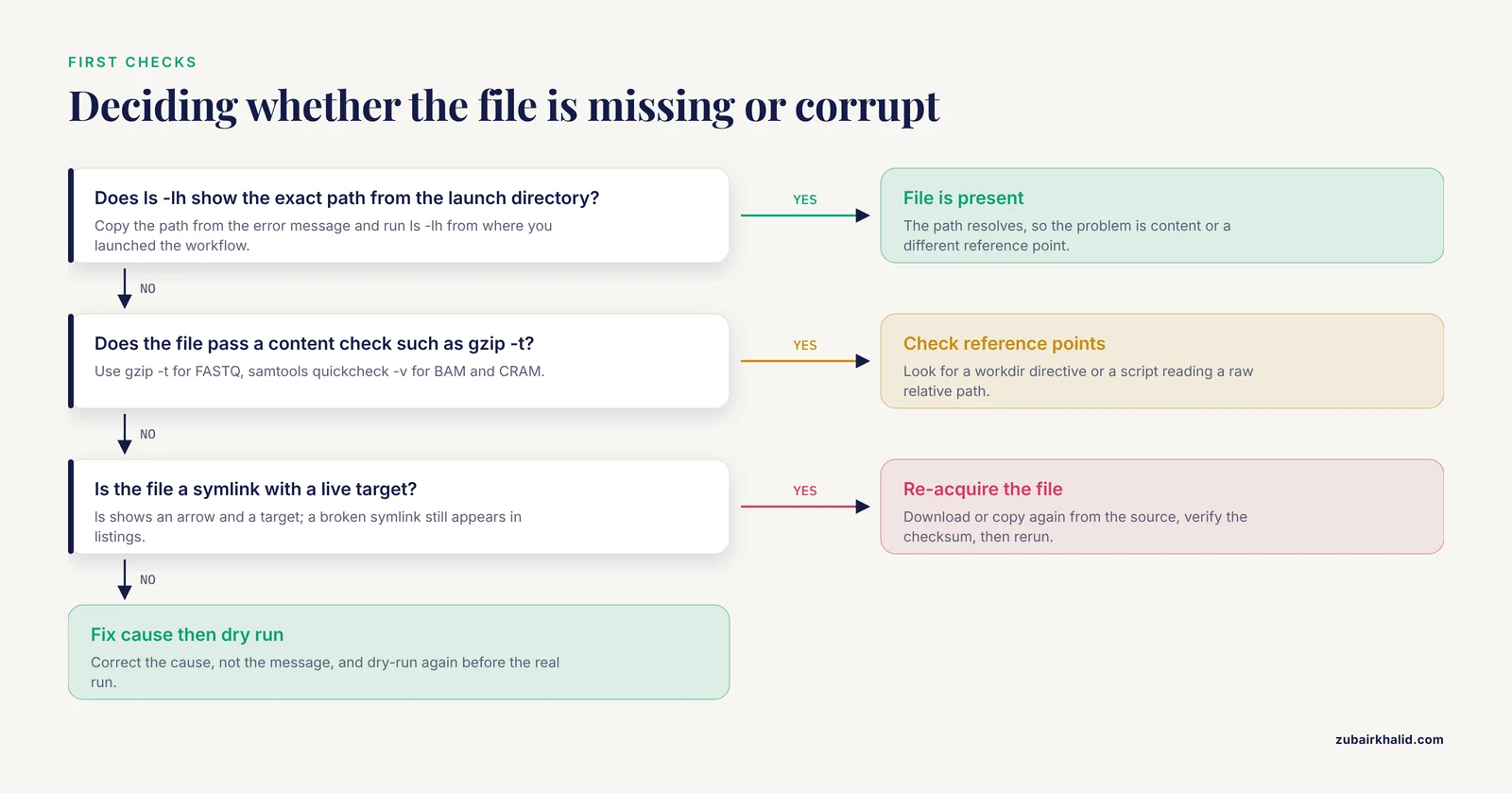
Work top to bottom and stop when the cause is confirmed. Every step is safe to run on production data unless marked otherwise.
- Read the error and copy the exact path or sample identifier. Snakemake names the rule and the paths. Nextflow names the process, the task hash, and the path.
- From the directory where you launched the workflow, run
ls -lhon that exact path. Note whether the file exists, its size, and whetherlsshows it as a symlink with an arrow and a target. A broken symlink still appears in listings. - Confirm the reference points. Run
pwd. For Snakemake, check the Snakefile for aworkdirdirective. For Nextflow, remember that channel globs resolve from the launch directory while task scripts run underwork/. - Preview without executing anything.
snakemake -n -pis a dry run (the plan is computed and printed without executing anything) and shows every planned job and command. In Nextflow, add.view()calls after each channel while debugging, or runnextflow run main.nf -stub-run, which executes cheap stub blocks instead of real commands and validates the shape of the DAG. - Test every glob by hand.
ls data/_R1.fastq.gz | wc -landfind data -name '.fastq.gz' | wc -lshould both equal the number of samples your samplesheet claims. Any mismatch localizes the problem to a pattern. - Validate the files that do exist.
gzip -tfor FASTQ files,samtools quickcheck -vfor BAM and CRAM (the reference-compressed cousin of BAM),filefor anything with a suspicious extension,find data -type f -size 0for empty files,find data -xtype lfor broken symlinks (GNU find). - Check permissions and mounts.
ls -lthe file and every parent directory.df -h .shows the volume and its free space.mountshows what is actually mounted on this machine. - Compare timestamps and cache state.
stat input outputshows modification times. In Snakemake, an output newer than its inputs means nothing will rerun. In Nextflow,nextflow logshows which tasks ran and which were CACHED in the last run. - Read the real logs. Each Nextflow task directory under
work/contains.command.sh,.command.out, and.command.err. Snakemake writes run logs under.snakemake/log, plus any log files your rules declare. - Fix the cause, not the message, then dry-run again before the real run.
Safety note: never pair find with -delete during a diagnostic pass. List first, review the list, then delete by hand. A wrong glob in a shared project directory can erase raw data that no backup can bring back.
How to Fix Missing Input Files in Snakemake and Nextflow
The solutions below mirror the causes above. The Snakemake pattern is to fail fast at DAG build with friendly messages, then validate content before heavy jobs. The Nextflow pattern is to make every channel loud about emptiness, then stage everything through path inputs.
Snakemake: fail fast with a validation rule and a guarded input function
import os
import pandas as pd

samples = pd.read_csv("config/samples.tsv", sep="\t")
required_columns = {"sample_id"}
missing_columns = required_columns - set(samples.columns)
if missing_columns:
    raise WorkflowError(f"Samplesheet is missing columns: {sorted(missing_columns)}")
SAMPLES = samples.sample_id.tolist()

def fastq_reads(wildcards):
    paths = [f"data/fastq/{wildcards.sample}_R{read}.fastq.gz" for read in (1, 2)]
    for path in paths:
        if not os.path.exists(path):
            raise WorkflowError(f"Missing input for sample {wildcards.sample}: {path}")
    return paths

rule all:
    input:
        expand("results/counts/{sample}.tsv", sample=SAMPLES)

rule validate_inputs:
    input:
        expand("data/fastq/{sample}_R{read}.fastq.gz", sample=SAMPLES, read=[1, 2])
    output:
        touch("logs/inputs_validated.done")
    shell:
        "gzip -t {input}"

rule count_reads:
    input:
        reads=fastq_reads,
        gate="logs/inputs_validated.done"
    output:
        "results/counts/{sample}.tsv"
    shell:
        "zcat {input.reads} | awk 'NR % 4 == 2' | wc -l > {output}"
Three layers do the work here. The samplesheet is checked at parse time, so a wrong column name fails before the DAG even starts. The input function fastq_reads runs per sample during DAG construction and raises WorkflowError with a message that names the sample, which is far easier to act on than a bare list of paths. The validate_inputs rule tests the gzip integrity of every declared input and produces a marker file, and because every count_reads job takes that marker as an input named gate, no heavy job starts until the whole input set has passed gzip -t. Two more helpers belong in every production Snakefile: wrap large reference files in ancient() so that touching them does not trigger a global rerun, and wrap outputs that must never be overwritten in protected(), which makes them read-only after the job finishes.
Nextflow: checkIfExists, path inputs, and explicit errors
#!/usr/bin/env nextflow

params.reads = "data/*_R{1,2}.fastq.gz"
params.genome = null

workflow {
    if (!params.genome) {
        error "A genome FASTA is required. Set params.genome in nextflow.config"
    }

    read_pairs_ch = Channel.fromFilePairs(params.reads, checkIfExists: true)
    COUNT_READS(read_pairs_ch)
    COUNT_READS.out.counts.view { pair -> "Counted ${pair[0]}: ${pair[1]}" }
}

process COUNT_READS {
    tag "${sampleId}"

    input:
    tuple val(sampleId), path(reads)

    output:
    tuple val(sampleId), path("${sampleId}.counts.txt"), emit: counts

    script:
    """
    zcat ${reads} | awk 'NR % 4 == 2' | wc -l > ${sampleId}.counts.txt
    """
}
Each guard closes a specific hole. checkIfExists: true turns an unmatched glob into a loud error at the start of the run instead of a silent empty channel. error() stops the run before any task when a required parameter is missing. Declaring the input as path rather than val makes Nextflow resolve and stage the files into the task directory and fail if they are missing, while val would pass the string untouched and push the failure into the script. The .view() call is a debugging aid you remove later. For critical steps, set errorStrategy 'terminate' so a failure stops the run instead of letting downstream work skip. When you do use when: guards, remember that a false guard skips the task silently, so pair guards with a check that counts what survived.
Verify file integrity before the run
| File type | Check to run | What it catches |
|---|---|---|
| , - | , - | , - |
| FASTQ, gzip compressed | gzip -t sample_R1.fastq.gz | Truncated or corrupt gzip stream |
| FASTQ, content | zcat the file, then head -4 and wc -l | Wrong content, line counts not divisible by 4 |
| BAM or CRAM | samtools quickcheck -v *.bam | Truncated files, missing EOF marker, empty files |
| VCF, bgzip compressed | bcftools view file.vcf.gz > /dev/null | Truncation and malformed records |
| Any file | file path/to/file | Content that does not match the extension, such as HTML saved as FASTQ |
| Any file set | sha256sum -c manifest.sha256 | Any changed byte against a known-good manifest |
| Whole directory | find data -type f -size 0 | Zero-byte files |
| Whole directory | find data -xtype l | Broken symlinks (GNU find) |
samtools quickcheck is fast because it reads only headers and the EOF marker rather than decompressing the file, which makes it practical on large file sets. A standard four-line FASTQ should always give a line count divisible by four, so a remainder is an immediate red flag.
Re-acquire, do not repair
When any check fails, the fix is almost always re-acquisition: download or copy the file again from the source, verify its checksum against a manifest, and only then rerun. Patching a truncated FASTQ by hand or stripping a corrupt BAM rarely produces trustworthy data. Keep raw data read-only so neither you nor a workflow can modify it in place, and keep a checksum manifest next to it.
Safety note: chmod on shared storage affects other users. Restrict read-only enforcement to directories you own, and record what you changed.
Troubleshooting Reference: Symptom to Fix
| Symptom | Likely cause | How to confirm | Fix |
|---|---|---|---|
| , - | , - | , - | , - |
| Snakemake stops with MissingInputException and lists paths under a rule name | Typo, renamed file, or launch directory mismatch | From the launch directory, run ls -lh on each listed path | Correct the paths, launch from the intended directory, or set workdir deliberately |
| Snakemake prints Nothing to be done when you expect work | The target exists and is newer than its inputs, or you named the wrong target | snakemake -n -p, then stat the input and output to compare times | Remove the stale output, force a targeted rerun with -R, or request the right target |
| Snakemake reports output files modified by another job | A previous run was killed mid-job, or two runs share one directory | Look in .snakemake/incomplete, then run ps aux and search for snakemake | Confirm no other run is active, rerun with the rerun-incomplete option, and keep one run per directory |
| Nextflow finishes in seconds with zero tasks | Empty channel from an unmatched glob or an over-strict when guard | Add .view() after the channel and count glob matches by hand | Fix the pattern, add checkIfExists: true, or relax the guard |
| Nextflow error similar to Missing input file(s) for process | A path given to a path input does not exist when the task is created | ls -lh the exact path from the launch directory | Fix the path or produce the file upstream before the run |
Nextflow task fails with No such file or directory inside .command.err | The script reads a raw relative path instead of a staged input | Open the task directory under work/ and read .command.sh | Declare the file as a path input so Nextflow stages it |
gzip reports unexpected end of file | Truncated download or interrupted transfer | gzip -t the file, compare size with the source, verify the checksum | Re-download, verify with sha256sum, then rerun |
samtools quickcheck reports a missing EOF marker | Incomplete BAM or CRAM copy, or a killed job | samtools quickcheck -v on the file set | Re-copy with rsync, verify checksums, rebuild the index |
find lists zero-byte files where data should be | An upstream job failed after creating the file, or a quota was hit | Read the producing job's logs, check df -h and your quota | Fix the upstream cause, delete the empty file, rerun the producing step |
head shows HTML or a short text pointer instead of data | A failed download saved an error page, or a git LFS pointer was never pulled | file the path and head it, look for HTML tags or the LFS version line | Re-download from a verified URL, or run git lfs pull |
| Sample names in errors carry a trailing character | Samplesheet saved with CRLF endings, a BOM, or stray spaces | cat -A config/samples.tsv, which shows carriage returns as ^M | Re-save with Unix line endings, strip whitespace, validate the sheet before the run |
| A Nextflow task was cached but you replaced its input | The cache key uses path and metadata, not file content | stat the file before and after, compare size and mtime | touch the file to change its mtime, or remove that task directory, then resume |
| Permission denied on a file you can see | Missing read permission, a directory without search permission, or an unmounted volume | ls -l the file and each parent directory, run df -h and mount | Fix permissions or the mount, or ask the storage administrator |