Grep FASTA Sequences: Step-by-Step Guide
By Dr. Zubair Khalid, DVM, MS, PhD ·

By the end of this guide you will be able to grep FASTA sequences with confidence. You will count records in a FASTA file, find every sequence whose header matches a name, keyword, or identifier, extract complete records rather than single lines, search a list of IDs in one pass, and verify that your output is correct before you build on it. Every command shown here runs in a plain terminal on Linux or macOS with no software to install beyond the shell tools that ship with the operating system.
This kind of work sits at the center of linux for bioinformatics. Sequencing centers, journals, and collaborators exchange data as plain text files, and the Unix tools that process plain text have remained stable for decades. A researcher who can grep a FASTA file can also parse a VCF, slice a BED file, and audit a metadata table, because the same small vocabulary of commands transfers across file types. The FAST toolbox, a set of sequence utilities published in Frontiers in Genetics, was modeled explicitly on GNU Textutils such as grep, cut, and tr precisely because that vocabulary is compact, composable, and easy to document in a methods section [1].
What a FASTA File Actually Contains
Before you grep anything, you need a mental model of the file. FASTA is a text format for nucleotide or protein sequences. Each record has exactly two parts:
- A header (also called the description or defline) that starts with a greater-than sign in column one. Everything after the
>on that line is free text, usually an identifier plus a human-readable description. - One or more sequence lines containing the residues themselves. Nucleotide sequences use the letters A, C, G, T (and often N for unknown bases). Protein sequences use the standard one-letter amino acid codes, sometimes with X, B, Z, or * for ambiguous or stop positions.
A minimal file looks like this:
>seq001 | acetylcholine receptor subunit | Homo sapiens
MVHVGAL
>seq002 | cytochrome c oxidase | Mus musculus
MFINRWLFST
>seq003 | kinase domain fragment | Gallus gallus
KKLERT
Three properties of this format drive everything that follows:
- Headers and sequence lines are visually distinct, so the
^>anchor (read as "a line that starts with a greater-than sign") reliably isolates headers. - Sequence lines wrap at arbitrary lengths. One record may occupy one line and the next may occupy forty. Any technique that assumes a fixed number of lines per record will fail silently on some files.
- The format is plain text, which is exactly what grep was designed to search.
What You Need on Hand
- A terminal. On Linux this is any shell session. On macOS open Terminal, which gives you the BSD variants of the tools. Windows users can use WSL2, which provides a genuine GNU userland.
- GNU grep version 3.x or any modern equivalent. Run
grep, versionto check. If you use macOS, the built-in BSD grep handles everything in this guide except a few GNU-specific extensions noted later. - One or more FASTA files to practice on. You can create the three-record sample file from the previous section with any text editor. A file named
sample.fastacontaining those three records is used in every example below. - Basic familiarity with the pipe character
|, which sends the output of one command into the next command.
Nothing else is required. The whole workflow lives in the standard set of linux commands bioinformatics researchers use daily: grep, awk, cut, head, wc, sort, and uniq.
Grep FASTA Sequences Step by Step

Step 1: Look at the File Before You Search It
The single highest-value habit in this workflow costs one command. Look at the first few lines so you know what the headers look like before you write a pattern against them.
head -n 6 sample.fastaExpected output:
>seq001 | acetylcholine receptor subunit | Homo sapiens
MVHVGAL
>seq002 | cytochrome c oxidase | Mus musculus
MFINRWLFST
>seq003 | kinase domain fragment | Gallus gallus
KKLERT
Two questions to answer from this peek. First, do headers wrap onto a second line? Some databases, notably certain NCBI exports, produce long descriptions that wrap, which changes how you should anchor patterns. Second, are sequences on one line each or wrapped across many lines? The answer determines whether the quick grep -A approach in Step 4 is safe for your file.
Step 2: Count the Records
Record count is the number of header lines. Count them with the -c flag, which prints a count of matching lines instead of the lines themselves:
grep -c '^>' sample.fastaExpected output:
3This number becomes your baseline. After any filtering step, counting the headers in your output and comparing it to your expectation is the fastest sanity check available. If a download is truncated, if a conversion step dropped records, or if a filter was too aggressive, the count tells you immediately.
A common variant is counting how many headers contain a word:
grep '^>' sample.fasta | grep -c 'kinase'Expected output:
1The first grep isolates header lines and the second counts the ones containing kinase. Chaining greps this way is a core idiom of linux commands bioinformatics work: each command does one job, and the pipe composes them.
Step 3: Find Matching Headers
The basic search pins your pattern to the start of a line with the caret anchor:
grep '^>seq002' sample.fastaExpected output:
>seq002 | cytochrome c oxidase | Mus musculusWithout the anchor, grep searches every line, and the letters of your pattern will also match inside sequences. Searching for atg in a genome without an anchor returns thousands of sequence lines containing the motif, which is a different (and sometimes useful) question entirely. Anchor when you mean headers.
Case-insensitive search uses -i. This matters because species names, gene symbols, and database fields vary in capitalization:
grep -i '^>.*homo sapiens' sample.fastaExpected output:
>seq001 | acetylcholine receptor subunit | Homo sapiensThe . between > and the pattern means "any characters in between". In grep's default regular expression flavor, . matches any single character and means zero or more of the preceding character, so .* together means any run of characters.
To get line numbers alongside matches, use -n:
grep -n '^>seq003' sample.fastaExpected output:
7:>seq003 | kinase domain fragment | Gallus gallusLine numbers are useful for cross-checking with other tools and for debugging files with malformed records.
Step 4: Show the Full Record, Not Just the Header
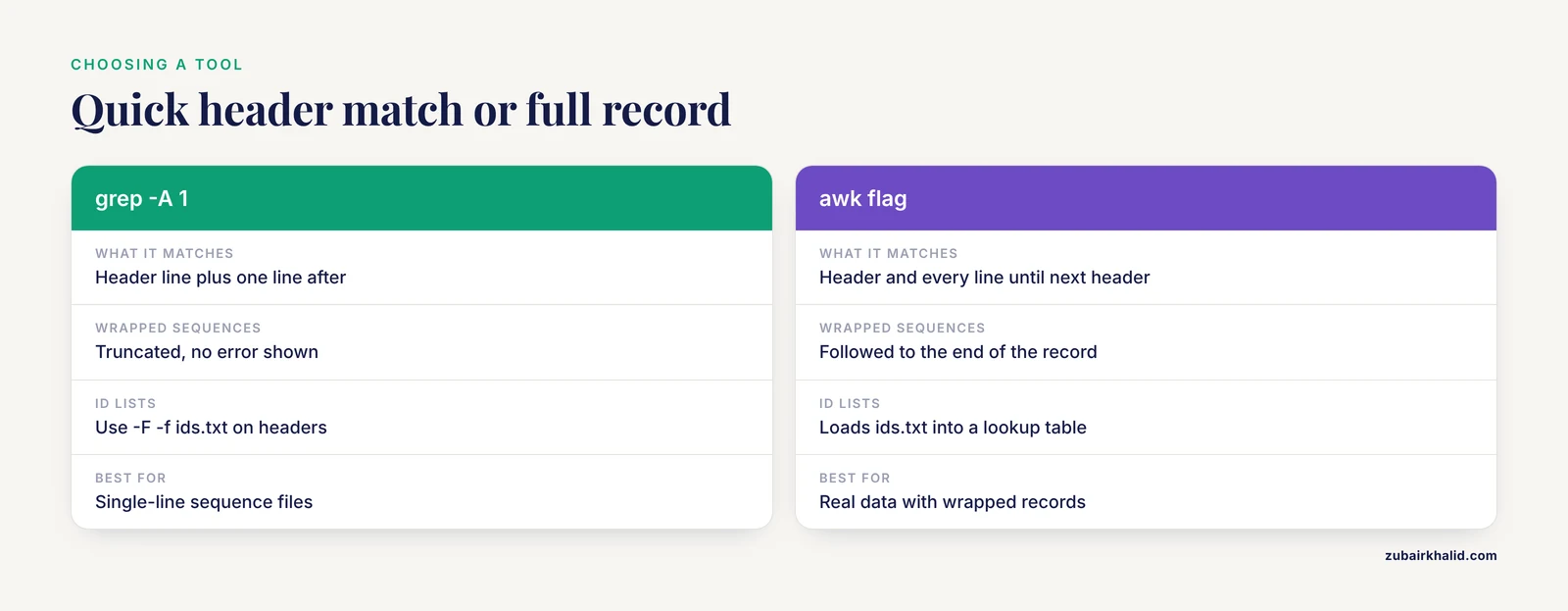
Most of the time you want the sequence along with the header. For files where each sequence sits on a single line, grep -A 1 (print one line after each match) is the fastest solution:
grep -A 1 '^>seq001' sample.fastaExpected output:
>seq001 | acetylcholine receptor subunit | Homo sapiens
MVHVGAL
This shortcut has a hard limit. If sequences wrap across many lines, -A 1 returns only the first sequence line and the rest of the record is lost, with no error message. For wrapped files, use a small awk program. awk processes a file line by line and lets you carry state between lines, which is exactly what a multi-line record requires:
awk -v pat="seq002" '
  /^>/ { keep = ($0 ~ pat) }
  keep { print }
' sample.fasta
Expected output:
>seq002 | cytochrome c oxidase | Mus musculus
MFINRWLFST
How it works, line by line:
-v pat="seq002"passes your search string into awk as a variable.- When awk sees a header line (the
/^>/test), it sets the variablekeepto true or false depending on whether the header matches the pattern. - The second rule,
keep { print }, prints every line whilekeepis true, which covers the header itself and all its sequence lines until the next header resets the flag.
This version never truncates a record, regardless of how the sequences are wrapped, and it is the pattern I reach for on real data. A case-insensitive variant lowercases both sides of the comparison:
awk -v pat="homo sapiens" '
  /^>/ { keep = (tolower($0) ~ tolower(pat)) }
  keep { print }
' sample.fasta
Step 5: Search Several Patterns at Once
The -E flag enables extended regular expressions, which support alternation with the pipe character:
grep -E '^>.*(kinase|oxidase)' sample.fastaExpected output:
>seq002 | cytochrome c oxidase | Mus musculus
>seq003 | kinase domain fragment | Gallus gallus
Here ^>.* anchors to the header, then (kinase|oxidase) matches either word. Alternation scales to as many alternatives as you need, which makes ad hoc extraction of a gene family or a set of species trivial.
To find headers that do not contain a word, invert the match with -v:
grep '^>' sample.fasta | grep -v 'Mus musculus'Expected output:
>seq001 | acetylcholine receptor subunit | Homo sapiens
>seq003 | kinase domain fragment | Gallus gallus
Step 6: Search a List of IDs in One Pass
Real work rarely involves one ID. Suppose you have a file ids.txt containing identifiers, one per line:
seq001
seq003
Two greps chained together handle the whole list. The first isolates headers, the second matches any line in the ID file as a fixed string:
grep '^>' sample.fasta | grep -F -f ids.txtExpected output:
>seq001 | acetylcholine receptor subunit | Homo sapiens
>seq003 | kinase domain fragment | Gallus gallus
Three details make this work:
-Ftreats each pattern as a literal string rather than a regular expression. Identifiers often contain regex metacharacters, and-Fremoves that whole class of problems.-f ids.txtreads patterns from a file, one per line.- Chaining through the header-only first grep guarantees the ID list cannot accidentally match letters inside sequence lines.
To pull the complete records for that ID list, hand the job to awk, which loads the list into memory and then streams the FASTA file:
awk '
  NR==FNR { want[$0] = 1
            next }
  /^>/    { keep = ($0 in want) }
  keep    { print }
' ids.txt sample.fasta
Expected output:
>seq001 | acetylcholine receptor subunit | Homo sapiens
MVHVGAL
>seq003 | kinase domain fragment | Gallus gallus
KKLERT
The condition NR==FNR is true only while awk reads the first file, so the first rule populates the want lookup table from ids.txt and skips to the next line. Once awk reaches the FASTA file, the second rule turns record tracking on or off based on whether the header appears in want. This exact program is one of the most reused one-liners in my own work, because it is short, correct on wrapped sequences, and fast enough for files with millions of records.
One caveat: $0 in want tests whether the entire header line matches an entry in the ID file. If ids.txt holds bare IDs like seq001 but headers are longer, switch the test to a substring match: keep = (index($0, want_id)) requires a loop, so the simpler fix is to grep the headers first and feed the result onward, or to make the ID file contain the full header text.
Step 7: Extract Identifiers Into a New File
Downstream tools frequently want a plain list of IDs. Headers are text, so cut does the trimming:
grep '^>' sample.fasta | cut -c 2- | cut -d ' ' -f 1Expected output:
seq001
seq002
seq003
Reading it from left to right: grep keeps header lines, cut -c 2- removes the leading > character, and cut -d ' ' -f 1 takes the text before the first space, which is the identifier. Redirect the output to save it:
grep '^>' sample.fasta | cut -c 2- | cut -d ' ' -f 1 > ids_out.txtFor UniProt-style headers such as >sp|P12345|ALBU_HUMAN, the field separator is a vertical bar, so cut -d '|' -f 3 extracts the entry name field. Adjust the field number after inspecting your own headers in Step 1.
Step 8: Check Your Result
Verification takes under a minute and prevents the most embarrassing class of errors, the ones that surface weeks later in a figure or a supplement.
First, count the headers in your output and compare against expectation:
grep -c '^>' results.fastaSecond, eyeball the boundaries between records. Every line starting with > should be a header you intended to keep:
grep -n '^>' results.fastaThird, confirm that no header line leaked into the sequence output and vice versa by looking at the first few lines:
head -n 6 results.fastaFourth, when your filter is a countable claim, compute the count two independent ways and require agreement. For example, the number of headers containing a word from grep and from awk:
grep '^>' sample.fasta | grep -c 'kinase'
grep -c '^>.*kinase' sample.fasta
Both should print 1. Disagreement between two independent implementations is the signature of an anchoring or quoting bug, and this two-way check finds it before your analysis does.
Key grep Options at a Glance
| Option or pattern | What it does | Typical use with FASTA | |
|---|---|---|---|
^> | Anchors the match to the start of a line followed by a greater-than sign | Isolate header lines | |
-c | Print a count of matching lines instead of the lines | Count records or keyword hits | |
-i | Ignore case when matching | Species names, gene symbols with mixed case | |
-v | Print lines that do not match | Exclude a species or keyword | |
-n | Prefix each match with its line number | Debugging, cross-checking coordinates | |
-E | Enable extended regular expressions, including alternation with `\ | ` | Search several keywords at once |
-F | Treat patterns as literal fixed strings | IDs containing pipes, dots, or brackets | |
-f FILE | Read patterns from a file, one per line | Batch searches against an ID list | |
-w | Match whole words only | Avoid matching kinase1 when you want kinase | |
-A NUM | Print NUM lines after each match | Quick full-record extraction on single-line sequences | |
-B NUM | Print NUM lines before each match | Context around a match in annotated files | |
-o | Print only the matched part, one per line | Count motif occurrences in sequence lines |
Practical Tips for Grepping FASTA Sequences
Quote every pattern. Unquoted patterns containing spaces, pipes, or greater-than signs are interpreted by the shell before grep ever sees them. The command grep > results.fasta sample.fasta does not search for anything: the shell treats > as a redirect, creates an empty results.fasta, and then grep waits forever for input on standard input with no pattern. Quote it as grep '>' sample.fasta and the meaning becomes unambiguous.
Search motifs in sequences deliberately. The anchor trick inverts nicely. To count occurrences of the EcoRI restriction site GAATTC across all sequences, drop the anchor and use -o with a pipe to wc -l:
grep -o 'GAATTC' sample.fasta | wc -lExpected output:
0(The sample file contains no GAATTC sites, so zero is the correct output here.) The -o flag prints each individual match on its own line rather than the whole line, which is what makes overlapping-free counting accurate.
Use word boundaries when IDs share prefixes. If you search for the gene src without -w, you will also match srclike, srcA, and every header containing those letters as a substring. grep -w 'src' matches only whole words. Be aware that -w considers a vertical bar a word separator, which is usually what you want in UniProt-style headers.
Set a fast locale for large files. By default, grep performs locale-aware character comparisons. Setting LC_ALL=C switches to raw byte comparisons, which are substantially faster and perfectly safe for FASTA, whose characters are plain ASCII:
LC_ALL=C grep '^>' genome.fasta > headers.txtPipe instead of writing intermediate files. Each intermediate file in a pipeline is a chance to version-drift and a claim on disk. grep '^>' sample.fasta | grep -i 'human' leaves no trace except the answer. When you do keep an output, name it after the operation that produced it.
Learn awk as the natural next tool. Every awk program in this guide fits in four lines, and awk covers the cases grep cannot reach: multi-line records, per-record decisions, and field arithmetic. The FAST toolbox authors made the same observation from the opposite direction, noting that compact command vocabularies make bioinformatic protocols easier to document and reproduce, which is the practical argument for investing an afternoon in awk [1].
The FAST Toolbox: grep-Style Tools Built for Sequence Data
Plain grep treats your file as text. The FAST (FAST Analysis of Sequences Toolbox) project took the grep philosophy and rebuilt it around sequence records, producing tools such as fasgrep, fascut, and fastr that filter, transform, annotate, and analyze biological sequence data from the command line [1].
The relevant tool here is fasgrep. Where grep matches individual lines, fasgrep is record-aware: it filters whole sequence records based on content, descriptive tags, annotated features, and in-line calculated analytics such as composition and codon usage [1]. In its most basic form it parallels the grep you already know:
fasgrep 'homo sapiens' sample.fastaBecause FAST was designed for conformity with the conventions of GNU tools, BioPerl, R, and GenBank, a researcher fluent in grep reads FAST pipelines without extra translation [1]. The project distributes stable releases through CPAN on its mature Perl and BioPerl foundations, and its documentation includes a publicly accessible cookbook of worked examples [1].
When should you reach for fasgrep instead of plain grep? Two situations stand out. First, when your filter depends on sequence content or computed properties rather than header text, since plain grep has no notion of the sequence attached to a header. Second, when you want the filtering steps themselves to be legible in a methods section, because FAST's compact combinatorial encoding of workflows was designed to simplify documentation and reproducibility [1]. For quick header searches on files you already understand, plain grep remains the right first tool, and the FAST tools are the upgrade path when the filter gets smarter than the text.
Common Mistakes and Limitations
These are the errors I see most often, with the exact symptom you will observe and the fix.
Forgetting the ^> anchor. Symptom: a search for pol2 in a bacterial genome returns tens of thousands of lines, most of them raw sequence. Cause: without an anchor, grep matches the pattern anywhere, including inside sequence lines where random letter combinations are abundant. Fix: write grep '^>.*pol2' when you mean headers, and reserve unanchored searches for motif counting where that is genuinely the question.
Leaving the pattern unquoted. Symptom: the terminal shows no output and appears to hang, or a file you did not expect appears in your directory. Cause: the shell split your command at spaces or interpreted > as a redirect. Fix: quote the pattern, grep '^>seq001' sample.fasta. Quoting costs nothing and eliminates an entire category of failures.
Truncating multi-line records with grep -A. Symptom: your extracted FASTA looks plausible, head looks fine, and the mistake only appears when sequence lengths come out short downstream. Cause: -A 1 prints exactly one line after the match, and wrapped sequences have more than one line. Fix: use the awk record-tracking program from Step 4, which follows each record to its end regardless of wrapping. This is the most dangerous of the common mistakes because the output passes a casual visual check.
Applying FASTA habits to FASTQ files. Symptom: extraction from a FASTQ produces records with the wrong number of lines or quality text where sequence should be. Cause: FASTQ records are exactly four lines (header, sequence, plus-header, quality), but grep knows nothing about that structure, and quality lines can begin with characters that confuse header-based assumptions. Fix: for FASTQ, either anchor to the @ header character with full awareness of its limits or use tools built for the format. The same principle holds in general: grep is line-oriented, and both FASTA and FASTQ are record-oriented, so any multi-line logic needs awk or a dedicated utility.
Getting bitten by regex metacharacters in IDs. Symptom: grep 'sp|P12345' in extended mode returns nothing, or returns the wrong records. Cause: in extended regular expressions the vertical bar means alternation, so your pattern reads as "sp" or "P12345". Fix: use -F for fixed-string matching whenever the pattern is a literal identifier. Identifiers from NCBI, UniProt, and Ensembl regularly contain pipes, dots, and underscores that double as regex syntax.
Ignoring Windows line endings. Symptom: patterns that anchor to the end of a line fail, and matches look correct otherwise. Cause: files edited on Windows carry a carriage return before each newline, so the header line actually ends with sapiens\r, and a pattern ending in sapiens at end-of-line does not match. Fix: strip the carriage returns once with tr -d '\r' < input.fasta > clean.fasta or run dos2unix on the file, then search the clean copy.
Trusting a single grep count as verification. Symptom: your record count looks right but the content is wrong, for example headers from the wrong organism. Cause: -c counts matching lines, and it tells you nothing about whether the right lines matched. Fix: pair the count with the two-implementation check from Step 8 and a direct look at several matched headers.
Assuming grep flags are identical everywhere. Symptom: a script that works on your Linux server fails on a collaborator's Mac or the reverse. Cause: GNU grep and BSD grep implement overlapping but not identical feature sets. Fix: stick to the POSIX options used in this guide, or install GNU grep through your package manager when you need GNU extensions.
One honest limitation sits above all of these. Grepping FASTA sequences is selection by text pattern. It cannot align anything, assess sequence quality, or tell you whether an extraction is biologically meaningful, and it becomes the wrong tool when you need random access to records by coordinate in a large reference genome, where indexed tools such as samtools faidx are the standard approach. Use grep for what it is: the fastest way to answer text-based questions about a text format.
Next Steps in Your Linux for Bioinformatics Workflow
Once header filtering is routine, three directions extend the same skills. First, combine grep with sort and uniq to profile a file: grep '^>' sample.fasta | cut -d '|' -f 3 | sort | uniq -c tallies species per record in one line, and this summarize-and-count pattern generalizes to any metadata field in your headers. Second, learn awk properly, since every record-aware extraction in this guide is an awk program in miniature, and awk adds arithmetic, associative arrays, and formatted output. Third, when a pipeline grows beyond a few chained commands, encode it in a shell script so it can be rerun and shared. This is the reproducibility argument the FAST authors made for compact command vocabularies: a workflow written as a short, readable chain of standard commands is a protocol another researcher can execute and audit [1].
A practice file and an hour with the steps above will do more for your fluency than any amount of reading. Every command here is safe to run, reversible, and observable, which makes FASTA files an ideal training ground for the broader craft of working with biological data on the command line.
Frequently Asked Questions
How do I grep only the sequence headers in a FASTA file?
Anchor your pattern to the start of the line with the caret: grep '^>' sample.fasta prints every header and nothing else. Add -n for line numbers or pipe into a second grep to narrow by keyword.
How do I extract complete FASTA records, headers and sequences together?
If each sequence occupies one line, grep -A 1 '^>pattern' file.fasta works. For wrapped sequences, use the awk program in Step 4, which sets a flag on matching headers and prints every line until the next header, so no record is ever truncated.
Why does my grep pattern match sequence letters instead of headers?
Because without the caret anchor, grep searches every line, and short patterns match inside sequence data constantly. Prefix the pattern with ^>.* so it can only match the header line of a record.
Can I grep a FASTQ file the same way?
Partially. FASTQ headers start with @, so grep '^@' finds them, but FASTQ is a strict four-line format and quality lines complicate record extraction. For anything beyond simple header counting, use a FASTQ-aware tool rather than grep alone.
How do I search for many sequence IDs at once?
Put one ID per line in a text file and run grep '^>' sample.fasta | grep -F -f ids.txt for matching headers. To extract the full records, use the awk program from Step 6, which loads the ID file into a lookup table and streams the FASTA against it.
Why does my pattern with a vertical bar fail on UniProt-style headers?
The vertical bar is an alternation operator in extended regular expressions, so grep splits your pattern into two unintended alternatives. Use grep -F to treat the identifier as a literal string, and the pipe is matched exactly.
Is grep fast enough for large genome files?
Yes for header work. grep streams the file and uses constant memory, and setting LC_ALL=C before the command speeds byte-level matching considerably. For repeated random-access retrieval by record or coordinate, build an index with a purpose-built tool instead of re-reading the file each time.
What is fasgrep and when should I use it instead of grep?
fasgrep is the grep-inspired filtering tool from the FAST toolbox, built to select complete sequence records by content, tags, features, and computed analytics rather than by line-level text matching. Use it when your filter depends on sequence properties or when you want record-aware, pipeline-friendly filtering that conforms to GNU-style conventions.