grep vs. awk vs. sed: Which Tool Should You Use?
By Dr. Zubair Khalid, DVM, MS, PhD ·
In one sentence, grep finds lines that match a pattern, sed edits text line by line, and awk reads text as fields and records so you can compute on it. The rule of thumb for anyone doing Linux for bioinformatics is simple: use grep to select, use sed to transform, and use awk when you need to split, count, compare, or calculate. Most command-line work in bioinformatics involves all three in the same pipeline, and knowing which one to reach for at each step is what separates a clean, fast workflow from a fragile one.
This guide gives you the direct comparison, the reasoning behind it, and worked examples on the file formats you actually handle every day, including FASTA, FASTQ, GFF3, SAM, VCF, and tab-delimited sample sheets.
The 30-Second Answer
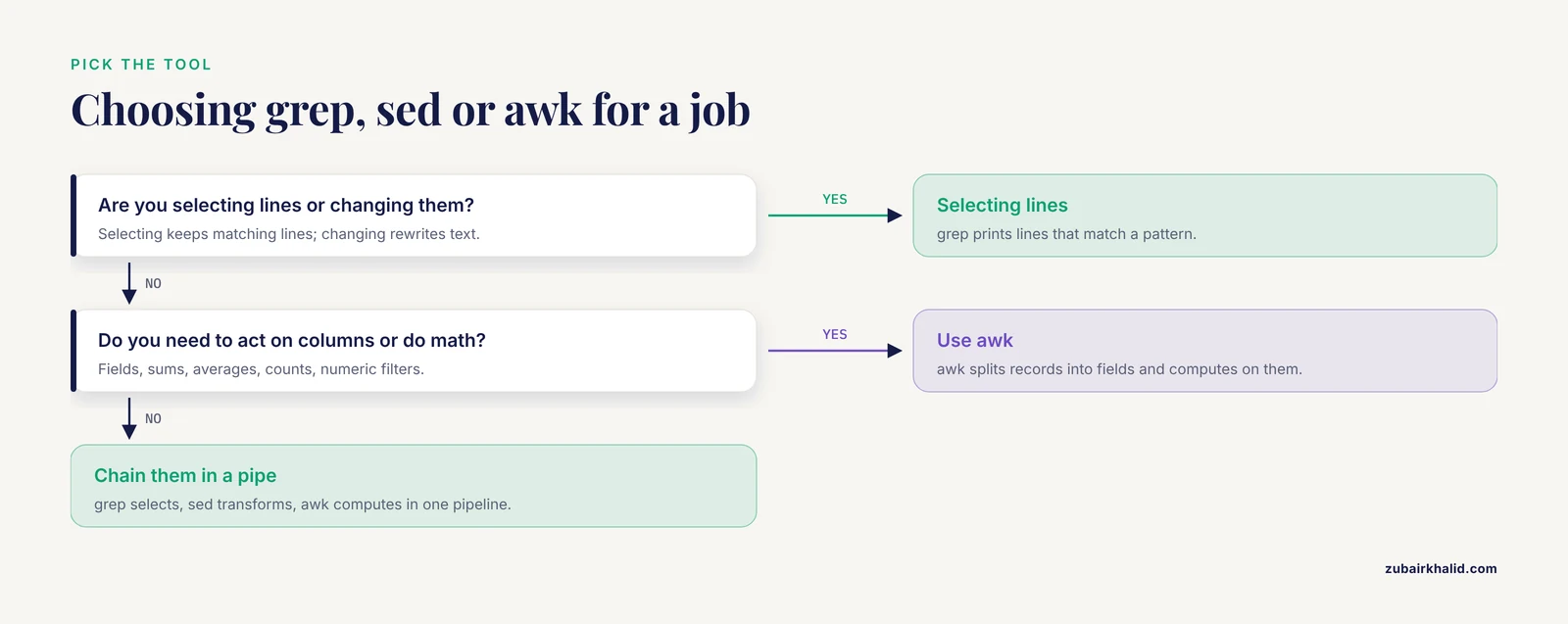
If you remember nothing else from this grep awk sed comparison for bioinformatics work, remember this decision rule.
| If you want to... | Reach for | Example |
|---|---|---|
| Find lines, headers, or records matching a pattern | grep | grep '^>' assembly.fa |
| Count matches | grep | grep -c 'NM_' transcripts.gtf |
| Substitute, delete, or extract fixed line ranges | sed | sed 's/chr/Chromosome/' |
| Edit a file in place | sed | sed -i.bak 's/old/new/g' samples.tsv |
| Split lines into columns and act on specific fields | awk | awk '{print $1, $3}' |
| Sum, average, or count values in a column | awk | awk '{sum += $2} END {print sum}' |
| Filter rows by a numeric condition in one column | awk | awk '$5 >= 20' aln.sam |
| Tally categories with a hash or array | awk | awk '{counts[$3]++} END {for (k in counts) print k, counts[k]}' |
A good habit is to ask two questions before typing anything. First, am I selecting data or changing it? Second, do I care about whole lines or about columns within lines? grep answers selection questions at the line level, sed answers change questions at the line level, and awk answers both questions at the column level.
Why These Three Tools Dominate Linux for Bioinformatics
Most core bioinformatics formats are plain text. FASTA stores sequences as header lines followed by sequence lines. FASTQ interleaves four lines per read. GFF3, GTF, BED, SAM, VCF, and tabular metadata files are all line-oriented text where columns carry meaning. That single property is why the classic Unix text-processing trio still runs the daily work of the field decades after it was written.
The lineage is long. Schmitt and Christianson described combining the Bourne shell, sed, and awk in the Unix environment for language analysis back in 1998, building analysis pipelines from small tools connected by pipes rather than one monolithic program [1]. The approach they documented, chaining small single-purpose programs so each one does one job and hands its output to the next, is exactly the shape of a modern bioinformatics workflow on the command line.
The tools have not been displaced by newer technology. A recent review of modern Unix automation for system administration covers shell scripting in Bash, sh, and zsh, and explicitly treats text processing with grep, awk, and sed as a foundational scripting skill alongside control flow, I/O redirection, exit code evaluation, and error handling [2]. The same practices that keep production systems reliable, such as modular design, input validation, logging, and careful exit-code checks, apply directly to reproducible bioinformatics pipelines [2].
There are also practical reasons these tools persist in genomics work:
- They stream. A 100 GB FASTQ does not need to fit in RAM. Each tool reads a line, processes it, and passes it on, so memory use stays flat regardless of file size.
- They compose. Every tool reads from standard input and writes to standard output by default, so you can chain them with pipes without writing glue code.
- They are everywhere. grep, sed, and awk ship with every Linux distribution and macOS, on compute clusters, in containers, and inside workflow systems, so a script written today still runs years later with no dependency management.
Side-by-Side Comparison
This table is the core of any honest grep awk sed comparison for bioinformatics. The pros and cons of each tool only make sense relative to what you are trying to do.
| Criterion | grep | sed | awk |
|---|---|---|---|
| Primary job | Select lines matching a pattern | Transform text stream line by line | Split records into fields and compute |
| Input model | Whole lines | Whole lines, with line numbers and ranges | Records (lines by default) split into fields |
| Language type | Pattern matcher, no programming | Editing language built around the substitute command | Full programming language with variables, arrays, conditionals, and functions |
| Regex dialect | Basic, extended (-E), Perl-compatible (-P where supported) | Basic by default, extended with -E | POSIX extended regular expressions (ERE), plus dynamic regexes as string values |
| In-place file editing | No (pair with -r or sponge if needed) | Yes, with -i and an optional backup suffix | No (redirect output to a new file) |
| Field handling | None. It sees lines, not columns | None in normal use. You operate on the whole line or captured groups | Native. $1 through $NF, adjustable field separator, rebuilt output with OFS |
| Variables and state | None | Hold space only, awkward for real logic | Full support. Numeric accumulators, associative arrays, user functions |
| Math and aggregation | No | No | Yes. Arithmetic, string functions, formatted output with printf |
| Typical bioinformatics use | Pull FASTA headers, count features, fetch IDs from a list | Clean sample sheets, rename chromosomes, trim fixed patterns, reformat strings | Column filters on SAM or VCF, per-gene counts, coverage summaries, format conversion |
| Memory profile | Constant, streams | Constant, streams | Constant while streaming, but associative arrays grow with the number of keys stored |
| Relative speed | Very fast, especially with -F on fixed strings | Fast for substitutions | Fast, with real differences between awk implementations discussed below |
| Learning curve | Minutes | An afternoon for everyday use | Days to weeks, because it is a real language |
| Failure mode when misused | Silent: you get zero lines and may not notice | Silent or destructive: -i rewrites your file | Silent: a wrong field number gives wrong numbers, not an error |
The short version of the pros and cons: grep is the safest and fastest but cannot transform anything. sed is precise for line-level edits but has no concept of columns. awk can do almost everything the other two can, plus computation, but a complex awk program is code that needs testing, while a grep pattern is a filter you can eyeball.
grep: Finding Lines That Matter
grep prints every line from its input that matches a pattern. In bioinformatics that usually means one of four tasks: pulling header lines, counting records, filtering a coordinate-sorted file against a list of identifiers, or checking that an expected string exists before a downstream step runs.
The flags that matter most
-ccounts matching lines instead of printing them.grep -c '^>' transcript.fagives you the number of sequences in a FASTA file, because every FASTA header starts with the greater-than character.-vinverts the match.grep -v '^#' annotations.gff3drops every comment line, which is how you strip GFF3 headers before counting features.-Ftreats the pattern as a fixed string rather than a regular expression. When you are searching for literal gene symbols,-Fis both faster and safer because characters like the question mark and asterisk lose their special meaning.-f filereads patterns from a file, one per line.grep -F -f keep_ids.txt edges.tsvpulls every interaction line involving a gene on your list. This pattern-file mode is one of the highest-value linux commands bioinformatics workflows use for set operations on identifiers.-wmatches whole words, which prevents BRCA1 from matching inside BRCA1P1 when you are filtering a gene list.-Eenables extended regular expressions so you can write alternation naturally, for examplegrep -E '^>(chr|scaffold)' assembly.fa.-oprints only the matched part, one match per line, which is how you extract all occurrences of a motif from a sequence line.-A,-B, and-Cprint context lines around a match, useful when scanning log files from a pipeline run.
A worked example: pulling and counting FASTA headers
# List every sequence ID in a multi-FASTA
grep '^>' assembly.fa

# Count sequences without loading the file into an editor
grep -c '^>' assembly.fa

# Extract just the accession from UniProt-style headers
grep '^>sp|' uniprot.faa | sed 's/^>sp|\([^|]*\)|.*/\1/'
That third command already shows the pattern you will use constantly, grep to select the relevant lines and sed to reformat them.
The FASTQ counting trap
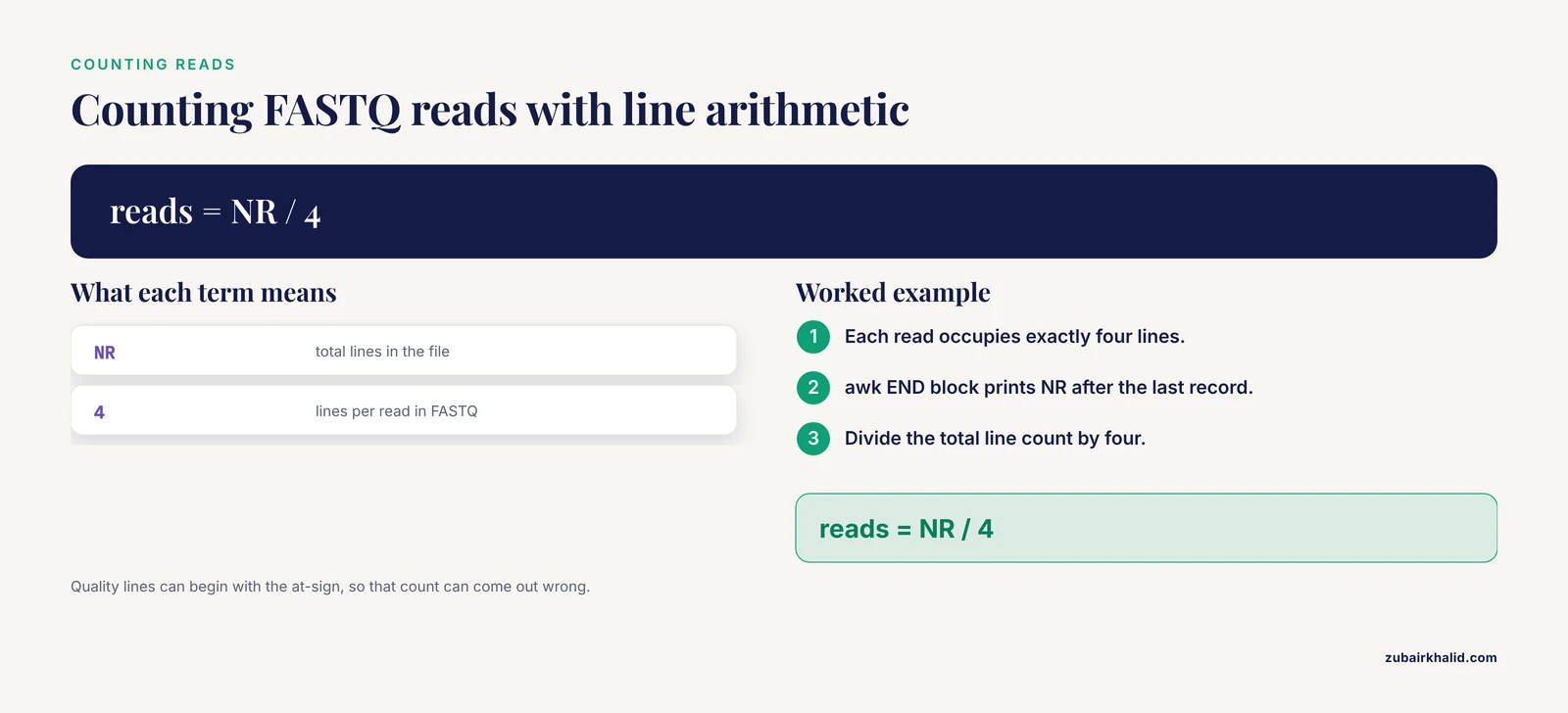
A common instinct is grep -c '^@' reads.fastq to count reads. FASTQ quality lines can legitimately begin with the at-sign character, so this count can come out wrong. The reliable idiom is to use awk and arithmetic on line numbers, shown in the awk section below. Knowing when a pattern match is structurally safe and when it is not is a core skill in linux for bioinformatics.
sed: Editing Streams Line by Line
sed is a stream editor. It reads input one line at a time, applies the editing commands you specify, and prints the result. In bioinformatics work, sed earns its keep on three jobs: substitution, deletion, and controlled extraction of line ranges.
Substitution with the s command
The substitute command has the form s/pattern/replacement/flags. The most common flag is g for global, which replaces every occurrence on the line rather than only the first.
# Normalize chromosome names in a BED file
sed 's/^chr//' peaks.bed > peaks.nochr.bed

# Convert a space-delimited string to tabs
sed 's/ /\t/g' old_format.txt > sample_sheet.tsv

# Use a different delimiter when the pattern contains slashes, such as file paths
sed 's|/mnt/old_ref|/mnt/new_ref|g' config.txt
The alternate delimiter trick matters when you edit paths or URLs, because otherwise every slash in the path needs escaping.
Deleting, printing, and ranges
# Drop the header row
sed '1d' counts.tsv

# Print only lines 100 through 200 of a large file
sed -n '100,200p' huge_alignment.sam

# Delete blank lines
sed '/^$/d' notes.txt

# Apply several edits in one pass using separate expressions
sed -e 's/^chr//' -e 's/GRCh37/GRCh38/' metadata.txt
Editing files in place, safely
sed -i rewrites the file on disk. This is genuinely useful for cleaning a sample sheet or renaming sequence identifiers across a directory, and it is also the single most dangerous command in everyday linux commands bioinformatics practice, because a bad pattern destroys the original with no undo. The safe habit costs nothing:
# Keep a backup with a .bak suffix, then verify before deleting it
sed -i.bak 's/2023_run/2024_run/g' sample_sheet.tsv
diff sample_sheet.tsv sample_sheet.tsv.bak
Run the same substitution without -i first, inspect the output, and only then commit the in-place edit. This two-step habit is the difference between a recoverable mistake and a lost file.
What sed cannot do
sed has no built-in notion of fields. You can approximate column work with capture groups, but the code gets hard to read fast. It also processes one line at a time with a small hold buffer, so anything requiring you to remember content across many lines, such as pairing a FASTA header with the sequence lines that follow it, fights the tool. Those jobs belong to awk.
awk: Fields, Records, and Small Programs
awk is a full programming language disguised as a filter. Every awk program has the same shape, one or more pattern { action } blocks. awk reads the input record by record, splits each record into fields based on a field separator, tests each pattern against the record, and runs the action for every pattern that matches. Two special blocks bracket every run: BEGIN runs before the first record and END runs after the last.
Fields and the variables you will use daily
$1,$2, and so on are fields, and$NFis the last field, whereNFis the number of fields in the current record.NRis the record number across all input, andFNRis the record number within the current file, which lets you treat the first file differently from the second.-Fsets the field separator.awk -F'\t'is the correct choice for every tab-delimited genomics file, because the default separator is any run of whitespace and that hides tab-versus-space problems rather than surfacing them.
Summing, averaging, and counting
# Mean coverage from a depth file where column 3 holds the depth
awk '{ sum += $3 } END { print sum / NR }' sample.depths.txt

# Number of reads in a FASTQ, using the four-lines-per-read structure
awk 'END { print NR / 4 }' reads.fastq

# Count each feature type in a GFF3 file
awk -F'\t' '$0 !~ /^#/ { counts[$3]++ } END {
  for (type in counts) print type, counts[type]
}' annotations.gff3
That last example uses an associative array, awk's hash table, keyed by the feature column. In three lines you get a feature census that would take a script in a heavier language.
Filtering rows by column values
# Keep SAM alignments with mapping quality at least 20, dropping headers
awk -F'\t' '$1 !~ /^@/ && $5 >= 20' alignments.sam

# Keep VCF variants with QUAL at least 30, skipping header lines
awk -F'\t' '$1 !~ /^#/ && $6 >= 30' variants.vcf

# Keep genes on a negative strand in a GTF file, column 7 holds the strand
awk -F'\t' '$7 == "-"' genes.gtf
Notice that the awk versions of these filters are safer than grep for numeric work, because awk '$5 >= 20' compares numbers, while grep would need a regular expression to approximate a numeric threshold and would do it badly.
Joining two files
The classic awk idiom for bioinformatics is the two-file join, storing one file in memory as a hash and streaming the second against it.
# Attach gene names to a counts table using an ID-to-name map
awk -F'\t' 'NR == FNR {
  names[$1] = $2
  next
}
{
  if ($1 in names) print $0, names[$1]
  else print $0, "NA"
}' gene_names.tsv counts.tsv
The NR == FNR condition is true only while reading the first file, so the first block loads the map and next skips to the next record without running the second block.
Parsing FASTA with awk
FASTA records span multiple lines, which breaks naive line-oriented thinking. The fix is to change the record separator so each record is a header plus its sequence.
# Print sequence ID and GC fraction for every record in a multi-FASTA
awk 'BEGIN { RS = ">" } NR > 1 {
  split($0, a, "\n")
  id = a[1]
  seq = ""
  for (i = 2; i <= length(a); i++) seq = seq a[i]
  n = length(seq)
  gc = gsub(/[GgCc]/, "", seq)
  print id, gc / n
}' assembly.fa
This is the point where awk stops being a filter and becomes a small program. That is exactly its role in the grep vs. awk vs. sed division of labor.
Choosing an awk implementation
gawk is the GNU implementation found on most Linux systems, mawk is a smaller, faster implementation common in slim container images, and BSD systems carry BWK awk. All interpret the POSIX language, but they differ in speed and in supported extensions. On large streaming jobs the difference between implementations can be substantial, so it is worth knowing which awk your cluster provides with awk, version or awk -W version depending on the build. For portable scripts, stick to POSIX awk constructs.
Head-to-Head on the Criteria That Decide Real Choices
Speed and memory
All three tools stream, so all three handle chromosome-scale files with flat memory. grep is the fastest of the three for pure selection, particularly with -F on fixed strings. sed is fast for substitutions. awk speed depends on the implementation and on the program, and any awk job that stores millions of keys in an associative array trades streaming for memory. For a rough ordering on a filtering task, expect grep with -F to be fastest, plain grep and sed close behind, and awk somewhat slower per line because it is interpreting a program.
One setting frequently changes measured speed by a large factor. Character-locale processing slows pattern matching on files with millions of lines. Setting the locale to C for ASCII genomics text restores full speed:
LC_ALL=C grep -F -f ids.txt big_table.tsvYou can export LC_ALL=C in a pipeline script header, and many production pipelines do exactly that for determinism as well as speed.
Regular expression dialects
grep without flags uses basic regular expressions, where the plus sign, question mark, and alternation pipe need backslash escapes. grep -E gives you extended regular expressions, and grep -P gives Perl-compatible regular expressions on builds that support it, which matters when you need lookarounds. sed defaults to basic regular expressions and offers -E for extended. awk uses extended regular expressions. The practical advice for reproducible work is to prefer -E everywhere and avoid the dialect matrix entirely, then reach for -P only when a pattern genuinely needs it, and record that dependency in the script header.
In-place editing
Only sed can rewrite its input file, and only sed therefore carries destructive risk. grep and awk write to standard output, which forces the safe pattern of writing a new file and comparing. Treat sed's -i as a privileged operation that deserves a backup suffix every single time.
Fields and state
This is the decisive criterion. If your question involves columns, awk wins by default, and the contest is over. sed can emulate column extraction with capture groups for simple cases, but awk's $3, NF, OFS, and arrays are purpose-built for it. grep simply does not see columns.
Learnability and readability
grep is learnable in minutes. sed covers 90 percent of everyday needs with the s command and two or three flags. awk is a language, and writing it well takes practice. The trap for beginners is inverted: people write long sed substitution chains with elaborate capture groups to do arithmetic awk would do in one line, or they write 40-line awk programs that a short Python script would express more clearly and test more honestly.
Reproducibility and pipeline hygiene
A pipeline is software, and the practices that keep software trustworthy apply to text-processing one-liners embedded in it. The Unix automation literature emphasizes modular design, logging, input validation, and exit code evaluation as the backbone of reliable scripting, and it covers grep, awk, and sed as core text-processing components of that backbone [2]. Two habits translate directly. First, validate inputs before processing, for example checking that a VCF is not empty and has the expected columns, rather than letting awk print a wrong-but-plausible number from malformed data [2]. Second, do not let a failing early step pass garbage downstream. In Bash, set -euo pipefail makes the pipeline stop when any component fails, and the same source discusses checking exit codes explicitly as a core robustness practice [2].
Worked Scenarios
Scenario 1: Cleaning a messy sample sheet
You receive a tab-delimited metadata file where sample names carry a legacy prefix, some rows are comments, and you need the sample ID and condition columns.
# Strip comment lines, drop the legacy prefix on IDs, keep two columns
grep -v '^#' raw_metadata.tsv | sed 's/legacy_//' | awk -F'\t' 'BEGIN { OFS = "\t" } {
  print $1, $4
}' > clean_metadata.tsv
Here each tool does the one thing it is best at. This composition pattern, small tools chained by pipes so each stage has a single job, is precisely the Unix design described in the language-analysis work by Schmitt and Christianson, where the shell, sed, and awk were combined in a single environment to build analysis pipelines [1].
Scenario 2: Filtering a VCF before visualization
You want variants with quality at least 30 that are not indels, and you want a per-chromosome count.
awk -F'\t' '$1 !~ /^#/ && $6 >= 30' variants.vcf | \
  awk -F'\t' '{ chr[$1]++ } END {
    for (c in chr) print c, chr[c]
  }'
You could merge this into one awk program, but the two-stage version reads like the question you were asked, which makes it easier for a collaborator to verify.
Scenario 3: FASTQ triage before alignment
Before spending compute on alignment, check read counts and per-read length statistics.
# Total reads
awk 'END { print NR / 4 }' reads.fastq

# Distribution of read lengths, assuming uniform length per lane
awk 'NR % 4 == 2 { print length($0) }' reads.fastq | sort | uniq -c

# GC fraction per read, streamed with constant memory
awk 'NR % 4 == 2 {
  n = length($0)
  gc = gsub(/[GgCc]/, "", $0)
  print gc / n
}' reads.fastq
The NR % 4 == 2 idiom relies on the FASTQ guarantee that every read occupies exactly four lines with the sequence on the second. That guarantee is what makes line-oriented tools safe here, and it is worth verifying once per file with awk 'NR % 4 == 1 { print substr($0, 1, 1) }' reads.fastq | sort -u, which should print only the at-sign.
Scenario 4: A diagnostic report from SAM output
You want unmapped count, mapped count, and mean mapping quality from a SAM file in one pass.
awk -F'\t' '
$1 ~ /^@/ { next }
{
  total++
  if (and($2, 4)) unmapped++
  else {
    mapped++
    sumq += $5
  }
}
END {
  print "total\t" total
  print "unmapped\t" unmapped
  print "mapped\t" mapped
  print "mean_mapq\t" sumq / mapped
}' alignments.sam
The bitwise and() function is a gawk extension, so on strict POSIX awk you would instead test the flag with arithmetic. This is a good example of knowing your awk implementation before shipping a script, as recommended in the implementation note above. This kind of chained reporting pipeline, where grep selects, sed normalizes, and awk computes, is the same composition strategy documented for combined shell, sed, and awk environments [1].
When to Graduate to Other Tools
Part of an honest grep awk sed comparison for bioinformatics is admitting where the trio ends:
cutandpastehandle trivial column extraction and pasting with less syntax than awk, at the cost of flexibility.sort,uniq,join, andcommhandle set and order operations on delimited files, and they pair naturally with awk output.- bedtools, and the wider family of format-specific toolkits, understand interval arithmetic and should replace hand-rolled awk for overlap and region operations.
- csvkit and similar parsers handle true CSV with quoted fields, which awk's simple separator model cannot do correctly.
- Python or R belong in the picture once logic outgrows about 30 lines of awk, or when you need real data structures, unit-testable functions, or statistical models. The modern automation literature treats integration of Python and Perl alongside shell tooling as standard practice for jobs shell alone handles poorly [2].
A sane rule: if an awk program needs helper functions, multi-line string manipulation, or nested data structures, rewrite it in Python and keep the awk one-liners for what they are good at.
Common Mistakes and Limitations
These are the errors that produce wrong results silently, which is worse than an error message.
- Assuming one record per line. Line-oriented tools are only correct on FASTQ because of the strict four-line structure, and only correct on FASTA if you change the record separator as shown above. SAM, BED, GFF3, and VCF data lines are one record per line, but their headers and comment lines must be excluded deliberately with patterns like
$1 !~ /^#/orgrep -v '^#'. - Forgetting the field separator. The awk default separator is any run of whitespace. On a file with empty tab-delimited cells, consecutive tabs collapse under the default, and every column after the first empty cell shifts by one. Always pass
-F'\t'for genomics tables. - Running
sed -iwithout a backup. As covered above, the in-place edit is irreversible. Use-i.bakand inspect the diff. - Trusting counts of lines that start with the at-sign in FASTQ. Quality lines can start with the same character as headers. Count reads with the
NR / 4idiom instead. - Ignoring locale. On multi-gigabyte files, a non-C locale can slow pattern matching dramatically, and different collation rules can change sort order. Export
LC_ALL=Cfor ASCII genomics text. - Regex greediness. A pattern like
<.>matches from the first opening character to the last closing character on the line, not to the nearest one. When extracting fields with sed capture groups, prefer negated character classes such as[^|]over the dot-star idiom. - Silent numeric parsing. awk converts non-numeric strings to zero in arithmetic, so a malformed depth file yields a plausible-looking mean of zero-contaminated numbers rather than an error. Spot-check inputs with
headand validate column counts withawk -F'\t' '{print NF}' file | sort -ubefore trusting downstream numbers. This is the input-validation discipline that production Unix automation practice emphasizes for any script that processes data [2]. - Unbounded associative arrays. Storing a key per line of a 500-million-line file consumes memory proportional to the file. For joins at that scale, sort both files and stream a merge, or use a join utility or a database.
- Ignoring exit codes in pipelines. By default a pipeline returns the exit status of its last command, so a grep that finds nothing and exits nonzero can be masked by a succeeding awk. Use
set -o pipefailin Bash pipeline scripts and check statuses deliberately, as recommended in Unix scripting practice for robust error handling [2]. - Overloading sed with logic. If a sed program needs more than about three expressions or nested addressing, it is an awk or Python job wearing the wrong costume.
- Not recording the tool versions. gawk, mawk, and BWK awk differ, GNU sed and BSD sed differ in
-ihandling, and GNU grep flags like-Pare not universal. Capture tool versions in your pipeline log so results can be reproduced later. This habit sits squarely in the logging and provenance practices recommended for Unix automation [2].
Frequently Asked Questions
Which tool should I learn first for bioinformatics?
Learn grep first, because it delivers value in five minutes and every later skill builds on pattern matching. Learn the sed substitute command second, then invest in awk, which carries the most capability and the longest learning curve of the three.
Can awk replace grep and sed entirely?
Technically yes, awk can express nearly all grep and sed work, but you should not let it. grep one-liners are easier to read, faster to run, and safer to audit than the awk equivalents, so keep each tool in its specialty.
How do I count reads in a FASTQ file correctly?
Use awk 'END { print NR / 4 }' reads.fastq, which exploits the guaranteed four-lines-per-read structure. Do not count lines beginning with the at-sign, because quality lines can also begin with that character.
Is sed safe for editing shared reference files in place?
No. Rewrite reference files only from a version-controlled master copy, and use sed -i.bak with a diff check for any in-place edit, even on your own working files.
Why is my awk output shifted by one column?
Almost always a field-separator problem. Consecutive tabs collapse under awk's default whitespace splitting, so pass -F'\t' explicitly for every tab-delimited genomics file and verify column counts before processing.
Do these tools still matter when I already use Python and R?
Yes. They remain the fastest way to inspect, filter, and sanity-check large text files interactively, and they are the standard glue between steps inside Snakemake, Nextflow, and shell-based pipelines, where a one-line filter is preferable to launching an interpreter for a two-second job.