Gitignore Strategies for Bioinformatics Pipelines: What to Exclude
By Dr. Zubair Khalid, DVM, MS, PhD ·

By the end of this article you will be able to write a .gitignore file that keeps sequencing reads, alignments, variant calls, workflow-manager caches, and conda installations out of your Git history, while keeping the workflow definitions, environment specifications, sample sheets, and configuration files safely versioned. You will also be able to untrack files that were already committed, verify that your ignore rules actually match the files you intended, and decide which large files belong in Git Large File Storage instead of ordinary Git.
To follow the walkthrough you need Git installed (version 2.23 or newer is comfortable, older versions work for everything except the git restore examples), a terminal, and a pipeline repository to work in. If your pipeline uses Snakemake, Nextflow, or both, the workflow-manager sections apply directly. Git Large File Storage (LFS, a Git extension that stores large file contents on a separate server while Git tracks lightweight pointer files) is optional and only needed for the last part.
Why gitignore Decisions Matter in Bioinformatics Workflows
A .gitignore file is a plain text file in the root of a Git repository that tells Git which paths to leave out of version control. In software projects this is mostly a convenience. In bioinformatics it is a reproducibility decision, because the boundary between what is committed and what is ignored defines what a collaborator can reconstruct from your repository alone.
The problem is acute in this field. Sequencing experiments generate files measured in gigabytes per sample. A whole-genome alignment directory can exceed the practical limits of Git hosting within a single run. At the same time, the things that determine whether an analysis can be reproduced are small text files: the workflow definition, the environment specification, the container recipe, the sample sheet, and the parameter configuration. A review of prenatal sequencing studies found that bioinformatics reporting was frequently incomplete, with tool names and versions often omitted and quality control steps poorly described [1]. If your Git repository mirrors that pattern by committing bulky outputs while ignoring the small files that define the method, the repository documents the results but not the analysis.
Consensus guidance for clinical bioinformatics points in the same direction. Recommendations from thirteen clinical bioinformatics units in the Nordic Alliance for Clinical Genomics call for strict version control and standardised file formats as part of production-grade practice [2]. A .gitignore file is the concrete instrument that enforces that boundary on a day-to-day basis: it makes "version control" mean the recipe rather than the products, and it makes accidental commits of multi-gigabyte data files impossible rather than merely discouraged.
There is also a hygiene argument. Environment directories, workflow caches, and log files change constantly and produce noisy diffs that bury the meaningful changes in code review. A community audit of error control in crosslinking mass spectrometry pipelines showed that software version changes alter results, and that tracking improvement between versions supports regression testing [3]. Regressions of that kind are visible only when the diff you are reviewing contains software and configuration changes, not thousands of lines of regenerated log output.
The Five Categories to Exclude
Every useful gitignore strategy for bioinformatics pipelines sorts candidates for exclusion into five categories. Sorting explicitly prevents the two classic failures: ignoring something that should be versioned (which destroys reproducibility) and failing to ignore something huge (which bloats the repository permanently, because Git history keeps every version of every file ever committed).
Raw data and derived sequence files
Raw reads and their derived formats are the largest category. A FASTQ file (a text format that stores sequencing reads with per-base quality scores) for one human whole-genome sample is roughly 50 to 100 GB, compressed. Downstream formats are comparably large: BAM (the compressed binary alignment format), CRAM (a more compact alignment format that references the genome), BCF and compressed VCF for variant calls, and the index files that accompany each of them (.bai, .crai, .tbi, .csi, .fai, .dict).
None of these belong in Git. They are either obtained from an archive, regenerated from raw data by running the pipeline, or both. The reference genome itself also stays out: reference FASTAs and their indices live in a shared filesystem location or a dedicated reference bundle, referenced by path and checksum. The hg38 genome build is the recommended reference for clinical analysis work [2], but whichever build you use, the repository should record its identity and checksum as text, not ship the several-gigabyte FASTA.
Generated outputs, reports, and logs
Everything the pipeline writes into a results directory is reproducible from inputs plus the committed workflow, so it is ignored. This includes QC reports such as those produced by MultiQC, per-sample log files, plot files, and intermediate files written into workflow-manager working directories. Logs deserve special mention because HPC schedulers like SLURM write one output file per job, and a small array job can produce hundreds of them in an afternoon.
Environment and dependency artifacts
Installed environments are heavy, machine-specific, and reconstructable. A Snakemake pipeline that declares per-rule Conda environments relies on Conda to create those environments from the committed YAML specification files, and this per-rule isolation is what keeps tool versions locked across the pipeline [4]. The YAML files go in Git. The Conda environments themselves, the Conda package cache, and the workflow manager's own metadata directories stay out. The same logic applies to Python virtual environments and to Node-style module directories if your pipeline has web components.
Version-lock artifacts are a special case. Conda environment.yml files, lock files, and container image references are the record of what was installed, and dependency documentation is exactly what reproducibility frameworks identify as the missing piece when identical code produces different results on different machines [5]. Commit these. They are small, and they are the evidence trail that reporting standards ask for [1].
Credentials and access tokens
Anything that authenticates you must be excluded: .env files, .netrc files, API keys for cloud storage, database passwords in connection strings, SSH private keys, and saved download credentials for controlled-access sequence data. This is the one category where a mistake cannot be fixed by an updated ignore rule alone, because a secret that entered Git history remains in history even after the file is deleted from the working tree.
Editor, operating system, and notebook clutter
.DS_Store files from macOS, Thumbs.db from Windows, vim swap files, pycache directories, Jupyter checkpoint directories, and R session artifacts (.Rhistory, .RData) carry no analytical value and generate constant diff noise.
The .gitignore Format in Five Rules
Understanding the format prevents most surprises. The rules are short and worth internalizing, because a pattern that looks right and matches nothing is the most common failure mode.
- Lines and comments. One pattern per line. Blank lines are ignored. A line starting with
#is a comment. Use\#if you need to match a literal hash at the start of a filename. - Wildcards and globs. A glob is a pattern-matching expression built from wildcards.
matches any run of characters except/, so.bammatchessample1.bamandalignments/sample1.bambut nota/b/sample1.bam.matches any number of directories, so/interim/*.tsvmatchesinterimfolders at any depth.?matches any single character, and[2][4][6][7]matches a character class. - Anchoring. A pattern containing a slash anywhere except at the end (for example
data/.fastq) is anchored to the directory containing the.gitignore. A pattern with no slash (for example.bam) matches at every depth. A trailing slash (results/) restricts the match to directories. - Negation. A pattern prefixed with
!un-ignores files that earlier rules ignored. Ordering matters: the last matching pattern wins. The trap is that Git will not descend into a fully ignored directory, soresults/followed by!results/keep.tsvdoes nothing. Writeresults/followed by!results/keep.tsvinstead, becauseresults/ignores the contents while the directory itself remains traversable. - Scope and layering. A
.gitignorein a subdirectory applies to that subtree, and a later, more specific.gitignoreoverrides rules from the parent. Rules in.git/info/excludeapply only to your clone, which is the right place for personal scratch paths you do not want to impose on collaborators.
A Complete Template
The following block is a working gitignore bioinformatics pipelines template for a repository containing one or more Snakemake or Nextflow workflows with Python and R components. Copy it into .gitignore at the repository root and prune the sections you do not need.
# ---- Sequence data and alignments ----
*.fastq
*.fastq.gz
*.fq.gz
*.bam
*.bam.bai
*.cram
*.crai
*.sam
*.vcf
*.vcf.gz
*.bcf
*.bcf.csi
*.tbi

# Reference genome artifacts (record checksums in a committed file instead)
*.fa.fai
*.fa.dict
*.fasta.fai
reference/bowtie2/
reference/bwa/
reference/bismark/

# ---- Generated results and reports ----
results/*
!results/.gitkeep
!results/README.md
out/*
output/*
*.multiqc.html
*.multiqc_data/
*.report.html

# ---- Logs and scheduler output ----
logs/
*.log
slurm-*.out
*.err
*.o[0-9]*
*.e[0-9]*

# ---- Snakemake ----
.snakemake/
.snakemake_timestamp

# ---- Nextflow ----
.nextflow/
.nextflow.log*
work/
 Tower Launch Identifier
.tower/

# ---- Conda and Python environments ----
miniconda3/
mambaforge/
pkgs/
.venv/
venv/
__pycache__/
*.pyc
*.egg-info/
build/
dist/
.pytest_cache/
.ipynb_checkpoints/

# ---- R ----
.Rhistory
.RData
.Rproj.user/
revdep/

# ---- Credentials ----
.env
.env.*
*.pem
*.key
.netrc
credentials*
secrets/

# ---- Editors and operating systems ----
.DS_Store
Thumbs.db
*.swp
.idea/
.vscode/
Two deliberate choices in this template deserve comment. First, results/* with a negated README.md keeps a short human-written description of what each subdirectory should contain inside the ignored tree, which is the cheapest way to document expected outputs. Second, the reference artifacts under reference/ are ignored by directory rather than by extension, because tool index directories (bowtie2, bwa, bismark) contain binaries whose extensions vary.
Step-by-Step: Applying the Strategy to an Existing Repository
This walkthrough assumes a repository with a Snakemake pipeline where results/ and one FASTQ fixture were committed by mistake before any ignore rules existed.
Step 1. Measure what you are carrying
$ du -sh .git
$ git count-objects -vH

count: 3120
size: 45.21 MiB
in-pack: 1805
pack-size: 1.20 GiB
The size-pack line (shown here as pack-size in the compressed total) tells you how much history Git is storing. A repository whose pack size exceeds a few hundred megabytes almost certainly contains data files. Confirm which ones:
$ git ls-files | xargs du -h 2>/dev/null | sort -rh | head -10The largest tracked files appear at the top. Anything over about 10 MB is a candidate for exclusion or LFS.
Step 2. Write the .gitignore
Create .gitignore in the repository root with the template above, edited for your stack. If the repository has subdirectories that are separate pipelines, each can carry its own more specific .gitignore, which overrides the parent for that subtree.
Step 3. Untrack files that are already committed
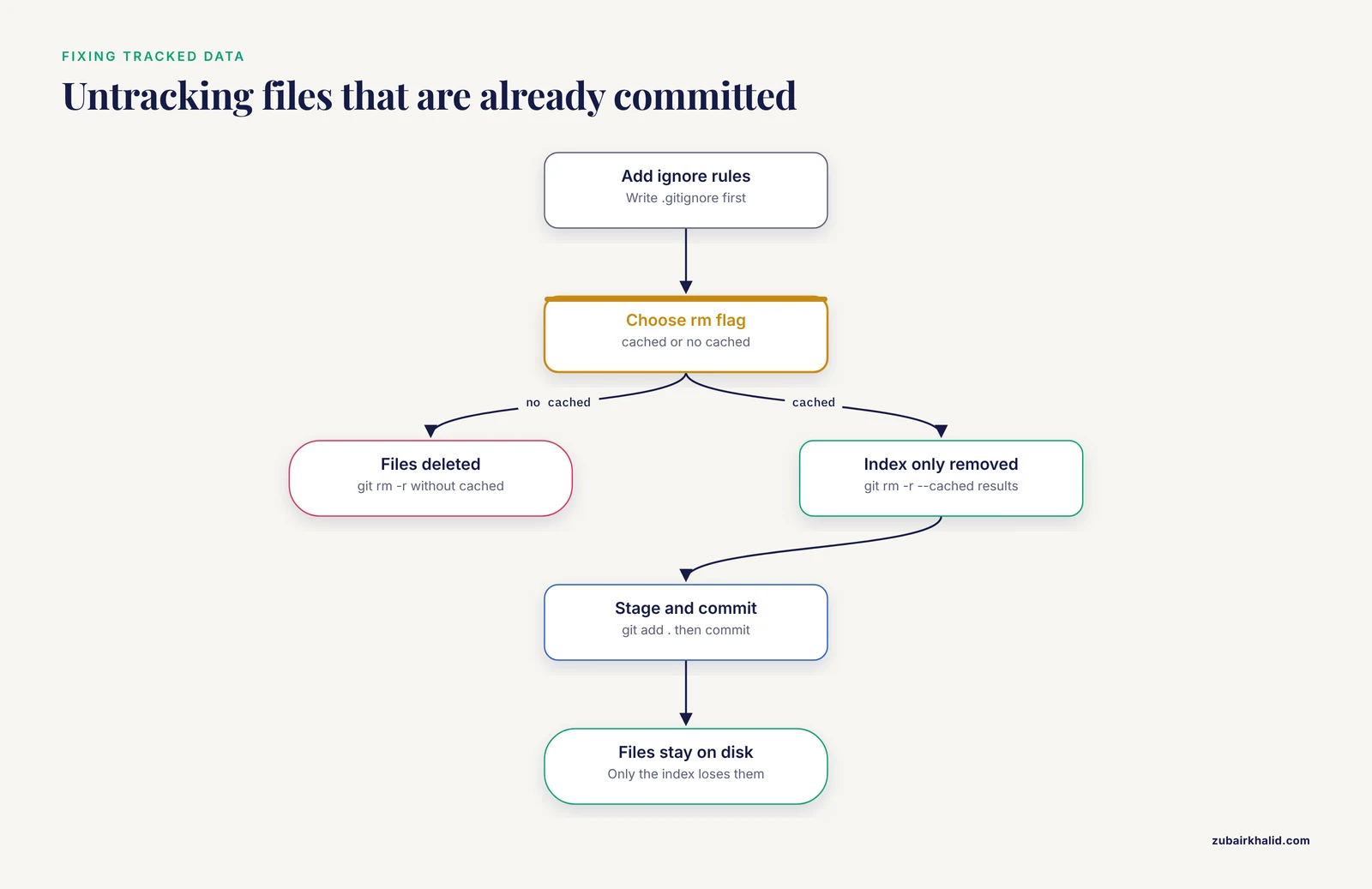
Adding an ignore rule does not untrack a file that Git already has in its index. Untrack the committed data and results without deleting them from disk:
$ git rm -r --cached results
$ git rm --cached test/fixtures/SRR1039520.subsample.fastq.gz
$ git add .
$ git commit -m "Stop tracking generated results and data fixtures"
Expected output for the first command looks like this:
rm 'results/QC/multiqc_report.html'
rm 'results/alignments/SRR1039520.sorted.bam'
rm 'results/variants/SRR1039520.vcf.gz'
The files remain on your disk. Only the Git index (the staging area that records what will be committed) loses them. If you instead ran git rm -r without the cached flag, Git would have deleted the files from disk, which is the single most expensive mistake in this whole procedure.
Step 4. Verify which rules match
git check-ignore with the verbose flag shows exactly which pattern in which file is matching a given path:
$ git check-ignore -v results/alignments/SRR1039520.sorted.bam
.gitignore:9:*.bam	results/alignments/SRR1039520.sorted.bam
The output reads file:line:pattern followed by a tab and the path. If a file you believe should be ignored produces no output, no rule matches it, and you can fix the pattern with confidence rather than guesswork.
Step 5. List everything being ignored
$ git status --ignored
On branch main
Ignored files:
  (use "git add -f" to force-adding them)
	results/
	.snakemake/
	slurm-1158231.out
	miniconda3/
Step 6. Preview a cleanup before running it
git clean removes untracked files, and with the -X flag it removes only ignored files. Always run it with -n (dry run) first:
$ git clean -Xdn
Would remove .snakemake/incomplete
Would remove logs/2026-11-10/
Would remove results/QC/multiqc_report.html
When the list looks right, run git clean -Xdf to actually delete. Dry run first is not optional on a shared HPC login node where the ignored tree may contain the only copy of a week of compute.
Step 7. Protect against accidental force-adds
git add -f overrides ignore rules, which is sometimes necessary and often accidental. A lightweight guard is a pre-commit hook that refuses commits containing files over a size threshold. A minimal version without semicolons:
#!/bin/bash
large=$(git diff --cached --name-only -z | xargs -0 -I{} find {} -size +50M 2>/dev/null)
if [ -n "$large" ]
then
  echo "Commit blocked, file over 50 MB:"
  echo "$large"
  exit 1
fi
Place this in .git/hooks/pre-commit and make it executable with chmod +x .git/hooks/pre-commit. Hooks are local to a clone, so for team-wide enforcement use your hosting platform's server-side protection or a shared hook manager.
Workflow-Manager Specifics
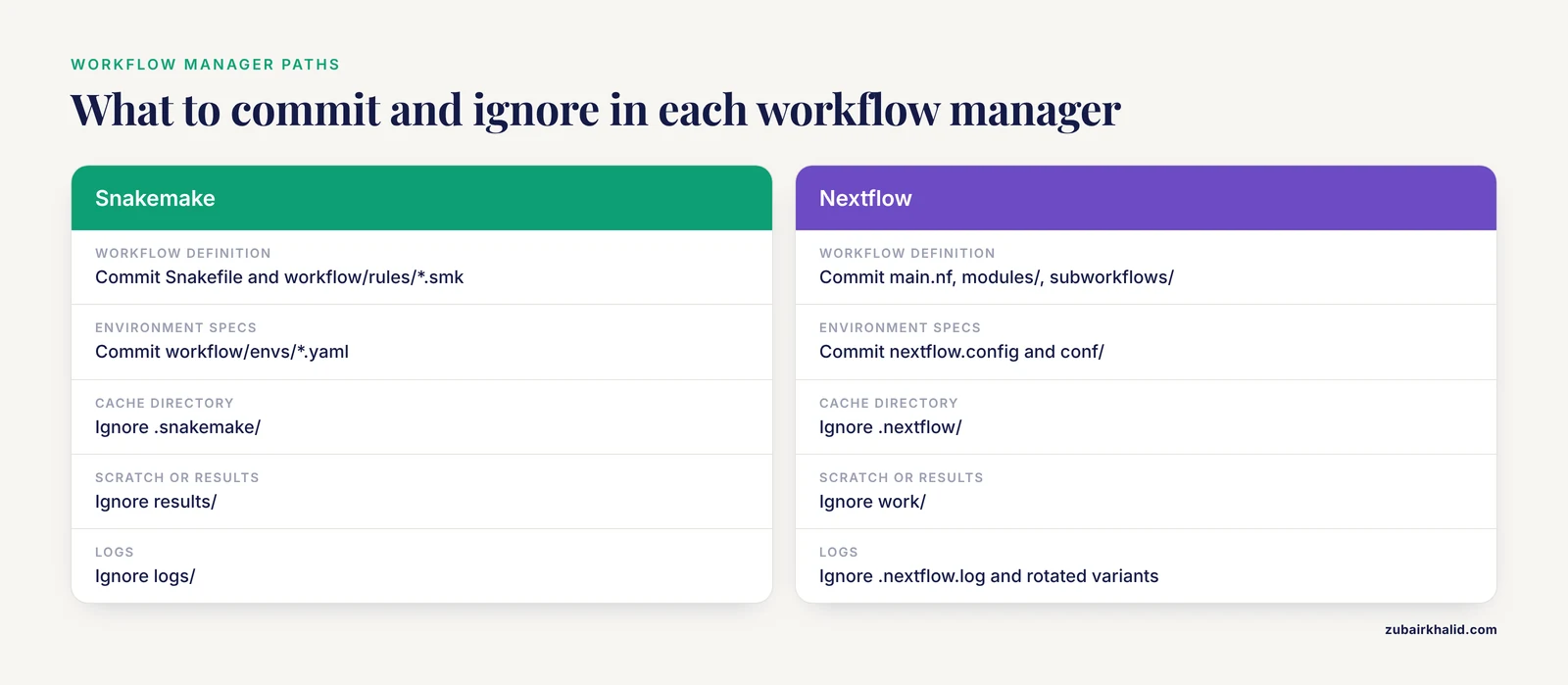
Snakemake repositories
Snakemake writes all of its bookkeeping into .snakemake/: the dependency DAG, per-rule timestamps, metadata, SLURM submission logs, and the conda environments it materializes from your YAML files. Ignore the whole directory. The YAML files themselves live where you wrote them, typically workflow/envs/ or envs/, and they must be committed, because they are the specification from which the environments are rebuilt. This separation between the declared environment (committed) and the materialized environment (ignored) is exactly how per-rule conda isolation achieves strict version control of the constituent tools in a pipeline such as MAYA [4].
A standard Snakemake repository keeps these committed: Snakefile or workflow/Snakefile, workflow/rules/.smk, workflow/envs/.yaml, workflow/scripts/*, config/config.yaml, and config/samples.tsv. It ignores .snakemake/, results/, logs/, and the conda installation directory if one lives inside the project.
Nextflow repositories
Nextflow is similar with different names. Ignore work/ (the per-task scratch directory), .nextflow/ (cache and history), .nextflow.log and its rotated variants, and your published results directory. Keep main.nf, nextflow.config, conf/, modules/, subworkflows/, bin/, and the assets/ or test/ fixtures that are small enough to version. Systems built on Nextflow for large clonal sequencing libraries, such as the clonevdjseq workflow and management system, keep the analysis workflow in the repository while sequencing archives and large processed datasets live in external storage [6], which is the same boundary this article is drawing.
A subtlety with Nextflow: if you use a container directive pinning a digest in nextflow.config or in module-level process blocks, those lines are part of the reproducibility record and must never be ignored. Frameworks built specifically to make version-locked containers the default execution unit exist precisely because ad hoc dependency documentation is unreliable [5].
What You Must Never Ignore
The ignore file defines what the repository is. These files define the method, and excluding them reproduces the reporting failure that systematic reviews of sequencing studies document, where tool names and versions are frequently omitted and filtering strategies lack reproducibility [1].
- Workflow definitions.
Snakefile,main.nf,.smk,.nf, WDL and CWL documents. These are the pipeline. - Environment specifications.
environment.yml,*.lock,requirements.txt,renv.lock. A lock file is a machine-generated record of exact package versions, and it is small. - Container recipes.
Dockerfile, Apptainer definition files (.def). If you cannot rebuild the image, the recipe is the only trace of it. - Sample sheets and metadata.
samples.tsv,units.tsv, phenotype tables. These are irreplaceable and tiny. - Configuration files.
config.yaml,nextflow.config, parameter files. Pipelines such as MINI-EX treat parameter configuration as a first-class part of the documented workflow, running from input preparation through configuration to output interpretation [7]. Deleting configuration from version control removes the one part of the method most likely to differ between runs. - Checksum manifests. A committed text file listing MD5 or SHA-256 checksums of reference files, inputs, and key outputs is how a repository with ignored data files still proves data integrity. Generate one with
md5sum data/*.fastq.gz > md5.txt(orsha256sumfor stronger hashing) before the data files themselves are ignored. - Test fixtures and expected outputs for regression tests. Small, synthetic inputs and their known outputs belong in Git, because version-to-version comparison is what catches silent result changes, as the crosslinking mass spectrometry audit demonstrated with its ground-truth designs [3].
Summary Table: Exclude, Keep, or Store Elsewhere
| Path or pattern | Action | Reason |
|---|---|---|
.fastq.gz, .bam, .cram, .vcf.gz | Ignore | Regenerated from raw data, far too large for Git |
*.bai, .fai, .dict, .tbi index files | Ignore | Derived from data or reference, machine-regenerable |
results/, logs/, slurm-.out | Ignore | Generated outputs, reproducible by rerunning |
.snakemake/, work/, .nextflow/ | Ignore | Workflow-manager caches and scratch space |
miniconda3/, pkgs/, .venv/ | Ignore | Installed environments, rebuilt from specs |
.env, *.pem, .netrc | Ignore | Secrets, must never enter history |
.DS_Store, pycache/, .Rhistory | Ignore | Editor and runtime clutter |
Snakefile, main.nf, .smk, .nf | Commit | The pipeline definition itself |
environment.yml, *.lock, requirements.txt | Commit | The reproducibility record of dependencies |
Dockerfile, *.def | Commit | Container build recipe |
samples.tsv, config.yaml | Commit | Inputs and parameters that define the analysis |
Small test fixtures under test/ | Commit | Enable regression testing |
| Multi-GB test data, reference FASTAs | Git LFS or external store | Too large for ordinary Git, needed by some collaborators |
When a File Is Too Big to Ignore: Git Large File Storage
Some files are neither regenerable nor small: a subsampled FASTQ fixture used by continuous integration, a small whole-genome variant call set used as a regression baseline, a trained model artifact. Git Large File Storage handles these by replacing file contents with a pointer and storing the bytes on an LFS server.
$ git lfs install
Updated git hooks.

$ git lfs track "test/fixtures/*.fastq.gz"
Tracking "test/fixtures/*.fastq.gz"

$ git add .gitattributes
$ git add test/fixtures/SRR1039520.subsample.fastq.gz
$ git commit -m "Store downsized FASTQ fixture in LFS"
The track command writes the pattern into .gitattributes, which must itself be committed before the tracked files, or the first push will send raw bytes to ordinary Git. Verify with git lfs ls-files, which lists every file currently managed by LFS. Keep the threshold for LFS strict (tens of megabytes, not gigabytes), because LFS bandwidth and storage quotas on hosted platforms are finite.
One Repository or Several: Scoping Ignore Rules
Laboratories often accumulate a monorepo containing several pipelines, or a single pipeline plus downstream notebooks. Three practices scale well.
First, keep a root .gitignore with the universal categories (data extensions, credentials, editor junk) and add per-directory .gitignore files for stack-specific paths. A notebooks/.gitignore can ignore large embedded outputs while the root file stays readable.
Second, use anchored patterns to avoid cross-talk. A root-level rule results/ ignores every results/ directory in every subtree, which is usually what you want. A rule pipelines/rna/results/ ignores only that one.
Third, prefer explicit over clever. A rule like * followed by a long list of negations (the "whitelist" pattern) is valid Git and occasionally justified for a directory that should contain only approved files, but as a repository-wide strategy it guarantees that new collaborators cannot add any file without editing the ignore rules. Reserve whitelisting for narrow directories such as reference/checksums/.
Common Mistakes and Limitations
- Adding the rules after the files. An ignore rule has no effect on tracked files. If
dushowed a 1.2 GB pack and you only added.gitignore, nothing shrank. You must untrack (Step 3) and, for files already pushed, accept that they remain in history. Complete removal requires history rewriting, which invalidates every clone and is a coordinated team event, not a casual fix. - Overly broad wildcards.
.tsvto ignore a results tree also ignoresconfig/samples.tsv. Scope generated outputs by directory (results/) rather than by extension whenever the extension is shared with inputs. - Negation inside a fully ignored directory. As explained in the format section,
results/plus!results/README.mdsilently does nothing. Useresults/*for the ignore and then negate specific files. - Treating .gitignore as privacy. An ignored file is merely untracked. Anyone with filesystem access to your project directory can read it, and a force-add or a careless
git add .before the rule exists puts it in history. Secrets need secret managers and, when they leak, history rewriting. - Ignoring the wrong half of the environment. Ignoring
envs/because it looks like "installed stuff" deletes your environment specification from version control. Ignore.snakemake/conda/(inside the cache directory), notworkflow/envs/. - Case sensitivity surprises. Git on Linux is case-sensitive and
*.BAMdoes not matchsample.bam. On macOS and Windows default filesystems it may match. Normalize extensions to lowercase and write patterns in lowercase. - The dry-run discipline.
git clean -Xdfis destructive and irreversible for ignored files. The-ndry run costs nothing. Skipping it on a shared analysis server is the most common way people lose a week of compute output. - A limitation to keep in mind: a
.gitignorestrategy supports reproducibility but cannot deliver it alone. The ignored results are only reconstructible if the committed workflow, environments, and configurations actually pin every tool version, which is the standard that clinical bioinformatics consensus guidance sets for production systems [2]. If your environment files are incomplete, the ignore boundary is tidy around an unreproducible core.
Next Steps
Once the ignore boundary is correct, the natural sequence is to tag a release (git tag -a v1.0.0 -m "First pinned pipeline release"), build or pin the container images referenced in the configuration, and wire the small test fixtures into automated regression tests so that every pull request is checked against known outputs. For teams adopting reproducibility frameworks that generate version-locked execution interfaces from a single specification [5], the same ignore rules carry over unchanged, because the boundary between recipe and product does not depend on which workflow manager executes the recipe.
Frequently Asked Questions
Should I ignore FASTQ and BAM files in Git?
Yes, always. A single sample's compressed FASTQ can be tens of gigabytes and BAM files are comparably large, and Git stores every version of every file ever committed, so one accidental push of raw data permanently bloats the repository. Keep the raw data on your storage system or in a sequence archive, commit the checksums, and let the pipeline regenerate the rest.
How do I stop tracking a file that is already committed?
Add the file to .gitignore, then run git rm -r, cached path/ to remove it from the index while leaving it on disk, then commit. The file stays in old history, so for secrets you also need a history rewrite coordinated with your team.
Why is my file still showing in git status after I added it to .gitignore?
Because the file was already tracked, and ignore rules only apply to untracked files. Untrack it with git rm, cached, commit, and the rule takes effect. If the file was never tracked and still shows up, check the pattern with git check-ignore -v path to see why no rule matches.
Should I commit results and reports or ignore them?
Ignore generated results and reports, and commit a short README describing what each results subdirectory should contain. The exception is small, curated outputs used as regression-test baselines, which belong in version control so future changes can be checked against known answers.
Do I ignore the conda environments or the YAML files?
Ignore the installed environments and the .snakemake/ cache directory, and commit the YAML environment specification files. The YAMLs are the recipe from which every environment is rebuilt, which is what makes per-rule Conda isolation reproduce tool versions across the pipeline.
What about the .snakemake and .nextflow directories, should any of it be committed?
Ignore both directories entirely. Everything inside them is cache, metadata, or logs that the workflow manager regenerates on the next run. Your Snakefile, modules, configuration, and environment YAMLs outside those directories are the parts that must be committed.
How do I handle large files that must still be versioned?
Use Git Large File Storage for files in the tens of megabytes range, such as downsized test fixtures. Run git lfs install, then git lfs track "pattern/*.ext", commit the resulting .gitattributes before adding the files, and verify with git lfs ls-files. For genuinely huge data, commit checksums and store the data elsewhere.
Where should the .gitignore file live?
In the repository root, committed like any other file, so every collaborator and every clone gets the same rules. Add per-subdirectory .gitignore files only when a subtree needs specific overrides, and put personal scratch paths in .git/info/exclude so they stay local to your clone.
Sources
- A Framework for Bioinformatic Reporting in Prenatal Sequencing: Insights From a Systematic Review.
- Recommendations for bioinformatics in clinical practice.
- A community audit of error control in crosslinking mass spectrometry.
- Deep Genomic Characterization of Bacillus subtilis SNUY1 & 168 Using MAYA (Multistage Analysis of Prokaryotic Annotations): An Integrated Snakemake-Based Bioinformatics Pipeline.
- FairFlow: A transparency-first framework for verifiable and reproducible bioinformatics.
- clonevdjseq: A workflow and bioinformatics management system for sequencing, archiving, and analysis of VDJ sequences from clonal libraries.
- MINI-EX Version 2: Cell-Type-Specific Gene Regulatory Network Inference Using an Integrative Single-Cell Transcriptomics Approach.