Setting Up GitHub Actions for Nextflow Pipelines
By Dr. Zubair Khalid, DVM, MS, PhD ·

By the end of this guide you will have a GitHub repository whose Nextflow pipeline runs automatically on every push and every pull request. The setup pins the Nextflow version, runs the pipeline inside Docker and Apptainer containers, caps resources so jobs fit on hosted runners, uploads logs when a run fails, and follows the linting and format conventions used by the nf-core community. You need a GitHub account with write access to a repository, a Nextflow pipeline to test (a minimal one is included below), and small test data. Everything else, including Java, Nextflow itself, and the container engine, is installed by the workflow on GitHub's hosted runners, so you do not need to configure a server. The same files work whether you are setting up GitHub Actions for Nextflow pipelines in a brand new repository or adding continuous integration (CI) to one that already exists.
Nextflow is a bioinformatics workflow manager, a program that expresses an analysis as processes connected by channels and schedules those processes across laptops, HPC schedulers, or cloud services. GitHub Actions is GitHub's built-in automation platform. You describe jobs in YAML files stored under .github/workflows, and GitHub executes them in response to events such as a push. The two tools fit together naturally because a Nextflow pipeline is already a self-contained, runnable unit, and CI turns "it works on my machine" into a check that gates every merge.
Why GitHub Actions Fits Nextflow Pipelines
Continuous integration for pipelines has three jobs: prove the code still runs, prove the outputs still look right, and do both before a human reviewer spends time on the change. GitHub Actions does this inside the repository itself. Because the workflows are event-driven and live next to the code, they remove the integration overhead of a separate CI server, and they pair cleanly with infrastructure-as-code tools such as Terraform for provisioning reproducible test environments [1].
The approach scales to serious scientific workloads. ROOT, the data processing framework at the center of high energy physics analysis, migrated its CI from Jenkins to GitHub Actions at the end of 2023. The project merges more than 1,500 pull requests per year and now runs thousands of unit, integration, functional, and end-to-end tests in under an hour across Windows and several macOS versions, with a cost-benefit assessment that favored the new system [2].
Nextflow pipelines are developed and shared as ordinary GitHub repositories. nf-cavalier, a Nextflow pipeline for rare disease variant prioritization and reporting, is maintained at bahlolab/nf-cavalier under the MIT license [3]. What makes the Nextflow ecosystem unusual is that the nf-core community ships a shared set of workflow files with every new pipeline, so a repository created from the template gets linting, matrix testing, and cloud test runs without anyone hand-writing YAML from scratch.
What You Need on Hand
- A GitHub repository containing a Nextflow pipeline. If you do not have one, the minimal pipeline in the next section takes five minutes to create.
- Write access to that repository so you can push the workflow file.
- Small test data. A few compressed FASTQ files, or even plain text files, are enough. The nf-core community keeps small public files in a dedicated test-datasets repository for exactly this purpose.
- Container images for your processes. Public images such as
ubuntu:24.04work for a demo, and nf-core modules reference versioned biocontainer images for real tools. - Optional: the nf-core tools command line interface installed locally with
pipx install nf-core, and Java 17 if you want to reproduce the CI run on your laptop before pushing.
How the Two Tools Fit Together
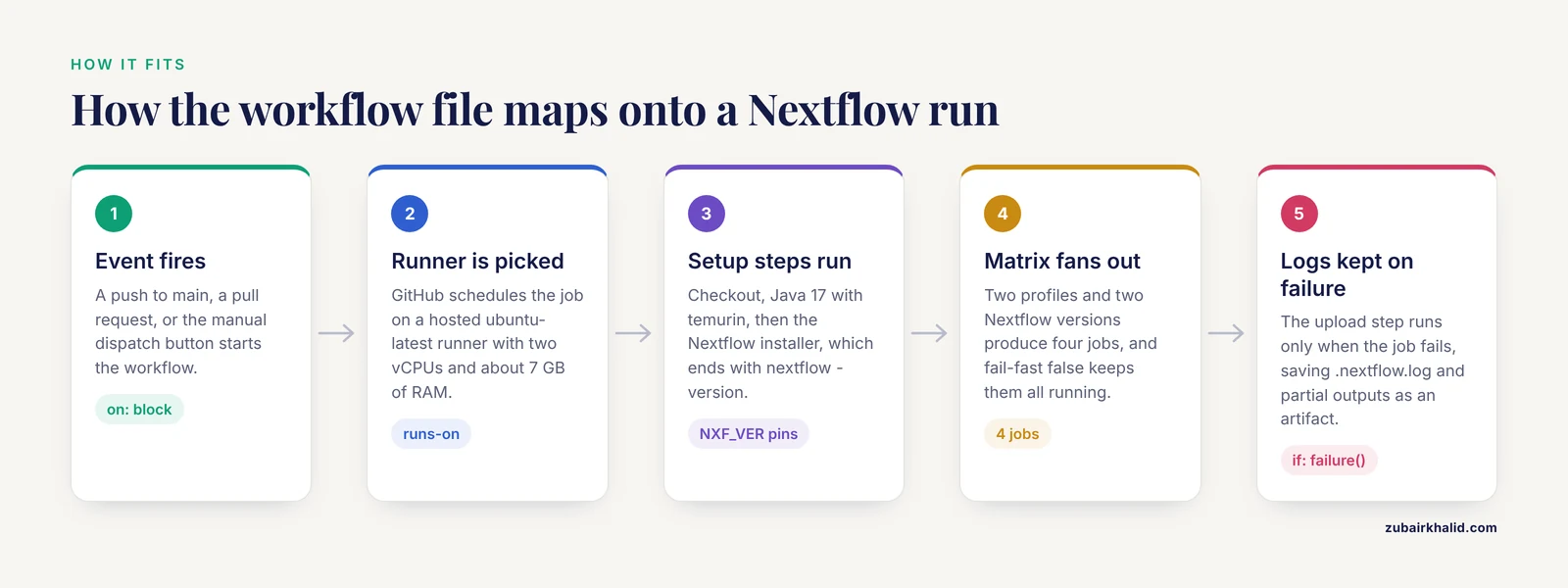
GitHub Actions reads every file matching .github/workflows/*.yml in your repository. Each file defines one automation, called a workflow. A workflow listens for events, such as a push to main or a pull request being opened. When an event matches, GitHub schedules the workflow's jobs on a runner, a virtual machine that GitHub hosts (ubuntu-latest is the standard Linux image) or one you register yourself. A job is a list of steps. A step either runs a shell command or calls an action, a reusable unit such as actions/checkout@v4, which checks out your repository. Jobs can read secrets, encrypted values injected as environment variables, and can upload artifacts, files preserved after the run for download. A matrix strategy fans a single job out into copies that differ by, for example, container engine. A concurrency group cancels superseded runs when you push again.
On the Nextflow side, five settings control how a pipeline behaves in CI. A profile is a named block of configuration in nextflow.config that you activate with the -profile flag. The convention is a test profile with tiny inputs and capped resources, combined with a container engine profile. NXF_VER is an environment variable that pins the Nextflow launcher version. The executor decides where processes run, and the local executor is the right choice in CI because the runner itself is the compute. The outdir parameter sets where published outputs land.
The mapping is direct. The workflow file replaces your fingers typing nextflow run, the runner replaces your laptop, the matrix replaces running the command twice with different engines, and artifacts replace scrolling a terminal after a failure.
A Complete GitHub Actions Nextflow Example
Step 1: Create a minimal pipeline
If you already have a pipeline, skip to step 2. Otherwise create these two files at the repository root. main.nf defines one process, the unit of work in DSL2, Nextflow's current scripting dialect:
#!/usr/bin/env nextflow

nextflow.enable.dsl = 2

process GREET {
    output:
    path "hello.txt"

    script:
    """
    echo "hello from $workflow.projectName" > hello.txt
    """
}

workflow {
    GREET()
}
nextflow.config declares the output directory, publishes every output there, and defines the profiles:
params.outdir = 'results'

process {
    publishDir = [path: params.outdir, mode: 'copy']
}

profiles {
    test {
        process.cpus   = 1
        process.memory = 1.GB
    }
    docker {
        docker.enabled    = true
        process.container = 'ubuntu:24.04'
    }
    singularity {
        singularity.enabled = true
        process.container   = 'ubuntu:24.04'
    }
}
The test profile caps each process at one CPU and 1 GB of memory so the run always fits a hosted runner. The docker and singularity profiles turn on the corresponding container engine and set the image. ubuntu:24.04 stands in for the bioinformatics images a real pipeline would use.
Step 2: Create the workflow file with triggers and concurrency
Create .github/workflows/ci.yml. The name and the on block decide when the automation runs:
name: nextflow-ci

on:
  push:
    branches: [main]
  pull_request:
  workflow_dispatch:

permissions:
  contents: read

concurrency:
  group: "${{ github.workflow }}-${{ github.ref }}"
  cancel-in-progress: true
This runs on pushes to main, on every pull request, and on demand through the workflow_dispatch button in the Actions tab. The concurrency group is keyed by workflow name and branch, so five pushes in a row produce one active run, not five. The permissions block grants the automatic GITHUB_TOKEN read-only access to repository contents, which is all a test run needs.
Step 3: Install Java and Nextflow
Add the setup steps to the job. actions/setup-java installs Eclipse Temurin 17, a long-term-support OpenJDK build, and the official installer script provides Nextflow:
jobs:
  test:
    name: test ${{ matrix.profile }} nextflow-${{ matrix.nxf_ver }}
    runs-on: ubuntu-latest
    timeout-minutes: 30
    env:
      NXF_VER: ${{ matrix.nxf_ver }}
      NXF_SINGULARITY_CACHEDIR: ${{ github.workspace }}/.singularity
    steps:
      - name: Check out pipeline
        uses: actions/checkout@v4

      - name: Install Java 17
        uses: actions/setup-java@v4
        with:
          distribution: "temurin"
          java-version: "17"

      - name: [Install Nextflow](/knowledge/bioinformatics/install-nextflow)
        run: |
          curl -fsSL https://get.nextflow.io | bash
          sudo mv nextflow /usr/local/bin/
          nextflow -version
The install step ends with nextflow -version, which prints the Nextflow banner and the version number. Confirm the version matches the value you pinned. Because NXF_VER is set at the job level, the launcher honors it in every step.
Step 4: Run the test profile on a matrix
The matrix creates one job copy per combination of profile and Nextflow version, so the example produces four jobs:
    strategy:
      fail-fast: false
      matrix:
        profile: ["docker", "singularity"]
        nxf_ver: ["24.04.2", "latest"]

    steps:
      - name: Install Apptainer
        if: matrix.profile == 'singularity'
        uses: eWaterCycle/setup-apptainer@main
        # pin this action to a release tag in production

      - name: Run test profile
        run: nextflow run . -profile test,${{ matrix.profile }} --outdir ci-results

      - name: List published outputs
        run: find ci-results -type f | sort
fail-fast: false keeps all four jobs running when one fails, so a Docker-only problem does not hide a Singularity-only problem. NXF_SINGULARITY_CACHEDIR keeps pulled images inside the workspace so a retried job does not download them again.
Step 5: Capture logs and cap runtime
timeout-minutes: 30 on the job stops a runaway pipeline before it consumes the default six-hour budget. Upload the Nextflow log and any partial outputs when the run fails, because that artifact is usually all you need to diagnose the problem:
      - name: Upload logs on failure
        if: failure()
        uses: actions/upload-artifact@v4
        with:
          name: logs-${{ matrix.profile }}-${{ matrix.nxf_ver }}
          path: |
            .nextflow.log*
            ci-results/
The complete file
name: nextflow-ci

on:
  push:
    branches: [main]
  pull_request:
  workflow_dispatch:

permissions:
  contents: read

concurrency:
  group: "${{ github.workflow }}-${{ github.ref }}"
  cancel-in-progress: true

jobs:
  test:
    name: test ${{ matrix.profile }} nextflow-${{ matrix.nxf_ver }}
    runs-on: ubuntu-latest
    timeout-minutes: 30
    env:
      NXF_VER: ${{ matrix.nxf_ver }}
      NXF_SINGULARITY_CACHEDIR: ${{ github.workspace }}/.singularity
    strategy:
      fail-fast: false
      matrix:
        profile: ["docker", "singularity"]
        nxf_ver: ["24.04.2", "latest"]
    steps:
      - name: Check out pipeline
        uses: actions/checkout@v4

      - name: Install Java 17
        uses: actions/setup-java@v4
        with:
          distribution: "temurin"
          java-version: "17"

      - name: Install Nextflow
        run: |
          curl -fsSL https://get.nextflow.io | bash
          sudo mv nextflow /usr/local/bin/
          nextflow -version

      - name: Install Apptainer
        if: matrix.profile == 'singularity'
        uses: eWaterCycle/setup-apptainer@main

      - name: Run test profile
        run: nextflow run . -profile test,${{ matrix.profile }} --outdir ci-results

      - name: List published outputs
        run: find ci-results -type f | sort

      - name: Upload logs on failure
        if: failure()
        uses: actions/upload-artifact@v4
        with:
          name: logs-${{ matrix.profile }}-${{ matrix.nxf_ver }}
          path: |
            .nextflow.log*
            ci-results/
Push and verify
git add .github main.nf nextflow.config
git commit -m "Add Nextflow CI"
git push
Open the Actions tab in the repository. You should see the nextflow-ci workflow running four jobs, one per matrix combination. Expand the "Run test profile" step of a docker job. The output looks like this, with a different run name and hash each time:
N E X T F L O W  ~  version 24.04.2
Launching `./main.nf` [soggy_curie] DSL2 - revision: 8f1c2a3b4d
executor >  local (1)
[c1/9d2e4f] process > GREET [100%] 1 of 1, succeeded ✔
The list step then prints the published file:
ci-results/hello.txtand the file contains the greeting with your repository name:
hello from your-repo-nameThree checks confirm the setup is right. Every matrix job shows a green check. The run step's first line shows the Nextflow version you pinned, not whatever the installer fetched by default. If you break the pipeline on purpose, for example by introducing a syntax error in main.nf, the workflow turns red and an artifact named logs-... appears on the run summary page containing .nextflow.log.
The parameters that matter
on.push.brancheslimits push runs to specific branches, keeping feature-branch pushes quiet until you open a pull request.pull_requestwith no filters runs on every pull request, including ones from forks.workflow_dispatchadds a manual run button, useful for retesting without a new commit.permissions: contents: readis the minimum scope for a test run and limits blast radius if a workflow is compromised.concurrencywithcancel-in-progress: truecancels superseded runs and saves minutes.timeout-minutesbounds each job independently of the repository-wide default.strategy.fail-fast: falseruns every matrix combination even after one fails.NXF_VERpins the Nextflow launcher version for the whole job.NXF_SINGULARITY_CACHEDIRsets where Nextflow stores pulled images.if: failure()on the upload step means artifacts are written only when they are actually needed.
Errors you will hit and their fixes
nextflow: command not found. The install step failed or the binary is not on PATH. Check the install step's log and keep thesudo mvline.Unknown configuration profile: test. The name passed to-profiledoes not matchnextflow.config. Fix the spelling or add the profile.Cannot connect to the Docker daemon at unix:///var/run/docker.sock. Docker is not running. Hosted runners start it for you, so this usually means a self-hosted runner needs the daemon started and the runner user added to the docker group.- A message like
Process 'GREET' exceeded resource request (2 GB memory). A process asked for more than the test profile allows. Lower the process request or raise the cap slightly. The job running on runner ... has exceeded the maximum execution time of 30 minutes.The test run is too heavy. Shrink the test data, add stub runs, or raisetimeout-minutes.No space left on device. Images plus the work directory exceeded the runner disk. Trim the test profile, clear caches, or move to a larger runner.Invalid workflow file: .github/workflows/ci.yml. A YAML syntax problem, and the annotation names the line. The most common causes are wrong indentation and unquoted${{ }}expressions.Unrecognized named-value: 'matrix'. A step referencedmatrixoutside the job that defines it. Move the step inside the matrix job.- Exit code 137. The Linux kernel killed a process for using too much memory. Apply the same fix as the resource request error and check the container's memory limit.
Next Steps After the First Green Run
Once the basic run passes, add branch protection so the check is required before merge, add the badge to your README, and split the test job from the lint job if you have not already. If your pipeline uses nf-core modules, add component tests as described below. When the pipeline is stable, wire a manual cloud test so you discover executor problems before a release rather than after one.
The nf-Core GitHub Actions Nextflow Template
The fastest way to a production-grade setup is the nf-core template. Install the community tools CLI and scaffold a pipeline:
pipx install nf-core
nf-core pipelines create
On nf-core tools version 2.x the command is nf-core create. The generator asks for a pipeline name and description, then writes a complete repository: main.nf, nextflow.config, a modules directory populated from the nf-core modules repository, tests, and a .github/workflows directory. The workflow files are the community's shared CI design:
| Workflow file | Typical trigger | What it does |
|---|---|---|
| , - | , - | , - |
ci.yml | push, pull_request | Runs the test profile on a matrix of Nextflow versions and container engines |
linting.yml | push, pull_request | Runs prettier, editorconfig-checker, and nf-core pipelines lint |
nf-test.yml | push, pull_request touching modules or subworkflows | Runs nf-test unit tests for the changed components |
awstest.yml | workflow_dispatch | Runs a small-scale test of the pipeline on AWS Batch |
awsfulltest.yml | workflow_dispatch, release | Runs the pipeline at full scale on AWS Batch |
Three details in the generated files matter. ci.yml installs Nextflow with the nf-core/setup-nextflow action and runs the test profile against a matrix of versions, including an edge build, so a breaking Nextflow release is caught before it reaches users. linting.yml runs prettier, editorconfig-checker, and nf-core pipelines lint, which enforces community conventions and validates nextflow_schema.json, the machine-readable description of your pipeline's parameters. nf-test.yml runs nf-test through the nf-core/setup-nf-test action.
Test data follows the same convention. The test profile references small files from the nf-core test-datasets repository rather than committing large data to the pipeline repo. README badges point at the workflow files, for example:
You do not have to be an nf-core pipeline to benefit. Any Nextflow repository can copy the same workflow files and adjust the lint rules to its own conventions.
Lint and Format Checks
In a GitHub Actions Nextflow repository, the format check usually runs three tools in one workflow. prettier, check . verifies that YAML, Markdown, and JSON files are consistently formatted. editorconfig-checker verifies whitespace, line endings, and encoding against .editorconfig. nf-core pipelines lint applies a long list of pipeline conventions, from required files to process naming, and validates the parameter schema. Run all three locally before pushing, because a format failure costs minutes and blocks the pull request:
prettier --check .
nf-core pipelines lint
The lint job needs a GitHub token for some API queries, which the automatic GITHUB_TOKEN provides without any setup:
env:
  GITHUB_TOKEN: ${{ secrets.GITHUB_TOKEN }}
Keep format checks in a separate job from the pipeline test. They fail in seconds when they fail, and separating them means a formatting typo does not consume a container pull and a pipeline run.
Testing Strategy: Profiles, Versions, and nf-test
The test profile is the heart of Nextflow CI. Design it so the whole pipeline runs in minutes: tiny inputs, one CPU and a small memory cap per process, and deterministic outputs. When a tool is slow or awkward to install, give the process a stub, a placeholder body that writes fake outputs, and run the pipeline with -stub. A stub run exercises all the wiring, channels, process ordering, and output publishing, without executing the tools.
Pin versions deliberately. The matrix in the example tests Nextflow 24.04.2 and the current stable release. nf-core pipelines also test an edge build, using the value latest-everything, which carries the newest changes including plugin updates, so a Nextflow regression is caught by the community before it reaches your pipeline.
For component-level tests, nf-test writes test files with the .nf.test extension next to the module they cover. A module test asserts that defined inputs produce expected outputs, including checksums of stable files. CI runs only the tests touched by the pull request, which keeps the feedback loop short.
Two debugging tools save hours. Setting a repository secret named ACTIONS_STEP_DEBUG to true makes GitHub print hidden step details for every run. The mxschmitt/action-tmate action opens an interactive shell on the runner so you can inspect a failing job directly, but restrict it to private repositories or gated branches, because an open debugging session on a public repository is a hazard.
Do not bother with -resume in CI. Every run starts from a clean runner, so there is nothing to resume. If a job fails, read the uploaded .nextflow.log artifact instead.
Compute: Hosted Runners, Self-Hosted Machines, and Cloud Executors
A standard GitHub-hosted ubuntu-latest runner provides two vCPUs, about 7 GB of RAM, and a 14 GB SSD, and a job is stopped after 360 minutes by default. That is enough for a test profile and not enough for a full analysis. Three escalation paths exist.
Larger hosted runners are available on paid plans, with more vCPUs, memory, and disk, selected per job through the runs-on label. Use them for heavyweight integration tests that still fit a single machine.
Self-hosted runners, machines you register with GitHub, are the way to test against GPUs, unusual schedulers, or an internal filesystem. They shift maintenance and security onto you. The machine must be patched, and a self-hosted runner attached to a public repository should be assumed to execute untrusted pull request code unless you require approval for workflow runs.
For full-scale data, the standard pattern is to keep the runner small and let Nextflow's cloud executors do the work. The runner submits the pipeline to AWS Batch or Google Batch, compute happens in the cloud, and CI just watches the log. nf-core ships this as two workflows: awstest.yml, a manual small-scale cloud test, and awsfulltest.yml, a full-size run usually tied to releases. Provisioning those environments is where infrastructure-as-code earns its keep, since Terraform or Ansible can recreate an identical Batch environment on demand, the synergy described in cloud CI/CD reference architectures [1].
Security and Secrets
CI files are executable infrastructure that strangers can propose changes to. Treat them with the same care as the pipeline code.
Start with permissions. The automatic GITHUB_TOKEN should get the minimum scope it needs, declared explicitly with the permissions key, as the example does with contents: read. This is not a formality. A checklist-based audit of real-world GitHub Actions workflows, built from 30 criteria spanning four workflow sections, found overall compliance at 28 percent, with permission controls the weakest area at 4 percent, far behind clarity checks at 68 percent. A read-only token cannot push code or create releases even if a workflow is compromised.
Pin third-party actions to a full-length commit SHA instead of a mutable tag. A tag can be moved, a SHA cannot. For cloud credentials, prefer OpenID Connect (OIDC), which lets a job assume a short-lived cloud role through the id-token permission instead of storing long-lived access keys as secrets.
Beware of two workflow patterns that turn CI into code execution for strangers. The pull_request_target trigger runs in the context of the base repository with access to secrets, and checking out the pull request's head code inside it hands attackers those keys. Use the plain pull_request trigger for untrusted forks. Second, never interpolate event text, an issue title, a PR body, a branch name, directly into a run script. Pass it through env and quote it. The stakes rise with agentic workflows. A study of AI-assisted Actions characterized 1,033 real-world AI-assisted actions and scanned 13,392 agentic workflows, defining Agentic Workflow Injection as the flaw where untrusted event context such as issue bodies or PR comments reaches an agent prompt or a script derived from model output, with two core patterns, Prompt-to-Agent and Prompt-to-Script. If you add an AI reviewer or triage agent to your pipeline repository, gate it behind labels or approvals and keep it away from secrets.
The broader CI/CD security literature reaches the same conclusions from the cloud side. A systematic review of 66 papers on CI/CD security in cloud environments highlights image manipulation, unauthorized access, and weak authentication as recurring challenges, and points to complementary tooling such as Harbor for image scanning and SonarQube for code quality [4]. For a Nextflow repository the practical translation is to pin container image digests for production runs, scan images you build, and rotate any secret you cannot replace with OIDC.
Nextflow vs Snakemake for CI
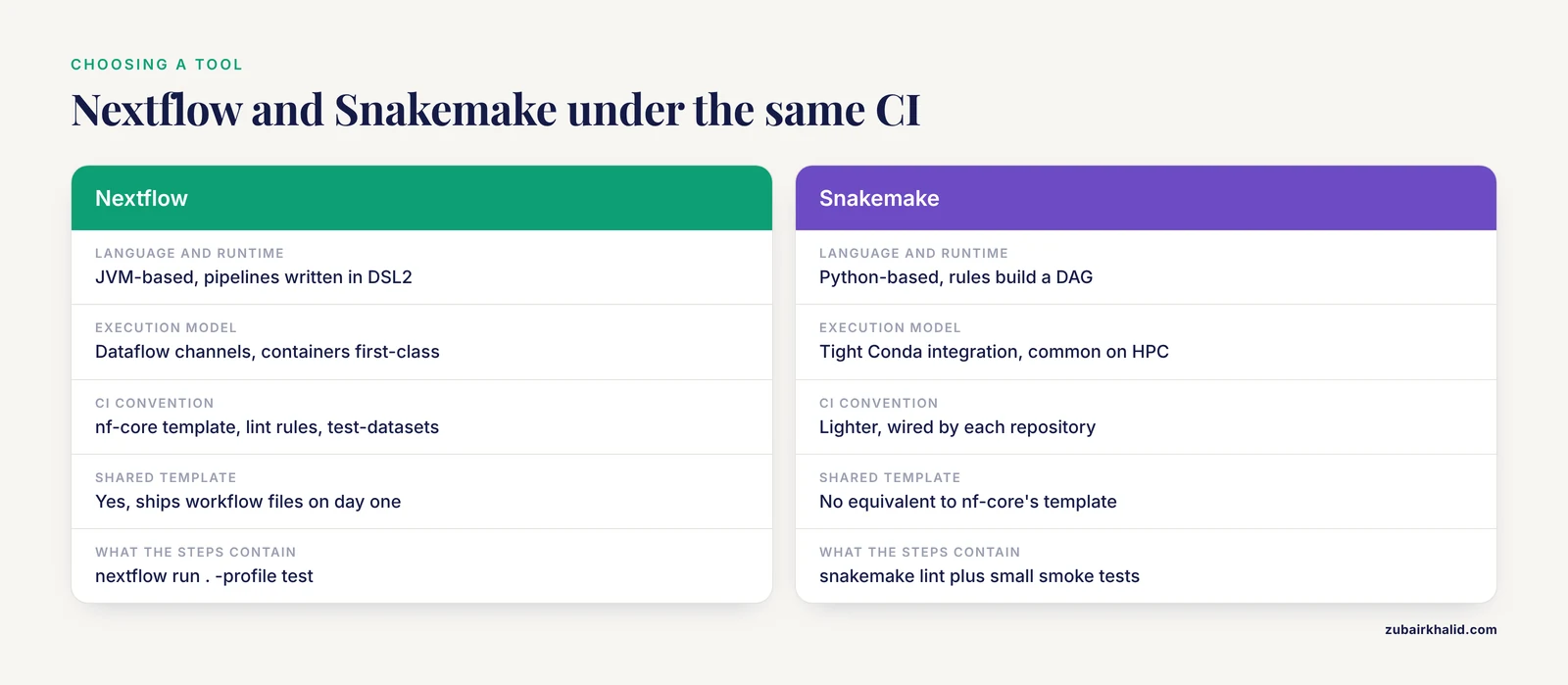
Nextflow and Snakemake are the two dominant open-source bioinformatics workflow managers, and both run well under GitHub Actions. The CI setup differs more in convention than in mechanics.
Nextflow is JVM-based, writes pipelines in DSL2 with dataflow channels, treats containers as a first-class execution mode, and ships built-in cloud executors. Its decisive CI advantage is the nf-core ecosystem: the template, the lint rules, the test-datasets convention, and the shared workflow files mean a new pipeline gets a mature GitHub Actions setup on day one.
Snakemake is Python-based, builds a directed acyclic graph of rules, integrates tightly with Conda environments, and is a common choice on HPC systems. Its CI convention is lighter: repositories typically run snakemake, lint, format checks, and small pipeline smoke tests they wire themselves.
If you are choosing between them, decide on execution environment and community, not on CI. Under GitHub Actions the YAML is the same, the runner is the same, and the difference is which commands the steps contain.
What CI Does to Pull Request Review
Automated checks change how humans review pull requests, and the empirical literature on GitHub Actions is worth reading before you stack more automation onto a pipeline repository.
The headline caution is that CI adoption does not automatically make reviews faster. A regression discontinuity study of 55 machine learning projects, comparing the 12 months before and after GitHub Actions adoption, found no significant reduction in the time to close pull requests, with review efficiency driven more by the size of the change and the size of the review backlog than by the presence of CI [5]. Rejected pull requests in that study had higher churn and longer discussions. For a pipeline repository the lesson is to keep test-profile changes small and the queue short, because Actions will not absorb a bloated review.
Adoption also shifts reviewer attention. A replication study across six open-source projects found that the pull request model produces more balanced discussion of test and production code than the older Gerrit model, but that after GitHub Actions adoption review attention pivoted sharply toward production code. In a Nextflow repository, the CI files and the test profile are production code. Review them like it.
Automated review bots are now common, and their effectiveness varies. A large study of 16 AI-based code review actions across 178 repositories and more than 22,000 review comments found that comments are more likely to lead to code changes when they are concise, contain code snippets, are manually triggered, and come from hunk-level tools that comment on specific lines [6]. If you add a review bot to your pipeline repository, prefer one that comments inline on changed lines and keep it quiet otherwise. Broader evidence also says humans should stay in the loop: across 278,790 review conversations in 300 projects, human reviewers exchanged 11.8 percent more rounds when reviewing AI-generated code than human-written code, and AI suggestions were adopted into the codebase at a significantly lower rate. Purpose-built review automation can perform well when tuned: one framework integrated with GitHub Actions reached an F1 score of 82.9 percent across 12,400 pull requests from 40 repositories, with a 73.6 percent developer acceptance rate in a controlled study.
Finally, keep checks green. An analysis of 14,234 stalled pull requests across 19 repositories found that inactivity is often blocked by technical or dependency issues, including failing checks, rather than simple disengagement. A red CI badge that stays red for days is how contributions die.
Common Mistakes and Limitations
- Running the full pipeline in CI. A test profile exists so CI finishes in minutes. If your CI run takes hours, the test profile is not doing its job, and reviewers will stop waiting for it.
- No resource caps in the test profile. Without capped CPUs and memory, a process that requests more than the runner has will fail with a resource error or an exit code 137 kill.
- Not pinning the Nextflow version. Testing only the newest release means a breaking Nextflow update breaks every pull request at once. Pin one version and matrix against the latest.
- Skipping the permissions block. The default token scope is broader than most pipelines need, and real-world audits show permission controls are the most neglected part of workflow files.
- Long-lived cloud keys as secrets. Prefer OIDC short-lived roles. Keys in secrets leak through logs, forks, and compromised actions.
- Interpolating untrusted text into scripts. Event context such as PR bodies and issue titles must flow through
env, never through string substitution intorunblocks, and the same rule applies to anything an AI agent produces. pull_request_targetwith untrusted checkouts. This combination gives fork authors access to your secrets. Use plainpull_requestfor outside contributions.- No concurrency group. Rapid pushes then queue redundant runs and burn minutes.
- Assuming container engines exist. Docker is preinstalled on hosted Linux runners, Apptainer is not, and self-hosted machines may have neither.
- Treating green CI as scientific validation. CI proves the test profile runs and outputs appear. It cannot prove the biology is right, that reference files are current, or that parameters suit your data.
- Hosted runner limits. Two vCPUs and about 7 GB of RAM bound what a standard runner can test. Full-size runs belong on larger runners, self-hosted machines, or cloud executors.
- Lint scope.
nf-core pipelines lintenforces nf-core conventions. A passing lint score does not mean a non-nf-core pipeline follows your lab's own standards. - Self-hosted runner security. A registered machine executes whatever workflows target it. Patch it, isolate it, and require approval for runs from forks.
Frequently Asked Questions
Do I need Docker to test a Nextflow pipeline on GitHub Actions?
No. Nextflow runs fine with the local executor and no container engine, and the example in this guide would work with the test profile alone. Containers are still recommended because they make the test environment match production. Docker is preinstalled on hosted Linux runners, while Apptainer needs a setup step.
Which Java version should the CI install?
Use Java 17 with the actions/setup-java action and the temurin distribution. Recent Nextflow releases require a modern Java runtime, and pinning the distribution keeps the CI environment identical from run to run.
How do I pin the Nextflow version in CI?
Set the NXF_VER environment variable, either to a fixed version such as 24.04.2 or through a matrix entry. The nf-core/setup-nextflow action accepts a version input and does the same thing with less boilerplate.
What is a test profile?
A named configuration block in nextflow.config that points the pipeline at tiny inputs and caps per-process CPUs and memory so the full pipeline executes in minutes on a CI runner. You activate it with nextflow run . -profile test.
Can GitHub Actions run my pipeline on real, full-size data?
Not on standard hosted runners, which are sized for small tests. Use larger hosted runners, self-hosted machines, or a cloud executor such as AWS Batch, which is the pattern behind the nf-core awstest and awsfulltest workflows.
How do I stop wasted runs when I push many commits in a row?
Add a concurrency group keyed on the workflow name and git ref with cancel-in-progress set to true. Superseded runs are cancelled the moment a newer push arrives.
Do I have to use the nf-core template?
No. A single ci.yml file with a test profile is a complete setup for a small pipeline. The template buys you shared lint rules, component tests, and cloud test workflows that the community maintains for you.
How does CI setup differ for Snakemake pipelines?
The YAML, triggers, and runners are identical. The steps change: Snakemake repositories run snakemake, lint and small smoke tests instead of a Nextflow test profile, and there is no shared template equivalent to nf-core's.
Sources
- A Cloud-Driven CI/CD Automation Model Using Jenkins, GitHub Actions, and Infrastructure-as-Code Tools
- Thoroughly testing and integrating hundreds of Pull Requests per month: ROOT’s new Cost-efficient and Feature Rich GitHub-based CI
- nf-cavalier: A Nextflow Pipeline for Rare Disease Variant Prioritization and Reporting
- A Systematic Literature Review on Continuous Integration and Deployment (CI/CD) for Secure Cloud Computing
- Exploring the Impact of GitHub Actions on Pull Request Reviews in Machine Learning Projects
- Does AI Code Review Lead to Code Changes? A Case Study of GitHub Actions