Troubleshooting GitHub Actions for Bioinformatics Workflows
By Dr. Zubair Khalid, DVM, MS, PhD ·

Most failures covered by GitHub Actions bioinformatics troubleshooting trace back to a single fact: the runner is not your laptop. A GitHub-hosted runner is a fresh cloud virtual machine with fixed disk, memory, and CPU, a hard job time cap, and none of the conda environments, container layers, or reference files you have accumulated locally. The first thing to check is the log of the failed step. Open the run in the Actions tab, click the failed job, expand the failed step, and read the last 30 to 50 lines. The exact error message plus the exit code on the final line identifies the cause in most runs.
This article explains how to fix the failures that appear most often when continuous integration (CI) runs a bioinformatics workflow manager, a program such as Nextflow or Snakemake that orchestrates multi-step analyses, on GitHub Actions. The causes are ordered from most common to rarest, each with its mechanism, a way to confirm it, and the fix. A dedicated section covers where Nextflow vs Snakemake behavior differs, and the article closes with prevention practices and a troubleshooting table you can scan under pressure.
How GitHub Actions Executes a Bioinformatics Workflow
A workflow is a YAML file stored under .github/workflows that GitHub runs in response to events such as a push, a pull request, or a schedule. A workflow contains jobs, each job runs on a runner (a virtual machine), and each job contains steps. A step is either a shell command (run) or a call to a reusable packaged action (uses). A matrix strategy clones one job into several copies with different parameters, for example one job per chromosome or per tool version.
Four mechanics explain most confusion:
- Every job starts on a fresh runner. Nothing survives between jobs unless a step saves it as an artifact (a stored output file) or a cache (a stored directory keyed for reuse).
- Steps within a job share one filesystem and one environment. Steps in different jobs never do.
- The GITHUB_TOKEN is a credential GitHub generates for each run, scoped to the repository.
- Hosted runners are managed by GitHub. Self-hosted runners are machines you register yourself.
GitHub's hosted runner documentation lists the standard Linux runner at 4 vCPUs, 16 GB of RAM, and 14 GB of SSD storage, with a six-hour cap per job and 90-day default retention for logs and artifacts. The cache service has its own per-repository size limit and evicts entries automatically. These figures change over time, so confirm them on GitHub's usage limits page before designing around them.
Bioinformatics stresses every one of these limits at once. Conda environments built from the Bioconda channel can reach several gigabytes. Container images are large. FASTQ and BAM test data is bulky. Analysis tools try to use every core they can see. A pipeline that runs comfortably on a workstation can therefore fail in CI for reasons that look mysterious but are almost always environmental.
Start Here: A Short Diagnostic Sequence
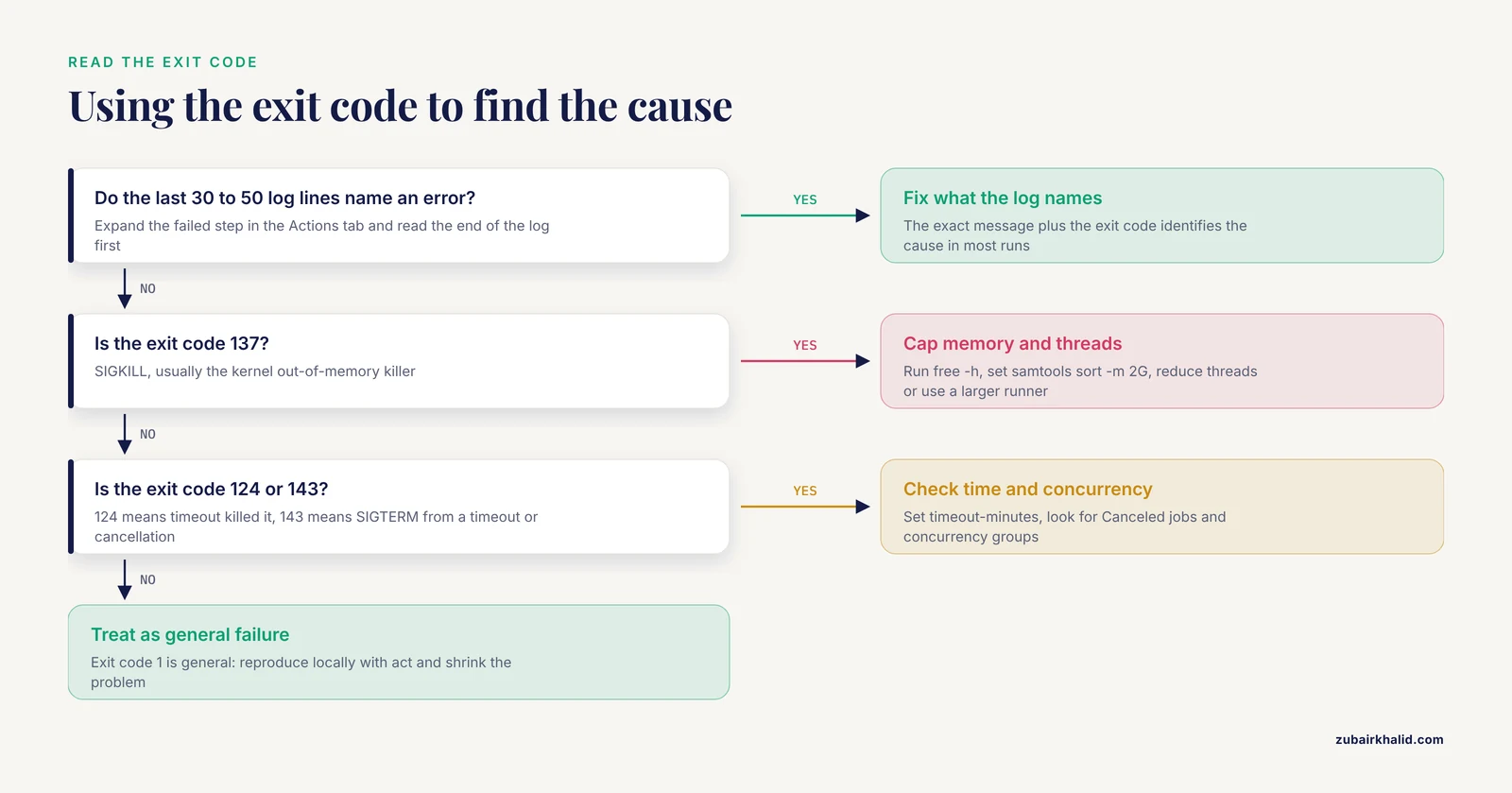
Work through these steps in order. Most failures are identified by step 3.
- Read the failed step's log. Expand the failed step in the Actions tab and read the last 30 to 50 lines. The GitHub command line tool helps from a terminal:
gh run list -L 10lists recent runs andgh run watchfollows one live. - Decode the exit code. Exit code 1 is a general failure. Exit code 124 means the
timeoutcommand killed a process. Exit code 137 means SIGKILL, which usually indicates the kernel out-of-memory (OOM) killer. Exit code 143 means SIGTERM, which points to a timeout or a cancellation. - Inspect the runner. The Set up job section of the log names the runner image and version. Add a resource step so disk, memory, and cores print on every run:
- name: Report runner resources
  run: |
    df -h
    free -h
nproc- Reproduce locally. Paste the failing commands into a container on your machine, or run the workflow with act, a tool that executes GitHub workflows locally in Docker (
act -llists jobs,act -j JOBruns one). - Shrink the problem. Run one rule or process, use the smallest test data, and run a single matrix leg by setting fail-fast to false or commenting the matrix out.
- Turn on debug logging. Re-run the job with the Enable debug logging option, or set the ACTIONS_STEP_DEBUG secret, to print runner-internal detail.
- Compare environments. Dump installed packages in CI with
conda list -n myenv > ci-packages.txt, upload the file as an artifact, and diff it against the same output from your machine. Different versions explain most works-locally failures.
Troubleshooting Table: Symptom, Cause, Confirmation, Fix
Scan the first column for what you see, then confirm before fixing. Confirming first prevents the most expensive mistake in CI debugging, which is fixing the wrong thing.
| Symptom | Likely cause | How to confirm | Fix |
|---|---|---|---|
| , - | , - | , - | , - |
| "No space left on device" | Disk filled by conda envs, images, test data | df -h step, Set up job section | Remove preinstalled toolchains, shrink data, prune images, larger runner |
| Step dies with exit code 137 | OOM killer terminated a process | free -h, "Killed" in log | Cap tool memory, fewer threads, larger runner |
| Job dies after hours with no error | Hosted job time cap reached | Elapsed time near the cap | timeout-minutes, progress logs, chunk the work |
| Conda solve fails or crawls | Unpinned mixed channels, slow solver | Read the solve log, time it locally | mamba or libmamba, strict priority, pins, cache |
| "command not found" in a later step | Conda activation does not persist across steps | which tool in the failing step | Activate per step with shell: bash -el {0} or use $GITHUB_PATH |
| Different tool versions than locally | Unpinned deps, rolling runner image | Diff package dumps, version banners | Lockfiles, pinned runner label, digest-pinned containers |
| "Invalid workflow file" banner | YAML parse error | actionlint and yamllint locally | Fix indentation and quoting, lint in pre-commit |
| Secret is empty on a fork pull request | Secrets withheld from fork runs | Report set or empty, never the value | Run secret jobs after merge, or pull_request_target with care |
| Cache never hits | Key mismatch or branch scoping | Caches view hit and miss counts | Key on lockfile hash, restore-keys, include OS |
| "toomanyrequests" on docker pull | Registry throttles anonymous pulls | Pull the same tag in a minimal job | Authenticate, mirror to GHCR, pin digests |
| Nextflow killed or plugins fail | JVM heap or NXF_HOME blocked | .nextflow.log | NXF_OPTS heap cap, cache or pre-provision plugins |
| Snakemake reruns everything | Rerun triggers in a fresh workspace | snakemake -n -r | CI profile, small pinned envs, accept clean reruns |
| Test data download fails intermittently | Flaky archive, LFS quota, truncation | gzip -t, md5sum -c, rerun alone | Vendor tiny data with checksums, stable mirror |
| Runs cancel each other | Concurrency group or fail-fast | Job shows "Canceled" | Adjust concurrency and fail-fast settings |
| Cron never fires | Cron runs in UTC, schedules disabled when repo idles | Run history timestamps | Fix the time, add workflow_dispatch fallback |
Common GitHub Actions Bioinformatics Troubleshooting Causes
The subsections below rank the common GitHub Actions bioinformatics troubleshooting causes from most frequent to rarest and explain the mechanism behind each one.
1. Disk and Memory Exhaustion on the Runner
The standard runner resources described above are small for bioinformatics. A conda environment with alignment, quality control, and annotation tools can occupy several gigabytes, container layers add more, and test FASTQ or BAM files add more still. When the disk fills, commands fail with the message "No space left on device".
Memory failure looks different. When a process requests more RAM than the runner has, the Linux kernel OOM killer terminates the largest process with SIGKILL, the step exits with code 137, and the log often shows a bare "Killed". Java tools such as Nextflow size their heap as a fraction of system RAM at startup, so a large DAG (the dependency graph of tasks) can exhaust the heap even when individual tasks are small.
Confirm with the resource step from the diagnostic sequence, and read the "Killed" messages in .nextflow.log for Nextflow.
Fixes, in order of effort: remove preinstalled toolchains you do not need (the community free-disk-space action does this in one step), prune unused images with docker system prune -a -f, shrink test data, cap tool memory explicitly (for example samtools sort -m 2G), reduce thread counts, and cap the JVM heap with export NXF_OPTS="-Xmx4g". Pay for a larger runner when the workload genuinely needs it.
Safety note: prune and cleanup commands delete data by pattern. On a hosted runner this is harmless because the machine is discarded after the job. On a self-hosted runner, review exactly what these commands remove before adding them.
2. Dependencies Install Differently Than on Your Machine
CI installs dependencies from scratch on every run. If versions are unpinned, the resolver picks the newest compatible release that day, and the result drifts. The ubuntu-latest label is a rolling alias that has moved across major Ubuntu releases, and GitHub rebuilds runner images regularly, so even the base system changes under you. Conda solves are not guaranteed reproducible when channels are mixed or unpinned, and pip resolves to the latest release by default. This mechanism produces the classic report that a pipeline works locally and fails in CI.
Confirm by diffing the environment dump from the diagnostic sequence against local output, or by printing a single tool's version banner in each environment.
Fix by pinning. List exact versions and build strings in environment.yml, export a lockfile with conda env export -n myenv > environment.lock.yml and create environments from that file, and set strict channel priority with conda-forge listed before Bioconda. Use mamba, or the libmamba solver that recent conda releases default to, for faster solves and clearer error messages. Pin the runner label (ubuntu-24.04 rather than ubuntu-latest). The strongest fix is a container pinned by digest, which makes the operating system and libraries identical on every machine.
3. YAML and Expression Errors in the Workflow File
GitHub parses the workflow file before any job starts. Two-space indentation is the convention, literal tabs break parsing, and a missing colon or unbalanced quote produces an Invalid workflow file error on the Actions page with no jobs at all. A second class passes parsing and fails at runtime: GitHub evaluates ${{ }} expressions before the shell runs, so shell variable syntax inside an expression, or expression syntax where shell syntax is required, produces errors that look unrelated to the real mistake.
Confirm locally with actionlint, which catches undefined references, invalid context usage, and shell problems inside run blocks, and with yamllint for pure formatting.
Fix by linting before push. Add actionlint and yamllint to a pre-commit hook so a broken workflow never reaches a branch, keep expressions minimal, move complicated logic into a committed shell script, and test changes with a workflow_dispatch trigger on a feature branch rather than a push to main.
4. Missing Secrets and Fork Pull Request Restrictions
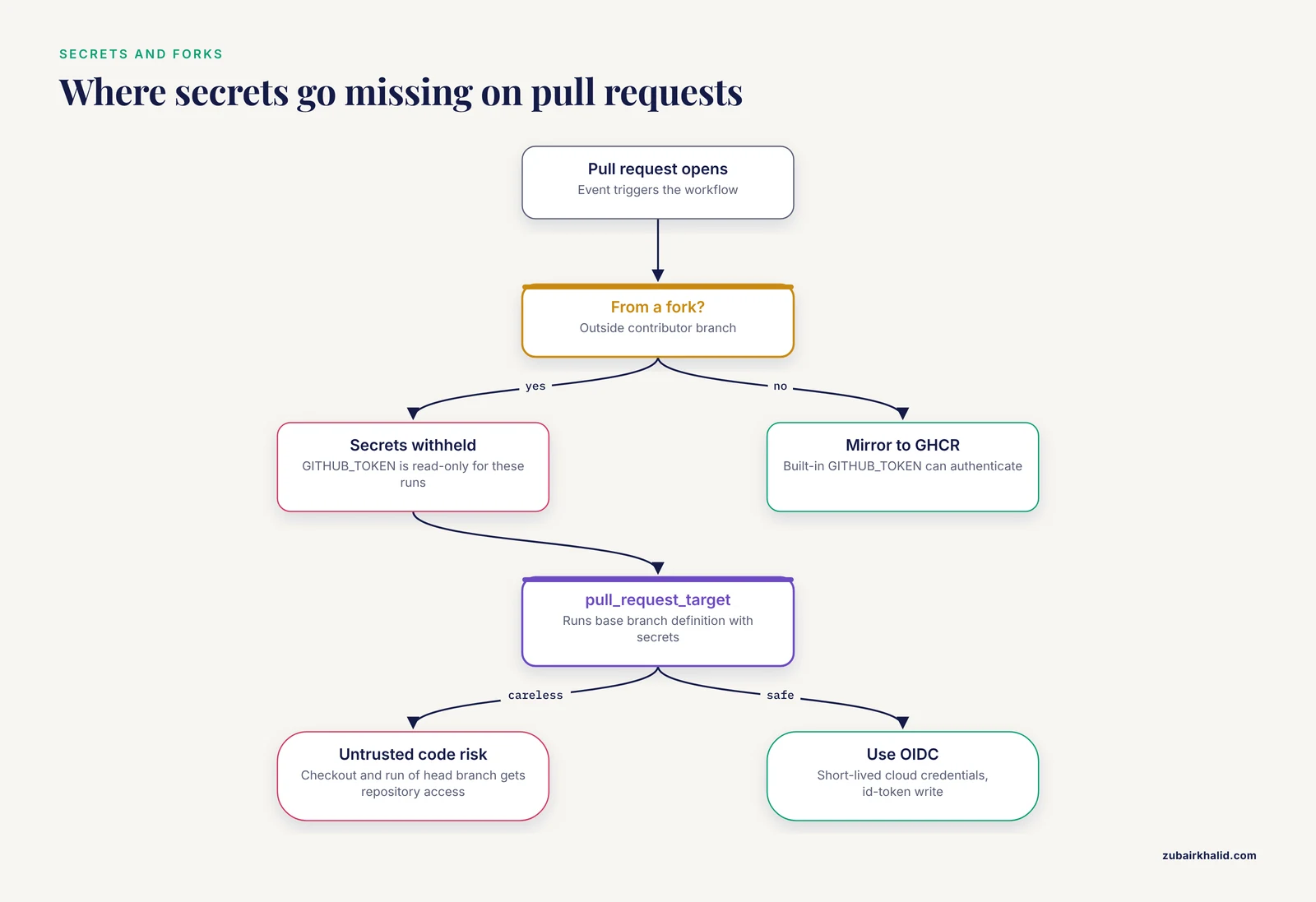
GitHub withholds secrets from pull_request workflows when the pull request originates from a fork, and it provides the GITHUB_TOKEN to those runs with read-only permission. A job that needs a token to pull a private container or call an authenticated API therefore passes for maintainers and fails only for outside contributors. The pull_request_target event reverses this: it runs the workflow definition from the base branch with secrets available, which means checking out and executing the fork's code under this event runs untrusted code with repository access.
Safety note: never combine pull_request_target with a checkout and execution of untrusted head-branch code, and never print a secret value into a log. If a step must print a value derived from a secret, mask it first with the ::add-mask:: workflow command.
Confirm by reporting whether a secret is set (a presence or length check), never its value.
Fix by removing secrets from the main test path. Mirror private images into the GitHub Container Registry (GHCR), where the built-in GITHUB_TOKEN can authenticate, and use short-lived OpenID Connect (OIDC) federation for cloud credentials, configured with the id-token write permission and the official configure-aws-credentials action for AWS.
5. Cache Misses, Bloat, and Stale Data
The actions/cache action stores a directory under a key you define. Scoping rules decide who can read it: a cache is available to the branch that created it, to that branch's descendants, and to pull requests targeting the base branch, so a cache built on a feature branch does not serve other branches. The service caps total storage per repository (about 10 GB), evicts least recently used entries, and deletes entries unused for seven days. Stale data causes a sneakier failure than a miss: an old cached environment keeps tests green while a fresh install would fail, which hides dependency rot until the cache is evicted.
Confirm in the Caches view under the Actions tab, which lists keys, sizes, and ages, and in the job log, where the post-cache step reports a hit or miss.
Fix by keying the cache on the hash of a lockfile so dependency changes invalidate it, adding a restore-keys prefix for partial hits, including the runner operating system in the key, and scheduling a weekly run that skips caches so rot surfaces on your schedule rather than mid-release.
6. Container Pulls Fail or Hit Rate Limits
Three mechanisms dominate. First, Docker Hub throttles unauthenticated pulls by source address, and hosted runners draw from large shared address pools, so anonymous pulls fail intermittently with a toomanyrequests error. Second, hosted Linux runners are x86 64-bit machines, so an image built only for ARM pulls successfully and then fails at start with exec format error. Third, a tag can disappear or a repository can be renamed.
Confirm by pulling the exact image and tag in a minimal job and reading the error verbatim.
Fix by authenticating pulls with a registry token stored as a secret, mirroring the images you need into GHCR, and pinning images by digest so pulls are reproducible. The Biocontainers project publishes container images for bioinformatics tools on Docker Hub and Quay, and nf-core pipelines resolve them automatically when you select a container profile. Before pruning, run docker system df to see what images, containers, and the build cache actually occupy.
Safety note: registry credentials belong in Actions secrets, never in the workflow file, and never echoed to a log.
7. Nextflow-Specific Failures
Nextflow runs on the Java virtual machine (JVM), which reserves heap memory at startup as a fraction of system RAM. Very large DAGs can exhaust that heap and get killed. On first use, Nextflow downloads plugins into its home directory (NXF_HOME, ~/.nextflow by default), which fails behind a restrictive proxy or without network access. The work directory (work by default) stores every task's files and grows quickly, and ANSI color codes clutter logs.
Confirm by reading .nextflow.log, which records task launches, exit statuses, and JVM messages, and by running nextflow log, which lists past runs for the project.
Fix with a run block like this:
- name: Run the test profile
  env:
    NXF_ANSI_LOG: false
  run: |
    nextflow run nf-core/rnaseq -profile test,docker -with-trace -with-report
The test profile activates small bundled test data and the docker profile selects the container engine, which is the pattern nf-core pipelines standardize for CI. Set NXF_OPTS to cap the heap (for example -Xmx4g) when the JVM is killed. Set NXF_OFFLINE to true only when plugins are pre-provisioned. The -resume flag reuses task outputs from the work directory, but because each job starts on a fresh runner, resume helps in CI only if you cache the work directory, which is rarely worth it for small test runs.
8. Snakemake-Specific Failures
With the use-conda option, Snakemake creates a conda environment per rule from that rule's conda directive and stores the environments under .snakemake/conda. The first run solves and installs every environment, which can consume most of a job. Rerun triggers (changes to task code, parameters, input file metadata, or the software environment) decide what reruns, and in a fresh CI workspace with no prior metadata, Snakemake can rerun everything. Interrupted runs leave markers in .snakemake/incomplete that block later runs until they are cleared.
Confirm with a dry run: snakemake -n -r -p -j 2 prints what would execute, the reason each job would rerun, and the shell commands, without running anything.
Fix by committing a CI profile (a YAML file of default options Snakemake reads at startup) so local and CI behavior match, keeping per-rule environments small and pinned, and pre-building environments in a separate cached step when solves are slow. Accept that CI reruns from scratch and design test workflows that finish in minutes. pytest-workflow is a dedicated tool for testing Snakemake workflows in CI.
9. Test Data and External Downloads Fail
Pipelines that download test data from public archives inherit those archives' rate limits, maintenance windows, and URL rot. Git LFS (Large File Storage, the Git extension for versioning large files) has small free bandwidth and storage quotas that repeated CI runs exhaust quickly. A download interrupted mid-stream leaves a truncated file that fails much later with a cryptic parser error far from the real cause.
Confirm by isolating the download in its own step and rerunning it alone, then validating immediately with gzip -t reads.fastq.gz and md5sum -c checksums.txt. For LFS files, git lfs ls-files lists what is tracked.
Safety note: never commit human or otherwise protected data to a repository, even as test data, and treat every public repository as fully public.
Fix by vendoring small test data into the repository. A few thousand downsampled reads are usually enough for a smoke test. Store the files in the repository or as release assets, publish a checksum file beside them, and prefer a mirror you control over an archive FTP endpoint. Use the checkout action's LFS option only when you genuinely need LFS-tracked files.
10. Timeouts, Cancellation, and Concurrency Collisions
GitHub-hosted jobs stop at the hosted time cap described above, and the timeout-minutes setting defaults to that maximum, so a hung job consumes hours before it dies. A concurrency group queues or cancels runs that share a group name, and cancel-in-progress makes each new push kill the previous run, which surprises people when a run they were watching disappears. In a matrix, fail-fast defaults to true, so the first failing leg cancels all remaining legs.
Confirm on the job page, which marks canceled jobs as Canceled with a timestamp, and compare that timestamp with recent pushes and matrix failures.
Fix by setting a deliberate timeout-minutes value (30 to 60 minutes for test jobs) so hangs fail fast and release the runner, setting fail-fast to false while debugging a matrix so every leg reports, and using concurrency groups with cancel-in-progress on pull requests but not on main branch runs whose results you need. Keep the repository active: GitHub disables scheduled workflows after 60 days of repository inactivity, so add a workflow_dispatch trigger as a manual fallback.
11. Self-Hosted Runner Problems
A self-hosted runner is a machine you register with GitHub, and state accumulates on it in ways hosted runners never experience. Work directories, conda environments, container layers, and logs fill the disk over days. Two jobs landing on the same machine can clobber fixed paths. A job stuck in Queued usually means no registered runner matches the labels the job requests. An outdated runner application can reject newer workflow syntax.
Confirm in the runner list under Settings, then Actions, then Runners, checking labels and last-seen activity, and on the machine itself with df -h and a search for stale work directories.
Safety note: GitHub's documentation warns that workflows from public repositories can execute arbitrary pull request code on self-hosted runners. Restrict self-hosted runners to private repositories, isolate them from important systems, or run them ephemeral so each runner processes one job and is destroyed.
Fix by configuring runners as ephemeral, giving each job its own work directory under $RUNNER_TEMP, keeping the runner application current, and keeping labels consistent between the workflow file and the runner configuration.
12. Rare and Environmental Causes
When everything above checks out, look outward. GitHub publishes incidents on its status page. Runner images are rebuilt regularly, which occasionally breaks a workflow that pinned nothing. Upstream services fail on their own schedules: Anaconda distribution channels, PyPI, Docker Hub, and public data archives all have outages. The GITHUB_TOKEN is rate limited at 1,000 REST API requests per hour per repository, which a workflow that loops over API calls can exhaust. GitHub-hosted runners do not provide IPv6 connectivity, so IPv6-only endpoints are unreachable. On private repositories, workflows stop when included minutes are exhausted and the spending limit is set to zero.
Confirm by checking the status page, rerunning the job to see whether the failure moved, and reading the HTTP response body, where rate limit errors identify themselves.
Fix by retrying transient upstream failures with a small retry wrapper, pinning the runner image label, mirroring critical packages where you control availability, batching API calls, and monitoring minutes usage on private repositories.
Nextflow vs Snakemake in CI
Nextflow and Snakemake are the two bioinformatics workflow manager options you are most likely to meet, and both run well on GitHub Actions when the test workload is small. Their failure signatures differ, so the same symptom leads to different fixes.
| Aspect | Nextflow | Snakemake |
|---|---|---|
| , - | , - | , - |
| Runtime | Java virtual machine | Python |
| Software environments | Container or conda per process | Conda or container per rule |
| Resume behavior | -resume reuses outputs by content hash | Rerun triggers on code, parameters, inputs, environment |
| First-run cost | Plugin download into NXF_HOME | Conda solves and installs per rule |
| Test conventions | Standardized test profiles in nf-core pipelines | Profiles plus pytest-workflow |
| Primary log | .nextflow.log | Task output plus .snakemake metadata |
| Typical CI failure | Killed JVM, blocked plugin download | Slow environment creation, unexpected reruns |
The causes above apply to both tools, with the Nextflow-specific and Snakemake-specific sections covering the differences. If your team is choosing between them, decide on ecosystem fit, cluster integration, and team experience rather than CI behavior, because both fit Actions comfortably once the test profile is small and the dependencies are pinned.
Prevention Practices
These solutions stop the same failure from returning.
- Pin everything. Exact package versions and build strings, container digests, and a fixed runner label such as ubuntu-24.04 instead of ubuntu-latest.
- Commit tiny test data with checksums. A smoke test that needs no network cannot fail on someone else's outage.
- Lint before push. actionlint, yamllint, and shellcheck in a pre-commit hook, plus a fast lint job as the first step of CI.
- Declare the shell. Explicitly setting shell: bash makes GitHub run steps with pipefail enabled, so a failure inside a pipe fails the step instead of hiding. In committed scripts, start with
set -euo pipefail. - Cache deliberately. Key caches on lockfile hashes, include the operating system in the key, and schedule a weekly cache-free canary run.
- Set timeout-minutes on every job. A deliberate ceiling turns hangs into fast, readable failures.
- Use concurrency groups on pull requests. cancel-in-progress keeps one run per branch and saves minutes.
- Upload evidence. Trace files, reports, and logs as artifacts with
if: always(), so a failed run explains itself after the runner is gone. - Apply least privilege. A permissions block limited to contents: read, and OIDC instead of long-lived cloud keys.
- Test without touching main. Feature branches, workflow_dispatch for manual runs, and act for local execution. A minimal, robust job looks like this:
name: ci
on:
  pull_request:
  push:
    branches: [main]
  workflow_dispatch:
permissions:
  contents: read
jobs:
  test:
    runs-on: ubuntu-24.04
    timeout-minutes: 45
    steps:
      - uses: actions/checkout@v4
      - uses: conda-incubator/setup-miniconda@v3
        with:
          environment-file: environment.lock.yml
          channels: conda-forge,bioconda
          channel-priority: strict
      - shell: bash -el {0}
        run: nextflow run . -profile test -with-trace
      - uses: actions/upload-artifact@v4
        if: always()
        with:
          name: evidence
          path: |
            trace.txt
            .nextflow.log
Common Mistakes and Limitations
- Debugging by repeated pushes to main. Each push fires runs, clutters history, and burns minutes on private repositories. Debug on a branch with workflow_dispatch.
- Retrying without reading the log. A re-run that passes proves the failure was transient, but a re-run that fails identically is telling you the cause. Read first, retry second.
- Assuming the runner matches your machine. Hosted Linux runners are x86 64-bit, lack IPv6, start with an empty filesystem, and share nothing between jobs.
- Treating Actions as production compute. Hosted runners have a hard job time cap, modest resources, and no shared scratch space or scheduler. Use CI to validate a small test profile, then run production work on a cluster or a cloud batch service.
- Caching forever. A cache that never invalidates hides dependency rot until the day it is evicted.
- Printing secrets while debugging. Debug output is visible to anyone who can read that repository's logs.
- Relying on cron alone. Scheduled workflows stop silently in inactive repositories, so always add a manual trigger.
- Forgetting macOS cost. On private repositories, macOS runner minutes bill at ten times the Linux rate, which a macOS matrix leg can multiply quietly.
Two limitations deserve plain language. Platform quotas and runner specifications change over time, so verify current numbers against GitHub's documentation rather than memorizing them, and act approximates hosted runners closely enough to catch logic errors but not closely enough to guarantee identical behavior, and it cannot run macOS jobs. Finally, a green CI run validates the workflow mechanics, not the scientific validity of the results, so pipeline outputs still need review by the scientists responsible for the analysis.
Frequently Asked Questions
Why does my bioinformatics pipeline pass locally but fail on GitHub Actions?
Because the hosted runner is a different machine with different installed software, resources, and network access. Compare installed versions (conda list, tool version banners) and resources (df -h, free -h) between your machine and the runner, then pin every difference you find.
How do I find the real error message in a failed job?
Open the failed job in the Actions tab, expand the failed step, and read the last 30 to 50 lines of the log. If the cause is unclear, re-run with the Enable debug logging option or set the ACTIONS_STEP_DEBUG secret, and interpret the final exit code (137 usually means out of memory, 143 means terminated).
Can Nextflow or Snakemake run on free GitHub-hosted runners?
Yes, for small test profiles. Standard Linux runners provide fixed, modest resources and stop jobs at a hard time cap, which fits downsampled test data and smoke tests but not production-scale compute.